<?xml version="1.0" encoding="utf-8"?>
<feed xmlns="http://www.w3.org/2005/Atom">
    <title>myme.no tech blog</title>
    <link href="https://myme.no/atom-feed.xml" rel="self" />
    <link href="https://myme.no" />
    <id>https://myme.no/atom-feed.xml</id>
    <author>
        <name>Martin Myrseth</name>
        
        <email>myrseth@gmail.com</email>
        
    </author>
    <updated>2025-12-11T00:00:00Z</updated>
    <entry>
    <title>How I fixed it: Sunshine issues on NixOS</title>
    <link href="https://myme.no/posts/2025-12-11-hifi-sunshine-on-nixos.html" />
    <id>https://myme.no/posts/2025-12-11-hifi-sunshine-on-nixos.html</id>
    <published>2025-12-11T00:00:00Z</published>
    <updated>2025-12-11T00:00:00Z</updated>
    <summary type="html"><![CDATA[<article>
  <h1>How I fixed it: Sunshine issues on NixOS</h1>
  <ul class="tags"><li><a href="/tags/nix.html" title="Navigate posts by tag: Nix"><span class="fa fa-tag"> </span> Nix</a></li><li><a href="/tags/linux.html" title="Navigate posts by tag: Linux"><span class="fa fa-tag"> </span> Linux</a></li></ul>
  <section class="header">
    Posted on 2025-12-11
    
  </section>
  <section>
    <h3 id="background">Background</h3>
<p>I’ve got a couple of computers in the home. One machine in particular is a
semi-powerful gaming machine. The weird thing about this machine is that it’s
stowed away in a storage room, not a very suitable place to sit and actually use
it.</p>
<p>To be honest, I’m not really much of a gamer, and so I mostly use its
capabilities for work and other heavier tasks. But it’s always nice to be able
to use graphical applications in a performant way. And I <em>do</em> in fact use it for
running <a href="https://www.zwift.com/">Zwift</a> with my virtual trainer.</p>
<div class="notes">
<p>This machine—as all my other machines—runs <code class="verbatim">NixOS</code>. But one goal I had for this
machine was to experiment with <code class="verbatim">GPU</code> passthrough to let me run a Windows VM for
gaming (and Zwift). An interesting project and I’ve managed to get it working
quite nicely. A topic for another post.</p>
</div>
<p>Before switching to <a href="https://hypr.land/">Hyprland</a> running on <code class="verbatim">Wayland</code> I used various <code class="verbatim">SPICE</code> and
<code class="verbatim">RDP</code> setups that worked well enough running on an X server. However, with my
limited patience I didn’t manage to find any suitable solutions working well on
<code class="verbatim">Wayland</code>. And when I found people mentioning solutions <a href="https://app.lizardbyte.dev/Sunshine/?lng=en">Sunshine</a> with <a href="https://moonlight-stream.org/">Moonlight</a>
always seemed to be high up on the list of options.</p>
<p>I managed to get Sunshine running on NixOS with minimal effort due to the
<a href="https://github.com/NixOS/nixpkgs/blob/nixos-25.11/nixos/modules/services/networking/sunshine.nix">Sunshine NixOS module</a>. Then on both my NixOS laptop and other Windows desktop
computer I’ve installed Moonlight.</p>
<h3 id="the-issue">The issue</h3>
<p>However, after upgrading to <code class="verbatim">NixOS</code> 25.11 I noticed that Moonlight no longer
managed to capture input (there were several other issues, but more on that
later).</p>
<p>Inspecting the <code class="verbatim">sunshine.service</code> logs I noticed the following warnings:</p>
<pre class="example"><code>Warning: Unable to create virtual mouse: Permission denied
Warning: Unable to create virtual keyboard: Permission denied
</code></pre>
<p>With a smoking gun I managed to google my way to realize that Sunshine uses
<code class="verbatim">udev</code> to emulate HID<a href="#fn1" class="footnote-ref" id="fnref1" role="doc-noteref"><sup>1</sup></a> devices for input capture through the <code class="verbatim">/dev/uinput</code>
device.</p>
<p>An sure enough, when I checked the permissions on <code class="verbatim">/dev/uinput</code> I saw that it
was only read-writable by <code class="verbatim">root</code>:</p>
<div class="sourceCode" id="cb2"><pre class="sourceCode bash"><code class="sourceCode bash"><span id="cb2-1"><a href="#cb2-1" aria-hidden="true" tabindex="-1"></a><span class="ex">❯</span> ls <span class="at">-l</span> /dev/uinput</span>
<span id="cb2-2"><a href="#cb2-2" aria-hidden="true" tabindex="-1"></a><span class="ex">crw-------</span> 1 root root 10, 223 Dec 11 22:36 /dev/uinput</span></code></pre></div>
<p>Although it might seem tempting to lean up and just <code class="verbatim">chmod 666 /dev/uinput</code>, you
don’t want to give <strong>everyone</strong> access to <code class="verbatim">/dev/uinput</code>, as that would be a security
risk. But Sunshine needs access to it, and the NixOS module spins up Sunshine
instances through a <code class="verbatim">systemd</code> user service running as your unprivileged user.</p>
<p>Not sure what has changed to cause this to break now, I don’t know. But there
must be a simple way to work around it, right?</p>
<h3 id="the-fix">The fix</h3>
<p>As covered on <a href="https://docs.lizardbyte.dev/projects/sunshine/latest/md_docs_2troubleshooting.html#input-not-working">the Sunshine troubleshooting page</a> users need to be a member of the
<code class="verbatim">input</code> group when running Sunshine unprivileged. However, this doesn’t really
help if <code class="verbatim">/dev/uinput</code> is only read-writable by <code class="verbatim">root</code>.</p>
<p>Luckily NixOS makes it easy to add custom <code class="verbatim">udev</code> rules through it’s
configuration system. Adding the following udev rule to my NixOS configuration:</p>
<div class="sourceCode" id="cb3"><pre class="sourceCode nix"><code class="sourceCode nix"><span id="cb3-1"><a href="#cb3-1" aria-hidden="true" tabindex="-1"></a>services.udev.extraRules = <span class="st">''</span></span>
<span id="cb3-2"><a href="#cb3-2" aria-hidden="true" tabindex="-1"></a><span class="st">  KERNEL==&quot;uinput&quot;, MODE=&quot;0660&quot;, GROUP=&quot;input&quot;, SYMLINK+=&quot;uinput&quot;</span></span>
<span id="cb3-3"><a href="#cb3-3" aria-hidden="true" tabindex="-1"></a><span class="st">''</span>;</span></code></pre></div>
<p>This creates <code class="verbatim">/dev/uinput</code> with the right permissions.</p>
<div class="sourceCode" id="cb4"><pre class="sourceCode bash"><code class="sourceCode bash"><span id="cb4-1"><a href="#cb4-1" aria-hidden="true" tabindex="-1"></a><span class="ex">❯</span> ls <span class="at">-l</span> /dev/uinput</span>
<span id="cb4-2"><a href="#cb4-2" aria-hidden="true" tabindex="-1"></a><span class="ex">crw-rw----</span> 1 root input 10, 223 Dec 11 22:36 /dev/uinput</span></code></pre></div>
<p>Then I had to add myself to the <code class="verbatim">input</code> group:</p>
<div class="sourceCode" id="cb5"><pre class="sourceCode nix"><code class="sourceCode nix"><span id="cb5-1"><a href="#cb5-1" aria-hidden="true" tabindex="-1"></a>users.users.myme.extraGroups = <span class="op">[</span> <span class="st">&quot;input&quot;</span> <span class="op">]</span>;</span></code></pre></div>
<p>And with that, Moonlight is able to pass captured input to Sunshine and I’m able
to control my stowed away gaming machine once again.</p>
<h3 id="footnotes">Footnotes</h3>
<section id="footnotes" class="footnotes footnotes-end-of-document" role="doc-endnotes">
<hr />
<ol>
<li id="fn1"><p>Human Interface Device<a href="#fnref1" class="footnote-back" role="doc-backlink">↩︎</a></p></li>
</ol>
</section>
  </section>
</article>
]]></summary>
</entry>
<entry>
    <title>How I fixed it: Firefox crash on Hyprland</title>
    <link href="https://myme.no/posts/2025-10-16-hifi-hyprland-firefox-crash.html" />
    <id>https://myme.no/posts/2025-10-16-hifi-hyprland-firefox-crash.html</id>
    <published>2025-10-16T00:00:00Z</published>
    <updated>2025-10-16T00:00:00Z</updated>
    <summary type="html"><![CDATA[<article>
  <h1>How I fixed it: Firefox crash on Hyprland</h1>
  <ul class="tags"><li><a href="/tags/firefox.html" title="Navigate posts by tag: Firefox"><span class="fa fa-tag"> </span> Firefox</a></li><li><a href="/tags/nix.html" title="Navigate posts by tag: Nix"><span class="fa fa-tag"> </span> Nix</a></li><li><a href="/tags/linux.html" title="Navigate posts by tag: Linux"><span class="fa fa-tag"> </span> Linux</a></li></ul>
  <section class="header">
    Posted on 2025-10-16
    
  </section>
  <section>
    <h3 id="background">Background</h3>
<p>As a developer, when something crashes on my computer I’m inclined to fix it.
Obviously that comes with the trade of writing your own software, but we are
also empowered with the knowledge and skill to find ways to contribute to fixing
issues in programs and apps we didn’t write ourselves.</p>
<p>In the world of open source we even have the superpower of <em>modifying</em> programs
someone else wrote, then build and run it without ever involving the upstream
maintainers. This is obviously great, but also cursed, in a way. <em>Knowing</em> you
are able to fix something can be frustrating when you feel you don’t have the
time or energy to do so.</p>
<p>I will admit as I’m getting older my threshold for debugging issues in other
people’s software is getting higher. Lazy, I know. But when I experience weird
crashes in off the shelf applications I quickly turn to search engines to see if
someone else has experienced similar issues.</p>
<p>
  <img src="https://imgs.xkcd.com/comics/wisdom_of_the_ancients.png" alt="Never have I felt so close to another soul and yet so helplessly alone as when I google an error and there's one result: A thread by someone with the same problem, and no answer, last posted to in 2003." title="XKCD wisdom of the acients" style="width: 50%" />
</p>

<p>Before LLMs we relied on people to continously publish their issues and
solutions online for this to work. Now this has obviously changed quite
significantly. LLMs provide great help <em>just for you in your particular
situation</em>, but the rest of the world won’t see a trace of this interaction
(besides the model providers, of course.)</p>
<p>So I thought to get back into writing I’d take some of the issues I experience
and try to document how I fixed them (or abandoned trying.)</p>
<h3 id="the-crash">The crash</h3>
<p>I choose to use <a href="https://www.firefox.com">Firefox</a> as my main browser and have been happy with it for the
last decade or so. One prerequisite for me to use a piece of software however,
is that it works™.</p>
<p>For the last few weeks I’ve noticed that both <code class="verbatim">Firefox</code> and <code class="verbatim">Thunderbird</code> has
been crashing when I leave work with my laptop. It happens the second I unplug
the USB-C cable connecting two external displays and a keyboard and presents the
following error:</p>
<pre class="example"><code>Crash Annotation GraphicsCriticalError: |[0][GFX1-]: (hyprland) Wayland protocol error: wp_color_manager_v1#46: error -1: Invalid output (2)
(t=3.49975) [GFX1-]: (hyprland) Wayland protocol error: wp_color_manager_v1#46: error -1: Invalid output (2)
</code></pre>
<p>I’m not going to admit to how long I kept up with just restarting <code class="verbatim">Firefox</code> (and
had to unlock my password manager browser extension with a stupidly long
password.) But eventually I couldn’t take it any longer.</p>
<p>First I seriously considered switching to <code class="verbatim">Chromium</code> just because of my
laziness. But it didn’t even take an hour before I realized I didn’t really
enjoy that experience.</p>
<p>Time to scour the internet for solutions!</p>
<h3 id="the-bug-report">The bug report</h3>
<p>Turns out there’s already <a href="https://bugzilla.mozilla.org/show_bug.cgi?id=1984696">an upstream issue</a> reported on <code class="verbatim">Bugzilla</code>, Firefox’s
issue tracker.</p>
<p>The report states that <code class="verbatim">Firefox</code> crashes on <code class="verbatim">Wayland</code> upon losing a display.
Sound like we got it!</p>
<p>Looking closer at the issue <em>could</em> be a generic <code class="verbatim">Wayland</code> and <code class="verbatim">Firefox</code> issue,
but the only reports that I’ve found mention <code class="verbatim">Hyperland</code> (my window manager.) To
resolve this issue let’s see if there are any issues or fixes for <code class="verbatim">Hyperland</code> in
particular.</p>
<p>And there is!</p>
<p><a href="https://github.com/hyprwm/Hyprland/pull/11916">https://github.com/hyprwm/Hyprland/pull/11916</a></p>
<h3 id="the-fix">The fix</h3>
<p>When there are bugs in software that you use and you don’t build everything
yourself from source, you’re by default at the mercy of package maintainers to
get fixes into upstream packages.</p>
<p>The same applies for the default experience on <code class="verbatim">NixOS</code>. However, since packages
(or derivations) on <code class="verbatim">NixOS</code> basically are defined through their build recipe
it’s trivial (once you know how) to patch software yourself.</p>
<p>The fix for <a href="https://github.com/hyprwm/Hyprland/pull/11916">Hyprland#11916</a> is already merged and applied in <code class="verbatim">main</code> upstream, but
there hasn’t been a release containing it yet. Regardless, we can quite easily
replace the source of the <code class="verbatim">hyprland</code> package in a <code class="verbatim">NixOS</code> configuration by
specifying an overlay pulling down a source tree containing the fix.</p>
<p>From my personal NixOS configuration in <a href="https://github.com/myme/dotfiles/blob/2dddb72fbcc08ea282d9c98be01b0c3b4c97bc0d/overlay.nix#L29:L40">myme/dotfiles</a>:</p>
<div class="sourceCode" id="cb2"><pre class="sourceCode nix"><code class="sourceCode nix"><span id="cb2-1"><a href="#cb2-1" aria-hidden="true" tabindex="-1"></a><span class="co"># overlay.nix</span></span>
<span id="cb2-2"><a href="#cb2-2" aria-hidden="true" tabindex="-1"></a><span class="op">{</span></span>
<span id="cb2-3"><a href="#cb2-3" aria-hidden="true" tabindex="-1"></a>  <span class="va">hyprland</span> <span class="op">=</span> nixpkgs.legacyPackages.$<span class="op">{</span><span class="va">prev</span>.<span class="va">system</span><span class="op">}</span>.hyprland.overrideAttrs <span class="op">({</span></span>
<span id="cb2-4"><a href="#cb2-4" aria-hidden="true" tabindex="-1"></a>    <span class="va">version</span> <span class="op">=</span> <span class="st">&quot;0.51.1-patched&quot;</span><span class="op">;</span></span>
<span id="cb2-5"><a href="#cb2-5" aria-hidden="true" tabindex="-1"></a>    <span class="va">src</span> <span class="op">=</span> prev.fetchFromGitHub <span class="op">{</span></span>
<span id="cb2-6"><a href="#cb2-6" aria-hidden="true" tabindex="-1"></a>      <span class="va">owner</span> <span class="op">=</span> <span class="st">&quot;hyprwm&quot;</span><span class="op">;</span></span>
<span id="cb2-7"><a href="#cb2-7" aria-hidden="true" tabindex="-1"></a>      <span class="va">repo</span> <span class="op">=</span> <span class="st">&quot;hyprland&quot;</span><span class="op">;</span></span>
<span id="cb2-8"><a href="#cb2-8" aria-hidden="true" tabindex="-1"></a>      <span class="va">fetchSubmodules</span> <span class="op">=</span> <span class="cn">true</span><span class="op">;</span></span>
<span id="cb2-9"><a href="#cb2-9" aria-hidden="true" tabindex="-1"></a>      <span class="va">rev</span> <span class="op">=</span> <span class="st">&quot;ab11af9664a80df70fe3398810b79c4298312a33&quot;</span><span class="op">;</span></span>
<span id="cb2-10"><a href="#cb2-10" aria-hidden="true" tabindex="-1"></a>      <span class="va">hash</span> <span class="op">=</span> <span class="st">&quot;sha256-dSAPRyKzxM+JodX5xBCmpVrVYWjYpNPPiSySaI4W+rQ=&quot;</span><span class="op">;</span></span>
<span id="cb2-11"><a href="#cb2-11" aria-hidden="true" tabindex="-1"></a>    <span class="op">};</span></span>
<span id="cb2-12"><a href="#cb2-12" aria-hidden="true" tabindex="-1"></a>  <span class="op">});</span></span>
<span id="cb2-13"><a href="#cb2-13" aria-hidden="true" tabindex="-1"></a><span class="op">}</span></span></code></pre></div>
<p><a href="https://hydra.nixos.org/">Hydra</a> builds packages in the maintained <code class="verbatim">NixOS</code> release channels, but once we
create an overlay we generally won’t find existing builds. What <code class="verbatim">nix</code> does when
applying the configuration is that it doesn’t find a cached derivation and
proceeds to build it on the spot.</p>
<p>After a <code class="verbatim">nixos-rebuild switch --flake .#</code> I now have a laptop setup where
<code class="verbatim">Firefox</code> no longer crashes when I unplug USB-C cables connected to external
displays. Great success!</p>
<p>Once the fix makes it into the next <code class="verbatim">NixOS</code> stable release I can remove the
overlay and use the stock package.</p>
  </section>
</article>
]]></summary>
</entry>
<entry>
    <title>There's No Escape!</title>
    <link href="https://myme.no/posts/2025-04-23-theres-no-escape.html" />
    <id>https://myme.no/posts/2025-04-23-theres-no-escape.html</id>
    <published>2025-04-23T00:00:00Z</published>
    <updated>2025-04-23T00:00:00Z</updated>
    <summary type="html"><![CDATA[<article>
  <h1>There's No Escape!</h1>
  <ul class="tags"><li><a href="/tags/programming.html" title="Navigate posts by tag: Programming"><span class="fa fa-tag"> </span> Programming</a></li><li><a href="/tags/emacs.html" title="Navigate posts by tag: Emacs"><span class="fa fa-tag"> </span> Emacs</a></li><li><a href="/tags/vim.html" title="Navigate posts by tag: Vim"><span class="fa fa-tag"> </span> Vim</a></li></ul>
  <section class="header">
    Posted on 2025-04-23
    
  </section>
  <section>
    <p>If you’re not already at the point where all your little AI agents are churning
out code for you — well, I guess it’s true if you’re extensively prompting via
text too — chances are you’re spending a significant time bashing on your
keyboards still?</p>
<p>Thought so!</p>
<div class="notes">
<p>This is a short post on the <em>very niche</em> topic of how I exit back to <code class="verbatim">&lt;NORMAL&gt;</code>
mode in the misc <code class="verbatim">vim</code> emulations I use — which includes <a href="https://neovim.io/">(neo)</a><a href="https://www.vim.org/">vim</a> itself.</p>
<p>If you’re here just for the tricks, <a href="#control-yourself">jump straight to it</a>.</p>
</div>
<h2 id="key-background-information">⌨ Key background information</h2>
<p>Personally I’m not in the “fancy keyboard camp”<a href="#fn1" class="footnote-ref" id="fnref1" role="doc-noteref"><sup>1</sup></a>. I’m not sporting some
split-keyboard variant, configured with some less-than-usual key layout (my
layout “family” is <a href="https://en.wikipedia.org/wiki/QWERTY">QWERTY</a>). I do require easy access to some weird “A”s and “O”s
with circles and lines through them to fully articulate my native tongue<a href="#fn2" class="footnote-ref" id="fnref2" role="doc-noteref"><sup>2</sup></a> —
Norwegian — in writing.</p>
<p>The standard <code class="verbatim">no</code> layout is horrible for coding, due to how all the special
characters are laid out and require modifiers, so I mostly try to find and apply
the <code class="verbatim">us alt-intl-unicode</code> variant where available (which is most Linuxes, but
not stock on Windows, afaik<a href="#fn3" class="footnote-ref" id="fnref3" role="doc-noteref"><sup>3</sup></a>).</p>
<p>What I can say is that I don’t go <em>very</em> overboard with my keyboard setup. I’m
reluctant to build habits on top of very unconventional setups, for a couple of
reasons:</p>
<ol type="1">
<li>I’ve been fortunate enough to never experience anything resembling <a href="https://en.wikipedia.org/wiki/Repetitive_strain_injury">RSI</a>.</li>
<li>Until I have to worry about point number <code class="verbatim">1</code>, I think it’s nice to stick
close to how most computers are setup by default.</li>
</ol>
<p>That said, I do find ergonomics and efficiency on the keyboard to be <a href="2024-03-19-focus-by-automation.html#typing-speed">very important</a>. Which is why I also <em>do</em> opt for having “regular” tenkeyless or mini
mechanical keyboards for my desktop setups, because it’s just more comfortable.
It is <em>also</em> why I use <code class="verbatim">vim</code> emulation in <a href="://tags/emacs.org">any</a> <a href="://tags/vim.html">editor</a> I use as well as <a href="https://addons.mozilla.org/en-US/firefox/addon/vimium-ff/">my browser</a>.</p>
<h2 id="control-yourself">🕹 Control yourself</h2>
<p>If you’ve used <code class="verbatim">vim</code> emulation modes — or <code class="verbatim">vim</code> itself, obviously — for any
extended amount of time, you know there’s a whole lot of <code class="verbatim">&lt;esc&gt;</code> action going
on. The <code class="verbatim">Escape</code> key is used to switch from most modes back to <code class="verbatim">&lt;NORMAL&gt;</code> mode
(used for general text navigation through <code class="verbatim">vim</code> motions.) On most keyboards one
might say this is a bit of a stretch. It gets your fingers off the home row and
generally hampers your flow.</p>
<p>I know there are many out there that for instance remap the <code class="verbatim">CapsLock</code> key to
<code class="verbatim">Escape</code>, or even to <code class="verbatim">Control</code> (I mean, WHO’S USING CAPSLOCK, RIGHT!?) I don’t
fancy that too much, as I mentioned I don’t want my setup to be too custom.</p>
<p>Instead, I’ve built my escape around what I think is a fairly unknown feature of
terminal emulators: Hitting <code class="verbatim">^[</code> fires off an <code class="verbatim">&lt;esc&gt;</code> (that is <code class="verbatim">Control+[</code>).</p>
<blockquote>
<p>But isn’t that, uhm, like pressing <em>two</em> keys to get an escape?</p>
</blockquote>
<p>Well, yes, indeed it is.</p>
<p>But the big difference is, although you’re pressing two keys at once, your hand
position is almost not affected by reaching for the two keys with each of your
pinkies. This felt so strange to me when I started incorporating it, but now I
much prefer keeping my hands still at the cost of pressing two keys at once.</p>
<p>If you find yourself exclusively in <code class="verbatim">vim</code>, another <code class="verbatim">&lt;esc&gt;</code> alternative is the
classical <code class="verbatim">^c</code> or <code class="verbatim">Ctrl+c</code>. It’s not an option for me who switch frequently
between <code class="verbatim">vim</code> and <code class="verbatim">emacs</code>, as <code class="verbatim">C-c</code> (yet another notation for <code class="verbatim">^c</code>)<a href="#fn4" class="footnote-ref" id="fnref4" role="doc-noteref"><sup>4</sup></a> is a
very common prefix for many sequential “key chords”.</p>
<p>In <code class="verbatim">evil-mode</code> it <em>does</em> work to use the traditional <code class="verbatim">emacs</code> “quit” binding of
<code class="verbatim">C-g</code> to escape back into <code class="verbatim">&lt;NORMAL&gt;</code> mode. But — and I bet you guessed it — it
does not translate well back into <code class="verbatim">vim</code>. Which is a muscle memory issue I still
struggle with on a frequent basis.</p>
<h2 id="terminal-escapes-there-are-dozens-of-us">🍒 Terminal escapes? There are dozens of us!</h2>
<p>There are a bunch of these <code class="verbatim">Ctrl+&lt;key&gt;</code> sequences — sitting at various levels of
useful — when typing on a typical terminal emulator<a href="#fn5" class="footnote-ref" id="fnref5" role="doc-noteref"><sup>5</sup></a>:</p>
<dl>
<dt><code class="verbatim">^[</code></dt>
<dd>
Escape
</dd>
<dt><code class="verbatim">^i</code></dt>
<dd>
Tab (Rarely used it)
</dd>
<dt><code class="verbatim">^m</code></dt>
<dd>
Carriage return (nah, not for me)
</dd>
<dt><code class="verbatim">^j</code></dt>
<dd>
New line (well, it’s somewhat of an <code class="verbatim">emacs</code> thing)
</dd>
<dt><code class="verbatim">^c</code></dt>
<dd>
Interrupt current command (I bet you know this)
</dd>
<dt><code class="verbatim">^d</code></dt>
<dd>
End of file (this one too!)
</dd>
<dt><code class="verbatim">^w</code></dt>
<dd>
Delete previous word (careful doing so in your browser)
</dd>
<dt><code class="verbatim">^l</code></dt>
<dd>
Clear screen
</dd>
<dt><code class="verbatim">^h</code></dt>
<dd>
Backspace
</dd>
<dt><code class="verbatim">^k</code></dt>
<dd>
Kill/delete to the end of line (super useful)
</dd>
<dt><code class="verbatim">^a</code></dt>
<dd>
Move cursor to the start of line
</dd>
<dt><code class="verbatim">^e</code></dt>
<dd>
Move cursor to the end of line
</dd>
<dt><code class="verbatim">^/</code></dt>
<dd>
Undo
</dd>
<dt><code class="verbatim">^_</code></dt>
<dd>
Redo
</dd>
</dl>
<p>Who am I kidding, I’m not going to list them all.</p>
<p>Like I said, some of these are mostly a curiosity and not all that useful in
everyday, programming life. Others are surprisingly handy, and you should
consider to get them into your typing habits.</p>
<p>I would suggest to have a look in the <code class="verbatim">READLINE</code> section of <code class="verbatim">man 1 bash</code>.
Similarly to <code class="verbatim">vim</code> bindings, you find <code class="verbatim">readline</code> bindings in quite a number of
places too, so mastering both is a useful skill to possess — even in 2025.</p>
<h2 id="footnotes">Footnotes</h2>
<section id="footnotes" class="footnotes footnotes-end-of-document" role="doc-endnotes">
<hr />
<ol>
<li id="fn1"><p>Although I could definitely see myself in it.<a href="#fnref1" class="footnote-back" role="doc-backlink">↩︎</a></p></li>
<li id="fn2"><p>Ææ, Øø, and Åå, to be precise.<a href="#fnref2" class="footnote-back" role="doc-backlink">↩︎</a></p></li>
<li id="fn3"><p>There are <a href="https://github.com/thomasfaingnaert/win-us-intl-altgr">various</a> <a href="https://github.com/Derriick/win-us-altgr-intl">projects</a> providing this on e.g. GitHub. I can’t
remember exactly what I’ve tried to use before, but I’ve later opted for just
switching layouts with hotkeys on Windows as opposed to installing third-party
extensions to get the layout I want.<a href="#fnref3" class="footnote-back" role="doc-backlink">↩︎</a></p></li>
<li id="fn4"><p>I’m doing my best to avoid any kind of consistency here!<a href="#fnref4" class="footnote-back" role="doc-backlink">↩︎</a></p></li>
<li id="fn5"><p><em>Some</em> of these should already be familiar to regular users of the
terminal, like <code class="verbatim">^w</code> to delete the previous word (I’ve closed one too many
browser tabs due to this habit.)<a href="#fnref5" class="footnote-back" role="doc-backlink">↩︎</a></p></li>
</ol>
</section>
  </section>
</article>
]]></summary>
</entry>
<entry>
    <title>NixOS: Copy Closest Closure</title>
    <link href="https://myme.no/posts/2024-05-28-nixos-copy-closest-closure.html" />
    <id>https://myme.no/posts/2024-05-28-nixos-copy-closest-closure.html</id>
    <published>2024-05-28T00:00:00Z</published>
    <updated>2024-05-28T00:00:00Z</updated>
    <summary type="html"><![CDATA[<article>
  <h1>NixOS: Copy Closest Closure</h1>
  <ul class="tags"><li><a href="/tags/nixos.html" title="Navigate posts by tag: NixOS"><span class="fa fa-tag"> </span> NixOS</a></li></ul>
  <section class="header">
    Posted on 2024-05-28
    
  </section>
  <section>
    <div class="toc"><h2>Contents</h2>
<ul>
<li><a href="#look-at-the-mesh-ive-made" id="toc-look-at-the-mesh-ive-made">🕸 Look at the mesh I’ve made</a></li>
<li><a href="#nixos-rebuild" id="toc-nixos-rebuild">🚧 NixOS rebuild</a></li>
<li><a href="#nix-tree" id="toc-nix-tree">🌳 nix-tree</a></li>
<li><a href="#copypasta" id="toc-copypasta">🍝 Copy/pasta</a></li>
<li><a href="#footnotes" id="toc-footnotes">Footnotes</a></li>
</ul>
</div>
<p>At work, I’ve set up a few <code class="verbatim">Raspberry Pi 400s</code> as signage devices. These devices
display a web browser in “kiosk” mode, showing a roulette of information pages,
live reports, and various system statuses.</p>
<p>Setting up the boxes, I probably could’ve used off-the-shelf solutions like
<a href="https://anthias.screenly.io/">Anthias</a> (never tried), but where’s the fun in that?</p>
<p>Instead, the whole setup is powered by a simple ~200 lines <code class="verbatim">NixOS</code> configuration
combined with a bespoke signage web application implemented using vanilla HTML,
CSS, and some simple JavaScript.</p>
<p>The Raspberry Pis aren’t exactly computational powerhouses and in my <a href="2022-12-01-nixos-on-raspberrypi.html">post on building <code class="verbatim">NixOS</code> for the Raspberry Pi 3B</a> I explained how I use emulated<a href="#fn1" class="footnote-ref" id="fnref1" role="doc-noteref"><sup>1</sup></a>
compilation via <code class="verbatim">binfmt_misc</code> from my more powerful laptop or desktop computers.
This avoids doing most of the distribution assembly work on the Raspberry Pi
(which would take forever) and it also keeps most development dependencies off
the target systems. This makes for a leaner deployment in general, which is good
given <code class="verbatim">NixOS</code>’s notorious appetite for disk space.</p>
<p>All that said, this post isn’t about the signage device configuration and the
application I’ve made, but a fun little detail in the capabilities of <code class="verbatim">nix</code> and
the exchange of its pre-built<a href="#fn2" class="footnote-ref" id="fnref2" role="doc-noteref"><sup>2</sup></a> artifacts.</p>
<h2 id="look-at-the-mesh-ive-made">🕸 Look at the mesh I’ve made</h2>
<p>We don’t have much physical infrastructure at work besides the WiFi mesh
network. There’s no corporate network or other VPNs. Pretty much everything is
cloud-hosted. The signage R-Pis are basically <em>the</em> local infrastructure at the
moment (lol). In any case, to access the devices from home, I’ve set them up on
a <a href="https://tailscale.com/kb/1136/tailnet">tailnet</a>.</p>
<p><img src="../images/nix-copy-closure-mesh.webp" style="width: 50%" alt="&quot;A NixOS snowflake mesh of nodes. (DALL-E)&quot;" title="&quot;A NixOS snowflake mesh of nodes. (DALL-E)&quot;" /></p>
<p>I’ve used various means of getting <code class="verbatim">NixOS</code> configurations onto remote hosts,
mainly <a href="https://github.com/serokell/deploy-rs">deploy-rs</a>. However, <code class="verbatim">NixOS</code> supports remote system profile activation
without any additional dependencies through <code>nixos-rebuild</code>. I won’t go into
details as there’s already an excellent <a href="https://www.haskellforall.com/2023/01/announcing-nixos-rebuild-new-deployment.html">Haskell for all post</a> on the topic. So
for these devices I simply stick with <code>nixos-rebuild</code>.</p>
<p>One pain point is that copying <code class="verbatim">nix</code> closures from my host machine to the
Raspberry Pis in the office is <em>slooow</em>. Dead slow. 💀</p>
<p>Also, as I’m iterating on configurations and upgrades, I don’t usually want to
mess with all devices at once, so I typically pick out one I use for
experimentation. Luckily, <code class="verbatim">nix</code> will only copy things that have changed, and
this means that most of the required derivations make it to my target device
incrementally until I’m done experimenting. However, when I want to apply this
final configuration to the other devices, I would need to copy them all…
again.</p>
<p>The devices themselves, however, are on the same network, and so copying between
them should be a fair amount quicker. What if I could copy common dependencies
in the configurations directly among the devices, saving me time as well as not
having to remember to keep my laptop on the same tailnet (I use
several)?</p>
<p>As long as we know what we’re after and nodes know how to communicate with each
other, <code class="verbatim">nix</code> alone can serve as its own little distributed binary cache.</p>
<p>That’s <em>preeetty</em> dope.</p>
<h2 id="nixos-rebuild">🚧 NixOS rebuild</h2>
<p>First off, we need to build the complete configurations for the devices we wish
to deploy. This is trivial with a <code class="verbatim">flake</code> configuration where the various hosts
are defined together. Building a specific one is as simple as using
<code>nixos-rebuild build</code>:</p>
<div class="sourceCode" id="cb1"><pre class="sourceCode bash"><code class="sourceCode bash"><span id="cb1-1"><a href="#cb1-1" aria-hidden="true" tabindex="-1"></a><span class="ex">nixos-rebuild</span> build <span class="at">--flake</span> .#baard-open-space</span></code></pre></div>
<p>This leaves the system activation package linked under <code class="verbatim">./result</code>:</p>
<div class="sourceCode" id="cb2"><pre class="sourceCode bash"><code class="sourceCode bash"><span id="cb2-1"><a href="#cb2-1" aria-hidden="true" tabindex="-1"></a><span class="ex">❯</span> ls <span class="at">-l</span> result</span>
<span id="cb2-2"><a href="#cb2-2" aria-hidden="true" tabindex="-1"></a><span class="ex">lrwxrwxrwx</span> 1 myme users 101 May 28 19:34 result <span class="at">-</span><span class="op">&gt;</span> /nix/store/h16i6zjrjcv0wrd2dl9n3m0g4xqjcn4a-nixos-system-baard-open-space-23.11.20240525.9d29cd</span></code></pre></div>
<div class="notes">
<p>Make a note of the <code class="verbatim">nix</code> store path or rename the symlink before building the
other system(s). I’m not sure if <code>nixos-rebuild</code> supports something like the
<code>nix-build</code> / <code>nix build</code> output link name parameter <code class="verbatim">--out-link</code>.</p>
</div>
<p>How do we find shared derivations between the various configurations?</p>
<h2 id="nix-tree">🌳 nix-tree</h2>
<p><a href="https://github.com/utdemir/nix-tree">nix-tree</a> is a great little tool for browsing the dependency graphs of <code class="verbatim">nix</code>
derivations: the derivation’s <em>closure</em>. It provides a TUI reminiscent a file
browser where it allows you to dig down into the dependency graph of derivations
provided on the command line:</p>
<p><video src="../images/nix-tree-nixos-closure.webm" autoplay controls loop></video></p>
<p><code class="verbatim">nix-tree</code> shows the derivation’s closure size and sorts the results from
largest to smallest. This is useful as I would like to avoid copying as much as
possible from my machine at home that has already been copied to one of the
Raspberry Pis in the office. Inspecting the activation packages we can see that
<code class="verbatim">etc</code> is the largest, while the <code class="verbatim">system-path</code> is the second largest.</p>
<p>I also would like to avoid copying stuff that is specific to a single host’s
configuration because it’s unusable by any other host. Navigating around in
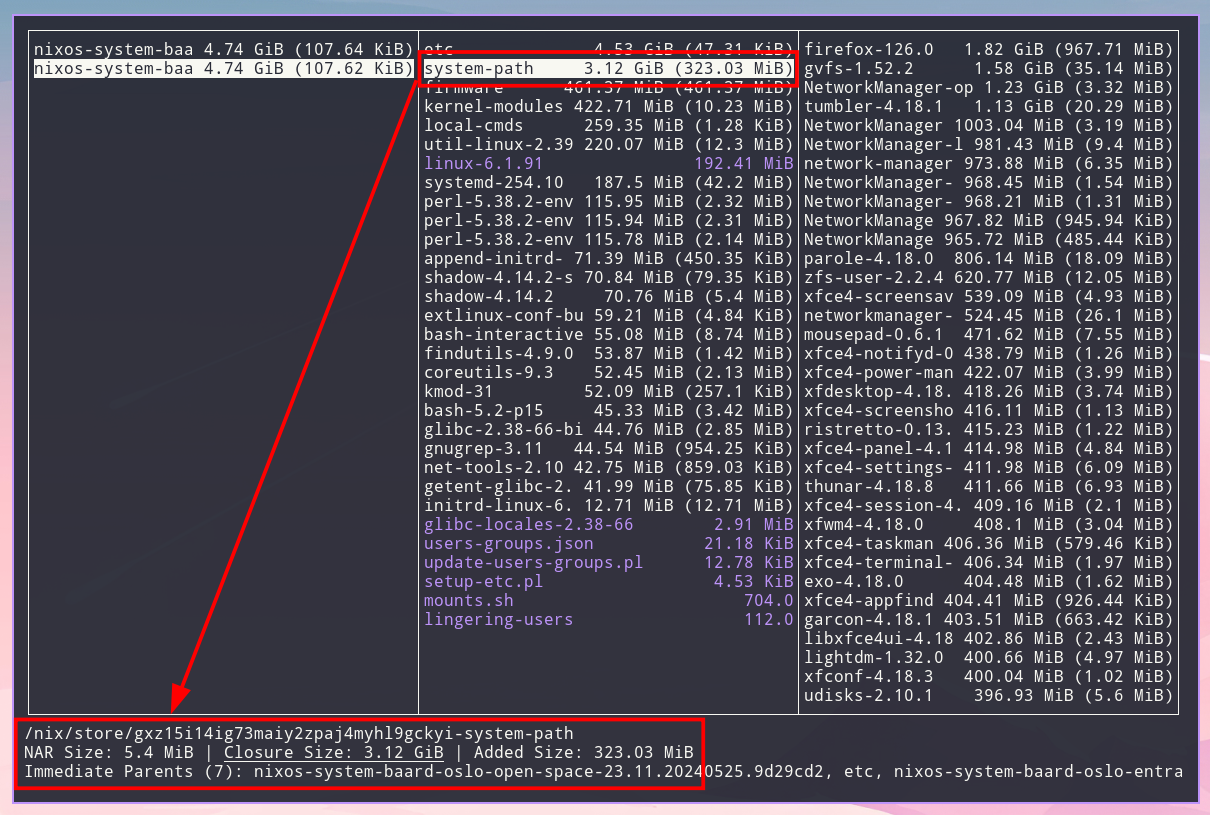
<code class="verbatim">nix-tree</code> it’s clear that there are certain host specifics in <code>etc</code>. This is
not surprising as the hostnames differ, etc. However, everything within the
<code>system-path</code> is identical and the closure hash is the same.</p>
<p><img src="../images/nix-tree-system-path.png" alt="&quot;&quot;" title="&quot;&quot;" /></p>
<p>Another even simpler (and more precise) way of determining shared derivations is
using <code>nix-store --query</code> directly:</p>
<div class="sourceCode" id="cb3"><pre class="sourceCode bash"><code class="sourceCode bash"><span id="cb3-1"><a href="#cb3-1" aria-hidden="true" tabindex="-1"></a><span class="ex">❯</span> nix-store <span class="at">-q</span> <span class="at">--references</span> ./result<span class="pp">*</span> <span class="kw">|</span> <span class="fu">cut</span> <span class="at">-d</span><span class="st">'-'</span> <span class="at">-f2-</span> <span class="kw">|</span> <span class="fu">sort</span> <span class="kw">|</span> <span class="fu">uniq</span> <span class="at">-c</span> <span class="kw">|</span> <span class="fu">sort</span> <span class="at">-n</span></span>
<span id="cb3-2"><a href="#cb3-2" aria-hidden="true" tabindex="-1"></a>      <span class="ex">1</span> append-initrd-secrets</span>
<span id="cb3-3"><a href="#cb3-3" aria-hidden="true" tabindex="-1"></a>      <span class="ex">1</span> bash-5.2-p15</span>
<span id="cb3-4"><a href="#cb3-4" aria-hidden="true" tabindex="-1"></a>      <span class="ex">1</span> bash-interactive-5.2-p15</span>
<span id="cb3-5"><a href="#cb3-5" aria-hidden="true" tabindex="-1"></a>      <span class="ex">1</span> coreutils-9.3</span>
<span id="cb3-6"><a href="#cb3-6" aria-hidden="true" tabindex="-1"></a>      <span class="ex">1</span> extlinux-conf-builder.sh</span>
<span id="cb3-7"><a href="#cb3-7" aria-hidden="true" tabindex="-1"></a>      <span class="ex">1</span> findutils-4.9.0</span>
<span id="cb3-8"><a href="#cb3-8" aria-hidden="true" tabindex="-1"></a>      <span class="ex">1</span> firmware</span>
<span id="cb3-9"><a href="#cb3-9" aria-hidden="true" tabindex="-1"></a>      <span class="ex">1</span> getent-glibc-2.38-66</span>
<span id="cb3-10"><a href="#cb3-10" aria-hidden="true" tabindex="-1"></a>      <span class="ex">1</span> glibc-2.38-66-bin</span>
<span id="cb3-11"><a href="#cb3-11" aria-hidden="true" tabindex="-1"></a>      <span class="ex">1</span> glibc-locales-2.38-66</span>
<span id="cb3-12"><a href="#cb3-12" aria-hidden="true" tabindex="-1"></a>      <span class="ex">1</span> gnugrep-3.11</span>
<span id="cb3-13"><a href="#cb3-13" aria-hidden="true" tabindex="-1"></a>      <span class="ex">1</span> initrd-linux-6.1.91</span>
<span id="cb3-14"><a href="#cb3-14" aria-hidden="true" tabindex="-1"></a>      <span class="ex">1</span> kernel-modules</span>
<span id="cb3-15"><a href="#cb3-15" aria-hidden="true" tabindex="-1"></a>      <span class="ex">1</span> kmod-31</span>
<span id="cb3-16"><a href="#cb3-16" aria-hidden="true" tabindex="-1"></a>      <span class="ex">1</span> lingering-users</span>
<span id="cb3-17"><a href="#cb3-17" aria-hidden="true" tabindex="-1"></a>      <span class="ex">1</span> linux-6.1.91</span>
<span id="cb3-18"><a href="#cb3-18" aria-hidden="true" tabindex="-1"></a>      <span class="ex">1</span> local-cmds</span>
<span id="cb3-19"><a href="#cb3-19" aria-hidden="true" tabindex="-1"></a>      <span class="ex">1</span> mounts.sh</span>
<span id="cb3-20"><a href="#cb3-20" aria-hidden="true" tabindex="-1"></a>      <span class="ex">1</span> net-tools-2.10</span>
<span id="cb3-21"><a href="#cb3-21" aria-hidden="true" tabindex="-1"></a>      <span class="ex">1</span> nixos-system-baard-entrance-23.11.20240525.9d29cd2</span>
<span id="cb3-22"><a href="#cb3-22" aria-hidden="true" tabindex="-1"></a>      <span class="ex">1</span> nixos-system-baard-open-space-23.11.20240525.9d29cd2</span>
<span id="cb3-23"><a href="#cb3-23" aria-hidden="true" tabindex="-1"></a>      <span class="ex">1</span> setup-etc.pl</span>
<span id="cb3-24"><a href="#cb3-24" aria-hidden="true" tabindex="-1"></a>      <span class="ex">1</span> shadow-4.14.2</span>
<span id="cb3-25"><a href="#cb3-25" aria-hidden="true" tabindex="-1"></a>      <span class="ex">1</span> shadow-4.14.2-su</span>
<span id="cb3-26"><a href="#cb3-26" aria-hidden="true" tabindex="-1"></a>      <span class="ex">1</span> systemd-254.10</span>
<span id="cb3-27"><a href="#cb3-27" aria-hidden="true" tabindex="-1"></a>      <span class="ex">1</span> system-path</span>
<span id="cb3-28"><a href="#cb3-28" aria-hidden="true" tabindex="-1"></a>      <span class="ex">1</span> update-users-groups.pl</span>
<span id="cb3-29"><a href="#cb3-29" aria-hidden="true" tabindex="-1"></a>      <span class="ex">1</span> users-groups.json</span>
<span id="cb3-30"><a href="#cb3-30" aria-hidden="true" tabindex="-1"></a>      <span class="ex">1</span> util-linux-2.39.2-bin</span>
<span id="cb3-31"><a href="#cb3-31" aria-hidden="true" tabindex="-1"></a>      <span class="ex">2</span> etc</span>
<span id="cb3-32"><a href="#cb3-32" aria-hidden="true" tabindex="-1"></a>      <span class="ex">3</span> perl-5.38.2-env</span></code></pre></div>
<div class="notes">
<p>Keep in mind that <code>nix-store -q --references</code> only returns the direct
dependencies (references) from the source derivations. To dig deeper, <code>nix-store
-q</code> also accepts a <code>--tree</code> flag to provide a recursive, tree-like view of the
graph (what <code>nix-tree</code> shows with an alternate representation).</p>
</div>
<p>By passing both system derivations to <code>nix-store --query --references</code>, we’re
getting the union of all referenced derivations. Since we also get the hash in
the <code class="verbatim">nix</code> store paths, any derivation name that appears only once is either an
identical, shared dependency, or it’s specific to one of the two devices.</p>
<div class="notes">
<p>Comparing the “potentially shared” list with the dependencies required for our
“to be updated” system is an exercise left for the reader.</p>
</div>
<p>I’ve yet to explore the possibilities of <code>nix-store</code> / <code>nix store</code> sub-commands
like <code>diff-closures</code>, which would most likely be able to provide even more
precise results with regard to which closures are identical between two
derivations. Neither have I spent any effort digging into other tools
specializing in <code class="verbatim">nix</code> deployment. For instance, <a href="https://github.com/zhaofengli/colmena">Colmena</a> supports parallel
deployment, but I’m unsure if it has any features related to copying derivations
between two or more <em>remote</em> hosts.</p>
<h2 id="copypasta">🍝 Copy/pasta</h2>
<p>Once we’ve determined the derivation(s) we want to copy we can use
<code>nix-copy-closure</code>. It allows us to copy a derivation and its dependency graph
in its entirety from one Raspberry Pi host to another.</p>
<p>Without further ceremony:</p>
<div class="sourceCode" id="cb4"><pre class="sourceCode bash"><code class="sourceCode bash"><span id="cb4-1"><a href="#cb4-1" aria-hidden="true" tabindex="-1"></a><span class="ex">nix-copy-closure</span> <span class="at">--from</span> 10.20.30.40 /nix/store/gxz15i14ig73maiy2zpaj4myhl9gckyi-system-path</span></code></pre></div>
<div class="notes">
<p><code class="verbatim">Nix</code> uses <code class="verbatim">ssh</code> for this so it’s convenient to make use of an <code class="verbatim">ssh-agent</code> to
avoid having to type in credentials. <code class="verbatim">Nix</code> commands invoking <code class="verbatim">ssh</code> also accept
an <code class="verbatim">NIX_SSHOPTS</code> environment variable containing parameters to pass on to the
<code class="verbatim">ssh</code> command.</p>
</div>
<p>Once the entire <code class="verbatim">system-units</code> from the example above have been transferred, we
need to perform the actual activation of the next <code class="verbatim">NixOS</code> generation. This can
be done using a regular <code>nixos-rebuild switch</code> with a remote target host.</p>
<div class="sourceCode" id="cb5"><pre class="sourceCode bash"><code class="sourceCode bash"><span id="cb5-1"><a href="#cb5-1" aria-hidden="true" tabindex="-1"></a><span class="ex">nixos-rebuild</span> switch <span class="at">--use-remote-sudo</span> <span class="at">--target-host</span> 10.20.30.40 <span class="at">--flake</span> .#baard-open-space</span></code></pre></div>
<p>For a little more ergonomics, I use a small <code class="verbatim">bash</code> script that also asks to
restart the display manager of the signage device (to apply window manager
configuration changes, etc.):</p>
<div class="sourceCode" id="cb6"><pre class="sourceCode bash"><code class="sourceCode bash"><span id="cb6-1"><a href="#cb6-1" aria-hidden="true" tabindex="-1"></a><span class="co">#!/usr/bin/env bash</span></span>
<span id="cb6-2"><a href="#cb6-2" aria-hidden="true" tabindex="-1"></a></span>
<span id="cb6-3"><a href="#cb6-3" aria-hidden="true" tabindex="-1"></a><span class="bu">set</span> <span class="at">-eo</span> pipefail</span>
<span id="cb6-4"><a href="#cb6-4" aria-hidden="true" tabindex="-1"></a></span>
<span id="cb6-5"><a href="#cb6-5" aria-hidden="true" tabindex="-1"></a><span class="co"># Ensure there's a hostname argument</span></span>
<span id="cb6-6"><a href="#cb6-6" aria-hidden="true" tabindex="-1"></a><span class="cf">if</span> <span class="bu">[</span> <span class="va">$#</span> <span class="ot">-ne</span> 1 <span class="bu">]</span><span class="kw">;</span> <span class="cf">then</span></span>
<span id="cb6-7"><a href="#cb6-7" aria-hidden="true" tabindex="-1"></a>    <span class="bu">echo</span> <span class="st">&quot;Usage: </span><span class="va">$(</span><span class="fu">basename</span> <span class="st">&quot;</span><span class="va">$0</span><span class="st">&quot;</span><span class="va">)</span><span class="st"> &lt;hostname&gt;&quot;</span></span>
<span id="cb6-8"><a href="#cb6-8" aria-hidden="true" tabindex="-1"></a>    <span class="bu">exit</span> 1</span>
<span id="cb6-9"><a href="#cb6-9" aria-hidden="true" tabindex="-1"></a><span class="cf">fi</span></span>
<span id="cb6-10"><a href="#cb6-10" aria-hidden="true" tabindex="-1"></a></span>
<span id="cb6-11"><a href="#cb6-11" aria-hidden="true" tabindex="-1"></a><span class="co"># Fetch all possible hostnames into an array</span></span>
<span id="cb6-12"><a href="#cb6-12" aria-hidden="true" tabindex="-1"></a><span class="va">hosts</span><span class="op">=</span><span class="va">()</span></span>
<span id="cb6-13"><a href="#cb6-13" aria-hidden="true" tabindex="-1"></a><span class="cf">while</span> <span class="va">IFS</span><span class="op">=</span> <span class="bu">read</span> <span class="at">-r</span> <span class="va">line</span><span class="kw">;</span> <span class="cf">do</span></span>
<span id="cb6-14"><a href="#cb6-14" aria-hidden="true" tabindex="-1"></a>    <span class="va">hosts</span><span class="op">+=</span><span class="va">(</span><span class="st">&quot;</span><span class="va">$line</span><span class="st">&quot;</span><span class="va">)</span></span>
<span id="cb6-15"><a href="#cb6-15" aria-hidden="true" tabindex="-1"></a><span class="cf">done</span> <span class="op">&lt;</span> <span class="op">&lt;(</span><span class="ex">nix</span> flake show <span class="at">--json</span> <span class="dv">2</span><span class="op">&gt;</span>/dev/null <span class="kw">|</span> <span class="ex">jq</span> <span class="at">-r</span> <span class="st">'.nixosConfigurations | keys[]'</span><span class="op">)</span></span>
<span id="cb6-16"><a href="#cb6-16" aria-hidden="true" tabindex="-1"></a></span>
<span id="cb6-17"><a href="#cb6-17" aria-hidden="true" tabindex="-1"></a><span class="co"># Ensure the hostname is valid</span></span>
<span id="cb6-18"><a href="#cb6-18" aria-hidden="true" tabindex="-1"></a><span class="cf">if</span> <span class="kw">[[</span> <span class="ot">!</span> <span class="st">&quot; </span><span class="va">${hosts</span><span class="op">[*]</span><span class="va">}</span><span class="st"> &quot;</span> <span class="ot">=~</span> <span class="st">&quot; </span><span class="va">$1</span><span class="st"> &quot;</span> <span class="kw">]];</span> <span class="cf">then</span></span>
<span id="cb6-19"><a href="#cb6-19" aria-hidden="true" tabindex="-1"></a>    <span class="bu">echo</span> <span class="st">&quot;Invalid hostname: </span><span class="va">$1</span><span class="st">&quot;</span></span>
<span id="cb6-20"><a href="#cb6-20" aria-hidden="true" tabindex="-1"></a>    <span class="bu">echo</span> <span class="st">&quot;&quot;</span></span>
<span id="cb6-21"><a href="#cb6-21" aria-hidden="true" tabindex="-1"></a>    <span class="bu">echo</span> <span class="st">&quot;Use one of:&quot;</span></span>
<span id="cb6-22"><a href="#cb6-22" aria-hidden="true" tabindex="-1"></a>    <span class="bu">printf</span> <span class="st">'  %s\n'</span> <span class="st">&quot;</span><span class="va">${hosts</span><span class="op">[@]</span><span class="va">}</span><span class="st">&quot;</span></span>
<span id="cb6-23"><a href="#cb6-23" aria-hidden="true" tabindex="-1"></a>    <span class="bu">exit</span> 1</span>
<span id="cb6-24"><a href="#cb6-24" aria-hidden="true" tabindex="-1"></a><span class="cf">fi</span></span>
<span id="cb6-25"><a href="#cb6-25" aria-hidden="true" tabindex="-1"></a></span>
<span id="cb6-26"><a href="#cb6-26" aria-hidden="true" tabindex="-1"></a><span class="co"># Build and deploy the system</span></span>
<span id="cb6-27"><a href="#cb6-27" aria-hidden="true" tabindex="-1"></a><span class="ex">nixos-rebuild</span> switch <span class="at">--use-remote-sudo</span> <span class="at">--target-host</span> <span class="st">&quot;</span><span class="va">$1</span><span class="st">&quot;</span> <span class="at">--flake</span> <span class="st">&quot;.#</span><span class="va">$1</span><span class="st">&quot;</span></span>
<span id="cb6-28"><a href="#cb6-28" aria-hidden="true" tabindex="-1"></a></span>
<span id="cb6-29"><a href="#cb6-29" aria-hidden="true" tabindex="-1"></a><span class="co"># Restart the display server if the user wants to</span></span>
<span id="cb6-30"><a href="#cb6-30" aria-hidden="true" tabindex="-1"></a><span class="bu">read</span> <span class="at">-p</span> <span class="st">&quot;Restart the display manager? (y/N) &quot;</span> <span class="at">-n</span> 1 <span class="at">-r</span></span>
<span id="cb6-31"><a href="#cb6-31" aria-hidden="true" tabindex="-1"></a></span>
<span id="cb6-32"><a href="#cb6-32" aria-hidden="true" tabindex="-1"></a><span class="cf">if</span> <span class="kw">[[</span> <span class="va">$REPLY</span> <span class="ot">=~</span> <span class="pp">^</span><span class="op">[</span><span class="ss">Yy</span><span class="op">]$</span> <span class="kw">]]</span></span>
<span id="cb6-33"><a href="#cb6-33" aria-hidden="true" tabindex="-1"></a><span class="cf">then</span></span>
<span id="cb6-34"><a href="#cb6-34" aria-hidden="true" tabindex="-1"></a>    <span class="fu">ssh</span> <span class="st">&quot;</span><span class="va">$1</span><span class="st">&quot;</span> sudo systemctl restart display-manager.service</span>
<span id="cb6-35"><a href="#cb6-35" aria-hidden="true" tabindex="-1"></a><span class="cf">fi</span></span></code></pre></div>
<p>Which is invoked via the configuration <code class="verbatim">flake</code> as an app:</p>
<div class="sourceCode" id="cb7"><pre class="sourceCode nix"><code class="sourceCode nix"><span id="cb7-1"><a href="#cb7-1" aria-hidden="true" tabindex="-1"></a><span class="op">{</span></span>
<span id="cb7-2"><a href="#cb7-2" aria-hidden="true" tabindex="-1"></a>  <span class="co"># ...</span></span>
<span id="cb7-3"><a href="#cb7-3" aria-hidden="true" tabindex="-1"></a></span>
<span id="cb7-4"><a href="#cb7-4" aria-hidden="true" tabindex="-1"></a>  <span class="va">outputs</span> <span class="op">=</span> <span class="op">{</span></span>
<span id="cb7-5"><a href="#cb7-5" aria-hidden="true" tabindex="-1"></a>    <span class="co"># ...</span></span>
<span id="cb7-6"><a href="#cb7-6" aria-hidden="true" tabindex="-1"></a></span>
<span id="cb7-7"><a href="#cb7-7" aria-hidden="true" tabindex="-1"></a>    <span class="va">apps</span> <span class="op">=</span> <span class="kw">let</span></span>
<span id="cb7-8"><a href="#cb7-8" aria-hidden="true" tabindex="-1"></a>      <span class="va">deploy</span> <span class="op">=</span> pkgs.stdenv.mkDerivation <span class="op">{</span></span>
<span id="cb7-9"><a href="#cb7-9" aria-hidden="true" tabindex="-1"></a>        <span class="va">name</span> <span class="op">=</span> <span class="st">&quot;baard-deploy&quot;</span><span class="op">;</span></span>
<span id="cb7-10"><a href="#cb7-10" aria-hidden="true" tabindex="-1"></a>        <span class="va">src</span> <span class="op">=</span> <span class="ss">./deploy.sh</span><span class="op">;</span></span>
<span id="cb7-11"><a href="#cb7-11" aria-hidden="true" tabindex="-1"></a>        <span class="va">dontUnpack</span> <span class="op">=</span> <span class="cn">true</span><span class="op">;</span></span>
<span id="cb7-12"><a href="#cb7-12" aria-hidden="true" tabindex="-1"></a>        <span class="va">installPhase</span> <span class="op">=</span> <span class="st">''</span></span>
<span id="cb7-13"><a href="#cb7-13" aria-hidden="true" tabindex="-1"></a><span class="st">          mkdir -p $out/bin</span></span>
<span id="cb7-14"><a href="#cb7-14" aria-hidden="true" tabindex="-1"></a><span class="st">          install $src $out/bin/deploy</span></span>
<span id="cb7-15"><a href="#cb7-15" aria-hidden="true" tabindex="-1"></a><span class="st">        ''</span><span class="op">;</span></span>
<span id="cb7-16"><a href="#cb7-16" aria-hidden="true" tabindex="-1"></a>      <span class="op">};</span></span>
<span id="cb7-17"><a href="#cb7-17" aria-hidden="true" tabindex="-1"></a>    <span class="kw">in</span> <span class="op">{</span></span>
<span id="cb7-18"><a href="#cb7-18" aria-hidden="true" tabindex="-1"></a>      <span class="va">deploy</span> <span class="op">=</span> <span class="op">{</span></span>
<span id="cb7-19"><a href="#cb7-19" aria-hidden="true" tabindex="-1"></a>        <span class="va">type</span> <span class="op">=</span> <span class="st">&quot;app&quot;</span><span class="op">;</span></span>
<span id="cb7-20"><a href="#cb7-20" aria-hidden="true" tabindex="-1"></a>        <span class="va">program</span> <span class="op">=</span> <span class="st">&quot;</span><span class="sc">${</span>deploy<span class="sc">}</span><span class="st">/bin/deploy&quot;</span><span class="op">;</span></span>
<span id="cb7-21"><a href="#cb7-21" aria-hidden="true" tabindex="-1"></a>      <span class="op">};</span></span>
<span id="cb7-22"><a href="#cb7-22" aria-hidden="true" tabindex="-1"></a>    <span class="op">};</span></span>
<span id="cb7-23"><a href="#cb7-23" aria-hidden="true" tabindex="-1"></a>  <span class="op">};</span></span>
<span id="cb7-24"><a href="#cb7-24" aria-hidden="true" tabindex="-1"></a><span class="op">}</span></span></code></pre></div>
<div class="sourceCode" id="cb8"><pre class="sourceCode bash"><code class="sourceCode bash"><span id="cb8-1"><a href="#cb8-1" aria-hidden="true" tabindex="-1"></a><span class="ex">nix</span> run .#deploy baard-open-space</span></code></pre></div>
<p>After running the remote-to-remote closure sync, the deployment only copies a
fraction of the required system dependency derivations.</p>
<p>How cool is that?</p>
<h2 id="footnotes">Footnotes</h2>
<section id="footnotes" class="footnotes footnotes-end-of-document" role="doc-endnotes">
<hr />
<ol>
<li id="fn1"><p>Not cross-compilation as <code class="verbatim">binfmt_misc</code> invokes <code class="verbatim">qemu</code> for the <code class="verbatim">aarch64</code>
architecture and runs the entire toolchain on the target architecture.<a href="#fnref1" class="footnote-back" role="doc-backlink">↩︎</a></p></li>
<li id="fn2"><p>Quite a large portion of <code class="verbatim">nix</code> artifacts are in fact not “binary” data.<a href="#fnref2" class="footnote-back" role="doc-backlink">↩︎</a></p></li>
</ol>
</section>
  </section>
</article>
]]></summary>
</entry>
<entry>
    <title>Focus by Automation</title>
    <link href="https://myme.no/posts/2024-03-19-focus-by-automation.html" />
    <id>https://myme.no/posts/2024-03-19-focus-by-automation.html</id>
    <published>2024-03-19T00:00:00Z</published>
    <updated>2024-03-19T00:00:00Z</updated>
    <summary type="html"><![CDATA[<article>
  <h1>Focus by Automation</h1>
  <ul class="tags"><li><a href="/tags/automation.html" title="Navigate posts by tag: Automation"><span class="fa fa-tag"> </span> Automation</a></li><li><a href="/tags/programming.html" title="Navigate posts by tag: Programming"><span class="fa fa-tag"> </span> Programming</a></li><li><a href="/tags/emacs.html" title="Navigate posts by tag: Emacs"><span class="fa fa-tag"> </span> Emacs</a></li><li><a href="/tags/vim.html" title="Navigate posts by tag: Vim"><span class="fa fa-tag"> </span> Vim</a></li></ul>
  <section class="header">
    Posted on 2024-03-19
    
  </section>
  <section>
    <div class="toc"><h2>Contents</h2>
<ul>
<li><a href="#automation" id="toc-automation">Automation 🤖</a></li>
<li><a href="#focus" id="toc-focus">Focus 🔍</a></li>
<li><a href="#distractions" id="toc-distractions">Distractions ⚡</a></li>
<li><a href="#organization" id="toc-organization">Organization 📓</a></li>
<li><a href="#the-value-of-mastery" id="toc-the-value-of-mastery">The value of mastery 🧙</a></li>
<li><a href="#braaains" id="toc-braaains">Braaains 🧠</a></li>
<li><a href="#footnotes" id="toc-footnotes">Footnotes</a></li>
</ul>
</div>
<h2 id="automation">Automation 🤖</h2>
<blockquote>
<p>I’ve invested leisure time to save time when I’m working hard, not to save
keystrokes but to save mental energy for the project at hand.</p>
<ul>
<li>John D. Cook</li>
</ul>
</blockquote>
<p><img src="../images/conveyor-belt-robot.webp" style="width: 50%" alt="&quot;DALL-E: A highly focused conveyor belt robot automating daily chores in the style of Pixar animations studios.&quot;" title="&quot;DALL-E: A highly focused conveyor belt robot automating daily chores in the style of Pixar animations studios.&quot;" /></p>
<p>In much of the work that I do I try to <a href="https://www.johndcook.com/blog/2015/12/22/automate-to-save-mental-energy-not-time/">automate to save mental energy</a>.
Automation, to “techy” people, often means to apply some sort of repeatable
application of machinery or code in order both free us from manual labor and
potentially increase our effective throughput. I’m using a more general
interpretation of “automation” when I say “I try to automate to save mental
energy” – an interpretation more in line with what John D. Cook points towards
in his post quoted and linked to above.</p>
<p>Yes, writing scripts, applying tools and utilities to common everyday
programming problems are undeniably “automation”. However, automation in its
purest sense isn’t reserved for silicate or metallic machinery only. Biology
automates through instinct and practice.</p>
<p>What this means to me in practice is that I relatively often invest a
significant amount of time learning new things, practicing various skills, and
iterating on my workflows. Not necessarily to save on some imaginary “net sum of
time spent”<a href="#fn1" class="footnote-ref" id="fnref1" role="doc-noteref"><sup>1</sup></a> – although Randall Munroe of <code>XKCD</code> has <a href="https://xkcd.com/1205/">shared</a> some <a href="https://xkcd.com/1319/">thoughts</a>
on the topic of – but to ensure I can maintain a certain level of focus in my
work when I’m “in the zone”.</p>
<h2 id="focus">Focus 🔍</h2>
<p>Why is focus so important? Well, <a href="2023-09-19-programming-is-hard.html">programming is hard</a> and I’m sure also most
non-programmers acknowledge the importance of focus when doing work requiring a
certain level of immersion.</p>
<p>This little gem from <a href="https://www.monkeyuser.com/">MonkeyUser.com</a> illustrates “focus” for a programmer
perfectly:</p>
<p><img src="../images/monkeyuser-focus.png" style="width: 50%" alt="&quot;https://www.monkeyuser.com/2018/focus/&quot;" title="Focus" /></p>
<p>I’ve often used the analogy of building a house of cards when explaining to
non-programmers how we build mental models of the problems we are solving. Like
a house of cards these mental models take considerable time and effort to
construct, but topple over and collapse from even the smallest breath of air
(interruptions).</p>
<p>Our mental models dissolve faster than cotton candy in water when we’re
distracted at an inappropriate time.</p>
<p><img src="../images/raccoon.gif" style="width: 35%" /></p>
<p>How about focus in <em>my</em> work? Sure!</p>
<iframe src="https://mastodon.social/@myme/110227268083781043/embed" class="mastodon-embed" style="max-width: 100%; border: 0" width="400" allowfullscreen="allowfullscreen"></iframe><script src="https://mastodon.social/embed.js" async="async"></script>

<p>The draft of this post is over a year old. I guess I got distracted!</p>
<div class="notes">
<p>In fact, I was writing this very post when I realized the prelude was worthy of
a post of its own. That became <a href="2023-09-19-programming-is-hard.html">Programming is hard</a>. It gained quite a few views,
then I guess I forgot all about this one.</p>
</div>
<h2 id="distractions">Distractions ⚡</h2>
<p>Distractions; the arch enemy of every coder. Distractions break our focus by
ripping us out of our flow states. It doesn’t help that programming environments
are littered with potential distractions. They come in many shapes and forms, to
name a few:</p>
<ul>
<li>⚡ Physical interruptions from our surroundings (meetings, colleagues, notifications).</li>
<li>🧠 Internal interruptions through impulsive thoughts (spontaneous ideas, procrastination).</li>
<li>🤷 Missing preconditions to perform a task (unclear objectives, yak shaving, tech debt).</li>
<li>➰ Long feedback loops (handovers, difficulty testing, ++).</li>
<li>🥪 An empty stomach.</li>
</ul>
<p>Some distractions are obvious, others are more subtle.</p>
<p>When we talk about distractions it’s often the “big and obvious” ones that
people think of. Those are the distractions where you’re interrupted by someone
or something in your surroundings. It may be somebody “just popping over to ask
a question” or some meeting looming on the horizon about to evacuate you from
your warm and cozy “flow zone”.</p>
<p>In recent years I’ve also grown more conscious of less obvious forms of
distractions. Things like small papercuts and annoyances which I previously
might have accepted simply as a natural part of “work”. By not acknowledging
these minor nuisances as distractions I’ve never stopped to consider how they
may negatively affect my productivity or cognitive ability. However, tiny
inconveniences can add up to make solving issues more difficult than it needs
to be.</p>
<p>Much can be done to reduce the distractions within an organization, but
introducing transformational change can be hard for an individual alone.
Organizational chaos might even be outside of our control. What we <em>can</em> control
to some extent is how we interface with the environment around us.</p>
<p>I find many negative effects of distractions – large and small – can be greatly
reduced through personal organization and mastery of your tools.</p>
<h2 id="organization">Organization 📓</h2>
<p>I’m personally a big fan of <a href="https://gettingthingsdone.com/">Getting Things Done</a> (GTD), <a href="https://en.wikipedia.org/wiki/Zettelkasten">Zettlekasten</a> methods
(using <code>emacs</code> with <a href="https://orgmode.org/">Org Mode</a> and <a href="https://www.orgroam.com/">Org-roam</a>), and various other “productivity
life-hacks”.</p>
<p>I strongly believe everyone should invest a bit of time and effort into learning
a few organizational tools. I don’t have strong opinions on which, but I believe
it’s crucial to learn them well enough and integrate them into your daily
workflow so that they stay out of your way. It doesn’t even have to be anything
digital. A paper notepad is honestly perfectly acceptable too. However, I
believe tighter integration into e.g. code editors increases the possibility for
distraction free note-taking and organization.</p>
<p>I feel an organizational tool hits the sweetspot when you hardly notice yourself
using it.</p>
<p>In my case I’ve achieved such ergonomics using <code>emacs</code> as both my primary code
editor <em>and</em> note-taking application. <code>Org mode</code> lets me capture all kinds of
fleeting notes and <code>Org-roam</code> complements it by allowing me to quickly refile
things into a personal knowledge graph. <code>TODO</code> lists and priorities fit nicely
into the same workflow, as does time-tracking.</p>
<div class="notes">
<p>I must admit I have a lot of issues with <code>emacs</code>, but the way some of these
“killer app” plugins integrate into a comprehensive productivity tool I have yet
to find anything matching what I’m after.</p>
</div>
<p>There is A LOT of literature on personal organization, so I don’t want to spend
too much time on this topic in this post. Let’s move on to another critical tool
in the battle against distractions: mastery.</p>
<h2 id="the-value-of-mastery">The value of mastery 🧙</h2>
<p>I briefly touched on “practice makes perfect” in <a href="2024-01-21-produce-dont-consume.html#practice-makes-perfect">produce, don’t consume</a> and how
practice can be incorporated into constructive efforts. Writing this post I’ve
also come to realize that another trait of practice and mastery is how
automating our skill through practice helps us cancel out distractions in order
to maintain focus.</p>
<p>Mastering our tools is important as it allows our brains to focus on the task at
hand. If we are forced to spend a significant amount of our brain power learning
programming language syntax, editor bindings or APIs then we have less mental
energy to spend on solving <em>actual</em> problems. Battling complexity on multiple
fronts increases cognitive load and often a loss of focus.</p>
<p>A dancer who doesn’t know the basic moves of a dance style will have great
trouble connecting motions in the choreography while maintaining rhythm and
composure. Similarly, a programmer who constantly stumble on basic syntax or
interpreting compiler errors will have a harder time constructing a mental model
of the problem she’s solving.</p>
<p>But we do not necessary have to become specialists to become effective. In fact,
becoming and staying a proper expert in more than a handful of fields is a fools
errand in modern software development. Ecosystems evolve too quickly, new tools
and practices come and go. Not to mention the looming paradigm shift of
artificial intelligence and how it might render significant aspects of
conventional programming obsolete<a href="#fn2" class="footnote-ref" id="fnref2" role="doc-noteref"><sup>2</sup></a>.</p>
<p>What I find useful is to learn enough about a wide variety of topics to build a
basic intuition for when specific technologies or methodologies will help solve
the problems we’re faced with. You’ll then eventually start picking out what
matters to you and your expertise will grow somewhat organically<a href="#fn3" class="footnote-ref" id="fnref3" role="doc-noteref"><sup>3</sup></a>. Also try
to surround yourself with smart people complementing your own abilities.</p>
<p>Practice and repetition is crucial to become a master in just about anything. A
musician spends time with her instrument to improve, programmers spend time with
their “tech stacks”, editors and tools. It’s a matter of starting somewhere.
Experts weren’t born experts. And even though talent or determination allow some
to progress faster than others nobody who achieve mastery within any discipline
will admit to not having worked hard – or for a long time – to acquire the skill
they possess.</p>
<p>Just as a musician is likely to butcher an unfamiliar instrument, a programmer
dropped into a new development environment will most definitely experience some
initial regression in their productivity. This is normal, but it is also the way
we learn. The difficulty is knowing (or choosing) what to learn, and when. In
the middle of a high-stakes project is probably not the right time to pick up a
new language or framework<a href="#fn4" class="footnote-ref" id="fnref4" role="doc-noteref"><sup>4</sup></a>.</p>
<p>Whether you consider yourself a specialist or a generalist I believe software
development is quite unique in the way many skills are transferable across
environments. Some skills invested transcend their technologies almost entirely
due to their pervasiveness or general applicability.</p>
<h3 id="typing-speed">Typing speed</h3>
<p>Muscle memory and habits are both important abilities of the body and mind to
increase our efficiency and reduce our cognitive load. Making things more
automatic allows us to complete repeatable tasks faster or do so without
sacrificing our ability to reason about the problems we’re currently solving.</p>
<p>Most seasoned programmers know that we spend significantly more time reading and
navigation through code than actually changing existing code or writing new
code. For this reason it’s easy to assume that learning effective typing is
secondary to learning how to structure programs really well. I don’t disagree,
yet I have the impression that many of the really amazing programmers I know are
also great typists.</p>
<p>I believe there might be a very simple reason for this correlation – besides the
obvious take that great programmers spend a lot of time in front of their
computer, thus become great typists. No, I believe by being able to generate
many programs fast you are also able to attempt many possible solutions faster.
Difficult problems require thinking, I know. But few things beat the speed of
finding code problems as actually passing code through a compiler or an
interpreter and executing it.</p>
<p>I would say it’s worth putting effort into improving your typing. Not with the
end-goal “writing as fast as possible” in mind of, but rather to <em>interface</em> as
efficiently as possible with the computer. Why then not also try to improve
<em>how</em> you type? Let’s take <code>vi/vim</code> and modal editing as an example.</p>
<h3 id="vim-bindings">Vim bindings</h3>
<p>In <a href="https://neovim.io/">(neo)</a><a href="https://www.vim.org/">vim</a> there are keybindings bound to operations which operate on various
textual structures.</p>
<p>Bindings may operate on “bodies” of text like letters, words, sentences or
paragraphs. Or they operate on pairs of quotes, parentheses and brackets. They
can work on locations like the beginning and end of a buffer. Or even metadata
not represented in the buffer itself, like the location of compilation errors
from an external tool or spelling errors from a spell checker.</p>
<p>Once <code>vim</code> motions are internalized it’s amazing how efficient it feels to
“delete all word” (<code>daw</code>) or “change in paragraph” (<code>cip</code>) without breaking a
sweat. The great strength and power of <code>vim</code> motion bindings come from how a few
handfuls of general-purpose operations translate across different types of
textual motions, from prose to any style of programming and markup languages.</p>
<div class="notes">
<p>Editors like <a href="https://github.com/mawww/kakoune">Kakoune</a> and <a href="https://github.com/helix-editor/helix">Helix</a> attempt to improve further on this concept. I
have little experience using them, but I struggle to see how investing
significant time into them at this point is worth the effort. After all, one of
the main benefits of <code>vim</code> and <code>vim</code> motions is how pervasive they are.</p>
</div>
<p>There are many ways people can argue that learning <code>vim</code>-style modal editing
helps their productivity. It can, however, be somewhat tricky to determine what
exactly people benefit from it. Personally I’m certain the time I invested into
learning motion bindings and compound operations many years ago has reaped
dividends way past the initial investment.</p>
<h3 id="optimize-the-common-paths">Optimize the common paths</h3>
<p>But how? By letting me type faster? What has typing and <code>vim</code> motions to do with
avoiding distractions?</p>
<p>Everything!</p>
<p>The keyboard is still my main interface to the computer. As long as it continues
to be it matters to me to wield it well.</p>
<p>Similarly to <code>vim</code> motions most mainstream <code>$SHELL</code> prompts default to
<code>emacs</code>-style <code>readline</code> bindings<a href="#fn5" class="footnote-ref" id="fnref5" role="doc-noteref"><sup>5</sup></a>. To me that was motivation enough to put
some effort into internalize the most common <code>readline</code> keyboard bindings on the
CLI (for <code>emacs</code> users this is trivial).</p>
<p>Raise your hand if you know how to undo edit operations in <code>readline</code> ✋ (yes,
<code>C-/</code> and <code>C-u C-/</code> works in your prompt!)</p>
<p>Programming is littered with micro-distractions, remember? Not only do you
increase your efficiency at typing out actual programs by learning effective
text navigation and manipulation (as well as text generation through snippets
and generative A.I.). You also do so while sparing your brain from having to
think about these trivial “problems” and road-blocks.</p>
<p>This is just as true <em>in</em> your editor as outside of it.</p>
<p>It’s not uncommon to find myself thinking about my <em>next</em> steps while doing some
other thing like text navigation or manipulation using either <code>vim</code> or
<code>readline</code> keybindings. By now they’re so ingrained in muscle memory that I more
often that not think about <em>what</em> I need to do, not <em>how</em>. It just happens.</p>
<p>And let me say that the point of this section is not to boast or rave about
<code>vim</code> and <code>emacs</code> bindings. The point is that by learning your tools really well
they eventually get out of your way and you’re free to tackle the actual
problems you’re faced with. It’s even better if these skills are applicable in a
wide variety of applications and environments – try to stick to defaults.</p>
<h2 id="braaains">Braaains 🧠</h2>
<p>I don’t mind learning, but I want to choose – within my power – when, how and
how much to learn. After all, learning is all about rewiring our brains. It’s
mental exercise, and like physical exercise learning can be very exhausting. The
same goes for problem solving – it’s our brains applying our existing knowledge
in order to achieve something new.</p>
<p>Knowing when to invest time into learning, automation or optimization is not
trivial. Done prematurely there’s the risk of sinking costs into efforts that
won’t pay off, yet stubbornly sticking to old ways could be impeding future
efficiency. A big part of maturing as a software developer is knowing (or more
likely, <em>sensing</em>) when the time is right for you.</p>
<p>The biggest bottleneck of software development is still the (human) brain. It’s
a precious resource, but it can only do so much and distractions greatly reduce
its capacity.</p>
<p>Through practice and mastery, by building and honing physical and internal
tools, we can offload our brains to focus much more of its effort on the
problems we’re solving. By allocating more brainpower into solving problems
we’re also more likely to succeed in solving some of the hard ones, and to more
gracefully recover from distractions when they occur.</p>
<p>Now, what was I doing again…?</p>
<h2 id="footnotes">Footnotes</h2>
<section id="footnotes" class="footnotes footnotes-end-of-document" role="doc-endnotes">
<hr />
<ol>
<li id="fn1"><p>Although measuring this would’ve been a very fun experiment had we had
access to parallel universes.<a href="#fnref1" class="footnote-back" role="doc-backlink">↩︎</a></p></li>
<li id="fn2"><p>Nah, don’t worry. You’ll be fine!<a href="#fnref2" class="footnote-back" role="doc-backlink">↩︎</a></p></li>
<li id="fn3"><p>Don’t get me wrong. I find it very important to combine theoretical
studying with practice and applying knowledge.<a href="#fnref3" class="footnote-back" role="doc-backlink">↩︎</a></p></li>
<li id="fn4"><p>Or who knows, maybe it is.<a href="#fnref4" class="footnote-back" role="doc-backlink">↩︎</a></p></li>
<li id="fn5"><p>Many shells also support <code>vi</code> mode bindings, but it’s rarely the default.<a href="#fnref5" class="footnote-back" role="doc-backlink">↩︎</a></p></li>
</ol>
</section>
  </section>
</article>
]]></summary>
</entry>
<entry>
    <title>Produce, Don't Consume</title>
    <link href="https://myme.no/posts/2024-01-21-produce-dont-consume.html" />
    <id>https://myme.no/posts/2024-01-21-produce-dont-consume.html</id>
    <published>2024-01-21T00:00:00Z</published>
    <updated>2024-01-21T00:00:00Z</updated>
    <summary type="html"><![CDATA[<article>
  <h1>Produce, Don't Consume</h1>
  <ul class="tags"><li><a href="/tags/programming.html" title="Navigate posts by tag: Programming"><span class="fa fa-tag"> </span> Programming</a></li></ul>
  <section class="header">
    Posted on 2024-01-21
    
  </section>
  <section>
    <div class="note">
<p>This post is following the somewhat more philosophical trail as my previous
post: <a href="2023-09-19-programming-is-hard.html">Programming is hard</a>. If you’re here for the technical stuff I plan to
return with more technical content in the next couple of posts.</p>
</div>
<h2 id="prelude">Prelude</h2>
<p>I grew up with the internet.</p>
<p>It’s mind-boggling how much it has changed since the first time my dad and I
plugged in our brand new <code>i486</code> computer into some dial-up modem in the early
90s. We had no idea what we were doing, and I have very few recollections from
this first household machine. Ironically, back then I was too physically active,
too much into sports and outdoor activities. My pre-adolescent ants-in-my-pants
attention span wouldn’t let me learn enough about computers to have them ensnare
me.</p>
<p>Fast-forward to today: While short-form dopamine-triggering micro-blogs and
reels on <code>X</code>, <code>TikTok</code>, <code>Instagram</code> et. al. are eating away our attention span,
the siren song of hours-long podcasts, streams and in-depth blog posts lure us
into never-ending rabbit holes of deep knowledge and insight. Short-form is
addictive. Long-form is addictive. But we need to set our own boundaries because
we can’t ever consume it all.</p>
<p>Back in the early 90s this internet thing was new to basically everybody. You
had to spend significant effort actively seeking relevant content, given you
knew where to look. I mean, just getting and staying online was a challenge:</p>
<blockquote>
<p>Martin, are you using <strong>the … internet</strong>!? I need to make a phone-call!</p>
</blockquote>
<p>A little under a decade later the situation had improved, slightly. Me and my
high-school friends – at night-time, on our home <code>ISDN</code> connections – would
round-robin share the responsibility of downloading the last week’s <code>Futurama</code>
episode (in <code>RealMedia</code>) and burn it out to a <code>CD-R(W)</code> and bring it to school.</p>
<p>These days content jumps into our face and we seem to have an insatiable
appetite for it. A thirst that’s driving a gold rush of content producers, many
only in search of fame and fortune. As a consumer it’s a wild luxury to have
instant news, knowledge and entertainment at our fingertips. However,
self-regulation is vital to not lose ourselves indulging in this luxury.</p>
<p>Perhaps our relatively new-found superpower of having incomprehensible amounts
of human knowledge, culture and talent directly accessible is overstimulating
and perverting some age-old survival trait. There was a time where <em>not</em>
learning certain abilities, latest events or social movements within a tribe
would in the very least reduce our likelihood of mating success. In the utmost
consequence ignorance would lead to exclusion or an inability to self-sustain
and ultimately a certain death. Knowing meant surviving.</p>
<p>From the start of the information age and beyond the consequences of <em>not
knowing</em> much less so imply our own personal demise. It’s just that our genes
and brains have not had the time to adapt. Meanwhile, the content produced and
the technological advances making it accessible show little sign of slowing
down.</p>
<div class="sourceCode" id="cb1"><pre class="sourceCode html"><code class="sourceCode html"><span id="cb1-1"><a href="#cb1-1" aria-hidden="true" tabindex="-1"></a><span class="dt">&lt;</span><span class="kw">pause-for-dramatic-effect</span> <span class="er">class</span><span class="ot">=</span><span class="st">&quot;spinner manual-breathing&quot;</span> <span class="dt">/&gt;</span></span></code></pre></div>
<p>But enough about me waving my proverbial stick and waddling my way through some
intuition-based reverse engineering of anthropological behavior. Hopefully it’s
illustrative for where I’m coming from and helps back up the underlying
motivation for what’s to come below.</p>
<h2 id="produce-dont-consume">Produce, Don’t Consume</h2>
<p>I don’t remember exactly when, but somewhere within the last couple of years I
felt an urge to set myself a strategic long-term goal: <strong>Default to produce
rather than to consume</strong>.</p>
<p>I meant this in a general sense, basically to focus less on being an active or
passive <em>receiver</em> of input and focus more on trying to be a <em>producer</em> of
output (or outcomes). It would imply engaging less with multi-media: Less TV and
shows. Digesting less social media and to a certain degree blogs. In social
settings to be engaging and a <em>driver</em> of conversations<a href="#fn1" class="footnote-ref" id="fnref1" role="doc-noteref"><sup>1</sup></a>. Another example
could be to spend less time in awestruck paralysis watching virtuosic
guitarists, more time “violating” my guitar. And obvisouly actively programming
more than consuming programming content.</p>
<p>What’s wrong with being a consumer, you may ask? Well, in a way, nothing.</p>
<p>And here I need to be perfectly clear: My motivation never stemmed from any
idealistic standpoint against the state of the modern internet nor the World in
general, as the prelude might have lead you to believe. Yes, there is enough
content out there to drown everybody tenfold. But I don’t necessarily have an
issue with that. In fact, looking back I don’t know what made me set myself this
goal in the first place. What I <em>do</em> know is that it was my intuition trying to
tell me something. It was definitely a deep and vague sensation. A gut feeling.</p>
<h2 id="content-inflation">Content inflation</h2>
<p>“But, all this talk of information overload” – you may wonder – “wouldn’t urging
yourself and other people to produce <em>more</em> simply lead to an acceleration of
content inflation?”</p>
<p>First off, I did just state that I don’t necessarily have a huge issue with the
amount of content on the internet.</p>
<p>Secondly, well sure, if we keep sharing <em>everything</em> we do or create then we’re
obviously contributing – perhaps negatively – to the cacophony. Yet it’s not on
us to decide what might appeal to others. I’m of the opinion that certain things
are good to keep to yourself, it’s either very personal or simply knowing you
did it is fulfilling enough.</p>
<p>In the end, a piece of good work should fill us with a sense of pride, and few
other things are as inspirational and likely to spawn new ideas as reciprocal
engagement. It’s important to distinguish between what’s sensible
self-censorship and what’s self-deprecation due to a lack of confidence. Sharing
and getting feedback is how we learn and improve, and as we improve we also gain
confidence<a href="#fn2" class="footnote-ref" id="fnref2" role="doc-noteref"><sup>2</sup></a>.</p>
<p>Furthermore, <em>consuming</em> content is voluntary. Producers shouldn’t feel a
responsibility catering for the (potential) lack of self-regulation of their
consumers. I mentioned that consumption is addictive to a degree – and some
people might require help to escape it – but in the end it’s our responsibility
to regulate and protect ourselves from information overload. Algorithms try to
“help” us, and do to a large extent, but also trap us in echo chambers of
monotony in order to drive engagement. I sincerely hope we continue to evolve
the tools that help us navigate the information jungle, discovering new pockets
of friendly people and relevant-to-us content, without click bait
sensationalism.</p>
<h2 id="practice-makes-perfect">Practice makes perfect</h2>
<p>As I’ve further reflected around this strategy<a href="#fn3" class="footnote-ref" id="fnref3" role="doc-noteref"><sup>3</sup></a> I’ve started forming an
understanding of what my intuition was trying to tell me: “Produce, Don’t
Consume” really was derived from the famous saying <strong>Practice makes perfect</strong>.</p>
<p>I wasn’t imposing on myself to create more content, be more visible or aspire
for anything in particular. Rather, I was urging myself to try to stay <em>active</em>
and <em>constructive</em>. I wanted to make sure I continued to apply my existing
knowledge while picking up some new along the way. It was the kid in me
remembering the joy of learning through experimentation and creation. And I was
protecting myself from <em>stagnation</em>.</p>
<p>By defining myself as a <em>producer</em> I was forcing myself to actively <em>do</em> stuff™.
“Repeatedly doing stuff” is what we commonly refer to as practicing. The acts of
producing and practicing relate to one another, although the two are definitely
not synonymous. Depending on what you produce, you end up practicing in various
ways:</p>
<ul>
<li>Repeatedly producing similar things, you practice and maintain the skills
that go into producing <u>that thing</u>.</li>
<li>Producing something you have not produced before practices your innovative
and problem-solving ability.</li>
<li>By adopting a producing mindset, you generally practice staying active and
constructive.</li>
</ul>
<p>Another way to look at it is that production is an offensive strategy – you take
the initiative and act. Whereas consumption is defensive – you <em>react</em> based on
external events or stimuli. This directly maps to the concepts of <em>active</em> and
<em>passive</em> learning.</p>
<p>I can’t stress this enough: You learn better by doing, and by doing you produce.
So in reverse, by choosing to produce you effectively practice; be that existing
skills or learning new ones. Doing both you maintain and evolve.</p>
<p>One can evolve ones abilities through consumption and passive learning too, but
I find it serves best as the catalyst to inspire and ignite the much more
effective skill building that comes from practical application. Some skills
simply can’t be learned solely through consumption.</p>
<p>Nobody learns to swim or drive a car just by reading a book. Likewise, you will
never achieve programming fluency by reading programming books and blogs alone.
Good books are essential learning tools, but you are yourself responsible for
internalizing their intuition and knowledge into your brain through <em>doing</em>.</p>
<h2 id="outcomes">Outcomes?</h2>
<p>So what’s the result of this? What did I produce?</p>
<p>Honestly? My public-facing output has not changed much at all. From a tech
perspective my blogging frequency has stayed equally infrequent. I have not made
any significant public contributions to open-source. I have not engaged more on
any social medium. But that’s what <em>you</em> see (if you were looking my way).</p>
<p>Professionally I can look back at a couple of years with new job opportunities
where I’ve been able to significantly increase the impact of my own efforts
towards engineering progress. Privately I’ve enjoyed some simple home- and
personal-improvement projects, like woodworking and picking up my guitar almost
every day – if only for a few minutes. I’ve also been spending considerable
amounts of time on private and personal coding projects<a href="#fn4" class="footnote-ref" id="fnref4" role="doc-noteref"><sup>4</sup></a>.</p>
<p>The “produce, don’t consume” strategy has been defining in how I’ve chosen to
spend my time and manage my interactions over the last few years.</p>
<p>In my opinion it wasn’t that much about <em>what</em> I ended up producing. What I have
realized, however, is that simply by having a simple strategy I’ve been able to
maintain a steady course and make decisions with a new level of confidence.</p>
<div class="note">
<p>As a final disclaimer: It’s hard for me overstate the importance of maintaining
a <em>balance</em>. I still consume significant amounts of information and
entertainment on a weekly basis. “Produce, don’t consume” to me is about
ensuring that balance. Without staying conscious about it I fear I’d be the
slowly boiled frog, growing increasingly passive without noticing.</p>
<p>Somewhat defensively (and it might be just me), but with the onset of popular
micro-blogging services we seem to have lost some of our ability to consider
nuance. Agreed, with polarizing titles like “Produce, Don’t Consume” it might
seem hypocritical to call for nuance in the first place.</p>
<p>However, these three words define <em>my</em> strategy. It’s one of the orienting
arrows on my compass to keep <em>me</em> on course. I want to steer myself away from
total consumption complacency, because in the end it doesn’t bring me <em>real</em>
joy.</p>
<p>Making stuff and engaging with my environment does.</p>
</div>
<section id="footnotes" class="footnotes footnotes-end-of-document" role="doc-endnotes">
<hr />
<ol>
<li id="fn1"><p>But still to respectfully remember to hear people out on their opinions
and focus on listening. I don’t believe driving conversation necessarily mean to
“speak the most”. Rather show your engagement through active listening and have
that input fuel further discussion and exchange of opinions.<a href="#fnref1" class="footnote-back" role="doc-backlink">↩︎</a></p></li>
<li id="fn2"><p>Not entirely true. I remember being a reckless “invincible” youth in many
ways, where I would attribute my confidence to ignorance. As I’ve evolved deeper
skill I’ve often felt myself <em>losing</em> confidence in my own abilities as I’ve
become more aware of all the things I <em>don’t</em> know. <a href="https://en.wikipedia.org/wiki/Dunning%E2%80%93Kruger_effect">David Dunning and Justin Kruger</a> has a word or two to say about this phenomenon.<a href="#fnref2" class="footnote-back" role="doc-backlink">↩︎</a></p></li>
<li id="fn3"><p>I call this a strategy because I intend to maintain this mentality as one
of my long-term guiding principles. To me, it makes little sense in the
short-term. I believe in the good that comes out of the consistency of doing
over time.<a href="#fnref3" class="footnote-back" role="doc-backlink">↩︎</a></p></li>
<li id="fn4"><p>Almost to the point of a mild obsession I’ve finally been able to spend
a non-trivial amount of time building a <code>Rust</code> project. I hope to be writing
about that experience in not too long.<a href="#fnref4" class="footnote-back" role="doc-backlink">↩︎</a></p></li>
</ol>
</section>
  </section>
</article>
]]></summary>
</entry>
<entry>
    <title>Programming is hard</title>
    <link href="https://myme.no/posts/2023-09-19-programming-is-hard.html" />
    <id>https://myme.no/posts/2023-09-19-programming-is-hard.html</id>
    <published>2023-09-19T00:00:00Z</published>
    <updated>2023-09-19T00:00:00Z</updated>
    <summary type="html"><![CDATA[<article>
  <h1>Programming is hard</h1>
  <ul class="tags"><li><a href="/tags/programming.html" title="Navigate posts by tag: Programming"><span class="fa fa-tag"> </span> Programming</a></li></ul>
  <section class="header">
    Posted on 2023-09-19
    
  </section>
  <section>
    <p>Software is weird. In its basic form, software is this very abstract thing with
seemingly little connection to the real world. Yet graphical applications
running on a hardware device like a modern phone <em>feel</em> very real, even to
people who have no appreciation of what happens within this “black box”. Some
pieces of software is even able to control hardware to perform real actions in
the physical world.</p>
<p>As programmers, some of the code that we write is supposed to model real world
concepts, and as a result the code often reflects this in its structure and
form. Other pieces of code are purely abstract and solve “metaphysical” problems
that only exist within the realm of computers. Code solving abstract problems
might also serve as necessary foundations to build more tangible “real world
modelling” on top of.</p>
<p>At the end of the day code has no obligation or enforced requirement to resemble
the problem it’s supposed to solve – and sometimes there <em>isn’t</em> even a “real”
problem to compare it to in the first place. Of course, code which is able to
somehow communicate this correlation tends to be considered more “readable” and
“maintainable” simply due to familiarity. But the purpose of the systems we
build is first and foremost “to model”, not simply “to be”<a href="#fn1" class="footnote-ref" id="fnref1" role="doc-noteref"><sup>1</sup></a>.</p>
<blockquote>
<p>Software is a means to an end and as long as the behavior of our model solves
our problem well enough users tend to be satisfied.</p>
<ul>
<li>Me @RightNow</li>
</ul>
</blockquote>
<p>Performance considerations aside, computers do not care at all about the
<em>structure</em> of the programs they’re evaluating. A legacy spaghetti mess of a
codebase might solve a problem just as well as any well-crafted system. The cost
of poorly constructed solutions only becomes relevant when we factor in the fact
that humans tend to have to come back and make changes to them.</p>
<p>This highlights one of the more hidden, but considerable challenges of being a
programmer: Having to translate real world requirements into abstract constructs
that – when evaluated by a computer – model our problem domain to a satisfactory
degree. And we have to do this while also considering how we best can model our
abstractions so both our future selves and our peers are able to make sense of
them.</p>
<p>Much of the online discourse about the complexity of programming tend to focus
on complexity associated with programming languages, tools and technology stacks
that we use. Not so much on how we can more effectively understand requirements
and translate these into code. Neither how we can ensure that these requirements
can be communicated and maintained over time as our system evolves. This is not
to say there <em>are</em> no such efforts. I myself very much enjoyed attending the
<a href="https://2023.dddeurope.com/">2023 edition of DDD Europe</a> where this exact problem is front-and-center.</p>
<p>Learning a programming language syntax and semantics can be both time-consuming
and mind-bending<a href="#fn2" class="footnote-ref" id="fnref2" role="doc-noteref"><sup>2</sup></a>. The same goes for tools, services and infrastructure
that’s central to building modern applications and services. And not only that!
Many of these technologies <em>change</em> at a rapid pace, so even keeping up with
updates to things we already though we knew can feel overwhelming. But let’s not
also forget or neglect our responsibility to understand the people and the world
around us – and how crucial this understanding is to ensure quality and purpose
in the majority of the code that we write.</p>
<p>Yeah, programming is hard! I mean, like, really hard!</p>
<section id="footnotes" class="footnotes footnotes-end-of-document" role="doc-endnotes">
<hr />
<ol>
<li id="fn1"><p>This does not mean that there can’t be code for the sake of code – be
that recreation, art or other purposes. But the code that most of us are <em>paid</em>
to write quickly falls into this category.<a href="#fnref1" class="footnote-back" role="doc-backlink">↩︎</a></p></li>
<li id="fn2"><p>This doesn’t just hold true when learning your <em>first</em> programming
language. Crossing programming language paradigms can also be quite a big
challenge. Attempting to learn <code>Haskell</code> after many years of using more
conventional languages was not just mind-opening to me, it was also bloody
difficult to <em>unlearn</em> some of the things I already <em>knew</em>.<a href="#fnref2" class="footnote-back" role="doc-backlink">↩︎</a></p></li>
</ol>
</section>
  </section>
</article>
]]></summary>
</entry>
<entry>
    <title>Analyze This: A take on Plausible</title>
    <link href="https://myme.no/posts/2023-02-25-analyze-this-a-take-on-plausible.html" />
    <id>https://myme.no/posts/2023-02-25-analyze-this-a-take-on-plausible.html</id>
    <published>2023-02-25T00:00:00Z</published>
    <updated>2023-02-25T00:00:00Z</updated>
    <summary type="html"><![CDATA[<article>
  <h1>Analyze This: A take on Plausible</h1>
  <ul class="tags"><li><a href="/tags/analytics.html" title="Navigate posts by tag: Analytics"><span class="fa fa-tag"> </span> Analytics</a></li><li><a href="/tags/web.html" title="Navigate posts by tag: Web"><span class="fa fa-tag"> </span> Web</a></li></ul>
  <section class="header">
    Posted on 2023-02-25
    
  </section>
  <section>
    <div class="toc"><h2>Contents</h2>
<ul>
<li><a href="#google-analytics-access-logs" id="toc-google-analytics-access-logs">Google Analytics &amp; access logs 🪵</a></li>
<li><a href="#github-pages" id="toc-github-pages">GitHub Pages 📃</a></li>
<li><a href="#plausible-analytics" id="toc-plausible-analytics">Plausible Analytics 📈</a></li>
<li><a href="#conclusion" id="toc-conclusion">Conclusion</a></li>
<li><a href="#footnotes" id="toc-footnotes">Footnotes</a></li>
</ul>
</div>
<p>Last month I published the blog post <a href="2023-01-22-git-commands-you-do-not-need.html">Git Commands You Probably Do Not Need</a>. It
seemed to have caused a bit of a buzz as it <a href="https://news.ycombinator.com/item?id=34487201">peaked on the orange site</a> and other
aggregators. I received quite a bit of pleasant feedback from it, which I’m
thankful for.</p>
<p>I write blog posts because I enjoy writing and I don’t feel like I have any
agenda besides the creative outlet it provides. I also have no immediate goal of
defining myself as a content creator simply because I do not have any
expectation for this blog to ever generate any significant revenue. I try to
keep a healthy balance between not feeling pressured into producing content
while maintaining the necessary personal discipline required to finish off a
post.</p>
<p>That said, I did feel a rush knowing that stuff I’d written struck a chord with
the community.</p>
<p>Being in the “15 minutes of fame” limelight there’s no doubt there would have
been a periodic surge of traffic to the site. I wouldn’t know the numbers
though, because I’ve been reluctant to add any analytics or metrics to the site
at all. In the end, curiosity got the best of me, and so I went in search of a
privacy-minded, light-weight solution able to provide me with some basic visitor
insights.</p>
<h2 id="google-analytics-access-logs">Google Analytics &amp; access logs 🪵</h2>
<p>Several years ago I did have Google Analytics integrated and running on the site
for a while. However, with the increased focus on privacy through <code>GDPR</code>, cookie
consent and what have you I saw no reason to keep tracking users for the
relatively low volume traffic I was receiving. After all, at that point I was
running a static website off a <a href="https://www.linode.com/">Linode</a> nanode <code>VPS</code> with an <a href="https://nginx.org/en/">nginx</a> web server
serving static files. If I wanted to check for traffic, I had the basic access
logs from <code>nginx</code><a href="#fn1" class="footnote-ref" id="fnref1" role="doc-noteref"><sup>1</sup></a>.</p>
<p>A little under a year ago I wrote another <a href="2022-04-11-a-dotfile-history.html">another post about my dotfile history</a>
which seemed to attract the <a href="https://news.ycombinator.com/item?id=31001126">attention of the interwebs</a> briefly appearing on the
orange site front page. At that time my little <code>Linode</code> server was happily
serving off the static website and I was able to get some sense of the page
views based on the <code>nginx</code> access logs.</p>
<h2 id="github-pages">GitHub Pages 📃</h2>
<p>Some time later I decided to <a href="https://github.com/myme/myme.no/commit/abaed8a8422f8948147be61a04aef6cbd1f288d6">simplify my blog deployment</a> by hosting it off
<a href="https://pages.github.com/">GitHub Pages</a>. Although I had no big issues with the <code>Linode</code> hosting it just
didn’t make much sense to me with regards to the manual management of deployment
and operations vs. the reliability and performance of Pages. Adding a GitHub
workflow triggering a <code>nix build</code> of the static assets then deploying them was
just too simple to ignore:</p>
<p><img src="../images/mymeno-github-pages-deploy-action.png" /></p>
<p>The major disadvantage of switching to <code>GitHub Pages</code> was to forfeit any kind of
application insights. It didn’t bother me at first, because all I wanted was to
ensure that the blog was up<a href="#fn2" class="footnote-ref" id="fnref2" role="doc-noteref"><sup>2</sup></a>. However, once a post blew up it would be
interesting to at least have <em>some</em> numbers reflecting the amount of traffic
going to the site.</p>
<h2 id="plausible-analytics">Plausible Analytics 📈</h2>
<p>I must admit that I didn’t spend much effort researching the alternatives for
privacy-minded, cookie-less analytics solutions. Coincidentally, I recently
found <a href="https://algustionesa.com/google-analytics-alternatives/">A Brief Comparison of 10+ Best Google Analytics Alternatives</a> on <a href="https://lobste.rs/s/nmotbs/brief_comparison_10_best_google">Lobsters</a>
which does seem to go into a decent selection of analytics alternatives.</p>
<p>Before reading the above summary I had already decided on <a href="https://plausible.io/">Plausible</a>. Primarily
because of a good first impression and some second-hand experiences from others.</p>
<h3 id="hosted-vs.-self-hosting">Hosted vs. self-hosting</h3>
<p><code>Plausible</code> provides a hosted service for what seems like a decent price. What
sold it to me though was the fact that it’s open source and quite simple to
self-host. I wanted to go down the self-host route because I still have some
<code>VPS</code> servers for other minor things which should quite easily manage the
additional overhead of running the <code>Plausible</code> backend service.</p>
<p>If you’re here just for adding some analytics then I would definitely suggest to
give the hosted solution a go, both for simplicity and for financial support to
the <code>Plausible</code> team.</p>
<h3 id="setup">Setup</h3>
<p>The <a href="https://github.com/plausible/hosting">github.com/plausible/hosting</a> repository contains the necessary <code>docker
compose</code> setup to spin up the self-hosted setup, as documented in <a href="https://plausible.io/docs/self-hosting">the Self-Hosting section</a> of the <code>Plausible</code> documentation. The steps are
replicated here for my own sake. I would direct anybody eager to try out
self-hosting <code>Plausible</code> for themselves to first and foremost consult the
official documentation.</p>
<p>Here are the steps:</p>
<ol type="1">
<li><p>Clone the hosting repo</p>
<div class="sourceCode" id="cb1"><pre class="sourceCode bash"><code class="sourceCode bash"><span id="cb1-1"><a href="#cb1-1" aria-hidden="true" tabindex="-1"></a><span class="ex">$</span> curl <span class="at">-L</span> https://github.com/plausible/hosting/archive/master.tar.gz <span class="kw">|</span> <span class="fu">tar</span> <span class="at">-xz</span></span>
<span id="cb1-2"><a href="#cb1-2" aria-hidden="true" tabindex="-1"></a><span class="ex">$</span> cd hosting-master</span></code></pre></div></li>
<li><p>Add required configuration</p>
<p>Generate a secret key for the application by setting <code>SECRET_KEY_BASE</code> in
<code>plausible-conf.env</code>.</p>
<div class="sourceCode" id="cb2"><pre class="sourceCode bash"><code class="sourceCode bash"><span id="cb2-1"><a href="#cb2-1" aria-hidden="true" tabindex="-1"></a><span class="ex">$</span> openssl rand <span class="at">-base64</span> 64 <span class="kw">|</span> <span class="fu">tr</span> <span class="at">-d</span> <span class="st">'\n'</span> <span class="kw">;</span> <span class="bu">echo</span></span></code></pre></div>
<p>Also, set the <code>BASE_URL</code> by specifying the base url of the instance,
including the URL scheme (e.g. <code>https://stats.example.com</code>).</p></li>
<li><p>Start the server</p>
<div class="sourceCode" id="cb3"><pre class="sourceCode bash"><code class="sourceCode bash"><span id="cb3-1"><a href="#cb3-1" aria-hidden="true" tabindex="-1"></a><span class="ex">$</span> docker-compose up <span class="at">-d</span></span></code></pre></div></li>
</ol>
<p>At this point the service should be accessible on <a href="http://localhost:8000">http://localhost:8000</a>. It’s
highly advisable to setup a reverse proxy with <code>SSL</code> in front though.</p>
<h3 id="graphs">Graphs</h3>
<p>And bam! Stats are live and stuff seems to work:</p>
<p><img src="../images/mymeno-plausible-analytics-graph.png" /></p>
<p>My numbers won’t impress anybody at this rate, but again, that’s not what I’m
here for.</p>
<h3 id="updating-plausible">Updating Plausible</h3>
<p>The self-hosting docs states that the self-hosted version is “somewhat of a
LTS”. This means self-hosting using the <code>Docker Hub</code> containers won’t contain
the latest and greatest <code>Plausible</code> features. It also means that updates will be
less frequent. However, there will be a need to upgrade <code>Plausible</code> at <em>some</em>
point, which is basically just a matter of pulling new <code>Docker</code> images and
restarting the services:</p>
<div class="sourceCode" id="cb4"><pre class="sourceCode bash"><code class="sourceCode bash"><span id="cb4-1"><a href="#cb4-1" aria-hidden="true" tabindex="-1"></a><span class="ex">$</span> docker-compose down <span class="at">--remove-orphans</span></span>
<span id="cb4-2"><a href="#cb4-2" aria-hidden="true" tabindex="-1"></a><span class="ex">$</span> docker-compose pull plausible</span>
<span id="cb4-3"><a href="#cb4-3" aria-hidden="true" tabindex="-1"></a><span class="ex">$</span> docker-compose up <span class="at">-d</span></span></code></pre></div>
<h2 id="conclusion">Conclusion</h2>
<p>There’s not really much to conclude after enabling and running these analytics
only for a few days. Getting started with self-hosting <code>Plausible</code> was a breeze
and I see numbers come in. Hopefully the numbers are fairly accurate. My
personal browser privacy plugins denies the <code>Plausible</code> hits from my browser to
be registered. Which means that many page views will never reach my backend. I
don’t mind. It’s motivating just to see my articles having <em>any</em> kind of reach,
and I hope people will continue to find some of them either insightful or
interesting.</p>
<h2 id="footnotes">Footnotes</h2>
<section id="footnotes" class="footnotes footnotes-end-of-document" role="doc-endnotes">
<hr />
<ol>
<li id="fn1"><p>Server-side logs are of course suspect to bot traffic as well as
oblivious to content in client caches. Server-side log analytics as with
client-side metrics would not, by itself, provide 100% accurate analytics.<a href="#fnref1" class="footnote-back" role="doc-backlink">↩︎</a></p></li>
<li id="fn2"><p>For site accessibility checking I’ve just setup a simple <a href="https://uptimerobot.com/">UptimeRobot</a>
monitor.<a href="#fnref2" class="footnote-back" role="doc-backlink">↩︎</a></p></li>
</ol>
</section>
  </section>
</article>
]]></summary>
</entry>
<entry>
    <title>Git Commands You Probably Do Not Need</title>
    <link href="https://myme.no/posts/2023-01-22-git-commands-you-do-not-need.html" />
    <id>https://myme.no/posts/2023-01-22-git-commands-you-do-not-need.html</id>
    <published>2023-01-22T00:00:00Z</published>
    <updated>2023-01-22T00:00:00Z</updated>
    <summary type="html"><![CDATA[<article>
  <h1>Git Commands You Probably Do Not Need</h1>
  <ul class="tags"><li><a href="/tags/git.html" title="Navigate posts by tag: Git"><span class="fa fa-tag"> </span> Git</a></li></ul>
  <section class="header">
    Posted on 2023-01-22
    
  </section>
  <section>
    <div class="toc"><h2>Contents</h2>
<ul>
<li><a href="#the-empty-commit" id="toc-the-empty-commit">The empty commit ∅</a></li>
<li><a href="#pushing-locally" id="toc-pushing-locally">Pushing locally 💨</a></li>
<li><a href="#commit-ranking" id="toc-commit-ranking">Commit ranking 🥇</a></li>
<li><a href="#cat-file" id="toc-cat-file">Cat file 🐈</a></li>
<li><a href="#orphan-commits" id="toc-orphan-commits">Orphan commits 🤷</a></li>
<li><a href="#filter-branch" id="toc-filter-branch">Filter branch 🌿</a></li>
<li><a href="#octopus-merge" id="toc-octopus-merge">Octopus merge 🐙</a></li>
<li><a href="#rounding-off" id="toc-rounding-off">Rounding off</a></li>
<li><a href="#footnotes" id="toc-footnotes">Footnotes</a></li>
</ul>
</div>
<p>Ah, <a href="https://git-scm.com/">git</a>! Love it, hate it. Few things are as central to the modern software
development workflow as source-control management (SCM) tools. Although there
have been and still are plenty of alternatives to <code>git</code> in the world of SCMs,
none other seem quite as prevalent both in open-source and the enterprise.</p>
<p>Regardless of how central <code>git</code> has grown to be for many (most?) software
developers, I frequently get the impression that people have a tendency to shy
away from anything beyond the relatively basic functionality it provides.</p>
<p>Since its very inception <code>git</code> has been notorious for its often unfriendly,
inconsistent and occasionally hostile command line interface:</p>
<p><img src="../images/git-abuse-tracked-repo.png" alt="Git man page generator" title="Git man page generator" /></p>
<div class="note">
<p>The image above was generated using <a href="https://git-man-page-generator.lokaltog.net/#YWJ1c2UkJHRyYWNrZWQgcmVwb3NpdG9yeQ==">git-man-page-generator.lokaltog.net</a> and does
not depict a <em>real</em> git command.</p>
</div>
<p>In this post I’ll present a few <code>git</code> commands and operations I run or have run
on occasion, in no particular order, that the majority of <code>git</code> users out there
might not ever need.</p>
<h2 id="the-empty-commit">The empty commit ∅</h2>
<p><code>git</code> is designed to track content and changes to that content over time, so
creating <em>empty</em> commits doesn’t sound like a very productive or sensible thing
to do. Not <em>adding</em> any content might seem like a waste.</p>
<p>Yet, I know off the top of my mind at least two occasions where creating an
empty commit can make quite a bit of sense:</p>
<ol type="1">
<li>Initializing new repositories.</li>
<li>Triggering continuous deployment pipelines.</li>
</ol>
<h3 id="initializing-a-new-repository">1. Initializing a new repository</h3>
<p>My main reason for using the <code>--allow-empty</code> flag to <code>git</code> is to create an
initial commit in a repository <em>before</em> I have any content for it.</p>
<p>Why?</p>
<p>Primary reason for me is that <code>git rebase</code> is somewhat troublesome when wanting
to rewrite the first commit of a repository. The <code>rebase</code> command centers around
working against an <code>&lt;upstream&gt;</code> commit<a href="#fn1" class="footnote-ref" id="fnref1" role="doc-noteref"><sup>1</sup></a>, and by definition the first commit
of a branch has no upstream. In later versions of <code>git</code> the <code>--root</code> option has
been added to remedy this, but I still like to use the opportunity to start any
new line of history with an empty commit:</p>
<pre class="example"><code>❯ git commit --allow-empty -m &quot;Initial commit&quot;
❯ git show --stat 592f9dd06d1013e4b5300311e6c1b7033c17ab9b
commit 592f9dd06d1013e4b5300311e6c1b7033c17ab9b
Author: Martin Øinæs Myrseth &lt;myrseth@gmail.com&gt;
Date:   Thu Dec 21 21:25:24 2017 +0100

    Initial commit
</code></pre>
<div class="note">
<p>Observe that the typical <em>diff</em> of the <code>git show</code> command is missing. There was
no content in this commit.</p>
</div>
<h3 id="trigger-a-build">2. Trigger a build</h3>
<p>Depending on your continuous integration/deployment setup chances are that
automated work is scheduled based on updates to some <code>git</code> repository. Alas,
flaky network and computation resources, tests and dependency management often
come in the way of a flawless pipeline execution.</p>
<p>Creating empty <code>git</code> commits and pushing them to a PR might be all you need to
scratch that “let’s just try it once more, without <em>changing</em> anything” itch.</p>
<h2 id="pushing-locally">Pushing locally 💨</h2>
<p>It’s hard to use <code>git</code> for long without encountering <code>git push</code>, the <code>git</code>
sub-command for transferring (copying) stuff from your local repository to some
<em>other</em>, remote <code>git</code> repository. The format of the command I’m sure most people
are familiar with is:</p>
<pre class="example"><code>git push &lt;remote&gt;
</code></pre>
<p>Or for the more adventurous:</p>
<pre class="example"><code>git push &lt;remote&gt; &lt;refspec&gt;
</code></pre>
<p>Now what if I told you it’s possible to push a <em>remote</em> reference to your
<em>local</em> repository, effectively reversing the direction of the push operation?</p>
<pre class="example"><code>git push . origin/main:main
</code></pre>
<div class="note">
<p>The dot (<code>.</code>) in the command above is what tells <code>git</code> that the destination
repository is the current directory. It’s equivalent to <code>./</code> or the absolute
path of the repository (i.e. <code>$(pwd)</code>).</p>
</div>
<blockquote>
<p>Why on earth would you ever want to do this? Haven’t you heard of git pull?</p>
</blockquote>
<p>Well, first off <code>git pull</code> is a combination of <em>two</em> <code>git</code> operations: <code>git
fetch</code> followed by either a <code>git merge</code> or a <code>git rebase</code> depending on user
configuration. In other words, a <em>fetch</em> followed by an <em>integration</em><a href="#fn2" class="footnote-ref" id="fnref2" role="doc-noteref"><sup>2</sup></a>.</p>
<p>Since the integration can result in conflicts, git will only allow you to
integrate into the <em>current branch</em>. After all, conflicts must be resolved in
the worktree, and the worktree sees only the current branch (by definition).
This is not always desirable.</p>
<div class="note">
<p>Remote-tracking branches are <code>git</code> references (<code>refs</code>) typically stored in
<code>.git/refs/remotes/&lt;remote-name&gt;/&lt;branch-name&gt;</code> which keep track of the branch
state of a remote repository. For the most part the <code>remote-name</code> and <code>branch</code>
combinations are unambiguous allowing references to remote-tracking branches to
be abbreviated like <code>origin/main</code>. These references are managed by the <code>git
fetch</code> command primarily. It’s important to be aware that <code>git</code> does <em>not</em> hit
the network to check for updates when simply referring to <code>refs</code> like
<code>origin/main</code>.</p>
</div>
<p>Let’s say that you have been working for a long-ish period of time on a feature
branch, leaving your local copy of the project’s <code>main</code> branch significantly out
of date. For whatever reason (diffing, cherry-picking, etc) you want to update
<code>main</code> with the latest upstream changes, but you don’t want to navigate <em>off</em>
your feature branch<a href="#fn3" class="footnote-ref" id="fnref3" role="doc-noteref"><sup>3</sup></a>. One reason might be to avoid invalidating much of a
slow-running incremental build.</p>
<p>In this case we specifically do <em>not</em> want the integration phase of a <code>git
merge</code> or <code>git rebase</code>, rather we <em>just</em> to update a branch without having to
check it out first<a href="#fn4" class="footnote-ref" id="fnref4" role="doc-noteref"><sup>4</sup></a>. As it happens, this exactly what <code>git push</code> does:
When <code>git push</code> pushes to a remote repository, there is no opportunity to
resolve conflicts, instead the update either works (fast-forward, or maybe
you’re using <code>--force</code>) or it is rejected: there is no <em>integration</em> phase.</p>
<p>We just need to turn the direction around: Instead of pushing a local branch
into the remote repo, we want to push a <em>remote branch</em> into the <em>local repo</em>.
The dot (<code>.</code>) target takes care of the <em>local repo</em> part, but we need to cheat a
little to get the <em>remote branch</em>. As already mentioned, <code>git fetch</code> will
<em>fetch</em> remote branches into the local repo, and update the corresponding
remote-tracking branches in your local repo[<sup>remote</sup>-tracking-branches]. From
there, you can now use the remote-tracking branch as the source of your `git
push`:</p>
<pre class="example"><code># update remote-tracking branches (incl. origin/main)
git fetch

# Update main branch in this repo to point the same place as origin/main
git push . origin/main:main
</code></pre>
<p><code>git</code> provides the same branch protection rules as when pushing to remote
repositories. Which is to say that it denies non-fast-forward pushes by default,
but allows overrides through <code>+&lt;commit&gt;:&lt;ref&gt;</code> refspecs, or the <code>--force</code> and
<code>--force-with-lease</code> command line options.</p>
<div class="note">
<p>Keep in mind that using these overrides are destructive and may lead to
dataloss. Always create a backup branch with something like <code>git branch
&lt;some-temp-name&gt; &lt;branch-to-update&gt;</code> if you’re not 100% certain you’re in
control of what’s going to get pushed.</p>
</div>
<h2 id="commit-ranking">Commit ranking 🥇</h2>
<p>Perhaps in need for something to serve as the year-end bonus rounds tie-breaker?
What better way to settle the implicit battle between your peers of “who’s
providing most value” than by having a “git commit count” showdown?</p>
<blockquote>
<p>No, that’s a horrible idea …</p>
</blockquote>
<p>Yes, yes it is. Any sensible developer knows that nothing good ever comes out of
placing merit in lines of code changed or number of commits committed.</p>
<p>But <em>should you</em>, God forbid, ever be in need to know (for the sake of
curiosity) who’s been committing the most to a repository, here’s <code>git rank</code>:</p>
<pre class="example"><code>git shortlog -s -n --no-merges
</code></pre>
<p>Configure it as an alias in <code>~/.config/git/config</code> with:</p>
<pre class="conf"><code>[alias]
  rank = &quot;shortlog -s -n --no-merges&quot;
</code></pre>
<p>and simply run:</p>
<pre class="example"><code>git rank
</code></pre>
<p>As a quick example, behold, here’s the horrendous output from my own <code>dotfiles</code>
repository, where I’ve been able to make commits under different names and
identities:</p>
<pre class="example"><code>❯ git shortlog -nse
   567  Martin Øinæs Myrseth &lt;myrseth@gmail.com&gt;
   322  Martin Øinæs Myrseth &lt;mmyrseth@cisco.com&gt;
   142  Martin Myrseth &lt;mm@myme.no&gt;
    14  Martin Myrseth &lt;myrseth@gmail.com&gt;
     4  Martin Øinæs Myrseth &lt;mm@myme.no&gt;
     3  Martin Myrseth &lt;myme@map&gt;
     2  Martin Øinæs Myrseth &lt;myme@Tuple.localdomain&gt;
     2  Martin Øinæs Myrseth &lt;myme@map.localdomain&gt;
</code></pre>
<p>It’s painful to read, I know. Try to imagine the pain and embarrassment it is
for me to share it. And have you been unfortunate or careless enough to get
yourself into a similar situation, please read on. I’ll revisit this problem in
the <a href="#filter-branch">filter branch</a> section below.</p>
<h2 id="cat-file">Cat file 🐈</h2>
<p>This is more of a <code>git</code> party trick than anything to actually make much use of.
But I should say I have made use of <code>git cat-file -p</code> on a couple of occasions
to help people <em>visualize</em> and actually grok <code>git</code>’s data model.</p>
<p>As the name hints at, the <code>cat-file</code> command outputs information about <code>git</code>
objects. I’ve personally only used <code>cat-file</code> with the <code>-p</code> (pretty-print) flag,
which first determines the type of the object before printing it out. Let’s
start off with inspecting the <code>HEAD</code> commit:</p>
<pre class="example"><code>$ git cat-file -p HEAD
tree 9491ada70010d722646b674d2e2a26521628df94
parent 9d7e5a6490c9f560f54fee9e1af5d72429bb26c7
author Martin Myrseth &lt;mm@myme.no&gt; 1665439490 +0200
committer Martin Myrseth &lt;mm@myme.no&gt; 1665439490 +0200

Delete Docker deploy action
</code></pre>
<p>We see the main metadata that git associates with a commit: the repository file
structure (<code>tree</code>), a parent commit <code>SHA1</code> reference, author information and
finally the commit message after a blank line. Let’s dig further by passing the
<code>SHA1</code> (<code>9491ad..94</code>) of the <code>tree</code> associated with the <code>HEAD</code> commit:</p>
<pre class="example"><code>$ git cat-file -p 9491ada70010d722646b674d2e2a26521628df94
040000 tree 6d71faa5d70085c5d07228d8fa522fb712253b6d    .github
100644 blob e09fe0dc282fdcaff06bcc6a9bbf57cbfc845eb4    .gitignore
100644 blob da7e7945524871726071f919690c9c9f6c1e173d    README.md
100644 blob e6be557357c3fe2e3cce6f1b7b9b3c9c55981a16    default.nix
040000 tree 4f69a79c432cde80b4a1c486974b03cab84b45b9    docker
100644 blob 2f8aacd9efa3cfdf9e5f2860fa7226b510ed83bc    feed-cors.conf
100644 blob 14b9e2dd0a41aa932c1f4bb5938519547f37f82c    flake.lock
100644 blob eeae336837db94ca62255a7e5fa7f32ae3363716    flake.nix
100644 blob f1f8ef836b3b9b9ea011a43972a28ffaa713c868    image.nix
040000 tree 5cad033d973f19ece938c33c3bb912eb63dc3305    site
040000 tree 49dc35d8e519f02f6f1a647f437226af198d225a    ssg
100644 blob 60dede4bba8cd9479b0bec49048da1397e14f352    todo.org
</code></pre>
<p>The result of printing a <code>tree</code> is what looks like a directory listing of the
contents of that “tree” directory. Each directory entry is represented as some
mode bits, an object type, the <code>SHA1</code> of the object and the name of the entry.
Trees may contain other <code>tree</code> objects to create a directory structure, or
<code>blob</code> objects which contain file contents.</p>
<p>Finally, let’s inspect one of the <code>blob</code> in the output, like <code>.gitignore</code>
(<code>e09fe0..b4</code>):</p>
<pre class="example"><code>$ git cat-file -p e09fe0dc282fdcaff06bcc6a9bbf57cbfc845eb4
.stack-work
_cache
public
dist-newstyle
.ghc.environment.*

# nix-build
result
</code></pre>
<p>Which prints out the actual content of <code>.gitignore</code> the way it was committed
into the current <code>HEAD</code> commit.</p>
<blockquote>
<p>Wait? What? So everything is just <em>text</em> files?</p>
</blockquote>
<p>Conceptually, yes. However, modern <code>git</code> does a lot more to optimize storage
(re)usage and whatnot to ensure that a repository stays as small as possible.
There are other, scarier objects lurking under <code>.git/objects</code> in a <code>git</code>
repository.</p>
<h3 id="the-git-parable">The git parable</h3>
<p>As I said in the beginning of this section, I’ve used <code>cat-file</code> to help myself
and others understand the <code>git</code> object model. Learning all the details of that
model isn’t the purpose of this section (or post) though. However, if reading
this ignited some form of curiosity on your part I would gladly recommend the
talk “The Git Parable” which dives deeper into the <code>git</code> object model, as
presented by my good friend <a href="https://herland.net/">Johan Herland</a>:</p>
<p>
  <iframe width="1279" height="721" src="https://www.youtube.com/embed/ANNboouhNHE" title="The Git Parable: a different approach to understanding Git" frameborder="3" allow="accelerometer; autoplay; clipboard-write; encrypted-media; gyroscope; picture-in-picture; web-share" allowfullscreen>
  </iframe>
</p>

<h3 id="use-case">Use case</h3>
<p>Now, why would you want to use <code>cat-file</code>? (Except you wouldn’t, but let’s just
play along here)</p>
<p>I was deep into some refactoring and clean-up of a set of template files used
for various messages sent out from a system. Each template directory would
contain a set of files for each message template. I’ve been working with the
files for a while when a feeling grew on me that several of these templates
seemed to be fairly similar, identical in fact.</p>
<p>At this point I had already been making some work-in-progress commits, which
would definitely get in the way for any attempt at checking if there were
identical template directories in my working copy. I wanted to compare the
contents of the template directories at the point <em>before</em> I started making my
changes.</p>
<p>The primary tool for checking differences to files in <code>git</code> is obviously the
<code>git diff</code> command. It can easily check the differences between files stored in
the <code>git</code> history. Typical usage of <code>diff</code> is to compare a <em>single</em> path across
various versions. However, looking closer at it’s synopsis we can see that there
are a couple of call signatures that might do somewhat what we need:</p>
<pre class="example"><code>NAME
       git-diff - Show changes between commits, commit and working tree, etc

SYNOPSIS
       git diff [&lt;options&gt;] [&lt;commit&gt;] [--] [&lt;path&gt;...]
       git diff [&lt;options&gt;] --cached [--merge-base] [&lt;commit&gt;] [--] [&lt;path&gt;...]
       git diff [&lt;options&gt;] [--merge-base] &lt;commit&gt; [&lt;commit&gt;...] &lt;commit&gt; [--] [&lt;path&gt;...]
       git diff [&lt;options&gt;] &lt;commit&gt;...&lt;commit&gt; [--] [&lt;path&gt;...]
       git diff [&lt;options&gt;] &lt;blob&gt; &lt;blob&gt;
       git diff [&lt;options&gt;] --no-index [--] &lt;path&gt; &lt;path&gt;
</code></pre>
<p>Primarily <code>git diff &lt;blob&gt; &lt;blob&gt;</code> which would let us compare any two <code>git</code> blob
objects. There’s also a note under “DESCRIPTION” which states:</p>
<blockquote>
<p>Just in case you are doing something exotic, it should be noted that all of the
<code>&lt;commit&gt;</code> in the above description, except in the <code>--merge-base</code> case and in
the last two forms that use <code>..</code> notations, can be any <code>&lt;tree&gt;</code>.</p>
</blockquote>
<p>Which means that also <code>git diff &lt;blob&gt; &lt;blob&gt;</code> should do something along the
lines that we want. And surely, doing something similar to the following yielded
an empty diff (where <code>HEAD~3</code> is the commit I based my work on):</p>
<pre class="example"><code>❯ git diff HEAD~3:some/templates/path/ HEAD~3:some/templates/other-path/
</code></pre>
<div class="note">
<p>The manual page for <code>git-diff</code> states that it takes two <em>blobs</em>, but it’s just
as valid with any tree-like object, often called <code>tree-ish</code> in the <code>git</code>
documentation.</p>
</div>
<p>So I had found one pair of templates that were identical, and which could be
coalesced into one. But what if there were more? Using <code>git diff</code> alone I would
have had to compare all permutations of template directories to see if the
results were empty.</p>
<p>No time for that…</p>
<p>Instead we can use <code>cat-file</code> to simply dump all the hashes of every sub
<code>&lt;tree&gt;</code>. Then we can use a familiar shell pipeline to group the hashes and
count them:</p>
<pre class="example"><code>❯ git cat-file -p HEAD~3:some/templates/ \
  | awk '{ print $3; }' \
  | sort \
  | uniq -c \
  | sort -rn
      2 af83bb357f2b8dc42f6c9f07620140590dc7fd44
      2 228182da5a0ffcf4c0d263bfa54852176f0250d2
      1 ef1a471185c2092e6708349fa710702dd416f892
      1 e453cb9d3dddbdd46a65c811068352ac40941fcd
      1 e3df1181dae478172a7ae6bbc1618a3af2151db4
      1 de0f6cd53ea97cb100a74c812f75c0d4844c0efa
      1 d7f239da6283c927dad650599d49639ddc761465
      1 d7d8f5aa3571ea2392028e353ad958d778d2bee0
      1 cc03005d684b5735da337a6e5ca9765751943d7d
      ... # A bunch more
</code></pre>
<p>Et voilà! We clearly see that there are not just one pair of duplicate
templates, but two!</p>
<div class="note">
<p>I should note that this approach is brittle in the sense that should there be
<em>any</em> difference to the blobs <em>at all</em> this method falls apart. In my case it
worked perfectly, but your mileage might vary. In my experience there are often
several ways to do the “same thing” using <code>git</code>, so it would be nice to hear of
other approaches.</p>
</div>
<h2 id="orphan-commits">Orphan commits 🤷</h2>
<p>Every commit in a <code>git</code> repository has a reference to its parent, which is the
commit that chronologically came immediately <em>before</em> the commit. For merge
commits the number of parents are greater than one.</p>
<p>Well, that’s not 100% accurate. As discussed in <a href="#the-empty-commit">the empty commit</a> the initial
commit of a branch is somewhat special: it has no parents. Commits without any
reference to a parent is called an “orphan” commit. In most repos there would
only be one such commit, the initial commit.</p>
<p>However, <code>git</code> is by no means limited to a single orphan commit. The default
behavior when creating a new branch is that the new branch is based on some
<code>start-point</code>. Using <code>git checkout --orphan</code> (or the <em>currently</em> unstable <code>git
switch --orphan</code>) it’s possible to start off a completely new and independent
line of history totally disconnected from the rest of the repository.</p>
<p>The main use-case I’ve had for <code>git</code>’s support of this functionality is not to
start “orphaned” histories, but rather <em>absorb</em> the history of a branch from
another, unrelated repository. It’s very useful when coalescing many smaller
repositories into a monorepo or when vendorizing some library.</p>
<h3 id="merging-histories">Merging histories</h3>
<p>As a synthetic case-study let’s import the <code>doomemacs</code> history into my
<code>dotfiles</code> repo!</p>
<p>First let’s create a new <code>worktree</code> so that we don’t mess up my <em>actual</em> files:</p>
<pre class="example"><code>❯ git worktree add ~/code/doomfiles doomfiles
Preparing worktree (checking out 'doomfiles')
HEAD is now at a0b32f8 machine: deque: Setup nginx with rtcp.myme.no
❯ cd ~/code/doomfiles
</code></pre>
<p>Doing a <code>git log</code> of the most recent commits we can see that they’re all mine:</p>
<pre class="example"><code>❯ git log --oneline --graph -5
* 0f1f6cd machine: map: Enable podman
* 46099b9 emacs: Add React fn-component snippet
* 2e75458 ssh: Update hosts
* 445ade4 machine: deque: Set SSH port
* bf0a552 flake: Add utils as &quot;apps&quot;
</code></pre>
<p>Another “little known” feature of <code>git</code> is that it’s trivial to fetch “a random”
upstream repository without adding an explicit <code>git remote</code>. This can be quite
useful when e.g. checking out some incoming one-off contribution. Just pass the
remote url to <code>fetch</code> directly:</p>
<pre class="example"><code>❯ git fetch git@github.com:doomemacs/doomemacs
remote: Enumerating objects: 118606, done.
remote: Counting objects: 100% (20/20), done.
remote: Compressing objects: 100% (17/17), done.
remote: Total 118606 (delta 4), reused 15 (delta 3), pack-reused 118586
Receiving objects: 100% (118606/118606), 26.98 MiB | 6.80 MiB/s, done.
Resolving deltas: 100% (82950/82950), done.
From github.com:doomemacs/doomemacs
 * branch                HEAD       -&gt; FETCH_HEAD
</code></pre>
<p>As the output states, the result of the fetch is placed in the special <code>git</code> ref
<code>FETCH_HEAD</code>. We can use this ref to refer to the <code>doomemacs</code> commit that was
fetched when we wish to merge the histories.</p>
<p>Now, <code>git</code> won’t let us merge without warning us first:</p>
<pre class="example"><code>❯ git merge FETCH_HEAD
fatal: refusing to merge unrelated histories
</code></pre>
<p>Easily enough we can add the <code>--allow-unrelated-histories</code> telling <code>git</code> we’re
being quite serious right here:</p>
<pre class="example"><code>❯ git merge --allow-unrelated-histories FETCH_HEAD
Auto-merging .gitignore
CONFLICT (add/add): Merge conflict in .gitignore
Auto-merging README.md
CONFLICT (add/add): Merge conflict in README.md
Recorded preimage for '.gitignore'
Recorded preimage for 'README.md'
Automatic merge failed; fix conflicts and then commit the result.
</code></pre>
<p><em>Pfffft</em>, conflicts … Let’s get on with our lives by simply resetting the conflicting files to the imported versions <code>#yolo</code>.</p>
<pre class="example"><code>❯ git checkout --theirs -- .gitignore README.md
❯ git add .gitignore README.md
❯ git commit -m 'Pulling in Doom Emacs!'
Recorded resolution for '.gitignore'.
Recorded resolution for 'README.md'.
[doomfiles 11826ae12] Pulling in Doom Emacs!
</code></pre>
<p>And that’s about it! Let’s inspect the result:</p>
<pre class="example"><code>❯ git show
commit 11826ae125834cc4e2263172275d8c51bca11d63 (HEAD -&gt; doomfiles)
Merge: a0b32f85f e96624926
Author: Martin Myrseth &lt;mm@myme.no&gt;
Date:   Thu Jan 19 01:13:17 2023 +0100

    Pulling in Doom Emacs!
</code></pre>
<p>We can see that the commit is a merge commit, where one parent is <a href="https://github.com/myme/dotfiles/commit/a0b32f85fd07eaa09fcb2bc06b695b7a067a43aa">a0b32f85f</a> from
my <code>dotfiles</code> while the other parent <a href="https://github.com/doomemacs/doomemacs/commit/e96624926d724aff98e862221422cd7124a99c19">e96624926</a> is the current<a href="#fn5" class="footnote-ref" id="fnref5" role="doc-noteref"><sup>5</sup></a> <code>HEAD</code> from the
<code>doomemacs</code> repo.</p>
<p>We have successfully merged the histories of my <code>dotfiles</code> repository with Doom
Emacs!</p>
<p>As stated previously, this can be quite useful when pulling in e.g. an
experimental repository, vendorizing some dependency or similarly constructing a
monorepo from separate smaller repositories.</p>
<p>The next section is about one (of several) times I’ve found this useful myself.</p>
<h3 id="dotfiles-bankruptcy">Dotfiles bankruptcy</h3>
<p>I agree that the previous example of absorbing <code>Doom Emacs</code> into my <code>dotfiles</code> is kind of silly, but it illustrates <em>possibilities</em>.</p>
<p>Stepping away from synthetic examples I also would like to show one of a few
occasions where I’ve made use of it to solve a real-world use-case.</p>
<p>Let’s step back into my <code>dotfiles</code>.</p>
<p>With our new knowledge about orphan commits we may wonder if there is a way to easily query for them in a <code>git</code> repository. And there sure is:</p>
<pre class="example"><code>❯ git log --all --max-parents=0
commit 6fa853118711f557a911b98f00d5c4a2eb3ded71
Author: Martin Myrseth &lt;mm@myme.no&gt;
Date:   Mon Jan 17 21:44:43 2022 +0000

    nixos: Initial commit

commit 61a3f80babec8c1339391462590dafe7ff30fe7f
Author: Martin Myrseth &lt;mm@myme.no&gt;
Date:   Wed Feb 10 11:59:23 2016 +0100

    Inital import of tuple
</code></pre>
<p>There is not one, but <em>two</em> commits in the <code>dotfiles</code> repository which doesn’t
have any parents.</p>
<ol type="1">
<li>The <em>real</em> “<a href="https://github.com/myme/dotfiles/commit/61a3f80babec8c1339391462590dafe7ff30fe7f">Initial import</a>” created at the beginning of time<a href="#fn6" class="footnote-ref" id="fnref6" role="doc-noteref"><sup>6</sup></a>.</li>
<li>The much more recent “<a href="https://github.com/myme/dotfiles/commit/6fa853118711f557a911b98f00d5c4a2eb3ded71">nixos: Initial commit</a>”.</li>
</ol>
<p>The second commit was the beginning of my attempt to move my machine
configurations towards a fully <code>NixOS</code> managed declarative setup built on top of
<code>flakes</code>. I’ve already covered this journey in <a href="2022-06-14-nixos-confederation.html">another post</a> which also links to
the state of my configuration management <em>before</em> that migration.</p>
<p>In any case, when starting my configuration rewrite I wasn’t yet sure if I would
want a clean slate or eventually port it into my <code>dotfiles</code>. In the end I
figured I could have both, by simply pulling in the experiment into my already
existing history.</p>
<p>Eventually my experiment had matured to the point where I was convinced I had
what I wanted. It was time to import it into the <code>dotfiles</code> repository.
Following pretty much the same steps as in the previous section I ended up with
the following <a href="https://github.com/myme/dotfiles/commit/79977b007099390a53e11f540e178f6285137206">merge commit</a>:</p>
<pre class="example"><code>❯ git show 79977b007099390a53e11f540e178f6285137206
commit 79977b007099390a53e11f540e178f6285137206
Merge: ad28da4 841eec3
Author: Martin Myrseth &lt;mm@myme.no&gt;
Date:   Wed Feb 2 00:19:24 2022 +0100

    nixos: Declare dotfile bankruptcy
</code></pre>
<div class="note">
<p>I remember reading an email thread on the <code>git</code> mailing list in the early days
of <code>git</code> where Linus Torvalds boasted performing this “absorption” operation in
order to pull in some unrelated history.</p>
<p>And equally interesting I remember reading an analysis which touched on how many
orphan commits there are in the <code>Linux</code> main tree. I remember there being four,
one in particular seemed like a “careless” unintentional mistake.</p>
<p>Edit 2023-01-23:</p>
<p>Initially I didn’t spend enough effort trying to find these two sources, but
both through help from readers and some more search-fu vigilance I was able to
find what I was referring to:</p>
<ol type="1">
<li><p>From <a href="https://lore.kernel.org/">lore.kernel.org</a>: Behold, <a href="https://lore.kernel.org/all/Pine.LNX.4.58.0506221433540.2353@ppc970.osdl.org/T/">The coolest merge EVER!</a></p></li>
<li><p>Thanks to <a href="https://enpo.no/">a reader</a> I was directed towards exactly the post I was after that
researched “weird” <code>Linux</code> commits (from <a href="https://www.destroyallsoftware.com/">Destroy All Software)</a>:</p>
<p><a href="https://www.destroyallsoftware.com/blog/2017/the-biggest-and-weirdest-commits-in-linux-kernel-git-history">“The Biggest and Weirdest Commits in Linux Kernel Git History”</a> goes through
both octopus merges and orphaned commits in the history <code>Linux</code>.</p></li>
</ol>
</div>
<h2 id="filter-branch">Filter branch 🌿</h2>
<div class="note">
<p>The <code>git filter-branch</code> command has got WARNING written all over it. Please
proceed with caution. This section illuminates usage of <code>filter-branch</code> to fix a
particular problem. As the section goes on to explain, there are better, less
destructive ways to resolve these problems.</p>
</div>
<p>I tend to work in a number of <code>git</code> repositories across various machines. I also
split work between my personal projects and anything related to <code>$DAYJOB</code>. I do
not want to taint the <code>git</code> history in work repositories with <em>personal</em> email
addresses and other “unprofessionalism”.</p>
<p>Turns out I <em>do</em> though. Remember the painful output from <a href="#commit-ranking">commit ranking</a>?</p>
<p><img src="../images/git-email-messup.png" alt="A shameful git log view with localdomain author email addresses" title="A shameful git log view with localdomain author email addresses" /></p>
<p>Oh, the embarrassment! It’s unbearable!</p>
<p>This example <del>is</del> was from <a href="https://github.com/myme/dotfiles">my dotfiles</a> history before I cleaned it up. I
occasionally setup new machines, and my <code>dotfiles</code> repo is the first thing I
pull in after the machine boots. Every host typically needs some form of
tweaking, and not realizing I haven’t setup my <code>git</code> configurations correctly, I
start patching and committing configurations for the new host.</p>
<p>Next thing I know I’ve completely missed the fact that I’ve been committing with
all kinds of ad-hoc <code>user</code> settings inferred from <code>git</code> without letting me know.</p>
<div class="note">
<p>I’ve been aware of this potential issue for a long time, and have proactively
tried to mitigate it using various strategies on several occasions in the past.
Sometimes bad commits manage to slip through though. With a stricter focus on a
holistic <code>nix flakes</code> host setup, I hope I’m rid this issue of partial
(mis)configuration once and for all.</p>
</div>
<h3 id="the-filter-branch-cleanup">The filter-branch cleanup</h3>
<p>Most people familiar with rewriting <code>git</code> history know about <code>git rebase</code> and
<code>git rebase --interactive</code>, which allow operations like “moving” (or replaying)
commits onto new parents, rewriting commit messages, re-assigning author
information, as well as making changes to the source tree.</p>
<p>Perhaps less familiar to people is the <code>git filter-branch</code> command, which is
sort of the <em>hydrogen bomb</em> of history rewriting. I urge you to heed the glaring warning
that meets you in <code>man git-filter-branch(1)</code> and perhaps consider alternative
solutions like <a href="https://github.com/newren/git-filter-repo/">git-filter-repo</a>:</p>
<pre class="example"><code>WARNING
       git filter-branch has a plethora of pitfalls that can produce non-obvious
       manglings of the intended history rewrite (and can leave you with little
       time to investigate such problems since it has such abysmal performance).
       These safety and performance issues cannot be backward compatibly fixed
       and as such, its use is not recommended. Please use an alternative
       history filtering tool such as git filter-repo. If you still need to use
       git filter-branch, please carefully read the section called “SAFETY” (and
       the section called “PERFORMANCE”) to learn about the land mines of
       filter-branch, and then vigilantly avoid as many of the hazards listed
       there as reasonably possible.
</code></pre>
<p>Warning aside, a few factors lead me to believe this was what I wanted in this particular scenario:</p>
<ol type="1">
<li>All the faulty commits were fairly recent, I wouldn’t touch very old history.</li>
<li>I’ve had experience running <code>filter-branch</code> from way back and felt confident
choosing it again.</li>
<li>The manpage has the exact use-case exemplified.</li>
</ol>
<p>With a few modifications from <a href="https://stackoverflow.com/a/750182">this Stack Overflow answer</a>:</p>
<pre class="example"><code>❯ git filter-branch --env-filter '
WRONG_EMAIL=&quot;martin@machine.localdomain&quot;
NEW_NAME=&quot;Martin Myrseth&quot;
NEW_EMAIL=&quot;martin@example.com&quot;

if [ &quot;$GIT_COMMITTER_EMAIL&quot; = &quot;$WRONG_EMAIL&quot; ]
then
    export GIT_COMMITTER_NAME=&quot;$NEW_NAME&quot;
    export GIT_COMMITTER_EMAIL=&quot;$NEW_EMAIL&quot;
fi
if [ &quot;$GIT_AUTHOR_EMAIL&quot; = &quot;$WRONG_EMAIL&quot; ]
then
    export GIT_AUTHOR_NAME=&quot;$NEW_NAME&quot;
    export GIT_AUTHOR_EMAIL=&quot;$NEW_EMAIL&quot;
fi
' --tag-name-filter cat -- --branches --tags
</code></pre>
<div class="note">
<p>I do not have the output of this command ready at hand. It’s a while since I ran
it, and I do not intending to do it again any time soon. All I can say is it
worked out nicely for me.</p>
</div>
<p>I don’t think there’s much reason to invest a whole lot of effort into
understanding all the ins and outs of <code>filter-branch</code>. There are most likely
always better options to solve the problems it too can solve, so try your best
to avoid it.</p>
<p>Following are some other workarounds to avoid committing with a broken <code>user</code>
configuration or ensuring that faults are at least concealed in command outputs.</p>
<h3 id="git-templates-and-pre-commit-hooks">Git templates and pre-commit hooks</h3>
<p>Before all of the other mitigations outlined in the sections below I used to
have a <code>.gittemplates</code> folder containing a few <code>git hooks</code> that would be added
to every newly created repository. One of these hooks was the <a href="https://github.com/myme/dotfiles/blob/cee48efdbfc34f2cf156234501e88337583b852c/git/.gittemplate/hooks/pre-commit">pre-commit hook</a>
which checked that I had a properly configured <code>user.name</code> and <code>user.email</code>.</p>
<div class="sourceCode" id="cb27" data-org-language="sh"><pre class="sourceCode bash"><code class="sourceCode bash"><span id="cb27-1"><a href="#cb27-1" aria-hidden="true" tabindex="-1"></a><span class="co">#!/usr/bin/env bash</span></span>
<span id="cb27-2"><a href="#cb27-2" aria-hidden="true" tabindex="-1"></a><span class="cf">if</span> <span class="ex">!</span><span class="er">(</span><span class="fu">git</span> config user.name <span class="op">&amp;&gt;</span> /dev/null <span class="kw">&amp;&amp;</span> <span class="fu">git</span> config user.email <span class="op">&amp;&gt;</span> /dev/null<span class="kw">);</span> <span class="cf">then</span></span>
<span id="cb27-3"><a href="#cb27-3" aria-hidden="true" tabindex="-1"></a>    <span class="bu">echo</span> <span class="st">&quot;Please setup your repository with a user.name and user.email&quot;</span> <span class="op">&gt;&amp;</span><span class="dv">2</span></span>
<span id="cb27-4"><a href="#cb27-4" aria-hidden="true" tabindex="-1"></a>    <span class="bu">exit</span> 1</span>
<span id="cb27-5"><a href="#cb27-5" aria-hidden="true" tabindex="-1"></a><span class="cf">fi</span></span></code></pre></div>
<p>If I ever forgot to properly setup particularly the <code>user.email</code> for a specific
repository then <code>git</code> wouldn’t let me commit without annoying me with a warning.
Since I rarely change my name (I haven’t yet), I would hardcode <code>user.name</code> into
my user-global git configuration.</p>
<p>Due to the chicken-and-egg problem, these hooks weren’t created for my
<code>dotfiles</code> repo on new hosts because they’re <em>in</em> the <code>dotfiles</code> repo. It’s a
while since I abandoned this approach alltogether as it’s obsoleted by the
solution of the next section.</p>
<div class="note">
<p>Keep in mind this was added a while ago, and before I’d learned about the
superior means of working around this problem which I’ll get to below. This
solution is most likely not what you want.</p>
</div>
<h3 id="no-second-guessing-please">No second guessing please!</h3>
<p>One of the <code>git</code> defaults I’m not very fond of is the <code>user.useConfigOnly</code>
configuration which is <code>false</code> by default. Here’s its excerpt from <code>man
git-config(1)</code>:</p>
<pre class="example"><code>user.useConfigOnly
    Instruct Git to avoid trying to guess defaults for user.email and user.name,
    and instead retrieve the values only from the configuration. For example, if
    you have multiple email addresses and would like to use a different one for
    each repository, then with this configuration option set to true in the
    global config along with a name, Git will prompt you to set up an email
    before making new commits in a newly cloned repository. Defaults to false.
</code></pre>
<p>I guess the documentation outlines my “default” use-case, which is to use
different email addresses for the repository I work in. With the following
configuration <code>git</code> will refuse to commit when <code>user</code> configuration is missing,
thus obsoleting my <code>pre-commit</code> hook:</p>
<pre class="conf"><code>[user]
  name = &quot;Martin Myrseth&quot;
  useConfigOnly = true
</code></pre>
<h3 id="git-conditional-configuration">Git conditional configuration</h3>
<p>It’s hard to argue against the fact that the <em>best</em> way to solve <em>any</em> problem,
is to not have the problem in the first place. Using some “clever” conditional
configuration sections it’s possible to include additional configurations for
e.g. repositories within specific sub-directories on the filesystem, ensuring
that there never <em>is</em> a partial <code>user</code> configuration.</p>
<p>Once I became aware of this configuration trick I took more care as to where I
placed repositories on disk. Making sure to have separate directories for
personal and work related repos. With this repository directory layout, it’s
possible to have a conditional section in <code>gitconfig</code> which applies additional
configurations to any repository matching the predicate (i.e. placement on
disk):</p>
<pre class="conf"><code>[includeIf &quot;gitdir:~/code/work/&quot;]
    path = &quot;./work_config&quot;
</code></pre>
<p>Any repository under <code>~/code/work</code> will include the configuration from
<code>./work_config</code>, which may contain something like the following:</p>
<pre class="conf"><code>[commit]
    gpgSign = true
[tag]
    forceAnnotated = true
    gpgSign = true
[user]
    email = &quot;martin@day.job&quot;
    signingKey = &quot;martin@day.job&quot;
</code></pre>
<h3 id="mailmap">.mailmap</h3>
<p>Although the <code>filter-branch</code> command allows a full cleanup of the history of a
<code>git</code> repository, it shouldn’t be understated the potential damage and
<em>inconvenience</em> such an operation has on the repository integrity. Rewriting
history has the viral effect of changing <code>SHA1</code> sums of all subsequent commits,
leading to parallel histories (old vs. new). This is most likely not what you
want for public histories.</p>
<p>On the other end of the spectrum <code>git</code> provides a rather convenient and
non-destructive feature to solve this particular issue through its <code>mailmap</code>
support. Quoting the <code>man gitmailmap</code>:</p>
<blockquote>
<p>If the file <code>.mailmap</code> exists at the toplevel of the repository … it is used
to map author and committer names and email addresses to canonical real names
and email addresses.</p>
</blockquote>
<p>The man page of <code>gitmailmap</code> contains syntactical examples of mailmap entries.
To correct a simple incorrect email one can add an entry on the format:</p>
<pre class="example"><code>&lt;proper@email.xx&gt; &lt;commit@email.xx&gt;
</code></pre>
<p>The <code>.mailmap</code> can also correct <code>user.name</code> issues as well as correct <em>specific</em>
commits and so on. Here’s the <a href="https://github.com/myme/dotfiles/blob/0736ab8da3312418750961c9eaa75d34da7bbada/.mailmap">.mailmap</a> file from my <code>dotfiles</code> which fixes up a
few of my past mistakes:</p>
<pre class="example"><code>Martin Myrseth &lt;mm@myme.no&gt; &lt;mm@myme.no&gt;
Martin Myrseth &lt;mm@myme.no&gt; &lt;myrseth@gmail.com&gt;
Martin Myrseth &lt;mm@myme.no&gt; &lt;mmyrseth@cisco.com&gt;
Martin Myrseth &lt;mm@myme.no&gt; &lt;myme@Tuple.localdomain&gt;
Martin Myrseth &lt;mm@myme.no&gt; &lt;myme@map.localdomain&gt;
</code></pre>
<h2 id="octopus-merge">Octopus merge 🐙</h2>
<p>I must admit, I never use this, but I remember being amazed the first time I learned about the many-parent merge ability of <code>git</code> long ago.</p>
<p>I would assume most people live their life thinking a merge commit is just the
combined result of <em>two</em> somewhat related histories. Ideally two histories that
forked off one another in (hopefully) the not too distant past.</p>
<p>Yet, we’ve already seen and debunked the fact that histories have to be
“somewhat related” in order to be merged. That’s what the “absorb some other
repository” functionality covered in the <a href="#orphan-commits">orphan commits</a> section was all about.</p>
<p>I guess then it comes as no surprise that the assumption of merges only ever
having just two parents is <em>also</em> not a hard limitation.</p>
<h3 id="tentacles">Tentacles</h3>
<p>Let’s see how we can create a many-parent merge commit, called an “octopus
merge”, by starting off a new repository and adding a bunch of branches to it:</p>
<pre class="example"><code>❯ mkdir octopus
❯ cd octopus/
❯ git init
Initialized empty Git repository in /home/myme/tmp/octopus/.git/

❯ git commit --allow-empty -m 'Initial commit'
Author identity unknown

*** Please tell me who you are.

Run

  git config --global user.email &quot;you@example.com&quot;
  ...
</code></pre>
<p>Ah … right. Forgot about that 🤦</p>
<pre class="example"><code>❯ git config user.email 'dave@tentacle.org'
❯ git commit --allow-empty -m 'Initial commit'
[main (root-commit) 9ff0a71] Initial commit
</code></pre>
<p>At this point we have a new <code>git</code> repository with a single <code>main</code> branch containing a single <em>empty</em> commit:</p>
<pre class="example"><code>❯ git log --all --oneline --graph
* 9ff0a71 (HEAD -&gt; main) Initial commit
</code></pre>
<p>Let’s create some branches with content:</p>
<pre class="example"><code>❯ git checkout -b tentacle
Switched to a new branch 'tentacle'
❯ date &gt; tentacle.txt
❯ git add tentacle.txt
❯ git commit -m 'Add day of tentacle.txt'
[tentacle 4dadc16] Add day of tentacle.txt
 1 file changed, 1 insertion(+)
 create mode 100644 tentacle.txt

</code></pre>
<p>Yay, one limb (aka branch) in place!</p>
<pre class="example"><code>❯ git log --all --oneline --graph
* 4dadc16 (HEAD -&gt; tentacle) Add day of tentacle.txt
* 9ff0a71 (main) Initial commit
</code></pre>
<p>But creating limbs is tedious. Let’s push the fast-forward button:</p>
<div class="sourceCode" id="cb39"><pre class="sourceCode bash"><code class="sourceCode bash"><span id="cb39-1"><a href="#cb39-1" aria-hidden="true" tabindex="-1"></a><span class="cf">for</span> count <span class="kw">in</span> nine eight seven six five four three two one<span class="kw">;</span> <span class="cf">do</span></span>
<span id="cb39-2"><a href="#cb39-2" aria-hidden="true" tabindex="-1"></a>  <span class="va">limb</span><span class="op">=</span><span class="st">&quot;</span><span class="va">${count}</span><span class="st">tacle&quot;</span></span>
<span id="cb39-3"><a href="#cb39-3" aria-hidden="true" tabindex="-1"></a>  <span class="fu">git</span> checkout <span class="at">-b</span> <span class="st">&quot;</span><span class="va">$limb</span><span class="st">&quot;</span> main</span>
<span id="cb39-4"><a href="#cb39-4" aria-hidden="true" tabindex="-1"></a>  <span class="fu">date</span> <span class="op">&gt;</span> <span class="st">&quot;</span><span class="va">${limb}</span><span class="st">.txt&quot;</span></span>
<span id="cb39-5"><a href="#cb39-5" aria-hidden="true" tabindex="-1"></a>  <span class="fu">git</span> add <span class="st">&quot;</span><span class="va">${limb}</span><span class="st">.txt&quot;</span></span>
<span id="cb39-6"><a href="#cb39-6" aria-hidden="true" tabindex="-1"></a>  <span class="fu">git</span> commit <span class="at">-m</span> <span class="st">&quot;Add </span><span class="va">${limb}</span><span class="st">&quot;</span></span>
<span id="cb39-7"><a href="#cb39-7" aria-hidden="true" tabindex="-1"></a><span class="cf">done</span></span></code></pre></div>
<pre class="example"><code>Switched to a new branch 'ninetacle'
[ninetacle 3f7a95e] Add ninetacle
 1 file changed, 1 insertion(+)
 create mode 100644 ninetacle.txt
Switched to a new branch 'eighttacle'
[eighttacle e9cd39a] Add eighttacle
 1 file changed, 1 insertion(+)
 create mode 100644 eighttacle.txt
Switched to a new branch 'seventacle'
...
Switched to a new branch 'sixtacle'
...
Switched to a new branch 'fivetacle'
...
Switched to a new branch 'fourtacle'
...
Switched to a new branch 'threetacle'
...
Switched to a new branch 'twotacle'
...
Switched to a new branch 'onetacle'
[onetacle c78c58a] Add onetacle
 1 file changed, 1 insertion(+)
 create mode 100644 onetacle.txt
</code></pre>
<p>And we got ourselves a bunch of limbs!</p>
<pre class="example"><code>❯ git log --all --oneline --graph
* e9cd39a (eighttacle) Add eighttacle
| * e310cbc (fivetacle) Add fivetacle
|/
| * 44ad755 (fourtacle) Add fourtacle
|/
| * 3f7a95e (ninetacle) Add ninetacle
|/
| * c78c58a (HEAD -&gt; onetacle) Add onetacle
|/
| * 6be7cf4 (seventacle) Add seventacle
|/
| * a54e5c1 (sixtacle) Add sixtacle
|/
| * 3b1a5da (threetacle) Add threetacle
|/
| * bb79112 (twotacle) Add twotacle
|/
| * 4dadc16 (tentacle) Add day of tentacle.txt
|/
* 9ff0a71 (main) Initial commit
</code></pre>
<p>Time to assemble our squid:</p>
<pre class="example"><code>❯ git merge tentacle ninetacle eighttacle seventacle sixtacle fivetacle fourtacle threetacle twotacle onetacle -m 'Assemble squid'
Fast-forwarding to: tentacle
Trying simple merge with ninetacle
Trying simple merge with eighttacle
Trying simple merge with seventacle
Trying simple merge with sixtacle
Trying simple merge with fivetacle
Trying simple merge with fourtacle
Trying simple merge with threetacle
Trying simple merge with twotacle
Trying simple merge with onetacle
Merge made by the 'octopus' strategy.
 eighttacle.txt | 1 +
 fivetacle.txt  | 1 +
 fourtacle.txt  | 1 +
 ninetacle.txt  | 1 +
 onetacle.txt   | 1 +
 seventacle.txt | 1 +
 sixtacle.txt   | 1 +
 tentacle.txt   | 1 +
 threetacle.txt | 1 +
 twotacle.txt   | 1 +
 10 files changed, 10 insertions(+)
 create mode 100644 eighttacle.txt
 create mode 100644 fivetacle.txt
 create mode 100644 fourtacle.txt
 create mode 100644 ninetacle.txt
 create mode 100644 onetacle.txt
 create mode 100644 seventacle.txt
 create mode 100644 sixtacle.txt
 create mode 100644 tentacle.txt
 create mode 100644 threetacle.txt
 create mode 100644 twotacle.txt
</code></pre>
<p>The end result is the most wonderful <code>git</code> graph ever!</p>
<p><img src="../images/git-octopus-merge.png" /></p>
<p>We’ve managed to create a new commit in our repository with no less than <em>ten</em>
parents. We can also confirm this using <code>git show</code>:</p>
<pre class="example"><code>❯ git show
commit 442b9a2852fc2707517690f1a994c1c5a38ac20b (HEAD -&gt; main)
Merge: 4dadc16 3f7a95e e9cd39a 6be7cf4 a54e5c1 e310cbc 44ad755 3b1a5da bb79112 c78c58a
Author: Martin Myrseth &lt;dave@tentacle.org&gt;
Date:   Fri Jan 20 01:09:57 2023 +0100

    Assemble squid
</code></pre>
<div class="note">
<p>Note the <code>Merge:</code> line with all the parent <code>SHA1</code> sums. Also notice how <code>git
show</code> deviates from the more “vanilla” <code>cat-file -p</code> output by renaming each of the
metadata labels.</p>
</div>
<h3 id="use-cases">Use-cases</h3>
<p>Honestly, in practice I haven’t found a single valid use-case for octopus merges
which aren’t already covered by sequencing a series of merges, one after the
other. Perhaps there are some integration use-cases out there which really let’s
the octopus merge strategy shine. Let me know!</p>
<p>I should also note that the octopus merge strategy is quite conservative and
bluntly refuses to merge anything which doesn’t trivially apply without
conflicts. I imaging trying to juggle changes and their origins during a merge
resolution to be quite the mess.</p>
<p>One thing I like though about the octopus merge is that it quite visually shows
how simple the <code>git</code> graph model really is. It has helped me build intuition
about what goes on during a merge operation in <code>git</code>.</p>
<h3 id="the-dishonest-merge">The dishonest merge 🤞</h3>
<p>While on the topic of merges, I’d like to quickly break down some of the
misconception(?) that merge commits are something special in <code>git</code>.</p>
<p>It might be true that there’s some special sauce involving <code>merge-bases</code> and
heuristics in order to determine the merge <em>result</em> of joining multiple
histories. But once a commit with multiple parents have been made there’s no
requirement that whichever <code>tree</code> is associated with a merge commit to make any
kind of sense with regards to the merge operation its parent relationship
reflects.</p>
<p>Let’s continue from where the octopus merge left off and see that we’ve got all
ten *tacles in place:</p>
<pre class="example"><code>❯ ls -la
total 52
drwxr-xr-x 3 myme users 4096 Jan 20 01:09 .
drwxr-xr-x 7 myme users 4096 Jan 20 00:42 ..
-rw-r--r-- 1 myme users   32 Jan 20 01:09 eighttacle.txt
-rw-r--r-- 1 myme users   32 Jan 20 01:09 fivetacle.txt
-rw-r--r-- 1 myme users   32 Jan 20 01:09 fourtacle.txt
drwxr-xr-x 9 myme users 4096 Jan 20 01:09 .git
-rw-r--r-- 1 myme users   32 Jan 20 01:09 ninetacle.txt
-rw-r--r-- 1 myme users   32 Jan 20 01:09 onetacle.txt
-rw-r--r-- 1 myme users   32 Jan 20 01:09 seventacle.txt
-rw-r--r-- 1 myme users   32 Jan 20 01:09 sixtacle.txt
-rw-r--r-- 1 myme users   32 Jan 20 01:09 tentacle.txt
-rw-r--r-- 1 myme users   32 Jan 20 01:09 threetacle.txt
-rw-r--r-- 1 myme users   32 Jan 20 01:09 twotacle.txt
</code></pre>
<p>There’s nothing stopping us at this point to <em>delete</em> everything introduced by
merging all the tentacles and amending the <code>HEAD</code> commit:</p>
<pre class="example"><code>❯ git rm *.txt
rm 'eighttacle.txt'
rm 'fivetacle.txt'
rm 'fourtacle.txt'
rm 'ninetacle.txt'
rm 'onetacle.txt'
rm 'seventacle.txt'
rm 'sixtacle.txt'
rm 'tentacle.txt'
rm 'threetacle.txt'
rm 'twotacle.txt'

❯ git commit --amend -C HEAD
[main 8494ef5] Assemble squid
 Date: Fri Jan 20 01:09:57 2023 +0100
</code></pre>
<p>All files are gone:</p>
<pre class="example"><code>❯ ls -l
total 0
</code></pre>
<p>Yet the default view of <code>git show</code> of the merge doesn’t hint at anything suspicious:</p>
<pre class="example"><code>commit de3e016de71484e62e6ac7e6dda08fe7f9d85af4 (HEAD -&gt; main)
Merge: 4dadc16 3f7a95e e9cd39a 6be7cf4 a54e5c1 e310cbc 44ad755 3b1a5da bb79112 c78c58a
Author: Martin Myrseth &lt;dave@tentacle.org&gt;
Date:   Fri Jan 20 01:09:57 2023 +0100

    Assemble squid

</code></pre>
<p>While asking it to also include the <em>merge</em> commits it’s fairly obvious that
somebody have been messing around with the merge resolution:</p>
<pre class="example"><code>❯ git show --pretty=oneline -m --stat
de3e016de71484e62e6ac7e6dda08fe7f9d85af4 (from 4dadc16d89758ed1625223286e1218b63c988313) (HEAD -&gt; main) Assemble squid
 tentacle.txt | 1 -
 1 file changed, 1 deletion(-)
de3e016de71484e62e6ac7e6dda08fe7f9d85af4 (from 3f7a95ecac18a92451f7e205c8ea0bb2366c2e97) (HEAD -&gt; main) Assemble squid
 ninetacle.txt | 1 -
 1 file changed, 1 deletion(-)
de3e016de71484e62e6ac7e6dda08fe7f9d85af4 (from e9cd39ad4664b04f29263250396ec1b270e4eeb8) (HEAD -&gt; main) Assemble squid
 eighttacle.txt | 1 -
 1 file changed, 1 deletion(-)
de3e016de71484e62e6ac7e6dda08fe7f9d85af4 (from 6be7cf4b00f640a32d61a9e205e0b4a1e18b3bb8) (HEAD -&gt; main) Assemble squid
 seventacle.txt | 1 -
 1 file changed, 1 deletion(-)
de3e016de71484e62e6ac7e6dda08fe7f9d85af4 (from a54e5c16f807a3f9aad8dd0c5187abcc9e6b6c7d) (HEAD -&gt; main) Assemble squid
 sixtacle.txt | 1 -
 1 file changed, 1 deletion(-)
de3e016de71484e62e6ac7e6dda08fe7f9d85af4 (from e310cbcfecaa3cb6f08084a64c18318f7552a8a7) (HEAD -&gt; main) Assemble squid
 fivetacle.txt | 1 -
 1 file changed, 1 deletion(-)
de3e016de71484e62e6ac7e6dda08fe7f9d85af4 (from 44ad755cc07047ee3dd25c5170aa9d4dde60475c) (HEAD -&gt; main) Assemble squid
 fourtacle.txt | 1 -
 1 file changed, 1 deletion(-)
de3e016de71484e62e6ac7e6dda08fe7f9d85af4 (from 3b1a5da6c6e5b2d0b93517dda20c3295ed893374) (HEAD -&gt; main) Assemble squid
 threetacle.txt | 1 -
 1 file changed, 1 deletion(-)
de3e016de71484e62e6ac7e6dda08fe7f9d85af4 (from bb791123be4bd03a0c6427d1990cd57898dd9793) (HEAD -&gt; main) Assemble squid
 twotacle.txt | 1 -
 1 file changed, 1 deletion(-)
de3e016de71484e62e6ac7e6dda08fe7f9d85af4 (from c78c58a2debbab2d88ed0e747a54f4d750f8378f) (HEAD -&gt; main) Assemble squid
 onetacle.txt | 1 -
 1 file changed, 1 deletion(-)
</code></pre>
<p>In the end, a merge commit in <code>git</code> tracks a <code>tree</code><a href="#fn7" class="footnote-ref" id="fnref7" role="doc-noteref"><sup>7</sup></a> – like any other commit –
and it only <em>extends</em> on the parent commit metadata by including one <code>parent</code>
field for all commits that serves as inputs to the merge operation. Furthermore,
it places no constraints onto the changes <em>made</em> to the <code>tree</code> associated with
that commit. Which basically gives a committer full “artistic freedom” as to
what should be the result of a merge, ranging from the trivial “sum of all
differences” or minor conflict resolutions to absolutely wild rewrites that had
absolutely nothing to do with the differences that went into a merge to begin with.</p>
<h2 id="rounding-off">Rounding off</h2>
<p>I’m sure that many of these features of <code>git</code> are by no means news to the
readers of this post, and I’m not exactly sure what pushed me towards writing it
in the first place. If anything, it’s a recollection of (silly) things I’ve done
in the past. Hopefully it could also inspire people to go learn tools that serve
as their daily drivers beyond just the basic or core functionality.</p>
<p>I’m a believer that not everything we learn or do has to necessarily have some
obvious usefulness in and of itself. Often when learning tools, techniques,
programming languages, and everything else in the field of software, I find that
going off on tangents can help build intuition about core concepts, ultimately
leading to a deeper understanding. Of course, the few times this peripheral
knowledge is of <em>actual</em> use in real-life situations it’s even better.</p>
<p>I <em>do</em> place great value in utility, but I also like to remind people to have
fun, experiment, and to build simply for the sake of building. Which, while
typing out this summary, reminded me of this recent post – <a href="https://twitchard.github.io/posts/2023-01-18-unicycles.html">“Take your pragmatism for a unicycle ride”</a> – which appeared on <a href="https://lobste.rs/s/wdeoob/take_your_pragmatism_for_unicycle_ride">my favorite tech aggregator site</a> the other day. A post which also touched on the importance of
<em>developer energy</em>. That’s something I consider very central to my own
motivation and mental well-being. If there’s fun to be had in learning – or
building – we’re much less likely to burn out from it.</p>
<h2 id="footnotes">Footnotes</h2>
<section id="footnotes" class="footnotes footnotes-end-of-document" role="doc-endnotes">
<hr />
<ol>
<li id="fn1"><p>The commit onto which to rebase/rewrite the selected list of commits.<a href="#fnref1" class="footnote-back" role="doc-backlink">↩︎</a></p></li>
<li id="fn2"><p>An <em>integration</em> is the process of combining things together either
through a <em>merge</em> or a <em>rebase</em>.<a href="#fnref2" class="footnote-back" role="doc-backlink">↩︎</a></p></li>
<li id="fn3"><p>Diffing and cherry-pick can of course also be done towards remote refs,
but for the incremental builds case it’s <em>very</em> useful to update a branch
<em>before</em> checking it out.<a href="#fnref3" class="footnote-back" role="doc-backlink">↩︎</a></p></li>
<li id="fn4"><p>An alternative approach is to sidestep the problem by creating <em>another</em>
worktree specifically for updating the <code>main</code> branch, for example by using the
<a href="https://git-scm.com/docs/git-worktree">worktree</a> functionality.<a href="#fnref4" class="footnote-back" role="doc-backlink">↩︎</a></p></li>
<li id="fn5"><p>At the time of writing.<a href="#fnref5" class="footnote-back" role="doc-backlink">↩︎</a></p></li>
<li id="fn6"><p>Yeah, yeah… Not that long ago, I know. But I did also track
configurations prior to starting my “new dotfiles” journey. However, I guess
that history wasn’t something I cared to take along with me and so the initial
commit wasn’t an an empty commit, but more the traditional “Initial import” of
existing files.<a href="#fnref6" class="footnote-back" role="doc-backlink">↩︎</a></p></li>
<li id="fn7"><p>Remember that <code>git</code> operates on <em>snapshots</em>, not changes (aka patches).<a href="#fnref7" class="footnote-back" role="doc-backlink">↩︎</a></p></li>
</ol>
</section>
  </section>
</article>
]]></summary>
</entry>
<entry>
    <title>Adding tags to Hakyll</title>
    <link href="https://myme.no/posts/2023-01-13-adding-tags-to-hakyll.html" />
    <id>https://myme.no/posts/2023-01-13-adding-tags-to-hakyll.html</id>
    <published>2023-01-13T00:00:00Z</published>
    <updated>2023-01-13T00:00:00Z</updated>
    <summary type="html"><![CDATA[<article>
  <h1>Adding tags to Hakyll</h1>
  <ul class="tags"><li><a href="/tags/haskell.html" title="Navigate posts by tag: Haskell"><span class="fa fa-tag"> </span> Haskell</a></li><li><a href="/tags/web.html" title="Navigate posts by tag: Web"><span class="fa fa-tag"> </span> Web</a></li></ul>
  <section class="header">
    Posted on 2023-01-13
    
  </section>
  <section>
    <div class="toc"><h2>Contents</h2>
<ul>
<li><a href="#adding-tags-to-posts" id="toc-adding-tags-to-posts">Adding tags to posts</a></li>
<li><a href="#finding-tags" id="toc-finding-tags">Finding tags</a></li>
<li><a href="#generating-tag-post-lists" id="toc-generating-tag-post-lists">Generating tag post lists</a></li>
<li><a href="#navigating-to-tags-list" id="toc-navigating-to-tags-list">Navigating to tags list</a></li>
</ul>
</div>
<p>I’ve been building this site statically using <a href="https://jaspervdj.be/hakyll/">Hakyll</a> <a href="2017-12-21-hello-world.html">since the beginning</a> and I
haven’t found any significant reason to move off it yet. I figured that since
there are <a href="file:///tags/nixos.html">some topics</a> that keeps repeating I wanted to start tagging my posts.
<code>Hakyll</code> supports tags out of the box and with some help from <a href="https://alan.leung.work/blog/post/adding-tags-to-hakyll/">this post</a> it
didn’t take me too long to get a decent initial implementation in place.</p>
<h2 id="adding-tags-to-posts">Adding tags to posts</h2>
<p><code>Hakell</code> allows defining some metadata for each post. In this metadata it’s
trivial to add a new <code>tags</code> key, which should define a list of comma-separated
tags:</p>
<pre class="example"><code>---
title: This is some post
tags: NixOS, Haskell, ...
---
</code></pre>
<p>Once all posts have been tagged it’s all about letting <code>Hakyll</code> know what to do
with them.</p>
<h2 id="finding-tags">Finding tags</h2>
<p>First off <code>Hakyll</code> needs to know from which files to lookup tags (all posts) and
where to place the <em>output</em> of each tag list. For this <code>Hakyll</code> provides the
<code>buildTags</code> function:</p>
<div class="sourceCode" id="cb2"><pre class="sourceCode haskell"><code class="sourceCode haskell"><span id="cb2-1"><a href="#cb2-1" aria-hidden="true" tabindex="-1"></a>λ<span class="op">:</span> <span class="op">:</span>i buildTags</span>
<span id="cb2-2"><a href="#cb2-2" aria-hidden="true" tabindex="-1"></a><span class="ot">buildTags ::</span></span>
<span id="cb2-3"><a href="#cb2-3" aria-hidden="true" tabindex="-1"></a>  <span class="dt">MonadMetadata</span> m <span class="ot">=&gt;</span> <span class="dt">Pattern</span> <span class="ot">-&gt;</span> (<span class="dt">String</span> <span class="ot">-&gt;</span> <span class="dt">Identifier</span>) <span class="ot">-&gt;</span> m <span class="dt">Tags</span></span>
<span id="cb2-4"><a href="#cb2-4" aria-hidden="true" tabindex="-1"></a>        <span class="co">-- Defined in ‘Hakyll.Web.Tags’</span></span></code></pre></div>
<p>In my static site generator (<a href="https://github.com/myme/myme.no/blob/f7d7c2047687f87cb6f113dd136e6190e10cfc1a/ssg/ssg.hs">ssg</a>) I apply it to the following arguments:</p>
<div class="sourceCode" id="cb3"><pre class="sourceCode haskell"><code class="sourceCode haskell"><span id="cb3-1"><a href="#cb3-1" aria-hidden="true" tabindex="-1"></a>main <span class="ot">=</span> <span class="kw">do</span></span>
<span id="cb3-2"><a href="#cb3-2" aria-hidden="true" tabindex="-1"></a>  <span class="co">-- snip snip</span></span>
<span id="cb3-3"><a href="#cb3-3" aria-hidden="true" tabindex="-1"></a>  tags <span class="ot">&lt;-</span> buildTags <span class="st">&quot;posts/*&quot;</span> (fromCapture <span class="st">&quot;tags/*.html&quot;</span> <span class="op">.</span> <span class="fu">toLower</span>)</span></code></pre></div>
<p>Basically this means for all files under <code>./posts</code> and generate files for each
tag under <code>./tags</code>. A personal preference of mine is to have the file names be
lower case, so each tag is converted to lower case for the file name only.</p>
<h2 id="generating-tag-post-lists">Generating tag post lists</h2>
<p><code>Hakyll</code> can generate one static page for each tag found. The posts are found,
filtered based on visibility and sorted before the tags file is rendered with
the same template as the “all posts” listing:</p>
<div class="sourceCode" id="cb4"><pre class="sourceCode haskell"><code class="sourceCode haskell"><span id="cb4-1"><a href="#cb4-1" aria-hidden="true" tabindex="-1"></a>tagsRules tags <span class="op">$</span> \tagStr tagsPattern <span class="ot">-&gt;</span> <span class="kw">do</span></span>
<span id="cb4-2"><a href="#cb4-2" aria-hidden="true" tabindex="-1"></a>  route idRoute</span>
<span id="cb4-3"><a href="#cb4-3" aria-hidden="true" tabindex="-1"></a>  compile <span class="op">$</span> <span class="kw">do</span></span>
<span id="cb4-4"><a href="#cb4-4" aria-hidden="true" tabindex="-1"></a>    posts <span class="ot">&lt;-</span> loadAll tagsPattern <span class="op">&gt;&gt;=</span> filterM postIsNotPreview <span class="op">&gt;&gt;=</span> recentFirst</span>
<span id="cb4-5"><a href="#cb4-5" aria-hidden="true" tabindex="-1"></a>    <span class="kw">let</span> postsCtx <span class="ot">=</span></span>
<span id="cb4-6"><a href="#cb4-6" aria-hidden="true" tabindex="-1"></a>          constField <span class="st">&quot;title&quot;</span> tagStr</span>
<span id="cb4-7"><a href="#cb4-7" aria-hidden="true" tabindex="-1"></a>            <span class="op">&lt;&gt;</span> listField <span class="st">&quot;posts&quot;</span> postCtx (<span class="fu">return</span> posts)</span>
<span id="cb4-8"><a href="#cb4-8" aria-hidden="true" tabindex="-1"></a>            <span class="op">&lt;&gt;</span> defaultContext</span>
<span id="cb4-9"><a href="#cb4-9" aria-hidden="true" tabindex="-1"></a></span>
<span id="cb4-10"><a href="#cb4-10" aria-hidden="true" tabindex="-1"></a>    makeItem <span class="st">&quot;&quot;</span></span>
<span id="cb4-11"><a href="#cb4-11" aria-hidden="true" tabindex="-1"></a>      <span class="op">&gt;&gt;=</span> loadAndApplyTemplate <span class="st">&quot;templates/posts.html&quot;</span> postsCtx</span>
<span id="cb4-12"><a href="#cb4-12" aria-hidden="true" tabindex="-1"></a>      <span class="op">&gt;&gt;=</span> loadAndApplyTemplate <span class="st">&quot;templates/default.html&quot;</span> postsCtx</span>
<span id="cb4-13"><a href="#cb4-13" aria-hidden="true" tabindex="-1"></a>      <span class="op">&gt;&gt;=</span> relativizeUrls</span></code></pre></div>
<h2 id="navigating-to-tags-list">Navigating to tags list</h2>
<p>At this point <code>Hakyll</code> will build <code>tags/*.html</code> pages containing all posts with
the given tags. However, there’s no way to <em>find</em> these pages through
navigation. In order to make each listing of topics defined by a tag reachable I
could choose to have a good old “tag cloud” overview page, using something like
<code>renderTagCloud</code>. To start off though I settled on just adding a list of tags to
each post, which allows the user to click into similar posts.</p>
<p><code>Hakyll</code> has various functions for rendering tags into <code>HTML</code> where the simplest
is <code>tagsField</code>:</p>
<div class="sourceCode" id="cb5"><pre class="sourceCode haskell"><code class="sourceCode haskell"><span id="cb5-1"><a href="#cb5-1" aria-hidden="true" tabindex="-1"></a>λ<span class="op">:</span> <span class="op">:</span>i tagsField</span>
<span id="cb5-2"><a href="#cb5-2" aria-hidden="true" tabindex="-1"></a><span class="ot">tagsField ::</span> <span class="dt">String</span> <span class="ot">-&gt;</span> <span class="dt">Tags</span> <span class="ot">-&gt;</span> <span class="dt">Context</span> a</span></code></pre></div>
<p>This function only renders a comma-separated set of <code>&lt;a&gt;</code> anchors, which doesn’t
give all the semantics and styling options I would like. Instead, there’s the
more general <code>tagsFieldWith</code> which accepts a few additional parameters:</p>
<div class="sourceCode" id="cb6"><pre class="sourceCode haskell"><code class="sourceCode haskell"><span id="cb6-1"><a href="#cb6-1" aria-hidden="true" tabindex="-1"></a>λ<span class="op">:</span> <span class="op">:</span>i tagsFieldWith</span>
<span id="cb6-2"><a href="#cb6-2" aria-hidden="true" tabindex="-1"></a><span class="ot">tagsFieldWith ::</span></span>
<span id="cb6-3"><a href="#cb6-3" aria-hidden="true" tabindex="-1"></a>  (<span class="dt">Identifier</span> <span class="ot">-&gt;</span> <span class="dt">Compiler</span> [<span class="dt">String</span>])</span>
<span id="cb6-4"><a href="#cb6-4" aria-hidden="true" tabindex="-1"></a>  <span class="co">-- ^ Get the tags</span></span>
<span id="cb6-5"><a href="#cb6-5" aria-hidden="true" tabindex="-1"></a>  <span class="ot">-&gt;</span> (<span class="dt">String</span> <span class="ot">-&gt;</span> (<span class="dt">Maybe</span> <span class="dt">FilePath</span>) <span class="ot">-&gt;</span> <span class="dt">Maybe</span> <span class="dt">H.Html</span>)</span>
<span id="cb6-6"><a href="#cb6-6" aria-hidden="true" tabindex="-1"></a>  <span class="co">-- ^ Render link for one tag</span></span>
<span id="cb6-7"><a href="#cb6-7" aria-hidden="true" tabindex="-1"></a>  <span class="ot">-&gt;</span> ([<span class="dt">H.Html</span>] <span class="ot">-&gt;</span> <span class="dt">H.Html</span>)</span>
<span id="cb6-8"><a href="#cb6-8" aria-hidden="true" tabindex="-1"></a>  <span class="co">-- ^ Concatenate tag links</span></span>
<span id="cb6-9"><a href="#cb6-9" aria-hidden="true" tabindex="-1"></a>  <span class="ot">-&gt;</span> <span class="dt">String</span></span>
<span id="cb6-10"><a href="#cb6-10" aria-hidden="true" tabindex="-1"></a>  <span class="co">-- ^ Destination field</span></span>
<span id="cb6-11"><a href="#cb6-11" aria-hidden="true" tabindex="-1"></a>  <span class="ot">-&gt;</span> <span class="dt">Tags</span></span>
<span id="cb6-12"><a href="#cb6-12" aria-hidden="true" tabindex="-1"></a>  <span class="co">-- ^ Tags structure</span></span>
<span id="cb6-13"><a href="#cb6-13" aria-hidden="true" tabindex="-1"></a>  <span class="ot">-&gt;</span> <span class="dt">Context</span> a</span>
<span id="cb6-14"><a href="#cb6-14" aria-hidden="true" tabindex="-1"></a>  <span class="co">-- ^ Resulting context</span></span></code></pre></div>
<p>For the most part I’d like the same behavior as <code>tagsField</code>, so I applied the
same arguments while providing a separate <code>renderLink</code> function which simply
puts the links into <code>&lt;li&gt;</code> as well:</p>
<div class="sourceCode" id="cb7"><pre class="sourceCode haskell"><code class="sourceCode haskell"><span id="cb7-1"><a href="#cb7-1" aria-hidden="true" tabindex="-1"></a>renderLink _ <span class="dt">Nothing</span> <span class="ot">=</span> <span class="dt">Nothing</span></span>
<span id="cb7-2"><a href="#cb7-2" aria-hidden="true" tabindex="-1"></a>renderLink tag (<span class="dt">Just</span> url) <span class="ot">=</span> <span class="dt">Just</span> <span class="op">$</span></span>
<span id="cb7-3"><a href="#cb7-3" aria-hidden="true" tabindex="-1"></a>  H.li <span class="op">$</span> H.a <span class="op">!</span> A.href (H.toValue (<span class="st">&quot;/&quot;</span> <span class="op">&lt;&gt;</span> url)) <span class="op">$</span> H.toHtml tag</span></code></pre></div>
<p>The whole rule ended up like the following:</p>
<div class="sourceCode" id="cb8"><pre class="sourceCode haskell"><code class="sourceCode haskell"><span id="cb8-1"><a href="#cb8-1" aria-hidden="true" tabindex="-1"></a>match <span class="st">&quot;posts/*&quot;</span> <span class="op">$</span> <span class="kw">do</span></span>
<span id="cb8-2"><a href="#cb8-2" aria-hidden="true" tabindex="-1"></a>  route <span class="op">$</span> setExtension <span class="st">&quot;html&quot;</span></span>
<span id="cb8-3"><a href="#cb8-3" aria-hidden="true" tabindex="-1"></a>  compile <span class="op">$</span> <span class="kw">do</span></span>
<span id="cb8-4"><a href="#cb8-4" aria-hidden="true" tabindex="-1"></a>    <span class="kw">let</span></span>
<span id="cb8-5"><a href="#cb8-5" aria-hidden="true" tabindex="-1"></a>      renderLink _ <span class="dt">Nothing</span> <span class="ot">=</span> <span class="dt">Nothing</span></span>
<span id="cb8-6"><a href="#cb8-6" aria-hidden="true" tabindex="-1"></a>      renderLink tag (<span class="dt">Just</span> url) <span class="ot">=</span> <span class="dt">Just</span> <span class="op">$</span></span>
<span id="cb8-7"><a href="#cb8-7" aria-hidden="true" tabindex="-1"></a>        H.li <span class="op">$</span> H.a <span class="op">!</span> A.href (H.toValue (<span class="st">&quot;/&quot;</span> <span class="op">&lt;&gt;</span> url)) <span class="op">$</span> H.toHtml tag</span>
<span id="cb8-8"><a href="#cb8-8" aria-hidden="true" tabindex="-1"></a>      tagsCtx <span class="ot">=</span> tagsFieldWith getTags renderLink <span class="fu">mconcat</span> <span class="st">&quot;tags&quot;</span> tags</span>
<span id="cb8-9"><a href="#cb8-9" aria-hidden="true" tabindex="-1"></a>    postCompiler</span>
<span id="cb8-10"><a href="#cb8-10" aria-hidden="true" tabindex="-1"></a>      <span class="op">&gt;&gt;=</span> loadAndApplyTemplate <span class="st">&quot;templates/post.html&quot;</span> (tagsCtx <span class="op">&lt;&gt;</span> postCtx)</span>
<span id="cb8-11"><a href="#cb8-11" aria-hidden="true" tabindex="-1"></a>      <span class="op">&gt;&gt;=</span> saveSnapshot <span class="st">&quot;content&quot;</span></span>
<span id="cb8-12"><a href="#cb8-12" aria-hidden="true" tabindex="-1"></a>      <span class="op">&gt;&gt;=</span> loadAndApplyTemplate <span class="st">&quot;templates/default.html&quot;</span> postCtx</span>
<span id="cb8-13"><a href="#cb8-13" aria-hidden="true" tabindex="-1"></a>      <span class="op">&gt;&gt;=</span> relativizeUrls</span></code></pre></div>
<p>Finally, in order to output the list of tags for each post the rendered HTML
must be injected into the post template. The <code>tagsCtx</code> places the rendered HTML
into a field named <code>tags</code> and so not much more is needed than referencing it in
the desired place in the template markup:</p>
<div class="sourceCode" id="cb9"><pre class="sourceCode html"><code class="sourceCode html"><span id="cb9-1"><a href="#cb9-1" aria-hidden="true" tabindex="-1"></a><span class="dt">&lt;</span><span class="kw">article</span><span class="dt">&gt;</span></span>
<span id="cb9-2"><a href="#cb9-2" aria-hidden="true" tabindex="-1"></a>  <span class="dt">&lt;</span><span class="kw">h1</span><span class="dt">&gt;</span>$title$<span class="dt">&lt;/</span><span class="kw">h1</span><span class="dt">&gt;</span></span>
<span id="cb9-3"><a href="#cb9-3" aria-hidden="true" tabindex="-1"></a>  <span class="dt">&lt;</span><span class="kw">ul</span> <span class="er">class</span><span class="ot">=</span><span class="st">&quot;tags&quot;</span><span class="dt">&gt;</span>$tags$<span class="dt">&lt;/</span><span class="kw">ul</span><span class="dt">&gt;</span></span>
<span id="cb9-4"><a href="#cb9-4" aria-hidden="true" tabindex="-1"></a>  <span class="dt">&lt;</span><span class="kw">section</span> <span class="er">class</span><span class="ot">=</span><span class="st">&quot;header&quot;</span><span class="dt">&gt;</span></span>
<span id="cb9-5"><a href="#cb9-5" aria-hidden="true" tabindex="-1"></a>    Posted on $date$</span>
<span id="cb9-6"><a href="#cb9-6" aria-hidden="true" tabindex="-1"></a>    $if(author)$</span>
<span id="cb9-7"><a href="#cb9-7" aria-hidden="true" tabindex="-1"></a>      by $author$</span>
<span id="cb9-8"><a href="#cb9-8" aria-hidden="true" tabindex="-1"></a>    $endif$</span>
<span id="cb9-9"><a href="#cb9-9" aria-hidden="true" tabindex="-1"></a>  <span class="dt">&lt;/</span><span class="kw">section</span><span class="dt">&gt;</span></span>
<span id="cb9-10"><a href="#cb9-10" aria-hidden="true" tabindex="-1"></a>  <span class="dt">&lt;</span><span class="kw">section</span><span class="dt">&gt;</span></span>
<span id="cb9-11"><a href="#cb9-11" aria-hidden="true" tabindex="-1"></a>    $body$</span>
<span id="cb9-12"><a href="#cb9-12" aria-hidden="true" tabindex="-1"></a>  <span class="dt">&lt;/</span><span class="kw">section</span><span class="dt">&gt;</span></span>
<span id="cb9-13"><a href="#cb9-13" aria-hidden="true" tabindex="-1"></a><span class="dt">&lt;/</span><span class="kw">article</span><span class="dt">&gt;</span></span></code></pre></div>
<p>And that’s pretty much it! Now the posts have tags and it should be possible to
see e.g. my <a href="file:///tags/nixos.html">list of Nix and NixOS related posts</a>.</p>
  </section>
</article>
]]></summary>
</entry>
<entry>
    <title>NixOS: On Raspberry Pi 3B</title>
    <link href="https://myme.no/posts/2022-12-01-nixos-on-raspberrypi.html" />
    <id>https://myme.no/posts/2022-12-01-nixos-on-raspberrypi.html</id>
    <published>2022-12-01T00:00:00Z</published>
    <updated>2022-12-01T00:00:00Z</updated>
    <summary type="html"><![CDATA[<article>
  <h1>NixOS: On Raspberry Pi 3B</h1>
  <ul class="tags"><li><a href="/tags/nixos.html" title="Navigate posts by tag: NixOS"><span class="fa fa-tag"> </span> NixOS</a></li></ul>
  <section class="header">
    Posted on 2022-12-01
    
  </section>
  <section>
    <div class="toc"><h2>Contents</h2>
<ul>
<li><a href="#building" id="toc-building">Building</a>
<ul>
<li><a href="#the-sd-image-attribute-path" id="toc-the-sd-image-attribute-path">The SD image attribute path</a></li>
<li><a href="#cross-compiling" id="toc-cross-compiling">Cross-compiling</a></li>
<li><a href="#registering-qemu-emulation-as-a-binfmt-wrapper" id="toc-registering-qemu-emulation-as-a-binfmt-wrapper">Registering <code>QEmu</code> emulation as a <code>binfmt</code> wrapper</a></li>
<li><a href="#customization" id="toc-customization">Customization</a></li>
<li><a href="#c.mpr.ss..n" id="toc-c.mpr.ss..n">C.mpr.ss..n</a></li>
<li><a href="#no-compression" id="toc-no-compression">No compression</a></li>
</ul></li>
<li><a href="#flashing-the-sd-card" id="toc-flashing-the-sd-card">Flashing the SD card</a></li>
<li><a href="#booting" id="toc-booting">Booting</a>
<ul>
<li><a href="#power-issues" id="toc-power-issues">Power issues</a></li>
</ul></li>
<li><a href="#remote-deployment" id="toc-remote-deployment">Remote deployment</a>
<ul>
<li><a href="#generating-nix-cache-keys" id="toc-generating-nix-cache-keys">Generating <code>nix</code> cache keys</a></li>
<li><a href="#deploy-rs" id="toc-deploy-rs">🚀 <code>deploy-rs</code></a></li>
<li><a href="#for-generations-to-come" id="toc-for-generations-to-come">For generations to come!</a></li>
</ul></li>
<li><a href="#rounding-off" id="toc-rounding-off">Rounding off</a></li>
<li><a href="#footnotes" id="toc-footnotes">Footnotes</a></li>
</ul>
</div>
<p>Hardware come and hardware go. About one year ago I <a href="2021-11-25-nixos-home-assistant.html">moved my Home Manager setup</a>
from a <code>Raspberry PI 3 Model B</code> to an <code>Intel NUC Core i3</code>. After that migration
my poor Raspberry Pi has been laying on a shelf, collecting dust.</p>
<p>Even a decommissioned Raspberry Pi could have some utility running on the home
network. With some time to spare, last weekend seemed like <a href="https://mastodon.social/@myme/109361279550675260">the weekend for building RPi images</a>. To get going quickly it’s possible to download <a href="https://hydra.nixos.org/job/nixos/release-22.05/nixos.sd_image.aarch64-linux">pre-built NixOS SD card images</a> from <a href="https://hydra.nixos.org">Hydra</a>. Guaranteed to save me a lot of time, that was
naturally not the path I chose. I wanted to build the image and machine
configuration myself, because why not<a href="#fn1" class="footnote-ref" id="fnref1" role="doc-noteref"><sup>1</sup></a>.</p>
<h2 id="building">Building</h2>
<p>The Raspberry Pi is quite a limited system when it comes to computing resources
and you don’t really want to find yourself building much to any software on it
natively. Instead it would be great to save some grief by building the
configuration on a more powerful machine.</p>
<p>The configuration required to build a <code>NixOS</code> SD card image for the Raspberry Pi
turned out to be really short and sweet. Here’s a minimal <code>nixosConfigurations</code>
entry where a system configuration includes the necessary module to build SD
card ISO images:</p>
<div class="sourceCode" id="cb1"><pre class="sourceCode nix"><code class="sourceCode nix"><span id="cb1-1"><a href="#cb1-1" aria-hidden="true" tabindex="-1"></a><span class="op">{</span></span>
<span id="cb1-2"><a href="#cb1-2" aria-hidden="true" tabindex="-1"></a>  <span class="va">description</span> <span class="op">=</span> <span class="st">&quot;NixOS Raspberry Pi configuration flake&quot;</span><span class="op">;</span></span>
<span id="cb1-3"><a href="#cb1-3" aria-hidden="true" tabindex="-1"></a>  <span class="va">outputs</span> <span class="op">=</span> <span class="op">{</span> <span class="va">self</span><span class="op">,</span> <span class="va">nixpkgs</span> <span class="op">}</span>: <span class="op">{</span></span>
<span id="cb1-4"><a href="#cb1-4" aria-hidden="true" tabindex="-1"></a>    <span class="va">nixosConfigurations</span>.<span class="va">rpi</span> <span class="op">=</span> nixpkgs.lib.nixosSystem <span class="op">{</span></span>
<span id="cb1-5"><a href="#cb1-5" aria-hidden="true" tabindex="-1"></a>      <span class="va">system</span> <span class="op">=</span> <span class="st">&quot;aarch64-linux&quot;</span><span class="op">;</span></span>
<span id="cb1-6"><a href="#cb1-6" aria-hidden="true" tabindex="-1"></a>      <span class="va">modules</span> <span class="op">=</span> <span class="op">[</span></span>
<span id="cb1-7"><a href="#cb1-7" aria-hidden="true" tabindex="-1"></a>        <span class="st">&quot;</span><span class="sc">${</span>nixpkgs<span class="sc">}</span><span class="st">/nixos/modules/installer/sd-card/sd-image-aarch64.nix&quot;</span></span>
<span id="cb1-8"><a href="#cb1-8" aria-hidden="true" tabindex="-1"></a>        <span class="op">{</span> <span class="va">config</span>.<span class="va">system</span>.<span class="va">stateVersion</span> <span class="op">=</span> <span class="st">&quot;22.05&quot;</span><span class="op">;</span> <span class="op">}</span></span>
<span id="cb1-9"><a href="#cb1-9" aria-hidden="true" tabindex="-1"></a>      <span class="op">];</span></span>
<span id="cb1-10"><a href="#cb1-10" aria-hidden="true" tabindex="-1"></a>    <span class="op">};</span></span>
<span id="cb1-11"><a href="#cb1-11" aria-hidden="true" tabindex="-1"></a>  <span class="op">};</span></span>
<span id="cb1-12"><a href="#cb1-12" aria-hidden="true" tabindex="-1"></a><span class="op">}</span></span></code></pre></div>
<div class="note">
<p>I pretty much exclusively use <code>nix flakes</code> these days. The configuration above,
as its description hints at, is a flake. This doesn’t mean that building <code>NixOS</code>
for Raspberry Pi cannot be done without flakes. I will only include flake
instructions in this post because I haven’t tried the alternatives.</p>
<p>I included a “crash course”, if you will, in flakes in <a href="2022-01-16-nixos-the-ultimate-dev-environment.html#nix-flakes">NixOS: The Ultimate Dev Environment?</a>, but there are several <a href="https://www.tweag.io/blog/2020-05-25-flakes/">introductions to flakes</a> popping up in
<a href="https://xeiaso.net/blog/series/nix-flakes">blogs</a> and <a href="https://nixos.wiki/wiki/Flakes">wikis</a>.</p>
</div>
<p>In fact, these days I frequently find things I would assume to be “tricky”,
“advanced” or “hacky” on other distros to be really elegant on <code>NixOS</code>. I’ve
come to conclude that not only is <code>NixOS</code> awesome because of how its
declarative, pure and composable nature result in highly reproducible builds and
configurations, but more often than not people have managed to hide complex
tasks behind elegant abstractions. I’m sure it’s a combination of the
environment enabling and encouraging the smart people working on <code>NixOS</code> to
easily build simple interfaces.</p>
<p>And on the flip side of that, <a href="2020-01-26-nixos-for-development.html#arrested-development">I have full sympathy</a> for all beginners to <code>nix</code>,
clawing their way up the rocky cliff towards the fabled lighthouse of hope of
eternal declarative reproducible software bliss.</p>
<h3 id="the-sd-image-attribute-path">The SD image attribute path</h3>
<p>The SD card image derivation can be found under the following property in the
flake configuration hierarchy:</p>
<div class="sourceCode" id="cb2"><pre class="sourceCode nix"><code class="sourceCode nix"><span id="cb2-1"><a href="#cb2-1" aria-hidden="true" tabindex="-1"></a>nixosConfigurations.rpi.config.system.build.sdImage</span></code></pre></div>
<p>While creating this configuration is trivial, chances are building it is not as
simple as invoking:</p>
<div class="sourceCode" id="cb3"><pre class="sourceCode bash"><code class="sourceCode bash"><span id="cb3-1"><a href="#cb3-1" aria-hidden="true" tabindex="-1"></a><span class="ex">nix</span> build .#nixosConfigurations.rpi.config.system.build.sdImage</span></code></pre></div>
<p>Most likely - depending on your build machine’s architecture - <code>nix</code> will greet
you with an error message similar to the following<a href="#fn2" class="footnote-ref" id="fnref2" role="doc-noteref"><sup>2</sup></a>:</p>
<pre class="example"><code>error: a 'aarch64-linux' with features {} is required to build
    '/nix/store/m9l1cvifh44nl7fscp7mjbl7qv88478g-stage-2-init.sh.drv',
    but I am a 'x86_64-linux' with features {benchmark, big-parallel, kvm, nixos-test}
</code></pre>
<h3 id="cross-compiling">Cross-compiling</h3>
<div class="note">
<p>This section reached a dead end for the time being. Skip on to <a href="#registering-qemu-emulation-as-a-binfmt-wrapper">the next section</a>
if this isn’t relevant to you.</p>
</div>
<p>The Raspberry Pi 3 is an <code>ARM</code> chip, requiring binaries targeting <code>aarch64</code>. As
with the full SD image <code>NixOS Hydra</code> builds <code>nixpkgs</code> for <code>aarch64-linux</code> (and
Apple <code>aarch64-darwin</code>). The binary cache on <a href="https://cache.nixos.org">cache.nixos.org</a> helps greatly
speeding up the image generation as most stock derivations would be already
built.</p>
<p>I use <code>x86_64</code> machines exclusively (besides this one R-Pi). This poses the
challenge of cross-compilation if I want to build the R-Pi SD card image. There
are several options listed on <a href="https://nixos.wiki/wiki/NixOS_on_ARM#Build_your_own_image_natively">the NixOS wiki’s ARM section</a> for how to “natively”
build the images.</p>
<p>The NixOS Wiki has a brief section on how to do native cross compilation setting
<code>nixpkgs.crossSystem.system</code> to <code>aarch64-linux</code>. The <code>nixpkgs</code> sources for
<code>crossSystem</code> states themselves, this is kind of a nonsensical settings. Why?
Because (pure, as in isolated builds) cross-compilation requires at least <em>two</em>
(or three) system architectures:</p>
<ol type="1">
<li>The build host’s architecture, on which the toolchain is built and run.</li>
<li>The host machine’s architecture, which is the target binary format of the
build process and where the binaries will eventually run.</li>
<li>The target machine’s architecture, which is more related to toolchain build
and compatibility.</li>
</ol>
<p>Given this, the following snippet from the <code>NixOS</code> Wiki seems to be outdated and
didn’t really work all that well:</p>
<div class="sourceCode" id="cb5"><pre class="sourceCode nix"><code class="sourceCode nix"><span id="cb5-1"><a href="#cb5-1" aria-hidden="true" tabindex="-1"></a><span class="op">{</span> <span class="op">...</span> <span class="op">}</span>: <span class="op">{</span></span>
<span id="cb5-2"><a href="#cb5-2" aria-hidden="true" tabindex="-1"></a>  <span class="va">nixpkgs</span>.<span class="va">crossSystem</span>.<span class="va">system</span> <span class="op">=</span> <span class="st">&quot;aarch64-linux&quot;</span><span class="op">;</span></span>
<span id="cb5-3"><a href="#cb5-3" aria-hidden="true" tabindex="-1"></a><span class="op">}</span></span></code></pre></div>
<p>The resulting toolchain did not seem to provide proper <code>NixOS</code>-style wrapped
binaries and several toolchain paths (like typical system includes) and linker
paths were broken.</p>
<p>Particularly, with flakes, the build (local) machine architecture shouldn’t be
inferred from the system for the sake of purity. Rather, what seemed to have a
lot more success in kicking off the (native) cross-compilation build of the SD
card image was the following <code>nixpkgs</code> settings:</p>
<div class="sourceCode" id="cb6"><pre class="sourceCode nix"><code class="sourceCode nix"><span id="cb6-1"><a href="#cb6-1" aria-hidden="true" tabindex="-1"></a><span class="op">{</span> <span class="op">...</span> <span class="op">}</span>: <span class="op">{</span></span>
<span id="cb6-2"><a href="#cb6-2" aria-hidden="true" tabindex="-1"></a>  <span class="va">nixpkgs</span>.<span class="va">buildPlatform</span>.<span class="va">system</span> <span class="op">=</span> <span class="st">&quot;x86_64-linux&quot;</span><span class="op">;</span></span>
<span id="cb6-3"><a href="#cb6-3" aria-hidden="true" tabindex="-1"></a>  <span class="va">nixpkgs</span>.<span class="va">hostPlatform</span>.<span class="va">system</span> <span class="op">=</span> <span class="st">&quot;aarch64-linux&quot;</span><span class="op">;</span></span>
<span id="cb6-4"><a href="#cb6-4" aria-hidden="true" tabindex="-1"></a><span class="op">}</span></span></code></pre></div>
<p>This resulted in better cache hits from the NixOS cache and many packages
started building, saturating my machine’s CPUs with parallel builds. Sweet!</p>
<p>Unfortunately, while the cross-compilation of the <code>aarch64</code> Linux kernel purred
away through the build, the simultaneous build of <code>samba</code> failed due to missing
headers. I did spent a wee bit of time trying to figure out why the <code>#ifdef</code>
including <code>crypt.h</code> was set when <code>waf</code> listed it as missing in the configure
step, but eventually I didn’t want to spend more time than necessary on this yak
shave:</p>
<pre class="example"><code>error: builder for '/nix/store/khs4kyxqa7gkd6wvg467d6a5s084zb7p-samba-aarch64-unknown-linux-gnu-4.15.9.drv' failed with exit code 1;
       last 10 log lines:
       &gt; [2095/3718] Compiling libcli/named_pipe_auth/npa_tstream.c
       &gt; In file included from ../../lib/talloc/pytalloc_util.c:25:
       &gt; ../../lib/replace/replace.h:885:10: fatal error: crypt.h: No such file or directory
       &gt;   885 | #include &lt;crypt.h&gt;
       &gt;       |          ^~~~~~~~~
       &gt; compilation terminated.
       &gt;
       &gt; Waf: Leaving directory `/build/samba-4.15.9/bin/default'
       &gt; Build failed
       &gt;  -&gt; task in 'pytalloc-util.cpython-310-aarch64-linux-gnu.objlist' failed with exit status 1 (run with -v to display more information)
       For full logs, run 'nix log /nix/store/khs4kyxqa7gkd6wvg467d6a5s084zb7p-samba-aarch64-unknown-linux-gnu-4.15.9.drv'.
</code></pre>
<p>In the end the native cross-compilation was looking promising, but at the end of
the day I left it at that.</p>
<h3 id="registering-qemu-emulation-as-a-binfmt-wrapper">Registering <code>QEmu</code> emulation as a <code>binfmt</code> wrapper</h3>
<p>As an alternative to native cross-compilation it’s also possible to compile for
<code>aarch64</code> registering <code>QEmu</code> emulation as a <code>binfmt</code> wrapper. This can easily be
done by adding this single definition to the build machine’s <code>NixOS</code>
configuration:</p>
<div class="sourceCode" id="cb8"><pre class="sourceCode nix"><code class="sourceCode nix"><span id="cb8-1"><a href="#cb8-1" aria-hidden="true" tabindex="-1"></a><span class="op">{</span></span>
<span id="cb8-2"><a href="#cb8-2" aria-hidden="true" tabindex="-1"></a>  <span class="va">boot</span>.<span class="va">binfmt</span>.<span class="va">emulatedSystems</span> <span class="op">=</span> <span class="op">[</span> <span class="st">&quot;aarch64-linux&quot;</span> <span class="op">];</span></span>
<span id="cb8-3"><a href="#cb8-3" aria-hidden="true" tabindex="-1"></a><span class="op">}</span></span></code></pre></div>
<p>After a <code>nixos-rebuild test</code> the local machine should now be able to run
binaries built for <code>aarch64</code> and thus the tools required to build the <code>NixOS</code>
configuration for the R-Pi SD images. I’ve tested this from both native <code>NixOS</code>
on <code>x86_64</code> and on <code>NixOS</code> running in <code>WSL</code>. Both worked great.</p>
<p>Now, one of the reasons for investing some effort into native cross-compilation
is that emulation is significantly slower than any native counterpart. As part
of my configuration I have e.g. some <a href="../projects.html">Haskell utlities</a> that require compilation.
<code>Haskell</code> isn’t exactly known for its ludicrous compilation speeds and
overlooking the emulated <code>GHC</code> grind through each source file was like watching
paint dry.</p>
<h3 id="customization">Customization</h3>
<p>The image build from the configurations already shown will not contain any
customizations. It would be a stock <code>NixOS</code> image, identical to the installers
built by <a href="https://hydra.nixos.org/">Hydra</a>.</p>
<p>Wouldn’t it be great if we could customize the configuration and have that
configuration be what we flash to the SD card without having to do any further
<code>nixos-rebuild</code> commands after booting the R-Pi?</p>
<p>But of course, we’re talking about <code>NixOS</code> here after all! Here’s an incomplete
example configuration illustrating various “configuration points” within the
flake structure. The R-Pi image is basically nothing more special than a regular
<code>NixOS</code> configuration, and thus it’s possible to pull in any existing <code>NixOS</code>
configuration or module into this config:</p>
<div class="sourceCode" id="cb9"><pre class="sourceCode nix"><code class="sourceCode nix"><span id="cb9-1"><a href="#cb9-1" aria-hidden="true" tabindex="-1"></a><span class="op">{</span></span>
<span id="cb9-2"><a href="#cb9-2" aria-hidden="true" tabindex="-1"></a>  <span class="va">description</span> <span class="op">=</span> <span class="st">&quot;NixOS Raspberry Pi configuration flake&quot;</span><span class="op">;</span></span>
<span id="cb9-3"><a href="#cb9-3" aria-hidden="true" tabindex="-1"></a>  <span class="va">outputs</span> <span class="op">=</span> <span class="op">{</span> <span class="va">self</span><span class="op">,</span> <span class="va">nixpkgs</span> <span class="op">}</span>: <span class="op">{</span></span>
<span id="cb9-4"><a href="#cb9-4" aria-hidden="true" tabindex="-1"></a>    <span class="va">nixosConfigurations</span>.<span class="va">rpi</span> <span class="op">=</span> nixpkgs.lib.nixosSystem <span class="op">{</span></span>
<span id="cb9-5"><a href="#cb9-5" aria-hidden="true" tabindex="-1"></a>      <span class="va">system</span> <span class="op">=</span> <span class="st">&quot;aarch64-linux&quot;</span><span class="op">;</span></span>
<span id="cb9-6"><a href="#cb9-6" aria-hidden="true" tabindex="-1"></a>      <span class="va">modules</span> <span class="op">=</span> <span class="op">[</span></span>
<span id="cb9-7"><a href="#cb9-7" aria-hidden="true" tabindex="-1"></a>        <span class="co"># SD card image</span></span>
<span id="cb9-8"><a href="#cb9-8" aria-hidden="true" tabindex="-1"></a>        <span class="st">&quot;</span><span class="sc">${</span>nixpkgs<span class="sc">}</span><span class="st">/nixos/modules/installer/sd-card/sd-image-aarch64.nix&quot;</span></span>
<span id="cb9-9"><a href="#cb9-9" aria-hidden="true" tabindex="-1"></a></span>
<span id="cb9-10"><a href="#cb9-10" aria-hidden="true" tabindex="-1"></a>        <span class="co"># Additional NixOS modules, like Home Manager or personal modules</span></span>
<span id="cb9-11"><a href="#cb9-11" aria-hidden="true" tabindex="-1"></a>        home-manager.nixosModules.home-manager</span>
<span id="cb9-12"><a href="#cb9-12" aria-hidden="true" tabindex="-1"></a>        <span class="ss">./some/presonal/module.nix</span></span>
<span id="cb9-13"><a href="#cb9-13" aria-hidden="true" tabindex="-1"></a></span>
<span id="cb9-14"><a href="#cb9-14" aria-hidden="true" tabindex="-1"></a>        <span class="co"># Inline configuration here</span></span>
<span id="cb9-15"><a href="#cb9-15" aria-hidden="true" tabindex="-1"></a>        <span class="op">({</span> <span class="op">...</span> <span class="op">}</span>: <span class="op">{</span></span>
<span id="cb9-16"><a href="#cb9-16" aria-hidden="true" tabindex="-1"></a>          <span class="va">config</span> <span class="op">=</span> <span class="op">{</span></span>
<span id="cb9-17"><a href="#cb9-17" aria-hidden="true" tabindex="-1"></a>            <span class="co"># ...like &lt;hostname&gt;</span></span>
<span id="cb9-18"><a href="#cb9-18" aria-hidden="true" tabindex="-1"></a>            <span class="va">networking</span>.<span class="va">hostName</span> <span class="op">=</span> <span class="st">&quot;bringebær-pai&quot;</span><span class="op">;</span></span>
<span id="cb9-19"><a href="#cb9-19" aria-hidden="true" tabindex="-1"></a>            <span class="va">system</span>.<span class="va">stateVersion</span> <span class="op">=</span> <span class="st">&quot;22.05&quot;</span><span class="op">;</span></span>
<span id="cb9-20"><a href="#cb9-20" aria-hidden="true" tabindex="-1"></a>          <span class="op">};</span></span>
<span id="cb9-21"><a href="#cb9-21" aria-hidden="true" tabindex="-1"></a>        <span class="op">})</span></span>
<span id="cb9-22"><a href="#cb9-22" aria-hidden="true" tabindex="-1"></a>      <span class="op">];</span></span>
<span id="cb9-23"><a href="#cb9-23" aria-hidden="true" tabindex="-1"></a>    <span class="op">};</span></span>
<span id="cb9-24"><a href="#cb9-24" aria-hidden="true" tabindex="-1"></a>  <span class="op">};</span></span>
<span id="cb9-25"><a href="#cb9-25" aria-hidden="true" tabindex="-1"></a><span class="op">}</span></span></code></pre></div>
<p>In the case of my dotfiles I do have <a href="https://github.com/myme/dotfiles/blob/0177caaff52fe66adae6829871c861be6c894c1d/lib/makeNixOS.nix">some abstractions</a> over
<code>nixpkgs.lib.nixosSystem</code> which builds configurations with some default modules
based on my dotfile repository structure. I gave a walkthrough of this
configuration in my previous post: <a href="2022-06-14-nixos-confederation.html">NixOS: Confederation</a>.</p>
<h3 id="c.mpr.ss..n">C.mpr.ss..n</h3>
<p>By default, the SD image <code>ISO</code> is <em>compressed</em> using <code>zstd</code>. This is a
reasonable default as it saves a significant amount of disk space:</p>
<pre class="example"><code>nix-repl&gt; :lf .
Added 8 variables.

nix-repl&gt; :p nixosConfigurations.rpi.config.system.build.sdImage.compressImage
true
</code></pre>
<p>The image can be decompressed using the following command:</p>
<div class="sourceCode" id="cb11" data-org-language="sh"><pre class="sourceCode bash"><code class="sourceCode bash"><span id="cb11-1"><a href="#cb11-1" aria-hidden="true" tabindex="-1"></a><span class="ex">$</span> nix shell nixpkgs#zstd <span class="at">-c</span> unzstd <span class="at">-o</span> nixos.img ./result/sd-image/<span class="op">&lt;</span>name<span class="op">&gt;</span>.img.zst</span></code></pre></div>
<h3 id="no-compression">No compression</h3>
<p>With all my customizations and additional tools the image size is considerably
bigger than the default. Expect that compressing the resulting <code>.img</code> using
<code>zstd</code> takes quite a bit of time. Since I was intending on only building the SD
image once, I skipped the <code>zstd</code> by setting
<code>config.system.build.sdImage.compressImage = false</code>:</p>
<div class="sourceCode" id="cb12"><pre class="sourceCode nix"><code class="sourceCode nix"><span id="cb12-1"><a href="#cb12-1" aria-hidden="true" tabindex="-1"></a><span class="op">{</span></span>
<span id="cb12-2"><a href="#cb12-2" aria-hidden="true" tabindex="-1"></a>  <span class="va">description</span> <span class="op">=</span> <span class="st">&quot;NixOS Raspberry Pi configuration flake&quot;</span><span class="op">;</span></span>
<span id="cb12-3"><a href="#cb12-3" aria-hidden="true" tabindex="-1"></a>  <span class="va">outputs</span> <span class="op">=</span> <span class="op">{</span> <span class="va">self</span><span class="op">,</span> <span class="va">nixpkgs</span> <span class="op">}</span>: <span class="op">{</span></span>
<span id="cb12-4"><a href="#cb12-4" aria-hidden="true" tabindex="-1"></a>    <span class="va">nixosConfigurations</span>.<span class="va">rpi</span> <span class="op">=</span> nixpkgs.lib.nixosSystem <span class="op">{</span></span>
<span id="cb12-5"><a href="#cb12-5" aria-hidden="true" tabindex="-1"></a>      <span class="va">system</span> <span class="op">=</span> <span class="st">&quot;aarch64-linux&quot;</span><span class="op">;</span></span>
<span id="cb12-6"><a href="#cb12-6" aria-hidden="true" tabindex="-1"></a>      <span class="va">modules</span> <span class="op">=</span> <span class="op">[</span></span>
<span id="cb12-7"><a href="#cb12-7" aria-hidden="true" tabindex="-1"></a>        <span class="st">&quot;</span><span class="sc">${</span>nixpkgs<span class="sc">}</span><span class="st">/nixos/modules/installer/sd-card/sd-image-aarch64.nix&quot;</span></span>
<span id="cb12-8"><a href="#cb12-8" aria-hidden="true" tabindex="-1"></a>        <span class="op">{</span></span>
<span id="cb12-9"><a href="#cb12-9" aria-hidden="true" tabindex="-1"></a>          <span class="va">config</span> <span class="op">=</span> <span class="op">{</span></span>
<span id="cb12-10"><a href="#cb12-10" aria-hidden="true" tabindex="-1"></a>            <span class="va">system</span> <span class="op">=</span> <span class="op">{</span></span>
<span id="cb12-11"><a href="#cb12-11" aria-hidden="true" tabindex="-1"></a>              <span class="co"># Disable zstd compression</span></span>
<span id="cb12-12"><a href="#cb12-12" aria-hidden="true" tabindex="-1"></a>              <span class="va">build</span>.<span class="va">sdImage</span>.<span class="va">compressImage</span> <span class="op">=</span> <span class="cn">false</span><span class="op">;</span></span>
<span id="cb12-13"><a href="#cb12-13" aria-hidden="true" tabindex="-1"></a></span>
<span id="cb12-14"><a href="#cb12-14" aria-hidden="true" tabindex="-1"></a>              <span class="co"># ... other configs</span></span>
<span id="cb12-15"><a href="#cb12-15" aria-hidden="true" tabindex="-1"></a></span>
<span id="cb12-16"><a href="#cb12-16" aria-hidden="true" tabindex="-1"></a>              <span class="va">stateVersion</span> <span class="op">=</span> <span class="st">&quot;22.05&quot;</span><span class="op">;</span></span>
<span id="cb12-17"><a href="#cb12-17" aria-hidden="true" tabindex="-1"></a>            <span class="op">};</span></span>
<span id="cb12-18"><a href="#cb12-18" aria-hidden="true" tabindex="-1"></a>          <span class="op">};</span></span>
<span id="cb12-19"><a href="#cb12-19" aria-hidden="true" tabindex="-1"></a>        <span class="op">}</span></span>
<span id="cb12-20"><a href="#cb12-20" aria-hidden="true" tabindex="-1"></a>      <span class="op">];</span></span>
<span id="cb12-21"><a href="#cb12-21" aria-hidden="true" tabindex="-1"></a>    <span class="op">};</span></span>
<span id="cb12-22"><a href="#cb12-22" aria-hidden="true" tabindex="-1"></a>  <span class="op">};</span></span>
<span id="cb12-23"><a href="#cb12-23" aria-hidden="true" tabindex="-1"></a><span class="op">}</span></span></code></pre></div>
<div class="note">
<p>If you’re building many of these configurations with slight changes keep in mind
that each build will result in a complete new <code>ISO</code> image in the <code>nix store</code>.
This will quickly exhaust your disk, so either keep compression <code>on</code> or make
sure to <code>nix-collect-garbage</code> on occasion.</p>
</div>
<p>Surely enough, in the end the SD image was built and ready to be flashed onto a
real SD card. Without concern of stripping down the configuration to bare
minimums my image containing all my headless customizations and tools take close
to <code>9GB</code> of disk space. A minimal installation ends up somewhere around <code>2.5GB</code>.</p>
<div class="sourceCode" id="cb13" data-org-language="sh"><pre class="sourceCode bash"><code class="sourceCode bash"><span id="cb13-1"><a href="#cb13-1" aria-hidden="true" tabindex="-1"></a><span class="ex">❯</span> ls <span class="at">-lh</span> result/sd-image/</span>
<span id="cb13-2"><a href="#cb13-2" aria-hidden="true" tabindex="-1"></a><span class="ex">total</span> 8.7G</span>
<span id="cb13-3"><a href="#cb13-3" aria-hidden="true" tabindex="-1"></a><span class="ex">-r--r--r--</span> 1 root root 8.7G Jan  1  1970 nixos-sd-image-22.11.20221031.d40fea9-aarch64-linux.img</span></code></pre></div>
<h2 id="flashing-the-sd-card">Flashing the SD card</h2>
<p>After plugging the SD card into the build machine there are several ways to
figure out which device it ends up being assigned. Personally I just use <code>dmesg</code>
or <code>dmesg --follow</code> for this, which provides some fairly obvious output:</p>
<pre class="example"><code>[1514026.420241] mmc0: new ultra high speed SDR50 SDHC card at address e624
[1514026.420557] mmcblk0: mmc0:e624 AALCD 29.7 GiB
[1514026.425039]  mmcblk0: p1 p2
</code></pre>
<p>This means that the SD card device to use in the following commands would be
<code>/dev/mmcblk0</code>.</p>
<div class="note">
<p>It’s important to be 100% sure to find the correct device. Using the <code>dd</code>
command it’s notoriously simple to start copying bytes over to the wrong device
and rendering it useless, as a poor coworker of mine once had the displeasure of
experiencing.</p>
</div>
<p>One alternative to <code>dmesg</code> is to use <code>lsblk</code>, for which I don’t currently have
any example output containing the SD card:</p>
<pre class="example"><code>❯ lsblk
NAME           MAJ:MIN RM   SIZE RO TYPE  MOUNTPOINTS
nvme0n1        259:0    0 476.9G  0 disk
├─nvme0n1p1    259:1    0   511M  0 part  /boot
└─nvme0n1p2    259:2    0 476.4G  0 part
  └─root       254:0    0 476.4G  0 crypt
    ├─vg-swap  254:1    0    16G  0 lvm   [SWAP]
    └─vg-nixos 254:2    0 460.4G  0 lvm   /nix/store
                                          /
</code></pre>
<p>Having gathered all pieces of information it should now be time to copy over the
image to the SD card device. This can be done using the <code>dd</code> command, specifying
the SD card image as the <code>if</code> (input file) and the device path as the <code>of</code>
(output file).</p>
<div class="sourceCode" id="cb16" data-org-language="sh"><pre class="sourceCode bash"><code class="sourceCode bash"><span id="cb16-1"><a href="#cb16-1" aria-hidden="true" tabindex="-1"></a><span class="fu">sudo</span> dd <span class="dt">\</span></span>
<span id="cb16-2"><a href="#cb16-2" aria-hidden="true" tabindex="-1"></a>    if=result/sd-image/nixos-sd-image-22.11.20221031.d40fea9-aarch64-linux.img <span class="dt">\</span></span>
<span id="cb16-3"><a href="#cb16-3" aria-hidden="true" tabindex="-1"></a>    of=/dev/mmcblk0 <span class="dt">\</span></span>
<span id="cb16-4"><a href="#cb16-4" aria-hidden="true" tabindex="-1"></a>    status=progress <span class="dt">\</span></span>
<span id="cb16-5"><a href="#cb16-5" aria-hidden="true" tabindex="-1"></a>    bs=4M</span></code></pre></div>
<h2 id="booting">Booting</h2>
<h3 id="power-issues">Power issues</h3>
<p>The <code>NixOS</code> wiki warns about <a href="https://nixos.wiki/wiki/NixOS_on_ARM/Raspberry_Pi_3#Power_issues">power issues</a> related specifically to the R-Pi 3:</p>
<blockquote>
<p>Especially with the power-hungry Raspberry Pi 3, it is important to have a
sufficient enough power supply or weirdness may happen.</p>
</blockquote>
<p>And surely enough, <em>weirdness</em> ensued.</p>
<p>I don’t quite remember what I used to power the R-Pi previously, but this time
around I was using some regular USB adapters I had laying around. The R-Pi
seemed to start up exactly as it should and once I had the SD image ready I was
presented with the <code>NixOS</code> boot process and all seemed well. Power being an
issue wasn’t in my mind at this point.</p>
<p>However, at some point during “Stage 2” of the boot process, everything went
black and the R-Pi eventually entered a cyclic boot. This seemed to consistently
happen right when the kernel changes or updates the framebuffer resolution
and/or fonts (or whatever happens with that regular boot-time “flicker”). For
the first couple of reboots I thought I might have mistakenly setup an X server
on my image, and now the X server was causing some panic or whatever right when
it was starting. Naturally my first though was that I had somehow messed up the
image and it was corrupt in one way or another. To eliminate personal fuckups my
first attempt at fixing this issue was to double check that one of the pre-built
images managed to get me to the login prompt.</p>
<p>No such luck.</p>
<p>The same blackout then reboot happened in exactly the same way with the
pre-built SD image. At this point I had spent quite a bit of time on this
project and was feeling tired. Building images, flashing SD cards and booting
Raspberry Pis has a long feedback loop, particularly with large images and slow
SD card bandwidths. Not knowing which wild goose to chase it killed my spirit to
push on. Better take a break!</p>
<p>A few days passed, but I eventually felt revigorated and came back with a fresh
mind. I started by re-reading the <code>NixOS</code> Wiki on Raspberry Pi, and surely
enough I was reminded of the importance of providing the R-Pi with sufficient,
stable power.</p>
<p>Switching out the random USB adapter with something capable of consistently
serving up to <code>2A</code> of <code>5V</code> seemed to get me to the long awaited login prompt on
<code>tty1</code>.</p>
<p>Great success! However, logging in I did not see my familiar <a href="https://starship.rs/">starship</a> prompt,
but rather a more stock <code>bash</code> prompt reminding me that I pulled all my configs
from the SD image to rule out any personal settings messing up the boot process.</p>
<p>After another few iterations of rebuilding and reflashing the SD card -
eventually growing the image to a (not so modest) <code>9 GB</code> from the stripped down
<code>2.5 GB</code> of the plain image - I was able to log in to a system that felt like
<code>$HOME</code>.</p>
<p><img src="../images/nixos-on-raspberry-pi3.png" /></p>
<h2 id="remote-deployment">Remote deployment</h2>
<p>Building the SD card image with all our customizations and tweaks saved us a ton
of time. Once the R-Pi is up running we can’t keep re-flashing the SD card
whenever we want to update our software. It’s of course possible copy over the
configuration to the R-Pi, <code>ssh</code> in and issue <code>nixos-rebuild switch</code> there, but
building my configuration itself the Raspberry Pi wouldn’t have finished by
Christmas.</p>
<p>It’s much more desirable to keep using remote building and rather copy over all
the <em>store paths</em> required for the new NixOS generation over to the R-Pi once
they’re built. There are a few hurdles to overcome first before making that a
reality.</p>
<h3 id="generating-nix-cache-keys">Generating <code>nix</code> cache keys</h3>
<p>In order for remote systems to accept derivations built on other machines they
have to be signed in the <code>nix store</code> of the build machine or through the <code>nix</code>
cache server. Generating a key is quite simple, following the steps on
<a href="https://nixos.wiki/wiki/Distributed_build#Using_remote_builders_as_substituters">Distributed build</a> or <a href="https://nixos.wiki/wiki/Binary_Cache">Binary Cache</a> over at the <a href="https://nixos.wiki/wiki">NixOS Wiki</a>:</p>
<pre class="example"><code>$ nix-store --generate-binary-cache-key builder-name cache-priv-key.pem cache-pub-key.pem
</code></pre>
<div class="note">
<p>This is using the “legacy”<a href="#fn3" class="footnote-ref" id="fnref3" role="doc-noteref"><sup>3</sup></a> <code>nix-store</code> command. There might be an entry
into cache key generation using <code>nix store</code> or similar, but I have neither
looked nor stumbled over it.</p>
</div>
<p>Most people who’ve used <code>nix</code> for any significant time should be familiar with
seeing pre-built store paths pulled down from <a href="https://cache.nixos.org">cache.nixos.org</a>. It’s also
possible to use other caches (substitutors) like <a href="https://cachix.org">cachix</a> or serving up a <code>nix
store</code> directly from the local machine using e.g. <a href="https://github.com/edolstra/nix-serve">nix-serve</a> (or any of its many
compatible clones).</p>
<p>As a security mechanism <code>nix</code> doesn’t allow using pre-built store paths from
random hosts. To ensure that a path has been built by a trusted remote <code>nix</code>
allows signing store paths. By default, <code>nix</code> is configured to trust the key
used by <a href="https://hydra.nixos.org">Hydra</a>:</p>
<pre class="example"><code>❯ grep trusted-public-keys /etc/nix/nix.conf
trusted-public-keys = cache.nixos.org-1:6NCHdD59X431o0gWypbMrAURkbJ16ZPMQFGspcDShjY=
</code></pre>
<p>It’s possible to have <code>nix</code> sign all store paths that are built locally using a
given private key. This can be done by adding the private key to
<code>/etc/nix/nix.conf</code>:</p>
<pre class="example"><code>secret-key-files &lt;path-to-key&gt;.pem
</code></pre>
<p>It’s also possible to sign all existing store paths after the fact:</p>
<pre class="example"><code>$ nix store sign --all --key-file cache-priv-key.pem
</code></pre>
<p>Instead of explicitly signing store paths on the local machine it’s possible
(and perhaps preferable) to sign the store paths when they are served through
servers like <code>nix-serve</code>. In which case you shouldn’t invoke the command above
or add the <code>secret-key-files</code> to <code>/etc/nix/nix.conf</code>.</p>
<h3 id="deploy-rs">🚀 <code>deploy-rs</code></h3>
<p>I haven’t been doing much of my own <code>nix</code> caching outside of simple experiments
and using the <a href="https://github.com/cachix/cachix-action">cachix-action</a> in GitHub workflows. The tool I chose to use for
this was <a href="https://github.com/serokell/deploy-rs">deploy-rs</a>. It allows checking, building and deploying <code>NixOS</code>
configurations to remote systems while also having some nice bells and whistles
like automatic rollback on failure.</p>
<div class="sourceCode" id="cb21"><pre class="sourceCode nix"><code class="sourceCode nix"><span id="cb21-1"><a href="#cb21-1" aria-hidden="true" tabindex="-1"></a><span class="op">{</span></span>
<span id="cb21-2"><a href="#cb21-2" aria-hidden="true" tabindex="-1"></a>  <span class="va">description</span> <span class="op">=</span> <span class="st">&quot;NixOS Raspberry Pi configuration flake&quot;</span><span class="op">;</span></span>
<span id="cb21-3"><a href="#cb21-3" aria-hidden="true" tabindex="-1"></a></span>
<span id="cb21-4"><a href="#cb21-4" aria-hidden="true" tabindex="-1"></a>  <span class="va">inputs</span> <span class="op">=</span> <span class="op">{</span></span>
<span id="cb21-5"><a href="#cb21-5" aria-hidden="true" tabindex="-1"></a>    <span class="co"># Add deploy-rs as Flake input from GitHub</span></span>
<span id="cb21-6"><a href="#cb21-6" aria-hidden="true" tabindex="-1"></a>    <span class="va">deploy-rs</span>.<span class="va">url</span> <span class="op">=</span> <span class="st">&quot;github:serokell/deploy-rs&quot;</span><span class="op">;</span></span>
<span id="cb21-7"><a href="#cb21-7" aria-hidden="true" tabindex="-1"></a>    <span class="va">nixpkgs</span>.<span class="va">url</span> <span class="op">=</span> <span class="st">&quot;github:NixOS/nixpkgs/nixos-22.05&quot;</span><span class="op">;</span></span>
<span id="cb21-8"><a href="#cb21-8" aria-hidden="true" tabindex="-1"></a>  <span class="op">};</span></span>
<span id="cb21-9"><a href="#cb21-9" aria-hidden="true" tabindex="-1"></a></span>
<span id="cb21-10"><a href="#cb21-10" aria-hidden="true" tabindex="-1"></a>  <span class="va">outputs</span> <span class="op">=</span> <span class="op">{</span> <span class="va">self</span><span class="op">,</span> <span class="va">deploy-rs</span><span class="op">,</span> <span class="va">nixpkgs</span> <span class="op">}</span>: <span class="op">{</span></span>
<span id="cb21-11"><a href="#cb21-11" aria-hidden="true" tabindex="-1"></a>    <span class="va">nixosConfigurations</span>.<span class="va">rpi</span> <span class="op">=</span> nixpkgs.lib.nixosSystem <span class="op">{</span></span>
<span id="cb21-12"><a href="#cb21-12" aria-hidden="true" tabindex="-1"></a>      <span class="va">system</span> <span class="op">=</span> <span class="st">&quot;aarch64-linux&quot;</span><span class="op">;</span></span>
<span id="cb21-13"><a href="#cb21-13" aria-hidden="true" tabindex="-1"></a>      <span class="va">modules</span> <span class="op">=</span> <span class="op">[</span></span>
<span id="cb21-14"><a href="#cb21-14" aria-hidden="true" tabindex="-1"></a>        <span class="co"># NixOS config</span></span>
<span id="cb21-15"><a href="#cb21-15" aria-hidden="true" tabindex="-1"></a>        <span class="co"># ...</span></span>
<span id="cb21-16"><a href="#cb21-16" aria-hidden="true" tabindex="-1"></a>      <span class="op">];</span></span>
<span id="cb21-17"><a href="#cb21-17" aria-hidden="true" tabindex="-1"></a>    <span class="op">};</span></span>
<span id="cb21-18"><a href="#cb21-18" aria-hidden="true" tabindex="-1"></a></span>
<span id="cb21-19"><a href="#cb21-19" aria-hidden="true" tabindex="-1"></a>    <span class="co"># deploy-rs node configuration</span></span>
<span id="cb21-20"><a href="#cb21-20" aria-hidden="true" tabindex="-1"></a>    <span class="va">deploy</span>.<span class="va">nodes</span>.<span class="va">rpi</span> <span class="op">=</span> <span class="op">{</span></span>
<span id="cb21-21"><a href="#cb21-21" aria-hidden="true" tabindex="-1"></a>      <span class="va">hostname</span> <span class="op">=</span> <span class="st">&quot;192.168.1.7&quot;</span><span class="op">;</span></span>
<span id="cb21-22"><a href="#cb21-22" aria-hidden="true" tabindex="-1"></a>      <span class="va">profiles</span>.<span class="va">system</span> <span class="op">=</span> <span class="op">{</span></span>
<span id="cb21-23"><a href="#cb21-23" aria-hidden="true" tabindex="-1"></a>        <span class="va">sshUser</span> <span class="op">=</span> <span class="st">&quot;myme&quot;</span><span class="op">;</span></span>
<span id="cb21-24"><a href="#cb21-24" aria-hidden="true" tabindex="-1"></a>        <span class="va">sshOpts</span> <span class="op">=</span> <span class="op">[</span> <span class="st">&quot;-t&quot;</span> <span class="op">];</span></span>
<span id="cb21-25"><a href="#cb21-25" aria-hidden="true" tabindex="-1"></a>        <span class="va">magicRollback</span> <span class="op">=</span> <span class="cn">false</span><span class="op">;</span></span>
<span id="cb21-26"><a href="#cb21-26" aria-hidden="true" tabindex="-1"></a>        <span class="va">path</span> <span class="op">=</span></span>
<span id="cb21-27"><a href="#cb21-27" aria-hidden="true" tabindex="-1"></a>          deploy<span class="op">-</span>rs.lib.aarch64<span class="op">-</span>linux.activate.nixos</span>
<span id="cb21-28"><a href="#cb21-28" aria-hidden="true" tabindex="-1"></a>            self.nixosConfigurations.rpi<span class="op">;</span></span>
<span id="cb21-29"><a href="#cb21-29" aria-hidden="true" tabindex="-1"></a>        <span class="va">user</span> <span class="op">=</span> <span class="st">&quot;root&quot;</span><span class="op">;</span></span>
<span id="cb21-30"><a href="#cb21-30" aria-hidden="true" tabindex="-1"></a>      <span class="op">};</span></span>
<span id="cb21-31"><a href="#cb21-31" aria-hidden="true" tabindex="-1"></a>    <span class="op">};</span></span>
<span id="cb21-32"><a href="#cb21-32" aria-hidden="true" tabindex="-1"></a>  <span class="op">};</span></span>
<span id="cb21-33"><a href="#cb21-33" aria-hidden="true" tabindex="-1"></a><span class="op">}</span></span></code></pre></div>
<div class="note">
<p>I currently have disabled the <code>magicRollback</code> and require some additional <code>ssh</code>
options in order for <code>sudo</code> to work well remotely on the R-Pi. There might be
ways around this, but I haven’t really spent much time on it.</p>
</div>
<p>Once the <code>deploy-rs</code> configuration is in place the time has come for testing our
first remote deployment. First we need to tell <code>deploy-rs</code> about our cache key
before we can start the actual deploy step. This is just defining a <code>LOCAL_KEY</code>
environment variable. Then running <code>deploy</code> with either zero arguments (defaults
to all defined nodes) or with a <code>flake</code> path to a specific node:</p>
<pre class="example"><code>$ export LOCAL_KEY=/var/nix/cache-priv-key.pem
$ deploy .#rpi
</code></pre>
<p><img src="../images/nixos-raspberry-pi3-deploy-rs.png" /></p>
<h3 id="for-generations-to-come">For generations to come!</h3>
<p>Once the <code>deploy-rs</code> deployment succeeds it’s possible to list the NixOS
generations on the R-Pi to see that we’re indeed able to activate new
generations remotely.</p>
<p><img src="../images/nixos-raspberry-pi3-generations.png" /></p>
<div class="note">
<p>See how the first generation running directly from the built SD image is from
<code>POSIX</code> epoch.</p>
</div>
<h2 id="rounding-off">Rounding off</h2>
<p>So, what did we do?</p>
<ol type="1">
<li>Configured our build host to emulate <code>aarch64</code> for building binaries for the
Raspberry Pi.</li>
<li>Added our <code>NixOS</code> customizations to the minimal Raspberry Pi SD card
configuration.</li>
<li>Built the SD card image and copied it over to a physical card.</li>
<li>Booted the Raspberry Pi (with sufficient power) into a batteries included
<code>NixOS</code> installation.</li>
<li>Set up our build machine with a <code>nix store</code> cache key.</li>
<li>Configured <code>deploy-rs</code> with our Raspberry Pi as a node.</li>
<li>Successfully deployed <code>NixOS</code> to the Raspberry Pi 🚀</li>
</ol>
<p>There are probably tons of things I can improve with this process, but at least
it’s at the point where this is working smoothly.</p>
<p>Now I just need to find something to use this aging R-Pi for!</p>
<div class="note">
<p>I’d like to thank <a href="https://mastodon.social/@martiert">@martiert</a> for keeping his <a href="https://github.com/martiert/nixos-config">NixOS configurations repo</a> publicly
available for inspiration and little tricks that got this all working for me.</p>
</div>
<h2 id="footnotes">Footnotes</h2>
<section id="footnotes" class="footnotes footnotes-end-of-document" role="doc-endnotes">
<hr />
<ol>
<li id="fn1"><p>Actually there is a great benefit in building SD images yourself. As the
post later goes on to explain, it’s possible to build your entire <code>NixOS</code>
configuration and flash it to an SD card from a much more powerful computer.
This allows to sidestep any building or installation process on the resource
limited Raspberry Pi.<a href="#fnref1" class="footnote-back" role="doc-backlink">↩︎</a></p></li>
<li id="fn2"><p>Newlines added for readability.<a href="#fnref2" class="footnote-back" role="doc-backlink">↩︎</a></p></li>
<li id="fn3"><p>Not really legacy, but I’ve been using the <code>nix</code> command for so long
it’s starting to feel a lot like it.<a href="#fnref3" class="footnote-back" role="doc-backlink">↩︎</a></p></li>
</ol>
</section>
  </section>
</article>
]]></summary>
</entry>
<entry>
    <title>NixOS: Confederation</title>
    <link href="https://myme.no/posts/2022-06-14-nixos-confederation.html" />
    <id>https://myme.no/posts/2022-06-14-nixos-confederation.html</id>
    <published>2022-06-14T00:00:00Z</published>
    <updated>2022-06-14T00:00:00Z</updated>
    <summary type="html"><![CDATA[<article>
  <h1>NixOS: Confederation</h1>
  <ul class="tags"><li><a href="/tags/dotfiles.html" title="Navigate posts by tag: Dotfiles"><span class="fa fa-tag"> </span> Dotfiles</a></li><li><a href="/tags/nixos.html" title="Navigate posts by tag: NixOS"><span class="fa fa-tag"> </span> NixOS</a></li></ul>
  <section class="header">
    Posted on 2022-06-14
    
  </section>
  <section>
    <div class="toc"><h2>Contents</h2>
<ul>
<li><a href="#the-flake" id="toc-the-flake">The flake</a>
<ul>
<li><a href="#inputs" id="toc-inputs">Inputs</a></li>
<li><a href="#outputs" id="toc-outputs">Outputs</a></li>
<li><a href="#nixpkgs-and-overlays" id="toc-nixpkgs-and-overlays">Nixpkgs and overlays</a></li>
<li><a href="#nixos-home-manager" id="toc-nixos-home-manager">NixOS &amp; Home Manager</a></li>
<li><a href="#development-shell" id="toc-development-shell">Development shell</a></li>
</ul></li>
<li><a href="#machines" id="toc-machines">Machines</a>
<ul>
<li><a href="#generic-config" id="toc-generic-config">Generic config</a></li>
<li><a href="#on-hardware" id="toc-on-hardware">On hardware</a></li>
<li><a href="#vmware" id="toc-vmware">VMWare</a></li>
<li><a href="#wsl" id="toc-wsl">WSL</a></li>
<li><a href="#qemu" id="toc-qemu">QEmu</a></li>
<li><a href="#raspberry-pi" id="toc-raspberry-pi">Raspberry PI</a></li>
</ul></li>
<li><a href="#configuration" id="toc-configuration">Configuration</a>
<ul>
<li><a href="#secrets" id="toc-secrets">Secrets</a></li>
<li><a href="#in-the-repl" id="toc-in-the-repl">In the <code>repl</code></a></li>
</ul></li>
<li><a href="#controlled-updates" id="toc-controlled-updates">Controlled updates</a>
<ul>
<li><a href="#updating-inputs" id="toc-updating-inputs">Updating inputs</a></li>
<li><a href="#remote-updates" id="toc-remote-updates">Remote updates</a></li>
</ul></li>
<li><a href="#bootstrapping" id="toc-bootstrapping">Bootstrapping</a></li>
<li><a href="#rounding-off" id="toc-rounding-off">Rounding off</a></li>
<li><a href="#footnotes" id="toc-footnotes">Footnotes</a></li>
</ul>
</div>
<p>In <a href="2022-04-11-a-dotfile-history.html">the previous post</a> I took a look back on my dotfiles journey through the last
decade or so. That post started as a preface to this one, but grew to the point
where it deserved a post of its own.</p>
<p>As I’ve journeyed deeper into the world of <code>NixOS</code> I have realized that there
were some major issues with the way I managed machine configurations. What I’m
presenting here is the outcome of that cleanup work. Now I have something I’m
quite happy with and I rounded off the last post by saying:</p>
<blockquote>
<p>I feel it’s a very exciting setup and would like to dive into the details, but
those are saved for another post… Stay tuned!</p>
</blockquote>
<p>The triggering moment for when I finally decided to refresh my system
configurations turned out to be <a href="https://twitter.com/mitchellh/status/1452721115009191938">this tweet</a> from Mitchell Hashimoto, which again
led me to his <a href="https://www.youtube.com/watch?v=ubDMLoWz76U&amp;t=42s">YouTube video</a> demonstrating his <code>macOS</code> virtual machine setup.
Since I’ve recently been <a href="2022-01-16-nixos-the-ultimate-dev-environment.html">investing more time and effort</a> into flakes and combined
with an increasing annoyance of the state of my system configuration it was the
perfect timing to start basing configurations fully on <a href="https://www.tweag.io/blog/2020-05-25-flakes/">nix flakes</a>. To begin with
I started copying pretty much the same things Mitchell was doing, but I quickly
started digging more into how others were building <code>NixOS</code> from <code>flakes</code> (see
“Note:” section below). I have since borrowed whichever tricks and methods I
found neat or useful, and so I’ve gathered inspiration from quite a few sources
in the end.</p>
<p>The title of the post is obviously a word play on “configuration” and
“federation”. I’ve gone through the process of uniting together the various bits
and pieces of a previously unstructured configurations repository into something
which feels much more consistent, not just as a source tree, but also the
machine states it generates. Components can be shared across various deployments
and architectures, yet configurable to accommodate for special needs. With
higher guarantees for reproducibility the configurations are now also much more
robust.</p>
<div class="note">
<p>I only started experimenting with this setup not too long ago and so I consider
it highly immature still.</p>
<p>Neither am I a pioneer in this space by any means and there are other
configurations much more mature than this personal experiment of mine. Here are
a notable few of the ones I’ve come across so far:</p>
<ul>
<li><a href="https://github.com/divnix/devos">devos</a> by DivNix, elaborate configuration “framework”.</li>
<li><a href="https://github.com/hlissner/dotfiles">hlissner/dotfiles</a> by Henrik Lissner (of <a href="https://github.com/hlissner/doom-emacs"><code>Doom Emacs</code></a>).</li>
<li><a href="https://github.com/utdemir/dotfiles">utdemir/dotfiles</a> by Utku Demir.</li>
<li><a href="https://github.com/gytis-ivaskevicius/flake-utils-plus">gytis-ivaskevicius/flake-utils-plus</a> &amp; <a href="https://github.com/gytis-ivaskevicius/nixfiles">gytis-ivaskevicius/nixfiles</a>.</li>
<li><a href="https://github.com/Mic92/dotfiles">Mic92/dotfiles</a></li>
</ul>
<p>The <a href="https://github.com/divnix/devos#shoulders"><code>devos</code> README.md</a> also lists the “Shoulders” upon which it’s built. Go check
it out for more inspiration!</p>
<p>I should also note that if you, the reader, feels as if I’m reinventing the
great stuff the projects above already solve, you’re absolutely right! One of my
goals with this migration has been to further deepen my knowledge of <code>NixOS</code>
machine configuration, usage of the <code>nix</code> language and <code>flakes</code>. And I’m bound
to make a bunch of silly mistakes people have made before me of course, but
therein lies some of the fun!</p>
</div>
<h2 id="the-flake">The flake</h2>
<p>Let’s gets started by jumping straight in to the action by looking at the <a href="https://github.com/myme/dotfiles/blob/0014937dd90f947f1c72a1e430db9e2c5dacbee4/flake.nix">flake.nix</a>.</p>
<div class="note">
<p>This post will assume some familiarity with <code>nix flakes</code>. I suggest reading up
some of the following resources to get your bearings on the basics:</p>
<ul>
<li><a href="2022-01-16-nixos-the-ultimate-dev-environment.html">myme.no - NixOS: The Ultimate Dev Environment?</a></li>
<li><a href="https://xeiaso.net/blog/nix-flakes-1-2022-02-21">xeiaso.net/blog - Nix Flakes: an Introduction</a> (Check out the full <code>Nix
 Flakes</code> ongoing series)</li>
<li><a href="https://www.tweag.io/blog/2020-05-25-flakes/">tweag.io/blog - Nix Flakes, Part 1: An introduction and tutorial</a></li>
</ul>
</div>
<p>The <code>flake.nix</code> is included as follows in its entirety, it’s not too long:</p>
<div class="sourceCode" id="cb1"><pre class="sourceCode nix"><code class="sourceCode nix"><span id="cb1-1"><a href="#cb1-1" aria-hidden="true" tabindex="-1"></a><span class="op">{</span></span>
<span id="cb1-2"><a href="#cb1-2" aria-hidden="true" tabindex="-1"></a>  <span class="va">description</span> <span class="op">=</span> <span class="st">&quot;myme's NixOS configuration with flakes&quot;</span><span class="op">;</span></span>
<span id="cb1-3"><a href="#cb1-3" aria-hidden="true" tabindex="-1"></a></span>
<span id="cb1-4"><a href="#cb1-4" aria-hidden="true" tabindex="-1"></a>  <span class="va">inputs</span> <span class="op">=</span> <span class="op">{</span></span>
<span id="cb1-5"><a href="#cb1-5" aria-hidden="true" tabindex="-1"></a>    <span class="va">nixpkgs</span>.<span class="va">url</span> <span class="op">=</span> <span class="st">&quot;github:NixOS/nixpkgs/nixos-unstable&quot;</span><span class="op">;</span></span>
<span id="cb1-6"><a href="#cb1-6" aria-hidden="true" tabindex="-1"></a>    <span class="va">nixos-wsl</span>.<span class="va">url</span> <span class="op">=</span> <span class="st">&quot;github:nix-community/NixOS-WSL&quot;</span><span class="op">;</span></span>
<span id="cb1-7"><a href="#cb1-7" aria-hidden="true" tabindex="-1"></a>    <span class="va">flake-utils</span>.<span class="va">url</span> <span class="op">=</span> <span class="st">&quot;github:numtide/flake-utils&quot;</span><span class="op">;</span></span>
<span id="cb1-8"><a href="#cb1-8" aria-hidden="true" tabindex="-1"></a>    <span class="va">agenix</span> <span class="op">=</span> <span class="op">{</span></span>
<span id="cb1-9"><a href="#cb1-9" aria-hidden="true" tabindex="-1"></a>      <span class="va">url</span> <span class="op">=</span> <span class="st">&quot;github:ryantm/agenix&quot;</span><span class="op">;</span></span>
<span id="cb1-10"><a href="#cb1-10" aria-hidden="true" tabindex="-1"></a>      <span class="va">inputs</span>.<span class="va">nixpkgs</span>.<span class="va">follows</span> <span class="op">=</span> <span class="st">&quot;nixpkgs&quot;</span><span class="op">;</span></span>
<span id="cb1-11"><a href="#cb1-11" aria-hidden="true" tabindex="-1"></a>    <span class="op">};</span></span>
<span id="cb1-12"><a href="#cb1-12" aria-hidden="true" tabindex="-1"></a>    <span class="va">home-manager</span> <span class="op">=</span> <span class="op">{</span></span>
<span id="cb1-13"><a href="#cb1-13" aria-hidden="true" tabindex="-1"></a>      <span class="va">url</span> <span class="op">=</span> <span class="st">&quot;github:nix-community/home-manager/master&quot;</span><span class="op">;</span></span>
<span id="cb1-14"><a href="#cb1-14" aria-hidden="true" tabindex="-1"></a>      <span class="va">inputs</span>.<span class="va">nixpkgs</span>.<span class="va">follows</span> <span class="op">=</span> <span class="st">&quot;nixpkgs&quot;</span><span class="op">;</span></span>
<span id="cb1-15"><a href="#cb1-15" aria-hidden="true" tabindex="-1"></a>    <span class="op">};</span></span>
<span id="cb1-16"><a href="#cb1-16" aria-hidden="true" tabindex="-1"></a>    <span class="va">doomemacs</span> <span class="op">=</span> <span class="op">{</span></span>
<span id="cb1-17"><a href="#cb1-17" aria-hidden="true" tabindex="-1"></a>      <span class="va">url</span> <span class="op">=</span> <span class="st">&quot;github:doomemacs/doomemacs&quot;</span><span class="op">;</span></span>
<span id="cb1-18"><a href="#cb1-18" aria-hidden="true" tabindex="-1"></a>      <span class="va">flake</span> <span class="op">=</span> <span class="cn">false</span><span class="op">;</span></span>
<span id="cb1-19"><a href="#cb1-19" aria-hidden="true" tabindex="-1"></a>    <span class="op">};</span></span>
<span id="cb1-20"><a href="#cb1-20" aria-hidden="true" tabindex="-1"></a>    <span class="va">i3ws</span>.<span class="va">url</span> <span class="op">=</span> <span class="st">&quot;github:myme/i3ws&quot;</span><span class="op">;</span></span>
<span id="cb1-21"><a href="#cb1-21" aria-hidden="true" tabindex="-1"></a>    <span class="va">annodate</span>.<span class="va">url</span> <span class="op">=</span> <span class="st">&quot;github:myme/annodate&quot;</span><span class="op">;</span></span>
<span id="cb1-22"><a href="#cb1-22" aria-hidden="true" tabindex="-1"></a>    <span class="va">nixon</span>.<span class="va">url</span> <span class="op">=</span> <span class="st">&quot;github:myme/nixon&quot;</span><span class="op">;</span></span>
<span id="cb1-23"><a href="#cb1-23" aria-hidden="true" tabindex="-1"></a>    <span class="va">wallpapers</span> <span class="op">=</span> <span class="op">{</span></span>
<span id="cb1-24"><a href="#cb1-24" aria-hidden="true" tabindex="-1"></a>      <span class="va">url</span> <span class="op">=</span> <span class="st">&quot;gitlab:myme/wallpapers&quot;</span><span class="op">;</span></span>
<span id="cb1-25"><a href="#cb1-25" aria-hidden="true" tabindex="-1"></a>      <span class="va">flake</span> <span class="op">=</span> <span class="cn">false</span><span class="op">;</span></span>
<span id="cb1-26"><a href="#cb1-26" aria-hidden="true" tabindex="-1"></a>    <span class="op">};</span></span>
<span id="cb1-27"><a href="#cb1-27" aria-hidden="true" tabindex="-1"></a>  <span class="op">};</span></span>
<span id="cb1-28"><a href="#cb1-28" aria-hidden="true" tabindex="-1"></a></span>
<span id="cb1-29"><a href="#cb1-29" aria-hidden="true" tabindex="-1"></a>  <span class="va">outputs</span> <span class="op">=</span> <span class="op">{</span> <span class="va">self</span><span class="op">,</span> <span class="va">nixpkgs</span><span class="op">,</span> <span class="va">flake-utils</span><span class="op">,</span> <span class="va">home-manager</span><span class="op">,</span> <span class="op">...</span> <span class="op">}</span>@<span class="va">inputs</span><span class="op">:</span></span>
<span id="cb1-30"><a href="#cb1-30" aria-hidden="true" tabindex="-1"></a>    <span class="kw">let</span></span>
<span id="cb1-31"><a href="#cb1-31" aria-hidden="true" tabindex="-1"></a>      <span class="va">system</span> <span class="op">=</span> <span class="st">&quot;x86_64-linux&quot;</span><span class="op">;</span></span>
<span id="cb1-32"><a href="#cb1-32" aria-hidden="true" tabindex="-1"></a>      <span class="va">overlays</span> <span class="op">=</span> <span class="op">[</span></span>
<span id="cb1-33"><a href="#cb1-33" aria-hidden="true" tabindex="-1"></a>        inputs.agenix.overlay</span>
<span id="cb1-34"><a href="#cb1-34" aria-hidden="true" tabindex="-1"></a>        inputs.i3ws.overlay</span>
<span id="cb1-35"><a href="#cb1-35" aria-hidden="true" tabindex="-1"></a>        inputs.annodate.overlay</span>
<span id="cb1-36"><a href="#cb1-36" aria-hidden="true" tabindex="-1"></a>        inputs.nixon.overlay</span>
<span id="cb1-37"><a href="#cb1-37" aria-hidden="true" tabindex="-1"></a>        self.overlay</span>
<span id="cb1-38"><a href="#cb1-38" aria-hidden="true" tabindex="-1"></a>      <span class="op">];</span></span>
<span id="cb1-39"><a href="#cb1-39" aria-hidden="true" tabindex="-1"></a>      <span class="va">lib</span> <span class="op">=</span> nixpkgs.lib.extend <span class="op">(</span><span class="va">final</span><span class="op">:</span> <span class="va">prev</span><span class="op">:</span></span>
<span id="cb1-40"><a href="#cb1-40" aria-hidden="true" tabindex="-1"></a>        <span class="bu">import</span> <span class="ss">./lib</span> <span class="op">{</span></span>
<span id="cb1-41"><a href="#cb1-41" aria-hidden="true" tabindex="-1"></a>          <span class="kw">inherit</span> home-manager<span class="op">;</span></span>
<span id="cb1-42"><a href="#cb1-42" aria-hidden="true" tabindex="-1"></a>          <span class="va">lib</span> <span class="op">=</span> final<span class="op">;</span></span>
<span id="cb1-43"><a href="#cb1-43" aria-hidden="true" tabindex="-1"></a>        <span class="op">});</span></span>
<span id="cb1-44"><a href="#cb1-44" aria-hidden="true" tabindex="-1"></a>    <span class="kw">in</span> <span class="op">{</span></span>
<span id="cb1-45"><a href="#cb1-45" aria-hidden="true" tabindex="-1"></a>      <span class="va">overlay</span> <span class="op">=</span> <span class="bu">import</span> <span class="ss">./overlay.nix</span> <span class="op">{</span></span>
<span id="cb1-46"><a href="#cb1-46" aria-hidden="true" tabindex="-1"></a>        <span class="kw">inherit</span> lib home-manager<span class="op">;</span></span>
<span id="cb1-47"><a href="#cb1-47" aria-hidden="true" tabindex="-1"></a>        <span class="kw">inherit</span> <span class="op">(</span>inputs<span class="op">)</span> doomemacs wallpapers<span class="op">;</span></span>
<span id="cb1-48"><a href="#cb1-48" aria-hidden="true" tabindex="-1"></a>      <span class="op">};</span></span>
<span id="cb1-49"><a href="#cb1-49" aria-hidden="true" tabindex="-1"></a></span>
<span id="cb1-50"><a href="#cb1-50" aria-hidden="true" tabindex="-1"></a>      <span class="co"># NixOS machines</span></span>
<span id="cb1-51"><a href="#cb1-51" aria-hidden="true" tabindex="-1"></a>      <span class="va">nixosConfigurations</span> <span class="op">=</span> lib.myme.allProfiles <span class="ss">./machines</span> <span class="op">(</span><span class="va">name</span><span class="op">:</span> <span class="va">file</span><span class="op">:</span></span>
<span id="cb1-52"><a href="#cb1-52" aria-hidden="true" tabindex="-1"></a>        lib.myme.makeNixOS name file <span class="op">{</span> <span class="kw">inherit</span> inputs system overlays<span class="op">;</span> <span class="op">});</span></span>
<span id="cb1-53"><a href="#cb1-53" aria-hidden="true" tabindex="-1"></a></span>
<span id="cb1-54"><a href="#cb1-54" aria-hidden="true" tabindex="-1"></a>      <span class="co"># Non-NixOS machines (Fedora, WSL, ++)</span></span>
<span id="cb1-55"><a href="#cb1-55" aria-hidden="true" tabindex="-1"></a>      <span class="va">homeConfigurations</span> <span class="op">=</span> lib.myme.nixos2hm <span class="op">{</span></span>
<span id="cb1-56"><a href="#cb1-56" aria-hidden="true" tabindex="-1"></a>        <span class="kw">inherit</span> <span class="op">(</span>self<span class="op">)</span> nixosConfigurations<span class="op">;</span></span>
<span id="cb1-57"><a href="#cb1-57" aria-hidden="true" tabindex="-1"></a>        <span class="kw">inherit</span> overlays system<span class="op">;</span></span>
<span id="cb1-58"><a href="#cb1-58" aria-hidden="true" tabindex="-1"></a>      <span class="op">};</span></span>
<span id="cb1-59"><a href="#cb1-59" aria-hidden="true" tabindex="-1"></a>    <span class="op">}</span> <span class="op">//</span> flake<span class="op">-</span>utils.lib.eachDefaultSystem <span class="op">(</span><span class="va">system</span><span class="op">:</span></span>
<span id="cb1-60"><a href="#cb1-60" aria-hidden="true" tabindex="-1"></a>      <span class="kw">let</span> <span class="va">pkgs</span> <span class="op">=</span> <span class="bu">import</span> nixpkgs <span class="op">{</span> <span class="kw">inherit</span> system overlays<span class="op">;</span> <span class="op">};</span></span>
<span id="cb1-61"><a href="#cb1-61" aria-hidden="true" tabindex="-1"></a>      <span class="kw">in</span> <span class="op">{</span></span>
<span id="cb1-62"><a href="#cb1-62" aria-hidden="true" tabindex="-1"></a>        <span class="co"># All packages under pkgs.myme.apps from the overlay</span></span>
<span id="cb1-63"><a href="#cb1-63" aria-hidden="true" tabindex="-1"></a>        <span class="va">packages</span> <span class="op">=</span> pkgs.myme.apps<span class="op">;</span></span>
<span id="cb1-64"><a href="#cb1-64" aria-hidden="true" tabindex="-1"></a></span>
<span id="cb1-65"><a href="#cb1-65" aria-hidden="true" tabindex="-1"></a>        <span class="va">devShells</span> <span class="op">=</span> <span class="op">{</span></span>
<span id="cb1-66"><a href="#cb1-66" aria-hidden="true" tabindex="-1"></a>          <span class="co"># Default dev shell (used by direnv)</span></span>
<span id="cb1-67"><a href="#cb1-67" aria-hidden="true" tabindex="-1"></a>          <span class="va">default</span> <span class="op">=</span> pkgs.mkShell <span class="op">{</span> <span class="va">buildInputs</span> <span class="op">=</span> <span class="kw">with</span> pkgs<span class="op">;</span> <span class="op">[</span> agenix <span class="op">];</span> <span class="op">};</span></span>
<span id="cb1-68"><a href="#cb1-68" aria-hidden="true" tabindex="-1"></a></span>
<span id="cb1-69"><a href="#cb1-69" aria-hidden="true" tabindex="-1"></a>          <span class="co"># For hacking on XMonad</span></span>
<span id="cb1-70"><a href="#cb1-70" aria-hidden="true" tabindex="-1"></a>          <span class="va">xmonad</span> <span class="op">=</span> pkgs.mkShell <span class="op">{</span></span>
<span id="cb1-71"><a href="#cb1-71" aria-hidden="true" tabindex="-1"></a>            <span class="va">buildInputs</span> <span class="op">=</span> <span class="kw">with</span> pkgs<span class="op">;</span></span>
<span id="cb1-72"><a href="#cb1-72" aria-hidden="true" tabindex="-1"></a>              <span class="op">[</span> <span class="op">(</span>ghc.withPackages <span class="op">(</span><span class="va">ps</span><span class="op">:</span> <span class="kw">with</span> ps<span class="op">;</span> <span class="op">[</span> xmonad xmonad-contrib <span class="op">]))</span> <span class="op">];</span></span>
<span id="cb1-73"><a href="#cb1-73" aria-hidden="true" tabindex="-1"></a>          <span class="op">};</span></span>
<span id="cb1-74"><a href="#cb1-74" aria-hidden="true" tabindex="-1"></a>        <span class="op">};</span></span>
<span id="cb1-75"><a href="#cb1-75" aria-hidden="true" tabindex="-1"></a>      <span class="op">});</span></span>
<span id="cb1-76"><a href="#cb1-76" aria-hidden="true" tabindex="-1"></a><span class="op">}</span></span></code></pre></div>
<p>And as seen by <code>nix</code>:</p>
<pre class="example"><code>❯ nix flake show .
git+file:///home/myme/code/dotfiles?ref=refs%2fheads%2fmain&amp;rev=37e5dccd614bfb4b6e369697e7c285327ef59668
├───devShell
│   └───x86_64-linux: development environment 'nix-shell'
├───homeConfigurations: unknown
├───nixosConfigurations
│   ├───Tuple: NixOS configuration
│   ├───map: NixOS configuration
│   ├───nuckie: NixOS configuration
│   ├───qemu-server: NixOS configuration
│   ├───qemu-vm: NixOS configuration
│   └───vmware: NixOS configuration
├───overlay: Nixpkgs overlay
└───packages
    └───x86_64-linux
        └───git-sync: package 'git-sync-0d0s33l2..hhjz'
</code></pre>
<p>I try to keep the <code>flake.nix</code> “high level” and easy to navigate. So I factor out
unnecessary details into helper functions and <code>nix</code> expressions that typically
gets placed into <code>./lib</code>.</p>
<h3 id="inputs">Inputs</h3>
<p>Everything under <code>inputs</code> are the <em>inputs</em> (aka. dependencies) of the
configuration flake. To ensure reproducibility all inputs are locked in the
<a href="https://github.com/myme/dotfiles/blob/d57fc7a4e98d96688b000ccbd3e9349c66a3afd3/flake.lock">flake.lock</a> file which is managed by <code>nix</code> commands, but is also added as a <code>git</code>
file to track its history of changes.</p>
<p>The <code>inputs</code> typically list other <code>nix flakes</code> that have a similar structure to
the one from my dotfiles repo. The <code>&lt;input&gt;.url</code> field is resolved using <a href="https://nixos.org/manual/nix/stable/command-ref/new-cli/nix3-registry.html">nix registry</a> symbolic identifiers and we can also tell <code>nix</code> that an input is <em>not</em>
a <code>flake</code> by using <code>&lt;input&gt;.flake = false</code>. This lets a <code>flake</code> track and pin
for instance <em>any</em> <code>git</code> repository, which is very convenient. In my case I use
that for tracking <a href="https://github.com/doomemacs/doomemacs">Doom Emacs</a> and my wallpaper repo.</p>
<h3 id="outputs">Outputs</h3>
<p>The <code>outputs</code> (more interestingly that the <code>inputs</code>) list the various
derivations, configurations and environments that the <code>flake</code> can generate. In
this case it’s the following:</p>
<ul>
<li>A <code>nix</code> overlay</li>
<li>A set of <code>x86-64</code> packages</li>
<li>NixOS configurations</li>
<li><a href="https://github.com/nix-community/home-manager">Home Manager</a> user profiles</li>
<li>A development environment</li>
</ul>
<p>The <code>outputs</code> section starts with the parameter list, or perhaps more correctly
the destructuring of the input attribute set. <code>Flake</code> outputs should define a
function which is applied to the attribute set of <code>flake</code> inputs. Only a few of
the inputs are bound in the function parameter list since <code>@inputs</code> is used to
pass on all the inputs to helper functions later on.</p>
<div class="sourceCode" id="cb3"><pre class="sourceCode nix"><code class="sourceCode nix"><span id="cb3-1"><a href="#cb3-1" aria-hidden="true" tabindex="-1"></a>outputs = <span class="op">{</span> <span class="va">self</span><span class="op">,</span> <span class="va">nixpkgs</span><span class="op">,</span> <span class="va">flake-utils</span><span class="op">,</span> <span class="va">home-manager</span><span class="op">,</span> <span class="op">...</span> <span class="op">}</span>@<span class="va">inputs</span><span class="op">:</span></span></code></pre></div>
<h3 id="nixpkgs-and-overlays">Nixpkgs and overlays</h3>
<p>After the parameters come a few local variables: <code>system</code>, <code>overlays</code> and <code>pkgs</code>.</p>
<div class="sourceCode" id="cb4"><pre class="sourceCode nix"><code class="sourceCode nix"><span id="cb4-1"><a href="#cb4-1" aria-hidden="true" tabindex="-1"></a><span class="kw">let</span></span>
<span id="cb4-2"><a href="#cb4-2" aria-hidden="true" tabindex="-1"></a>  <span class="va">system</span> <span class="op">=</span> <span class="st">&quot;x86_64-linux&quot;</span><span class="op">;</span></span>
<span id="cb4-3"><a href="#cb4-3" aria-hidden="true" tabindex="-1"></a>  <span class="va">overlays</span> <span class="op">=</span> <span class="op">[</span></span>
<span id="cb4-4"><a href="#cb4-4" aria-hidden="true" tabindex="-1"></a>    inputs.agenix.overlay</span>
<span id="cb4-5"><a href="#cb4-5" aria-hidden="true" tabindex="-1"></a>    inputs.i3ws.overlay</span>
<span id="cb4-6"><a href="#cb4-6" aria-hidden="true" tabindex="-1"></a>    inputs.annodate.overlay</span>
<span id="cb4-7"><a href="#cb4-7" aria-hidden="true" tabindex="-1"></a>    inputs.nixon.overlay</span>
<span id="cb4-8"><a href="#cb4-8" aria-hidden="true" tabindex="-1"></a>    self.overlay</span>
<span id="cb4-9"><a href="#cb4-9" aria-hidden="true" tabindex="-1"></a>  <span class="op">];</span></span>
<span id="cb4-10"><a href="#cb4-10" aria-hidden="true" tabindex="-1"></a>  <span class="va">pkgs</span> <span class="op">=</span> <span class="bu">import</span> nixpkgs <span class="op">{</span></span>
<span id="cb4-11"><a href="#cb4-11" aria-hidden="true" tabindex="-1"></a>    <span class="kw">inherit</span> system overlays<span class="op">;</span></span>
<span id="cb4-12"><a href="#cb4-12" aria-hidden="true" tabindex="-1"></a>  <span class="op">};</span></span></code></pre></div>
<p>The <code>system</code> is hard-coded to <code>x86-64</code><a href="#fn1" class="footnote-ref" id="fnref1" role="doc-noteref"><sup>1</sup></a> and used to instantiate <code>pkgs</code> from
the <code>nixpkgs</code> input. In the “pure” world of <code>flakes</code> the <code>system</code> argument to
<code>nixpkgs</code> cannot be deferred from the running system and must always be
provided. The last one is <code>overlays</code> which is just a list of all the <code>nix</code>
overlays in use. Most overlays come from the other input flakes, but it also
includes its own overlay from <code>self.overlay</code>:</p>
<div class="sourceCode" id="cb5"><pre class="sourceCode nix"><code class="sourceCode nix"><span id="cb5-1"><a href="#cb5-1" aria-hidden="true" tabindex="-1"></a>overlay = <span class="bu">import</span> <span class="ss">./overlay.nix</span> <span class="op">{</span></span>
<span id="cb5-2"><a href="#cb5-2" aria-hidden="true" tabindex="-1"></a>  <span class="kw">inherit</span> home-manager<span class="op">;</span></span>
<span id="cb5-3"><a href="#cb5-3" aria-hidden="true" tabindex="-1"></a>  <span class="kw">inherit</span> <span class="op">(</span>inputs<span class="op">)</span> doom-emacs wallpapers<span class="op">;</span></span>
<span id="cb5-4"><a href="#cb5-4" aria-hidden="true" tabindex="-1"></a><span class="op">}</span>;</span></code></pre></div>
<p>The overlay of the <code>flake</code> just adds library functions, apps and packages that
are bundled along with the dotfiles. This makes them available to the NixOS
configurations and Home Manager profiles as well as possible to export using:</p>
<div class="sourceCode" id="cb6"><pre class="sourceCode nix"><code class="sourceCode nix"><span id="cb6-1"><a href="#cb6-1" aria-hidden="true" tabindex="-1"></a><span class="co"># All packages under pkgs.myme.apps from the overlay</span></span>
<span id="cb6-2"><a href="#cb6-2" aria-hidden="true" tabindex="-1"></a>packages = pkgs.myme.apps;</span></code></pre></div>
<h3 id="nixos-home-manager">NixOS &amp; Home Manager</h3>
<p>I find that the next part of the <code>flake.nix</code> is quite interesting. This is the
<code>NixOS</code> configurations and <code>Home Manager</code> user profiles generated from my
dotfiles:</p>
<div class="sourceCode" id="cb7"><pre class="sourceCode nix"><code class="sourceCode nix"><span id="cb7-1"><a href="#cb7-1" aria-hidden="true" tabindex="-1"></a><span class="co"># NixOS machines</span></span>
<span id="cb7-2"><a href="#cb7-2" aria-hidden="true" tabindex="-1"></a>nixosConfigurations = pkgs.myme.lib.allProfiles <span class="ss">./machines</span> <span class="op">(</span><span class="va">name</span><span class="op">:</span> <span class="va">file</span><span class="op">:</span></span>
<span id="cb7-3"><a href="#cb7-3" aria-hidden="true" tabindex="-1"></a>  pkgs.myme.lib.makeNixOS name file <span class="op">{</span></span>
<span id="cb7-4"><a href="#cb7-4" aria-hidden="true" tabindex="-1"></a>    <span class="kw">inherit</span> inputs system overlays<span class="op">;</span></span>
<span id="cb7-5"><a href="#cb7-5" aria-hidden="true" tabindex="-1"></a>  <span class="op">})</span>;</span>
<span id="cb7-6"><a href="#cb7-6" aria-hidden="true" tabindex="-1"></a></span>
<span id="cb7-7"><a href="#cb7-7" aria-hidden="true" tabindex="-1"></a><span class="co"># Non-NixOS machines (Fedora, WSL, ++)</span></span>
<span id="cb7-8"><a href="#cb7-8" aria-hidden="true" tabindex="-1"></a>homeConfigurations = pkgs.myme.lib.nixos2hm <span class="op">{</span></span>
<span id="cb7-9"><a href="#cb7-9" aria-hidden="true" tabindex="-1"></a>  <span class="kw">inherit</span> overlays system nixosConfigurations<span class="op">;</span></span>
<span id="cb7-10"><a href="#cb7-10" aria-hidden="true" tabindex="-1"></a><span class="op">}</span>;</span></code></pre></div>
<p>This makes use of a couple of (home grown) library functions that automatically
generate host/machine configurations and associated user profiles from files on
disk. Instead of enumerating all machines in the <code>flake.nix</code> there is an
<code>allNixFiles</code> function that finds files and directories under <code>./machines/</code> and
treats them as individual host configurations:</p>
<div class="sourceCode" id="cb8"><pre class="sourceCode nix"><code class="sourceCode nix"><span id="cb8-1"><a href="#cb8-1" aria-hidden="true" tabindex="-1"></a><span class="op">{</span> <span class="va">lib</span> <span class="op">}</span>:</span>
<span id="cb8-2"><a href="#cb8-2" aria-hidden="true" tabindex="-1"></a></span>
<span id="cb8-3"><a href="#cb8-3" aria-hidden="true" tabindex="-1"></a><span class="va">dir</span><span class="op">:</span></span>
<span id="cb8-4"><a href="#cb8-4" aria-hidden="true" tabindex="-1"></a></span>
<span id="cb8-5"><a href="#cb8-5" aria-hidden="true" tabindex="-1"></a><span class="kw">let</span></span>
<span id="cb8-6"><a href="#cb8-6" aria-hidden="true" tabindex="-1"></a>  <span class="va">isNixFile</span> <span class="op">=</span> <span class="op">{</span> <span class="va">name</span><span class="op">,</span> <span class="va">type</span> <span class="op">}</span>: type == <span class="st">&quot;directory&quot;</span> <span class="op">||</span> lib.strings.hasSuffix <span class="st">&quot;.nix&quot;</span> name<span class="op">;</span></span>
<span id="cb8-7"><a href="#cb8-7" aria-hidden="true" tabindex="-1"></a></span>
<span id="cb8-8"><a href="#cb8-8" aria-hidden="true" tabindex="-1"></a><span class="kw">in</span> <span class="bu">builtins</span>.<span class="bu">map</span> <span class="op">(</span><span class="va">x</span><span class="op">:</span> x.name<span class="op">)</span> <span class="op">(</span><span class="bu">builtins</span>.filter isNixFile</span>
<span id="cb8-9"><a href="#cb8-9" aria-hidden="true" tabindex="-1"></a>  <span class="op">(</span>lib.mapAttrsToList <span class="op">(</span><span class="va">name</span><span class="op">:</span> <span class="va">type</span><span class="op">:</span> <span class="op">{</span> <span class="kw">inherit</span> name type<span class="op">;</span> <span class="op">})</span></span>
<span id="cb8-10"><a href="#cb8-10" aria-hidden="true" tabindex="-1"></a>    <span class="op">(</span><span class="bu">builtins</span>.readDir dir<span class="op">)))</span></span></code></pre></div>
<p>Host names are inferred from the basename of each directory entry under <code>./machines/</code>:</p>
<pre class="example"><code>❯ tree machines/
machines/
├── map.nix
├── nuckie.nix
├── qemu-server.nix
├── qemu-vm.nix
├── Tuple.nix
└── vmware.nix
</code></pre>
<div class="note">
<p>This lists only the <em>public</em> part of my dotfiles and does not show an example of
a “directory” based host configuration. Basically that’s similar to the
top-level ones except defined as a directory with a <code>default.nix</code> and possibly
auxiliary files.</p>
</div>
<p>The <code>nixos2hm</code> function extracts user profiles from all the <code>NixOS</code> machine
configurations, exposing the <code>Home Manager</code> profiles for all users on all
machines. This is particularly useful for non-<code>NixOS</code> environments so I can
reuse “global” <code>NixOS</code> configurations even though I don’t build a complete
<code>NixOS</code> system profile. As a more concrete example, I use the machine <code>role</code>
configuration to determine whether or not the machine should have graphical
tools installed or not. By defining a “mock” <code>NixOS</code> machine for these machines
the <code>Home Manager</code> part of the configuration can still depend on the <code>NixOS</code>
configurations and make decisions based on the values:</p>
<div class="sourceCode" id="cb10"><pre class="sourceCode nix"><code class="sourceCode nix"><span id="cb10-1"><a href="#cb10-1" aria-hidden="true" tabindex="-1"></a><span class="op">{</span> <span class="va">home-manager</span><span class="op">,</span> <span class="va">lib</span> <span class="op">}</span>:</span>
<span id="cb10-2"><a href="#cb10-2" aria-hidden="true" tabindex="-1"></a></span>
<span id="cb10-3"><a href="#cb10-3" aria-hidden="true" tabindex="-1"></a><span class="op">{</span> <span class="va">overlays</span><span class="op">,</span> <span class="va">system</span><span class="op">,</span> <span class="va">nixosConfigurations</span> <span class="op">}</span>:</span>
<span id="cb10-4"><a href="#cb10-4" aria-hidden="true" tabindex="-1"></a></span>
<span id="cb10-5"><a href="#cb10-5" aria-hidden="true" tabindex="-1"></a><span class="kw">let</span></span>
<span id="cb10-6"><a href="#cb10-6" aria-hidden="true" tabindex="-1"></a>  <span class="va">removeHostname</span> <span class="op">=</span> <span class="va">str</span><span class="op">:</span> <span class="bu">builtins</span>.head <span class="op">(</span><span class="bu">builtins</span>.split <span class="st">&quot;@&quot;</span> str<span class="op">);</span></span>
<span id="cb10-7"><a href="#cb10-7" aria-hidden="true" tabindex="-1"></a>  <span class="va">userAtHostConfig</span> <span class="op">=</span> <span class="op">{</span> <span class="va">host</span><span class="op">,</span> <span class="va">config</span> <span class="op">}</span>: <span class="op">(</span></span>
<span id="cb10-8"><a href="#cb10-8" aria-hidden="true" tabindex="-1"></a>    lib.mapAttrsToList</span>
<span id="cb10-9"><a href="#cb10-9" aria-hidden="true" tabindex="-1"></a>      <span class="op">(</span><span class="va">username</span><span class="op">:</span> <span class="va">hmConfig</span><span class="op">:</span> <span class="op">{</span></span>
<span id="cb10-10"><a href="#cb10-10" aria-hidden="true" tabindex="-1"></a>        <span class="va">name</span> <span class="op">=</span> <span class="st">&quot;</span><span class="sc">${</span>username<span class="sc">}</span><span class="st">@</span><span class="sc">${</span>host<span class="sc">}</span><span class="st">&quot;</span><span class="op">;</span></span>
<span id="cb10-11"><a href="#cb10-11" aria-hidden="true" tabindex="-1"></a>        <span class="va">value</span> <span class="op">=</span> hmConfig.home<span class="op">;</span></span>
<span id="cb10-12"><a href="#cb10-12" aria-hidden="true" tabindex="-1"></a>      <span class="op">})</span></span>
<span id="cb10-13"><a href="#cb10-13" aria-hidden="true" tabindex="-1"></a>      config.home<span class="op">-</span>manager.users</span>
<span id="cb10-14"><a href="#cb10-14" aria-hidden="true" tabindex="-1"></a>  <span class="op">);</span></span>
<span id="cb10-15"><a href="#cb10-15" aria-hidden="true" tabindex="-1"></a></span>
<span id="cb10-16"><a href="#cb10-16" aria-hidden="true" tabindex="-1"></a><span class="kw">in</span> <span class="kw">with</span> <span class="bu">builtins</span><span class="op">;</span> <span class="op">(</span>listToAttrs <span class="op">(</span>concatMap userAtHostConfig</span>
<span id="cb10-17"><a href="#cb10-17" aria-hidden="true" tabindex="-1"></a>  <span class="op">(</span>lib.mapAttrsToList <span class="op">(</span><span class="va">host</span><span class="op">:</span> <span class="va">config</span><span class="op">:</span> <span class="op">{</span></span>
<span id="cb10-18"><a href="#cb10-18" aria-hidden="true" tabindex="-1"></a>    <span class="kw">inherit</span> host<span class="op">;</span></span>
<span id="cb10-19"><a href="#cb10-19" aria-hidden="true" tabindex="-1"></a>    <span class="kw">inherit</span> <span class="op">(</span>config<span class="op">)</span> config<span class="op">;</span></span>
<span id="cb10-20"><a href="#cb10-20" aria-hidden="true" tabindex="-1"></a>  <span class="op">})</span> nixosConfigurations<span class="op">)))</span></span></code></pre></div>
<p>Since <code>nix flake show</code> only lists <code>homeConfiguration</code> as “unknown” we can use
the <code>nix repl</code> to list all user profiles pulled from the machine configurations:</p>
<pre class="example"><code>❯ nix repl
Welcome to Nix 2.9.0pre20220530_af23d38. Type :? for help.

nix-repl&gt; :lf .
Added 13 variables.

nix-repl&gt; builtins.attrNames homeConfigurations
[
  &quot;myme@Tuple&quot;
  &quot;myme@map&quot;
  &quot;myme@nuckie&quot;
  &quot;myme@vmware&quot;
  &quot;nixos@qemu-server&quot;
  &quot;nixos@qemu-vm&quot;
  &quot;nixos@vmware&quot;
  &quot;user@qemu-server&quot;
]
</code></pre>
<h3 id="development-shell">Development shell</h3>
<p>Finally there is the <code>devShells</code>. Flakes can define multiple shell development
environments. The <code>Haskell</code> toolchain involved with hacking on <code>xmonad</code> is quite
heavy, so I keep that in a separate shell environment called <code>xmonad</code> that’s not
used by default. In the default shell I currently only expose <a href="https://github.com/ryantm/agenix">agenix</a> which I use
to manage the small set of secrets (aka. semi-sensitive data).</p>
<div class="sourceCode" id="cb12"><pre class="sourceCode nix"><code class="sourceCode nix"><span id="cb12-1"><a href="#cb12-1" aria-hidden="true" tabindex="-1"></a>devShells = <span class="op">{</span></span>
<span id="cb12-2"><a href="#cb12-2" aria-hidden="true" tabindex="-1"></a>  <span class="co"># Default dev shell (used by direnv)</span></span>
<span id="cb12-3"><a href="#cb12-3" aria-hidden="true" tabindex="-1"></a>  <span class="va">default</span> <span class="op">=</span> pkgs.mkShell <span class="op">{</span> <span class="va">buildInputs</span> <span class="op">=</span> <span class="kw">with</span> pkgs<span class="op">;</span> <span class="op">[</span> agenix <span class="op">];</span> <span class="op">};</span></span>
<span id="cb12-4"><a href="#cb12-4" aria-hidden="true" tabindex="-1"></a></span>
<span id="cb12-5"><a href="#cb12-5" aria-hidden="true" tabindex="-1"></a>  <span class="co"># For hacking on XMonad</span></span>
<span id="cb12-6"><a href="#cb12-6" aria-hidden="true" tabindex="-1"></a>  <span class="va">xmonad</span> <span class="op">=</span> pkgs.mkShell <span class="op">{</span></span>
<span id="cb12-7"><a href="#cb12-7" aria-hidden="true" tabindex="-1"></a>    <span class="va">buildInputs</span> <span class="op">=</span> <span class="kw">with</span> pkgs<span class="op">;</span></span>
<span id="cb12-8"><a href="#cb12-8" aria-hidden="true" tabindex="-1"></a>      <span class="op">[</span> <span class="op">(</span>ghc.withPackages <span class="op">(</span><span class="va">ps</span><span class="op">:</span> <span class="kw">with</span> ps<span class="op">;</span> <span class="op">[</span> xmonad xmonad-contrib <span class="op">]))</span> <span class="op">];</span></span>
<span id="cb12-9"><a href="#cb12-9" aria-hidden="true" tabindex="-1"></a>  <span class="op">};</span></span>
<span id="cb12-10"><a href="#cb12-10" aria-hidden="true" tabindex="-1"></a><span class="op">}</span>;</span></code></pre></div>
<h2 id="machines">Machines</h2>
<p>The configurations I push to <a href="https://github.com/myme/dotfiles">github.com/myme/dotfiles</a> is of course not the whole
truth of the configurations I have for machines. Traditionally I’ve been keeping
various machine configurations off in separate host branches. Each branch with a
set of tweaks specific for that machines only. These tweaks are mostly mutually
exclusive since that’s the whole point of not propagating it back to the shared
<code>main</code> branch:</p>
<p><img src="../images/dotfiles-git-graph.png" style="max-width: 500px" alt="&quot;dotfiles git branches&quot;" title="&quot;dotfiles git branches&quot;" /></p>
<p>My workflow has been to make changes to a machine and try it out for anything
from a couple of seconds to weeks or even months. Changes that are useful for
other machines are rebased to the beginning of the “host branch” and the <code>main</code>
branch is updated by a simple fast-forward to the rebased commit. All other host
branches are then rebased in turn on top of the <code>main</code> branch. Ideally the set
of tweaks should be few to minimize general configuration differences between
machines as well as reducing the hassle of conflicts while rebasing.</p>
<p>The boilerplate of setting up a configuration for each machine is done with the
<a href="https://github.com/myme/dotfiles/blob/5ed40879b3ec360f6ac3184775cab7e2c0377225/lib/makeNixOS.nix">makeNixOS</a> function:</p>
<div class="sourceCode" id="cb13"><pre class="sourceCode nix"><code class="sourceCode nix"><span id="cb13-1"><a href="#cb13-1" aria-hidden="true" tabindex="-1"></a><span class="va">name</span><span class="op">:</span> <span class="va">machineFile</span><span class="op">:</span> <span class="op">{</span> <span class="va">inputs</span><span class="op">,</span> <span class="va">overlays</span><span class="op">,</span> <span class="va">system</span> <span class="op">}</span>:</span>
<span id="cb13-2"><a href="#cb13-2" aria-hidden="true" tabindex="-1"></a></span>
<span id="cb13-3"><a href="#cb13-3" aria-hidden="true" tabindex="-1"></a><span class="kw">let</span></span>
<span id="cb13-4"><a href="#cb13-4" aria-hidden="true" tabindex="-1"></a>  <span class="va">inherit</span> (<span class="va">inputs</span>) <span class="va">self</span> <span class="va">agenix</span> <span class="va">home-manager</span> <span class="va">nixpkgs</span> <span class="va">nixos-wsl</span>;</span>
<span id="cb13-5"><a href="#cb13-5" aria-hidden="true" tabindex="-1"></a></span>
<span id="cb13-6"><a href="#cb13-6" aria-hidden="true" tabindex="-1"></a><span class="kw">in</span> nixpkgs.lib.nixosSystem <span class="op">{</span></span>
<span id="cb13-7"><a href="#cb13-7" aria-hidden="true" tabindex="-1"></a>  <span class="kw">inherit</span> system<span class="op">;</span></span>
<span id="cb13-8"><a href="#cb13-8" aria-hidden="true" tabindex="-1"></a>  <span class="va">modules</span> <span class="op">=</span> <span class="op">[</span></span>
<span id="cb13-9"><a href="#cb13-9" aria-hidden="true" tabindex="-1"></a>    <span class="ss">../system</span></span>
<span id="cb13-10"><a href="#cb13-10" aria-hidden="true" tabindex="-1"></a>    <span class="ss">../users/root.nix</span></span>
<span id="cb13-11"><a href="#cb13-11" aria-hidden="true" tabindex="-1"></a>    agenix.nixosModule</span>
<span id="cb13-12"><a href="#cb13-12" aria-hidden="true" tabindex="-1"></a>    nixos-wsl.nixosModules.wsl</span>
<span id="cb13-13"><a href="#cb13-13" aria-hidden="true" tabindex="-1"></a>    home-manager.nixosModules.home-manager</span>
<span id="cb13-14"><a href="#cb13-14" aria-hidden="true" tabindex="-1"></a>    machineFile</span>
<span id="cb13-15"><a href="#cb13-15" aria-hidden="true" tabindex="-1"></a>    <span class="op">{</span></span>
<span id="cb13-16"><a href="#cb13-16" aria-hidden="true" tabindex="-1"></a>      <span class="co"># Hostname</span></span>
<span id="cb13-17"><a href="#cb13-17" aria-hidden="true" tabindex="-1"></a>      <span class="va">networking</span>.<span class="va">hostName</span> <span class="op">=</span> name<span class="op">;</span></span>
<span id="cb13-18"><a href="#cb13-18" aria-hidden="true" tabindex="-1"></a></span>
<span id="cb13-19"><a href="#cb13-19" aria-hidden="true" tabindex="-1"></a>      <span class="co"># Let 'nixos-version --json' know about the Git revision</span></span>
<span id="cb13-20"><a href="#cb13-20" aria-hidden="true" tabindex="-1"></a>      <span class="co"># of this flake.</span></span>
<span id="cb13-21"><a href="#cb13-21" aria-hidden="true" tabindex="-1"></a>      <span class="va">system</span>.<span class="va">configurationRevision</span> <span class="op">=</span> nixpkgs.lib.mkIf <span class="op">(</span>self <span class="op">?</span> rev<span class="op">)</span> self.rev<span class="op">;</span></span>
<span id="cb13-22"><a href="#cb13-22" aria-hidden="true" tabindex="-1"></a></span>
<span id="cb13-23"><a href="#cb13-23" aria-hidden="true" tabindex="-1"></a>      <span class="co"># Nix + nixpkgs</span></span>
<span id="cb13-24"><a href="#cb13-24" aria-hidden="true" tabindex="-1"></a>      <span class="va">nix</span>.<span class="va">registry</span>.<span class="va">nixpkgs</span>.<span class="va">flake</span> <span class="op">=</span> nixpkgs<span class="op">;</span>  <span class="co"># Pin flake nixpkgs</span></span>
<span id="cb13-25"><a href="#cb13-25" aria-hidden="true" tabindex="-1"></a>      <span class="va">nixpkgs</span>.<span class="va">overlays</span> <span class="op">=</span> overlays<span class="op">;</span></span>
<span id="cb13-26"><a href="#cb13-26" aria-hidden="true" tabindex="-1"></a>    <span class="op">}</span></span>
<span id="cb13-27"><a href="#cb13-27" aria-hidden="true" tabindex="-1"></a>  <span class="op">];</span></span>
<span id="cb13-28"><a href="#cb13-28" aria-hidden="true" tabindex="-1"></a><span class="op">}</span></span></code></pre></div>
<p>It includes several upstream <code>NixOS</code> modules that are pulled in as <code>flake</code>
inputs: <code>nixos-wsl</code>, <code>home-manger</code> and <code>agenix</code>. The <code>./system</code> directory
contains most of the defaults for a machine as well as custom <code>NixOS</code>
configurations that mostly serve as high-level feature management for each
machine:</p>
<div class="sourceCode" id="cb14"><pre class="sourceCode nix"><code class="sourceCode nix"><span id="cb14-1"><a href="#cb14-1" aria-hidden="true" tabindex="-1"></a>options.myme.machine = <span class="op">{</span></span>
<span id="cb14-2"><a href="#cb14-2" aria-hidden="true" tabindex="-1"></a>  <span class="va">name</span> <span class="op">=</span> lib.mkOption <span class="op">{</span></span>
<span id="cb14-3"><a href="#cb14-3" aria-hidden="true" tabindex="-1"></a>    <span class="va">type</span> <span class="op">=</span> lib.types.str<span class="op">;</span></span>
<span id="cb14-4"><a href="#cb14-4" aria-hidden="true" tabindex="-1"></a>    <span class="va">default</span> <span class="op">=</span> <span class="st">&quot;nixos&quot;</span><span class="op">;</span></span>
<span id="cb14-5"><a href="#cb14-5" aria-hidden="true" tabindex="-1"></a>    <span class="va">description</span> <span class="op">=</span> <span class="st">&quot;Machine name&quot;</span><span class="op">;</span></span>
<span id="cb14-6"><a href="#cb14-6" aria-hidden="true" tabindex="-1"></a>  <span class="op">};</span></span>
<span id="cb14-7"><a href="#cb14-7" aria-hidden="true" tabindex="-1"></a>  <span class="va">role</span> <span class="op">=</span> lib.mkOption <span class="op">{</span></span>
<span id="cb14-8"><a href="#cb14-8" aria-hidden="true" tabindex="-1"></a>    <span class="va">type</span> <span class="op">=</span> lib.types.enum <span class="op">[</span> <span class="st">&quot;desktop&quot;</span> <span class="st">&quot;laptop&quot;</span> <span class="st">&quot;server&quot;</span> <span class="op">];</span></span>
<span id="cb14-9"><a href="#cb14-9" aria-hidden="true" tabindex="-1"></a>    <span class="va">default</span> <span class="op">=</span> <span class="st">&quot;desktop&quot;</span><span class="op">;</span></span>
<span id="cb14-10"><a href="#cb14-10" aria-hidden="true" tabindex="-1"></a>    <span class="va">description</span> <span class="op">=</span> <span class="st">&quot;Machine type&quot;</span><span class="op">;</span></span>
<span id="cb14-11"><a href="#cb14-11" aria-hidden="true" tabindex="-1"></a>  <span class="op">};</span></span>
<span id="cb14-12"><a href="#cb14-12" aria-hidden="true" tabindex="-1"></a>  <span class="va">flavor</span> <span class="op">=</span> lib.mkOption <span class="op">{</span></span>
<span id="cb14-13"><a href="#cb14-13" aria-hidden="true" tabindex="-1"></a>    <span class="va">type</span> <span class="op">=</span> lib.types.enum <span class="op">[</span> <span class="st">&quot;nixos&quot;</span> <span class="st">&quot;generic&quot;</span> <span class="st">&quot;wsl&quot;</span> <span class="op">];</span></span>
<span id="cb14-14"><a href="#cb14-14" aria-hidden="true" tabindex="-1"></a>    <span class="va">default</span> <span class="op">=</span> <span class="st">&quot;nixos&quot;</span><span class="op">;</span></span>
<span id="cb14-15"><a href="#cb14-15" aria-hidden="true" tabindex="-1"></a>    <span class="va">description</span> <span class="op">=</span> <span class="st">&quot;Linux flavor&quot;</span><span class="op">;</span></span>
<span id="cb14-16"><a href="#cb14-16" aria-hidden="true" tabindex="-1"></a>  <span class="op">};</span></span>
<span id="cb14-17"><a href="#cb14-17" aria-hidden="true" tabindex="-1"></a><span class="op">}</span>;</span></code></pre></div>
<p>The <code>name</code> is obviously used to give the machine a hostname, and so on.</p>
<p>The <code>role</code> determines if it’s a headless server machine, a <code>laptop</code> that
requires e.g. battery and power management, or a <code>desktop</code> computer.</p>
<p>The <code>flavor</code> is used to specify the <code>Linux</code> flavor of the installation. Is this
a <code>NixOS</code> machine, a “generic” Linux like <code>Ubuntu</code> or <code>Arch</code>, or <code>WSL</code>.</p>
<h3 id="generic-config">Generic config</h3>
<p>Each machine configuration follow a pretty similar setup. The following is the
configuration for <a href="https://github.com/myme/dotfiles/blob/5ed40879b3ec360f6ac3184775cab7e2c0377225/machines/map.nix">map</a>, a <code>WSL</code> installation running on a Microsoft Surface
tablet:</p>
<div class="sourceCode" id="cb15"><pre class="sourceCode nix"><code class="sourceCode nix"><span id="cb15-1"><a href="#cb15-1" aria-hidden="true" tabindex="-1"></a><span class="co">#</span></span>
<span id="cb15-2"><a href="#cb15-2" aria-hidden="true" tabindex="-1"></a><span class="co"># `map` is a Windows 11 machine and this configuration is for WSL on that host.</span></span>
<span id="cb15-3"><a href="#cb15-3" aria-hidden="true" tabindex="-1"></a><span class="co">#</span></span>
<span id="cb15-4"><a href="#cb15-4" aria-hidden="true" tabindex="-1"></a><span class="co"># Graphical apps are supported, but unfortunately not GL, see:</span></span>
<span id="cb15-5"><a href="#cb15-5" aria-hidden="true" tabindex="-1"></a><span class="co">#</span></span>
<span id="cb15-6"><a href="#cb15-6" aria-hidden="true" tabindex="-1"></a><span class="co">#   https://github.com/guibou/nixGL/issues/69</span></span>
<span id="cb15-7"><a href="#cb15-7" aria-hidden="true" tabindex="-1"></a><span class="co">#</span></span>
<span id="cb15-8"><a href="#cb15-8" aria-hidden="true" tabindex="-1"></a></span>
<span id="cb15-9"><a href="#cb15-9" aria-hidden="true" tabindex="-1"></a><span class="op">{</span> <span class="va">config</span><span class="op">,</span> <span class="va">pkgs</span><span class="op">,</span> <span class="op">...</span> <span class="op">}</span>: <span class="op">{</span></span>
<span id="cb15-10"><a href="#cb15-10" aria-hidden="true" tabindex="-1"></a>  <span class="va">myme</span>.<span class="va">machine</span> <span class="op">=</span> <span class="op">{</span></span>
<span id="cb15-11"><a href="#cb15-11" aria-hidden="true" tabindex="-1"></a>    <span class="va">role</span> <span class="op">=</span> <span class="st">&quot;desktop&quot;</span><span class="op">;</span></span>
<span id="cb15-12"><a href="#cb15-12" aria-hidden="true" tabindex="-1"></a>    <span class="va">flavor</span> <span class="op">=</span> <span class="st">&quot;wsl&quot;</span><span class="op">;</span></span>
<span id="cb15-13"><a href="#cb15-13" aria-hidden="true" tabindex="-1"></a>    <span class="va">highDPI</span> <span class="op">=</span> <span class="cn">false</span><span class="op">;</span></span>
<span id="cb15-14"><a href="#cb15-14" aria-hidden="true" tabindex="-1"></a>    <span class="va">user</span> <span class="op">=</span> <span class="op">{</span></span>
<span id="cb15-15"><a href="#cb15-15" aria-hidden="true" tabindex="-1"></a>      <span class="va">name</span> <span class="op">=</span> <span class="st">&quot;myme&quot;</span><span class="op">;</span></span>
<span id="cb15-16"><a href="#cb15-16" aria-hidden="true" tabindex="-1"></a></span>
<span id="cb15-17"><a href="#cb15-17" aria-hidden="true" tabindex="-1"></a>      <span class="co"># This maps to the `users.users.myme` NixOS config</span></span>
<span id="cb15-18"><a href="#cb15-18" aria-hidden="true" tabindex="-1"></a>      <span class="va">config</span> <span class="op">=</span> <span class="op">{</span></span>
<span id="cb15-19"><a href="#cb15-19" aria-hidden="true" tabindex="-1"></a>        <span class="va">isNormalUser</span> <span class="op">=</span> <span class="cn">true</span><span class="op">;</span></span>
<span id="cb15-20"><a href="#cb15-20" aria-hidden="true" tabindex="-1"></a>        <span class="va">initialPassword</span> <span class="op">=</span> <span class="st">&quot;nixos&quot;</span><span class="op">;</span></span>
<span id="cb15-21"><a href="#cb15-21" aria-hidden="true" tabindex="-1"></a>        <span class="va">extraGroups</span> <span class="op">=</span> <span class="op">[</span> <span class="st">&quot;wheel&quot;</span> <span class="st">&quot;networkmanager&quot;</span> <span class="op">];</span></span>
<span id="cb15-22"><a href="#cb15-22" aria-hidden="true" tabindex="-1"></a>        <span class="va">openssh</span>.<span class="va">authorizedKeys</span>.<span class="va">keys</span> <span class="op">=</span> <span class="op">[];</span></span>
<span id="cb15-23"><a href="#cb15-23" aria-hidden="true" tabindex="-1"></a>      <span class="op">};</span></span>
<span id="cb15-24"><a href="#cb15-24" aria-hidden="true" tabindex="-1"></a></span>
<span id="cb15-25"><a href="#cb15-25" aria-hidden="true" tabindex="-1"></a>      <span class="co"># This maps to the `home-manager.users.myme` NixOS (HM module) config</span></span>
<span id="cb15-26"><a href="#cb15-26" aria-hidden="true" tabindex="-1"></a>      <span class="va">profile</span> <span class="op">=</span> <span class="op">{</span></span>
<span id="cb15-27"><a href="#cb15-27" aria-hidden="true" tabindex="-1"></a>        <span class="va">imports</span> <span class="op">=</span> <span class="op">[</span></span>
<span id="cb15-28"><a href="#cb15-28" aria-hidden="true" tabindex="-1"></a>          <span class="ss">../home-manager</span></span>
<span id="cb15-29"><a href="#cb15-29" aria-hidden="true" tabindex="-1"></a>        <span class="op">];</span></span>
<span id="cb15-30"><a href="#cb15-30" aria-hidden="true" tabindex="-1"></a></span>
<span id="cb15-31"><a href="#cb15-31" aria-hidden="true" tabindex="-1"></a>        <span class="va">config</span> <span class="op">=</span> <span class="op">{</span></span>
<span id="cb15-32"><a href="#cb15-32" aria-hidden="true" tabindex="-1"></a>          <span class="va">home</span>.<span class="va">packages</span> <span class="op">=</span> <span class="kw">with</span> pkgs<span class="op">;</span> <span class="op">[</span></span>
<span id="cb15-33"><a href="#cb15-33" aria-hidden="true" tabindex="-1"></a>            mosh</span>
<span id="cb15-34"><a href="#cb15-34" aria-hidden="true" tabindex="-1"></a>          <span class="op">];</span></span>
<span id="cb15-35"><a href="#cb15-35" aria-hidden="true" tabindex="-1"></a></span>
<span id="cb15-36"><a href="#cb15-36" aria-hidden="true" tabindex="-1"></a>          <span class="va">programs</span> <span class="op">=</span> <span class="op">{</span></span>
<span id="cb15-37"><a href="#cb15-37" aria-hidden="true" tabindex="-1"></a>            <span class="co"># SSH agent</span></span>
<span id="cb15-38"><a href="#cb15-38" aria-hidden="true" tabindex="-1"></a>            <span class="va">keychain</span> <span class="op">=</span> <span class="op">{</span></span>
<span id="cb15-39"><a href="#cb15-39" aria-hidden="true" tabindex="-1"></a>              <span class="va">enable</span> <span class="op">=</span> <span class="cn">true</span><span class="op">;</span></span>
<span id="cb15-40"><a href="#cb15-40" aria-hidden="true" tabindex="-1"></a>              <span class="va">keys</span> <span class="op">=</span> <span class="op">[</span> <span class="st">&quot;id_ed25519&quot;</span> <span class="op">];</span></span>
<span id="cb15-41"><a href="#cb15-41" aria-hidden="true" tabindex="-1"></a>            <span class="op">};</span></span>
<span id="cb15-42"><a href="#cb15-42" aria-hidden="true" tabindex="-1"></a></span>
<span id="cb15-43"><a href="#cb15-43" aria-hidden="true" tabindex="-1"></a>            <span class="va">ssh</span> <span class="op">=</span> <span class="op">{</span></span>
<span id="cb15-44"><a href="#cb15-44" aria-hidden="true" tabindex="-1"></a>              <span class="va">enable</span> <span class="op">=</span> <span class="cn">true</span><span class="op">;</span></span>
<span id="cb15-45"><a href="#cb15-45" aria-hidden="true" tabindex="-1"></a>              <span class="va">includes</span> <span class="op">=</span> <span class="op">[</span></span>
<span id="cb15-46"><a href="#cb15-46" aria-hidden="true" tabindex="-1"></a>                config.age.secrets.ssh.path</span>
<span id="cb15-47"><a href="#cb15-47" aria-hidden="true" tabindex="-1"></a>              <span class="op">];</span></span>
<span id="cb15-48"><a href="#cb15-48" aria-hidden="true" tabindex="-1"></a>            <span class="op">};</span></span>
<span id="cb15-49"><a href="#cb15-49" aria-hidden="true" tabindex="-1"></a>          <span class="op">};</span></span>
<span id="cb15-50"><a href="#cb15-50" aria-hidden="true" tabindex="-1"></a></span>
<span id="cb15-51"><a href="#cb15-51" aria-hidden="true" tabindex="-1"></a>          <span class="va">myme</span>.<span class="va">dev</span>.<span class="va">haskell</span> <span class="op">=</span> <span class="op">{</span></span>
<span id="cb15-52"><a href="#cb15-52" aria-hidden="true" tabindex="-1"></a>            <span class="va">enable</span> <span class="op">=</span> <span class="cn">true</span><span class="op">;</span></span>
<span id="cb15-53"><a href="#cb15-53" aria-hidden="true" tabindex="-1"></a>            <span class="va">lsp</span> <span class="op">=</span> <span class="cn">false</span><span class="op">;</span></span>
<span id="cb15-54"><a href="#cb15-54" aria-hidden="true" tabindex="-1"></a>          <span class="op">};</span></span>
<span id="cb15-55"><a href="#cb15-55" aria-hidden="true" tabindex="-1"></a>        <span class="op">};</span></span>
<span id="cb15-56"><a href="#cb15-56" aria-hidden="true" tabindex="-1"></a>      <span class="op">};</span></span>
<span id="cb15-57"><a href="#cb15-57" aria-hidden="true" tabindex="-1"></a>    <span class="op">};</span></span>
<span id="cb15-58"><a href="#cb15-58" aria-hidden="true" tabindex="-1"></a>  <span class="op">};</span></span>
<span id="cb15-59"><a href="#cb15-59" aria-hidden="true" tabindex="-1"></a></span>
<span id="cb15-60"><a href="#cb15-60" aria-hidden="true" tabindex="-1"></a>  <span class="va">age</span>.<span class="va">secrets</span>.<span class="va">ssh</span> <span class="op">=</span> <span class="op">{</span></span>
<span id="cb15-61"><a href="#cb15-61" aria-hidden="true" tabindex="-1"></a>    <span class="va">file</span> <span class="op">=</span> <span class="ss">./../secrets/ssh.age</span><span class="op">;</span></span>
<span id="cb15-62"><a href="#cb15-62" aria-hidden="true" tabindex="-1"></a>    <span class="va">owner</span> <span class="op">=</span> config.myme.machine.user.name<span class="op">;</span></span>
<span id="cb15-63"><a href="#cb15-63" aria-hidden="true" tabindex="-1"></a>  <span class="op">};</span></span>
<span id="cb15-64"><a href="#cb15-64" aria-hidden="true" tabindex="-1"></a><span class="op">}</span></span></code></pre></div>
<p>Most of the configuration goes into the <code>myme.machine</code> configuration. This is
because it also contains the <code>home-manager</code> configuration for each machine under
<code>myme.machine.user.profile</code> which is mapped directly to the <a href="https://nix-community.github.io/home-manager/options.html">home-manager configuration options</a>.</p>
<h3 id="on-hardware">On hardware</h3>
<p>I have a couple of machines running regular <code>NixOS</code> on hardware. My main work
computer is a <code>Lenovo P1</code> laptop and the configuration for it is not currently
public. However, one useful part of its configuration is the use of
<a href="https://github.com/NixOS/nixos-hardware">nixos-hardware</a> which is added as a flake input and provides useful
configurations for the Lenovo P1’s quirks:</p>
<div class="sourceCode" id="cb16"><pre class="sourceCode nix"><code class="sourceCode nix"><span id="cb16-1"><a href="#cb16-1" aria-hidden="true" tabindex="-1"></a>imports = <span class="op">[</span></span>
<span id="cb16-2"><a href="#cb16-2" aria-hidden="true" tabindex="-1"></a>  inputs.nixos-hardware.nixosModules.common-gpu-nvidia</span>
<span id="cb16-3"><a href="#cb16-3" aria-hidden="true" tabindex="-1"></a>  inputs.nixos-hardware.nixosModules.lenovo-thinkpad-p1</span>
<span id="cb16-4"><a href="#cb16-4" aria-hidden="true" tabindex="-1"></a>  inputs.nixos-hardware.nixosModules.lenovo-thinkpad-p1-gen3</span>
<span id="cb16-5"><a href="#cb16-5" aria-hidden="true" tabindex="-1"></a>  <span class="ss">./hardware.nix</span></span>
<span id="cb16-6"><a href="#cb16-6" aria-hidden="true" tabindex="-1"></a><span class="op">]</span>;</span></code></pre></div>
<p>…and don’t get me started on the <code>nvidia</code> graphics of that machine:</p>
<div class="sourceCode" id="cb17"><pre class="sourceCode nix"><code class="sourceCode nix"><span id="cb17-1"><a href="#cb17-1" aria-hidden="true" tabindex="-1"></a><span class="co"># NVidia - 😭</span></span>
<span id="cb17-2"><a href="#cb17-2" aria-hidden="true" tabindex="-1"></a>hardware.nvidia = <span class="op">{</span></span>
<span id="cb17-3"><a href="#cb17-3" aria-hidden="true" tabindex="-1"></a>  <span class="va">package</span> <span class="op">=</span> config.boot.kernelPackages.nvidiaPackages.beta<span class="op">;</span></span>
<span id="cb17-4"><a href="#cb17-4" aria-hidden="true" tabindex="-1"></a>  <span class="va">modesetting</span>.<span class="va">enable</span> <span class="op">=</span> <span class="cn">true</span><span class="op">;</span></span>
<span id="cb17-5"><a href="#cb17-5" aria-hidden="true" tabindex="-1"></a>  <span class="va">powerManagement</span> <span class="op">=</span> <span class="op">{</span></span>
<span id="cb17-6"><a href="#cb17-6" aria-hidden="true" tabindex="-1"></a>    <span class="va">enable</span> <span class="op">=</span> <span class="cn">true</span><span class="op">;</span></span>
<span id="cb17-7"><a href="#cb17-7" aria-hidden="true" tabindex="-1"></a>    <span class="va">finegrained</span> <span class="op">=</span> <span class="cn">true</span><span class="op">;</span></span>
<span id="cb17-8"><a href="#cb17-8" aria-hidden="true" tabindex="-1"></a>  <span class="op">};</span></span>
<span id="cb17-9"><a href="#cb17-9" aria-hidden="true" tabindex="-1"></a><span class="op">}</span>;</span>
<span id="cb17-10"><a href="#cb17-10" aria-hidden="true" tabindex="-1"></a>services.xserver.displayManager.sessionCommands = <span class="st">''</span></span>
<span id="cb17-11"><a href="#cb17-11" aria-hidden="true" tabindex="-1"></a><span class="st">  </span><span class="sc">${</span>lib.getBin pkgs.xorg.xrandr<span class="sc">}</span><span class="st">/bin/xrandr --setprovideroutputsource NVIDIA-G0 modesetting</span></span>
<span id="cb17-12"><a href="#cb17-12" aria-hidden="true" tabindex="-1"></a><span class="st">''</span>;</span></code></pre></div>
<blockquote class="twitter-tweet"><p lang="en" dir="ltr">So... if you're not particularly careful, you might screw up and order a dual graphics laptop (with nvidia). Next thing you know you're knee deep in X config/driver hell 😭<a href="https://twitter.com/hashtag/fml?src=hash&amp;ref_src=twsrc%5Etfw">#fml</a><a href="https://t.co/tD0bxniErY">https://t.co/tD0bxniErY</a></p>&mdash; Martin Myrseth (@ubermyme) <a href="https://twitter.com/ubermyme/status/1506928847488438273?ref_src=twsrc%5Etfw">March 24, 2022</a></blockquote> <script async src="https://platform.twitter.com/widgets.js" charset="utf-8"></script>

<p>The <code>X</code> server still craps itself when adding/removing external displays, so
it’s not a very desirable setup for hot-desking at the moment. Besides the
regrets of picking out a <code>nvidia</code>-based laptop, I’m quite happy with the power
and screen of the P1 in general though.</p>
<p>I also have an <a href="https://github.com/myme/dotfiles/blob/5ed40879b3ec360f6ac3184775cab7e2c0377225/machines/nuckie.nix">Intel NUC</a> that I use for <a href="2021-11-25-nixos-home-assistant.html">home automation</a> which runs <code>NixOS</code>
directly on hardware. It’s not a graphical installation and there’s not really
much more interesting to say about it.</p>
<h3 id="vmware">VMWare</h3>
<p>My daily driver in the days of home office is an AMD Ryzen desktop computer
running Windows on the metal. It’s the same computer I use for home studio music
production and most of the relevant music editing software I use is mostly
<code>macos</code> and <code>Windows</code> only. I expect there would be quite a bit of suffering
jumping onto Linux-based music production, and so I haven’t justified spending
time on it.</p>
<p>Since the machine is powerful enough for my needs I don’t have any trouble doing
most of my work in <code>VMWare</code> virtual machine and have been doing so for several
years. There’s not much interesting to say regarding the <code>VMWare</code>-specifics in
my <code>NixOS</code> setup, besides perhaps the guest tools:</p>
<div class="sourceCode" id="cb18"><pre class="sourceCode nix"><code class="sourceCode nix"><span id="cb18-1"><a href="#cb18-1" aria-hidden="true" tabindex="-1"></a><span class="co"># VM</span></span>
<span id="cb18-2"><a href="#cb18-2" aria-hidden="true" tabindex="-1"></a>virtualisation.vmware.guest.enable = <span class="cn">true</span>;</span></code></pre></div>
<h3 id="wsl">WSL</h3>
<p>I’ve been making more and more use of <a href="https://docs.microsoft.com/en-us/windows/wsl/">Windows Subsystem for Linux v2</a> over the
past months. Thanks to the excellent <a href="https://github.com/nix-community/NixOS-WSL">NixOS-WSL</a> project I’m now able to run a
pretty much complete <code>NixOS</code> installation on my Windows machines.</p>
<div class="note">
<p>To learn more about how you can run <code>NixOS</code> on <code>WSL</code> check out Xe’s post <a href="https://xeiaso.net/blog/nix-flakes-4-wsl-2022-05-01">Nix Flakes on WSL</a>.</p>
</div>
<p><a href="https://github.com/myme/dotfiles/blob/5ed40879b3ec360f6ac3184775cab7e2c0377225/system/default.nix#L77">My configuration</a> enables the <a href="https://github.com/nix-community/NixOS-WSL">NixOS-WSL</a> configurations if the machine has a Linux
flavor of <code>wsl</code>:</p>
<div class="sourceCode" id="cb19"><pre class="sourceCode nix"><code class="sourceCode nix"><span id="cb19-1"><a href="#cb19-1" aria-hidden="true" tabindex="-1"></a><span class="op">(</span>lib.mkIf <span class="op">(</span>config.myme.machine.flavor == <span class="st">&quot;wsl&quot;</span><span class="op">)</span> <span class="op">{</span></span>
<span id="cb19-2"><a href="#cb19-2" aria-hidden="true" tabindex="-1"></a>  <span class="va">wsl</span> <span class="op">=</span> <span class="op">{</span></span>
<span id="cb19-3"><a href="#cb19-3" aria-hidden="true" tabindex="-1"></a>    <span class="va">enable</span> <span class="op">=</span> <span class="cn">true</span><span class="op">;</span></span>
<span id="cb19-4"><a href="#cb19-4" aria-hidden="true" tabindex="-1"></a>    <span class="va">automountPath</span> <span class="op">=</span> <span class="st">&quot;/mnt&quot;</span><span class="op">;</span></span>
<span id="cb19-5"><a href="#cb19-5" aria-hidden="true" tabindex="-1"></a>    <span class="va">defaultUser</span> <span class="op">=</span> config.myme.machine.user.name<span class="op">;</span></span>
<span id="cb19-6"><a href="#cb19-6" aria-hidden="true" tabindex="-1"></a>  <span class="op">};</span></span>
<span id="cb19-7"><a href="#cb19-7" aria-hidden="true" tabindex="-1"></a><span class="op">})</span></span></code></pre></div>
<p>For <code>WSL</code> I also don’t include the <code>boot</code> and some <code>networking</code> parts of the
configuration:</p>
<div class="sourceCode" id="cb20"><pre class="sourceCode nix"><code class="sourceCode nix"><span id="cb20-1"><a href="#cb20-1" aria-hidden="true" tabindex="-1"></a><span class="co"># Disable boot + networking for WSL</span></span>
<span id="cb20-2"><a href="#cb20-2" aria-hidden="true" tabindex="-1"></a><span class="op">(</span>lib.mkIf <span class="op">(</span>config.myme.machine.flavor <span class="op">!</span>= <span class="st">&quot;wsl&quot;</span><span class="op">)</span> <span class="op">{</span></span>
<span id="cb20-3"><a href="#cb20-3" aria-hidden="true" tabindex="-1"></a>  <span class="co"># Boot</span></span>
<span id="cb20-4"><a href="#cb20-4" aria-hidden="true" tabindex="-1"></a>  <span class="va">boot</span>.<span class="va">loader</span>.<span class="va">systemd-boot</span>.<span class="va">enable</span> <span class="op">=</span> <span class="cn">true</span><span class="op">;</span></span>
<span id="cb20-5"><a href="#cb20-5" aria-hidden="true" tabindex="-1"></a>  <span class="va">boot</span>.<span class="va">loader</span>.<span class="va">systemd-boot</span>.<span class="va">configurationLimit</span> <span class="op">=</span> <span class="dv">30</span><span class="op">;</span></span>
<span id="cb20-6"><a href="#cb20-6" aria-hidden="true" tabindex="-1"></a>  <span class="va">boot</span>.<span class="va">loader</span>.<span class="va">efi</span>.<span class="va">canTouchEfiVariables</span> <span class="op">=</span> <span class="cn">true</span><span class="op">;</span></span>
<span id="cb20-7"><a href="#cb20-7" aria-hidden="true" tabindex="-1"></a>  <span class="va">boot</span>.<span class="va">kernelPackages</span> <span class="op">=</span> pkgs.linuxPackages_latest<span class="op">;</span></span>
<span id="cb20-8"><a href="#cb20-8" aria-hidden="true" tabindex="-1"></a></span>
<span id="cb20-9"><a href="#cb20-9" aria-hidden="true" tabindex="-1"></a>  <span class="co"># Network</span></span>
<span id="cb20-10"><a href="#cb20-10" aria-hidden="true" tabindex="-1"></a>  <span class="va">networking</span>.<span class="va">networkmanager</span>.<span class="va">enable</span> <span class="op">=</span> <span class="cn">true</span><span class="op">;</span></span>
<span id="cb20-11"><a href="#cb20-11" aria-hidden="true" tabindex="-1"></a>  <span class="va">networking</span>.<span class="va">firewall</span>.<span class="va">enable</span> <span class="op">=</span> <span class="cn">true</span><span class="op">;</span></span>
<span id="cb20-12"><a href="#cb20-12" aria-hidden="true" tabindex="-1"></a><span class="op">})</span></span></code></pre></div>
<h3 id="qemu">QEmu</h3>
<p>Even with the atomic rollbacks that <code>NixOS</code> provides it can be convenient to
occasionally try out experimental configurations in a controlled environment
such as a virtual machine. I’m already relying on <code>VMWare</code> or <code>VirtualBox</code> for
some hosts and could of course use those virtualizers to test out configuration.</p>
<p>However, <code>NixOS</code> provides a very convenient sub-command to build <code>QEmu</code> virtual
machines through <code>nixos-rebuild build-vm</code>. Through clever mounts of the host’s
<code>nix</code> store the guest gets access to a read-only version of it. Also with the
performance <code>KVM</code> provides it’s a <em>very</em> quick and lightweight way to <a href="https://github.com/myme/dotfiles/blob/0014937dd90f947f1c72a1e430db9e2c5dacbee4/machines/qemu-vm.nix">spin up a configuration</a>:</p>
<div class="sourceCode" id="cb21"><pre class="sourceCode nix"><code class="sourceCode nix"><span id="cb21-1"><a href="#cb21-1" aria-hidden="true" tabindex="-1"></a><span class="co"># QEmu</span></span>
<span id="cb21-2"><a href="#cb21-2" aria-hidden="true" tabindex="-1"></a><span class="co">#</span></span>
<span id="cb21-3"><a href="#cb21-3" aria-hidden="true" tabindex="-1"></a><span class="co"># Full graphical NixOS setup on QEmu.</span></span>
<span id="cb21-4"><a href="#cb21-4" aria-hidden="true" tabindex="-1"></a><span class="co">#</span></span>
<span id="cb21-5"><a href="#cb21-5" aria-hidden="true" tabindex="-1"></a></span>
<span id="cb21-6"><a href="#cb21-6" aria-hidden="true" tabindex="-1"></a><span class="op">{</span> <span class="va">config</span><span class="op">,</span> <span class="va">lib</span><span class="op">,</span> <span class="va">pkgs</span><span class="op">,</span> <span class="op">...</span> <span class="op">}</span>: <span class="op">{</span></span>
<span id="cb21-7"><a href="#cb21-7" aria-hidden="true" tabindex="-1"></a>  <span class="va">myme</span>.<span class="va">machine</span> <span class="op">=</span> <span class="op">{</span></span>
<span id="cb21-8"><a href="#cb21-8" aria-hidden="true" tabindex="-1"></a>    <span class="va">role</span> <span class="op">=</span> <span class="st">&quot;desktop&quot;</span><span class="op">;</span></span>
<span id="cb21-9"><a href="#cb21-9" aria-hidden="true" tabindex="-1"></a>    <span class="va">flavor</span> <span class="op">=</span> <span class="st">&quot;nixos&quot;</span><span class="op">;</span></span>
<span id="cb21-10"><a href="#cb21-10" aria-hidden="true" tabindex="-1"></a>    <span class="va">user</span> <span class="op">=</span> <span class="op">{</span></span>
<span id="cb21-11"><a href="#cb21-11" aria-hidden="true" tabindex="-1"></a>      <span class="va">name</span> <span class="op">=</span> <span class="st">&quot;nixos&quot;</span><span class="op">;</span></span>
<span id="cb21-12"><a href="#cb21-12" aria-hidden="true" tabindex="-1"></a></span>
<span id="cb21-13"><a href="#cb21-13" aria-hidden="true" tabindex="-1"></a>      <span class="co"># This maps to the `users.users.nixos` NixOS config</span></span>
<span id="cb21-14"><a href="#cb21-14" aria-hidden="true" tabindex="-1"></a>      <span class="va">config</span> <span class="op">=</span> <span class="op">{</span></span>
<span id="cb21-15"><a href="#cb21-15" aria-hidden="true" tabindex="-1"></a>        <span class="va">isNormalUser</span> <span class="op">=</span> <span class="cn">true</span><span class="op">;</span></span>
<span id="cb21-16"><a href="#cb21-16" aria-hidden="true" tabindex="-1"></a>        <span class="va">initialPassword</span> <span class="op">=</span> <span class="st">&quot;nixos&quot;</span><span class="op">;</span></span>
<span id="cb21-17"><a href="#cb21-17" aria-hidden="true" tabindex="-1"></a>        <span class="va">extraGroups</span> <span class="op">=</span> <span class="op">[</span> <span class="st">&quot;wheel&quot;</span> <span class="op">];</span></span>
<span id="cb21-18"><a href="#cb21-18" aria-hidden="true" tabindex="-1"></a>      <span class="op">};</span></span>
<span id="cb21-19"><a href="#cb21-19" aria-hidden="true" tabindex="-1"></a></span>
<span id="cb21-20"><a href="#cb21-20" aria-hidden="true" tabindex="-1"></a>      <span class="co"># This maps to the `home-manager.users.nixos` NixOS (HM module) config</span></span>
<span id="cb21-21"><a href="#cb21-21" aria-hidden="true" tabindex="-1"></a>      <span class="va">profile</span> <span class="op">=</span> <span class="op">{</span></span>
<span id="cb21-22"><a href="#cb21-22" aria-hidden="true" tabindex="-1"></a>        <span class="va">imports</span> <span class="op">=</span> <span class="op">[</span></span>
<span id="cb21-23"><a href="#cb21-23" aria-hidden="true" tabindex="-1"></a>          <span class="ss">../home-manager</span></span>
<span id="cb21-24"><a href="#cb21-24" aria-hidden="true" tabindex="-1"></a>        <span class="op">];</span></span>
<span id="cb21-25"><a href="#cb21-25" aria-hidden="true" tabindex="-1"></a></span>
<span id="cb21-26"><a href="#cb21-26" aria-hidden="true" tabindex="-1"></a>        <span class="va">config</span> <span class="op">=</span> <span class="op">{</span></span>
<span id="cb21-27"><a href="#cb21-27" aria-hidden="true" tabindex="-1"></a>          <span class="va">myme</span>.<span class="va">wm</span> <span class="op">=</span> <span class="op">{</span></span>
<span id="cb21-28"><a href="#cb21-28" aria-hidden="true" tabindex="-1"></a>            <span class="va">enable</span> <span class="op">=</span> <span class="cn">true</span><span class="op">;</span></span>
<span id="cb21-29"><a href="#cb21-29" aria-hidden="true" tabindex="-1"></a>            <span class="va">variant</span> <span class="op">=</span> <span class="st">&quot;xmonad&quot;</span><span class="op">;</span></span>
<span id="cb21-30"><a href="#cb21-30" aria-hidden="true" tabindex="-1"></a>            <span class="va">conky</span> <span class="op">=</span> <span class="cn">false</span><span class="op">;</span></span>
<span id="cb21-31"><a href="#cb21-31" aria-hidden="true" tabindex="-1"></a>            <span class="va">polybar</span>.<span class="va">monitor</span> <span class="op">=</span> <span class="st">&quot;Virtual-1&quot;</span><span class="op">;</span></span>
<span id="cb21-32"><a href="#cb21-32" aria-hidden="true" tabindex="-1"></a>          <span class="op">};</span></span>
<span id="cb21-33"><a href="#cb21-33" aria-hidden="true" tabindex="-1"></a>        <span class="op">};</span></span>
<span id="cb21-34"><a href="#cb21-34" aria-hidden="true" tabindex="-1"></a>      <span class="op">};</span></span>
<span id="cb21-35"><a href="#cb21-35" aria-hidden="true" tabindex="-1"></a>    <span class="op">};</span></span>
<span id="cb21-36"><a href="#cb21-36" aria-hidden="true" tabindex="-1"></a>  <span class="op">};</span></span>
<span id="cb21-37"><a href="#cb21-37" aria-hidden="true" tabindex="-1"></a></span>
<span id="cb21-38"><a href="#cb21-38" aria-hidden="true" tabindex="-1"></a>  <span class="co"># Security</span></span>
<span id="cb21-39"><a href="#cb21-39" aria-hidden="true" tabindex="-1"></a>  <span class="va">security</span>.<span class="va">sudo</span>.<span class="va">wheelNeedsPassword</span> <span class="op">=</span> <span class="cn">false</span><span class="op">;</span></span>
<span id="cb21-40"><a href="#cb21-40" aria-hidden="true" tabindex="-1"></a><span class="op">}</span></span></code></pre></div>
<p>From my dotfiles repo such a configuration can be built and run using:</p>
<div class="sourceCode" id="cb22"><pre class="sourceCode bash"><code class="sourceCode bash"><span id="cb22-1"><a href="#cb22-1" aria-hidden="true" tabindex="-1"></a><span class="ex">nixos-rebuild</span> build-vm <span class="at">--flake</span> .#qemu-vm</span>
<span id="cb22-2"><a href="#cb22-2" aria-hidden="true" tabindex="-1"></a><span class="ex">./result/bin/run-qemu-vm-vm</span></span></code></pre></div>
<p>Bringing <code>NixOS</code> to life inside <code>QEmu</code> running in <code>NixOS</code> in <code>WSL</code> (yo dawg, I
heard you like virtualization):</p>
<p><img src="../images/nixos-in-qemu-in-wsl.png" /></p>
<h3 id="raspberry-pi">Raspberry PI</h3>
<p>I have a <code>Raspberry PI</code> that I’ve momentarily relieved from service as its
purpose being a <a href="2021-11-25-nixos-home-assistant.html">home automation driver</a> has been replaced by a <code>NUC</code>. I intend to
bootstrap the PI with NixOS at some point, but it’s not really on the top of my
personal backlog. It would be a fun exercise though as it would allow me to test
some other architectures for NixOS.</p>
<p>Should I end up doing this I’ll try to make sure I’ll write about it and add a
link to it here.</p>
<div class="edit">
<p>The <a href="2022-12-01-nixos-on-raspberrypi.html">NixOS: On Raspberry Pi 3B</a> post is now available!</p>
<p>2022-12-06</p>
</div>
<h2 id="configuration">Configuration</h2>
<p>The <code>Home Manager</code> configuration entry point is <a href="https://github.com/myme/dotfiles/blob/0014937dd90f947f1c72a1e430db9e2c5dacbee4/home-manager/default.nix">home-manager/default.nix</a> and
should be familiar to those who’ve already used <code>Home Manager</code>:</p>
<div class="sourceCode" id="cb23"><pre class="sourceCode nix"><code class="sourceCode nix"><span id="cb23-1"><a href="#cb23-1" aria-hidden="true" tabindex="-1"></a><span class="op">{</span> <span class="va">lib</span><span class="op">,</span> <span class="va">pkgs</span><span class="op">,</span> <span class="op">...</span> <span class="op">}</span>: <span class="op">{</span></span>
<span id="cb23-2"><a href="#cb23-2" aria-hidden="true" tabindex="-1"></a>  <span class="va">imports</span> <span class="op">=</span> <span class="op">[</span></span>
<span id="cb23-3"><a href="#cb23-3" aria-hidden="true" tabindex="-1"></a>    <span class="ss">./barrier.nix</span></span>
<span id="cb23-4"><a href="#cb23-4" aria-hidden="true" tabindex="-1"></a>    <span class="ss">./dev.nix</span></span>
<span id="cb23-5"><a href="#cb23-5" aria-hidden="true" tabindex="-1"></a>    <span class="ss">./emacs</span></span>
<span id="cb23-6"><a href="#cb23-6" aria-hidden="true" tabindex="-1"></a>    <span class="ss">./git.nix</span></span>
<span id="cb23-7"><a href="#cb23-7" aria-hidden="true" tabindex="-1"></a>    <span class="ss">./irc.nix</span></span>
<span id="cb23-8"><a href="#cb23-8" aria-hidden="true" tabindex="-1"></a>    <span class="ss">./nixon.nix</span></span>
<span id="cb23-9"><a href="#cb23-9" aria-hidden="true" tabindex="-1"></a>    <span class="ss">./spotify.nix</span></span>
<span id="cb23-10"><a href="#cb23-10" aria-hidden="true" tabindex="-1"></a>    <span class="ss">./tmux.nix</span></span>
<span id="cb23-11"><a href="#cb23-11" aria-hidden="true" tabindex="-1"></a>    <span class="ss">./vim.nix</span></span>
<span id="cb23-12"><a href="#cb23-12" aria-hidden="true" tabindex="-1"></a>    <span class="ss">./wm</span></span>
<span id="cb23-13"><a href="#cb23-13" aria-hidden="true" tabindex="-1"></a>  <span class="op">];</span></span>
<span id="cb23-14"><a href="#cb23-14" aria-hidden="true" tabindex="-1"></a></span>
<span id="cb23-15"><a href="#cb23-15" aria-hidden="true" tabindex="-1"></a>  <span class="va">config</span> <span class="op">=</span> <span class="op">{</span></span>
<span id="cb23-16"><a href="#cb23-16" aria-hidden="true" tabindex="-1"></a>    <span class="co"># ...</span></span>
<span id="cb23-17"><a href="#cb23-17" aria-hidden="true" tabindex="-1"></a>  <span class="op">};</span></span>
<span id="cb23-18"><a href="#cb23-18" aria-hidden="true" tabindex="-1"></a><span class="op">}</span></span></code></pre></div>
<p>I’m slowly but surely trying to move to a structure where the <code>./home-manager</code>
directory and configurations are the same for all machines, but controlled
through custom high-level configurations. This in an attempt to try to minimize
the differences between machines. The alternative would be to include <code>Home
Manager</code> configuration modules into each machine configuration, which does lead
to more boilerplate and repetition.</p>
<p>I don’t really want to go into deeper details regarding how I structure my <code>Home
Manager</code> stuff, because I don’t really think it’s unique in any way. Going
in-depth sounds like a topic for a dedicated future post.</p>
<h3 id="secrets">Secrets</h3>
<p>I honestly don’t have many things I consider secrets in my configurations at the
moment. However, since I’m trying to move more and more common configurations
into my <code>main</code> dotfiles branch I do want to hide some configurations, like
<code>~/.ssh/config</code> hosts and whatnot.</p>
<p>I’ve found <a href="https://github.com/ryantm/agenix">agenix</a> to be simple enough for my needs so far. For my use-case I use
<code>ssh</code> key infrastructure to encrypt secrets to each machine’s host key for <code>sshd</code>.</p>
<p><code>agenix</code> needs a (by default) <code>./secrets.nix</code> file containing the keys
associated with each encrypted secrets file:</p>
<div class="sourceCode" id="cb24"><pre class="sourceCode nix"><code class="sourceCode nix"><span id="cb24-1"><a href="#cb24-1" aria-hidden="true" tabindex="-1"></a><span class="kw">let</span></span>
<span id="cb24-2"><a href="#cb24-2" aria-hidden="true" tabindex="-1"></a>  <span class="va">hostKeys</span> <span class="op">=</span> <span class="op">{</span></span>
<span id="cb24-3"><a href="#cb24-3" aria-hidden="true" tabindex="-1"></a>    <span class="va">map</span> <span class="op">=</span></span>
<span id="cb24-4"><a href="#cb24-4" aria-hidden="true" tabindex="-1"></a>      <span class="st">&quot;ssh-ed25519 AAAAC3NzaC1lZDI1NTE5AAAAILaNxtQ37YaiXRXx+Ff3sPEbzsjA2i934r0Bl+eXVh3P root@map&quot;</span><span class="op">;</span></span>
<span id="cb24-5"><a href="#cb24-5" aria-hidden="true" tabindex="-1"></a>    <span class="va">tuple</span> <span class="op">=</span></span>
<span id="cb24-6"><a href="#cb24-6" aria-hidden="true" tabindex="-1"></a>      <span class="st">&quot;ssh-ed25519 AAAAC3NzaC1lZDI1NTE5AAAAIMhSCm/KiFfhkTcLaza/GFrpPVEzIFhALxM6gBmNK3Gi root@Tuple&quot;</span><span class="op">;</span></span>
<span id="cb24-7"><a href="#cb24-7" aria-hidden="true" tabindex="-1"></a>  <span class="op">};</span></span>
<span id="cb24-8"><a href="#cb24-8" aria-hidden="true" tabindex="-1"></a></span>
<span id="cb24-9"><a href="#cb24-9" aria-hidden="true" tabindex="-1"></a>  <span class="va">userKeys</span> <span class="op">=</span> <span class="op">{</span></span>
<span id="cb24-10"><a href="#cb24-10" aria-hidden="true" tabindex="-1"></a>    <span class="va">map</span> <span class="op">=</span></span>
<span id="cb24-11"><a href="#cb24-11" aria-hidden="true" tabindex="-1"></a>      <span class="st">&quot;ssh-ed25519 AAAAC3NzaC1lZDI1NTE5AAAAII1Qsv8MA+cyu7n+4H1kpbVrAmOosJJxjPWAdl08YDvL myme@map&quot;</span><span class="op">;</span></span>
<span id="cb24-12"><a href="#cb24-12" aria-hidden="true" tabindex="-1"></a>    <span class="va">tuple</span> <span class="op">=</span></span>
<span id="cb24-13"><a href="#cb24-13" aria-hidden="true" tabindex="-1"></a>      <span class="st">&quot;ssh-ed25519 AAAAC3NzaC1lZDI1NTE5AAAAIH+9tnNlMesGrK/lDvycgzyS4pPrsGqcGQP6yLCsr/LN myme@Tuple&quot;</span><span class="op">;</span></span>
<span id="cb24-14"><a href="#cb24-14" aria-hidden="true" tabindex="-1"></a>  <span class="op">};</span></span>
<span id="cb24-15"><a href="#cb24-15" aria-hidden="true" tabindex="-1"></a></span>
<span id="cb24-16"><a href="#cb24-16" aria-hidden="true" tabindex="-1"></a><span class="kw">in</span> <span class="op">{</span></span>
<span id="cb24-17"><a href="#cb24-17" aria-hidden="true" tabindex="-1"></a>  <span class="co"># Files to manage - used by the agenix cli to encrypt/decrypt</span></span>
<span id="cb24-18"><a href="#cb24-18" aria-hidden="true" tabindex="-1"></a>  <span class="st">&quot;</span>./secrets/ssh.age<span class="st">&quot;</span>.<span class="va">publicKeys</span> <span class="op">=</span></span>
<span id="cb24-19"><a href="#cb24-19" aria-hidden="true" tabindex="-1"></a>    <span class="op">[</span> hostKeys.<span class="bu">map</span> hostKeys.tuple userKeys.<span class="bu">map</span> userKeys.tuple <span class="op">];</span></span>
<span id="cb24-20"><a href="#cb24-20" aria-hidden="true" tabindex="-1"></a><span class="op">}</span></span></code></pre></div>
<p>The <code>agenix</code> command line tool can the be used to edit the secrets file (it’s
available through the default <code>devShell</code>, remember?):</p>
<div class="sourceCode" id="cb25"><pre class="sourceCode bash"><code class="sourceCode bash"><span id="cb25-1"><a href="#cb25-1" aria-hidden="true" tabindex="-1"></a><span class="ex">agenix</span> <span class="at">-e</span> ./secrets/ssh.age</span></code></pre></div>
<p>For each machine the secrets file must have a corresponding entry in the <code>NixOS</code>
configuration:</p>
<div class="sourceCode" id="cb26"><pre class="sourceCode nix"><code class="sourceCode nix"><span id="cb26-1"><a href="#cb26-1" aria-hidden="true" tabindex="-1"></a>age.secrets.ssh = <span class="op">{</span></span>
<span id="cb26-2"><a href="#cb26-2" aria-hidden="true" tabindex="-1"></a>  <span class="va">file</span> <span class="op">=</span> <span class="ss">./../secrets/ssh.age</span><span class="op">;</span></span>
<span id="cb26-3"><a href="#cb26-3" aria-hidden="true" tabindex="-1"></a>  <span class="va">owner</span> <span class="op">=</span> config.myme.machine.user.name<span class="op">;</span></span>
<span id="cb26-4"><a href="#cb26-4" aria-hidden="true" tabindex="-1"></a><span class="op">}</span>;</span></code></pre></div>
<p>The secrets can then be included from the <code>~/.ssh/config</code> by referencing e.g.
the <code>path</code> attribute, like so:</p>
<div class="sourceCode" id="cb27"><pre class="sourceCode nix"><code class="sourceCode nix"><span id="cb27-1"><a href="#cb27-1" aria-hidden="true" tabindex="-1"></a>myme.machine.user.profile.config.programs = <span class="op">{</span></span>
<span id="cb27-2"><a href="#cb27-2" aria-hidden="true" tabindex="-1"></a>  <span class="va">ssh</span> <span class="op">=</span> <span class="op">{</span></span>
<span id="cb27-3"><a href="#cb27-3" aria-hidden="true" tabindex="-1"></a>    <span class="va">enable</span> <span class="op">=</span> <span class="cn">true</span><span class="op">;</span></span>
<span id="cb27-4"><a href="#cb27-4" aria-hidden="true" tabindex="-1"></a>    <span class="va">includes</span> <span class="op">=</span> <span class="op">[</span></span>
<span id="cb27-5"><a href="#cb27-5" aria-hidden="true" tabindex="-1"></a>      config.age.secrets.ssh.path</span>
<span id="cb27-6"><a href="#cb27-6" aria-hidden="true" tabindex="-1"></a>    <span class="op">];</span></span>
<span id="cb27-7"><a href="#cb27-7" aria-hidden="true" tabindex="-1"></a>  <span class="op">};</span></span>
<span id="cb27-8"><a href="#cb27-8" aria-hidden="true" tabindex="-1"></a><span class="op">}</span>;</span></code></pre></div>
<p>The <code>ssh.includes</code> attribute then resolves to the following line in the <code>~/.ssh/config</code> file:</p>
<pre class="example"><code>Include /run/agenix/ssh
</code></pre>
<p><code>agenix</code> will then ensure that files are decrypted using each machine’s <code>sshd</code>
host key and the content made available through files under <code>/run/agenix</code>.</p>
<h3 id="in-the-repl">In the <code>repl</code></h3>
<p>One thing that I find quite useful (and also quite amazing) is using the <code>nix
repl</code> to browse through <code>nixpkgs</code> and <code>flakes</code>. This is a great way to explore
the properties of derivations and other <code>nix</code> expressions. I can’t get over how
awesome it is to do exactly that with your <code>NixOS</code> configuration as well.</p>
<p>When loading the <code>dotfiles flake</code> into the <code>nix repl</code> I can browse the various
<code>nixosConfiguration</code> and <code>homeConfigurations</code> as well as build individual apps
and programs. This is great to explore a system configuration to learn or
validate that it’s configured correctly. And it’s not restricted to the
configuration for the current system, but all systems specified in the current
<code>flake</code>.</p>
<p>As an example, I was debugging why the <code>X</code> server didn’t want to start properly
in the <code>qemu-vm</code> example configuration. I realized I had to have a look at some
of the generated files for the user’s home directory. Instead of tweaking
configurations, rebuilding and booting the VM, I could simply load up the <code>repl</code>
and build the user’s <code>home-files</code>, a part of the <code>NixOS</code> configuration provided
by the <code>Home Manager</code>’s <code>NixOS</code> module. The built derivation contains all the
dotfiles that will be symlinked into the user’s home directory, which can be
easily inspected:</p>
<p><video src="../images/nixos-config-in-nix-repl.webm" autoplay controls loop></video></p>
<p>I should note that you don’t <em>need</em> the <code>repl</code> to build sub-parts of a <code>NixOS</code>
like this. The tab completion and interactive navigation of the <code>repl</code> makes
exploration a lot more seamless.</p>
<h2 id="controlled-updates">Controlled updates</h2>
<p>One of the most empowering benefits of automatic version locking/pinning is how
easy it makes working with unstable software “channels”<a href="#fn2" class="footnote-ref" id="fnref2" role="doc-noteref"><sup>2</sup></a>. Personally the
main reason it’s a hassle to base machine configurations on unstable upstreams
is when things break exactly because of upstream updates. It can be immensely
frustrating when anything from a simple configuration to the whole system stops
working because of an uncontrolled software update.</p>
<p>Having controlled and atomic rollbacks fixes part of this problem as it gets you
back to a working state and <code>NixOS</code> have been having this for a long time.
Having complete control of <em>when</em> to upgrade fixes most of the remaining issues.
An unstable upstream is only as unstable as the new features that come in, so
by ensuring that upstream updates don’t automatically trickle down to your
system the system state for a locked version should remain the same. For example
if your system is working well under a specific version of <code>nixos-unstable</code> it
is stable for you and should remain so until you decide to pull in new changes.</p>
<p>Whereas <code>nix channels</code> traditionally have been updated globally either on the
system or user level, <code>flake</code> inputs are locked to specific versions for each
individual project. Firstly, this means that no global command affect how
individual <code>nix flake</code> projects manage their dependencies. Furthermore, a
<code>flake</code> can easily track unstable upstreams as it simply locks down that
upstream to a specific version ignoring new changes to the upstream and only on
the user’s request will it update that lock information. This happens primarily
due to two things:</p>
<ol type="1">
<li>The user changes a flake input <code>url</code>.</li>
<li>The user runs <code>nix flake lock --update-input &lt;input&gt;</code>.</li>
</ol>
<h3 id="updating-inputs">Updating inputs</h3>
<div class="sourceCode" id="cb29"><pre class="sourceCode bash"><code class="sourceCode bash"><span id="cb29-1"><a href="#cb29-1" aria-hidden="true" tabindex="-1"></a><span class="ex">$</span> nix flake lock <span class="at">--update-input</span> nixpkgs</span></code></pre></div>
<p>And similarly for a non-flake input:</p>
<div class="sourceCode" id="cb30"><pre class="sourceCode bash"><code class="sourceCode bash"><span id="cb30-1"><a href="#cb30-1" aria-hidden="true" tabindex="-1"></a><span class="ex">$</span> nix flake lock <span class="at">--update-input</span> doomemacs</span></code></pre></div>
<h3 id="remote-updates">Remote updates</h3>
<p>I mentioned I have both a <code>NUC</code> and a <code>RaspberryPi</code>, which aren’t the most
powerful computers. I have experimented a bit with using my desktop computer to
build the <code>NixOS</code> configuration for the <code>NUC</code>. It worked well enough once I
started getting grips on the binary cache signature checks of <code>nix</code>. I did end
up with some unusable derivations that were synced over and that I weren’t able
to properly remove. One of the key parts (no pun intended) was to set the
<a href="https://github.com/myme/dotfiles/blob/0014937dd90f947f1c72a1e430db9e2c5dacbee4/machines/nuckie.nix#L26">binaryCachePublicKeys</a> to include that of the host that built the configuration:</p>
<div class="sourceCode" id="cb31"><pre class="sourceCode nix"><code class="sourceCode nix"><span id="cb31-1"><a href="#cb31-1" aria-hidden="true" tabindex="-1"></a>nix.binaryCachePublicKeys = <span class="op">[</span></span>
<span id="cb31-2"><a href="#cb31-2" aria-hidden="true" tabindex="-1"></a>  <span class="st">&quot;tuple:RLwVT0X7XUres7PkgkMLgsMfWhbHP0PYIfQmqJ2M6Ac=&quot;</span></span>
<span id="cb31-3"><a href="#cb31-3" aria-hidden="true" tabindex="-1"></a><span class="op">]</span>;</span></code></pre></div>
<p>I definitely see a lot of potential of doing remote builds using <code>nix</code>. Tools
like <a href="https://github.com/NixOS/nixops">NixOps</a> have been around for a while, but I have yet to really give it a
spin. Alternatively, there are other options like <a href="https://github.com/serokell/deploy-rs">serokell/deploy-rs</a> which seem
to integrate even nicer with <code>flakes</code>.</p>
<h2 id="bootstrapping">Bootstrapping</h2>
<p>The majority of time spent managing <code>NixOS</code> running on general purpose machines
is done through changing configurations and then invoking <code>nixos-rebuild</code> to
apply it. This, of course, depends on the system already <em>running</em> NixOS.</p>
<p>I had some big plans making sure that bootstrapping new machines with <code>NixOS</code>
would be a breeze with proper automation. Due to a couple of reasons I haven’t
been able to deliver on this promise to myself yet.</p>
<p>In the interim I’ve first of all not really (re-)installed machines all that
much - and for the few times it’s happened I’ve used a plain <code>NixOS</code>
installation medium and pretty much installed machines <a href="2019-07-01-nixos-into-the-deep-end.html">the way I’ve always done</a>.</p>
<p>Then, once a machine is running <code>NixOS</code> I copy the <code>flake</code> template from
whichever machine is the most similar and tweak it to my specific needs.</p>
<p>I have done some experimentation with scripting the installation process and
managed to get it working quite well for any machine running a live-ISO version
of NixOS. It requires a running system with an open <code>SSH</code> port. Then the
<code>bootstrap/copy.sh</code> script uses <code>rsync</code> to copy over the configuration.</p>
<p>The scripts can be found under <a href="https://github.com/myme/dotfiles/tree/0014937dd90f947f1c72a1e430db9e2c5dacbee4/bootstrap">./bootstrap</a> in the dotfiles repo, but aren’t
really very configurable making them neither very impressive nor useful.</p>
<p>There are obviously things to improve when it comes to the bootstrapping of new
machines. It’s somewhat less rewarding work because there’s often quite a long
time between each time I <em>actually</em> need to setup a new machine from scratch.
However, with the structure of the dotfiles settling down for now I might find
some motivation to eventually improve that too. Perhaps it could be fun to
combine it with something like <a href="https://github.com/serokell/deploy-rs">serokell/deploy-rs</a>. I don’t know…</p>
<h2 id="rounding-off">Rounding off</h2>
<p>I’m very happy I started on this next chapter of the never-ending journey of
configuration management. I had to make quite a few changes and updates to have
things fit into this next-generation solution. Regardless of this, most of the
actual configurations and setup have been preserved from the previous non-flakes
<code>NixOS</code> setup and non-NixOS, standalone <code>Home Manager</code> approach. I believe it’s
good to be making these kind of incremental changes, not worrying about getting
everything “right” or “perfect” the first time around, but rather have most
things <em>working</em> along the way.</p>
<p>As always, I don’t expect I’ll ever be done, but another configuration milestone
reached. Fun was had, and so it was time to share my experience of migrating to
a fully <code>flakes</code> based <code>NixOS</code> configuration across all machines.</p>
<p><a href="https://twitter.com/ubermyme">Let me know</a> if you also decide to take the plunge!</p>
<p>Thanks to <a href="https://twitter.com/evenbrenden">@evenbrenden</a> for proof-reading.</p>
<h2 id="footnotes">Footnotes</h2>
<section id="footnotes" class="footnotes footnotes-end-of-document" role="doc-endnotes">
<hr />
<ol>
<li id="fn1"><p>For the time being I don’t have any interesting machines that run on
anything other than <code>x86-64</code>. This is why I haven’t made the <code>flake</code> map over
other system architectures, although that’s a very trivial fix to make should
the need arise.<a href="#fnref1" class="footnote-back" role="doc-backlink">↩︎</a></p></li>
<li id="fn2"><p>Not talking about <code>nix channels</code> here.<a href="#fnref2" class="footnote-back" role="doc-backlink">↩︎</a></p></li>
</ol>
</section>
  </section>
</article>
]]></summary>
</entry>
<entry>
    <title>A Dotfile History</title>
    <link href="https://myme.no/posts/2022-04-11-a-dotfile-history.html" />
    <id>https://myme.no/posts/2022-04-11-a-dotfile-history.html</id>
    <published>2022-04-11T00:00:00Z</published>
    <updated>2022-04-11T00:00:00Z</updated>
    <summary type="html"><![CDATA[<article>
  <h1>A Dotfile History</h1>
  <ul class="tags"><li><a href="/tags/dotfiles.html" title="Navigate posts by tag: Dotfiles"><span class="fa fa-tag"> </span> Dotfiles</a></li></ul>
  <section class="header">
    Posted on 2022-04-11
    
  </section>
  <section>
    <div class="toc"><h2>Contents</h2>
<ul>
<li><a href="#primordial-soup-aka-rotfiles" id="toc-primordial-soup-aka-rotfiles">Primordial soup, aka rotfiles</a></li>
<li><a href="#missing-links-git-init-home" id="toc-missing-links-git-init-home">Missing links: <code>git init $HOME</code></a></li>
<li><a href="#link-farming-the-gnu-stown-age" id="toc-link-farming-the-gnu-stown-age">Link farming: The (GNU) stown age</a></li>
<li><a href="#the-age-of-enlightenment-nixos" id="toc-the-age-of-enlightenment-nixos">The Age of Enlightenment: NixOS</a></li>
<li><a href="#the-industrial-age-home-manager" id="toc-the-industrial-age-home-manager">The Industrial Age: Home manager</a></li>
<li><a href="#the-next-ice-snowflake-age" id="toc-the-next-ice-snowflake-age">The Next <del>Ice</del> Snowflake Age</a></li>
<li><a href="#footnotes" id="toc-footnotes">Footnotes</a></li>
</ul>
</div>
<p>Much has changed since <a href="2019-01-28-dotfiles.html">I made a brief post</a> about my dotfiles and which tools I
use, but my fondness for managed dotfiles has not changed. Being able to track
the changes I make to setup on one machine <em>greatly</em> reduces the complexity of
setting up new ones or apply the changes to the other machines that I use.</p>
<p>This post started as a sub-section of a more elaborate post describing to how to
manage full system configurations using <code>nix flakes</code>. However, as I continued
writing I realized that what was intended as a slight digressions grew out of
proportions and would probably be better as an individual post entirely.</p>
<p>I respect that not everyone cares about how I managed dotfiles in the past, but
I’m sure most people have a turbulent relationship with dotfiles in one way or
another so the following post might be interesting to you. In any case, I write
this mostly for myself to remember.</p>
<h2 id="primordial-soup-aka-rotfiles">Primordial soup, aka rotfiles</h2>
<p>In my early days of <code>Linux</code> I’m fairly certain I didn’t have any management of
dotfiles at all. The first memory I have of any kind of “dotfile curation” was a
<code>.vimrc</code> copied between myself and a few friends. I definitely did not use any
form of version control. No application to manage or install configurations. No
consideration regarding which version or even which <em>applications</em> were
installed on a machine nor any means of <em>upgrading</em> existing applications and
configurations.</p>
<p>Configuration files were left to rot or forgotten on decommissioned machines and
through the means of “customization” Darwinism only the most fit<a href="#fn1" class="footnote-ref" id="fnref1" role="doc-noteref"><sup>1</sup></a> tweaks
would stand a chance of surviving. While without sensible tracking and diffing,
useful changes to configuration files on one system would easily be forgotten
and eventually lost.</p>
<h2 id="missing-links-git-init-home">Missing links: <code>git init $HOME</code></h2>
<p>One of the first attempts I remember of keeping my dotfiles on a leash was to
turn my user home directory into a <code>git</code> repository. By this I mean to simply
<code>git init</code> inside of <code>$HOME</code>. At the time it must have felt like the greatest
idea ever, but it quickly turns out there are a bunch of issues with this
approach. Most of which I no longer remember, but I imagine just the fact that
any <code>git</code> related tool (like a <code>bash</code> prompt status) used under <code>$HOME</code> will
<em>always</em> detect that it’s running in <em>some</em> <code>git</code> worktree would suck quite bad.
Similarly, without smart use of e.g. <code>excludes</code> there will always be a bunch of
untracked files in the worktree.</p>
<p>It must have felt promising then to stumble over the <a href="https://news.ycombinator.com/item?id=11070797">Ask HN: What do you use to manage dotfiles?</a> post over at the orange site. The <a href="https://news.ycombinator.com/item?id=11071754">top-rated comment</a> details how
to rather use a <em>bare</em> git repository somewhere under <code>$HOME</code> and defining a
shell alias setting the <code>--git-dir</code> and <code>--work-tree</code> to point to the bare repo
and <code>$HOME</code> respectively:</p>
<div class="sourceCode" id="cb1"><pre class="sourceCode bash"><code class="sourceCode bash"><span id="cb1-1"><a href="#cb1-1" aria-hidden="true" tabindex="-1"></a><span class="fu">git</span> init <span class="at">--bare</span> <span class="va">$HOME</span>/.myconf</span>
<span id="cb1-2"><a href="#cb1-2" aria-hidden="true" tabindex="-1"></a><span class="bu">alias</span> config=<span class="st">'/usr/bin/git --git-dir=$HOME/.myconf/ --work-tree=$HOME'</span></span>
<span id="cb1-3"><a href="#cb1-3" aria-hidden="true" tabindex="-1"></a><span class="ex">config</span> config status.showUntrackedFiles no</span></code></pre></div>
<p>The date of the Hacker News thread <em>(February 10th, 2016)</em> suspiciously
coincides with <a href="https://github.com/myme/dotfiles/commit/61a3f80babec8c1339391462590dafe7ff30fe7f">the first commit</a> of my <a href="https://github.com/myme/dotfiles">dotfiles repo</a> that I still have to this
date<a href="#fn2" class="footnote-ref" id="fnref2" role="doc-noteref"><sup>2</sup></a>:</p>
<pre class="example"><code>commit 61a3f80babec8c1339391462590dafe7ff30fe7f
Author: Martin Myrseth &lt;mm@myme.no&gt;
Date:   Wed Feb 10 11:59:23 2016 +0100

    Inital import of tuple
</code></pre>
<p><a href="https://github.com/myme/dotfiles/blob/61a3f80babec8c1339391462590dafe7ff30fe7f/.zshrc#L45">From the <code>.zshrc</code></a> of that commit:</p>
<div class="sourceCode" id="cb3"><pre class="sourceCode bash"><code class="sourceCode bash"><span id="cb3-1"><a href="#cb3-1" aria-hidden="true" tabindex="-1"></a><span class="bu">alias</span> conf=<span class="st">&quot;GIT_DIR=~/.dotfiles GIT_WORK_TREE=~ git&quot;</span></span></code></pre></div>
<p>I don’t think I was very impressed by this workflow because <a href="https://github.com/myme/dotfiles/commit/6b0faf6">less than a year later</a> I seem to have made the decision to switch setup again (without a mention
as to why):</p>
<pre class="example"><code>commit 6b0faf6ced6b20669fb3bab8b68617e94ea3ffb9
Author: Martin Myrseth &lt;mm@myme.no&gt;
Date:   Wed Dec 21 10:53:02 2016 +0100

    Switch to a GNU Stow based setup
</code></pre>
<h2 id="link-farming-the-gnu-stown-age">Link farming: The (GNU) stown age</h2>
<p>As the commit message above hints at I made the decision to stop having <code>git</code>
mess about with files in my user home and use a more specialized tool the job.
<a href="https://www.gnu.org/software/stow/">GNU stow</a> is a general purpose “link farm” manager which merges and replicates
distinct directory structures in a single location using symbolic links. In fact
it’s actually quite similar to how complete <code>nix</code> profiles are built from
merging together the build outputs of many smaller <code>nix</code> packages using
symbolic links.</p>
<p>This is quite useful for dotfiles management as the symbolic links allow for all
the configurations to be stored in a git repository in an arbitrary location on
disk, but then installed into <code>$HOME</code>. At the same time the symbolic links
ensure that changes made to files <em>under</em> <code>$HOME</code> are reflected back into the
repository.</p>
<p>One thing that I think makes the <code>Stow</code> approach superior to the bare <code>git</code> repo
approach is that <code>Stow</code> can manage sub-parts of the configurations
independently. It’s relatively easy to exclude or remove unwanted sections of
the configurations simply by <em>not</em> installing them or using <code>Stow</code>’s remove
action. <code>git</code> on the other hand would see such a removal as a file deletion
forcing either keeping a dirty local configuration state or having to create
dedicated branches for host configurations<a href="#fn3" class="footnote-ref" id="fnref3" role="doc-noteref"><sup>3</sup></a>.</p>
<p>One of the downsides of <code>Stow</code> is that it forces the directory structure in the
source location to match how it’s supposed to end up in the destination
location. This can put unwanted restrictions on the structure of a configuration
repository. Additionally, since <code>Stow</code> only manages files and directory
structures it does not provide much help in building and managing <em>applications</em>
(this is a major selling-point for e.g. <code>Home Manager</code>, as we’ll get to).</p>
<p>In order to ensure that the applications (and plugins) that I use were available
I resorted to a combination of <code>git submodules</code>:</p>
<div class="sourceCode" id="cb5"><pre class="sourceCode bash"><code class="sourceCode bash"><span id="cb5-1"><a href="#cb5-1" aria-hidden="true" tabindex="-1"></a><span class="ex">❯</span> git submodule</span>
<span id="cb5-2"><a href="#cb5-2" aria-hidden="true" tabindex="-1"></a><span class="ex">-21063bcd924bd8efb65eb36b2fe12ffd6ed1b6a5</span> bash/.bash/bash-git-prompt</span>
<span id="cb5-3"><a href="#cb5-3" aria-hidden="true" tabindex="-1"></a><span class="ex">+c7753adbb301dcb647dc96d182c28b228551890e</span> emacs/.emacs.d <span class="er">(</span><span class="ex">v2.0-14235-gc7753adbb</span><span class="kw">)</span></span>
<span id="cb5-4"><a href="#cb5-4" aria-hidden="true" tabindex="-1"></a><span class="ex">-f0fe79dd3bb4b782ad6040c970b4bfc818729f05</span> fzf/apps/fzf</span>
<span id="cb5-5"><a href="#cb5-5" aria-hidden="true" tabindex="-1"></a><span class="ex">-d049fdfeef422933912c66245a50904ee98f86d0</span> haskell/apps/haskell-ide-engine</span>
<span id="cb5-6"><a href="#cb5-6" aria-hidden="true" tabindex="-1"></a><span class="ex">-2f9947b7b966a0da31528f987bee3bf274c4ae82</span> i3/apps/i3-gnome</span>
<span id="cb5-7"><a href="#cb5-7" aria-hidden="true" tabindex="-1"></a><span class="ex">-909900a553443beb75ee47f7354da26b43a2c1b6</span> shell/apps/gogh</span>
<span id="cb5-8"><a href="#cb5-8" aria-hidden="true" tabindex="-1"></a> <span class="ex">26d9ace1b47f4591b2afdf333442a498311b6ace</span> tmux/.tmux/plugins/tpm <span class="er">(</span><span class="ex">v3.0.0-45-g26d9ace</span><span class="kw">)</span></span></code></pre></div>
<p>and a <code>Makefile</code>:</p>
<div class="sourceCode" id="cb6"><pre class="sourceCode makefile"><code class="sourceCode makefile"><span id="cb6-1"><a href="#cb6-1" aria-hidden="true" tabindex="-1"></a><span class="dt">APT</span> <span class="ch">:=</span><span class="st"> sudo apt</span></span>
<span id="cb6-2"><a href="#cb6-2" aria-hidden="true" tabindex="-1"></a></span>
<span id="cb6-3"><a href="#cb6-3" aria-hidden="true" tabindex="-1"></a><span class="dv">emacs:</span></span>
<span id="cb6-4"><a href="#cb6-4" aria-hidden="true" tabindex="-1"></a><span class="er"> </span><span class="ch">$(</span><span class="dt">APT</span><span class="ch">)</span> install build-essential mu4e isync</span>
<span id="cb6-5"><a href="#cb6-5" aria-hidden="true" tabindex="-1"></a> <span class="ch">$(</span><span class="dt">APT</span><span class="ch">)</span> build-dep emacs25</span>
<span id="cb6-6"><a href="#cb6-6" aria-hidden="true" tabindex="-1"></a> (cd ~/apps/emacs &amp;&amp; ./autogen.sh &amp;&amp; ./configure &amp;&amp; make -j)</span>
<span id="cb6-7"><a href="#cb6-7" aria-hidden="true" tabindex="-1"></a> ./install emacs</span>
<span id="cb6-8"><a href="#cb6-8" aria-hidden="true" tabindex="-1"></a></span>
<span id="cb6-9"><a href="#cb6-9" aria-hidden="true" tabindex="-1"></a><span class="co"># https://fontawesome.com/v4.7.0</span></span>
<span id="cb6-10"><a href="#cb6-10" aria-hidden="true" tabindex="-1"></a><span class="dv">fonts:</span></span>
<span id="cb6-11"><a href="#cb6-11" aria-hidden="true" tabindex="-1"></a><span class="er"> </span>wget https://fontawesome.com/v4.7.0/assets/font-awesome-4.7.0.zip -P /tmp</span>
<span id="cb6-12"><a href="#cb6-12" aria-hidden="true" tabindex="-1"></a> xdg-open /tmp/font-awesome-4.7.0.zip</span>
<span id="cb6-13"><a href="#cb6-13" aria-hidden="true" tabindex="-1"></a></span>
<span id="cb6-14"><a href="#cb6-14" aria-hidden="true" tabindex="-1"></a><span class="dv">i3:</span></span>
<span id="cb6-15"><a href="#cb6-15" aria-hidden="true" tabindex="-1"></a><span class="er"> </span><span class="ch">$(</span><span class="dt">APT</span><span class="ch">)</span> install i3 i3blocks compton rofi gnome-flashback gnome-power-manager gnome-screensaver feh session-shortcuts</span>
<span id="cb6-16"><a href="#cb6-16" aria-hidden="true" tabindex="-1"></a> sudo make -C i3/apps/i3-gnome install</span>
<span id="cb6-17"><a href="#cb6-17" aria-hidden="true" tabindex="-1"></a></span>
<span id="cb6-18"><a href="#cb6-18" aria-hidden="true" tabindex="-1"></a><span class="dv">haskell:</span></span>
<span id="cb6-19"><a href="#cb6-19" aria-hidden="true" tabindex="-1"></a><span class="er"> </span><span class="ch">$(</span><span class="dt">APT</span><span class="ch">)</span> install haskell-stack</span>
<span id="cb6-20"><a href="#cb6-20" aria-hidden="true" tabindex="-1"></a> stack upgrade</span>
<span id="cb6-21"><a href="#cb6-21" aria-hidden="true" tabindex="-1"></a> stack install hindent hlint</span>
<span id="cb6-22"><a href="#cb6-22" aria-hidden="true" tabindex="-1"></a></span>
<span id="cb6-23"><a href="#cb6-23" aria-hidden="true" tabindex="-1"></a><span class="dv">python:</span></span>
<span id="cb6-24"><a href="#cb6-24" aria-hidden="true" tabindex="-1"></a><span class="er"> </span><span class="ch">$(</span><span class="dt">APT</span><span class="ch">)</span> install virtualenv virtualenvwrapper</span>
<span id="cb6-25"><a href="#cb6-25" aria-hidden="true" tabindex="-1"></a></span>
<span id="cb6-26"><a href="#cb6-26" aria-hidden="true" tabindex="-1"></a><span class="dv">term:</span></span>
<span id="cb6-27"><a href="#cb6-27" aria-hidden="true" tabindex="-1"></a><span class="er"> </span>wget -O gogh https://git.io/vQgMr &amp;&amp; chmod +x gogh &amp;&amp; ./gogh &amp;&amp; rm gogh</span>
<span id="cb6-28"><a href="#cb6-28" aria-hidden="true" tabindex="-1"></a></span>
<span id="cb6-29"><a href="#cb6-29" aria-hidden="true" tabindex="-1"></a><span class="ot">.PHONY:</span><span class="dt"> all emacs fonts haskell i3 python term</span></span></code></pre></div>
<p>I shudder looking back at this “crap”, but to be honest things could probably
have been much worse. At least with a <code>Makefile</code> there <em>is</em> a place listing
which packages and processes <em>likely</em> were run on a machine. I say “likely”
because there’s no guarantee all commends were ever run.</p>
<p>Of course there are a number of obvious flaws here:</p>
<p>Building <code>emacs</code> from source this way requires system-wide installation of
<code>emacs</code>’s build dependencies. There were a bunch of auxiliary applications to
ensure <code>i3</code> ran the way I wanted, kept “miles” away from the <code>i3</code> configuration.
Installing <code>Haskell</code> and <code>Python</code> tools <em>system-wide</em> with <code>apt</code>, while having a
much more manually download process for fonts and theme manager applications.
Perhaps most of all there seems to be very little cohesion between applications
and their associated configurations, as well as no consistent tracking of
installed content. Cleanup must have been a pain (or I never did).</p>
<h2 id="the-age-of-enlightenment-nixos">The Age of Enlightenment: NixOS</h2>
<p>Fate eventually lead me to <a href="2019-07-01-nixos-into-the-deep-end.html">install NixOS</a> on my first couple of machines back
in 2019. And for a while I stuck with my <code>stow</code> based dotfile setup.</p>
<p>There’s really not a whole lot of configuration necessary to have a fully
functional <code>NixOS</code> installation. The defaults are often enough to get a machine
running, with the exception of some hardware or network configuration. In fact,
I found the <code>NixOS</code> text-based installation flow is so surprisingly simple I
fear people run a risk of gaining unfounded<a href="#fn4" class="footnote-ref" id="fnref4" role="doc-noteref"><sup>4</sup></a> confidence early on in their first
<code>NixOS</code> encounter.</p>
<p>According to the <a href="https://search.nixos.org/options">NixOS options search</a> <code>NixOS</code> has thousands of options. Not only
has <code>NixOS</code> the appeal of reproducibility and declarative configuration, but
every part of a system configuration can be tweaked and molded into whichever
shape.</p>
<p>However, I suspect for the majority of people who venture into the world of
<code>NixOS</code> and who do not have a pre-existing experience with <code>nix</code> start off by
only managing <em>system</em> configurations declaratively using
<code>/etc/nixos/configuration.nix</code>. There’s no obvious way for newcomers to include
their user profiles and everything else under <code>$HOME</code> in the global system
<code>NixOS</code> configuration.</p>
<p>Even when using <code>NixOS</code> it’s easy to miss out of the <em>full</em> advantage of using
<code>nix</code> through and through. I assume many newbies (like myself at that point)
start by managing <code>$USER</code> apps imperatively using <code>nix-env</code>. Then eventually
thinking that this is weirdly inconsistent with the declarative <code>nixos-rebuild</code>
workflow. I turned to the <a href="https://nixos.org/manual/nixpkgs/stable/#sec-declarative-package-management">Declarative Package Management</a> section of the <a href="https://nixos.org/manual/nixpkgs/stable/">nixpkgs manual</a>:</p>
<div class="sourceCode" id="cb7"><pre class="sourceCode nix"><code class="sourceCode nix"><span id="cb7-1"><a href="#cb7-1" aria-hidden="true" tabindex="-1"></a><span class="co"># Put something like this into ~/.config/nixpkgs/config.nix</span></span>
<span id="cb7-2"><a href="#cb7-2" aria-hidden="true" tabindex="-1"></a><span class="op">{</span></span>
<span id="cb7-3"><a href="#cb7-3" aria-hidden="true" tabindex="-1"></a>  <span class="va">packageOverrides</span> <span class="op">=</span> <span class="va">pkgs</span><span class="op">:</span> <span class="kw">with</span> pkgs<span class="op">;</span> <span class="op">{</span></span>
<span id="cb7-4"><a href="#cb7-4" aria-hidden="true" tabindex="-1"></a>    <span class="va">myPackages</span> <span class="op">=</span> pkgs.buildEnv <span class="op">{</span></span>
<span id="cb7-5"><a href="#cb7-5" aria-hidden="true" tabindex="-1"></a>      <span class="va">name</span> <span class="op">=</span> <span class="st">&quot;my-packages&quot;</span><span class="op">;</span></span>
<span id="cb7-6"><a href="#cb7-6" aria-hidden="true" tabindex="-1"></a>      <span class="va">paths</span> <span class="op">=</span> <span class="op">[</span></span>
<span id="cb7-7"><a href="#cb7-7" aria-hidden="true" tabindex="-1"></a>        aspell</span>
<span id="cb7-8"><a href="#cb7-8" aria-hidden="true" tabindex="-1"></a>        bc</span>
<span id="cb7-9"><a href="#cb7-9" aria-hidden="true" tabindex="-1"></a>        coreutils</span>
<span id="cb7-10"><a href="#cb7-10" aria-hidden="true" tabindex="-1"></a>        gdb</span>
<span id="cb7-11"><a href="#cb7-11" aria-hidden="true" tabindex="-1"></a>        ffmpeg</span>
<span id="cb7-12"><a href="#cb7-12" aria-hidden="true" tabindex="-1"></a>        nixUnstable</span>
<span id="cb7-13"><a href="#cb7-13" aria-hidden="true" tabindex="-1"></a>        emscripten</span>
<span id="cb7-14"><a href="#cb7-14" aria-hidden="true" tabindex="-1"></a>        jq</span>
<span id="cb7-15"><a href="#cb7-15" aria-hidden="true" tabindex="-1"></a>        nox</span>
<span id="cb7-16"><a href="#cb7-16" aria-hidden="true" tabindex="-1"></a>        silver-searcher</span>
<span id="cb7-17"><a href="#cb7-17" aria-hidden="true" tabindex="-1"></a>      <span class="op">];</span></span>
<span id="cb7-18"><a href="#cb7-18" aria-hidden="true" tabindex="-1"></a>    <span class="op">};</span></span>
<span id="cb7-19"><a href="#cb7-19" aria-hidden="true" tabindex="-1"></a>  <span class="op">};</span></span>
<span id="cb7-20"><a href="#cb7-20" aria-hidden="true" tabindex="-1"></a><span class="op">}</span></span></code></pre></div>
<p>This would allow installing everything using <code>nix-env -iA nixpkgs.myPackages</code>,
which surely felt a whole lot better. It’s a nice complement to the <code>stow</code> based
approach providing a means of installing <em>applications</em>. This means I couldn’t
yet purge <code>Stow</code> from my setup as it was responsible for providing the configs
of all the apps I might choose to install. Perhaps worse is the fact that there
are scary impurities of using <code>packageOverrides</code> (and global <code>overlays</code>) that I
won’t elaborate on now.</p>
<h2 id="the-industrial-age-home-manager">The Industrial Age: Home manager</h2>
<p>It’s inevitable for anybody who survive long enough in the <code>NixOS</code> world to
encounter <a href="https://github.com/nix-community/home-manager">Home Manager</a>. The <code>README.md</code> states:</p>
<blockquote>
<p>This project provides a basic system for managing a user environment using the
<code>Nix</code> package manager together with the <code>Nix</code> libraries found in <code>Nixpkgs</code>. It
allows declarative configuration of user specific (non global) packages and
dotfiles.</p>
</blockquote>
<p><code>Home Manager</code> reuses the same concepts and conventions found in the <code>NixOS</code>
configurations to create a way to manage user profiles and dotfiles in pretty
much the same declarative way. Not only does <code>Home Manager</code> provide a
<em>framework</em> for building such configurations, but also curates and exposes
modules for a <a href="https://nix-community.github.io/home-manager/options.html">multitude of options</a> for many well-known applications and
services.</p>
<p>One major shift of switching over to <code>Home Manager</code> is that not only does it
generate <em>configuration</em> files, it also ensures all the required <em>software</em> for
the given configuration is built. This is <em>huge</em>! With every approach I’ve used
up to this point executables had to be installed separately from configurations.
This could easily lead to inconsistencies between application versions and their
respective configurations. <code>Home Manager</code> ensures that applications and
configurations stay in sync through community effort.</p>
<p>I was skeptical at first to what I felt was handing over control of all
configurations to pre-written “templates”, so I didn’t immediately jump on the
band wagon. However, I eventually made the switch and quickly realized which
superior solution to dotfile management it is. Furthermore, not only did it make
my <code>NixOS</code> machines configuration better, it also works well on non-<code>NixOS</code>
machines greatly simplifying the configuration management across all the
machines I use.</p>
<pre class="example"><code>commit 2ed03a3abd85fa35a2f9ab47ded79d1dce9b3826
Author: Martin Øinæs Myrseth &lt;myrseth@gmail.com&gt;
Date:   Fri Dec 6 15:32:20 2019 +0100

    nix: Add home.nix

    Initial commit of Home Manager
</code></pre>
<p>At this point I had a fairly automated and reproducible setup. My <code>NixOS</code>
configuration was managing all system setup, then separately invoking <code>Home
Manager</code> to generate my <code>$USER</code> configuration. Life was good, and has been good
for a long time. In fact so good that I didn’t really see the flaw with this
setup:</p>
<blockquote>
<p>Hey yo! I know you like your config and all, but you know, it’s still not like
managed as a <em>single</em> declarative unit.</p>
</blockquote>
<p>Aw, poop… You’re right.</p>
<p>Re-provisioning a new or existing machine to match a certain configuration still
requires a <em>combination</em> of commands for updates in addition to some first-time
initial setup of e.g. <code>Home Manager</code>. Without up-to-date documentation this is
bound to be non-reproducible and can easily lead to some pain.</p>
<h2 id="the-next-ice-snowflake-age">The Next <del>Ice</del> Snowflake Age</h2>
<p>What we want is a machine configuration where pretty much <em>everything</em> is
declaratively defined in a single <code>nix</code> configuration hierarchy. <code>Home Manager</code>
has a <code>NixOS</code> module, which allows it to be <em>integrated</em> into the build of
<code>NixOS</code> generations. This removes the disconnect between system and user
settings.</p>
<p>One remaining issue is that typically such a setup relies on <code>nix</code> channels to
determine the specific version of <a href="https://github.com/NixOS/nixpkgs">nixpkgs</a> being used to build the current
<code>NixOS</code> generation. Channels are designed to be moving targets and which means
that a configuration that built or ran successfully at some point can break in
the future if the channel has been updated.</p>
<p>This non-determinism is one of the problems that <a href="https://www.tweag.io/blog/2020-05-25-flakes/">flakes</a> tries to address. For
the last year or so I’ve increasingly adopted <code>flakes</code> into my workflow and have
really begun to enjoy the benefits they bring. Locking down software project
inputs is done by <em>default</em> and with less ceremony than earlier, which ensures I
won’t forget to <a href="https://nixos.wiki/wiki/FAQ/Pinning_Nixpkgs">pin</a> manually.</p>
<p>So…</p>
<p>By combining the <code>Home Manager</code> module for <code>NixOS</code> and integrating everything
into a <code>flake</code> I’ve eventually reached the point where pretty much everything
required to get my machines up and running is handled through a single build
step. Not only that, by using <code>git</code> to track configuration history and <code>flakes</code>
pinning dependencies I can be much more certain that configurations that have
worked in the past will continue to work in the future. This is great for
rolling back experimental updates. Furthermore, with an automatically pinned
configuration there’s much less hassle to follow the rolling release of <code>NixOS</code>
unstable. Should stuff break, it’s just a matter of rolling back and sitting
quietly for a little while.</p>
<p>I feel it’s a very exciting setup and would like to dive into the details, but
those are saved for another post… Stay tuned!</p>
<h2 id="footnotes">Footnotes</h2>
<section id="footnotes" class="footnotes footnotes-end-of-document" role="doc-endnotes">
<hr />
<ol>
<li id="fn1"><p><a href="https://en.wikipedia.org/wiki/Fitness_(biology)">Fitness (biology)</a><a href="#fnref1" class="footnote-back" role="doc-backlink">↩︎</a></p></li>
<li id="fn2"><p>I seriously hope that I had <em>some</em> sort of tracking prior to this commit,
because 2016 is really not that long ago. Let’s assume I filed some sort of
configuration bankruptcy at that point and started a repo from scratch.<a href="#fnref2" class="footnote-back" role="doc-backlink">↩︎</a></p></li>
<li id="fn3"><p>I do manage my hosts and configurations using branches regardless.
However, less differences between <code>git</code> branches makes porting configurations
between hosts much easier.<a href="#fnref3" class="footnote-back" role="doc-backlink">↩︎</a></p></li>
<li id="fn4"><p>Using <code>NixOS</code> merely as a <em>consumer</em> of packages is actually very
straight forward in many cases. The learning curve quickly steepens once you
start looking into packaging and building your own software with <code>nix</code>.<a href="#fnref4" class="footnote-back" role="doc-backlink">↩︎</a></p></li>
</ol>
</section>
  </section>
</article>
]]></summary>
</entry>
<entry>
    <title>NixOS: The Ultimate Dev Environment?</title>
    <link href="https://myme.no/posts/2022-01-16-nixos-the-ultimate-dev-environment.html" />
    <id>https://myme.no/posts/2022-01-16-nixos-the-ultimate-dev-environment.html</id>
    <published>2022-01-16T00:00:00Z</published>
    <updated>2022-01-16T00:00:00Z</updated>
    <summary type="html"><![CDATA[<article>
  <h1>NixOS: The Ultimate Dev Environment?</h1>
  <ul class="tags"><li><a href="/tags/nixos.html" title="Navigate posts by tag: NixOS"><span class="fa fa-tag"> </span> NixOS</a></li></ul>
  <section class="header">
    Posted on 2022-01-16
    
  </section>
  <section>
    <div class="toc"><h2>Contents</h2>
<ul>
<li><a href="#the-elevator-pitch" id="toc-the-elevator-pitch">The elevator pitch</a></li>
<li><a href="#nix-flakes" id="toc-nix-flakes">Nix Flakes</a>
<ul>
<li><a href="#dependency-pinning" id="toc-dependency-pinning">Dependency pinning</a></li>
<li><a href="#anatomy-of-a-flake" id="toc-anatomy-of-a-flake">Anatomy of a flake</a>
<ul>
<li><a href="#top-level-attributes" id="toc-top-level-attributes">Top-level attributes</a></li>
<li><a href="#output-schema" id="toc-output-schema">Output schema:</a></li>
<li><a href="#home-grown-utilities" id="toc-home-grown-utilities">Home-grown utilities</a></li>
<li><a href="#flake-utils" id="toc-flake-utils">Flake utils</a></li>
</ul></li>
<li><a href="#overlay" id="toc-overlay">Overlay</a></li>
<li><a href="#file-structure" id="toc-file-structure">File structure</a></li>
</ul></li>
<li><a href="#application-components" id="toc-application-components">Application components</a>
<ul>
<li><a href="#frontend" id="toc-frontend">Frontend</a>
<ul>
<li><a href="#dependencies" id="toc-dependencies">Dependencies</a></li>
<li><a href="#production-build" id="toc-production-build">Production build</a></li>
<li><a href="#fast-feedback" id="toc-fast-feedback">Fast feedback</a></li>
</ul></li>
<li><a href="#backend" id="toc-backend">Backend</a>
<ul>
<li><a href="#dependencies-1" id="toc-dependencies-1">Dependencies</a></li>
<li><a href="#fast-feedback-1" id="toc-fast-feedback-1">Fast feedback</a></li>
</ul></li>
</ul></li>
<li><a href="#nix-setup" id="toc-nix-setup">Nix setup</a>
<ul>
<li><a href="#javascript-frontend" id="toc-javascript-frontend">JavaScript frontend</a>
<ul>
<li><a href="#invoking-node2nix" id="toc-invoking-node2nix">Invoking node2nix</a></li>
<li><a href="#frontend-shell" id="toc-frontend-shell">Frontend shell</a></li>
</ul></li>
<li><a href="#haskell-backend" id="toc-haskell-backend">Haskell backend</a>
<ul>
<li><a href="#backend-shell" id="toc-backend-shell">Backend shell</a></li>
</ul></li>
<li><a href="#frankenshell" id="toc-frankenshell">Frankenshell</a></li>
<li><a href="#launch-script" id="toc-launch-script">Launch script</a></li>
</ul></li>
<li><a href="#a-better-virtual-env" id="toc-a-better-virtual-env">A better virtual env</a>
<ul>
<li><a href="#direnv" id="toc-direnv">Direnv</a></li>
</ul></li>
<li><a href="#docker-container" id="toc-docker-container">Docker container</a></li>
<li><a href="#conclusion" id="toc-conclusion">Conclusion</a></li>
<li><a href="#footnotes" id="toc-footnotes">Footnotes</a></li>
</ul>
</div>
<p>This post is another in an unstructured series of <code>nix</code> and <code>NixOS</code> related
material. It hopefully provides a few new takes on what was already covered by
<a href="2020-01-26-nixos-for-development.html">For developers</a> and <a href="2021-09-16-containers-a-la-nix.html">Containers a la Nix</a>. It is a case-study of a recent “full
stack”<a href="#fn1" class="footnote-ref" id="fnref1" role="doc-noteref"><sup>1</sup></a> polyglot pet project of mine combining tools and languages that I
enjoy: <code>nix</code>, <code>Haskell</code> and <code>TypeScript</code>. It’s a good candidate to serve as an
example application of nix <code>flakes</code> and how they can be used to combine
different language environments in a monorepo, while at the same time having a
codebase small and unimpressive enough to not get in the way.</p>
<p>What got me motivated into writing this post is that once all the pieces came
into place the resulting development workflow turned out to be quite amazing. Of
course it might not be perfect or even suited to everyone else out there, but at
the very least I hope it serves as inspiration to finding your own perfect
setup. Also I should note that <code>flakes</code> are quite new to me and so I wouldn’t
claim to be following best practice. I’d love to hear about improvements,
misconceptions and remarks regarding the presented content.</p>
<p>The application is an ad-hoc copy/paste app allowing to share a piece of text or
a secret between two computers using a Web Browser. To avoid having the shared
data pass through the backend server it’s using <code>WebRTC</code> to establish a
peer-to-peer data channel connection. In order for <code>WebRTC</code> to work a signaling
server is required to help the peers connect to each other. This signaling
server is implemented in <code>Haskell</code>.</p>
<p>The application is live at <a href="https://cp.myme.no/">cp.myme.no/</a> and the code is hosted on
<a href="https://github.com/myme/xchg/tree/988ae84389e5c701a10eba2a16aef18dab727dd6">github.com/myme/xchg</a> <em>(commit from the time of writing this article)</em>.</p>
<h2 id="the-elevator-pitch">The elevator pitch</h2>
<p><a href="2020-01-26-nixos-for-development.html#again-why-nix">For developers</a> did an attempt at selling the purpose of pursuing <code>nix</code> for
software projects, but it doesn’t hurt to reiterate:</p>
<p>Arguably the sole purpose of using computers and building software for them is
to automate tasks for humans. Computers tirelessly execute automated work to
simplify and augment<a href="#fn2" class="footnote-ref" id="fnref2" role="doc-noteref"><sup>2</sup></a> anything from the lives of individuals to
world-spanning business endeavors.</p>
<p>Computers don’t discriminate the task that they are given, yet it’s common for
us humans to discriminate the tasks we want the computers to solve. It’s not
uncommon to see effort directed primarily towards meeting metrics and
measurables that directly affect the revenue bottom line, customer satisfaction
or whatever good user-facing feature seemed important at the time. While it’s
hard to disagree with such a sentiment (not making money is a sure way to kill
any project), what’s hard to measure on the bottom line also becomes what’s hard
to justify investing time in.</p>
<p>Software does not write itself, and computers do not write (amazing)
software<a href="#fn3" class="footnote-ref" id="fnref3" role="doc-noteref"><sup>3</sup></a>. <em>Humans</em> write software – and I’m sorry to say we’re often not
all that great at it. We <em>need</em> computers to help us maintain quality in the
work that we do. Computers help us scale – because humans scale poorly. The
output we produce is limited to the time we get to spend uninterrupted at our
keyboards, while our minds cannot easily be shared with our peers who require
assistance.</p>
<p>I believe the efforts we make to automate the setup and execution of
deterministic development and build environments <em>significantly</em> improve the
overall quality and velocity of software projects. A reproducible environment
scales to any number of developer machines, continuous integration servers or
production nodes. Although there are many great tools that do this in various
ways no tool that I know has done it to the extent and with the level of success
that <code>nix</code> has.</p>
<blockquote>
<p>Hey, wait, you said this was an elevator pitch. Enough talking!</p>
</blockquote>
<p>Right. Let’s measure success in lines of <code>bash</code>. Starting with launching a
development server from scratch by running a single command:</p>
<div class="sourceCode" id="cb1"><pre class="sourceCode bash"><code class="sourceCode bash"><span id="cb1-1"><a href="#cb1-1" aria-hidden="true" tabindex="-1"></a><span class="ex">❯</span> nix run</span></code></pre></div>
<p>Preparing a deterministic editing environment for
<em>&lt;insert-favorite-editor-here&gt;</em> with access to compilers, <code>LSP</code> servers, static
analysis tools and whatever else you desire:</p>
<div class="sourceCode" id="cb2"><pre class="sourceCode bash"><code class="sourceCode bash"><span id="cb2-1"><a href="#cb2-1" aria-hidden="true" tabindex="-1"></a><span class="ex">❯</span> nix develop</span></code></pre></div>
<p>Building a <em>complete</em> application container image without worrying about <code>sudo
docker</code> commands, pinning <code>apt</code> sources in a <code>Dockerfile</code> or having an
otherwise inconsistent environment during the image creation:</p>
<div class="sourceCode" id="cb3"><pre class="sourceCode bash"><code class="sourceCode bash"><span id="cb3-1"><a href="#cb3-1" aria-hidden="true" tabindex="-1"></a><span class="ex">❯</span> nix build</span></code></pre></div>
<p>Coming from a <code>npm</code>, <code>cargo</code> or <code>poetry</code>-based project this might not be all
that impressive to you. But contrary to language-specific package managers the
<code>nix</code> commands above all ensure that every single required dependency is
fetched, built<a href="#fn4" class="footnote-ref" id="fnref4" role="doc-noteref"><sup>4</sup></a> and available before launching the respective executables
and shells. Equally important, build recipes are composed and reused ensuring
there’s no difference between the way something’s built for development as for
production.</p>
<div class="note">
<p>The rest of this article will assume familiarity with the <code>nix</code> and its
ecosystem. Following are some of my previous posts on <code>nix</code> which might help
build some foundation for the rest of the article:</p>
<ul>
<li><a href="2019-07-01-nixos-into-the-deep-end.html">NixOS: Into the deep end</a></li>
<li><a href="2020-01-26-nixos-for-development.html">NixOS: For developers</a></li>
</ul>
</div>
<h2 id="nix-flakes">Nix Flakes</h2>
<p>If you’ve been worried about “pinning” <code>nixpkgs</code> or using tools like <a href="https://github.com/nmattia/niv">niv</a> to take
back control of you <code>nix</code> inputs and so on then <code>flakes</code> might be for you. The
seminal article that most seem to point to as an introduction to <code>flakes</code> is
Eelco Dolstra’s <a href="https://www.tweag.io/blog/2020-05-25-flakes/">Nix Flakes, Part 1: An introduction and tutorial</a>. In my opinion
it does give a digestible introduction to why <code>flakes</code> were needed and how to
get started, so it’s definitely worth the read.</p>
<p>Do not expect this article to give a thorough introduction to the <em>what’s</em> and
<em>why’s</em> of <code>flakes</code>. I’ve only recently started to use them more extensively
myself and there are most likely more in-depth and precise writeups out there.
Another caveat is the fact that the commands and APIs are still marked
experimental and may experience some changes in the future.</p>
<p><code>Flakes</code> are (still) an upcoming feature of the <code>nix</code> package manager. It was
only in the fairly recent <a href="https://discourse.nixos.org/t/nix-2-4-released/15822">nix 2.4 release</a> that it was made a generally available
feature, yet behind an experimental toggle. In order to enable both the <code>nix</code>
command<a href="#fn5" class="footnote-ref" id="fnref5" role="doc-noteref"><sup>5</sup></a> and <code>flakes</code> support add the following to <code>~/.config/nix/nix.conf</code>
(or <code>/etc/nix/nix.conf</code>):</p>
<pre class="example"><code>experimental-features = nix-command flakes
</code></pre>
<p>or for <code>NixOS</code> under <code>nix.extraOptions</code> in the system’s
<code>/etc/nixos/configuration.nix</code>:</p>
<div class="sourceCode" id="cb5"><pre class="sourceCode nix"><code class="sourceCode nix"><span id="cb5-1"><a href="#cb5-1" aria-hidden="true" tabindex="-1"></a>nix = <span class="op">{</span></span>
<span id="cb5-2"><a href="#cb5-2" aria-hidden="true" tabindex="-1"></a>  <span class="va">extraOptions</span> <span class="op">=</span> <span class="st">''experimental-features = nix-command flakes''</span><span class="op">;</span></span>
<span id="cb5-3"><a href="#cb5-3" aria-hidden="true" tabindex="-1"></a></span>
<span id="cb5-4"><a href="#cb5-4" aria-hidden="true" tabindex="-1"></a>  <span class="co"># The following previously got a pre-release of 2.4 and may no longer be necessary.</span></span>
<span id="cb5-5"><a href="#cb5-5" aria-hidden="true" tabindex="-1"></a>  <span class="co"># If the system is stuck on an older then channel then this might still be useful.</span></span>
<span id="cb5-6"><a href="#cb5-6" aria-hidden="true" tabindex="-1"></a>  <span class="va">package</span> <span class="op">=</span> pkgs.nixFlakes<span class="op">;</span></span>
<span id="cb5-7"><a href="#cb5-7" aria-hidden="true" tabindex="-1"></a><span class="op">}</span>;</span></code></pre></div>
<p>If you just want to try it out it’s also possible to simply pass the following
command line arguments to the <code>nix</code> commands intended to be used with a <code>flake</code>:</p>
<div class="sourceCode" id="cb6"><pre class="sourceCode bash"><code class="sourceCode bash"><span id="cb6-1"><a href="#cb6-1" aria-hidden="true" tabindex="-1"></a><span class="ex">❯</span> nix <span class="at">--experimental-features</span> <span class="st">&quot;nix-command flakes&quot;</span> <span class="op">&lt;</span>...<span class="op">&gt;</span></span></code></pre></div>
<h3 id="dependency-pinning">Dependency pinning</h3>
<p>Traditional <code>nix</code> commands typically would map a reference to <code>&lt;nixpkgs&gt;</code> to a
channel or pinned version of the <a href="https://github.com/NixOS/nixpkgs">github.com/NixOS/nixpkgs</a> repository. This puts
the responsibility directly on the <em>user</em> of <code>nix</code> to ensure a package stays
fully reproducible. Outside factors like a rouge <code>NIX_PATH</code> environment variable
can have devastating effects on the build result of a <code>nix</code> expression.</p>
<p><code>Flakes</code> make a few changes to this model where first of all builds are even
more hermetic than previously. Fixed output derivation fetchers like <code>fetchGit</code>
and <code>fetchTarball</code> has allowed sources to be fetched from various locations, but
require hashes to be considered pure. Manually calculating and updating
revisions and hashes is tedious work. Impure inputs are disabled by default and
<code>flakes</code> ensure inputs are consistent by introducing a perhaps familiar concept:
<em>lock</em> files, named <code>flake.lock</code>. These lock files are only updated by running
package update commands like <code>nix flake update</code>.</p>
<p>Here’s an example based off the project’s <code>flake.lock</code>:</p>
<div class="sourceCode" id="cb7" data-org-language="js"><pre class="sourceCode javascript"><code class="sourceCode javascript"><span id="cb7-1"><a href="#cb7-1" aria-hidden="true" tabindex="-1"></a>{</span>
<span id="cb7-2"><a href="#cb7-2" aria-hidden="true" tabindex="-1"></a>  <span class="st">&quot;nodes&quot;</span><span class="op">:</span> {</span>
<span id="cb7-3"><a href="#cb7-3" aria-hidden="true" tabindex="-1"></a>    <span class="st">&quot;nixpkgs&quot;</span><span class="op">:</span> {</span>
<span id="cb7-4"><a href="#cb7-4" aria-hidden="true" tabindex="-1"></a>      <span class="st">&quot;locked&quot;</span><span class="op">:</span> {</span>
<span id="cb7-5"><a href="#cb7-5" aria-hidden="true" tabindex="-1"></a>        <span class="st">&quot;lastModified&quot;</span><span class="op">:</span> <span class="dv">1628427351</span><span class="op">,</span></span>
<span id="cb7-6"><a href="#cb7-6" aria-hidden="true" tabindex="-1"></a>        <span class="st">&quot;narHash&quot;</span><span class="op">:</span> <span class="st">&quot;sha256-WuZUIQ07AvRw+T9wvQ3qFf8MXmKZ+ktZz9drNgWXDbs=&quot;</span><span class="op">,</span></span>
<span id="cb7-7"><a href="#cb7-7" aria-hidden="true" tabindex="-1"></a>        <span class="st">&quot;path&quot;</span><span class="op">:</span> <span class="st">&quot;/nix/store/aqinic6h77nrsrzwdsq2mxihw0kd87ml-source&quot;</span><span class="op">,</span></span>
<span id="cb7-8"><a href="#cb7-8" aria-hidden="true" tabindex="-1"></a>        <span class="st">&quot;rev&quot;</span><span class="op">:</span> <span class="st">&quot;348bc5de8bca09c624f5c4975f538684da4713d2&quot;</span><span class="op">,</span></span>
<span id="cb7-9"><a href="#cb7-9" aria-hidden="true" tabindex="-1"></a>        <span class="st">&quot;type&quot;</span><span class="op">:</span> <span class="st">&quot;path&quot;</span></span>
<span id="cb7-10"><a href="#cb7-10" aria-hidden="true" tabindex="-1"></a>      }<span class="op">,</span></span>
<span id="cb7-11"><a href="#cb7-11" aria-hidden="true" tabindex="-1"></a>      <span class="st">&quot;original&quot;</span><span class="op">:</span> {</span>
<span id="cb7-12"><a href="#cb7-12" aria-hidden="true" tabindex="-1"></a>        <span class="st">&quot;id&quot;</span><span class="op">:</span> <span class="st">&quot;nixpkgs&quot;</span><span class="op">,</span></span>
<span id="cb7-13"><a href="#cb7-13" aria-hidden="true" tabindex="-1"></a>        <span class="st">&quot;type&quot;</span><span class="op">:</span> <span class="st">&quot;indirect&quot;</span></span>
<span id="cb7-14"><a href="#cb7-14" aria-hidden="true" tabindex="-1"></a>      }</span>
<span id="cb7-15"><a href="#cb7-15" aria-hidden="true" tabindex="-1"></a>    }<span class="op">,</span></span>
<span id="cb7-16"><a href="#cb7-16" aria-hidden="true" tabindex="-1"></a>    <span class="st">&quot;root&quot;</span><span class="op">:</span> {</span>
<span id="cb7-17"><a href="#cb7-17" aria-hidden="true" tabindex="-1"></a>      <span class="st">&quot;inputs&quot;</span><span class="op">:</span> {</span>
<span id="cb7-18"><a href="#cb7-18" aria-hidden="true" tabindex="-1"></a>        <span class="st">&quot;nixpkgs&quot;</span><span class="op">:</span> <span class="st">&quot;nixpkgs&quot;</span></span>
<span id="cb7-19"><a href="#cb7-19" aria-hidden="true" tabindex="-1"></a>      }</span>
<span id="cb7-20"><a href="#cb7-20" aria-hidden="true" tabindex="-1"></a>    }</span>
<span id="cb7-21"><a href="#cb7-21" aria-hidden="true" tabindex="-1"></a>  }<span class="op">,</span></span>
<span id="cb7-22"><a href="#cb7-22" aria-hidden="true" tabindex="-1"></a>  <span class="st">&quot;root&quot;</span><span class="op">:</span> <span class="st">&quot;root&quot;</span><span class="op">,</span></span>
<span id="cb7-23"><a href="#cb7-23" aria-hidden="true" tabindex="-1"></a>  <span class="st">&quot;version&quot;</span><span class="op">:</span> <span class="dv">7</span></span>
<span id="cb7-24"><a href="#cb7-24" aria-hidden="true" tabindex="-1"></a>}</span></code></pre></div>
<div class="note">
<p>The lock file does not mention <em>exactly</em> where to fetch the given inputs.
Resolving the symbolic indirect inputs like <code>"nixpkgs"</code> is the responsibility of
the <a href="https://nixos.org/manual/nix/unstable/command-ref/new-cli/nix3-registry.html">flake registries</a> and beyond the scope of this post.</p>
</div>
<h3 id="anatomy-of-a-flake">Anatomy of a flake</h3>
<p>The <a href="https://nixos.wiki/wiki/Flakes#Flake_schema">flake schema</a> over on the NixOS wiki lists all of the attributes supported by
flakes in more detail. Following is a quick run through.</p>
<h4 id="top-level-attributes">Top-level attributes</h4>
<p>Here’s an extract showing the 3 top-level attributes <code>description</code>, <code>inputs</code> and
<code>outputs</code>:</p>
<div class="sourceCode" id="cb8"><pre class="sourceCode nix"><code class="sourceCode nix"><span id="cb8-1"><a href="#cb8-1" aria-hidden="true" tabindex="-1"></a><span class="op">{</span></span>
<span id="cb8-2"><a href="#cb8-2" aria-hidden="true" tabindex="-1"></a>  <span class="va">description</span> <span class="op">=</span> <span class="st">&quot;xchg - Exchange stuff between things using WebRTC&quot;</span><span class="op">;</span></span>
<span id="cb8-3"><a href="#cb8-3" aria-hidden="true" tabindex="-1"></a></span>
<span id="cb8-4"><a href="#cb8-4" aria-hidden="true" tabindex="-1"></a>  <span class="va">inputs</span>.<span class="va">nixpkgs</span>.<span class="va">url</span> <span class="op">=</span> <span class="st">&quot;nixpkgs&quot;</span><span class="op">;</span></span>
<span id="cb8-5"><a href="#cb8-5" aria-hidden="true" tabindex="-1"></a></span>
<span id="cb8-6"><a href="#cb8-6" aria-hidden="true" tabindex="-1"></a>  <span class="va">outputs</span> <span class="op">=</span> <span class="op">{</span> <span class="va">self</span><span class="op">,</span> <span class="va">nixpkgs</span> <span class="op">}</span>: <span class="op">{</span></span>
<span id="cb8-7"><a href="#cb8-7" aria-hidden="true" tabindex="-1"></a>    <span class="co"># ...</span></span>
<span id="cb8-8"><a href="#cb8-8" aria-hidden="true" tabindex="-1"></a>  <span class="op">};</span></span>
<span id="cb8-9"><a href="#cb8-9" aria-hidden="true" tabindex="-1"></a><span class="op">}</span></span></code></pre></div>
<p>The <code>description</code> should be self-explanatory. The <code>inputs</code> are either absolute
<code>URIs</code> to <code>flakes</code> or symbolic identifies, again managed by the <a href="https://nixos.org/manual/nix/unstable/command-ref/new-cli/nix3-registry.html">nix registry</a>.
The <code>inputs</code> are what <code>nix</code> will lock in the <code>flake.lock</code> file. Finally the
<code>outputs</code> describe the various <code>flake</code> outputs, which aren’t necessarily just
applications or libraries, but also development environments and <code>NixOS</code>
modules.</p>
<h4 id="output-schema">Output schema:</h4>
<p>Flake outputs describe all the possible outputs, results or build targets if you
will, of a <code>flake</code>. One important thing to note is that each output attribute is
actually an attribute set over the <code>systems</code> that the flake supports, like
<code>x86_64-linux</code>, <code>aarch64-linux</code>, <code>i686-linux</code>, <code>x86_64-darwin</code>.</p>
<p>Here’s one version of the <code>output</code> part of the project’s <code>flake.nix</code> with some
annotations added:</p>
<div class="sourceCode" id="cb9"><pre class="sourceCode nix"><code class="sourceCode nix"><span id="cb9-1"><a href="#cb9-1" aria-hidden="true" tabindex="-1"></a><span class="op">{</span></span>
<span id="cb9-2"><a href="#cb9-2" aria-hidden="true" tabindex="-1"></a>  <span class="co"># overlay are exposed in dependent derivations through callPackage</span></span>
<span id="cb9-3"><a href="#cb9-3" aria-hidden="true" tabindex="-1"></a>  <span class="co"># NB: Some care needs to be taken no to introduce infinite recursions.</span></span>
<span id="cb9-4"><a href="#cb9-4" aria-hidden="true" tabindex="-1"></a>  <span class="va">overlay</span> <span class="op">=</span> <span class="op">(</span><span class="va">final</span><span class="op">:</span> <span class="va">prev</span><span class="op">:</span> <span class="op">{</span></span>
<span id="cb9-5"><a href="#cb9-5" aria-hidden="true" tabindex="-1"></a>    <span class="va">xchg</span> <span class="op">=</span> <span class="op">(</span>final.callPackage <span class="ss">./.</span> <span class="op">{</span> <span class="op">}</span> <span class="op">//</span> <span class="op">{</span></span>
<span id="cb9-6"><a href="#cb9-6" aria-hidden="true" tabindex="-1"></a>        <span class="va">server</span> <span class="op">=</span> final.callPackage <span class="ss">./server</span> <span class="op">{</span> <span class="op">};</span></span>
<span id="cb9-7"><a href="#cb9-7" aria-hidden="true" tabindex="-1"></a>        <span class="va">frontend</span> <span class="op">=</span> final.callPackage <span class="ss">./frontend</span> <span class="op">{</span> <span class="op">};</span></span>
<span id="cb9-8"><a href="#cb9-8" aria-hidden="true" tabindex="-1"></a>    <span class="op">});</span></span>
<span id="cb9-9"><a href="#cb9-9" aria-hidden="true" tabindex="-1"></a>  <span class="op">});</span></span>
<span id="cb9-10"><a href="#cb9-10" aria-hidden="true" tabindex="-1"></a></span>
<span id="cb9-11"><a href="#cb9-11" aria-hidden="true" tabindex="-1"></a>  <span class="co"># executed by `nix run`</span></span>
<span id="cb9-12"><a href="#cb9-12" aria-hidden="true" tabindex="-1"></a>  <span class="va">apps</span> <span class="op">=</span> forAllSystems <span class="op">(</span><span class="va">system</span><span class="op">:</span> <span class="op">{</span> <span class="va">dev</span> <span class="op">=</span> nixpkgsFor.$<span class="op">{</span><span class="va">system</span><span class="op">}</span>.xchg.dev<span class="op">;</span> <span class="op">});</span></span>
<span id="cb9-13"><a href="#cb9-13" aria-hidden="true" tabindex="-1"></a></span>
<span id="cb9-14"><a href="#cb9-14" aria-hidden="true" tabindex="-1"></a>  <span class="co"># executed by `nix build .#name`</span></span>
<span id="cb9-15"><a href="#cb9-15" aria-hidden="true" tabindex="-1"></a>  <span class="va">packages</span> <span class="op">=</span> forAllSystems <span class="op">(</span><span class="va">system</span><span class="op">:</span></span>
<span id="cb9-16"><a href="#cb9-16" aria-hidden="true" tabindex="-1"></a>    <span class="kw">let</span> <span class="va">pkgs</span> <span class="op">=</span> nixpkgsFor.$<span class="op">{</span><span class="va">system</span><span class="op">};</span></span>
<span id="cb9-17"><a href="#cb9-17" aria-hidden="true" tabindex="-1"></a>    <span class="kw">in</span> <span class="op">{</span></span>
<span id="cb9-18"><a href="#cb9-18" aria-hidden="true" tabindex="-1"></a>      <span class="va">image</span> <span class="op">=</span> pkgs.xchg.image<span class="op">;</span></span>
<span id="cb9-19"><a href="#cb9-19" aria-hidden="true" tabindex="-1"></a>      <span class="va">server</span> <span class="op">=</span> pkgs.xchg.server.server<span class="op">;</span></span>
<span id="cb9-20"><a href="#cb9-20" aria-hidden="true" tabindex="-1"></a>      <span class="va">static</span> <span class="op">=</span> pkgs.xchg.frontend.static<span class="op">;</span></span>
<span id="cb9-21"><a href="#cb9-21" aria-hidden="true" tabindex="-1"></a>    <span class="op">});</span></span>
<span id="cb9-22"><a href="#cb9-22" aria-hidden="true" tabindex="-1"></a></span>
<span id="cb9-23"><a href="#cb9-23" aria-hidden="true" tabindex="-1"></a>  <span class="co"># executed by `nix buil` (no name, aka default package)</span></span>
<span id="cb9-24"><a href="#cb9-24" aria-hidden="true" tabindex="-1"></a>  <span class="va">defaultPackage</span> <span class="op">=</span> forAllSystems <span class="op">(</span><span class="va">system</span><span class="op">:</span> self.packages.$<span class="op">{</span><span class="va">system</span><span class="op">}</span>.image<span class="op">);</span></span>
<span id="cb9-25"><a href="#cb9-25" aria-hidden="true" tabindex="-1"></a></span>
<span id="cb9-26"><a href="#cb9-26" aria-hidden="true" tabindex="-1"></a>  <span class="co"># executed by `nix develop` (also used by nix-direnv's &quot;use flake&quot;)</span></span>
<span id="cb9-27"><a href="#cb9-27" aria-hidden="true" tabindex="-1"></a>  <span class="va">devShell</span> <span class="op">=</span> forAllSystems <span class="op">(</span><span class="va">system</span><span class="op">:</span></span>
<span id="cb9-28"><a href="#cb9-28" aria-hidden="true" tabindex="-1"></a>    mergeEnvs nixpkgsFor.$<span class="op">{</span><span class="va">system</span><span class="op">}</span></span>
<span id="cb9-29"><a href="#cb9-29" aria-hidden="true" tabindex="-1"></a>    <span class="op">(</span><span class="kw">with</span> self.devShells.$<span class="op">{</span><span class="va">system</span><span class="op">};</span> <span class="op">[</span> frontend server <span class="op">]));</span></span>
<span id="cb9-30"><a href="#cb9-30" aria-hidden="true" tabindex="-1"></a></span>
<span id="cb9-31"><a href="#cb9-31" aria-hidden="true" tabindex="-1"></a>  <span class="co"># executed by `nix develop .#name` (development shells)</span></span>
<span id="cb9-32"><a href="#cb9-32" aria-hidden="true" tabindex="-1"></a>  <span class="va">devShells</span> <span class="op">=</span> forAllSystems <span class="op">(</span><span class="va">system</span><span class="op">:</span></span>
<span id="cb9-33"><a href="#cb9-33" aria-hidden="true" tabindex="-1"></a>    <span class="kw">let</span></span>
<span id="cb9-34"><a href="#cb9-34" aria-hidden="true" tabindex="-1"></a>      <span class="va">pkgs</span> <span class="op">=</span> nixpkgsFor.$<span class="op">{</span><span class="va">system</span><span class="op">};</span></span>
<span id="cb9-35"><a href="#cb9-35" aria-hidden="true" tabindex="-1"></a>      <span class="va">haskellPackages</span> <span class="op">=</span> pkgs.haskellPackages<span class="op">;</span></span>
<span id="cb9-36"><a href="#cb9-36" aria-hidden="true" tabindex="-1"></a>    <span class="kw">in</span> <span class="op">{</span></span>
<span id="cb9-37"><a href="#cb9-37" aria-hidden="true" tabindex="-1"></a>      <span class="va">frontend</span> <span class="op">=</span> pkgs.xchg.frontend.shell<span class="op">;</span></span>
<span id="cb9-38"><a href="#cb9-38" aria-hidden="true" tabindex="-1"></a>      <span class="va">server</span> <span class="op">=</span> pkgs.xchg.server.shell<span class="op">;</span></span>
<span id="cb9-39"><a href="#cb9-39" aria-hidden="true" tabindex="-1"></a>    <span class="op">});</span></span>
<span id="cb9-40"><a href="#cb9-40" aria-hidden="true" tabindex="-1"></a><span class="op">}</span></span></code></pre></div>
<h4 id="home-grown-utilities">Home-grown utilities</h4>
<p>The <code>nix</code> expressions above do get a bit convoluted due to a couple of functions
called <code>forAllSystems</code> and <code>nixpkgsFor</code>. The reasoning behind these utilities is
to generate <code>nixpkgs</code> and outputs for all valid systems. Using helper functions
like these avoids some repetitive code where attribute sets for each supported
system would have to be defined for each output. Here are their definitions:</p>
<div class="sourceCode" id="cb10"><pre class="sourceCode nix"><code class="sourceCode nix"><span id="cb10-1"><a href="#cb10-1" aria-hidden="true" tabindex="-1"></a><span class="kw">let</span></span>
<span id="cb10-2"><a href="#cb10-2" aria-hidden="true" tabindex="-1"></a>  <span class="va">supportedSystems</span> <span class="op">=</span> <span class="op">[</span> <span class="st">&quot;x86_64-linux&quot;</span> <span class="op">];</span></span>
<span id="cb10-3"><a href="#cb10-3" aria-hidden="true" tabindex="-1"></a>  <span class="va">forAllSystems</span> <span class="op">=</span> <span class="va">f</span><span class="op">:</span> nixpkgs.lib.genAttrs supportedSystems <span class="op">(</span><span class="va">system</span><span class="op">:</span> f system<span class="op">);</span></span>
<span id="cb10-4"><a href="#cb10-4" aria-hidden="true" tabindex="-1"></a>  <span class="va">nixpkgsFor</span> <span class="op">=</span> forAllSystems <span class="op">(</span><span class="va">system</span><span class="op">:</span></span>
<span id="cb10-5"><a href="#cb10-5" aria-hidden="true" tabindex="-1"></a>    <span class="bu">import</span> nixpkgs <span class="op">{</span></span>
<span id="cb10-6"><a href="#cb10-6" aria-hidden="true" tabindex="-1"></a>      <span class="kw">inherit</span> system<span class="op">;</span></span>
<span id="cb10-7"><a href="#cb10-7" aria-hidden="true" tabindex="-1"></a>      <span class="va">overlays</span> <span class="op">=</span> <span class="op">[</span> self.overlay <span class="op">];</span></span>
<span id="cb10-8"><a href="#cb10-8" aria-hidden="true" tabindex="-1"></a>    <span class="op">});</span></span>
<span id="cb10-9"><a href="#cb10-9" aria-hidden="true" tabindex="-1"></a></span>
<span id="cb10-10"><a href="#cb10-10" aria-hidden="true" tabindex="-1"></a><span class="kw">in</span> <span class="op">{</span></span>
<span id="cb10-11"><a href="#cb10-11" aria-hidden="true" tabindex="-1"></a>  <span class="co"># ...</span></span>
<span id="cb10-12"><a href="#cb10-12" aria-hidden="true" tabindex="-1"></a><span class="op">}</span></span></code></pre></div>
<ol>
<li><p><code>forAllSystems</code></p>
<p>Building an attribute set by mapping a function over all the supported systems.
Typically this is useful to create derivations for all supported systems by
reusing a single derivation definition.</p></li>
<li><p><code>nixpkgsFor</code></p>
<p>Instantiates the <code>nixpkgs</code> package set for all the supported systems as well as
including the flake’s own <code>overlay</code> which contains the derivations being built.</p></li>
</ol>
<h4 id="flake-utils">Flake utils</h4>
<p>There are tools for these kind of things if we don’t want to write these small
utilities ourselves. Particularly <code>eachDefaultSystem</code> from
<a href="https://github.com/numtide/flake-utils#eachdefaultsystem---system---attrs">github.com/numtide/flake-utils</a> helps to reduce the complexity of a flake by
allowing to specify an outputs set which is shared for all supported systems. To
make use of it <code>flake-utils</code> can be added just as another input to the flake. It
would turn the expression into something like the following, producing the exact
same outputs as before while looking a bit cleaner:</p>
<div class="sourceCode" id="cb11"><pre class="sourceCode nix"><code class="sourceCode nix"><span id="cb11-1"><a href="#cb11-1" aria-hidden="true" tabindex="-1"></a><span class="op">{</span></span>
<span id="cb11-2"><a href="#cb11-2" aria-hidden="true" tabindex="-1"></a>  <span class="va">inputs</span>.<span class="va">nixpkgs</span>.<span class="va">url</span> <span class="op">=</span> <span class="st">&quot;nixpkgs&quot;</span><span class="op">;</span></span>
<span id="cb11-3"><a href="#cb11-3" aria-hidden="true" tabindex="-1"></a>  <span class="va">inputs</span>.<span class="va">flake-utils</span>.<span class="va">url</span> <span class="op">=</span> <span class="st">&quot;github:numtide/flake-utils&quot;</span><span class="op">;</span></span>
<span id="cb11-4"><a href="#cb11-4" aria-hidden="true" tabindex="-1"></a></span>
<span id="cb11-5"><a href="#cb11-5" aria-hidden="true" tabindex="-1"></a>  <span class="co"># Note how `flake-utils` becomes an input to the outputs</span></span>
<span id="cb11-6"><a href="#cb11-6" aria-hidden="true" tabindex="-1"></a>  <span class="va">outputs</span> <span class="op">=</span> <span class="op">{</span> <span class="va">self</span><span class="op">,</span> <span class="va">nixpkgs</span><span class="op">,</span> <span class="va">flake-utils</span> <span class="op">}</span>:</span>
<span id="cb11-7"><a href="#cb11-7" aria-hidden="true" tabindex="-1"></a>    <span class="co"># This creates equal attribute sets for each supported system</span></span>
<span id="cb11-8"><a href="#cb11-8" aria-hidden="true" tabindex="-1"></a>    flake<span class="op">-</span>utils.lib.eachDefaultSystem <span class="op">(</span><span class="va">system</span><span class="op">:</span></span>
<span id="cb11-9"><a href="#cb11-9" aria-hidden="true" tabindex="-1"></a>      <span class="kw">let</span></span>
<span id="cb11-10"><a href="#cb11-10" aria-hidden="true" tabindex="-1"></a>        <span class="va">pkgs</span> <span class="op">=</span> <span class="bu">import</span> nixpkgs <span class="op">{</span></span>
<span id="cb11-11"><a href="#cb11-11" aria-hidden="true" tabindex="-1"></a>          <span class="kw">inherit</span> system<span class="op">;</span></span>
<span id="cb11-12"><a href="#cb11-12" aria-hidden="true" tabindex="-1"></a>          <span class="va">overlays</span> <span class="op">=</span> <span class="op">[</span> overlay <span class="op">];</span></span>
<span id="cb11-13"><a href="#cb11-13" aria-hidden="true" tabindex="-1"></a>        <span class="op">};</span></span>
<span id="cb11-14"><a href="#cb11-14" aria-hidden="true" tabindex="-1"></a></span>
<span id="cb11-15"><a href="#cb11-15" aria-hidden="true" tabindex="-1"></a>        <span class="va">overlay</span> <span class="op">=</span> <span class="op">(</span><span class="va">final</span><span class="op">:</span> <span class="va">prev</span><span class="op">:</span> <span class="op">{</span></span>
<span id="cb11-16"><a href="#cb11-16" aria-hidden="true" tabindex="-1"></a>          <span class="va">xchg</span> <span class="op">=</span> <span class="op">(</span>final.callPackage <span class="ss">./.</span> <span class="op">{</span> <span class="op">}</span> <span class="op">//</span> <span class="op">{</span></span>
<span id="cb11-17"><a href="#cb11-17" aria-hidden="true" tabindex="-1"></a>            <span class="va">server</span> <span class="op">=</span> final.callPackage <span class="ss">./server</span> <span class="op">{</span> <span class="op">};</span></span>
<span id="cb11-18"><a href="#cb11-18" aria-hidden="true" tabindex="-1"></a>            <span class="va">frontend</span> <span class="op">=</span> final.callPackage <span class="ss">./frontend</span> <span class="op">{</span> <span class="op">};</span></span>
<span id="cb11-19"><a href="#cb11-19" aria-hidden="true" tabindex="-1"></a>          <span class="op">});</span></span>
<span id="cb11-20"><a href="#cb11-20" aria-hidden="true" tabindex="-1"></a>        <span class="op">});</span></span>
<span id="cb11-21"><a href="#cb11-21" aria-hidden="true" tabindex="-1"></a></span>
<span id="cb11-22"><a href="#cb11-22" aria-hidden="true" tabindex="-1"></a>      <span class="co"># Instead of &quot;rec&quot; (which is susceptible to infinite recursion),</span></span>
<span id="cb11-23"><a href="#cb11-23" aria-hidden="true" tabindex="-1"></a>      <span class="co"># referring to sibling outputs can be done using `self.${system}.&lt;output&gt;`.</span></span>
<span id="cb11-24"><a href="#cb11-24" aria-hidden="true" tabindex="-1"></a>      <span class="kw">in</span> <span class="kw">rec</span> <span class="op">{</span></span>
<span id="cb11-25"><a href="#cb11-25" aria-hidden="true" tabindex="-1"></a>        <span class="kw">inherit</span> overlay<span class="op">;</span></span>
<span id="cb11-26"><a href="#cb11-26" aria-hidden="true" tabindex="-1"></a>        <span class="va">apps</span> <span class="op">=</span> <span class="op">{</span> <span class="va">dev</span> <span class="op">=</span> pkgs.xchg.dev<span class="op">;</span> <span class="op">};</span></span>
<span id="cb11-27"><a href="#cb11-27" aria-hidden="true" tabindex="-1"></a>        <span class="va">packages</span> <span class="op">=</span> <span class="op">{</span></span>
<span id="cb11-28"><a href="#cb11-28" aria-hidden="true" tabindex="-1"></a>          <span class="va">image</span> <span class="op">=</span> pkgs.xchg.image<span class="op">;</span></span>
<span id="cb11-29"><a href="#cb11-29" aria-hidden="true" tabindex="-1"></a>          <span class="va">server</span> <span class="op">=</span> pkgs.xchg.server.server<span class="op">;</span></span>
<span id="cb11-30"><a href="#cb11-30" aria-hidden="true" tabindex="-1"></a>          <span class="va">static</span> <span class="op">=</span> pkgs.xchg.frontend.static<span class="op">;</span></span>
<span id="cb11-31"><a href="#cb11-31" aria-hidden="true" tabindex="-1"></a>        <span class="op">};</span></span>
<span id="cb11-32"><a href="#cb11-32" aria-hidden="true" tabindex="-1"></a>        <span class="va">defaultPackage</span> <span class="op">=</span> packages.image<span class="op">;</span></span>
<span id="cb11-33"><a href="#cb11-33" aria-hidden="true" tabindex="-1"></a>        <span class="va">checks</span> <span class="op">=</span> packages<span class="op">;</span></span>
<span id="cb11-34"><a href="#cb11-34" aria-hidden="true" tabindex="-1"></a>        <span class="va">devShell</span> <span class="op">=</span> mergeEnvs pkgs <span class="op">(</span><span class="kw">with</span> devShells<span class="op">;</span> <span class="op">[</span> frontend server <span class="op">]);</span></span>
<span id="cb11-35"><a href="#cb11-35" aria-hidden="true" tabindex="-1"></a>        <span class="va">devShells</span> <span class="op">=</span> <span class="op">{</span></span>
<span id="cb11-36"><a href="#cb11-36" aria-hidden="true" tabindex="-1"></a>          <span class="va">frontend</span> <span class="op">=</span> pkgs.xchg.frontend.shell<span class="op">;</span></span>
<span id="cb11-37"><a href="#cb11-37" aria-hidden="true" tabindex="-1"></a>          <span class="va">server</span> <span class="op">=</span> pkgs.xchg.server.shell<span class="op">;</span></span>
<span id="cb11-38"><a href="#cb11-38" aria-hidden="true" tabindex="-1"></a>        <span class="op">};</span></span>
<span id="cb11-39"><a href="#cb11-39" aria-hidden="true" tabindex="-1"></a>      <span class="op">});</span></span>
<span id="cb11-40"><a href="#cb11-40" aria-hidden="true" tabindex="-1"></a><span class="op">}</span></span></code></pre></div>
<div class="note">
<p>Bear in mind that in order to use <code>eachDefaultSystem</code> every output must have the
same build expressions across all supported systems.</p>
</div>
<p>I’m not sure if it’s idiomatic, but it seems to make sense to me that
<code>flake.nix</code> should primarily define the <em>purpose</em> of components without having
too much additional <code>nix</code> “logic”. It’s a declarative definition of the various
<em>outputs</em> that a package may have. Then by using regular <code>default.nix</code> files
written in a <a href="https://nixos.org/guides/nix-pills/callpackage-design-pattern.html"><code>callPackage</code> design pattern</a> users are still granted control over
exactly how the derivations will be used. This makes the <code>flake</code> more of a
progressive enhancement over “regular” <code>nix</code> and does not get in the way of
backwards compatibility.</p>
<p>For instance, a non-flake user may use the default <code>nixpkgs</code> to build the server
application and its shell using the following command line invocation:</p>
<div class="sourceCode" id="cb12"><pre class="sourceCode nix"><code class="sourceCode nix"><span id="cb12-1"><a href="#cb12-1" aria-hidden="true" tabindex="-1"></a>❯ nix<span class="op">-</span>build <span class="op">--</span>expr '<span class="op">(</span><span class="kw">with</span> <span class="bu">import</span> &lt;nixpkgs&gt; <span class="op">{};</span> callPackage <span class="ss">./server</span> <span class="op">{})</span>'</span></code></pre></div>
<h3 id="overlay">Overlay</h3>
<p>One thing that can be tricky to grok the first times around with <code>nix</code> are
<code>overlays</code>. Specifically an <code>overlay</code> is a function applied to two different
“views” of a base package set:</p>
<ol type="1">
<li>First the <code>final</code> set often called “self” is the resulting set of applying
the overlay itself 🤯.</li>
<li>Secondly the <code>previous</code> set often called “super” is the set <em>before</em>
applying the overlay.</li>
</ol>
<p>In the flake presented above the <code>overlay</code> is a core piece defining a nested
attribute set of all app derivations:</p>
<div class="sourceCode" id="cb13"><pre class="sourceCode nix"><code class="sourceCode nix"><span id="cb13-1"><a href="#cb13-1" aria-hidden="true" tabindex="-1"></a>overlay = <span class="op">(</span><span class="va">final</span><span class="op">:</span> <span class="va">prev</span><span class="op">:</span> <span class="op">{</span></span>
<span id="cb13-2"><a href="#cb13-2" aria-hidden="true" tabindex="-1"></a>  <span class="va">xchg</span> <span class="op">=</span> <span class="op">(</span>final.callPackage <span class="ss">./.</span> <span class="op">{</span> <span class="op">}</span> <span class="op">//</span> <span class="op">{</span></span>
<span id="cb13-3"><a href="#cb13-3" aria-hidden="true" tabindex="-1"></a>    <span class="va">server</span> <span class="op">=</span> final.callPackage <span class="ss">./server</span> <span class="op">{</span> <span class="op">};</span></span>
<span id="cb13-4"><a href="#cb13-4" aria-hidden="true" tabindex="-1"></a>    <span class="va">frontend</span> <span class="op">=</span> final.callPackage <span class="ss">./frontend</span> <span class="op">{</span> <span class="op">};</span></span>
<span id="cb13-5"><a href="#cb13-5" aria-hidden="true" tabindex="-1"></a>  <span class="op">});</span></span>
<span id="cb13-6"><a href="#cb13-6" aria-hidden="true" tabindex="-1"></a><span class="op">})</span>;</span></code></pre></div>
<p>This resulting structure looks something like the following simplified attribute
set:</p>
<div class="sourceCode" id="cb14"><pre class="sourceCode nix"><code class="sourceCode nix"><span id="cb14-1"><a href="#cb14-1" aria-hidden="true" tabindex="-1"></a><span class="op">{</span></span>
<span id="cb14-2"><a href="#cb14-2" aria-hidden="true" tabindex="-1"></a>  <span class="va">xchg</span> <span class="op">=</span> <span class="op">{</span></span>
<span id="cb14-3"><a href="#cb14-3" aria-hidden="true" tabindex="-1"></a>    <span class="co"># Docker image</span></span>
<span id="cb14-4"><a href="#cb14-4" aria-hidden="true" tabindex="-1"></a>    <span class="va">image</span> <span class="op">=</span> ...<span class="op">;</span></span>
<span id="cb14-5"><a href="#cb14-5" aria-hidden="true" tabindex="-1"></a></span>
<span id="cb14-6"><a href="#cb14-6" aria-hidden="true" tabindex="-1"></a>    <span class="co"># Development server script</span></span>
<span id="cb14-7"><a href="#cb14-7" aria-hidden="true" tabindex="-1"></a>    <span class="va">dev</span> <span class="op">=</span> ...<span class="op">;</span></span>
<span id="cb14-8"><a href="#cb14-8" aria-hidden="true" tabindex="-1"></a></span>
<span id="cb14-9"><a href="#cb14-9" aria-hidden="true" tabindex="-1"></a>    <span class="va">frontend</span> <span class="op">=</span> <span class="op">{</span></span>
<span id="cb14-10"><a href="#cb14-10" aria-hidden="true" tabindex="-1"></a>      <span class="co"># Node.js + dependencies</span></span>
<span id="cb14-11"><a href="#cb14-11" aria-hidden="true" tabindex="-1"></a>      <span class="va">nodeDependencies</span> <span class="op">=</span> ...<span class="op">;</span></span>
<span id="cb14-12"><a href="#cb14-12" aria-hidden="true" tabindex="-1"></a></span>
<span id="cb14-13"><a href="#cb14-13" aria-hidden="true" tabindex="-1"></a>      <span class="co"># Fully built frontend as static files</span></span>
<span id="cb14-14"><a href="#cb14-14" aria-hidden="true" tabindex="-1"></a>      <span class="va">static</span> <span class="op">=</span> ...<span class="op">;</span></span>
<span id="cb14-15"><a href="#cb14-15" aria-hidden="true" tabindex="-1"></a></span>
<span id="cb14-16"><a href="#cb14-16" aria-hidden="true" tabindex="-1"></a>      <span class="co"># Development shell for the frontend</span></span>
<span id="cb14-17"><a href="#cb14-17" aria-hidden="true" tabindex="-1"></a>      <span class="va">shell</span> <span class="op">=</span> ...<span class="op">;</span></span>
<span id="cb14-18"><a href="#cb14-18" aria-hidden="true" tabindex="-1"></a>    <span class="op">};</span></span>
<span id="cb14-19"><a href="#cb14-19" aria-hidden="true" tabindex="-1"></a></span>
<span id="cb14-20"><a href="#cb14-20" aria-hidden="true" tabindex="-1"></a>    <span class="va">server</span> <span class="op">=</span> <span class="op">{</span></span>
<span id="cb14-21"><a href="#cb14-21" aria-hidden="true" tabindex="-1"></a>      <span class="co"># Fully built backend server</span></span>
<span id="cb14-22"><a href="#cb14-22" aria-hidden="true" tabindex="-1"></a>      <span class="va">server</span> <span class="op">=</span> ...<span class="op">;</span></span>
<span id="cb14-23"><a href="#cb14-23" aria-hidden="true" tabindex="-1"></a></span>
<span id="cb14-24"><a href="#cb14-24" aria-hidden="true" tabindex="-1"></a>      <span class="co"># Development shell for the server</span></span>
<span id="cb14-25"><a href="#cb14-25" aria-hidden="true" tabindex="-1"></a>      <span class="va">shell</span> <span class="op">=</span> ...<span class="op">;</span></span>
<span id="cb14-26"><a href="#cb14-26" aria-hidden="true" tabindex="-1"></a>    <span class="op">};</span></span>
<span id="cb14-27"><a href="#cb14-27" aria-hidden="true" tabindex="-1"></a>  <span class="op">};</span></span>
<span id="cb14-28"><a href="#cb14-28" aria-hidden="true" tabindex="-1"></a><span class="op">}</span></span></code></pre></div>
<p>Due to the laziness of <code>nix</code> the <code>xchg</code> packages are able to reference each
other through the <code>final</code> package set. For instance since each of the
sub-derivations are invoked using <code>final.callPackage</code> it allows the top level
<code>image</code> target to reference both the <code>frontend</code> and <code>server</code> derivations and
combine them into a resulting <code>docker</code> image.</p>
<div class="note">
<p>Some care must be taken when using the <code>final</code> set as it’s easy to accidentally
introduce infinite recursion through self-referencing or variants of mutual
recursion.</p>
</div>
<h3 id="file-structure">File structure</h3>
<p>The composability of <code>nix</code> is great. It’s not uncommon to see projects with
<em>several</em> smaller <code>.nix</code> files rather than a few bigger ones. This make reuse
and overriding easier. Here’s how the various <code>.nix</code> files are placed in the
project and set up to match the <code>overlay</code> structure explained above:</p>
<div class="sourceCode" id="cb15"><pre class="sourceCode bash"><code class="sourceCode bash"><span id="cb15-1"><a href="#cb15-1" aria-hidden="true" tabindex="-1"></a><span class="ex">❯</span> tree <span class="at">-P</span> <span class="st">'*.nix'</span> <span class="at">--prune</span></span>
<span id="cb15-2"><a href="#cb15-2" aria-hidden="true" tabindex="-1"></a><span class="bu">.</span></span>
<span id="cb15-3"><a href="#cb15-3" aria-hidden="true" tabindex="-1"></a><span class="ex">├──</span> default.nix</span>
<span id="cb15-4"><a href="#cb15-4" aria-hidden="true" tabindex="-1"></a><span class="ex">├──</span> flake.nix</span>
<span id="cb15-5"><a href="#cb15-5" aria-hidden="true" tabindex="-1"></a><span class="ex">├──</span> frontend</span>
<span id="cb15-6"><a href="#cb15-6" aria-hidden="true" tabindex="-1"></a><span class="ex">│  </span> ├── default.nix</span>
<span id="cb15-7"><a href="#cb15-7" aria-hidden="true" tabindex="-1"></a><span class="ex">│  </span> └── nix</span>
<span id="cb15-8"><a href="#cb15-8" aria-hidden="true" tabindex="-1"></a><span class="ex">│  </span>     ├── default.nix</span>
<span id="cb15-9"><a href="#cb15-9" aria-hidden="true" tabindex="-1"></a><span class="ex">│  </span>     ├── node-env.nix</span>
<span id="cb15-10"><a href="#cb15-10" aria-hidden="true" tabindex="-1"></a><span class="ex">│  </span>     └── node-packages.nix</span>
<span id="cb15-11"><a href="#cb15-11" aria-hidden="true" tabindex="-1"></a><span class="ex">└──</span> server</span>
<span id="cb15-12"><a href="#cb15-12" aria-hidden="true" tabindex="-1"></a>    <span class="ex">└──</span> default.nix</span></code></pre></div>
<p>We’ve already seen the <code>flake.nix</code> file. On the top level there’s also a
<code>default.nix</code> which contains the top level expressions for the app’s container
image and development server. The <code>default.nix</code> files in <code>frontend/</code> and
<code>server/</code> specify the build recipes for the frontend and backend server
respectively, as well as the development shells for each of them.</p>
<p>The files under <code>frontend/nix</code> are managed by <code>node2nix</code>, a <a href="2020-01-26-nixos-for-development.html#a-quick-note-on-generators">generator</a> generating
<code>nix</code> expressions from <code>package.json</code> and <code>package-lock.json</code> files. The
resulting files should not be edited manually. The files are added to <code>git</code> even
though the files are derived by <code>node2nix</code>. Similar to <code>package-lock.json</code> this
helps validating updates when they are regenerated.</p>
<p>Tracking the <code>node2nix</code> files does have a humorous effect on the language
distribution of the project:</p>
<p><img src="../images/xchg-languages.png" style="max-width: 250px" alt="&quot;xchg language distribution&quot;" title="&quot;xchg language distribution&quot;" /></p>
<h2 id="application-components">Application components</h2>
<p>Let’s step away from <code>nix</code> for a short while and look closer at which
technologies are used to build and drive the application itself.</p>
<h3 id="frontend">Frontend</h3>
<p>The app is not intended to appear overly impressive. It’s a simple form-based UI
that allows the user to input and existing “Share Id” or start a new “Share”:</p>
<p><img src="../images/xchg.png" style="max-width: 500px" alt="&quot;xchg home page&quot;" title="&quot;xchg home page&quot;" /></p>
<p>An initiating client creates a new share which generates a <code>Share Id</code> which may
be used by a second client to connect to the session. When the second client
connects the signaling server lets the two clients know about each other and
relays <a href="https://en.wikipedia.org/wiki/Interactive_Connectivity_Establishment">ICE</a> information.</p>
<p>Once the two peers are connected the UI switches to a very simple form with a
text input that lets users share plain text or hidden text. The main purpose of
this app is to simplify copy/paste of e.g. a SSH public key or a WiFi passphrase
to a fresh computer.</p>
<p><video src="../images/xchg-share-session.webm" autoplay controls loop></video></p>
<div class="note">
<p>The production app does currently not make use of a <a href="https://en.wikipedia.org/wiki/STUN">STUN</a> or <a href="https://en.wikipedia.org/wiki/Traversal_Using_Relays_around_NAT">TURN</a> server, which
means that it won’t do NAT traversal and the two peers are restricted to be on
the same network. <a href="https://github.com/coturn/coturn">Coturn</a> is packaged for <code>nix</code> and shouldn’t be too hard to
include in the app image.</p>
</div>
<h4 id="dependencies">Dependencies</h4>
<p>It’s a long time since I attempted to stay up to date with the wild pace of the
<code>JavaScript</code> ecosystem. I’m sure <a href="https://reactjs.org/">React</a> is by no means the trendiest framework
for building Web UIs in 2022, but combined with great tools like <a href="https://vitejs.dev/">vite</a> and
<a href="https://www.typescriptlang.org/">TypeScript</a> it still feels fresh and ergonomic to me. There is also a great deal
of comfort in the maturity of these tools. As a fan of functional programming I
have yet to make more extensive use of <a href="https://elm-lang.org/">elm</a>, although I have been using
<a href="https://www.purescript.org/">PureScript</a> a bit previously.</p>
<p>It’s still very convenient to use <code>npm</code> to manage a <code>JavaScript</code> app’s
dependencies, even in a “<code>nix</code> first” project. When adding new dependencies,
upgrading them or running <code>npm audit</code> to audit security issues it’s nice to be
able to this with the <code>npm</code> commands. Here’s the <code>package.json</code> describing the
development and runtime dependencies as well as the <code>scripts</code> to be used with
<code>npm run</code>:</p>
<div class="sourceCode" id="cb16" data-org-language="js"><pre class="sourceCode javascript"><code class="sourceCode javascript"><span id="cb16-1"><a href="#cb16-1" aria-hidden="true" tabindex="-1"></a>{</span>
<span id="cb16-2"><a href="#cb16-2" aria-hidden="true" tabindex="-1"></a>  <span class="st">&quot;name&quot;</span><span class="op">:</span> <span class="st">&quot;xchg&quot;</span><span class="op">,</span></span>
<span id="cb16-3"><a href="#cb16-3" aria-hidden="true" tabindex="-1"></a>  <span class="st">&quot;version&quot;</span><span class="op">:</span> <span class="st">&quot;0.0.0&quot;</span><span class="op">,</span></span>
<span id="cb16-4"><a href="#cb16-4" aria-hidden="true" tabindex="-1"></a>  <span class="st">&quot;scripts&quot;</span><span class="op">:</span> {</span>
<span id="cb16-5"><a href="#cb16-5" aria-hidden="true" tabindex="-1"></a>    <span class="st">&quot;build&quot;</span><span class="op">:</span> <span class="st">&quot;tsc &amp;&amp; vite build&quot;</span><span class="op">,</span></span>
<span id="cb16-6"><a href="#cb16-6" aria-hidden="true" tabindex="-1"></a>    <span class="st">&quot;preview&quot;</span><span class="op">:</span> <span class="st">&quot;vite preview&quot;</span><span class="op">,</span></span>
<span id="cb16-7"><a href="#cb16-7" aria-hidden="true" tabindex="-1"></a>    <span class="st">&quot;start&quot;</span><span class="op">:</span> <span class="st">&quot;vite&quot;</span></span>
<span id="cb16-8"><a href="#cb16-8" aria-hidden="true" tabindex="-1"></a>  }<span class="op">,</span></span>
<span id="cb16-9"><a href="#cb16-9" aria-hidden="true" tabindex="-1"></a>  <span class="st">&quot;devDependencies&quot;</span><span class="op">:</span> {</span>
<span id="cb16-10"><a href="#cb16-10" aria-hidden="true" tabindex="-1"></a>    <span class="st">&quot;@types/node&quot;</span><span class="op">:</span> <span class="st">&quot;^17.0.8&quot;</span><span class="op">,</span></span>
<span id="cb16-11"><a href="#cb16-11" aria-hidden="true" tabindex="-1"></a>    <span class="st">&quot;@types/react&quot;</span><span class="op">:</span> <span class="st">&quot;^17.0.38&quot;</span><span class="op">,</span></span>
<span id="cb16-12"><a href="#cb16-12" aria-hidden="true" tabindex="-1"></a>    <span class="st">&quot;@types/react-dom&quot;</span><span class="op">:</span> <span class="st">&quot;^17.0.11&quot;</span><span class="op">,</span></span>
<span id="cb16-13"><a href="#cb16-13" aria-hidden="true" tabindex="-1"></a>    <span class="st">&quot;@types/uuid&quot;</span><span class="op">:</span> <span class="st">&quot;^8.3.4&quot;</span><span class="op">,</span></span>
<span id="cb16-14"><a href="#cb16-14" aria-hidden="true" tabindex="-1"></a>    <span class="st">&quot;@vitejs/plugin-react&quot;</span><span class="op">:</span> <span class="st">&quot;^1.1.3&quot;</span><span class="op">,</span></span>
<span id="cb16-15"><a href="#cb16-15" aria-hidden="true" tabindex="-1"></a>    <span class="st">&quot;typescript&quot;</span><span class="op">:</span> <span class="st">&quot;^4.4.4&quot;</span><span class="op">,</span></span>
<span id="cb16-16"><a href="#cb16-16" aria-hidden="true" tabindex="-1"></a>    <span class="st">&quot;vite&quot;</span><span class="op">:</span> <span class="st">&quot;^2.7.2&quot;</span></span>
<span id="cb16-17"><a href="#cb16-17" aria-hidden="true" tabindex="-1"></a>  }<span class="op">,</span></span>
<span id="cb16-18"><a href="#cb16-18" aria-hidden="true" tabindex="-1"></a>  <span class="st">&quot;dependencies&quot;</span><span class="op">:</span> {</span>
<span id="cb16-19"><a href="#cb16-19" aria-hidden="true" tabindex="-1"></a>    <span class="st">&quot;react&quot;</span><span class="op">:</span> <span class="st">&quot;^17.0.2&quot;</span><span class="op">,</span></span>
<span id="cb16-20"><a href="#cb16-20" aria-hidden="true" tabindex="-1"></a>    <span class="st">&quot;react-dom&quot;</span><span class="op">:</span> <span class="st">&quot;^17.0.2&quot;</span><span class="op">,</span></span>
<span id="cb16-21"><a href="#cb16-21" aria-hidden="true" tabindex="-1"></a>    <span class="st">&quot;react-router-dom&quot;</span><span class="op">:</span> <span class="st">&quot;^6.2.1&quot;</span><span class="op">,</span></span>
<span id="cb16-22"><a href="#cb16-22" aria-hidden="true" tabindex="-1"></a>    <span class="st">&quot;uuid&quot;</span><span class="op">:</span> <span class="st">&quot;^8.3.2&quot;</span></span>
<span id="cb16-23"><a href="#cb16-23" aria-hidden="true" tabindex="-1"></a>  }</span>
<span id="cb16-24"><a href="#cb16-24" aria-hidden="true" tabindex="-1"></a>}</span></code></pre></div>
<h4 id="production-build">Production build</h4>
<p>For the production build <code>vite build</code> is used which handles all bundling of
dependencies and optimization. The result is a static build of the site:</p>
<div class="sourceCode" id="cb17"><pre class="sourceCode bash"><code class="sourceCode bash"><span id="cb17-1"><a href="#cb17-1" aria-hidden="true" tabindex="-1"></a><span class="ex">❯</span> npm run build</span>
<span id="cb17-2"><a href="#cb17-2" aria-hidden="true" tabindex="-1"></a></span>
<span id="cb17-3"><a href="#cb17-3" aria-hidden="true" tabindex="-1"></a><span class="op">&gt;</span> xchg@0.0.0 <span class="ex">build</span> /home/myme/src/xchg/frontend</span>
<span id="cb17-4"><a href="#cb17-4" aria-hidden="true" tabindex="-1"></a><span class="op">&gt;</span> tsc <span class="kw">&amp;&amp;</span> <span class="ex">vite</span> build</span>
<span id="cb17-5"><a href="#cb17-5" aria-hidden="true" tabindex="-1"></a></span>
<span id="cb17-6"><a href="#cb17-6" aria-hidden="true" tabindex="-1"></a><span class="ex">vite</span> v2.7.7 building for production...</span>
<span id="cb17-7"><a href="#cb17-7" aria-hidden="true" tabindex="-1"></a><span class="ex">✓</span> 63 modules transformed.</span>
<span id="cb17-8"><a href="#cb17-8" aria-hidden="true" tabindex="-1"></a><span class="ex">dist/assets/favicon.7383218d.svg</span>   1.82 KiB</span>
<span id="cb17-9"><a href="#cb17-9" aria-hidden="true" tabindex="-1"></a><span class="ex">dist/index.html</span>                    0.54 KiB</span>
<span id="cb17-10"><a href="#cb17-10" aria-hidden="true" tabindex="-1"></a><span class="ex">dist/assets/index.cd59808c.css</span>     1.99 KiB / gzip: 0.84 KiB</span>
<span id="cb17-11"><a href="#cb17-11" aria-hidden="true" tabindex="-1"></a><span class="ex">dist/assets/index.abe69b62.js</span>      15.49 KiB / gzip: 5.45 KiB</span>
<span id="cb17-12"><a href="#cb17-12" aria-hidden="true" tabindex="-1"></a><span class="ex">dist/assets/vendor.f7ee7bb4.js</span>     141.70 KiB / gzip: 46.21 KiB</span></code></pre></div>
<h4 id="fast-feedback">Fast feedback</h4>
<p>Regardless if I’m working in the frontend or backend, in a dynamic or static
typed languages one thing is certain: I feel severely limited if I don’t have
some kind of a near instant feedback loop. Typically this would come from a
type-checker or static analysis tool like a linter which integrates with the
<code>Language Server Protocol (LSP)</code> client of <code>emacs</code>, my editor. For more dynamic
languages having keybindings to launch a test suite might provide a sufficiently
short feedback loop.</p>
<p>In many ways I’m actually quite fond of <code>JavaScript</code>. It’s expressive, flexible
and actually quite functional in nature. However, similarly to <code>Python</code> without
type annotations I quickly get to a point where I start to lose track of data
structures and function signatures. This is why I’m quick to introduce
<code>TypeScript</code> into my <code>JavaScript</code> based projects. The main reason why I
typically lean towards languages with stronger types is more about being “lazy”
than anything else. I want the computer to take care of checking the things I
don’t want to waste mental energy worrying about myself, or write tests for to
simply validate that two pieces of code fit nicely together.</p>
<p>Stronger types also grant the computer more insight into the code. A type
checker can provide richer feedback, autocompletions make more sense, and so on.</p>
<p>Fast feedback is not just something that happens within the editor. For this
project I’m using <code>vite</code>, which provides builtin support for both automatic
reload with page refresh <em>and</em> Hot Module Replacement (HRM) for both
<code>JavaScript</code> sources and <code>CSS</code>. What HRM means is that whenever a change to code
or styles are saved, the development server pushes this change to the client
<em>without</em> having the browser reload the page:</p>
<p><video src="../images/xchg-auto-update.webm" autoplay controls loop></video></p>
<h3 id="backend">Backend</h3>
<p>The backend server is written in <code>Haskell</code> using <a href="https://hackage.haskell.org/package/warp">warp</a>: a fast, light-weight web
server for <code>WAI</code> applications. It’s harder to show a screenshot of a backend, so
here’s the middleware stack of the application to show off <em>something</em>:</p>
<div class="sourceCode" id="cb18"><pre class="sourceCode haskell"><code class="sourceCode haskell"><span id="cb18-1"><a href="#cb18-1" aria-hidden="true" tabindex="-1"></a><span class="ot">main ::</span> <span class="dt">IO</span> ()</span>
<span id="cb18-2"><a href="#cb18-2" aria-hidden="true" tabindex="-1"></a>main <span class="ot">=</span></span>
<span id="cb18-3"><a href="#cb18-3" aria-hidden="true" tabindex="-1"></a>  Warp.run port <span class="op">$</span></span>
<span id="cb18-4"><a href="#cb18-4" aria-hidden="true" tabindex="-1"></a>    wsMiddleware getNextId state <span class="op">$</span></span>
<span id="cb18-5"><a href="#cb18-5" aria-hidden="true" tabindex="-1"></a>      routeMiddleware <span class="op">$</span></span>
<span id="cb18-6"><a href="#cb18-6" aria-hidden="true" tabindex="-1"></a>        staticMiddleware</span>
<span id="cb18-7"><a href="#cb18-7" aria-hidden="true" tabindex="-1"></a>          staticRoot</span>
<span id="cb18-8"><a href="#cb18-8" aria-hidden="true" tabindex="-1"></a>          fallbackApp</span></code></pre></div>
<p>There’s a bit more to it of course, but digging into application details isn’t
the point of this article. What <em>is</em> interesting though is that it’s a <code>Haskell</code>
application and it has some dependencies.</p>
<h4 id="dependencies-1">Dependencies</h4>
<p>Before getting into <code>nix</code> my goto tool for <code>Haskell</code> projects was <a href="https://docs.haskellstack.org/en/stable/README/">stack</a>. It’s a
great tool, but since switching to <code>nix</code> simply using <code>Cabal</code> based projects
seem sufficient. Since the main <code>nixpkgs</code> tool for building <code>Cabal</code> projects
support <a href="https://hackage.haskell.org/package/hpack">hpack</a> I kind of like using it for its brevity:</p>
<div class="sourceCode" id="cb19"><pre class="sourceCode yaml"><code class="sourceCode yaml"><span id="cb19-1"><a href="#cb19-1" aria-hidden="true" tabindex="-1"></a><span class="fu">name</span><span class="kw">:</span><span class="at"> xchg-server</span></span>
<span id="cb19-2"><a href="#cb19-2" aria-hidden="true" tabindex="-1"></a><span class="fu">version</span><span class="kw">:</span><span class="at"> </span><span class="st">'0.1.0.0'</span></span>
<span id="cb19-3"><a href="#cb19-3" aria-hidden="true" tabindex="-1"></a><span class="fu">dependencies</span><span class="kw">:</span></span>
<span id="cb19-4"><a href="#cb19-4" aria-hidden="true" tabindex="-1"></a><span class="at">  </span><span class="kw">-</span><span class="at"> base == 4.*</span></span>
<span id="cb19-5"><a href="#cb19-5" aria-hidden="true" tabindex="-1"></a><span class="at">  </span><span class="kw">-</span><span class="at"> aeson</span></span>
<span id="cb19-6"><a href="#cb19-6" aria-hidden="true" tabindex="-1"></a><span class="at">  </span><span class="kw">-</span><span class="at"> http-types</span></span>
<span id="cb19-7"><a href="#cb19-7" aria-hidden="true" tabindex="-1"></a><span class="at">  </span><span class="kw">-</span><span class="at"> optparse-applicative</span></span>
<span id="cb19-8"><a href="#cb19-8" aria-hidden="true" tabindex="-1"></a><span class="at">  </span><span class="kw">-</span><span class="at"> random</span></span>
<span id="cb19-9"><a href="#cb19-9" aria-hidden="true" tabindex="-1"></a><span class="at">  </span><span class="kw">-</span><span class="at"> text</span></span>
<span id="cb19-10"><a href="#cb19-10" aria-hidden="true" tabindex="-1"></a><span class="at">  </span><span class="kw">-</span><span class="at"> wai</span></span>
<span id="cb19-11"><a href="#cb19-11" aria-hidden="true" tabindex="-1"></a><span class="at">  </span><span class="kw">-</span><span class="at"> wai-extra</span></span>
<span id="cb19-12"><a href="#cb19-12" aria-hidden="true" tabindex="-1"></a><span class="at">  </span><span class="kw">-</span><span class="at"> wai-middleware-static</span></span>
<span id="cb19-13"><a href="#cb19-13" aria-hidden="true" tabindex="-1"></a><span class="at">  </span><span class="kw">-</span><span class="at"> wai-websockets</span></span>
<span id="cb19-14"><a href="#cb19-14" aria-hidden="true" tabindex="-1"></a><span class="at">  </span><span class="kw">-</span><span class="at"> warp</span></span>
<span id="cb19-15"><a href="#cb19-15" aria-hidden="true" tabindex="-1"></a><span class="at">  </span><span class="kw">-</span><span class="at"> websockets</span></span></code></pre></div>
<p><code>hpack</code> generates <code>.cabal</code> files from <code>package.yaml</code> files, and that’s about it.
It allows for a short and sweet declarative definition of a <code>Haskell</code> package
which may later be managed by <code>cabal2nix</code>, the generator for <code>Haskell</code> packages
in <code>nix</code> land.</p>
<h4 id="fast-feedback-1">Fast feedback</h4>
<p>One of the main reasons for using <code>Haskell</code> is its excellent type system.
Although it might seem good enough to run code changes incrementally through
manual compiler invocations other languages (like <code>TypeScript</code>) has shown us
that we’re losing out on a bunch of potential. The state of the <a href="https://github.com/haskell/haskell-language-server">haskell language server</a> is getting quite good from personal experience in the small projects I’ve
used it for. Having type checks and code suggestions presented directly in the
editor as you’re making edits really gives another dimension to the awesomeness
of <code>Haskell</code>.</p>
<p>Similarly to the frontend it’s very convenient to have an automatically
reloading backend application while developing. This allows for rapid iterative
work without having to invoke additional compilation commands and wait for the
results. It’s much less trivial to maintain state like active connections and so
on, so I’m fine with having them reset whenever the backend restarts due to a
change.</p>
<p>There might be multiple good options for automatically reloading <code>Haskell</code>
sources and running them, but <a href="https://github.com/ndmitchell/ghcid#readme">ghcid</a> provides a simple means of doing just that.
<code>ghcid</code> lights up whenever there are compilation errors and otherwise doesn’t
get much in the way when it’s just monitoring files and reloading whenever
something’s changed.</p>
<div class="note">
<p>I haven’t bothered with tests yet for the backend in this project, but have good
experience also using <code>ghci</code> as a continuous test runner.</p>
</div>
<h2 id="nix-setup">Nix setup</h2>
<p>Now that we’ve gone through the technologies used to develop and drive the app
let’s see how to incorporate these into <code>nix</code>.</p>
<p>What we require is to be able to <em>build</em> the project, but perhaps even more
importantly is setting up a sweet <em>development environment</em> that doesn’t get in
our way. Development setup is important. At the end of the day development of an
application is done by <em>humans</em> and I know from experience that development
environments are often neglected and so can be complicated to set up as well as
breaking frequently. Personally I get really frustrated by poor setups because I
know how much it negatively impacts my productivity and ability to maintain
quality in my work.</p>
<p>Development environments that “just work™” foster better quality software, as
developers are able to focus their mental capacity and energy on solving actual
tasks and fixing issues.</p>
<p>A reproducible development environment scales, the mind of a programmer does
not.</p>
<h3 id="javascript-frontend">JavaScript frontend</h3>
<p>One thing about this project setup which I find really cool involves the use of
<a href="https://github.com/svanderburg/node2nix">node2nix</a>.</p>
<p>In a traditional frontend codebase <code>npm</code> (or <a href="https://yarnpkg.com/">yarn</a>) would be responsible for
fetching dependencies into a <code>node_modules</code> directory and ensure the integrity
of them through the use of a <code>package-lock.json</code> file. <code>Node.js</code> will be able to
resolve the dependencies as long as <code>node_modules</code> is somewhere up the directory
hierarchy from the current working directory.</p>
<p>What <code>node2nix</code> does is to parse the package files used by <code>npm</code> in order to
create <code>nix</code> expressions for fetching the dependencies. Without a lock file
<code>node2nix</code> will have to resolve package versions to URLs and hashes, whereas
with a lock file it seems to rely on that directly for a quicker and
deterministic result. I haven’t inspected the source of <code>node2nix</code>, but I
wouldn’t be surprised if it’s making use of <code>npm</code> directly to extract this
information.</p>
<p>The generated files contain various <code>nix</code> derivations, where at the core is a
<code>Node.js</code> environment where all dependencies are available like system packages.
What this means is that the <code>node</code> command has access to all <code>npm</code> packages
regardless of what the current working directory was for the command when it was
invoked. This is done by setting the <code>NODE_PATH</code> to point into the <code>nix</code> store.
In the end what this means is as a long as e.g. the development environment has
been loaded into the current shell there’s no need to even <em>have</em> a
<code>node_modules</code> directory withing the project directory structure at all making
it truly standalone.</p>
<p>There is a catch though. Some tools are not able to resolve the system
dependencies and rather expect to find <code>node_modules</code> in the directory
hierarchy. To work around this we can simply symlink the <code>node_modules</code> from the
<code>node2nix</code> derivation <em>into</em> the build or project directory. This leaves us with
an immutable <code>node_modules</code> symbolic link pointing into the <code>nix</code> store
containing all of the dependencies.</p>
<p>Here’s the entire <code>./frontend/default.nix</code> with annotations:</p>
<div class="sourceCode" id="cb20"><pre class="sourceCode nix"><code class="sourceCode nix"><span id="cb20-1"><a href="#cb20-1" aria-hidden="true" tabindex="-1"></a><span class="op">{</span> <span class="va">stdenv</span><span class="op">,</span> <span class="va">callPackage</span><span class="op">,</span> <span class="va">nodejs</span><span class="op">,</span> <span class="va">nodePackages</span><span class="op">,</span> <span class="va">writeShellScriptBin</span> <span class="op">}</span>:</span>
<span id="cb20-2"><a href="#cb20-2" aria-hidden="true" tabindex="-1"></a></span>
<span id="cb20-3"><a href="#cb20-3" aria-hidden="true" tabindex="-1"></a><span class="kw">let</span></span>
<span id="cb20-4"><a href="#cb20-4" aria-hidden="true" tabindex="-1"></a>  <span class="co"># Import &amp; invoke the generated files from node2nix</span></span>
<span id="cb20-5"><a href="#cb20-5" aria-hidden="true" tabindex="-1"></a>  <span class="va">generated</span> <span class="op">=</span> callPackage <span class="ss">./nix</span> <span class="op">{</span> <span class="kw">inherit</span> nodejs<span class="op">;</span> <span class="op">};</span></span>
<span id="cb20-6"><a href="#cb20-6" aria-hidden="true" tabindex="-1"></a></span>
<span id="cb20-7"><a href="#cb20-7" aria-hidden="true" tabindex="-1"></a>  <span class="co"># node2nix wrapper to update nix files on npm changes</span></span>
<span id="cb20-8"><a href="#cb20-8" aria-hidden="true" tabindex="-1"></a>  <span class="va">node2nix</span> <span class="op">=</span> writeShellScriptBin <span class="st">&quot;node2nix&quot;</span> <span class="st">''</span></span>
<span id="cb20-9"><a href="#cb20-9" aria-hidden="true" tabindex="-1"></a><span class="st">    </span><span class="sc">${</span>nodePackages.node2nix<span class="sc">}</span><span class="st">/bin/node2nix \</span></span>
<span id="cb20-10"><a href="#cb20-10" aria-hidden="true" tabindex="-1"></a><span class="st">      --development \</span></span>
<span id="cb20-11"><a href="#cb20-11" aria-hidden="true" tabindex="-1"></a><span class="st">      -l package-lock.json \</span></span>
<span id="cb20-12"><a href="#cb20-12" aria-hidden="true" tabindex="-1"></a><span class="st">      -c ./nix/default.nix \</span></span>
<span id="cb20-13"><a href="#cb20-13" aria-hidden="true" tabindex="-1"></a><span class="st">      -o ./nix/node-packages.nix \</span></span>
<span id="cb20-14"><a href="#cb20-14" aria-hidden="true" tabindex="-1"></a><span class="st">      -e ./nix/node-env.nix</span></span>
<span id="cb20-15"><a href="#cb20-15" aria-hidden="true" tabindex="-1"></a><span class="st">  ''</span><span class="op">;</span></span>
<span id="cb20-16"><a href="#cb20-16" aria-hidden="true" tabindex="-1"></a></span>
<span id="cb20-17"><a href="#cb20-17" aria-hidden="true" tabindex="-1"></a><span class="kw">in</span> <span class="op">{</span></span>
<span id="cb20-18"><a href="#cb20-18" aria-hidden="true" tabindex="-1"></a>  <span class="co"># Location of the node_modules system dependencies</span></span>
<span id="cb20-19"><a href="#cb20-19" aria-hidden="true" tabindex="-1"></a>  <span class="kw">inherit</span> <span class="op">(</span>generated<span class="op">)</span> nodeDependencies<span class="op">;</span></span>
<span id="cb20-20"><a href="#cb20-20" aria-hidden="true" tabindex="-1"></a></span>
<span id="cb20-21"><a href="#cb20-21" aria-hidden="true" tabindex="-1"></a>  <span class="co"># Build recipe for the static assets</span></span>
<span id="cb20-22"><a href="#cb20-22" aria-hidden="true" tabindex="-1"></a>  <span class="va">static</span> <span class="op">=</span> stdenv.mkDerivation <span class="op">{</span></span>
<span id="cb20-23"><a href="#cb20-23" aria-hidden="true" tabindex="-1"></a>    <span class="va">name</span> <span class="op">=</span> <span class="st">&quot;xchg-frontend&quot;</span><span class="op">;</span></span>
<span id="cb20-24"><a href="#cb20-24" aria-hidden="true" tabindex="-1"></a>    <span class="va">src</span> <span class="op">=</span> <span class="ss">./.</span><span class="op">;</span></span>
<span id="cb20-25"><a href="#cb20-25" aria-hidden="true" tabindex="-1"></a>    <span class="va">buildInputs</span> <span class="op">=</span> <span class="op">[</span> nodejs <span class="op">];</span></span>
<span id="cb20-26"><a href="#cb20-26" aria-hidden="true" tabindex="-1"></a>    <span class="va">buildPhase</span> <span class="op">=</span> <span class="st">''</span></span>
<span id="cb20-27"><a href="#cb20-27" aria-hidden="true" tabindex="-1"></a><span class="st">      ln -s </span><span class="sc">${</span>generated.nodeDependencies<span class="sc">}</span><span class="st">/lib/node_modules ./node_modules</span></span>
<span id="cb20-28"><a href="#cb20-28" aria-hidden="true" tabindex="-1"></a><span class="st">      export PATH=&quot;</span><span class="sc">${</span>generated.nodeDependencies<span class="sc">}</span><span class="st">/bin:$PATH&quot;</span></span>
<span id="cb20-29"><a href="#cb20-29" aria-hidden="true" tabindex="-1"></a><span class="st">      npm run build</span></span>
<span id="cb20-30"><a href="#cb20-30" aria-hidden="true" tabindex="-1"></a><span class="st">    ''</span><span class="op">;</span></span>
<span id="cb20-31"><a href="#cb20-31" aria-hidden="true" tabindex="-1"></a>    <span class="va">installPhase</span> <span class="op">=</span> <span class="st">''</span></span>
<span id="cb20-32"><a href="#cb20-32" aria-hidden="true" tabindex="-1"></a><span class="st">      cp -r dist $out/</span></span>
<span id="cb20-33"><a href="#cb20-33" aria-hidden="true" tabindex="-1"></a><span class="st">    ''</span><span class="op">;</span></span>
<span id="cb20-34"><a href="#cb20-34" aria-hidden="true" tabindex="-1"></a>  <span class="op">};</span></span>
<span id="cb20-35"><a href="#cb20-35" aria-hidden="true" tabindex="-1"></a></span>
<span id="cb20-36"><a href="#cb20-36" aria-hidden="true" tabindex="-1"></a>  <span class="co"># Development shell with node2nix wrapper script</span></span>
<span id="cb20-37"><a href="#cb20-37" aria-hidden="true" tabindex="-1"></a>  <span class="va">shell</span> <span class="op">=</span> generated.shell.override <span class="op">{</span></span>
<span id="cb20-38"><a href="#cb20-38" aria-hidden="true" tabindex="-1"></a>    <span class="va">buildInputs</span> <span class="op">=</span> <span class="op">[</span> node2nix <span class="op">];</span></span>
<span id="cb20-39"><a href="#cb20-39" aria-hidden="true" tabindex="-1"></a>  <span class="op">};</span></span>
<span id="cb20-40"><a href="#cb20-40" aria-hidden="true" tabindex="-1"></a><span class="op">}</span></span></code></pre></div>
<div class="note">
<p>We’re not doing it this way for “just for fun”. <code>Flake</code> evaluation is done in a
pure build environment where operations like <code>npm install</code> which fetch packages
from remote locations are not granted network access.</p>
</div>
<p>The project makes use of the symlink “trick” on two occasions:</p>
<ol type="1">
<li>Above in the <code>buildPhase</code> of the “static” derivation when building the
static frontend assets.</li>
<li>In the <a href="#launch-script"><code>dev</code> server script</a> to make the dependencies available to the <code>vite</code>
development server.</li>
</ol>
<pre class="example"><code>❯ ls -l
total 36K
lrwxrwxrwx 1 myme users   89 Jan 15 12:47 node_modules -&gt;
    /nix/store/d4nq25...-node-dependencies-xchg-0.0.0/lib/node_modules
</code></pre>
<div class="note">
<p>The <code>node_modules</code> symlink is added in the project root and <em>not</em> under
<code>./frontend</code> to not interfere with whenever using <code>npm</code> to install new
dependencies or updating old ones. Similarly <code>vite</code> expects to have write
permissions to a <code>node_modules</code> where it seems to place some cache files<a href="#fn6" class="footnote-ref" id="fnref6" role="doc-noteref"><sup>6</sup></a>.</p>
</div>
<p>The build artifacts we’re most interested in from the frontend is <code>static</code>. For
convenience this can be added to the top level <code>flake.nix</code>:</p>
<div class="sourceCode" id="cb22"><pre class="sourceCode nix"><code class="sourceCode nix"><span id="cb22-1"><a href="#cb22-1" aria-hidden="true" tabindex="-1"></a><span class="op">{</span></span>
<span id="cb22-2"><a href="#cb22-2" aria-hidden="true" tabindex="-1"></a>  <span class="va">outputs</span> <span class="op">=</span> <span class="op">{</span> <span class="op">...</span> <span class="op">}</span>: <span class="op">{</span></span>
<span id="cb22-3"><a href="#cb22-3" aria-hidden="true" tabindex="-1"></a>    <span class="va">packages</span> <span class="op">=</span> <span class="op">{</span></span>
<span id="cb22-4"><a href="#cb22-4" aria-hidden="true" tabindex="-1"></a>      <span class="va">static</span> <span class="op">=</span> pkgs.xchg.frontend.static<span class="op">;</span></span>
<span id="cb22-5"><a href="#cb22-5" aria-hidden="true" tabindex="-1"></a>    <span class="op">};</span></span>
<span id="cb22-6"><a href="#cb22-6" aria-hidden="true" tabindex="-1"></a>  <span class="op">};</span></span>
<span id="cb22-7"><a href="#cb22-7" aria-hidden="true" tabindex="-1"></a><span class="op">}</span></span></code></pre></div>
<p>Which allows the static assets to be built individually through:</p>
<div class="sourceCode" id="cb23"><pre class="sourceCode bash"><code class="sourceCode bash"><span id="cb23-1"><a href="#cb23-1" aria-hidden="true" tabindex="-1"></a><span class="ex">❯</span> nix build .#static</span>
<span id="cb23-2"><a href="#cb23-2" aria-hidden="true" tabindex="-1"></a><span class="ex">❯</span> tree result</span>
<span id="cb23-3"><a href="#cb23-3" aria-hidden="true" tabindex="-1"></a><span class="ex">result</span></span>
<span id="cb23-4"><a href="#cb23-4" aria-hidden="true" tabindex="-1"></a><span class="ex">├──</span> assets</span>
<span id="cb23-5"><a href="#cb23-5" aria-hidden="true" tabindex="-1"></a><span class="ex">│  </span> ├── favicon.7383218d.svg</span>
<span id="cb23-6"><a href="#cb23-6" aria-hidden="true" tabindex="-1"></a><span class="ex">│  </span> ├── index.1a52971d.js</span>
<span id="cb23-7"><a href="#cb23-7" aria-hidden="true" tabindex="-1"></a><span class="ex">│  </span> ├── index.cd59808c.css</span>
<span id="cb23-8"><a href="#cb23-8" aria-hidden="true" tabindex="-1"></a><span class="ex">│  </span> └── vendor.f9fdb51e.js</span>
<span id="cb23-9"><a href="#cb23-9" aria-hidden="true" tabindex="-1"></a><span class="ex">└──</span> index.html</span>
<span id="cb23-10"><a href="#cb23-10" aria-hidden="true" tabindex="-1"></a></span>
<span id="cb23-11"><a href="#cb23-11" aria-hidden="true" tabindex="-1"></a><span class="ex">1</span> directory, 5 files</span></code></pre></div>
<h4 id="invoking-node2nix">Invoking node2nix</h4>
<p>Here’s how the project invokes the <code>node2nix</code> command and instructs it to write
the result files in the <code>./nix</code> directory. The command is supposed to be invoked
in the <code>./frontend</code> directory:</p>
<div class="sourceCode" id="cb24"><pre class="sourceCode bash"><code class="sourceCode bash"><span id="cb24-1"><a href="#cb24-1" aria-hidden="true" tabindex="-1"></a><span class="ex">❯</span> node2nix <span class="at">--development</span> <span class="dt">\</span></span>
<span id="cb24-2"><a href="#cb24-2" aria-hidden="true" tabindex="-1"></a>    <span class="at">-l</span> package-lock.json <span class="dt">\</span></span>
<span id="cb24-3"><a href="#cb24-3" aria-hidden="true" tabindex="-1"></a>    <span class="at">-c</span> ./nix/default.nix <span class="dt">\</span></span>
<span id="cb24-4"><a href="#cb24-4" aria-hidden="true" tabindex="-1"></a>    <span class="at">-o</span> ./nix/node-packages.nix <span class="dt">\</span></span>
<span id="cb24-5"><a href="#cb24-5" aria-hidden="true" tabindex="-1"></a>    <span class="at">-e</span> ./nix/node-env.nix</span></code></pre></div>
<p>The <code>node2nix</code> program is wrapped up in a shell script with
<code>writeShellScriptBin</code> in the frontend’s <code>default.nix</code> and added as a build input
to the development shell <em>(excerpt from above)</em>:</p>
<div class="sourceCode" id="cb25"><pre class="sourceCode nix"><code class="sourceCode nix"><span id="cb25-1"><a href="#cb25-1" aria-hidden="true" tabindex="-1"></a><span class="kw">let</span></span>
<span id="cb25-2"><a href="#cb25-2" aria-hidden="true" tabindex="-1"></a>  <span class="co"># node2nix wrapper to update nix files on npm changes</span></span>
<span id="cb25-3"><a href="#cb25-3" aria-hidden="true" tabindex="-1"></a>  <span class="va">node2nix</span> <span class="op">=</span> writeShellScriptBin <span class="st">&quot;node2nix&quot;</span> <span class="st">''</span></span>
<span id="cb25-4"><a href="#cb25-4" aria-hidden="true" tabindex="-1"></a><span class="st">    </span><span class="sc">${</span>nodePackages.node2nix<span class="sc">}</span><span class="st">/bin/node2nix</span></span>
<span id="cb25-5"><a href="#cb25-5" aria-hidden="true" tabindex="-1"></a><span class="st">      # ... snip</span></span>
<span id="cb25-6"><a href="#cb25-6" aria-hidden="true" tabindex="-1"></a><span class="st">  ''</span><span class="op">;</span></span>
<span id="cb25-7"><a href="#cb25-7" aria-hidden="true" tabindex="-1"></a></span>
<span id="cb25-8"><a href="#cb25-8" aria-hidden="true" tabindex="-1"></a><span class="kw">in</span> <span class="op">{</span></span>
<span id="cb25-9"><a href="#cb25-9" aria-hidden="true" tabindex="-1"></a>  <span class="co"># Development shell with node2nix wrapper script</span></span>
<span id="cb25-10"><a href="#cb25-10" aria-hidden="true" tabindex="-1"></a>  <span class="va">shell</span> <span class="op">=</span> generated.shell.override <span class="op">{</span></span>
<span id="cb25-11"><a href="#cb25-11" aria-hidden="true" tabindex="-1"></a>    <span class="va">buildInputs</span> <span class="op">=</span> <span class="op">[</span> node2nix <span class="op">];</span></span>
<span id="cb25-12"><a href="#cb25-12" aria-hidden="true" tabindex="-1"></a>  <span class="op">};</span></span>
<span id="cb25-13"><a href="#cb25-13" aria-hidden="true" tabindex="-1"></a><span class="op">}</span></span></code></pre></div>
<p>It can then be invoked directly without having to remember the correct
parameters:</p>
<div class="sourceCode" id="cb26"><pre class="sourceCode bash"><code class="sourceCode bash"><span id="cb26-1"><a href="#cb26-1" aria-hidden="true" tabindex="-1"></a><span class="ex">❯</span> node2nix</span></code></pre></div>
<h4 id="frontend-shell">Frontend shell</h4>
<p>The <code>shell</code> is also added to the top level flake under <code>devShells</code> like so:</p>
<div class="sourceCode" id="cb27"><pre class="sourceCode nix"><code class="sourceCode nix"><span id="cb27-1"><a href="#cb27-1" aria-hidden="true" tabindex="-1"></a><span class="op">{</span></span>
<span id="cb27-2"><a href="#cb27-2" aria-hidden="true" tabindex="-1"></a>  <span class="va">outputs</span> <span class="op">=</span> <span class="op">{</span> <span class="op">...</span> <span class="op">}</span>: <span class="op">{</span></span>
<span id="cb27-3"><a href="#cb27-3" aria-hidden="true" tabindex="-1"></a>    <span class="va">devShells</span> <span class="op">=</span> <span class="op">{</span></span>
<span id="cb27-4"><a href="#cb27-4" aria-hidden="true" tabindex="-1"></a>      <span class="va">frontend</span> <span class="op">=</span> pkgs.xchg.frontend.shell<span class="op">;</span></span>
<span id="cb27-5"><a href="#cb27-5" aria-hidden="true" tabindex="-1"></a>      <span class="co"># ...</span></span>
<span id="cb27-6"><a href="#cb27-6" aria-hidden="true" tabindex="-1"></a>    <span class="op">};</span></span>
<span id="cb27-7"><a href="#cb27-7" aria-hidden="true" tabindex="-1"></a>  <span class="op">};</span></span>
<span id="cb27-8"><a href="#cb27-8" aria-hidden="true" tabindex="-1"></a><span class="op">}</span></span></code></pre></div>
<p>Running the frontend shell can then be done using:</p>
<div class="sourceCode" id="cb28"><pre class="sourceCode bash"><code class="sourceCode bash"><span id="cb28-1"><a href="#cb28-1" aria-hidden="true" tabindex="-1"></a><span class="ex">❯</span> nix develop .#frontend</span></code></pre></div>
<div class="note">
<p>This shell naturally only contains the <em>frontend</em> dependencies of the
application. The following sections will show how the server shell is setup and
then how the two may be combined into a super-shell environment.</p>
</div>
<h3 id="haskell-backend">Haskell backend</h3>
<p>One thing that’s great with using <code>nix</code> for <code>Haskell</code> development is that
<code>nixpkgs</code> and thus <code>nix</code>’s binary cache <a href="https://cache.nixos.org/">cache.nixos.org</a> contains builds of most
of <a href="https://hackage.haskell.org/">Hackage</a>. Once you’re used to not spending a bunch of time building <code>Haskell</code>
dependencies you never want to go back.</p>
<p>Creating <code>nix</code> expressions from <code>Haskell</code> projects can be done through
<code>cabal2nix</code>. As the name suggests it is a generator for <code>Cabal</code> projects. It
also has a <code>callPackage</code> wrapper under <code>haskellPackages</code> named <code>callCabal2nix</code>
allowing it to be used directly from <code>nix</code> expressions without having to be
invoked separately like with <code>node2nix</code>. Also, whereas <code>node2nix</code> needs to hit
the network to resolve <code>package.json</code> packages <code>callCabal2nix</code> typically won’t
since most <code>Hackage</code> packages are in the <code>nixpkgs</code> package set.</p>
<p>All of this makes defining our <code>Haskell</code> package trivial:</p>
<div class="sourceCode" id="cb29"><pre class="sourceCode nix"><code class="sourceCode nix"><span id="cb29-1"><a href="#cb29-1" aria-hidden="true" tabindex="-1"></a><span class="op">{</span> <span class="va">haskellPackages</span> <span class="op">}</span>:</span>
<span id="cb29-2"><a href="#cb29-2" aria-hidden="true" tabindex="-1"></a><span class="op">{</span></span>
<span id="cb29-3"><a href="#cb29-3" aria-hidden="true" tabindex="-1"></a>  <span class="va">server</span> <span class="op">=</span> haskellPackages.callCabal2nix <span class="st">&quot;xchg-server&quot;</span> <span class="ss">./.</span> <span class="op">{};</span></span>
<span id="cb29-4"><a href="#cb29-4" aria-hidden="true" tabindex="-1"></a><span class="op">}</span></span></code></pre></div>
<p>It’s nice to be able to build the server individually in the same way as the
static frontend assets, so it can be added to the <code>flake.nix</code> like so:</p>
<div class="sourceCode" id="cb30"><pre class="sourceCode nix"><code class="sourceCode nix"><span id="cb30-1"><a href="#cb30-1" aria-hidden="true" tabindex="-1"></a><span class="op">{</span></span>
<span id="cb30-2"><a href="#cb30-2" aria-hidden="true" tabindex="-1"></a>  <span class="va">outputs</span> <span class="op">=</span> <span class="op">{</span> <span class="op">...</span> <span class="op">}</span>: <span class="op">{</span></span>
<span id="cb30-3"><a href="#cb30-3" aria-hidden="true" tabindex="-1"></a>    <span class="va">packages</span> <span class="op">=</span> <span class="op">{</span></span>
<span id="cb30-4"><a href="#cb30-4" aria-hidden="true" tabindex="-1"></a>      <span class="va">server</span> <span class="op">=</span> pkgs.xchg.server.server<span class="op">;</span></span>
<span id="cb30-5"><a href="#cb30-5" aria-hidden="true" tabindex="-1"></a>    <span class="op">};</span></span>
<span id="cb30-6"><a href="#cb30-6" aria-hidden="true" tabindex="-1"></a>  <span class="op">};</span></span>
<span id="cb30-7"><a href="#cb30-7" aria-hidden="true" tabindex="-1"></a><span class="op">}</span></span></code></pre></div>
<p>Which allows the server to be built individually through:</p>
<div class="sourceCode" id="cb31"><pre class="sourceCode bash"><code class="sourceCode bash"><span id="cb31-1"><a href="#cb31-1" aria-hidden="true" tabindex="-1"></a><span class="ex">❯</span> nix build <span class="st">'.#server'</span></span>
<span id="cb31-2"><a href="#cb31-2" aria-hidden="true" tabindex="-1"></a><span class="ex">❯</span> tree result</span>
<span id="cb31-3"><a href="#cb31-3" aria-hidden="true" tabindex="-1"></a><span class="ex">result</span></span>
<span id="cb31-4"><a href="#cb31-4" aria-hidden="true" tabindex="-1"></a><span class="ex">└──</span> bin</span>
<span id="cb31-5"><a href="#cb31-5" aria-hidden="true" tabindex="-1"></a>    <span class="ex">└──</span> xchg-server</span>
<span id="cb31-6"><a href="#cb31-6" aria-hidden="true" tabindex="-1"></a></span>
<span id="cb31-7"><a href="#cb31-7" aria-hidden="true" tabindex="-1"></a><span class="ex">1</span> directory, 1 file</span></code></pre></div>
<h4 id="backend-shell">Backend shell</h4>
<p>In the <code>haskellPackages</code> of <code>nixpkgs</code> there are other functions than
<code>callCabal2nix</code> that helps setting up <code>Haskell</code> environments. To create a <code>ghc</code>
shell environment with additional development tools like
<code>haskell-language-server</code> and <code>ghcid</code> there’s the <code>shellFor</code> function:</p>
<div class="sourceCode" id="cb32"><pre class="sourceCode nix"><code class="sourceCode nix"><span id="cb32-1"><a href="#cb32-1" aria-hidden="true" tabindex="-1"></a><span class="op">{</span> <span class="va">haskellPackages</span> <span class="op">}</span>: <span class="kw">rec</span> <span class="op">{</span></span>
<span id="cb32-2"><a href="#cb32-2" aria-hidden="true" tabindex="-1"></a>  <span class="va">server</span> <span class="op">=</span> haskellPackages.callCabal2nix <span class="st">&quot;xchg-server&quot;</span> <span class="ss">./.</span> <span class="op">{</span> <span class="op">};</span></span>
<span id="cb32-3"><a href="#cb32-3" aria-hidden="true" tabindex="-1"></a>  <span class="va">shell</span> <span class="op">=</span> haskellPackages.shellFor <span class="op">{</span></span>
<span id="cb32-4"><a href="#cb32-4" aria-hidden="true" tabindex="-1"></a>    <span class="va">packages</span> <span class="op">=</span> <span class="va">p</span><span class="op">:</span> <span class="op">[</span> server <span class="op">];</span></span>
<span id="cb32-5"><a href="#cb32-5" aria-hidden="true" tabindex="-1"></a>    <span class="va">withHoogle</span> <span class="op">=</span> <span class="cn">true</span><span class="op">;</span></span>
<span id="cb32-6"><a href="#cb32-6" aria-hidden="true" tabindex="-1"></a>    <span class="va">buildInputs</span> <span class="op">=</span> <span class="kw">with</span> haskellPackages<span class="op">;</span> <span class="op">[</span></span>
<span id="cb32-7"><a href="#cb32-7" aria-hidden="true" tabindex="-1"></a>      haskell-language-server</span>
<span id="cb32-8"><a href="#cb32-8" aria-hidden="true" tabindex="-1"></a>      ghcid</span>
<span id="cb32-9"><a href="#cb32-9" aria-hidden="true" tabindex="-1"></a>      cabal-install</span>
<span id="cb32-10"><a href="#cb32-10" aria-hidden="true" tabindex="-1"></a>    <span class="op">];</span></span>
<span id="cb32-11"><a href="#cb32-11" aria-hidden="true" tabindex="-1"></a>  <span class="op">};</span></span>
<span id="cb32-12"><a href="#cb32-12" aria-hidden="true" tabindex="-1"></a><span class="op">}</span></span></code></pre></div>
<p>The <code>shell</code> is added to the top level flake in the same manner as the frontend shell:</p>
<div class="sourceCode" id="cb33"><pre class="sourceCode nix"><code class="sourceCode nix"><span id="cb33-1"><a href="#cb33-1" aria-hidden="true" tabindex="-1"></a><span class="op">{</span></span>
<span id="cb33-2"><a href="#cb33-2" aria-hidden="true" tabindex="-1"></a>  <span class="va">outputs</span> <span class="op">=</span> <span class="op">{</span> <span class="op">...</span> <span class="op">}</span>: <span class="op">{</span></span>
<span id="cb33-3"><a href="#cb33-3" aria-hidden="true" tabindex="-1"></a>    <span class="va">devShells</span> <span class="op">=</span> <span class="op">{</span></span>
<span id="cb33-4"><a href="#cb33-4" aria-hidden="true" tabindex="-1"></a>      <span class="va">frontend</span> <span class="op">=</span> pkgs.xchg.frontend.shell<span class="op">;</span></span>
<span id="cb33-5"><a href="#cb33-5" aria-hidden="true" tabindex="-1"></a>      <span class="va">server</span> <span class="op">=</span> pkgs.xchg.server.shell<span class="op">;</span></span>
<span id="cb33-6"><a href="#cb33-6" aria-hidden="true" tabindex="-1"></a>    <span class="op">};</span></span>
<span id="cb33-7"><a href="#cb33-7" aria-hidden="true" tabindex="-1"></a>  <span class="op">};</span></span>
<span id="cb33-8"><a href="#cb33-8" aria-hidden="true" tabindex="-1"></a><span class="op">}</span></span></code></pre></div>
<p>Running the server shell can then be done using:</p>
<div class="sourceCode" id="cb34"><pre class="sourceCode bash"><code class="sourceCode bash"><span id="cb34-1"><a href="#cb34-1" aria-hidden="true" tabindex="-1"></a><span class="ex">❯</span> nix develop .#server</span></code></pre></div>
<h3 id="frankenshell">Frankenshell</h3>
<p>When running the development server we want to have access to <em>both</em> the
<code>frontend</code> <em>and</em> <code>backend</code> shell environments. The trouble is that in my
experience <code>nix</code> shell environments do not compose as well as derivations in
general. There might be various ways that the shells provided by <code>node2nix</code> and
<code>haskellPackages.shellFor</code> can be composed, but following is a rather manual
approach.</p>
<p>Time for a hack!</p>
<p>In order to combine the two shells the project defines a <code>mergeEnvs</code> utility
which combines all shell input attributes as well as the <code>shellHook</code>:</p>
<div class="sourceCode" id="cb35"><pre class="sourceCode nix"><code class="sourceCode nix"><span id="cb35-1"><a href="#cb35-1" aria-hidden="true" tabindex="-1"></a><span class="op">{</span></span>
<span id="cb35-2"><a href="#cb35-2" aria-hidden="true" tabindex="-1"></a>  <span class="va">outputs</span> <span class="op">=</span> <span class="op">{</span> <span class="va">self</span><span class="op">,</span> <span class="va">nixpkgs</span> <span class="op">}</span>:</span>
<span id="cb35-3"><a href="#cb35-3" aria-hidden="true" tabindex="-1"></a>    <span class="kw">let</span></span>
<span id="cb35-4"><a href="#cb35-4" aria-hidden="true" tabindex="-1"></a>      <span class="va">mergeEnvs</span> <span class="op">=</span> <span class="va">pkgs</span><span class="op">:</span> <span class="va">envs</span><span class="op">:</span></span>
<span id="cb35-5"><a href="#cb35-5" aria-hidden="true" tabindex="-1"></a>        pkgs.mkShell <span class="op">(</span><span class="bu">builtins</span>.foldl' <span class="op">(</span><span class="va">a</span><span class="op">:</span> <span class="va">v</span><span class="op">:</span> <span class="op">{</span></span>
<span id="cb35-6"><a href="#cb35-6" aria-hidden="true" tabindex="-1"></a>          <span class="va">buildInputs</span> <span class="op">=</span> a.buildInputs <span class="op">++</span> v.buildInputs<span class="op">;</span></span>
<span id="cb35-7"><a href="#cb35-7" aria-hidden="true" tabindex="-1"></a>          <span class="va">nativeBuildInputs</span> <span class="op">=</span> a.nativeBuildInputs <span class="op">++</span> v.nativeBuildInputs<span class="op">;</span></span>
<span id="cb35-8"><a href="#cb35-8" aria-hidden="true" tabindex="-1"></a>          <span class="va">propagatedBuildInputs</span> <span class="op">=</span> a.propagatedBuildInputs</span>
<span id="cb35-9"><a href="#cb35-9" aria-hidden="true" tabindex="-1"></a>            <span class="op">++</span> v.propagatedBuildInputs<span class="op">;</span></span>
<span id="cb35-10"><a href="#cb35-10" aria-hidden="true" tabindex="-1"></a>          <span class="va">propagatedNativeBuildInputs</span> <span class="op">=</span> a.propagatedNativeBuildInputs</span>
<span id="cb35-11"><a href="#cb35-11" aria-hidden="true" tabindex="-1"></a>            <span class="op">++</span> v.propagatedNativeBuildInputs<span class="op">;</span></span>
<span id="cb35-12"><a href="#cb35-12" aria-hidden="true" tabindex="-1"></a>          <span class="va">shellHook</span> <span class="op">=</span> a.shellHook <span class="op">+</span> <span class="st">&quot;</span><span class="sc">\n</span><span class="st">&quot;</span> <span class="op">+</span> v.shellHook<span class="op">;</span></span>
<span id="cb35-13"><a href="#cb35-13" aria-hidden="true" tabindex="-1"></a>        <span class="op">})</span> <span class="op">(</span>pkgs.mkShell <span class="op">{</span> <span class="op">})</span> envs<span class="op">);</span></span>
<span id="cb35-14"><a href="#cb35-14" aria-hidden="true" tabindex="-1"></a>    <span class="kw">in</span> <span class="op">{</span> <span class="op">};</span></span>
<span id="cb35-15"><a href="#cb35-15" aria-hidden="true" tabindex="-1"></a><span class="op">}</span></span></code></pre></div>
<div class="note">
<p>The function above was snatched from a <code>gist</code> posted on the <code>NixOS</code> reddit:</p>
<ul>
<li><a href="https://www.reddit.com/r/NixOS/comments/ce9cmu/comment/eu1c7sh/?utm_source=share&amp;utm_medium=web2x&amp;context=3">reddit.com/r/NixOS/comments/ce9cmu/comment/eu1c7sh</a></li>
<li><a href="https://gist.github.com/adisbladis/2a44cded73e048458a815b5822eea195">gist.github.com/adisbladis/2a44cded73e048458a815b5822eea195</a></li>
</ul>
</div>
<p>This is used in <code>flake.nix</code> to compose the default development shell:</p>
<div class="sourceCode" id="cb36"><pre class="sourceCode nix"><code class="sourceCode nix"><span id="cb36-1"><a href="#cb36-1" aria-hidden="true" tabindex="-1"></a><span class="op">{</span></span>
<span id="cb36-2"><a href="#cb36-2" aria-hidden="true" tabindex="-1"></a>  <span class="va">output</span> <span class="op">=</span> <span class="op">{</span></span>
<span id="cb36-3"><a href="#cb36-3" aria-hidden="true" tabindex="-1"></a>    <span class="va">devShell</span> <span class="op">=</span> forAllSystems <span class="op">(</span><span class="va">system</span><span class="op">:</span></span>
<span id="cb36-4"><a href="#cb36-4" aria-hidden="true" tabindex="-1"></a>      mergeEnvs nixpkgsFor.$<span class="op">{</span><span class="va">system</span><span class="op">}</span></span>
<span id="cb36-5"><a href="#cb36-5" aria-hidden="true" tabindex="-1"></a>      <span class="op">(</span><span class="kw">with</span> self.devShells.$<span class="op">{</span><span class="va">system</span><span class="op">};</span> <span class="op">[</span> frontend server <span class="op">]));</span></span>
<span id="cb36-6"><a href="#cb36-6" aria-hidden="true" tabindex="-1"></a>  <span class="op">};</span></span>
<span id="cb36-7"><a href="#cb36-7" aria-hidden="true" tabindex="-1"></a><span class="op">}</span></span></code></pre></div>
<p>The default development shell is what <code>nix</code> drops into when invoking:</p>
<div class="sourceCode" id="cb37"><pre class="sourceCode bash"><code class="sourceCode bash"><span id="cb37-1"><a href="#cb37-1" aria-hidden="true" tabindex="-1"></a><span class="ex">❯</span> nix develop</span></code></pre></div>
<p>At this point <em>all</em> frontend and backend development utilitities should be
available:</p>
<div class="sourceCode" id="cb38"><pre class="sourceCode bash"><code class="sourceCode bash"><span id="cb38-1"><a href="#cb38-1" aria-hidden="true" tabindex="-1"></a><span class="ex">❯</span> which ghc ghcid haskell-language-server node npm vite tsc</span>
<span id="cb38-2"><a href="#cb38-2" aria-hidden="true" tabindex="-1"></a><span class="ex">/nix/store/skj20vlz2hkipj3cgcclzvhbm0hj9q6s-ghc-8.10.4-with-packages/bin/ghc</span></span>
<span id="cb38-3"><a href="#cb38-3" aria-hidden="true" tabindex="-1"></a><span class="ex">/nix/store/7fsfkbdwypm4v6vjfv8a0dxrqw1x7rdi-ghcid-0.8.7-bin/bin/ghcid</span></span>
<span id="cb38-4"><a href="#cb38-4" aria-hidden="true" tabindex="-1"></a><span class="ex">/nix/store/ap50ycw05bkf9y8q0527lndv4wcfswr6-haskell-language-server-1.1.0.0/bin/haskell-language-server</span></span>
<span id="cb38-5"><a href="#cb38-5" aria-hidden="true" tabindex="-1"></a><span class="ex">/nix/store/5kkjf5wvfvclqj76k9f69c95gw5mfbhc-nodejs-14.17.4/bin/node</span></span>
<span id="cb38-6"><a href="#cb38-6" aria-hidden="true" tabindex="-1"></a><span class="ex">/nix/store/5kkjf5wvfvclqj76k9f69c95gw5mfbhc-nodejs-14.17.4/bin/npm</span></span>
<span id="cb38-7"><a href="#cb38-7" aria-hidden="true" tabindex="-1"></a><span class="ex">/nix/store/i3mahfd9ac2sys8c3j8zfpqpsjl4lf2v-node-dependencies-xchg-0.0.0/bin/vite</span></span>
<span id="cb38-8"><a href="#cb38-8" aria-hidden="true" tabindex="-1"></a><span class="ex">/nix/store/i3mahfd9ac2sys8c3j8zfpqpsjl4lf2v-node-dependencies-xchg-0.0.0/bin/tsc</span></span></code></pre></div>
<p>I can begin to stress how mind-bendingly amazing that is! 😎</p>
<h3 id="launch-script">Launch script</h3>
<p>Running the app during development requires building the static assets and
serving them, as well as building and running the backend server.</p>
<p>There are various options for launching multiple processes on the shell from <a href="https://www.gnu.org/software/parallel/">GNU Parallel</a> to <a href="https://github.com/greymd/tmux-xpanes">tmux-xpanes</a>. Since the project already is <code>Node.js</code> based I find
<a href="https://github.com/open-cli-tools/concurrently#readme">concurrently</a> nice and simple to use.</p>
<p>The <code>dev</code> script makes use of the <code>nix run</code> command to launch a specific <code>app</code>
specified in the <code>flake.nix</code>:</p>
<div class="sourceCode" id="cb39"><pre class="sourceCode nix"><code class="sourceCode nix"><span id="cb39-1"><a href="#cb39-1" aria-hidden="true" tabindex="-1"></a><span class="op">{</span></span>
<span id="cb39-2"><a href="#cb39-2" aria-hidden="true" tabindex="-1"></a>  <span class="va">outputs</span> <span class="op">=</span> <span class="op">{</span> <span class="op">...</span> <span class="op">}</span>: <span class="kw">rec</span> <span class="op">{</span></span>
<span id="cb39-3"><a href="#cb39-3" aria-hidden="true" tabindex="-1"></a>    <span class="va">apps</span> <span class="op">=</span> <span class="op">{</span> <span class="va">dev</span> <span class="op">=</span> pkgs.xchg.dev<span class="op">;</span> <span class="op">};</span></span>
<span id="cb39-4"><a href="#cb39-4" aria-hidden="true" tabindex="-1"></a>    <span class="va">defaultApp</span> <span class="op">=</span> apps.dev<span class="op">;</span></span>
<span id="cb39-5"><a href="#cb39-5" aria-hidden="true" tabindex="-1"></a>  <span class="op">};</span></span>
<span id="cb39-6"><a href="#cb39-6" aria-hidden="true" tabindex="-1"></a><span class="op">}</span></span></code></pre></div>
<p>This is accessing the <code>dev</code> output from the <code>default.nix</code> in the root folder,
provided through the <code>overlay</code> in <code>flake.nix</code>:</p>
<div class="sourceCode" id="cb40"><pre class="sourceCode nix"><code class="sourceCode nix"><span id="cb40-1"><a href="#cb40-1" aria-hidden="true" tabindex="-1"></a><span class="op">{</span> <span class="va">writeShellScriptBin</span><span class="op">,</span> <span class="va">xchg</span> <span class="op">}</span>: <span class="op">{</span></span>
<span id="cb40-2"><a href="#cb40-2" aria-hidden="true" tabindex="-1"></a>  <span class="va">dev</span> <span class="op">=</span> writeShellScriptBin <span class="st">&quot;dev&quot;</span> <span class="st">''</span></span>
<span id="cb40-3"><a href="#cb40-3" aria-hidden="true" tabindex="-1"></a><span class="st">    rm -rf ./node_modules</span></span>
<span id="cb40-4"><a href="#cb40-4" aria-hidden="true" tabindex="-1"></a><span class="st">    ln -s </span><span class="sc">${</span>xchg.frontend.nodeDependencies<span class="sc">}</span><span class="st">/lib/node_modules ./node_modules</span></span>
<span id="cb40-5"><a href="#cb40-5" aria-hidden="true" tabindex="-1"></a><span class="st">    export PATH=&quot;</span><span class="sc">${</span>xchg.frontend.nodeDependencies<span class="sc">}</span><span class="st">/bin:$PATH&quot;</span></span>
<span id="cb40-6"><a href="#cb40-6" aria-hidden="true" tabindex="-1"></a><span class="st">    nix develop --command npx concurrently \</span></span>
<span id="cb40-7"><a href="#cb40-7" aria-hidden="true" tabindex="-1"></a><span class="st">      -n FE,BE \</span></span>
<span id="cb40-8"><a href="#cb40-8" aria-hidden="true" tabindex="-1"></a><span class="st">      -c green,red \</span></span>
<span id="cb40-9"><a href="#cb40-9" aria-hidden="true" tabindex="-1"></a><span class="st">      &quot;cd frontend &amp;&amp; npm start&quot; \</span></span>
<span id="cb40-10"><a href="#cb40-10" aria-hidden="true" tabindex="-1"></a><span class="st">      &quot;cd server &amp;&amp; hpack &amp;&amp; cabal build &amp;&amp; ghcid -r Main&quot;</span></span>
<span id="cb40-11"><a href="#cb40-11" aria-hidden="true" tabindex="-1"></a><span class="st">  ''</span><span class="op">;</span></span>
<span id="cb40-12"><a href="#cb40-12" aria-hidden="true" tabindex="-1"></a><span class="op">}</span></span></code></pre></div>
<p>The <code>dev</code> script can then be built and run with the following command:</p>
<div class="sourceCode" id="cb41"><pre class="sourceCode bash"><code class="sourceCode bash"><span id="cb41-1"><a href="#cb41-1" aria-hidden="true" tabindex="-1"></a><span class="ex">❯</span> nix run</span></code></pre></div>
<p>For convenience I put this into a tiny script <code>./dev</code> in the project root:</p>
<div class="sourceCode" id="cb42"><pre class="sourceCode bash"><code class="sourceCode bash"><span id="cb42-1"><a href="#cb42-1" aria-hidden="true" tabindex="-1"></a><span class="co">#!/usr/bin/env bash</span></span>
<span id="cb42-2"><a href="#cb42-2" aria-hidden="true" tabindex="-1"></a><span class="ex">nix</span> run</span></code></pre></div>
<p>This might seem redundant, but I like finding an executable in the root of a
project directory named <code>./dev</code>. It gives a good indication how to get started
hacking on the code without having to know exactly how to correctly invoke
<code>nix</code>.</p>
<p><img src="../images/xchg-dev-server.png" /></p>
<h2 id="a-better-virtual-env">A better virtual env</h2>
<p>Developers must be allowed to use the set of tools that they feel comfortable
with and make them feel like they’re staying productive in. Although it’s never
a bad idea to try out alternatives people tend to prefer one or two editors. I’m
sure there are many ways to setup the above environments in most of the
mainstream editors, but I cannot list them all in this article.</p>
<p>The most important piece of the puzzle to get a decent editor setup with <code>nix</code>
is that the editor is able to run with the environment generated by <code>nix</code>. The
easiest way to drop into such an environment is through the <code>nix develop</code>
command (<code>nix-shell</code> with the old cli). With <code>flakes</code> the caching of these
environments is ensuring that once an environment is built launching into it is
fast.</p>
<p><code>nix develop</code> accepts a <code>--command</code> parameter which can be used to launch an
editor or similar job within the environment. For scripts it’s also possible to
use <code>nix print-dev-env</code> that outputs shell code which may be sourced by <code>bash</code>
to reproduce a build environment. However, for a more seamless setup I highly
recommend <code>direnv</code> covered in the following section.</p>
<h3 id="direnv">Direnv</h3>
<p>One of the key pieces of my editor and shell setup is <a href="https://github.com/direnv/direnv">direnv</a>. It’s shockingly
beautiful how well it bridges the gap between a “bare” user environment without
globally installed packages and isolated development environments that declare
all their dependencies.</p>
<p>As far as I know <code>direnv</code> doesn’t yet come with <code>flake</code> support. Luckily
<a href="https://github.com/nix-community/nix-direnv">nix-direnv</a> supports flakes quite well through the <code>use flake</code> hook. Another
benefit of using <code>nix-direnv</code> is that it takes care to add development
environments to <code>nix</code>’s <a href="https://nixos.org/guides/nix-pills/garbage-collector.html">gcroots</a> ensuring they’re not deleted by the garbage
collector. This way development environments won’t be rebuilt until there has
been updates to the <code>flake</code> and they’re garbage collected once the project is
removed. This is great for times like the daily commute where network access is
unstable.</p>
<p>In order to integrate <code>direnv</code> into <code>emacs</code> I rely on the <a href="https://github.com/purcell/envrc">envrc</a> which is curated
by <a href="https://github.com/hlissner/doom-emacs">Doom Emacs</a>. There might be <code>direnv</code> plugins for the other mainstream editors,
but I haven’t researched this myself.</p>
<h2 id="docker-container">Docker container</h2>
<p>A <code>Docker</code> container ties everything together into a simple single unit that’s
easy to deploy. One may argue that containers are unnecessary when using <code>nix</code>
because a package closure contains everything it needs to run. Since I’m running
my blog and other apps on a single multi-purpose server I find more comfort in
separating the various apps into containers. With dedicated nodes I would
definitely consider a completely <code>nix</code> based deployment approach like <a href="https://nixos.wiki/wiki/NixOps">NixOps</a>.</p>
<p><a href="2021-09-16-containers-a-la-nix.html">Containers a la Nix</a> goes a bit more in-depth into how <code>Docker</code> / <code>OCI</code>
containers can be created from <code>nix</code> expressions. Long story short using
<code>buildLayeredImage</code> makes creating <code>docker</code> images a breeze:</p>
<div class="sourceCode" id="cb43"><pre class="sourceCode nix"><code class="sourceCode nix"><span id="cb43-1"><a href="#cb43-1" aria-hidden="true" tabindex="-1"></a><span class="op">{</span> <span class="va">dockerTools</span><span class="op">,</span> <span class="va">xchg</span> <span class="op">}</span>: <span class="op">{</span></span>
<span id="cb43-2"><a href="#cb43-2" aria-hidden="true" tabindex="-1"></a>  <span class="va">image</span> <span class="op">=</span> dockerTools.buildLayeredImage <span class="op">{</span></span>
<span id="cb43-3"><a href="#cb43-3" aria-hidden="true" tabindex="-1"></a>    <span class="va">name</span> <span class="op">=</span> <span class="st">&quot;xchg&quot;</span><span class="op">;</span></span>
<span id="cb43-4"><a href="#cb43-4" aria-hidden="true" tabindex="-1"></a>    <span class="va">tag</span> <span class="op">=</span> <span class="st">&quot;latest&quot;</span><span class="op">;</span></span>
<span id="cb43-5"><a href="#cb43-5" aria-hidden="true" tabindex="-1"></a>    <span class="va">contents</span> <span class="op">=</span> <span class="kw">with</span> xchg<span class="op">;</span> <span class="op">[</span> server.server frontend.static <span class="op">];</span></span>
<span id="cb43-6"><a href="#cb43-6" aria-hidden="true" tabindex="-1"></a>    <span class="va">config</span> <span class="op">=</span> <span class="op">{</span></span>
<span id="cb43-7"><a href="#cb43-7" aria-hidden="true" tabindex="-1"></a>      <span class="va">Cmd</span> <span class="op">=</span> <span class="op">[</span> <span class="st">&quot;xchg-server&quot;</span> <span class="op">];</span></span>
<span id="cb43-8"><a href="#cb43-8" aria-hidden="true" tabindex="-1"></a>      <span class="va">ExposedPorts</span> <span class="op">=</span> <span class="op">{</span> <span class="st">&quot;</span>8000/tcp<span class="st">&quot;</span> <span class="op">=</span> <span class="op">{</span> <span class="op">};</span> <span class="op">};</span></span>
<span id="cb43-9"><a href="#cb43-9" aria-hidden="true" tabindex="-1"></a>    <span class="op">};</span></span>
<span id="cb43-10"><a href="#cb43-10" aria-hidden="true" tabindex="-1"></a>  <span class="op">};</span></span>
<span id="cb43-11"><a href="#cb43-11" aria-hidden="true" tabindex="-1"></a><span class="op">}</span></span></code></pre></div>
<p>What is worth noting is that the <code>xchg</code> application is simply an input to the
<code>buildLayeredImage</code> image function. There’s no need to customize or change the
way the artifacts are built. They are stored and served from the container in
the exact same way they are on the host system.</p>
<p>The final image can be built in its entirety by running <code>nix build</code>:</p>
<div class="sourceCode" id="cb44"><pre class="sourceCode bash"><code class="sourceCode bash"><span id="cb44-1"><a href="#cb44-1" aria-hidden="true" tabindex="-1"></a><span class="ex">❯</span> nix build</span>
<span id="cb44-2"><a href="#cb44-2" aria-hidden="true" tabindex="-1"></a><span class="ex">❯</span> ls <span class="at">-l</span> result</span>
<span id="cb44-3"><a href="#cb44-3" aria-hidden="true" tabindex="-1"></a><span class="ex">lrwxrwxrwx</span> 1 myme users 55 Jan 16 21:55 result <span class="at">-</span><span class="op">&gt;</span></span>
<span id="cb44-4"><a href="#cb44-4" aria-hidden="true" tabindex="-1"></a>    <span class="ex">/nix/store/cs7q9jff9ddfdi3x8h4hqm1r6rrb37bj-xchg.tar.gz</span></span></code></pre></div>
<p>The resulting image can be loaded directly into <code>docker</code>:</p>
<div class="sourceCode" id="cb45"><pre class="sourceCode bash"><code class="sourceCode bash"><span id="cb45-1"><a href="#cb45-1" aria-hidden="true" tabindex="-1"></a><span class="ex">❯</span> docker load <span class="op">&lt;</span> result</span>
<span id="cb45-2"><a href="#cb45-2" aria-hidden="true" tabindex="-1"></a><span class="ex">085adbf08859:</span> Loading layer [==================================================<span class="op">&gt;</span>]  174.1kB/174.1kB</span>
<span id="cb45-3"><a href="#cb45-3" aria-hidden="true" tabindex="-1"></a><span class="ex">dc5a9beb6417:</span> Loading layer [==================================================<span class="op">&gt;</span>]  3.727MB/3.727MB</span>
<span id="cb45-4"><a href="#cb45-4" aria-hidden="true" tabindex="-1"></a><span class="ex">a64a49591b50:</span> Loading layer [==================================================<span class="op">&gt;</span>]  10.24kB/10.24kB</span>
<span id="cb45-5"><a href="#cb45-5" aria-hidden="true" tabindex="-1"></a><span class="ex">Loaded</span> image: xchg:latest</span></code></pre></div>
<p>And executed:</p>
<div class="sourceCode" id="cb46"><pre class="sourceCode bash"><code class="sourceCode bash"><span id="cb46-1"><a href="#cb46-1" aria-hidden="true" tabindex="-1"></a><span class="ex">❯</span> docker run <span class="at">-d</span> <span class="at">--rm</span> <span class="at">-p</span> 8000:8000 xchg</span>
<span id="cb46-2"><a href="#cb46-2" aria-hidden="true" tabindex="-1"></a><span class="ex">❯</span> docker ps</span>
<span id="cb46-3"><a href="#cb46-3" aria-hidden="true" tabindex="-1"></a><span class="ex">CONTAINER</span> ID  IMAGE  COMMAND        CREATED     STATUS     PORTS     NAMES</span>
<span id="cb46-4"><a href="#cb46-4" aria-hidden="true" tabindex="-1"></a><span class="ex">bdece8b1d6ab</span>  xchg   <span class="st">&quot;xchg-server&quot;</span>  2 days ago  Up 2 days  8000/tcp  ...</span></code></pre></div>
<p>Once all the smaller building blocks have been defined it’s hard to imagine
these last few steps being any simpler. Another great example of the power of
composition!</p>
<h2 id="conclusion">Conclusion</h2>
<p>This article has obviously centered around <code>nix</code> and <code>flakes</code> specifically.
However, I also hope that it has showed to those familiar to <code>JavaScript</code>,
<code>Haskell</code> and <code>Docker</code> that knowledge and experience from those ecosystems isn’t
wasted when moving to <code>nix</code>. I also hope that the content translates well to
other languages and tools available in the <code>nixpkgs</code>. The fact that <code>nix</code> for
the most part <em>wraps</em> around environments<a href="#fn7" class="footnote-ref" id="fnref7" role="doc-noteref"><sup>7</sup></a> rather than insisting on
specific conventions shows some of it’s most important appeal and power.</p>
<p>I’m not going to lie, <code>nix</code> struggles with the fact that the learning curve is
still exceptionally steep. Newcomers must be expected to spend a significant
amount of time pulling their hair, trawling through elaborate but poorly
structured documentation and accept that progress will initially be slow. I’m
hoping through articles of my own and other great efforts like <a href="https://nix.dev/">nix.dev</a> that
<code>nix</code> slowly but surely breaches the niche and manages to convince the masses of
its potential. It definitely feels like it’s already starting to happen!</p>
<p>I hope this article has been able to show some of the possibilities of managing
both development and build environments using <code>nix</code>. I believe that developers
who have fewer distractions, less things to worry about and who can reduce yak
shaving will have more mental surplus for the problems at hand. In the end this
leads to happier and more productive developers who will have the prerequisites
to be able to deliver software with higher quality.</p>
<p>Now to answer the title question: Is this in fact the <em>ultimate</em> development
environment? To be honest, the combination of <code>nix flakes</code> with great tools for
type checking, code reloading, editor and shell integration is getting close to
an ideal for me at this point. It’s the sum of great technologies spread across
multiple language barriers all neatly combined with the power of <code>nix</code>.</p>
<p>Got any thoughts or comments on this post? Tweet me a me a reply:</p>
<blockquote class="twitter-tweet"><p lang="en" dir="ltr">New post: The Ultimate Dev Environment? <a href="https://twitter.com/hashtag/nix?src=hash&amp;ref_src=twsrc%5Etfw">#nix</a> <a href="https://twitter.com/nixos_org?ref_src=twsrc%5Etfw">@nixos_org</a> <a href="https://t.co/Nz22Y9j7MX">https://t.co/Nz22Y9j7MX</a></p>&mdash; Martin Myrseth (@ubermyme) <a href="https://twitter.com/ubermyme/status/1482839450761760770?ref_src=twsrc%5Etfw">January 16, 2022</a></blockquote> <script async src="https://platform.twitter.com/widgets.js" charset="utf-8"></script>

<h2 id="footnotes">Footnotes</h2>
<section id="footnotes" class="footnotes footnotes-end-of-document" role="doc-endnotes">
<hr />
<ol>
<li id="fn1"><p>As in nothing more fancy than both backend and frontend web technologies.<a href="#fnref1" class="footnote-back" role="doc-backlink">↩︎</a></p></li>
<li id="fn2"><p>My parents might argue “to complicate”, but I digress.<a href="#fnref2" class="footnote-back" role="doc-backlink">↩︎</a></p></li>
<li id="fn3"><p>I’m sorry <a href="https://copilot.github.com/">Copilot</a> - Yeah, feel free to disagree, but no, I’m not fearing
for my job just yet.<a href="#fnref3" class="footnote-back" role="doc-backlink">↩︎</a></p></li>
<li id="fn4"><p>Or fetched from binary cache if unchanged.<a href="#fnref4" class="footnote-back" role="doc-backlink">↩︎</a></p></li>
<li id="fn5"><p>Traditionally <code>nix</code> commands are dash-separated like <code>nix-store</code>,
<code>nix-build</code>, <code>nix-shell</code>, etc.<a href="#fnref5" class="footnote-back" role="doc-backlink">↩︎</a></p></li>
<li id="fn6"><p>I would perhaps suggest to use <code>$XDG_CACHE_DIR</code> for this, but I assume
there are reasons.<a href="#fnref6" class="footnote-back" role="doc-backlink">↩︎</a></p></li>
<li id="fn7"><p>With the exception of fetching non-nix dependencies.<a href="#fnref7" class="footnote-back" role="doc-backlink">↩︎</a></p></li>
</ol>
</section>
  </section>
</article>
]]></summary>
</entry>
<entry>
    <title>NixOS: Headless Home Assistant VM</title>
    <link href="https://myme.no/posts/2021-11-25-nixos-home-assistant.html" />
    <id>https://myme.no/posts/2021-11-25-nixos-home-assistant.html</id>
    <published>2021-11-25T00:00:00Z</published>
    <updated>2021-11-25T00:00:00Z</updated>
    <summary type="html"><![CDATA[<article>
  <h1>NixOS: Headless Home Assistant VM</h1>
  <ul class="tags"><li><a href="/tags/nixos.html" title="Navigate posts by tag: NixOS"><span class="fa fa-tag"> </span> NixOS</a></li></ul>
  <section class="header">
    Posted on 2021-11-25
    
  </section>
  <section>
    <div class="toc"><h2>Contents</h2>
<ul>
<li><a href="#nixos-virtualization" id="toc-nixos-virtualization">NixOS virtualization</a></li>
<li><a href="#bridged-network-host-setup" id="toc-bridged-network-host-setup">Bridged network host setup</a></li>
<li><a href="#install-vm-script" id="toc-install-vm-script">Install VM script</a></li>
<li><a href="#connect-to-console-using-remote-viewer" id="toc-connect-to-console-using-remote-viewer">Connect to console using <code>remote-viewer</code></a></li>
<li><a href="#configure-a-static-guest-ip" id="toc-configure-a-static-guest-ip">Configure a static guest IP</a></li>
<li><a href="#bridge-usb-devices-to-the-guest" id="toc-bridge-usb-devices-to-the-guest">Bridge <code>USB</code> devices to the guest</a></li>
<li><a href="#summary" id="toc-summary">Summary</a></li>
<li><a href="#footnotes" id="toc-footnotes">Footnotes</a></li>
</ul>
</div>
<p>This post is based off the notes I made while setting up <a href="https://www.home-assistant.io/">Home Assistant</a> in a
virtual machine running the Home Assistant OS image on an <code>Intel NUC i3</code>. My
existing setup was running on a <code>Raspberry Pi 3</code> which was starting to feel a
bit sluggish while also using a somewhat unsupported manual <code>docker</code> setup. The
full Home Assistant OS manages upgrades and would hopefully simplify management
and backups.</p>
<p>At least that was the idea…</p>
<p>There was quite a bit of trial, error and frustration getting this setup the way
I wanted. Finding the combination of resources that I was after was scarce which
is why I wanted to share my notes on the setup. I’m not yet done migrating
settings over and so the post does not cover migration or in fact much Home
Assistant specific setup at all. Bringing up a decent virtualized environment
turned out to be enough material in itself.</p>
<h2 id="nixos-virtualization">NixOS virtualization</h2>
<p>I want to stow the <code>NUC</code> away out of sight and primary manage it from the
command line. The host hypervisor is a fairly minimal <code>NixOS</code> installation and I
see no reason to setup a display server on it. That also includes managing the
guest VMs through the command line instead of graphical tools like
<code>virt-manager</code>. VMs are managed by <code>libvirtd</code> and while some configuration is
done through the <code>virsh</code> shell the setup also uses some of the auxiliary tools
from the <code>virt-manager</code> package.</p>
<p>Most of the <code>NixOS</code> configuration is plain standard stuff, but a few <code>libvirtd</code>
options must be enabled:</p>
<div class="sourceCode" id="cb1"><pre class="sourceCode nix"><code class="sourceCode nix"><span id="cb1-1"><a href="#cb1-1" aria-hidden="true" tabindex="-1"></a><span class="co"># /etc/nixos/configuration.nix</span></span>
<span id="cb1-2"><a href="#cb1-2" aria-hidden="true" tabindex="-1"></a>virtualisation = <span class="op">{</span></span>
<span id="cb1-3"><a href="#cb1-3" aria-hidden="true" tabindex="-1"></a>  <span class="va">libvirtd</span> <span class="op">=</span> <span class="op">{</span></span>
<span id="cb1-4"><a href="#cb1-4" aria-hidden="true" tabindex="-1"></a>    <span class="va">enable</span> <span class="op">=</span> <span class="cn">true</span><span class="op">;</span></span>
<span id="cb1-5"><a href="#cb1-5" aria-hidden="true" tabindex="-1"></a>    <span class="co"># Used for UEFI boot of Home Assistant OS guest image</span></span>
<span id="cb1-6"><a href="#cb1-6" aria-hidden="true" tabindex="-1"></a>    <span class="va">qemuOvmf</span> <span class="op">=</span> <span class="cn">true</span><span class="op">;</span></span>
<span id="cb1-7"><a href="#cb1-7" aria-hidden="true" tabindex="-1"></a>  <span class="op">};</span></span>
<span id="cb1-8"><a href="#cb1-8" aria-hidden="true" tabindex="-1"></a><span class="op">}</span>;</span>
<span id="cb1-9"><a href="#cb1-9" aria-hidden="true" tabindex="-1"></a></span>
<span id="cb1-10"><a href="#cb1-10" aria-hidden="true" tabindex="-1"></a>environment.systemPackages = <span class="kw">with</span> pkgs<span class="op">;</span> <span class="op">[</span></span>
<span id="cb1-11"><a href="#cb1-11" aria-hidden="true" tabindex="-1"></a>  <span class="co"># For virt-install</span></span>
<span id="cb1-12"><a href="#cb1-12" aria-hidden="true" tabindex="-1"></a>  virt-manager</span>
<span id="cb1-13"><a href="#cb1-13" aria-hidden="true" tabindex="-1"></a></span>
<span id="cb1-14"><a href="#cb1-14" aria-hidden="true" tabindex="-1"></a>  <span class="co"># For lsusb</span></span>
<span id="cb1-15"><a href="#cb1-15" aria-hidden="true" tabindex="-1"></a>  usbutils</span>
<span id="cb1-16"><a href="#cb1-16" aria-hidden="true" tabindex="-1"></a><span class="op">]</span>;</span>
<span id="cb1-17"><a href="#cb1-17" aria-hidden="true" tabindex="-1"></a></span>
<span id="cb1-18"><a href="#cb1-18" aria-hidden="true" tabindex="-1"></a><span class="co"># Access to libvirtd</span></span>
<span id="cb1-19"><a href="#cb1-19" aria-hidden="true" tabindex="-1"></a>users.users.myme = <span class="op">{</span></span>
<span id="cb1-20"><a href="#cb1-20" aria-hidden="true" tabindex="-1"></a>  <span class="va">extraGroups</span> <span class="op">=</span> <span class="op">[</span><span class="st">&quot;libvirtd&quot;</span><span class="op">];</span></span>
<span id="cb1-21"><a href="#cb1-21" aria-hidden="true" tabindex="-1"></a><span class="op">}</span>;</span></code></pre></div>
<h2 id="bridged-network-host-setup">Bridged network host setup</h2>
<p>The Home Assistant VM needs to talk to various devices within the home which is
why it should also be on the same network as the home devices. Most virtualizers
default to use NAT-based networks which means that some configuration is to be
expected in order to expose the virtual network interface to the external local
network.</p>
<p>With the luxury of multiple network cards a machine can dedicate one directly to
the guest VM, simplifying the network configuration of the host. The <code>NUC</code>,
however, only has a single network interface, not counting the WiFi adapter.
This means that the physical network adapter must be shared between the host and
the guest by allowing the guest to expose its virtual network adapter as if it
was a physical one. A bridged network setup is what’s commonly used for this
scenario.</p>
<h3 id="nixos-configuration">NixOS configuration</h3>
<p>The <code>NixOS</code> configuration exposes options to define bridge interfaces. The
following snippet from <code>configuration.nix</code> defines a bridge interface <code>br0</code> and
binds a static IP to it. This bridge device should be connected to the physical
interface (e.g. <code>eno1</code>) through <code>networking.bridges</code>:</p>
<div class="sourceCode" id="cb2"><pre class="sourceCode nix"><code class="sourceCode nix"><span id="cb2-1"><a href="#cb2-1" aria-hidden="true" tabindex="-1"></a><span class="co"># /etc/nixos/configuration.nix</span></span>
<span id="cb2-2"><a href="#cb2-2" aria-hidden="true" tabindex="-1"></a>networking.defaultGateway = <span class="st">&quot;10.0.0.1&quot;</span>;</span>
<span id="cb2-3"><a href="#cb2-3" aria-hidden="true" tabindex="-1"></a>networking.bridges.br0.interfaces = <span class="op">[</span><span class="st">&quot;eno1&quot;</span><span class="op">]</span>;</span>
<span id="cb2-4"><a href="#cb2-4" aria-hidden="true" tabindex="-1"></a>networking.interfaces.br0 = <span class="op">{</span></span>
<span id="cb2-5"><a href="#cb2-5" aria-hidden="true" tabindex="-1"></a>  <span class="va">useDHCP</span> <span class="op">=</span> <span class="cn">false</span><span class="op">;</span></span>
<span id="cb2-6"><a href="#cb2-6" aria-hidden="true" tabindex="-1"></a>  <span class="va">ipv4</span>.<span class="va">addresses</span> <span class="op">=</span> <span class="op">[{</span></span>
<span id="cb2-7"><a href="#cb2-7" aria-hidden="true" tabindex="-1"></a>    <span class="st">&quot;</span>address<span class="st">&quot;</span> <span class="op">=</span> <span class="st">&quot;10.0.0.5&quot;</span><span class="op">;</span></span>
<span id="cb2-8"><a href="#cb2-8" aria-hidden="true" tabindex="-1"></a>    <span class="st">&quot;prefixLength&quot;</span> <span class="op">=</span> <span class="dv">24</span><span class="op">;</span></span>
<span id="cb2-9"><a href="#cb2-9" aria-hidden="true" tabindex="-1"></a>  <span class="op">}];</span></span>
<span id="cb2-10"><a href="#cb2-10" aria-hidden="true" tabindex="-1"></a><span class="op">}</span>;</span></code></pre></div>
<p>Once the configuration is applied <code>ip addr show</code> would list something similar to
the following:</p>
<pre class="example"><code>❯ ip a
1: lo: &lt;LOOPBACK,UP,LOWER_UP&gt; mtu 65536 qdisc noqueue state UNKNOWN group default qlen 1000
    link/loopback 00:00:00:00:00:00 brd 00:00:00:00:00:00
    inet 127.0.0.1/8 scope host lo
       valid_lft forever preferred_lft forever
2: eno1: &lt;BROADCAST,MULTICAST,UP,LOWER_UP&gt; mtu 1500 qdisc fq_codel master br0 state UP group default qlen 1000
    link/ether 1c:69:7a:ab:e7:ae brd ff:ff:ff:ff:ff:ff
3: br0: &lt;BROADCAST,MULTICAST,UP,LOWER_UP&gt; mtu 1500 qdisc noqueue state UP group default qlen 1000
    link/ether 1c:69:7a:ab:e7:ae brd ff:ff:ff:ff:ff:ff
    inet 10.0.0.5/24 scope global br0
       valid_lft forever preferred_lft forever
</code></pre>
<p>There we see both the physical <code>eno1</code> interface and the <code>br0</code> bridge.</p>
<h3 id="configure-a-libvirt-bridged-network-with-virsh">Configure a <code>libvirt</code> bridged network with <code>virsh</code></h3>
<p>Once the host network has been configured the way we want it a virtual network
must be configured for the guest to use later. I don’t think I’ve ever used
<code>libvirt</code> before and besides having used <code>VirutalBox</code> and <code>VMWare</code> extensively
for work-related VMs I’ve only occasionally done simple manual <code>qemu</code> launches
when streamlining e.g. a <code>NixOS</code> bring-up. When not using GUI tools like
<code>virt-manager</code> it seems like <code>virsh</code> is the Swiss army knife in the world of
<code>libvirt</code>.</p>
<p>I was not prepared for what hit me when I first invoked <code>help</code> in the <code>virsh</code>
prompt…</p>
<p><video src="../images/virsh-help.webm" autoplay controls loop></video></p>
<p>Luckily a bit <code>DuckDuckGo</code>-fu got me well enough through the maze of <code>virsh</code>
sub-commands.</p>
<p>Several elements exposed through <code>virsh</code> are configured by editing small
snippets of <code>XML</code> and importing them. It would’ve been great with a more
interactive configuration option for newbies like me unfamiliar with the <code>XML</code>
configuration structures of <code>libvirt</code>. At least there are <code>relaxng</code> schemas that
detect invalid structure of the <code>XML</code> automatically.</p>
<p>Whispers off the internet told me I wanted to create an <code>XML</code> file specifying
the bridged network setup which is tied to the <code>br0</code> bridge interface:</p>
<div class="sourceCode" id="cb4"><pre class="sourceCode xml"><code class="sourceCode xml"><span id="cb4-1"><a href="#cb4-1" aria-hidden="true" tabindex="-1"></a><span class="co">&lt;!-- bridged-network.xml --&gt;</span></span>
<span id="cb4-2"><a href="#cb4-2" aria-hidden="true" tabindex="-1"></a>&lt;<span class="kw">network</span>&gt;</span>
<span id="cb4-3"><a href="#cb4-3" aria-hidden="true" tabindex="-1"></a>  &lt;<span class="kw">name</span>&gt;bridged-network&lt;/<span class="kw">name</span>&gt;</span>
<span id="cb4-4"><a href="#cb4-4" aria-hidden="true" tabindex="-1"></a>  &lt;<span class="kw">forward</span><span class="ot"> mode=</span><span class="st">&quot;bridge&quot;</span> /&gt;</span>
<span id="cb4-5"><a href="#cb4-5" aria-hidden="true" tabindex="-1"></a>  &lt;<span class="kw">bridge</span><span class="ot"> name=</span><span class="st">&quot;br0&quot;</span> /&gt;</span>
<span id="cb4-6"><a href="#cb4-6" aria-hidden="true" tabindex="-1"></a>&lt;/<span class="kw">network</span>&gt;</span></code></pre></div>
<p>This network can the be added/defined using the <code>net-define</code> sub-command:</p>
<div class="sourceCode" id="cb5"><pre class="sourceCode bash"><code class="sourceCode bash"><span id="cb5-1"><a href="#cb5-1" aria-hidden="true" tabindex="-1"></a><span class="ex">$</span> virsh <span class="at">--connect</span> qemu:///system net-define bridged-network.xml</span></code></pre></div>
<h2 id="install-vm-script">Install VM script</h2>
<p>With all the network setup out of the way it’s time to grab the <code>Home Assistant</code>
OS disk image and create the virtual machine instance. Links to images can be
found from the <a href="https://www.home-assistant.io/installation/linux">documentation download page</a>. For this setup we need the <code>Home
Assistant</code> virtual machine image for <code>KVM</code> (<code>.qcow2</code>) .</p>
<p>Once the image is downloaded it should be moved somewhere you would like to
store disk images. It’s convenient to create an install script that invokes
<code>virt-install</code> with all the specs for the guest VM because it makes it a lot
easier to tweak settings later.</p>
<div class="sourceCode" id="cb6"><pre class="sourceCode bash"><code class="sourceCode bash"><span id="cb6-1"><a href="#cb6-1" aria-hidden="true" tabindex="-1"></a><span class="co">#!/usr/bin/env bash</span></span>
<span id="cb6-2"><a href="#cb6-2" aria-hidden="true" tabindex="-1"></a></span>
<span id="cb6-3"><a href="#cb6-3" aria-hidden="true" tabindex="-1"></a><span class="bu">set</span> <span class="at">-e</span></span>
<span id="cb6-4"><a href="#cb6-4" aria-hidden="true" tabindex="-1"></a></span>
<span id="cb6-5"><a href="#cb6-5" aria-hidden="true" tabindex="-1"></a><span class="ex">virt-install</span> <span class="dt">\</span></span>
<span id="cb6-6"><a href="#cb6-6" aria-hidden="true" tabindex="-1"></a>    <span class="at">--connect</span> qemu:///system <span class="dt">\</span></span>
<span id="cb6-7"><a href="#cb6-7" aria-hidden="true" tabindex="-1"></a>    <span class="at">--name</span> hass <span class="dt">\</span></span>
<span id="cb6-8"><a href="#cb6-8" aria-hidden="true" tabindex="-1"></a>    <span class="at">--boot</span> uefi <span class="dt">\</span></span>
<span id="cb6-9"><a href="#cb6-9" aria-hidden="true" tabindex="-1"></a>    <span class="at">--import</span> <span class="dt">\</span></span>
<span id="cb6-10"><a href="#cb6-10" aria-hidden="true" tabindex="-1"></a>    <span class="at">--disk</span> haos_ova-6.6.qcow2 <span class="dt">\</span></span>
<span id="cb6-11"><a href="#cb6-11" aria-hidden="true" tabindex="-1"></a>    <span class="at">--cpu</span> host <span class="dt">\</span></span>
<span id="cb6-12"><a href="#cb6-12" aria-hidden="true" tabindex="-1"></a>    <span class="at">--vcpus</span> 2 <span class="dt">\</span></span>
<span id="cb6-13"><a href="#cb6-13" aria-hidden="true" tabindex="-1"></a>    <span class="at">--memory</span> 4098 <span class="dt">\</span></span>
<span id="cb6-14"><a href="#cb6-14" aria-hidden="true" tabindex="-1"></a>    <span class="at">--network</span> network=bridged-network <span class="dt">\</span></span>
<span id="cb6-15"><a href="#cb6-15" aria-hidden="true" tabindex="-1"></a>    <span class="at">--graphics</span> <span class="st">&quot;spice,listen=0.0.0.0&quot;</span></span></code></pre></div>
<p>After running the script the VM should be visible in <code>virsh</code>:</p>
<pre class="example"><code>$ virsh --connect qemu:///system
virsh # list
 Id   Name   State
----------------------
 1    hass   running
</code></pre>
<h2 id="connect-to-console-using-remote-viewer">Connect to console using <code>remote-viewer</code></h2>
<p>Home Assistant is mainly configured using the <code>Lovelace</code> Web UI, but for initial
configuration and management the Home Assistant OS also provides the <code>ha</code>
command line. To my knowledge the guest does not run any <code>SSH</code> server by default
so the best way to reach the console is using some remote monitoring protocol
like <code>spice</code> or <code>vnc</code>.</p>
<p>The install script configured the virtual machine with <code>spice</code> graphics which
can be viewed from a remote machine using <code>remote-viewer</code>:</p>
<div class="sourceCode" id="cb8"><pre class="sourceCode bash"><code class="sourceCode bash"><span id="cb8-1"><a href="#cb8-1" aria-hidden="true" tabindex="-1"></a><span class="ex">$</span> remote-viewer spice://10.0.0.5:5900</span></code></pre></div>
<p>Hopefully you’ll be greeted with the first glimpse of your new <code>Home Assistant</code> VM!</p>
<p><img src="../images/home-assistant.png" alt="Home Assistant CLI" title="Home Assistant CLI" /></p>
<p>One potential source of trouble at this point could be the <code>NixOS</code> firewall
blocking the <code>spice</code> port. Ensure to either open the port specifically or
disable the firewall entirely:</p>
<div class="sourceCode" id="cb9"><pre class="sourceCode nix"><code class="sourceCode nix"><span id="cb9-1"><a href="#cb9-1" aria-hidden="true" tabindex="-1"></a><span class="co"># /etc/nixos/configuration.nix</span></span>
<span id="cb9-2"><a href="#cb9-2" aria-hidden="true" tabindex="-1"></a>networking.firewall.allowedTCPPorts = <span class="op">[</span></span>
<span id="cb9-3"><a href="#cb9-3" aria-hidden="true" tabindex="-1"></a>  <span class="dv">5900</span></span>
<span id="cb9-4"><a href="#cb9-4" aria-hidden="true" tabindex="-1"></a><span class="op">]</span>;</span>
<span id="cb9-5"><a href="#cb9-5" aria-hidden="true" tabindex="-1"></a><span class="co"># or</span></span>
<span id="cb9-6"><a href="#cb9-6" aria-hidden="true" tabindex="-1"></a>networking.firewall.enable = <span class="cn">false</span>;</span></code></pre></div>
<h2 id="configure-a-static-guest-ip">Configure a static guest IP</h2>
<p>It’s convenient to also configure the guest with a static IP to make accessing
the <code>Home Assistant</code> web UI more predictable. The <code>ha</code> command line can be used
to configure the virtual machine with a static IP on the bridged network:</p>
<div class="sourceCode" id="cb10"><pre class="sourceCode bash"><code class="sourceCode bash"><span id="cb10-1"><a href="#cb10-1" aria-hidden="true" tabindex="-1"></a><span class="ex">ha</span> <span class="op">&gt;</span> network update enp0s3 <span class="at">--ipv4-method</span> static <span class="at">--ipv4-address</span> 10.0.0.6/24</span></code></pre></div>
<p>…and if everything has gone smoothly up to this point the <code>Home Assistant</code> web
UI should be accessible through the static IP on port <code>:8123</code>:</p>
<p><img src="../images/home-assistant-web.png" alt="Home Assistant Web UI" title="Home Assistant Web UI" /></p>
<h2 id="bridge-usb-devices-to-the-guest">Bridge <code>USB</code> devices to the guest</h2>
<p>An increasing amount of the devices in our homes are getting “smarter”.
Basically that’s your toaster or dishwasher growing TCP/IP capabilities and
getting intimate with your home WiFi. Yet in the era of IoT it’s comforting to
know that not all devices speak the language of the internet and for numerous
reasons<a href="#fn1" class="footnote-ref" id="fnref1" role="doc-noteref"><sup>1</sup></a> other protocols are prevalent in home automation systems.</p>
<p>Two wireless communications protocols in wide use today are <code>Zigbee</code> and
<code>Z-Wave</code>. A WiFi adapter card doesn’t speak these alternative protocols and an
adapter must be used in order to integrate <code>Zigbee</code> and <code>Z-Wave</code> smart devices
into a home automation controller. For the <code>Raspberry Pi</code> I used the <a href="https://projects-raspberry.com/razberry-z-wave/">RaZberry Z-Wave</a> adapter card, which is a PCB specifically designed for the <code>Raspberry
Pi</code>. For the <code>NUC</code> I went with the <a href="https://aeotec.com/z-wave-usb-stick/index.html">Aeotec Z-Stick Gen5+</a> USB dongle:</p>
<p><img src="../images/aeotech-z-stick.png" style="max-width: 400px" alt="&quot;Aeotec Z-Stick&quot;" title="&quot;Aeotec Z-Stick&quot;" /></p>
<h3 id="find-usb-device-details">Find <code>USB</code> device details</h3>
<p>In order to use the dongle from the guest VM the adapter must be bridged from
the host into the guest. In order to do that some product details are required.</p>
<p>List existing devices using <code>lsusb</code>:</p>
<pre class="example"><code>$ lsusb
Bus 004 Device 001: ID 1d6b:0003 Linux Foundation 3.0 root hub
Bus 003 Device 001: ID 1d6b:0002 Linux Foundation 2.0 root hub
Bus 002 Device 001: ID 1d6b:0003 Linux Foundation 3.0 root hub
Bus 001 Device 002: ID 0658:0200 Sigma Designs, Inc. Aeotec Z-Stick Gen5 (ZW090) - UZB
Bus 001 Device 003: ID 8087:0026 Intel Corp.
Bus 001 Device 001: ID 1d6b:0002 Linux Foundation 2.0 root hub
</code></pre>
<p>Find the desired device in the list and note the vendor and product IDs, the
numbers joined by a single <code>:</code> and no whitespace.</p>
<pre class="example"><code>Bus 001 Device 002: ID 0658:0200 Sigma Designs, Inc. Aeotec Z-Stick Gen5 (ZW090) - UZB
</code></pre>
<p>E.g. for the <code>Aeotec Z-Stick Gen5+</code> the vendor id is <code>0658</code> and the product id
is <code>0200</code>.</p>
<h3 id="write-an-xml-file-with-the-device-setup">Write an <code>XML</code> file with the device setup</h3>
<p>Create another <code>XML</code> file with the following structure and fill out the <code>vendor</code>
and <code>product</code> tags for the specific device:</p>
<div class="sourceCode" id="cb13"><pre class="sourceCode xml"><code class="sourceCode xml"><span id="cb13-1"><a href="#cb13-1" aria-hidden="true" tabindex="-1"></a><span class="co">&lt;!-- usb-device.xml --&gt;</span></span>
<span id="cb13-2"><a href="#cb13-2" aria-hidden="true" tabindex="-1"></a>&lt;<span class="kw">hostdev</span><span class="ot"> mode=</span><span class="st">'subsystem'</span><span class="ot"> type=</span><span class="st">'usb'</span><span class="ot"> managed=</span><span class="st">'yes'</span>&gt;</span>
<span id="cb13-3"><a href="#cb13-3" aria-hidden="true" tabindex="-1"></a>  &lt;<span class="kw">source</span>&gt;</span>
<span id="cb13-4"><a href="#cb13-4" aria-hidden="true" tabindex="-1"></a>    &lt;<span class="kw">vendor</span><span class="ot"> id=</span><span class="st">'0x0658'</span>/&gt;</span>
<span id="cb13-5"><a href="#cb13-5" aria-hidden="true" tabindex="-1"></a>    &lt;<span class="kw">product</span><span class="ot"> id=</span><span class="st">'0x0200'</span>/&gt;</span>
<span id="cb13-6"><a href="#cb13-6" aria-hidden="true" tabindex="-1"></a>  &lt;/<span class="kw">source</span>&gt;</span>
<span id="cb13-7"><a href="#cb13-7" aria-hidden="true" tabindex="-1"></a>&lt;/<span class="kw">hostdev</span>&gt;</span></code></pre></div>
<p>Attach the device to the guest by invoking the <code>attach-device</code> command with the
<code>XML</code> file path:</p>
<div class="sourceCode" id="cb14"><pre class="sourceCode bash"><code class="sourceCode bash"><span id="cb14-1"><a href="#cb14-1" aria-hidden="true" tabindex="-1"></a><span class="ex">$</span> virsh <span class="at">--connect</span> qemu:///system attach-device hass usb-device.xml</span></code></pre></div>
<h3 id="configuring-home-assistant">Configuring Home Assistant</h3>
<p>A <code>Z-Wave</code> add-on is required for <code>Home Assistant</code> to be able to integrate with
the <code>Z-Wave</code> dongle. The old <code>OpenZWave</code> add-on is deprecated and it’s
recommended to use the <code>Z-Wave JS</code> add-on moving forwards. Installing and
configuring the add-on is quite straight forward. Selecting the “Supervisor”
sidebar item and then “Add-on Store” it’s possible to use the search bar to find
the <code>Z-Wave JS</code> add-on.</p>
<p><img src="../images/home-assistant-web-z-wave-config.png" alt="Home Assistant Web Z-Wave JS" title="Home Assistant Web Z-Wave JS" /></p>
<p>For certain devices like the <code>Aeotec Z-Stick Gen5+</code> Home Assistant is able to
automatically detect the dongle making configuration simpler. Otherwise I guess
it’s just a matter of finding the <code>/dev</code> device path for the configuration.</p>
<h2 id="summary">Summary</h2>
<p>At this point I’ve got the Home Assistant OS running in a VM on an <code>Intel NUC</code>
just as I planned. What remains is to start migrating and setting it up with a
similar configuration to the <code>Raspberry Pi</code>.</p>
<p>While in the end the steps to setup the Home Assistant VM were actually quite
few and simple the road to get there was bumpy. One of the things that really
did trip me up was getting the network configuration right. Once the right
combination of <code>NixOS</code> options were set and some tweaks to the <code>libvirt</code> bridged
network configuration it all just suddenly worked and I’m super pleased with
that.</p>
<p>Virtualization is great when there’s not a need for superior performance. The
power of the <code>NUC</code> has no trouble running the Home Assistant VM while being host
to various other simple tasks. What remains now is to port over the <em>actual</em>
Home Assistant configuration from the <code>Raspberry Pi</code>. With the <code>Pi</code> freed of its
current duty I have other plans for it to serve a purpose in the home.</p>
<h2 id="footnotes">Footnotes</h2>
<section id="footnotes" class="footnotes footnotes-end-of-document" role="doc-endnotes">
<hr />
<ol>
<li id="fn1"><p>WiFi isn’t the most power-friendly protocol, so battery lifetime is
improved greatly with <code>Z-Wave</code> and <code>Zigbee</code>. And honestly, why’d you even want
your toaster on the internet?<a href="#fnref1" class="footnote-back" role="doc-backlink">↩︎</a></p></li>
</ol>
</section>
  </section>
</article>
]]></summary>
</entry>
<entry>
    <title>Dark Mode</title>
    <link href="https://myme.no/posts/2021-11-08-dark-mode.html" />
    <id>https://myme.no/posts/2021-11-08-dark-mode.html</id>
    <published>2021-11-08T00:00:00Z</published>
    <updated>2021-11-08T00:00:00Z</updated>
    <summary type="html"><![CDATA[<article>
  <h1>Dark Mode</h1>
  <ul class="tags"><li><a href="/tags/web.html" title="Navigate posts by tag: Web"><span class="fa fa-tag"> </span> Web</a></li></ul>
  <section class="header">
    Posted on 2021-11-08
    
  </section>
  <section>
    <div class="toc"><h2>Contents</h2>
<ul>
<li><a href="#accessibility" id="toc-accessibility">Accessibility</a></li>
<li><a href="#operating-system-support" id="toc-operating-system-support">Operating system support</a></li>
<li><a href="#automatic-color-scheme-switching" id="toc-automatic-color-scheme-switching">Automatic color scheme switching</a>
<ul>
<li><a href="#css-custom-properties" id="toc-css-custom-properties"><code>CSS</code> custom properties</a></li>
</ul></li>
<li><a href="#manual-color-scheme-switching" id="toc-manual-color-scheme-switching">Manual color scheme switching</a>
<ul>
<li><a href="#css-duplication" id="toc-css-duplication"><code>CSS</code> duplication</a></li>
<li><a href="#dynamically-changing-color-scheme" id="toc-dynamically-changing-color-scheme">Dynamically changing color scheme</a></li>
<li><a href="#apply-manual-overrides-on-page-load" id="toc-apply-manual-overrides-on-page-load">Apply manual overrides on page load</a></li>
<li><a href="#flicker-transitions" id="toc-flicker-transitions">Flicker &amp; transitions</a></li>
<li><a href="#the-wrong-long-way" id="toc-the-wrong-long-way">The <del>wrong</del> long way</a></li>
<li><a href="#the-right-way" id="toc-the-right-way">The right way?</a></li>
</ul></li>
<li><a href="#conclusion" id="toc-conclusion">Conclusion</a></li>
<li><a href="#footnotes" id="toc-footnotes">Footnotes</a></li>
</ul>
</div>
<p>I tend to setup my machines with a fairly dark appearance, often using <a href="https://draculatheme.com/">Dracula Theme</a> or similar for my editor setup, terminal colors and so on. In fact I do
this for <code>GTK</code> and <code>KDE</code>, which means that <code>Firefox</code> also knows about my
preference for a darker visual appearance. Quite many <del>most?</del> websites still do
not take this into consideration and so I also find myself using <a href="https://addons.mozilla.org/en-US/firefox/addon/darkreader/">Dark Reader</a> a
lot to have more visual consistency across my internet browsing. Even
<a href="https://myme.no">myme.no</a><a href="#fn1" class="footnote-ref" id="fnref1" role="doc-noteref"><sup>1</sup></a> did not, until very recently, have a “dark mode”. This post is
about me fixing that!</p>
<p>If ever there is a topic defining bikeshedding<a href="#fn2" class="footnote-ref" id="fnref2" role="doc-noteref"><sup>2</sup></a> “color schemes” (or
palettes) has to be it. In the context of desktop environments, text editors,
terminal emulators and other GUI applications customization <em>start</em> with the
color scheme. A color scheme is perhaps the most elementary building block for
an application theme, next to font selections, icon collections and geometric
characteristics like rounded or sharp window corners, transparency and so on.</p>
<p>In more recent years an increased awareness of accessibility has provided a more
<em>functional</em> justification for color variations as opposed to pure subjective
aesthetics. By providing several carefully crafted color schemes and font face
combinations a web site is not only able to accommodate a reader’s personal
preference, but it can also greatly improve the experience for visually impaired
individuals who might struggle with the legibility of certain color
combinations, font sizes or contrast levels.</p>
<h2 id="accessibility">Accessibility</h2>
<p>My own experience with colors as an accessibility concern is quite limited. I do
not have much of a visual impediment myself beyond being unable to use a
computer for extended periods of time without my modest prescription glasses.
Neither was accessibility something I was purposely considering when wanting a
“dark mode” for the site. Yet as I was researching around I did stumble on some
resources and tools which I wanted to save for my future self or any reader whom
might not be too familiar with this themselves.</p>
<p>The <a href="https://www.w3.org/WAI/standards-guidelines/wcag/">Web Content Accessibility Guidelines</a> (WCAG) define calculations to compute
the <a href="https://www.w3.org/TR/WCAG21/#dfn-contrast-ratio">contrast ratio</a> between a font color against its background color, a
heuristic for how distinguishable text of a certain color is when overlaid
another background color. The minimum requirement (Level AA) of contrast is set
to <code>4.5</code> for most regular text:</p>
<blockquote>
<p>The visual presentation of text and images of text has a contrast ratio of at
least <code>4.5:1</code>.</p>
</blockquote>
<p>For larger or heavier fonts<a href="#fn3" class="footnote-ref" id="fnref3" role="doc-noteref"><sup>3</sup></a> the contrast requirement is relaxed a bit, but
shouldn’t be below <code>3:1</code>. For the <em>enhanced</em> success criterion a contrast ration
of <code>7:1</code> should be met.</p>
<p>Using tools like <a href="https://contrastchecker.com/">Contrast Checker</a> it is possible to experiment with various
color combinations to see if your desired color combinations are considered
accessible enough. The style browser in the developer tools of both <code>Firefox</code>
and <code>Chrome</code> (-ium and variants as well of course) include contrast information
for the <code>color</code> value of the selected element:</p>
<p><img src="../images/chromium-color-picker.png" style="width: auto" alt="Chromium color picker" title="Chromium color picker" /></p>
<p>I have not spent much effort tweaking the palette to be fully WCAG (enhanced)
compliant, but already I’m quite happy with the results.</p>
<div class="note">
<p>I was tipped about what seems like a very cool and useful accessibility tool
over at <a href="https://www.experte.com/accessibility/contrast">https://www.experte.com/accessibility/contrast</a>. It automates contrast
checking and other accessibility concerns by scraping a URL (and sub-pages) and
reporting all findings for each page. I haven’t extensively tested the tool
myself, but doing a quick test run on my site it did rightfully report the
elements I know did not 100% comply with contrast thresholds.</p>
<p>2023-07-27</p>
</div>
<h2 id="operating-system-support">Operating system support</h2>
<p>Both desktop and mobile operating systems have acknowledged the need for
providing high level controls over the visual expression of the OS GUI
components. All major OSes, including <code>iOS</code> and <code>Android</code> as well as the main
<code>Linux</code> Desktop Environments like <code>Gnome</code> and <code>KDE</code>, provide toggles for
enabling “dark mode” or themes with a dark appearance.</p>
<p>Typically it’s a simple toggle switch between two possible values of <code>light</code> and
<code>dark</code>. Toggling the switch changes the default color scheme from the typical
dark foreground on light background to a light-on-dark color scheme. A light
foreground on a dark background will appear “darker” than the opposite, and
hence is mainly referred to as a “dark mode”.</p>
<p>Due to being visually “darker” than the regular light modes, dark mode color
schemes are often preferred in low-light environments. For the same reason
“night mode” is often used to describe them. For users who enjoy reading through
the news or browsing blogs at bedtime the bright light from white backgrounds
can feel uncomfortable to the eyes.</p>
<p>Applications are able to hook into the OS-level preference of “dark mode” and
adjust the color scheme accordingly. Providing a dark variant of an app’s color
scheme not only caters to a user’s general preference, it also helps smooth the
transitions <em>between</em> apps that all respect the setting, keeping a consistent
level of perceived light emitted from the device screen.</p>
<h2 id="automatic-color-scheme-switching">Automatic color scheme switching</h2>
<p>I wanted a stylesheet for this site which could at least make automatic
switching of color schemes based on the operating setting. Users who have
configured their OS accordingly will now see a dark version of the site:</p>
<p><img src="../images/light-vs-dark.png" /></p>
<p>The first thing I had working was automatic selection of color scheme based on
browser preference. In other words, no user controlled overrides to force the
scheme to either <code>light</code> or <code>dark</code>. For automatic switching <code>CSS</code> exposes
primarily a <a href="https://developer.mozilla.org/en-US/docs/Web/CSS/@media/prefers-color-scheme">media query</a> to define rules to apply in the case of the operating
system (or browser) prefers either a <code>light</code> or <code>dark</code> scheme:</p>
<div class="sourceCode" id="cb1"><pre class="sourceCode css"><code class="sourceCode css"><span id="cb1-1"><a href="#cb1-1" aria-hidden="true" tabindex="-1"></a><span class="im">@media</span> (<span class="kw">prefers-color-scheme</span>: dark) {</span>
<span id="cb1-2"><a href="#cb1-2" aria-hidden="true" tabindex="-1"></a>    <span class="co">/* Overrides ... */</span></span>
<span id="cb1-3"><a href="#cb1-3" aria-hidden="true" tabindex="-1"></a>}</span></code></pre></div>
<h3 id="css-custom-properties"><code>CSS</code> custom properties</h3>
<p>For the most part it’s only color overrides that are needed when applying a dark
mode scheme and for my use-case there are not really any other custom <code>CSS</code>
rules required.</p>
<p>The simplest way to change all color values associated with page elements is to
use <code>CSS</code> custom properties. Custom properties can easily be overridden in
selectors with <a href="https://developer.mozilla.org/en-US/docs/Web/CSS/Specificity">higher specificity</a>, like the media query in the section above.
Another benefit of <code>CSS</code> custom properties is that they provide semantic naming
of values, which greatly improves the readability of the stylesheet in my
opinion:</p>
<div class="sourceCode" id="cb2"><pre class="sourceCode css"><code class="sourceCode css"><span id="cb2-1"><a href="#cb2-1" aria-hidden="true" tabindex="-1"></a><span class="co">/* Light mode default colors */</span></span>
<span id="cb2-2"><a href="#cb2-2" aria-hidden="true" tabindex="-1"></a><span class="in">:root</span> {</span>
<span id="cb2-3"><a href="#cb2-3" aria-hidden="true" tabindex="-1"></a>    <span class="va">--main-bg</span>: <span class="cn">#ffffff</span><span class="op">;</span></span>
<span id="cb2-4"><a href="#cb2-4" aria-hidden="true" tabindex="-1"></a>    <span class="va">--main-bg-dim</span>: <span class="cn">#ddddee</span><span class="op">;</span></span>
<span id="cb2-5"><a href="#cb2-5" aria-hidden="true" tabindex="-1"></a>    <span class="va">--main-fg</span>: <span class="cn">#555566</span><span class="op">;</span></span>
<span id="cb2-6"><a href="#cb2-6" aria-hidden="true" tabindex="-1"></a>    <span class="va">--main-fg-heavy</span>: <span class="cn">#333344</span><span class="op">;</span></span>
<span id="cb2-7"><a href="#cb2-7" aria-hidden="true" tabindex="-1"></a>    <span class="va">--main-fg-dim</span>: <span class="cn">#888899</span><span class="op">;</span></span>
<span id="cb2-8"><a href="#cb2-8" aria-hidden="true" tabindex="-1"></a>    <span class="va">--main-link</span>: <span class="cn">#0077aa</span><span class="op">;</span></span>
<span id="cb2-9"><a href="#cb2-9" aria-hidden="true" tabindex="-1"></a></span>
<span id="cb2-10"><a href="#cb2-10" aria-hidden="true" tabindex="-1"></a>    <span class="co">/* ... and so on */</span></span>
<span id="cb2-11"><a href="#cb2-11" aria-hidden="true" tabindex="-1"></a>}</span>
<span id="cb2-12"><a href="#cb2-12" aria-hidden="true" tabindex="-1"></a></span>
<span id="cb2-13"><a href="#cb2-13" aria-hidden="true" tabindex="-1"></a><span class="co">/* Dark mode colors */</span></span>
<span id="cb2-14"><a href="#cb2-14" aria-hidden="true" tabindex="-1"></a><span class="im">@media</span> (<span class="kw">prefers-color-scheme</span>: dark) {</span>
<span id="cb2-15"><a href="#cb2-15" aria-hidden="true" tabindex="-1"></a>    <span class="in">:root</span> {</span>
<span id="cb2-16"><a href="#cb2-16" aria-hidden="true" tabindex="-1"></a>        <span class="va">--main-bg</span>: <span class="cn">#1e2029</span><span class="op">;</span></span>
<span id="cb2-17"><a href="#cb2-17" aria-hidden="true" tabindex="-1"></a>        <span class="va">--main-bg-dim</span>: <span class="cn">#a1a1b2</span><span class="op">;</span></span>
<span id="cb2-18"><a href="#cb2-18" aria-hidden="true" tabindex="-1"></a>        <span class="va">--main-fg</span>: <span class="cn">#e5e9f0</span><span class="op">;</span></span>
<span id="cb2-19"><a href="#cb2-19" aria-hidden="true" tabindex="-1"></a>        <span class="va">--main-fg-heavy</span>: <span class="cn">#f8f8f2</span><span class="op">;</span></span>
<span id="cb2-20"><a href="#cb2-20" aria-hidden="true" tabindex="-1"></a>        <span class="va">--main-fg-dim</span>: <span class="cn">#a9a9b8</span><span class="op">;</span></span>
<span id="cb2-21"><a href="#cb2-21" aria-hidden="true" tabindex="-1"></a>        <span class="va">--main-link</span>: <span class="cn">#5ac5f2</span><span class="op">;</span></span>
<span id="cb2-22"><a href="#cb2-22" aria-hidden="true" tabindex="-1"></a></span>
<span id="cb2-23"><a href="#cb2-23" aria-hidden="true" tabindex="-1"></a>        <span class="co">/* ... */</span></span>
<span id="cb2-24"><a href="#cb2-24" aria-hidden="true" tabindex="-1"></a>    }</span>
<span id="cb2-25"><a href="#cb2-25" aria-hidden="true" tabindex="-1"></a>}</span>
<span id="cb2-26"><a href="#cb2-26" aria-hidden="true" tabindex="-1"></a></span>
<span id="cb2-27"><a href="#cb2-27" aria-hidden="true" tabindex="-1"></a>body {</span>
<span id="cb2-28"><a href="#cb2-28" aria-hidden="true" tabindex="-1"></a>    <span class="kw">background-color</span>: <span class="fu">var(</span><span class="va">--main-bg</span><span class="fu">)</span><span class="op">;</span></span>
<span id="cb2-29"><a href="#cb2-29" aria-hidden="true" tabindex="-1"></a>    <span class="kw">color</span>: <span class="fu">var(</span><span class="va">--main-fg</span><span class="fu">)</span><span class="op">;</span></span>
<span id="cb2-30"><a href="#cb2-30" aria-hidden="true" tabindex="-1"></a>    <span class="co">/* ... */</span></span>
<span id="cb2-31"><a href="#cb2-31" aria-hidden="true" tabindex="-1"></a>}</span></code></pre></div>
<p>Custom properties in <code>CSS</code> are subject to the cascade and inherit their value
from their parent. Properties are bound to the scope of the selector in which
they’re defined and so it’s common practice to define them using the <code>:root</code>
pseudo-class selector to have them applied to the entire HTML document.</p>
<h2 id="manual-color-scheme-switching">Manual color scheme switching</h2>
<p>Although it’s nice to have a site that respects the users’ preference for
<code>light</code> vs. <code>dark</code> mode as expressed by the browser, I find that it would also
be interesting to investigate the possibility of a manual override. Perhaps
something similar to the OS toggle button:</p>
<p><img src="../images/color-scheme-switcher.gif" style="max-width: 500px" alt="Color scheme switcher" title="Color scheme switcher" /></p>
<h3 id="css-duplication"><code>CSS</code> duplication</h3>
<p>With just the automatic rules all specializations of the dark scheme could be
done within the <code>@media</code> query. For a manual override something in the document
itself must change for the browser to know which style to apply. This site is
statically generated and so I do not want any logic on the server side to
determine this. The simplest solution client-side is to use <code>JavaScript</code> and
store the preference field persisted in <code>LocalStorage</code>.</p>
<p><code>JavaScript</code> has to change <em>some</em> attribute of the document to allow selectors
to properly apply light and dark styles. In this case the <code>JavaScript</code> is adding
a <code>data-scheme</code> attribute to the document root (<code>&lt;html&gt;</code>). Unfortunately though,
I’m not aware of any way of composing the media query with selectors on the data
attribute using vanilla <code>CSS</code> which makes some duplication unavoidable:</p>
<div class="sourceCode" id="cb3"><pre class="sourceCode css"><code class="sourceCode css"><span id="cb3-1"><a href="#cb3-1" aria-hidden="true" tabindex="-1"></a><span class="in">:root</span><span class="ex">[data-scheme</span><span class="op">=</span><span class="st">&quot;dark&quot;</span><span class="ex">]</span> {</span>
<span id="cb3-2"><a href="#cb3-2" aria-hidden="true" tabindex="-1"></a>    <span class="va">--main-bg</span>: <span class="cn">#1e2029</span><span class="op">;</span></span>
<span id="cb3-3"><a href="#cb3-3" aria-hidden="true" tabindex="-1"></a>    <span class="va">--main-bg-dim</span>: <span class="cn">#a1a1b2</span><span class="op">;</span></span>
<span id="cb3-4"><a href="#cb3-4" aria-hidden="true" tabindex="-1"></a>    <span class="va">--main-fg</span>: <span class="cn">#e5e9f0</span><span class="op">;</span></span>
<span id="cb3-5"><a href="#cb3-5" aria-hidden="true" tabindex="-1"></a>    <span class="va">--main-fg-heavy</span>: <span class="cn">#f8f8f2</span><span class="op">;</span></span>
<span id="cb3-6"><a href="#cb3-6" aria-hidden="true" tabindex="-1"></a>    <span class="va">--main-fg-dim</span>: <span class="cn">#a9a9b8</span><span class="op">;</span></span>
<span id="cb3-7"><a href="#cb3-7" aria-hidden="true" tabindex="-1"></a></span>
<span id="cb3-8"><a href="#cb3-8" aria-hidden="true" tabindex="-1"></a>    <span class="co">/* .. */</span></span>
<span id="cb3-9"><a href="#cb3-9" aria-hidden="true" tabindex="-1"></a>}</span>
<span id="cb3-10"><a href="#cb3-10" aria-hidden="true" tabindex="-1"></a></span>
<span id="cb3-11"><a href="#cb3-11" aria-hidden="true" tabindex="-1"></a><span class="co">/*</span></span>
<span id="cb3-12"><a href="#cb3-12" aria-hidden="true" tabindex="-1"></a><span class="co"> * (Duplicate :-( ) media dark colors</span></span>
<span id="cb3-13"><a href="#cb3-13" aria-hidden="true" tabindex="-1"></a><span class="co"> */</span></span>
<span id="cb3-14"><a href="#cb3-14" aria-hidden="true" tabindex="-1"></a></span>
<span id="cb3-15"><a href="#cb3-15" aria-hidden="true" tabindex="-1"></a><span class="im">@media</span> (<span class="kw">prefers-color-scheme</span>: dark) {</span>
<span id="cb3-16"><a href="#cb3-16" aria-hidden="true" tabindex="-1"></a>    <span class="in">:root:not(</span><span class="ex">[data-scheme</span><span class="op">=</span><span class="st">&quot;light&quot;</span><span class="ex">]</span><span class="in">)</span> {</span>
<span id="cb3-17"><a href="#cb3-17" aria-hidden="true" tabindex="-1"></a>        <span class="va">--main-bg</span>: <span class="cn">#1e2029</span><span class="op">;</span></span>
<span id="cb3-18"><a href="#cb3-18" aria-hidden="true" tabindex="-1"></a>        <span class="va">--main-bg-dim</span>: <span class="cn">#a1a1b2</span><span class="op">;</span></span>
<span id="cb3-19"><a href="#cb3-19" aria-hidden="true" tabindex="-1"></a>        <span class="va">--main-fg</span>: <span class="cn">#e5e9f0</span><span class="op">;</span></span>
<span id="cb3-20"><a href="#cb3-20" aria-hidden="true" tabindex="-1"></a>        <span class="va">--main-fg-heavy</span>: <span class="cn">#f8f8f2</span><span class="op">;</span></span>
<span id="cb3-21"><a href="#cb3-21" aria-hidden="true" tabindex="-1"></a>        <span class="va">--main-fg-dim</span>: <span class="cn">#a9a9b8</span><span class="op">;</span></span>
<span id="cb3-22"><a href="#cb3-22" aria-hidden="true" tabindex="-1"></a></span>
<span id="cb3-23"><a href="#cb3-23" aria-hidden="true" tabindex="-1"></a>        <span class="co">/* .. */</span></span>
<span id="cb3-24"><a href="#cb3-24" aria-hidden="true" tabindex="-1"></a>    }</span>
<span id="cb3-25"><a href="#cb3-25" aria-hidden="true" tabindex="-1"></a>}</span></code></pre></div>
<p>This is quite unfortunate, as I’ve already been bitten by forgetting to update
color values in one of the two places the dark colors are defined. This can
<em>somewhat</em> be remedied by introducing yet another level of <code>CSS</code> custom property
indirection. Also, throwing something like <code>sass</code> mixins on the problem would
help reduce the duplication, but that would mean adding additional tools to the
building of the site.</p>
<h3 id="dynamically-changing-color-scheme">Dynamically changing color scheme</h3>
<p>For those who’ve already tried the manual switcher or who looked closely at the
animation above would notice that the toggle switch has <em>three</em> states, and not
just two. One thing that can be a problem with user overrides is that it’s often
easy to forget that once a preference has been set, there’s no way to return to
the default behavior. I did not want to end up in a situation where users are
unable to return to the default automatic switching behavior if they ever
pressed the toggle button. For this reason the button is a three-state toggle
where it cycles from <code>auto</code> to either <code>light</code> or <code>dark</code> then eventually back to
<code>auto</code>.</p>
<p>Depending on the browser scheme preference the order in which the cycle rotates
through the schemes changes. If the media query returns that <code>light</code> is the
preferred scheme then it makes sense for the next state to be the <code>dark</code> scheme.
Conversely, if the media query detects a preferred scheme of <code>dark</code> then the
next state should be the <code>light</code> scheme.</p>
<p>Finally, the last state before the toggle loops around is the same scheme that
is detected as the preferred. This is so that it’s possible to “lock” the scheme
to the same value as the media query detects, because this global preference
might be changed at some later time while the user wishes to retain the specific
scheme for the site.</p>
<p>Here is the implementation of <code>setThemeExplicitly()</code> which drives the logic
behind the toggle switch:</p>
<div class="sourceCode" id="cb4" data-org-language="js"><pre class="sourceCode javascript"><code class="sourceCode javascript"><span id="cb4-1"><a href="#cb4-1" aria-hidden="true" tabindex="-1"></a><span class="kw">const</span> schemeMedia <span class="op">=</span> <span class="bu">window</span><span class="op">.</span><span class="fu">matchMedia</span>(<span class="st">'(prefers-color-scheme: dark)'</span>)<span class="op">;</span></span>
<span id="cb4-2"><a href="#cb4-2" aria-hidden="true" tabindex="-1"></a></span>
<span id="cb4-3"><a href="#cb4-3" aria-hidden="true" tabindex="-1"></a><span class="kw">function</span> <span class="fu">setThemeExplicitly</span>() {</span>
<span id="cb4-4"><a href="#cb4-4" aria-hidden="true" tabindex="-1"></a>  <span class="kw">const</span> themeOrder <span class="op">=</span> schemeMedia<span class="op">.</span><span class="at">matches</span></span>
<span id="cb4-5"><a href="#cb4-5" aria-hidden="true" tabindex="-1"></a>        <span class="op">?</span> [<span class="st">'auto'</span><span class="op">,</span> <span class="st">'light'</span><span class="op">,</span> <span class="st">'dark'</span>]</span>
<span id="cb4-6"><a href="#cb4-6" aria-hidden="true" tabindex="-1"></a>        <span class="op">:</span> [<span class="st">'auto'</span><span class="op">,</span> <span class="st">'dark'</span><span class="op">,</span> <span class="st">'light'</span>]<span class="op">;</span></span>
<span id="cb4-7"><a href="#cb4-7" aria-hidden="true" tabindex="-1"></a></span>
<span id="cb4-8"><a href="#cb4-8" aria-hidden="true" tabindex="-1"></a>  <span class="kw">const</span> storedTheme <span class="op">=</span> localStorage<span class="op">.</span><span class="fu">getItem</span>(<span class="st">'theme'</span>)<span class="op">;</span></span>
<span id="cb4-9"><a href="#cb4-9" aria-hidden="true" tabindex="-1"></a>  <span class="kw">const</span> themeState <span class="op">=</span> themeOrder<span class="op">.</span><span class="fu">includes</span>(storedTheme) <span class="op">?</span> storedTheme <span class="op">:</span> <span class="st">'auto'</span><span class="op">;</span></span>
<span id="cb4-10"><a href="#cb4-10" aria-hidden="true" tabindex="-1"></a>  <span class="kw">const</span> nextState <span class="op">=</span> (() <span class="kw">=&gt;</span> {</span>
<span id="cb4-11"><a href="#cb4-11" aria-hidden="true" tabindex="-1"></a>    <span class="kw">let</span> current<span class="op">;</span></span>
<span id="cb4-12"><a href="#cb4-12" aria-hidden="true" tabindex="-1"></a>    <span class="cf">do</span> {</span>
<span id="cb4-13"><a href="#cb4-13" aria-hidden="true" tabindex="-1"></a>      current <span class="op">=</span> themeOrder<span class="op">.</span><span class="fu">shift</span>()<span class="op">;</span></span>
<span id="cb4-14"><a href="#cb4-14" aria-hidden="true" tabindex="-1"></a>      themeOrder<span class="op">.</span><span class="fu">push</span>(current)<span class="op">;</span></span>
<span id="cb4-15"><a href="#cb4-15" aria-hidden="true" tabindex="-1"></a>    } <span class="cf">while</span> (current <span class="op">!==</span> themeState)<span class="op">;</span></span>
<span id="cb4-16"><a href="#cb4-16" aria-hidden="true" tabindex="-1"></a>    <span class="cf">return</span> themeOrder<span class="op">.</span><span class="fu">shift</span>()<span class="op">;</span></span>
<span id="cb4-17"><a href="#cb4-17" aria-hidden="true" tabindex="-1"></a>  })()<span class="op">;</span></span>
<span id="cb4-18"><a href="#cb4-18" aria-hidden="true" tabindex="-1"></a></span>
<span id="cb4-19"><a href="#cb4-19" aria-hidden="true" tabindex="-1"></a>  localStorage<span class="op">.</span><span class="fu">setItem</span>(<span class="st">'theme'</span><span class="op">,</span> nextState)<span class="op">;</span></span>
<span id="cb4-20"><a href="#cb4-20" aria-hidden="true" tabindex="-1"></a>  <span class="fu">setThemeUIState</span>()<span class="op">;</span></span>
<span id="cb4-21"><a href="#cb4-21" aria-hidden="true" tabindex="-1"></a>}</span></code></pre></div>
<p>Most of the logic is concerned with finding the next state based on which scheme
is the preferred scheme matched by a <code>matchMedia()</code> query and whatever
preference the user has explicitly set. When the next state has been determined
it’s also written to <code>LocalStorage</code> for persistence between page loads.</p>
<h3 id="apply-manual-overrides-on-page-load">Apply manual overrides on page load</h3>
<p>On a new page load the <code>JavaScript</code> must query the <code>LocalStorage</code> to check if
the user wants an override of the automatically detected scheme. Based on this
the override button icons are set to match the current scheme and the
<code>data-scheme</code> attribute is set on the page root element. The following function
is run on the <a href="https://developer.mozilla.org/en-US/docs/Web/API/Document/DOMContentLoaded_event">DOMContentLoaded</a> event:</p>
<div class="sourceCode" id="cb5" data-org-language="js"><pre class="sourceCode javascript"><code class="sourceCode javascript"><span id="cb5-1"><a href="#cb5-1" aria-hidden="true" tabindex="-1"></a><span class="kw">function</span> <span class="fu">setThemeUIState</span>() {</span>
<span id="cb5-2"><a href="#cb5-2" aria-hidden="true" tabindex="-1"></a>  <span class="kw">const</span> themeState <span class="op">=</span> localStorage<span class="op">.</span><span class="fu">getItem</span>(<span class="st">'theme'</span>) <span class="op">||</span> <span class="st">'auto'</span><span class="op">;</span></span>
<span id="cb5-3"><a href="#cb5-3" aria-hidden="true" tabindex="-1"></a>  <span class="kw">const</span> icon <span class="op">=</span> {</span>
<span id="cb5-4"><a href="#cb5-4" aria-hidden="true" tabindex="-1"></a>    <span class="dt">light</span><span class="op">:</span> <span class="st">'sun'</span><span class="op">,</span></span>
<span id="cb5-5"><a href="#cb5-5" aria-hidden="true" tabindex="-1"></a>    <span class="dt">dark</span><span class="op">:</span> <span class="st">'moon'</span><span class="op">,</span></span>
<span id="cb5-6"><a href="#cb5-6" aria-hidden="true" tabindex="-1"></a>  }[themeState] <span class="op">||</span> <span class="st">'adjust'</span><span class="op">;</span></span>
<span id="cb5-7"><a href="#cb5-7" aria-hidden="true" tabindex="-1"></a></span>
<span id="cb5-8"><a href="#cb5-8" aria-hidden="true" tabindex="-1"></a>  themeIcon<span class="op">.</span><span class="at">className</span> <span class="op">=</span> <span class="vs">`fas fa-</span><span class="sc">${</span>icon<span class="sc">}</span><span class="vs">`</span><span class="op">;</span></span>
<span id="cb5-9"><a href="#cb5-9" aria-hidden="true" tabindex="-1"></a></span>
<span id="cb5-10"><a href="#cb5-10" aria-hidden="true" tabindex="-1"></a>  <span class="cf">if</span> (themeState <span class="op">===</span> <span class="st">'auto'</span>) {</span>
<span id="cb5-11"><a href="#cb5-11" aria-hidden="true" tabindex="-1"></a>    <span class="kw">delete</span> <span class="bu">root</span><span class="op">.</span><span class="at">dataset</span><span class="op">.</span><span class="at">scheme</span><span class="op">;</span></span>
<span id="cb5-12"><a href="#cb5-12" aria-hidden="true" tabindex="-1"></a>  } <span class="cf">else</span> {</span>
<span id="cb5-13"><a href="#cb5-13" aria-hidden="true" tabindex="-1"></a>    <span class="bu">root</span><span class="op">.</span><span class="at">dataset</span><span class="op">.</span><span class="at">scheme</span> <span class="op">=</span> themeState<span class="op">;</span></span>
<span id="cb5-14"><a href="#cb5-14" aria-hidden="true" tabindex="-1"></a>  }</span>
<span id="cb5-15"><a href="#cb5-15" aria-hidden="true" tabindex="-1"></a>}</span></code></pre></div>
<h3 id="flicker-transitions">Flicker &amp; transitions</h3>
<p>Animating the transition between dark and light mode feels a lot easier on the
eyes, even with a rather short animation duration. By defining a <code>transition</code>
property on most of the page elements the browser will automatically tween<a href="#fn4" class="footnote-ref" id="fnref4" role="doc-noteref"><sup>4</sup></a>
to the new color value:</p>
<div class="sourceCode" id="cb6"><pre class="sourceCode css"><code class="sourceCode css"><span id="cb6-1"><a href="#cb6-1" aria-hidden="true" tabindex="-1"></a>body<span class="fu">.transitions</span><span class="op">,</span> body<span class="fu">.transitions</span> <span class="op">*</span> {</span>
<span id="cb6-2"><a href="#cb6-2" aria-hidden="true" tabindex="-1"></a>    <span class="kw">transition</span>:</span>
<span id="cb6-3"><a href="#cb6-3" aria-hidden="true" tabindex="-1"></a>        color <span class="dv">.5</span><span class="dt">s</span> <span class="dv">linear</span><span class="op">,</span></span>
<span id="cb6-4"><a href="#cb6-4" aria-hidden="true" tabindex="-1"></a>        background-color <span class="dv">.5</span><span class="dt">s</span> <span class="dv">linear</span><span class="op">;</span></span>
<span id="cb6-5"><a href="#cb6-5" aria-hidden="true" tabindex="-1"></a>}</span></code></pre></div>
<p>Although this transition rule works well once the page has loaded it does cause
quite a bit of problems on the initial page load. When using the automatic
scheme selection based on the media query from the last section there is no
problem. Likewise there would have been no issue had the theme been determined
server-side through the use of cookies or other session-related state.</p>
<p>Client-side the browser will apply the default styles regardless until the
<code>JavaScript</code> code to read the <code>LocalStorage</code> and apply the overridden scheme
gets to run. Once the <code>JavaScript</code> detects that the scheme should be switched it
changes the <code>data-</code> attribute on the root element causing the colors to flip to
the correct ones. This causes an unpleasant flicker that’s hard to avoid should
the <code>JavaScript</code> on the site be evaluated slowly.</p>
<p>Even worse is with the transition rules enabled the colors changing from the
default to the selected scheme will trigger an animation. This causes a very
sluggish and unpleasant experience of transitioning colors while the page is
being rendered. Can’t have that.</p>
<p>To avoid this issue entirely it’s possible to serve the original document
without a <code>transitions</code> class on the <code>&lt;body&gt;</code> element and add it at some point
later from <code>JavaScript</code>. The downside is that transitions won’t be enabled for
users without <code>JavaScript</code>, which might not be much of a loss as the only way
for them to trigger a scheme change would be through the browser’s preferred
scheme. This is typically done from a modal or settings screen which means the
user isn’t actively looking at the document to notice the transition (or lack
thereof) in the first place.</p>
<h3 id="the-wrong-long-way">The <del>wrong</del> long way</h3>
<p>I first went down the rabbit hole of trying to have transitions enabled by
default, disable them from <code>JavaScript</code> by removing the <code>transitions</code> class from
<code>&lt;body&gt;</code> during load, then add it back again later. This caused a bunch of
trouble.</p>
<p>Firstly, when should the class be added back?</p>
<p>I’m often seeing the transition effect while running the development server and
it seems that if the class is added back too soon the transitions will come back
into effect. Or it could be that <code>DOM</code> changes aren’t happening strictly in the order
of the code. For all I know it might be browser issues.</p>
<p>While I did test various approaches, one fun one in particular which seemed to
work decently was to try to calculate at which time the transition <em>would</em> have
finished, and add back the <code>transitions</code> class at that point.</p>
<p>This uses a somewhat horrible helper function which creates a temporary element
with transitions enabled simply to read the <code>style</code> property from <code>JavaScript</code>,
parse it and wait for the largest transition amount of time to re-apply
transitions:</p>
<div class="sourceCode" id="cb7" data-org-language="js"><pre class="sourceCode javascript"><code class="sourceCode javascript"><span id="cb7-1"><a href="#cb7-1" aria-hidden="true" tabindex="-1"></a>(<span class="kw">async</span> <span class="kw">function</span> <span class="fu">waitToEnableTransitions</span>() {</span>
<span id="cb7-2"><a href="#cb7-2" aria-hidden="true" tabindex="-1"></a>  <span class="kw">const</span> el <span class="op">=</span> <span class="bu">document</span><span class="op">.</span><span class="fu">createElement</span>(<span class="st">'div'</span>)<span class="op">;</span></span>
<span id="cb7-3"><a href="#cb7-3" aria-hidden="true" tabindex="-1"></a>  el<span class="op">.</span><span class="at">className</span> <span class="op">=</span> <span class="st">'transitions'</span><span class="op">;</span></span>
<span id="cb7-4"><a href="#cb7-4" aria-hidden="true" tabindex="-1"></a>  <span class="bu">document</span><span class="op">.</span><span class="at">body</span><span class="op">.</span><span class="fu">appendChild</span>(el)<span class="op">;</span></span>
<span id="cb7-5"><a href="#cb7-5" aria-hidden="true" tabindex="-1"></a></span>
<span id="cb7-6"><a href="#cb7-6" aria-hidden="true" tabindex="-1"></a>  <span class="cf">try</span> {</span>
<span id="cb7-7"><a href="#cb7-7" aria-hidden="true" tabindex="-1"></a>    <span class="kw">const</span> duration <span class="op">=</span> <span class="bu">Math</span><span class="op">.</span><span class="fu">max</span>(</span>
<span id="cb7-8"><a href="#cb7-8" aria-hidden="true" tabindex="-1"></a>      <span class="op">...</span><span class="fu">getComputedStyle</span>(el)</span>
<span id="cb7-9"><a href="#cb7-9" aria-hidden="true" tabindex="-1"></a>        <span class="op">.</span><span class="at">transitionDuration</span></span>
<span id="cb7-10"><a href="#cb7-10" aria-hidden="true" tabindex="-1"></a>        <span class="op">.</span><span class="fu">split</span>(<span class="st">','</span>)</span>
<span id="cb7-11"><a href="#cb7-11" aria-hidden="true" tabindex="-1"></a>        <span class="op">.</span><span class="fu">map</span>((x) <span class="kw">=&gt;</span> <span class="pp">parseFloat</span>(x) <span class="op">*</span> (x<span class="op">.</span><span class="fu">match</span>(<span class="ss">/ms</span><span class="sc">$</span><span class="ss">/</span>) <span class="op">?</span> <span class="dv">1</span> <span class="op">:</span> <span class="dv">1000</span>)))<span class="op">;</span></span>
<span id="cb7-12"><a href="#cb7-12" aria-hidden="true" tabindex="-1"></a></span>
<span id="cb7-13"><a href="#cb7-13" aria-hidden="true" tabindex="-1"></a>    <span class="cf">await</span> <span class="fu">sleep</span>(duration)<span class="op">;</span></span>
<span id="cb7-14"><a href="#cb7-14" aria-hidden="true" tabindex="-1"></a>  } <span class="cf">finally</span> {</span>
<span id="cb7-15"><a href="#cb7-15" aria-hidden="true" tabindex="-1"></a>    <span class="bu">document</span><span class="op">.</span><span class="at">body</span><span class="op">.</span><span class="fu">removeChild</span>(el)<span class="op">;</span></span>
<span id="cb7-16"><a href="#cb7-16" aria-hidden="true" tabindex="-1"></a>    <span class="bu">document</span><span class="op">.</span><span class="at">body</span><span class="op">.</span><span class="at">className</span> <span class="op">=</span> <span class="st">'transitions'</span><span class="op">;</span></span>
<span id="cb7-17"><a href="#cb7-17" aria-hidden="true" tabindex="-1"></a>  }</span>
<span id="cb7-18"><a href="#cb7-18" aria-hidden="true" tabindex="-1"></a>})()<span class="op">;</span></span></code></pre></div>
<p><code>sleep()</code> by the way is this amazingly useful little thing:</p>
<div class="sourceCode" id="cb8" data-org-language="js"><pre class="sourceCode javascript"><code class="sourceCode javascript"><span id="cb8-1"><a href="#cb8-1" aria-hidden="true" tabindex="-1"></a><span class="kw">const</span> sleep <span class="op">=</span> (timeout) <span class="kw">=&gt;</span> <span class="kw">new</span> <span class="bu">Promise</span>((resolve) <span class="kw">=&gt;</span> {</span>
<span id="cb8-2"><a href="#cb8-2" aria-hidden="true" tabindex="-1"></a>  <span class="pp">setTimeout</span>(resolve<span class="op">,</span> timeout)<span class="op">;</span></span>
<span id="cb8-3"><a href="#cb8-3" aria-hidden="true" tabindex="-1"></a>})<span class="op">;</span></span></code></pre></div>
<p>Now what does this abomination attempt to do?</p>
<ol type="1">
<li>Create and insert a temporary <code>&lt;div&gt;</code> element into the document.</li>
<li>Find all computed style properties of the element through
<code>getComputedStyle(el)</code>.</li>
<li>The <code>transitionDuration</code> property is extracted from the set of styles.</li>
<li>Split the transition duration values on comma using <code>split(',')</code>.</li>
<li>Each transition duration is then parsed for a floating point number duration
value and normalized to <code>milliseconds</code>.</li>
<li>Find the largest value with <code>Math.max()</code>.</li>
<li>Sleep for the <code>duration</code> before applying transitions and removing the
temporary element.</li>
</ol>
<p>Since <code>CSS</code> <a href="https://developer.mozilla.org/en-US/docs/Web/CSS/time">&lt;time&gt;</a> supports two units, <code>seconds</code> and <code>milliseconds</code>, and the
<code>transitionDuration</code> values aren’t normalized to one of them when read, the
final step converts <code>second</code> values into <code>milliseconds</code> through simple
multiplication.</p>
<p>The result of the chain of operations on <code>transitionDuration</code> is an <code>Array</code> of
duration values. In order to get the biggest (longest) duration, the <code>...</code> splat
operator is used to pass all the values to the <code>Math.max()</code> function which
computes the largest value.</p>
<p>The reason the element has to be <em>in</em> the document before getting the transition
values is that any non-visible element will have empty transition values,
causing the computed <code>duration</code> to simply be <code>0</code>.</p>
<h3 id="the-right-way">The right way?</h3>
<p>Instead of <em>disabling</em> transitions when we don’t want them we could try to
<em>enable</em> them when we do. For this to work the <code>transitions</code> class must be added
back whenever the color scheme will change. This can happen in on of two ways:</p>
<ol type="1">
<li>The browser preferred scheme changes.</li>
<li>The users presses the toggle switch.</li>
</ol>
<p>Fortunately the browser provides us with events for both of these cases, and
here is the code:</p>
<div class="sourceCode" id="cb9" data-org-language="js"><pre class="sourceCode javascript"><code class="sourceCode javascript"><span id="cb9-1"><a href="#cb9-1" aria-hidden="true" tabindex="-1"></a><span class="kw">const</span> schemeMedia <span class="op">=</span> <span class="bu">window</span><span class="op">.</span><span class="fu">matchMedia</span>(<span class="st">'(prefers-color-scheme: dark)'</span>)<span class="op">;</span></span>
<span id="cb9-2"><a href="#cb9-2" aria-hidden="true" tabindex="-1"></a><span class="kw">const</span> themeBtn <span class="op">=</span> <span class="bu">document</span><span class="op">.</span><span class="fu">querySelector</span>(<span class="st">'button.scheme'</span>)<span class="op">;</span></span>
<span id="cb9-3"><a href="#cb9-3" aria-hidden="true" tabindex="-1"></a></span>
<span id="cb9-4"><a href="#cb9-4" aria-hidden="true" tabindex="-1"></a>schemeMedia<span class="op">.</span><span class="fu">addEventListener</span>(<span class="st">'change'</span><span class="op">,</span> () <span class="kw">=&gt;</span> {</span>
<span id="cb9-5"><a href="#cb9-5" aria-hidden="true" tabindex="-1"></a>  <span class="bu">document</span><span class="op">.</span><span class="at">body</span><span class="op">.</span><span class="at">className</span> <span class="op">=</span> <span class="st">'transitions'</span><span class="op">;</span></span>
<span id="cb9-6"><a href="#cb9-6" aria-hidden="true" tabindex="-1"></a>  <span class="fu">setThemeUIState</span>()<span class="op">;</span></span>
<span id="cb9-7"><a href="#cb9-7" aria-hidden="true" tabindex="-1"></a>})<span class="op">;</span></span>
<span id="cb9-8"><a href="#cb9-8" aria-hidden="true" tabindex="-1"></a><span class="fu">setThemeUIState</span>()<span class="op">;</span></span>
<span id="cb9-9"><a href="#cb9-9" aria-hidden="true" tabindex="-1"></a></span>
<span id="cb9-10"><a href="#cb9-10" aria-hidden="true" tabindex="-1"></a>themeBtn<span class="op">.</span><span class="fu">addEventListener</span>(<span class="st">'click'</span><span class="op">,</span> () <span class="kw">=&gt;</span> {</span>
<span id="cb9-11"><a href="#cb9-11" aria-hidden="true" tabindex="-1"></a>  <span class="bu">document</span><span class="op">.</span><span class="at">body</span><span class="op">.</span><span class="at">className</span> <span class="op">=</span> <span class="st">'transitions'</span><span class="op">;</span></span>
<span id="cb9-12"><a href="#cb9-12" aria-hidden="true" tabindex="-1"></a>  <span class="fu">setThemeExplicitly</span>()<span class="op">;</span></span>
<span id="cb9-13"><a href="#cb9-13" aria-hidden="true" tabindex="-1"></a>})<span class="op">;</span></span></code></pre></div>
<p>The first even listener is hooked up to the <code>change</code> event of the <code>matchMedia</code>
query. The second is of course a regular button <code>click</code> event. Undeniably it’s
quite lot easier to reason about this code and it serves the purpose well.</p>
<h2 id="conclusion">Conclusion</h2>
<p>It’s been very engaging to play around with color scheme support and to find all
the quirks and strange behavior that makes such a seemingly trivial feature
harder to get right than first expectations. It’s not very appealing to have web
sites that are unnecessary busy during load, and especially with big flickers
between light and dark, as well as unnatural transitions.</p>
<p>The implementation of manually switched schemes with transitions is by no means
flawless and so it would be interesting to know how these kind of issues have
been solved by others elsewhere.</p>
<h2 id="footnotes">Footnotes</h2>
<section id="footnotes" class="footnotes footnotes-end-of-document" role="doc-endnotes">
<hr />
<ol>
<li id="fn1"><p>Yes, this site!<a href="#fnref1" class="footnote-back" role="doc-backlink">↩︎</a></p></li>
<li id="fn2"><p><a href="https://en.wikipedia.org/wiki/Law_of_triviality">See the “Law of triviality”</a><a href="#fnref2" class="footnote-back" role="doc-backlink">↩︎</a></p></li>
<li id="fn3"><p><a href="https://www.w3.org/TR/WCAG21/#dfn-large-scale">WCAG definition of large scale text</a><a href="#fnref3" class="footnote-back" role="doc-backlink">↩︎</a></p></li>
<li id="fn4"><p><a href="https://en.wikipedia.org/wiki/Inbetweening">Inbetweening</a><a href="#fnref4" class="footnote-back" role="doc-backlink">↩︎</a></p></li>
</ol>
</section>
  </section>
</article>
]]></summary>
</entry>
<entry>
    <title>NixOS: Containers a la Nix</title>
    <link href="https://myme.no/posts/2021-09-16-containers-a-la-nix.html" />
    <id>https://myme.no/posts/2021-09-16-containers-a-la-nix.html</id>
    <published>2021-09-16T00:00:00Z</published>
    <updated>2021-09-16T00:00:00Z</updated>
    <summary type="html"><![CDATA[<article>
  <h1>NixOS: Containers a la Nix</h1>
  <ul class="tags"><li><a href="/tags/docker.html" title="Navigate posts by tag: Docker"><span class="fa fa-tag"> </span> Docker</a></li><li><a href="/tags/nixos.html" title="Navigate posts by tag: NixOS"><span class="fa fa-tag"> </span> NixOS</a></li></ul>
  <section class="header">
    Posted on 2021-09-16
    
  </section>
  <section>
    <div class="toc"><h2>Contents</h2>
<ul>
<li><a href="#impure-imperfection" id="toc-impure-imperfection">Impure imperfection</a></li>
<li><a href="#imagine-all-the-containers" id="toc-imagine-all-the-containers">Imagine all the containers</a></li>
<li><a href="#the-static-site-generator" id="toc-the-static-site-generator">The static site generator</a></li>
<li><a href="#deployment" id="toc-deployment">Deployment</a></li>
<li><a href="#conclusion" id="toc-conclusion">Conclusion</a></li>
<li><a href="#footnotes" id="toc-footnotes">Footnotes</a></li>
</ul>
</div>
<p>I don’t really have much interest in maintaining a complex personal home page.
First off I only quite sporadically find time and motivation to actually write
content. Secondly, if things seem to run well enough I tend to try to leave them
alone. If it ain’t broke, don’t fix it, right? Thirdly, there’s really no reason
to do something overly complex, particularly for my use case.</p>
<p>All that said I’ve been meaning to fix something which I’ve seen as an issue
with how I <a href="2018-01-03-serves-you-right.html">serve this site</a> using various containers running in <code>docker</code>. To keep
things simple I’ve been using stock images from <a href="https://hub.docker.com/">Docker Hub</a> and have not been
building custom containers with their own <code>Dockerfile</code>.</p>
<p><img src="../images/containers.png" /></p>
<h2 id="impure-imperfection">Impure imperfection</h2>
<p>In order to have the <code>nginx</code> container serve my statically generated blog I’ve
been using <a href="https://docs.docker.com/storage/bind-mounts/">bind mounts</a> or <a href="https://docs.docker.com/storage/volumes/">volumes</a> to make files on the host file system readable
for the container:</p>
<div class="sourceCode" id="cb1"><pre class="sourceCode yaml"><code class="sourceCode yaml"><span id="cb1-1"><a href="#cb1-1" aria-hidden="true" tabindex="-1"></a><span class="fu">myme.no</span><span class="kw">:</span></span>
<span id="cb1-2"><a href="#cb1-2" aria-hidden="true" tabindex="-1"></a><span class="at">  </span><span class="fu">restart</span><span class="kw">:</span><span class="at"> always</span></span>
<span id="cb1-3"><a href="#cb1-3" aria-hidden="true" tabindex="-1"></a><span class="at">  </span><span class="fu">image</span><span class="kw">:</span><span class="at"> nginx</span></span>
<span id="cb1-4"><a href="#cb1-4" aria-hidden="true" tabindex="-1"></a><span class="at">  </span><span class="fu">container_name</span><span class="kw">:</span><span class="at"> myme.no</span></span>
<span id="cb1-5"><a href="#cb1-5" aria-hidden="true" tabindex="-1"></a><span class="at">  </span><span class="fu">volumes</span><span class="kw">:</span></span>
<span id="cb1-6"><a href="#cb1-6" aria-hidden="true" tabindex="-1"></a><span class="at">    </span><span class="kw">-</span><span class="at"> </span><span class="st">&quot;/data/myme.no/nginx:/etc/nginx/conf.d:ro&quot;</span></span>
<span id="cb1-7"><a href="#cb1-7" aria-hidden="true" tabindex="-1"></a><span class="at">    </span><span class="kw">-</span><span class="at"> </span><span class="st">&quot;/data/myme.no/public:/usr/share/nginx/html:ro&quot;</span></span></code></pre></div>
<p>Making actual files accessible to the container allows for a very simple and
straightforward way to apply updates to the site content. Publishing a new post is
as simple as an <code>rsync</code> command with the generated sources to the hosting
server:</p>
<div class="sourceCode" id="cb2"><pre class="sourceCode bash"><code class="sourceCode bash"><span id="cb2-1"><a href="#cb2-1" aria-hidden="true" tabindex="-1"></a><span class="fu">rsync</span> <span class="at">-Pavz</span> <span class="at">--delete</span> ./public myme.no:/data/myme.no</span></code></pre></div>
<p>Where <code>./public</code> is in a working copy of the <a href="https://github.com/myme/myme.no">myme.no source code</a> where somebody
has compiled and run the <a href="https://jaspervdj.be/hakyll/">Hakyll</a> static site generator.</p>
<p>The convenience of directly copying files across hosts comes at the expense of
reproducible builds and consistency. Even though the version of <code>Hakyll</code> and the
sources for the posts are maintained using deterministic tools like <a href="https://nixos.org/">nix</a> and <a href="https://git-scm.com/">git</a>
there is no guarantee that somebody or something has messed about with the files
on disk on the production server. That could be me accidentally deleting some
files leaving the site full of dead links, or somebody who’ve compromised the
server and replaced site content with something malicious<a href="#fn1" class="footnote-ref" id="fnref1" role="doc-noteref"><sup>1</sup></a>.</p>
<h2 id="imagine-all-the-containers">Imagine all the containers</h2>
<p>Thinking about this for a while I think I’d most prefer a solution where the
site content is baked into the web server container, instead of relying on the
assets being accessible from the host. Getting there would mean creating custom
containers rather than using existing ones. One requirement that’s important to
me though is for the containers to be reproducible with as little effort as
possible. <a href="https://matduggan.com/are-dockerfiles-good-enough/">Are Dockerfiles good enough?</a> questions the many pitfalls of using a
regular <code>Dockerfile</code> and I’ve never been a particularly big fan of them myself.
Much more tempting would be to build <code>docker</code> images from <code>nix</code> derivations, and
luckily <code>nixpkgs</code> provides just that!</p>
<p>In <code>nixpkgs</code> the <code>docker</code> utilities are found under <code>dockerTools</code>. Primarily the
<code>buildImage</code> and <code>buildLayeredImage</code> functions generate <code>OCI</code> image derivations
ready to be loaded into either <a href="https://www.docker.com/">Docker</a> or <a href="https://podman.io/">Podman</a>. Here’s an example based on this
site:</p>
<div class="sourceCode" id="cb3"><pre class="sourceCode nix"><code class="sourceCode nix"><span id="cb3-1"><a href="#cb3-1" aria-hidden="true" tabindex="-1"></a>dockerTools.buildLayeredImage <span class="op">{</span></span>
<span id="cb3-2"><a href="#cb3-2" aria-hidden="true" tabindex="-1"></a>  <span class="va">name</span> <span class="op">=</span> imageName<span class="op">;</span></span>
<span id="cb3-3"><a href="#cb3-3" aria-hidden="true" tabindex="-1"></a>  <span class="va">tag</span> <span class="op">=</span> <span class="st">&quot;latest&quot;</span><span class="op">;</span></span>
<span id="cb3-4"><a href="#cb3-4" aria-hidden="true" tabindex="-1"></a>  <span class="va">contents</span> <span class="op">=</span> <span class="op">[</span> fakeNss nginx <span class="op">];</span></span>
<span id="cb3-5"><a href="#cb3-5" aria-hidden="true" tabindex="-1"></a></span>
<span id="cb3-6"><a href="#cb3-6" aria-hidden="true" tabindex="-1"></a>  <span class="va">extraCommands</span> <span class="op">=</span> <span class="st">''</span></span>
<span id="cb3-7"><a href="#cb3-7" aria-hidden="true" tabindex="-1"></a><span class="st">    # nginx still tries to read this directory even if error_log</span></span>
<span id="cb3-8"><a href="#cb3-8" aria-hidden="true" tabindex="-1"></a><span class="st">    # directive is specifying another file :/</span></span>
<span id="cb3-9"><a href="#cb3-9" aria-hidden="true" tabindex="-1"></a><span class="st">    mkdir -p var/log/nginx</span></span>
<span id="cb3-10"><a href="#cb3-10" aria-hidden="true" tabindex="-1"></a><span class="st">    mkdir -p var/cache/nginx</span></span>
<span id="cb3-11"><a href="#cb3-11" aria-hidden="true" tabindex="-1"></a><span class="st">  ''</span><span class="op">;</span></span>
<span id="cb3-12"><a href="#cb3-12" aria-hidden="true" tabindex="-1"></a></span>
<span id="cb3-13"><a href="#cb3-13" aria-hidden="true" tabindex="-1"></a>  <span class="va">config</span> <span class="op">=</span> <span class="op">{</span></span>
<span id="cb3-14"><a href="#cb3-14" aria-hidden="true" tabindex="-1"></a>    <span class="va">Cmd</span> <span class="op">=</span> <span class="op">[</span> <span class="st">&quot;nginx&quot;</span> <span class="st">&quot;-c&quot;</span> nginxConf <span class="op">];</span></span>
<span id="cb3-15"><a href="#cb3-15" aria-hidden="true" tabindex="-1"></a>    <span class="va">ExposedPorts</span> <span class="op">=</span> <span class="op">{</span></span>
<span id="cb3-16"><a href="#cb3-16" aria-hidden="true" tabindex="-1"></a>      <span class="st">&quot;</span><span class="sc">${</span>nginxPort<span class="sc">}</span>/tcp<span class="st">&quot;</span> <span class="op">=</span> <span class="op">{};</span></span>
<span id="cb3-17"><a href="#cb3-17" aria-hidden="true" tabindex="-1"></a>    <span class="op">};</span></span>
<span id="cb3-18"><a href="#cb3-18" aria-hidden="true" tabindex="-1"></a>  <span class="op">};</span></span>
<span id="cb3-19"><a href="#cb3-19" aria-hidden="true" tabindex="-1"></a><span class="op">}</span></span></code></pre></div>
<p>The <code>contents</code> list enumerates all <code>nix</code> derivations that should be a part of
the resulting image, in this case <code>nginx</code> and a custom hack <code>fakeNss</code> discussed
further below. Also part of the derivation inputs, but somewhat more concealed
are <code>nginxConf</code> and <code>nginxPort</code>. Configurations for the image are defined under
<code>config</code>. In this case <code>nginx</code> is specified as the default entrypoint command of
the container.</p>
<h3 id="the-layer-cake">The layer cake</h3>
<p>Using <code>buildLayeredImage</code> has the advantage of caching unchanged layers for
better storage utilization:</p>
<pre class="example"><code>Creating layer 1 from paths: ['/nix/store/5d821pjgzb90lw4zbg6xwxs7llm335wr-libunistring-0.9.10']
Creating layer 2 from paths: ['/nix/store/ckb0qa2yrxrpp0piffgjq9id38gc5z9v-libidn2-2.3.1']
Creating layer 3 from paths: ['/nix/store/jsp3h3wpzc842j0rz61m5ly71ak6qgdn-glibc-2.32-54']
Creating layer 4 from paths: ['/nix/store/ds491f6b5pdk3xxnc2w103asyz1y4cfc-zlib-1.2.11']
...
Creating layer 32 from paths: ['/nix/store/4kjqv0spn9pk4k873mi2ffm37glzx4w0-nginx.conf']
Creating layer 33 from paths: ['/nix/store/gxipn2bzmj7ak1lr5af4k2j8qpcy8ny7-nsswitch.conf']
Creating layer 34 from paths: ['/nix/store/wwymvm7qrlcr9y690ml3ws6r23h6cj5j-passwd']
Creating layer 35 from paths: ['/nix/store/n3cg3kh8h9pwc6r71r226sav1z7xgkwb-fake-nss']
Creating layer 36 with customisation...
</code></pre>
<p>From the output it’s quite clear that each layer adds separate derivations with
their <code>nix</code> store path. This means that any layer containing a <code>nix</code> derivation
that has updated or otherwise changed will be rebuilt, whereas the remaining
layers would remain unchanged.</p>
<h3 id="configuring-nginx">Configuring <code>nginx</code></h3>
<p>Below is the very basic <code>nginx.conf</code> for this site which redirects log output to
<code>stdout</code>, include the <code>mime.types</code> file from the <code>nginx</code> derivation, listens to
a configurable port <code>nginxPort</code> and serve up the files under <code>nginxWebRoot</code>. One
fascinating thing about <code>nix</code> is that just from the fact of referring to two
external paths: <code>${nginx}</code> and <code>${nginxWebRoot}</code> the resources <em>under</em> those
paths automatically become a dependency of the configuration. Wherever the
<code>nginx.conf</code> is used, its dependencies follow:</p>
<div class="sourceCode" id="cb5"><pre class="sourceCode nix"><code class="sourceCode nix"><span id="cb5-1"><a href="#cb5-1" aria-hidden="true" tabindex="-1"></a>nginxConf = writeText <span class="st">&quot;nginx.conf&quot;</span> <span class="st">''</span></span>
<span id="cb5-2"><a href="#cb5-2" aria-hidden="true" tabindex="-1"></a><span class="st">  user nobody nobody;</span></span>
<span id="cb5-3"><a href="#cb5-3" aria-hidden="true" tabindex="-1"></a><span class="st">  daemon off;</span></span>
<span id="cb5-4"><a href="#cb5-4" aria-hidden="true" tabindex="-1"></a><span class="st">  error_log /dev/stdout info;</span></span>
<span id="cb5-5"><a href="#cb5-5" aria-hidden="true" tabindex="-1"></a><span class="st">  pid /dev/null;</span></span>
<span id="cb5-6"><a href="#cb5-6" aria-hidden="true" tabindex="-1"></a><span class="st">  events {}</span></span>
<span id="cb5-7"><a href="#cb5-7" aria-hidden="true" tabindex="-1"></a><span class="st">  http {</span></span>
<span id="cb5-8"><a href="#cb5-8" aria-hidden="true" tabindex="-1"></a><span class="st">    include </span><span class="sc">${</span>nginx<span class="sc">}</span><span class="st">/conf/mime.types;</span></span>
<span id="cb5-9"><a href="#cb5-9" aria-hidden="true" tabindex="-1"></a><span class="st">    access_log /dev/stdout;</span></span>
<span id="cb5-10"><a href="#cb5-10" aria-hidden="true" tabindex="-1"></a><span class="st">    server {</span></span>
<span id="cb5-11"><a href="#cb5-11" aria-hidden="true" tabindex="-1"></a><span class="st">      listen </span><span class="sc">${</span>nginxPort<span class="sc">}</span><span class="st">;</span></span>
<span id="cb5-12"><a href="#cb5-12" aria-hidden="true" tabindex="-1"></a><span class="st">      index index.html;</span></span>
<span id="cb5-13"><a href="#cb5-13" aria-hidden="true" tabindex="-1"></a><span class="st">      location / {</span></span>
<span id="cb5-14"><a href="#cb5-14" aria-hidden="true" tabindex="-1"></a><span class="st">        root </span><span class="sc">${</span>nginxWebRoot<span class="sc">}</span><span class="st">;</span></span>
<span id="cb5-15"><a href="#cb5-15" aria-hidden="true" tabindex="-1"></a><span class="st">      }</span></span>
<span id="cb5-16"><a href="#cb5-16" aria-hidden="true" tabindex="-1"></a><span class="st">    }</span></span>
<span id="cb5-17"><a href="#cb5-17" aria-hidden="true" tabindex="-1"></a><span class="st">  }</span></span>
<span id="cb5-18"><a href="#cb5-18" aria-hidden="true" tabindex="-1"></a><span class="st">''</span>;</span></code></pre></div>
<p><a href="https://github.com/NixOS/nixpkgs/blob/610ceb54e34aa95ec0a500d0021a22a55afda416/pkgs/build-support/docker/examples.nix#L44">Example straight from nixpkgs.</a></p>
<h3 id="some-hacks-required">Some hacks required</h3>
<p>I should mention that <code>nginx</code> does require a hack to bypass the fact that the
image lacks user mappings. Apparently <code>nginx</code> will not be able to start up it
doesn’t find valid users.</p>
<div class="sourceCode" id="cb6"><pre class="sourceCode nix"><code class="sourceCode nix"><span id="cb6-1"><a href="#cb6-1" aria-hidden="true" tabindex="-1"></a>fakeNss = symlinkJoin <span class="op">{</span></span>
<span id="cb6-2"><a href="#cb6-2" aria-hidden="true" tabindex="-1"></a>  <span class="va">name</span> <span class="op">=</span> <span class="st">&quot;fake-nss&quot;</span><span class="op">;</span></span>
<span id="cb6-3"><a href="#cb6-3" aria-hidden="true" tabindex="-1"></a>  <span class="va">paths</span> <span class="op">=</span> <span class="op">[</span></span>
<span id="cb6-4"><a href="#cb6-4" aria-hidden="true" tabindex="-1"></a>    <span class="op">(</span>writeTextDir <span class="st">&quot;etc/passwd&quot;</span> <span class="st">''</span></span>
<span id="cb6-5"><a href="#cb6-5" aria-hidden="true" tabindex="-1"></a><span class="st">      root:x:0:0:root user:/var/empty:/bin/sh</span></span>
<span id="cb6-6"><a href="#cb6-6" aria-hidden="true" tabindex="-1"></a><span class="st">      nobody:x:65534:65534:nobody:/var/empty:/bin/sh</span></span>
<span id="cb6-7"><a href="#cb6-7" aria-hidden="true" tabindex="-1"></a><span class="st">    ''</span><span class="op">)</span></span>
<span id="cb6-8"><a href="#cb6-8" aria-hidden="true" tabindex="-1"></a>    <span class="op">(</span>writeTextDir <span class="st">&quot;etc/group&quot;</span> <span class="st">''</span></span>
<span id="cb6-9"><a href="#cb6-9" aria-hidden="true" tabindex="-1"></a><span class="st">      root:x:0:</span></span>
<span id="cb6-10"><a href="#cb6-10" aria-hidden="true" tabindex="-1"></a><span class="st">      nobody:x:65534:</span></span>
<span id="cb6-11"><a href="#cb6-11" aria-hidden="true" tabindex="-1"></a><span class="st">    ''</span><span class="op">)</span></span>
<span id="cb6-12"><a href="#cb6-12" aria-hidden="true" tabindex="-1"></a>    <span class="op">(</span>writeTextDir <span class="st">&quot;etc/nsswitch.conf&quot;</span> <span class="st">''</span></span>
<span id="cb6-13"><a href="#cb6-13" aria-hidden="true" tabindex="-1"></a><span class="st">      hosts: files dns</span></span>
<span id="cb6-14"><a href="#cb6-14" aria-hidden="true" tabindex="-1"></a><span class="st">    ''</span><span class="op">)</span></span>
<span id="cb6-15"><a href="#cb6-15" aria-hidden="true" tabindex="-1"></a>    <span class="op">(</span>runCommand <span class="st">&quot;var-empty&quot;</span> <span class="op">{</span> <span class="op">}</span> <span class="st">''</span></span>
<span id="cb6-16"><a href="#cb6-16" aria-hidden="true" tabindex="-1"></a><span class="st">      mkdir -p $out/var/empty</span></span>
<span id="cb6-17"><a href="#cb6-17" aria-hidden="true" tabindex="-1"></a><span class="st">    ''</span><span class="op">)</span></span>
<span id="cb6-18"><a href="#cb6-18" aria-hidden="true" tabindex="-1"></a>  <span class="op">];</span></span>
<span id="cb6-19"><a href="#cb6-19" aria-hidden="true" tabindex="-1"></a><span class="op">}</span>;</span></code></pre></div>
<p><a href="https://github.com/NixOS/nixpkgs/blob/610ceb54e34aa95ec0a500d0021a22a55afda416/pkgs/build-support/docker/default.nix#L738">Example straight from nixpkgs.</a></p>
<h2 id="the-static-site-generator">The static site generator</h2>
<p>There’s nothing new with how the <code>Hakyll</code> static site generator (<code>ssg</code>) is built.
Here’s the short <code>nix</code> expression which uses <code>callCabal2nix</code> to build a standard
<code>Haskell</code> project using <code>Cabal</code>.</p>
<div class="sourceCode" id="cb7"><pre class="sourceCode nix"><code class="sourceCode nix"><span id="cb7-1"><a href="#cb7-1" aria-hidden="true" tabindex="-1"></a><span class="op">{</span> <span class="va">haskellPackages</span><span class="op">,</span> <span class="va">locale</span><span class="op">,</span> <span class="va">nix-gitignore</span> <span class="op">}</span>:</span>
<span id="cb7-2"><a href="#cb7-2" aria-hidden="true" tabindex="-1"></a></span>
<span id="cb7-3"><a href="#cb7-3" aria-hidden="true" tabindex="-1"></a><span class="kw">let</span></span>
<span id="cb7-4"><a href="#cb7-4" aria-hidden="true" tabindex="-1"></a>  <span class="va">srcs</span> <span class="op">=</span> nix<span class="op">-</span>gitignore.gitignoreSourcePure <span class="ss">../.gitignore</span> <span class="ss">./.</span><span class="op">;</span></span>
<span id="cb7-5"><a href="#cb7-5" aria-hidden="true" tabindex="-1"></a></span>
<span id="cb7-6"><a href="#cb7-6" aria-hidden="true" tabindex="-1"></a><span class="kw">in</span></span>
<span id="cb7-7"><a href="#cb7-7" aria-hidden="true" tabindex="-1"></a>  haskellPackages.callCabal2nix <span class="st">&quot;ssg&quot;</span> srcs <span class="op">{}</span></span></code></pre></div>
<h3 id="building-the-sources">Building the sources</h3>
<p>One of the major issues of the impure approach was how the actual site files
were generated. Relying on manual invocations of <code>Hakyll</code> is error prone, and
even though having automated scripts reducing the chance of errors we can take
this one step further: by defining a proper <code>nix</code> expression for the static
files. This means not only that site files are generated by automation, but also
that the <em>inputs</em> to the environment in which the files are generated are
deterministic.</p>
<p>Following is a standard <code>mkDerivation</code> which uses the <code>ssg</code> to build all site
files and assets:</p>
<div class="sourceCode" id="cb8"><pre class="sourceCode nix"><code class="sourceCode nix"><span id="cb8-1"><a href="#cb8-1" aria-hidden="true" tabindex="-1"></a><span class="op">{</span> <span class="va">glibcLocales</span><span class="op">,</span> <span class="va">nix-gitignore</span><span class="op">,</span> <span class="va">ssg</span><span class="op">,</span> <span class="va">stdenv</span> <span class="op">}</span>:</span>
<span id="cb8-2"><a href="#cb8-2" aria-hidden="true" tabindex="-1"></a></span>
<span id="cb8-3"><a href="#cb8-3" aria-hidden="true" tabindex="-1"></a>stdenv.mkDerivation <span class="op">{</span></span>
<span id="cb8-4"><a href="#cb8-4" aria-hidden="true" tabindex="-1"></a>  <span class="va">name</span> <span class="op">=</span> <span class="st">&quot;myme.no-site&quot;</span><span class="op">;</span></span>
<span id="cb8-5"><a href="#cb8-5" aria-hidden="true" tabindex="-1"></a>  <span class="va">version</span> <span class="op">=</span> <span class="st">&quot;0.1.0&quot;</span><span class="op">;</span></span>
<span id="cb8-6"><a href="#cb8-6" aria-hidden="true" tabindex="-1"></a>  <span class="va">srcs</span> <span class="op">=</span> nix<span class="op">-</span>gitignore.gitignoreSourcePure <span class="ss">../.gitignore</span> <span class="ss">./.</span><span class="op">;</span></span>
<span id="cb8-7"><a href="#cb8-7" aria-hidden="true" tabindex="-1"></a>  <span class="va">buildInputs</span> <span class="op">=</span> <span class="op">[</span></span>
<span id="cb8-8"><a href="#cb8-8" aria-hidden="true" tabindex="-1"></a>    glibcLocales</span>
<span id="cb8-9"><a href="#cb8-9" aria-hidden="true" tabindex="-1"></a>  <span class="op">];</span></span>
<span id="cb8-10"><a href="#cb8-10" aria-hidden="true" tabindex="-1"></a>  <span class="va">LANG</span><span class="op">=</span><span class="st">&quot;en_US.UTF-8&quot;</span><span class="op">;</span></span>
<span id="cb8-11"><a href="#cb8-11" aria-hidden="true" tabindex="-1"></a>  <span class="va">buildPhase</span> <span class="op">=</span> <span class="st">''</span></span>
<span id="cb8-12"><a href="#cb8-12" aria-hidden="true" tabindex="-1"></a><span class="st">    </span><span class="sc">${</span>ssg<span class="sc">}</span><span class="st">/bin/ssg build</span></span>
<span id="cb8-13"><a href="#cb8-13" aria-hidden="true" tabindex="-1"></a><span class="st">  ''</span><span class="op">;</span></span>
<span id="cb8-14"><a href="#cb8-14" aria-hidden="true" tabindex="-1"></a>  <span class="va">installPhase</span> <span class="op">=</span> <span class="st">''</span></span>
<span id="cb8-15"><a href="#cb8-15" aria-hidden="true" tabindex="-1"></a><span class="st">    cp -av public $out</span></span>
<span id="cb8-16"><a href="#cb8-16" aria-hidden="true" tabindex="-1"></a><span class="st">  ''</span><span class="op">;</span></span>
<span id="cb8-17"><a href="#cb8-17" aria-hidden="true" tabindex="-1"></a><span class="op">}</span></span></code></pre></div>
<h3 id="didnt-you-say-determinism">Didn’t you say determinism?</h3>
<p>As a perfect example of <em>how</em> important controlling the build environment is, is
to note the inclusion of <code>glibcLocales</code> and setting <code>LANG="en_US.UTF-8</code>.
Unfortunately, despite <code>Haskell</code>’s valiant and idealistic quest for programming
purity <code>Haskell</code> programs have yet to escape the hell which is <code>locales</code>.</p>
<p><code>Hakyll</code> makes use of various functions to read source files during static site
generation, among them <code>hGetContents</code>:</p>
<blockquote>
<p>Encoding and decoding errors are always detected and reported, except during
lazy I/O (<code>hGetContents</code>, <code>getContents</code>, and <code>readFile</code>), where a decoding error
merely results in termination of the character stream, as with other I/O errors.</p>
</blockquote>
<p>Michael Snoyman has <a href="https://www.snoyman.com/blog/2016/12/beware-of-readfile/">a thing</a> or <a href="https://www.snoyman.com/blog/2020/10/haskell-bad-parts-1/#data-text-io">two</a> to say about <code>System.IO</code> and related file
reading functions in <code>Haskell</code>.</p>
<p>In a minimal <code>nix</code> environment the <code>locale</code> is not set and so defaults to <code>"C"</code>
or <code>"POSIX"</code>. With this text encoding non-ASCII character sequences are invalid,
and so the static site generator fails:</p>
<pre class="example"><code>ssg: ./css/default.css: hGetContents: invalid argument (invalid byte sequence)
</code></pre>
<p>Since even <code>Haskell</code> programs may change their behavior based on global system
settings, the more important controlling the environment in which stuff is built
becomes. Enabling a sensible <code>UTF-8</code> locale isn’t too hard, and now we’ll
hopefully never see this error again.</p>
<h2 id="deployment">Deployment</h2>
<h3 id="building-the-final-image">Building the final image</h3>
<p>The <code>docker</code> image can be built using simple <code>nix-build</code> (I’m not using <a href="https://nixos.wiki/wiki/Flakes">flakes</a>
just yet). This ensures that all dependencies for the <code>Hakyll</code> static site
generator (<code>ssg</code>) is downloaded. Then the generator is built because it’s a
dependency of the site assets. The site assets are generated because they are a
dependency of the <code>nginx</code> derivation, which pulls them is as the root directory
to serve. Finally, the <code>nginx</code> derivation is passed to the <code>buildLayeredImage</code>
function and the image is built:</p>
<pre class="example"><code>$ nix-build
...
Done.
/nix/store/kj1mh526f568vyydapsq20gnrh3alv2x-myme.no.tar.gz
$ ls -l result
lrwxrwxrwx 1 mmyrseth users 58 Sep 16 23:37 result -&gt; /nix/store/kj1mh526f568vyydapsq20gnrh3alv2x-myme.no.tar.gz
</code></pre>
<h3 id="loading-the-image-into-docker">Loading the image into <code>docker</code></h3>
<p>There’s not a whole lot to say about deploying containers that hasn’t been well
described elsewhere. Once the image has been generated it’s simply a matter of
piping it into <code>docker load</code> or <code>podman load</code>, perhaps over an ssh connection:</p>
<div class="sourceCode" id="cb11"><pre class="sourceCode bash"><code class="sourceCode bash"><span id="cb11-1"><a href="#cb11-1" aria-hidden="true" tabindex="-1"></a><span class="ex">$</span> ssh host docker load <span class="op">&lt;</span> result</span></code></pre></div>
<p>or alternatively with the full <code>nix</code> store path:</p>
<div class="sourceCode" id="cb12"><pre class="sourceCode bash"><code class="sourceCode bash"><span id="cb12-1"><a href="#cb12-1" aria-hidden="true" tabindex="-1"></a><span class="ex">$</span> ssh host docker load <span class="op">&lt;</span> /nix/store/i2lnbxj4kk6qqr427d4jpl9nnd2wxh7r-myme.no.tar.gz</span></code></pre></div>
<p>It’s even possible to pipe <code>nix-build</code> directly into <code>load</code>:</p>
<div class="sourceCode" id="cb13"><pre class="sourceCode bash"><code class="sourceCode bash"><span id="cb13-1"><a href="#cb13-1" aria-hidden="true" tabindex="-1"></a><span class="ex">$</span> nix-build <span class="kw">|</span> <span class="fu">ssh</span> host docker load</span></code></pre></div>
<h3 id="restarting-containers">Restarting containers</h3>
<p>In order to start the new image I use <code>docker-compose</code> to recreate the new
container and start it in the background:</p>
<div class="sourceCode" id="cb14"><pre class="sourceCode bash"><code class="sourceCode bash"><span id="cb14-1"><a href="#cb14-1" aria-hidden="true" tabindex="-1"></a><span class="ex">$</span> docker-compose up <span class="at">--force-recreate</span> <span class="at">--build</span> <span class="at">-d</span> myme.no</span></code></pre></div>
<p>And the site should be back up and running with the latest updates:</p>
<pre class="example"><code>$ docker ps
CONTAINER ID  IMAGE    COMMAND                 CREATED        STATUS        PORTS   NAMES
d15ee9606075  myme.no  &quot;nginx -c /nix/store…&quot;  3 minutes ago  Up 3 minutes  80/tcp  myme.no
</code></pre>
<h3 id="pruning-old-images">Pruning old images</h3>
<p>The <code>docker load</code> command replaces the existing <code>myme.no</code> image with a new one
and renames the old one to the empty string. The old image is not deleted
immediately, and over time these unused images accumulate and basically just
waste space:</p>
<pre class="example"><code>REPOSITORY  TAG         IMAGE ID          CREATED           SIZE
&lt;none&gt;      &lt;none&gt;      7dcc87219f07      51 years ago      61.4MB
&lt;none&gt;      &lt;none&gt;      3b9a2d33e953      51 years ago      61.7MB
&lt;none&gt;      &lt;none&gt;      953d1297b2e3      51 years ago      61.7MB
&lt;none&gt;      &lt;none&gt;      c70831e55be9      51 years ago      61.7MB
&lt;none&gt;      &lt;none&gt;      ec95e8f7d32e      51 years ago      61.7MB
</code></pre>
<p>In order to clean up, this simple command will do:</p>
<div class="sourceCode" id="cb17"><pre class="sourceCode bash"><code class="sourceCode bash"><span id="cb17-1"><a href="#cb17-1" aria-hidden="true" tabindex="-1"></a><span class="ex">$</span> docker image prune</span></code></pre></div>
<h2 id="conclusion">Conclusion</h2>
<p>Containerization is not only reserved for large-scale cloud services, and has
become the preferred way for many to deploy even their personal web pages. Once
a container is build, shipping it off as a stand-alone unit to one or several
servers is a breeze. For small deployments using <code>docker-compose</code> it’s also
simple to ensure containers start up and run in the way you intend.</p>
<p>Many write their <code>Dockerfile</code> without considering the fact that months or years
down the line rebuilding the container might yield a different resulting image.
The package manager used to fetch the container contents could return different
versions of a package, file system differences might contain changed files, and
so on.</p>
<p><code>Nix</code> arguably resolves this through its simple dependency management and
declarative language. Additionally its large ecosystem of packages, helpers
functions and tools means you’ve got access to most of the software you’ll ever
need. Building containers with <code>nix</code> gets us closer to perfectly reproducible
container builds without sacrificing compatibility or simplicity.</p>
<p>All that’s required is <a href="2020-01-26-nixos-for-development.html">a little knowledge of using nix</a>.</p>
<h2 id="footnotes">Footnotes</h2>
<section id="footnotes" class="footnotes footnotes-end-of-document" role="doc-endnotes">
<hr />
<ol>
<li id="fn1"><p>Not really a decent argument as anybody compromising the server would
most likely be able to cause all kinds of havoc.<a href="#fnref1" class="footnote-back" role="doc-backlink">↩︎</a></p></li>
</ol>
</section>
  </section>
</article>
]]></summary>
</entry>
<entry>
    <title>NixOS: For developers</title>
    <link href="https://myme.no/posts/2020-01-26-nixos-for-development.html" />
    <id>https://myme.no/posts/2020-01-26-nixos-for-development.html</id>
    <published>2020-01-26T00:00:00Z</published>
    <updated>2020-01-26T00:00:00Z</updated>
    <summary type="html"><![CDATA[<article>
  <h1>NixOS: For developers</h1>
  <ul class="tags"><li><a href="/tags/nixos.html" title="Navigate posts by tag: NixOS"><span class="fa fa-tag"> </span> NixOS</a></li></ul>
  <section class="header">
    Posted on 2020-01-26
    
  </section>
  <section>
    <div class="toc"><h2>Contents</h2>
<ul>
<li><a href="#again-why-nix" id="toc-again-why-nix">Again, why <code>Nix</code>?</a></li>
<li><a href="#arrested-development" id="toc-arrested-development">Arrested development</a></li>
<li><a href="#turtles-all-the-way-down" id="toc-turtles-all-the-way-down">Turtles all the way down</a></li>
<li><a href="#system-integration" id="toc-system-integration">System integration</a>
<ul>
<li><a href="#virtual-environments-using-nix-shell" id="toc-virtual-environments-using-nix-shell">Virtual environments using <code>nix-shell</code></a></li>
<li><a href="#automatic-environment-activation-using-direnv" id="toc-automatic-environment-activation-using-direnv">Automatic environment activation using <code>direnv</code></a></li>
<li><a href="#the-single-emacs-process-conundrum" id="toc-the-single-emacs-process-conundrum">The single <code>Emacs</code> process conundrum</a></li>
</ul></li>
<li><a href="#defining-development-environments" id="toc-defining-development-environments">Defining development environments</a>
<ul>
<li><a href="#installing-my-own-tools" id="toc-installing-my-own-tools">Installing my own tools</a></li>
<li><a href="#a-quick-note-on-generators" id="toc-a-quick-note-on-generators">A quick note on generators</a></li>
<li><a href="#pinning-nixpkgs" id="toc-pinning-nixpkgs">Pinning <code>nixpkgs</code></a></li>
<li><a href="#haskell" id="toc-haskell">Haskell</a></li>
<li><a href="#python" id="toc-python">Python</a></li>
<li><a href="#javascript-typescript" id="toc-javascript-typescript">JavaScript &amp; TypeScript</a></li>
<li><a href="#ad-hoc-environments" id="toc-ad-hoc-environments">Ad-hoc environments</a></li>
</ul></li>
<li><a href="#summary" id="toc-summary">Summary</a></li>
<li><a href="#footnotes" id="toc-footnotes">Footnotes</a></li>
</ul>
</div>
<p>After <a href="2019-07-01-nixos-into-the-deep-end.html">my brief introduction</a> to <code>NixOS</code> and the process of installing it, I
thought I’d dive into my experience with development on <code>NixOS</code>. I failed my
initial intention to come with a follow-up post in quick succession to the
introduction, but this one dragged on for several reasons. Finding structure and
trying to be concise when discussing something as “generic” as <code>Nix</code> turned out
to be quite challenging. Also, while still learning I found many of the things
I’d written in the past to be obsolete the next time I returned to writing.</p>
<h2 id="again-why-nix">Again, why <code>Nix</code>?</h2>
<p>One of the main selling points of <code>Nix</code> and <code>NixOS</code> is its focus on
deterministic and reproducable builds, something all developers should strive
for in their projects. Many build and packaging tools have been putting
considerable effort into maintaining integrity, but normally this is localized
to libraries and dependencies in a single language<a href="#fn1" class="footnote-ref" id="fnref1" role="doc-noteref"><sup>1</sup></a>. It is still common for
programming languages to depend on system-wide compilers, interpreters and
shared libraries by default. No tool<a href="#fn2" class="footnote-ref" id="fnref2" role="doc-noteref"><sup>2</sup></a> has pioneered and gone to the lengths
<code>Nix</code> has to ensure reproducible builds, where not just the project’s direct
dependencies are locked, but practically <em>every</em> external dependency up to and
including the global system<a href="#fn3" class="footnote-ref" id="fnref3" role="doc-noteref"><sup>3</sup></a>.</p>
<p><code>Nix</code> does not do away with the build tools you would use for building and
deploying a project. Instead, it formalizes and encapsulates these tools in a
way that they too are locked to a given version. <code>Nix</code>-compatible projects are
still built using the regular tools for that project’s ecosystem, however the
versions of these tools will be deterministic.</p>
<h2 id="arrested-development">Arrested development</h2>
<p><code>Nix</code> as a language is quite minimalistic, yet built on sound functional
programming concepts. The result is a language which shines when creating
reusable functions, which again allows it to express build recipes (derivations)
for a wide variety of projects. <code>Nix</code> does not directly <em>compete</em> with existing
build tools, but tries to <em>complement</em> and <em>combine</em> them. While the “core” of
the <code>Nix</code> ecosystem may be small, the community has accumulated many conventions
and utilities with the aim to reduce duplication and boilerplate. This effort is
mainly contained within the <a href="https://github.com/NixOS/nixpkgs">nixpkgs package collection</a>. And while the modularity
and reusability is impressive, the information overload when dealing with
<code>nixpkgs</code> leads to a steep learning curve for newcomers.</p>
<p>I was of course expecting a learning curve when diving head first into <code>NixOS</code>,
but I must admit there were several times when I questioned my decision to
switch. Learning curves imply a drop in productivity as you spend time learning,
when you instead could have been producing. It is not easy to value ongoing
efforts like these which have yet to produce measurable results. I was steadily
learning more about <code>Nix</code>, yet I felt a growing desperation and despair because
despite my efforts, I had very little to show for it. Progress was slow.</p>
<p>In retrospect the goals I had to reach seem more well-defined than they were up
front:</p>
<ul>
<li>Create project environments free of system dependencies.</li>
<li>Change my development workflow to accommodate new restrictions and requirements.</li>
<li>Manage my <em>own</em> software using <code>Nix</code>.</li>
</ul>
<p>But to begin with I was a bit stuck in <code>NixOS</code>, enjoying all the great software
built and maintained by others, yet having quite a bit of trouble getting
anywhere with my own projects.</p>
<h2 id="turtles-all-the-way-down">Turtles all the way down</h2>
<p>While learning <code>Nix</code> I’ve had many <em>aha</em> moments. One was when I finally
realized that <code>Nix</code> isn’t a package manager in the normal sense used for
distributing binary builds. The fact that it can fetch pre-built derivations is
merely a consequence of its design. Primarily it is a <em>source distribution and
build</em> tool. I gradually grokked this as I got further involved with writing nix
expressions. Documentation might already state it clearly, but here I’m talking
about reaching enlightenment at a deeper level. Perhaps similar to being told
something as a kid, but still having to <em>experience</em> it first hand in order to
“get it”.</p>
<p>The <code>Nix</code> expression for a <a href="https://nixos.org/nix/manual/#ssec-derivation">derivation</a> (a build unit) must state all of its
dependencies in order to build. This first and foremost includes its <em>build</em>
dependencies, but also its runtime dependencies. And here’s where it gets weird.
These dependencies are themselves merely other <code>Nix</code> expressions for other
derivations. More concretely, if project <em>A</em> uses tool <em>B</em> in its build process,
its obvious that <em>B</em> must be built before attempting to build <em>A</em>. In most
environment I’ve encountered this typically means to use “some package manager”™
to go fetch <em>B</em>, typically not caring how it is built or distributed. In <code>Nix</code>
though, the dependency <em>A</em> has on <em>B</em> is declared by simply referring to the
recipe for building <em>B</em>. This means <code>Nix</code> will simply go ahead and build <em>B</em> in
order to build <em>A</em>. And the same goes for all of the dependencies <em>B</em> might have
on other tools, even up to the <code>C</code> library and compiler.</p>
<p>Nobody wants to waste precious CPU cycles (and time) on rebuilding the “whole
world” whenever we wish to build a project, which is why most build tools
implement caching in one way or another. By tracking all inputs to every
derivation, <code>Nix</code> is able to implement a <a href="https://en.wikipedia.org/wiki/Content-addressable_storage">content-addressable</a> cache which is
queried for pre-built derivations. This cache is also distributed, allowing
content to be fetched from trusted sources, primarily the <code>NixOS</code> cache at
<a href="https://cache.nixos.org">cache.nixos.org</a>. It is populated by <a href="https://hydra.nixos.org/">build servers</a>, ensuring that the most
common/popular derivations are always up to date. Locally this doubles as the
<code>Nix</code> store, in which all the artifacts built and <em>used</em> in the current system
or user profile reside.</p>
<p>In the end it’s the sole fact that by having deterministic builds and knowing
all the inputs involved, it’s possible to determine up-front which identifier
such an artifact will have in the <code>Nix</code> store. And if it’s already there,
there’s no point in building it again. Et voilà, you get binary package
distribution for “free”!<a href="#fn4" class="footnote-ref" id="fnref4" role="doc-noteref"><sup>4</sup></a> However, if a dependency is neither in the local
<code>Nix</code> store, nor in one of the trusted binary caches, <code>Nix</code> simply builds the
nested dependencies on demand. They’re just layers upon layers of <code>Nix</code>
expressions after all. Simply mind-bending!</p>
<h2 id="system-integration">System integration</h2>
<h3 id="virtual-environments-using-nix-shell">Virtual environments using <code>nix-shell</code></h3>
<p><code>Nix</code> provides packages for many compilers, interpreters, libraries, and related
tools. Through <code>Nix</code> we get a uniform way of installing dependencies, as opposed
to using several domain-specific ones, each with their own unique behavior.
<code>Nix</code> also comes with <code>nix-shell</code>, which starts an interactive shell based on a
<code>Nix</code> expression, analogous to the way <code>virtualenv</code> work in <code>Python</code>. It either
builds or fetches cached builds of dependencies and adds them to the
<code>Nix</code> store, before making them accessible in a subshell through modified
environment variables and symlinks. The user or system environment remains
untouched, which means projects can pick and choose developer tools at their
leisure, without polluting the user’s environment or requiring root-access.</p>
<p>Following is a short example of my system where neither <code>python3</code> nor <code>node</code> is
found in my <code>$PATH</code>, then using <code>nix-shell</code> to create an ad-hoc environment
where the <code>Python 3.7</code> and <code>Node.js 10.x</code> interpreters are available:</p>
<pre class="example"><code>❯ which python
python not found

~
❯ which node
node not found

~
❯ nix-shell -p python3 -p nodejs-10_x

[nix-shell:~]$ python --version
Python 3.7.3

[nix-shell:~]$ node --version
v10.15.3
</code></pre>
<p><code>Nix</code> will download pre-built binaries of <code>Python</code> and <code>Node.js</code> on the first
run, then cache them in the <code>Nix</code> store until garbage collected. The <code>-p
&lt;package&gt;</code> flag to <code>nix-shell</code> is really convenient when you want to quickly try
something out, but for proper projects you’d want something more persistent and
declarative. Without the <code>-p</code> flag <code>nix-shell</code> will look for and evaluate <code>Nix</code>
expressions from files named <code>shell.nix</code>, or fall back to <code>default.nix</code>.</p>
<p>Invoking <code>nix-shell</code> in the same directory then loads the environment in a
subshell:</p>
<pre class="example"><code>~/project $ nix-shell

[nix-shell:~/project]$ node --version
v10.15.3

[nix-shell:~/project]$ python --version
Python 3.7.3

[nix-shell:~/project]$
</code></pre>
<p>We can also instruct <code>Nix</code> to include <code>Python</code> packages in our environment:</p>
<div class="sourceCode" id="cb3"><pre class="sourceCode nix"><code class="sourceCode nix"><span id="cb3-1"><a href="#cb3-1" aria-hidden="true" tabindex="-1"></a><span class="kw">with</span> <span class="bu">import</span> &lt;nixpkgs&gt; <span class="op">{};</span></span>
<span id="cb3-2"><a href="#cb3-2" aria-hidden="true" tabindex="-1"></a>mkShell <span class="op">{</span></span>
<span id="cb3-3"><a href="#cb3-3" aria-hidden="true" tabindex="-1"></a>  <span class="va">buildInputs</span> <span class="op">=</span> <span class="op">[</span></span>
<span id="cb3-4"><a href="#cb3-4" aria-hidden="true" tabindex="-1"></a>    <span class="op">(</span>python3.withPackages <span class="op">(</span><span class="va">ps</span><span class="op">:</span> <span class="kw">with</span> ps<span class="op">;</span> <span class="op">[</span></span>
<span id="cb3-5"><a href="#cb3-5" aria-hidden="true" tabindex="-1"></a>      requests</span>
<span id="cb3-6"><a href="#cb3-6" aria-hidden="true" tabindex="-1"></a>    <span class="op">]))</span></span>
<span id="cb3-7"><a href="#cb3-7" aria-hidden="true" tabindex="-1"></a>  <span class="op">];</span></span>
<span id="cb3-8"><a href="#cb3-8" aria-hidden="true" tabindex="-1"></a><span class="op">}</span></span></code></pre></div>
<p>Where invoking <code>nix-shell</code> gives us:</p>
<pre class="example"><code>[nix-shell:~/tmp]$ python
Python 3.7.3 (default, Mar 25 2019, 20:59:09)
[GCC 7.4.0] on linux
Type &quot;help&quot;, &quot;copyright&quot;, &quot;credits&quot; or &quot;license&quot; for more information.
&gt;&gt;&gt; import requests
&gt;&gt;&gt; requests
&lt;module 'requests' from
'/nix/store/j70h9pxi8sn1sq0cy65k5y3knhrmyqb7-python3-3.7.3-env/lib/python3.7/site-packages/requests/__init__.py'&gt;
</code></pre>
<p><code>nixpkgs</code> provides definitions for a large set of <code>Python</code> packages. However, if
a package is not available it’s fully possible to pull it down using <code>pip</code>. In
order to use <code>pip</code> from within the environment it has to be added as a
<code>buildInput</code> like any other. Furthermore, <code>pip install</code> must either be invoked
with the <code>--user</code> option to install dependencies under <code>~/.local/lib</code>, or even
better using a <code>virtualenv</code>. There are also ways of instructing <code>Nix</code> about how
to fetch packages from package archives like <a href="https://pypi.org/">pypi</a>, typically through utilities
available in <code>nixpkgs</code> or using external tools called <code>generators</code>.</p>
<h3 id="automatic-environment-activation-using-direnv">Automatic environment activation using <code>direnv</code></h3>
<p>If you, like me, jump around a lot between projects and environments, the
inconvenience of having to invoke <code>nix-shell</code> all the time quickly becomes
apparent. To automate this I rely on a tool called <a href="https://github.com/direnv/direnv">direnv</a>, a companion for your
shell:</p>
<blockquote>
<p>direnv is an extension for your shell. It augments existing shells with a new
feature that can load and unload environment variables depending on the current
directory.</p>
</blockquote>
<p>Personally I integrate it with <code>zsh</code>, which means that whenever I <code>cd</code> into a
project directory tree, <code>direnv</code> will ensure that the shell is setup with the
same environment you would get by invoking <code>nix-shell</code> directly. Another
difference is that <code>direnv</code> does not invoke a new sub-shell for the new
environment, but mutates the current process’ environment. This provides a
seamless experience navigating between different projects, not having to worry
about loading the correct <code>virtualenvs</code> or switching between interpreter
versions using tools like <code>nvm</code> or <code>pyenv</code>:</p>
<pre class="example"><code>~
❯ for prg in cabal ghc hlint; do which &quot;$prg&quot;; done
cabal not found
ghc not found
hlint not found

~
❯ cd ~/projects/nixon
direnv: loading .envrc
direnv: using nix
direnv: using cached derivation
direnv: eval .direnv/cache-.1926.5d6da42cf79
direnv: export +AR +AR_FOR_TARGET ... ~PATH

nixon on  master [$!?]
❯ for prg in cabal ghc hlint; do which &quot;$prg&quot;; done
/nix/store/h433cxh423lrm3d3hb960l056xpdagkh-cabal-install-2.4.1.0/bin/cabal
/nix/store/zj821y9lddvn8wkh1wwk6c3j5z6hpjhh-ghc-8.6.5-with-packages/bin/ghc
/nix/store/1pwskgibynsvr5fjqbvkdbw616baw8c4-hlint-2.2.2/bin/hlint
</code></pre>
<p>For <code>direnv</code> to know when and how to load an environment, it checks for the
existence of <code>.envrc</code> files. These files are basic shell scripts evaluated using
<code>bash</code> and should output expressions for setting environment variables. In the
case of <code>Nix</code> I typically just invoke <code>use_nix</code> in these files. The first time
an <code>.envrc</code> file is found (and on changes) <code>direnv</code> will ask for permission to
evaluate its content. This is a security mechanism in order to avoid
accidentally invoking malicious code. Once allowed, <code>direnv</code> will continue to
load and unload the environment when entering and leaving project directory
trees.</p>
<pre class="example"><code>~/tmp/project
❯ echo 'use_nix' &gt; .envrc
direnv: error .envrc is blocked. Run `direnv allow` to approve its content.

~/tmp/project
❯ direnv allow
direnv: loading .envrc
error: getting status of '/home/mmyrseth/tmp/project/default.nix': No such file or directory
direnv: eval .direnv/cache-.1926.5d6da42cf79
direnv: export ~PATH
</code></pre>
<h3 id="the-single-emacs-process-conundrum">The single <code>Emacs</code> process conundrum</h3>
<p>Back in my <code>vim</code> days I’d typically launch the editor from within a <code>virtualenv</code>
in a shell, or at least starting in a project directory. Typically I’d have a
<code>tmux</code> session for each project, a single <code>vim</code> for that project in one pane,
and potentially several shells in other panes. When switching to <code>Emacs</code> I
quickly got used to using <a href="https://github.com/bbatsov/projectile">projectile</a> for switching between projects in
combination with <a href="https://github.com/nex3/perspective-el">perspective</a> to provide workspaces for each project. This keeps
buffer lists and window layouts tidy and organized while working on multiple
projects in a single <code>Emacs</code> process.</p>
<p><code>Emacs</code> uses a single variable for the execution path (<code>exec-path</code>) and other
similar globals defining environmental values, which ultimately affect how
<code>Emacs</code> will spawn external commands like compilers, linters, repls, and so on.
Naturally <code>Emacs</code> won’t be able to launch these tools if they aren’t in the
<code>$PATH</code>, and so these globals have to change when switching between projects.
This can be done manually by invoking commands, or automatically by hooks
triggered when switching between buffers. I was already using plugins like
<a href="https://github.com/jorgenschaefer/pyvenv">pyvenv</a> to switch between <code>virtualenvs</code> in <code>Python</code> projects. Most <code>node</code>-related
plugins already support finding tools in <code>npm bin</code>.</p>
<p>I started off looking for solutions which would allow me to keep my “single
process <code>Emacs</code>”-based workflow. There are <code>direnv</code> <a href="https://github.com/wbolster/emacs-direnv">plugins for Emacs</a> which
loads the project environment on file/buffer changes in <code>Emacs</code>. Unfortunately,
after using <code>emacs-direnv</code> for while I came to realize it wasn’t the solution I
wanted. The main issue with the <code>direnv</code> plugin for <code>Emacs</code> is that environments
are loaded automatically, while this is typically what you want, I found that
switching between buffers <code>Emacs</code> would keep evaluating and updating the
environment. In the end this caused the editor to feel slow and unresponsive. A
deal-breaker!</p>
<p>Biting the bullet, I moved on to a workflow centered around having one <code>Emacs</code>
instance per project I was currently working on. I dropped my single long-lived
<code>Emacs</code> sessions in favor of multiple sessions, each running within the project
environment set up by <code>nix-shell</code>. It ended up with me firing up and shutting
down <code>Emacs</code> much more often than before, as well as having to find the correct
editor instance for a certain project. This quickly started to annoy me in the
same way using a slow <code>direnv</code> did. If only I could make the first approach
faster…</p>
<p>Turns out <a href="https://discourse.nixos.org/t/what-is-the-best-dev-workflow-around-nix-shell/418/4">I wasn’t the only one looking for this</a> and I eventually stumbled on <a href="https://github.com/nix-community/nix-direnv">an implementation</a> of the <code>use_nix</code> function used by <code>direnv</code>. This provided a
significant performance increase by <em>caching</em> the result of evaluating
<code>nix-shell</code>. Another benefit of this function is that it also symlinks the
environment derivation into <code>Nix</code>’s <code>gcroots</code>. Don’t worry, this basically means
that the artifacts required by the development environment won’t be garbage
collected when cleaning out the <code>Nix</code> store using <code>nix-collect-garbage</code>.</p>
<p>Even more time passes, and I became aware of a new tool built by <a href="https://www.target.com/">Target</a>, called
<a href="https://github.com/target/lorri">lorri</a>. It is basically a daemon you can run in the background, building all your
environments as their expressions or dependencies change, while also ensuring
they are not garbage collected. I have yet to start using <code>lorri</code> myself mostly
out of laziness, but I must say it looks very promising.</p>
<h2 id="defining-development-environments">Defining development environments</h2>
<h3 id="installing-my-own-tools">Installing my own tools</h3>
<p>In <code>Nix</code> it’s important to distinguish between software intended to be used as a
dependency, like libraries, compilers, and so on, and <em>end-user</em> software, which
can be command line tools and GUI applications. While libraries and developer
tools should only be available from within any given project depending on them,
end-user software should be accessible from a user environment. I do develop a
few end-user tools that make my life easier, and so I had to figure out how to
best install these projects into my user profile.</p>
<p>Both <code>stack</code> and <code>npm</code>, and many other package managers<a href="#fn5" class="footnote-ref" id="fnref5" role="doc-noteref"><sup>5</sup></a>, are able to
install software into a “global” location. The <code>stack install</code> and <code>npm install
--global</code> commands allow installing not just upstream packages, but also locally
from the same machine. Even though this was the way I installed my own software
on other operating systems, it was not the way I liked to do it on <code>NixOS</code>. In
my opinion it’s <a href="https://en.wikipedia.org/wiki/Code_smell">a smell</a> when you have to invoke several different tools to not
only install software, but also figure out what you’ve already installed. Some
tools do not even <em>track</em> what they installed, forcing you to manually go
through and remove stuff from you <code>~/.local~</code>.</p>
<p><code>Nix</code> resolves these issues in one go, at the cost of having to figure out <em>how</em>
to create <em>proper</em> <code>Nix</code> expressions for <code>Python</code>, <code>JavaScript</code>, and <code>Haskell</code>
code bases. Luckily, <code>nixpkgs</code> has us covered, normally providing a single
function doing what you want. Some <code>nixpkgs</code> functions also wrap <code>Nix</code>
generators like <code>callCabal2nix</code>, saving you from having to run these tools
yourself. It took me a while to figure out it was <code>callCabal2nix</code> and
<code>buildPythonApplication</code> I wanted for most <code>Haskell</code> and <code>Python</code> projects,
respectively. I have yet to make an attempt at installing any of my <code>JavaScript</code>
tools on <code>NixOS</code>.</p>
<h3 id="a-quick-note-on-generators">A quick note on generators</h3>
<p>I’ve mentioned that <code>Nix</code> doesn’t stop you from using package managers like
<code>pip</code> and <code>yarn</code> from within a project environment. The downside is that <code>Nix</code>
has no knowledge of what these tools are doing, and so cannot ensure the same
guarantees as if it knew about the artifacts these tools create (or fetch). It
is possible to use these other tools to fetch or build the software we want,
<em>then</em> inform <code>Nix</code> about the artifacts, which is then able to add these to the
<code>Nix</code> store.</p>
<p>Since package managers normally operate based on existing dependency meta-data,
it’s possible to automate the process of listing out the dependencies,
performing the build steps for each, adding artifacts to the <code>Nix</code> store, and so
on. Tools that automatically generate <code>Nix</code> expressions from some input are
called <em>generators</em>. The output of these generators are <code>Nix</code> expressions which
can then be saved to file and evaluated by <code>nix-build</code> and <code>nix-shell</code>. In the
case of <code>nixpkgs</code> there are also wrapper functions around generators, which
saves you from having to <em>use</em> the generators themselves, One example of this is
<code>callCabal2nix</code> used for building <code>Haskell</code> packages.</p>
<p>Here’s a list of a few assorted generators for different project types:</p>
<ul>
<li><a href="https://github.com/svanderburg/node2nix">node2nix</a>: Generate <code>Nix</code> derivations to build <code>npm</code> packages.</li>
<li><a href="https://github.com/datakurre/setup.nix">setup.nix</a>: Generate <code>Nix</code> derivations for <code>Python</code> packages.</li>
<li><a href="https://github.com/NixOS/cabal2nix">cabal2nix</a>: Generate <code>Nix</code> derivations from a <code>.cabal</code> file.</li>
</ul>
<h3 id="pinning-nixpkgs">Pinning <code>nixpkgs</code></h3>
<p>The package repository <code>nixpkgs</code> is based on the concept of channels. Channels
are basically branches of development in the <code>git</code> repository moving the
contained <code>Nix</code> expressions forward by updating upstream versions, fixing bugs
and security issues, and provide new <code>Nix</code> utilities. Channels are also moving
targets. System <em>users</em> want to automatically receive security updates, new
application versions, and so on. Software developers on the other hand want to
control the upgrade of dependencies in a controlled manner.</p>
<p>The <code>Nix</code> way of locking down dependencies is to <a href="https://nixos.wiki/wiki/FAQ/Pinning_Nixpkgs">pin the <code>nixpkgs</code> versions</a>. In
essence this is to use a version of <code>nixpkgs</code> from a specific commit, a
snapshot. This ensures that building the <code>Nix</code> derivation will always result in
the same output, regardless of future upstream changes to <code>nixpkgs</code>. Different
derivations may also use different versions of <code>nixpkgs</code> without that
necessarily becoming an issue. To upgrade one or more dependencies it is often
enough to just change the snapshot of <code>nixpkgs</code> to a newer version.</p>
<h3 id="haskell">Haskell</h3>
<p><code>Haskell</code> projects are typically built using <code>cabal</code>. <code>stack</code> is another popular
tool, which manages package sets of <code>GHC</code> versions along with compatible
<code>Haskell</code> packages. Gabriel Gonzales’ writeup of <a href="https://github.com/Gabriel439/haskell-nix">Nix and Haskell in production</a>
state that <code>Nix</code> is not a replacement for <code>cabal</code>, but rather a <code>stack</code>
replacement.</p>
<p><code>Nix</code> has become quite popular in the <code>Haskell</code> community and it seems many
people choose it to build their projects. In a way similar to <a href="https://www.stackage.org/">Stackage</a>,
<code>nixpkgs</code> contains package sets build for different versions of <code>ghc</code><a href="#fn6" class="footnote-ref" id="fnref6" role="doc-noteref"><sup>6</sup></a>.
There’s a section in the <code>nixpkgs</code> manual under <a href="https://nixos.org/nixpkgs/manual/#users-guide-to-the-haskell-infrastructure">“User’s Guide to the Haskell Infrastructure”</a> providing some information on how to use <code>Nix</code> for <code>Haskell</code>.</p>
<p>I used <code>stack</code> for all <code>Haskell</code> development I’d been doing leading up to my
switch to <code>NixOS</code>, and so it felt natural to continue using <code>stack</code> under <code>Nix</code>.
<code>stack</code> even has <a href="https://docs.haskellstack.org/en/stable/nix_integration/">native Nix support</a>. However, since there’s quite a bit of
overlap what <code>stack</code> and <code>Nix</code> attempts to solve, I’ve since switched my
workflow over to <code>Nix</code> and just <code>cabal</code>. <code>nixpkgs</code> provide a <code>callCabal2nix</code>
function which in short suffices to setup a simple project. Following are a few
hobby projects which I’ve recently switched over to this model:</p>
<h4 id="nixon---nix-aware-project-environment-launcher"><a href="https://github.com/myme/nixon">nixon</a> - <code>Nix</code>-aware project environment launcher</h4>
<p>Using either <a href="https://github.com/davatorium/rofi">rofi</a> or <a href="https://github.com/junegunn/fzf">fzf</a>, <code>nixon</code> selects projects from predefined directories
and launches <code>nix-shell</code> (or other commands) in the project’s environment. This
is very useful when projects have <code>.nix</code> files setting up shell environments in
which you want to spawn a terminal, an editor, run compilation commands, and so
on.</p>
<p>This project uses a single <code>default.nix</code> file which also works by creating a
shell environment with additional developer tools when run in <code>nix-shell</code>:</p>
<p><code>default.nix</code>:</p>
<div class="sourceCode" id="cb7"><pre class="sourceCode nix"><code class="sourceCode nix"><span id="cb7-1"><a href="#cb7-1" aria-hidden="true" tabindex="-1"></a><span class="op">{</span></span>
<span id="cb7-2"><a href="#cb7-2" aria-hidden="true" tabindex="-1"></a>  <span class="va">pkgs</span> <span class="op">?</span> <span class="bu">import</span> <span class="ss">./nixpkgs.nix</span> <span class="op">{},</span></span>
<span id="cb7-3"><a href="#cb7-3" aria-hidden="true" tabindex="-1"></a>  <span class="va">haskellPackages</span> <span class="op">?</span> pkgs.haskellPackages<span class="op">,</span></span>
<span id="cb7-4"><a href="#cb7-4" aria-hidden="true" tabindex="-1"></a><span class="op">}</span>:</span>
<span id="cb7-5"><a href="#cb7-5" aria-hidden="true" tabindex="-1"></a></span>
<span id="cb7-6"><a href="#cb7-6" aria-hidden="true" tabindex="-1"></a><span class="kw">let</span></span>
<span id="cb7-7"><a href="#cb7-7" aria-hidden="true" tabindex="-1"></a>  <span class="va">gitignore</span> <span class="op">=</span> pkgs.nix<span class="op">-</span>gitignore.gitignoreSourcePure <span class="op">[</span> <span class="ss">./.gitignore</span> <span class="op">];</span></span>
<span id="cb7-8"><a href="#cb7-8" aria-hidden="true" tabindex="-1"></a></span>
<span id="cb7-9"><a href="#cb7-9" aria-hidden="true" tabindex="-1"></a><span class="kw">in</span> haskellPackages.mkDerivation <span class="op">{</span></span>
<span id="cb7-10"><a href="#cb7-10" aria-hidden="true" tabindex="-1"></a>  <span class="va">pname</span> <span class="op">=</span> <span class="st">&quot;nixon&quot;</span><span class="op">;</span></span>
<span id="cb7-11"><a href="#cb7-11" aria-hidden="true" tabindex="-1"></a>  <span class="va">version</span> <span class="op">=</span> <span class="st">&quot;0.1.0.0&quot;</span><span class="op">;</span></span>
<span id="cb7-12"><a href="#cb7-12" aria-hidden="true" tabindex="-1"></a>  <span class="va">src</span> <span class="op">=</span> <span class="op">(</span>gitignore <span class="ss">./.</span><span class="op">);</span></span>
<span id="cb7-13"><a href="#cb7-13" aria-hidden="true" tabindex="-1"></a>  <span class="va">isLibrary</span> <span class="op">=</span> <span class="cn">true</span><span class="op">;</span></span>
<span id="cb7-14"><a href="#cb7-14" aria-hidden="true" tabindex="-1"></a>  <span class="va">isExecutable</span> <span class="op">=</span> <span class="cn">true</span><span class="op">;</span></span>
<span id="cb7-15"><a href="#cb7-15" aria-hidden="true" tabindex="-1"></a>  <span class="va">executableHaskellDepends</span> <span class="op">=</span> <span class="kw">with</span> haskellPackages<span class="op">;</span> <span class="op">[</span></span>
<span id="cb7-16"><a href="#cb7-16" aria-hidden="true" tabindex="-1"></a>    aeson</span>
<span id="cb7-17"><a href="#cb7-17" aria-hidden="true" tabindex="-1"></a>    base</span>
<span id="cb7-18"><a href="#cb7-18" aria-hidden="true" tabindex="-1"></a>    bytestring</span>
<span id="cb7-19"><a href="#cb7-19" aria-hidden="true" tabindex="-1"></a>    containers</span>
<span id="cb7-20"><a href="#cb7-20" aria-hidden="true" tabindex="-1"></a>    directory</span>
<span id="cb7-21"><a href="#cb7-21" aria-hidden="true" tabindex="-1"></a>    foldl</span>
<span id="cb7-22"><a href="#cb7-22" aria-hidden="true" tabindex="-1"></a>    haskeline</span>
<span id="cb7-23"><a href="#cb7-23" aria-hidden="true" tabindex="-1"></a>    process</span>
<span id="cb7-24"><a href="#cb7-24" aria-hidden="true" tabindex="-1"></a>    text</span>
<span id="cb7-25"><a href="#cb7-25" aria-hidden="true" tabindex="-1"></a>    transformers</span>
<span id="cb7-26"><a href="#cb7-26" aria-hidden="true" tabindex="-1"></a>    turtle</span>
<span id="cb7-27"><a href="#cb7-27" aria-hidden="true" tabindex="-1"></a>    unix</span>
<span id="cb7-28"><a href="#cb7-28" aria-hidden="true" tabindex="-1"></a>    unordered-containers</span>
<span id="cb7-29"><a href="#cb7-29" aria-hidden="true" tabindex="-1"></a>    wordexp</span>
<span id="cb7-30"><a href="#cb7-30" aria-hidden="true" tabindex="-1"></a>  <span class="op">];</span></span>
<span id="cb7-31"><a href="#cb7-31" aria-hidden="true" tabindex="-1"></a>  <span class="va">executableSystemDepends</span> <span class="op">=</span> <span class="kw">with</span> pkgs<span class="op">;</span> <span class="op">[</span></span>
<span id="cb7-32"><a href="#cb7-32" aria-hidden="true" tabindex="-1"></a>    fzf</span>
<span id="cb7-33"><a href="#cb7-33" aria-hidden="true" tabindex="-1"></a>    rofi</span>
<span id="cb7-34"><a href="#cb7-34" aria-hidden="true" tabindex="-1"></a>  <span class="op">];</span></span>
<span id="cb7-35"><a href="#cb7-35" aria-hidden="true" tabindex="-1"></a>  <span class="va">testDepends</span> <span class="op">=</span> <span class="kw">with</span> haskellPackages<span class="op">;</span> <span class="op">[</span></span>
<span id="cb7-36"><a href="#cb7-36" aria-hidden="true" tabindex="-1"></a>    hspec</span>
<span id="cb7-37"><a href="#cb7-37" aria-hidden="true" tabindex="-1"></a>  <span class="op">];</span></span>
<span id="cb7-38"><a href="#cb7-38" aria-hidden="true" tabindex="-1"></a>  <span class="va">license</span> <span class="op">=</span> pkgs.stdenv.lib.licenses.mit<span class="op">;</span></span>
<span id="cb7-39"><a href="#cb7-39" aria-hidden="true" tabindex="-1"></a><span class="op">}</span></span></code></pre></div>
<p><code>shell.nix</code>:</p>
<div class="sourceCode" id="cb8"><pre class="sourceCode nix"><code class="sourceCode nix"><span id="cb8-1"><a href="#cb8-1" aria-hidden="true" tabindex="-1"></a><span class="op">{</span></span>
<span id="cb8-2"><a href="#cb8-2" aria-hidden="true" tabindex="-1"></a>  <span class="va">pkgs</span> <span class="op">?</span> <span class="bu">import</span> <span class="ss">./nixpkgs.nix</span> <span class="op">{},</span></span>
<span id="cb8-3"><a href="#cb8-3" aria-hidden="true" tabindex="-1"></a>  <span class="va">haskellPackages</span> <span class="op">?</span> pkgs.haskellPackages<span class="op">,</span></span>
<span id="cb8-4"><a href="#cb8-4" aria-hidden="true" tabindex="-1"></a><span class="op">}</span>:</span>
<span id="cb8-5"><a href="#cb8-5" aria-hidden="true" tabindex="-1"></a><span class="kw">let</span></span>
<span id="cb8-6"><a href="#cb8-6" aria-hidden="true" tabindex="-1"></a>  <span class="va">drv</span> <span class="op">=</span> <span class="op">(</span><span class="bu">import</span> <span class="ss">./default.nix</span><span class="op">)</span> <span class="op">{</span></span>
<span id="cb8-7"><a href="#cb8-7" aria-hidden="true" tabindex="-1"></a>    <span class="kw">inherit</span> pkgs haskellPackages<span class="op">;</span></span>
<span id="cb8-8"><a href="#cb8-8" aria-hidden="true" tabindex="-1"></a>  <span class="op">};</span></span>
<span id="cb8-9"><a href="#cb8-9" aria-hidden="true" tabindex="-1"></a><span class="kw">in</span> haskellPackages.shellFor <span class="op">{</span></span>
<span id="cb8-10"><a href="#cb8-10" aria-hidden="true" tabindex="-1"></a>  <span class="va">packages</span> <span class="op">=</span> <span class="va">_</span><span class="op">:</span> <span class="op">[</span> drv <span class="op">];</span></span>
<span id="cb8-11"><a href="#cb8-11" aria-hidden="true" tabindex="-1"></a>  <span class="va">buildInputs</span> <span class="op">=</span> <span class="op">(</span><span class="kw">with</span> pkgs<span class="op">;</span> <span class="op">[</span></span>
<span id="cb8-12"><a href="#cb8-12" aria-hidden="true" tabindex="-1"></a>    cabal2nix</span>
<span id="cb8-13"><a href="#cb8-13" aria-hidden="true" tabindex="-1"></a>    cabal-install</span>
<span id="cb8-14"><a href="#cb8-14" aria-hidden="true" tabindex="-1"></a>    hlint</span>
<span id="cb8-15"><a href="#cb8-15" aria-hidden="true" tabindex="-1"></a>  <span class="op">])</span> <span class="op">++</span> <span class="op">(</span><span class="kw">with</span> haskellPackages<span class="op">;</span> <span class="op">[</span></span>
<span id="cb8-16"><a href="#cb8-16" aria-hidden="true" tabindex="-1"></a>    ghcid</span>
<span id="cb8-17"><a href="#cb8-17" aria-hidden="true" tabindex="-1"></a>  <span class="op">]);</span></span>
<span id="cb8-18"><a href="#cb8-18" aria-hidden="true" tabindex="-1"></a><span class="op">}</span></span></code></pre></div>
<p>In short, to define the derivation (<code>drv</code>) I’m using the <code>Haskell</code>
specialization of <code>mkDerivation</code> in <code>haskellPackages.mkDerivation</code>. It also
makes use of <code>haskellPackages.shellFor</code> to setup a shell environment used when
developing. This shell includes <code>cabal2nix</code>, <code>cabal</code>, <code>hlint</code>, and <code>ghcid</code>.</p>
<h4 id="i3ws---automatic-workspace-management-in-i3."><a href="https://github.com/myme/i3ws">i3ws</a> - Automatic workspace management in <a href="https://i3wm.org/">i3</a>.</h4>
<p>This project is interesting because the project was using <code>stack</code> in a monorepo
style layout before switching to <code>Nix</code>. This meant that I had to find a nice way
to have several packages under development integrating nicely in <code>Nix</code>. Luckily
somebody beat me to it, and I drew some inspiration from the “<a href="https://discourse.nixos.org/t/nix-haskell-monorepo-tutorial/2945">Nix + Haskell monorepo tutorial</a>” post on the <code>NixOS</code> <code>discourse</code>, pointing to the
<a href="https://github.com/fghibellini/nix-haskell-monorepo">nix-haskell-monorepo</a> <code>GitHub</code> repo.</p>
<p>The new-style commands of <code>cabal</code> supports multiple projects using a
<code>cabal.project</code> file. This file contains a listing of the
packages/subdirectories contained in the project, each with their own <code>.cabal</code>
file:</p>
<pre class="example"><code>$ cat cabal.project
packages: foo
          bar
          baz
</code></pre>
<p>For a working example of this setup, see the <a href="https://github.com/myme/i3ws/tree/325f6c6150d7d25a9e18bd842e42079dea7d182b">GitHub repo</a><a href="#fn7" class="footnote-ref" id="fnref7" role="doc-noteref"><sup>7</sup></a> for <code>i3ws</code>.</p>
<h3 id="python">Python</h3>
<p>We use <code>Python</code> extensively at work, and our most active codebase is a web
application with a <code>Python</code> backend and a <code>JavaScript/TypeScript</code> frontend.
It was this project I first tried to get working on my laptop after switching it
to <code>NixOS</code>. We use some automation scripts which call out to <code>pip</code> and <code>yarn</code> to
install dependencies.</p>
<p>This is not a trivial project, but still I find the <code>shell.nix</code> file I use to
setup the environment to not be very large. It is worth noting that we do not
build and deploy this project using <code>Nix</code>, and so the expression is <em>only</em>
setting up enough for me to successfully run our install, testing and packaging
scripts:</p>
<div class="sourceCode" id="cb10"><pre class="sourceCode nix"><code class="sourceCode nix"><span id="cb10-1"><a href="#cb10-1" aria-hidden="true" tabindex="-1"></a><span class="op">{</span></span>
<span id="cb10-2"><a href="#cb10-2" aria-hidden="true" tabindex="-1"></a>  <span class="va">pkgs</span> <span class="op">?</span> <span class="bu">import</span> <span class="op">(</span><span class="bu">fetchTarball</span> <span class="op">{</span></span>
<span id="cb10-3"><a href="#cb10-3" aria-hidden="true" tabindex="-1"></a>    <span class="va">url</span> <span class="op">=</span> <span class="st">&quot;https://github.com/NixOS/nixpkgs/archive/19.09.tar.gz&quot;</span><span class="op">;</span></span>
<span id="cb10-4"><a href="#cb10-4" aria-hidden="true" tabindex="-1"></a>    <span class="va">sha256</span> <span class="op">=</span> <span class="st">&quot;0mhqhq21y5vrr1f30qd2bvydv4bbbslvyzclhw0kdxmkgg3z4c92&quot;</span><span class="op">;</span></span>
<span id="cb10-5"><a href="#cb10-5" aria-hidden="true" tabindex="-1"></a>  <span class="op">})</span> <span class="op">{},</span></span>
<span id="cb10-6"><a href="#cb10-6" aria-hidden="true" tabindex="-1"></a><span class="op">}</span>:</span>
<span id="cb10-7"><a href="#cb10-7" aria-hidden="true" tabindex="-1"></a></span>
<span id="cb10-8"><a href="#cb10-8" aria-hidden="true" tabindex="-1"></a><span class="kw">let</span></span>
<span id="cb10-9"><a href="#cb10-9" aria-hidden="true" tabindex="-1"></a>  <span class="co"># Pin Pillow to v6.0.0</span></span>
<span id="cb10-10"><a href="#cb10-10" aria-hidden="true" tabindex="-1"></a>  <span class="va">pillowOverride</span> <span class="op">=</span> <span class="va">ps</span><span class="op">:</span> <span class="kw">with</span> ps<span class="op">;</span> pillow.override <span class="op">{</span></span>
<span id="cb10-11"><a href="#cb10-11" aria-hidden="true" tabindex="-1"></a>    <span class="va">buildPythonPackage</span> <span class="op">=</span> <span class="va">attrs</span><span class="op">:</span> buildPythonPackage <span class="op">(</span>attrs <span class="op">//</span> <span class="kw">rec</span> <span class="op">{</span></span>
<span id="cb10-12"><a href="#cb10-12" aria-hidden="true" tabindex="-1"></a>      <span class="va">pname</span> <span class="op">=</span> <span class="st">&quot;Pillow&quot;</span><span class="op">;</span></span>
<span id="cb10-13"><a href="#cb10-13" aria-hidden="true" tabindex="-1"></a>      <span class="va">version</span> <span class="op">=</span> <span class="st">&quot;6.0.0&quot;</span><span class="op">;</span></span>
<span id="cb10-14"><a href="#cb10-14" aria-hidden="true" tabindex="-1"></a>      <span class="va">src</span> <span class="op">=</span> fetchPypi <span class="op">{</span></span>
<span id="cb10-15"><a href="#cb10-15" aria-hidden="true" tabindex="-1"></a>        <span class="kw">inherit</span> pname version<span class="op">;</span></span>
<span id="cb10-16"><a href="#cb10-16" aria-hidden="true" tabindex="-1"></a>        <span class="va">sha256</span> <span class="op">=</span> <span class="st">&quot;809c0a2ce9032cbcd7b5313f71af4bdc5c8c771cb86eb7559afd954cab82ebb5&quot;</span><span class="op">;</span></span>
<span id="cb10-17"><a href="#cb10-17" aria-hidden="true" tabindex="-1"></a>      <span class="op">};</span></span>
<span id="cb10-18"><a href="#cb10-18" aria-hidden="true" tabindex="-1"></a>    <span class="op">});</span></span>
<span id="cb10-19"><a href="#cb10-19" aria-hidden="true" tabindex="-1"></a>  <span class="op">};</span></span>
<span id="cb10-20"><a href="#cb10-20" aria-hidden="true" tabindex="-1"></a>  <span class="va">venv</span> <span class="op">=</span> <span class="st">&quot;./venv&quot;</span><span class="op">;</span></span>
<span id="cb10-21"><a href="#cb10-21" aria-hidden="true" tabindex="-1"></a></span>
<span id="cb10-22"><a href="#cb10-22" aria-hidden="true" tabindex="-1"></a><span class="kw">in</span> self.mkShell <span class="op">{</span></span>
<span id="cb10-23"><a href="#cb10-23" aria-hidden="true" tabindex="-1"></a>  <span class="va">buildInputs</span> <span class="op">=</span> <span class="kw">with</span> pkgs<span class="op">;</span> <span class="op">[</span></span>
<span id="cb10-24"><a href="#cb10-24" aria-hidden="true" tabindex="-1"></a>    binutils</span>
<span id="cb10-25"><a href="#cb10-25" aria-hidden="true" tabindex="-1"></a>    gcc</span>
<span id="cb10-26"><a href="#cb10-26" aria-hidden="true" tabindex="-1"></a>    gnumake</span>
<span id="cb10-27"><a href="#cb10-27" aria-hidden="true" tabindex="-1"></a>    libffi.dev</span>
<span id="cb10-28"><a href="#cb10-28" aria-hidden="true" tabindex="-1"></a>    libjpeg.dev</span>
<span id="cb10-29"><a href="#cb10-29" aria-hidden="true" tabindex="-1"></a>    libxslt.dev</span>
<span id="cb10-30"><a href="#cb10-30" aria-hidden="true" tabindex="-1"></a>    nodejs</span>
<span id="cb10-31"><a href="#cb10-31" aria-hidden="true" tabindex="-1"></a>    openssl.dev</span>
<span id="cb10-32"><a href="#cb10-32" aria-hidden="true" tabindex="-1"></a>    <span class="op">(</span>python36.withPackages <span class="op">(</span><span class="va">ps</span><span class="op">:</span> <span class="kw">with</span> ps<span class="op">;</span> <span class="op">[</span></span>
<span id="cb10-33"><a href="#cb10-33" aria-hidden="true" tabindex="-1"></a>      <span class="op">(</span>pillowOverride ps<span class="op">)</span></span>
<span id="cb10-34"><a href="#cb10-34" aria-hidden="true" tabindex="-1"></a>      pip</span>
<span id="cb10-35"><a href="#cb10-35" aria-hidden="true" tabindex="-1"></a>      python-language-server</span>
<span id="cb10-36"><a href="#cb10-36" aria-hidden="true" tabindex="-1"></a>      virtualenv</span>
<span id="cb10-37"><a href="#cb10-37" aria-hidden="true" tabindex="-1"></a>    <span class="op">]))</span></span>
<span id="cb10-38"><a href="#cb10-38" aria-hidden="true" tabindex="-1"></a>    squashfsTools</span>
<span id="cb10-39"><a href="#cb10-39" aria-hidden="true" tabindex="-1"></a>    sshpass</span>
<span id="cb10-40"><a href="#cb10-40" aria-hidden="true" tabindex="-1"></a>    yarn</span>
<span id="cb10-41"><a href="#cb10-41" aria-hidden="true" tabindex="-1"></a>    zip</span>
<span id="cb10-42"><a href="#cb10-42" aria-hidden="true" tabindex="-1"></a>    zlib.dev</span>
<span id="cb10-43"><a href="#cb10-43" aria-hidden="true" tabindex="-1"></a>  <span class="op">];</span></span>
<span id="cb10-44"><a href="#cb10-44" aria-hidden="true" tabindex="-1"></a>  <span class="va">shellHook</span> <span class="op">=</span> <span class="st">''</span></span>
<span id="cb10-45"><a href="#cb10-45" aria-hidden="true" tabindex="-1"></a><span class="st">    # For using Python wheels</span></span>
<span id="cb10-46"><a href="#cb10-46" aria-hidden="true" tabindex="-1"></a><span class="st">    export SOURCE_DATE_EPOCH=&quot;$(date +%s)&quot;</span></span>
<span id="cb10-47"><a href="#cb10-47" aria-hidden="true" tabindex="-1"></a><span class="st">    # https://github.com/NixOS/nixpkgs/issues/66366</span></span>
<span id="cb10-48"><a href="#cb10-48" aria-hidden="true" tabindex="-1"></a><span class="st">    export PYTHONEXECUTABLE=</span><span class="sc">${</span>venv<span class="sc">}</span><span class="st">/bin/python</span></span>
<span id="cb10-49"><a href="#cb10-49" aria-hidden="true" tabindex="-1"></a><span class="st">    export PYTHONPATH=</span><span class="sc">${</span>python<span class="sc">}</span><span class="st">/lib/python3.7/site-packages</span></span>
<span id="cb10-50"><a href="#cb10-50" aria-hidden="true" tabindex="-1"></a><span class="st">    if [ -d </span><span class="sc">${</span>venv<span class="sc">}</span><span class="st"> ]; then</span></span>
<span id="cb10-51"><a href="#cb10-51" aria-hidden="true" tabindex="-1"></a><span class="st">        source </span><span class="sc">${</span>venv<span class="sc">}</span><span class="st">/bin/activate</span></span>
<span id="cb10-52"><a href="#cb10-52" aria-hidden="true" tabindex="-1"></a><span class="st">    fi</span></span>
<span id="cb10-53"><a href="#cb10-53" aria-hidden="true" tabindex="-1"></a><span class="st">  ''</span><span class="op">;</span></span>
<span id="cb10-54"><a href="#cb10-54" aria-hidden="true" tabindex="-1"></a><span class="op">}</span>;</span></code></pre></div>
<p>First of all, none of the other developers on the team use <code>Nix</code><a href="#fn8" class="footnote-ref" id="fnref8" role="doc-noteref"><sup>8</sup></a>, which means I
have to add my <code>Nix</code> configuration without being too intrusive on the others. I
also want to make sure I don’t deviate too much from the rest, leading to issues
caused by differences in my environment. We also have several scripts and
workflows centered around some of these tools, like automating dependency
installation across multiple sub-projects, package introspection, and <code>yarn
workspace</code> symlinking, to name a few.</p>
<p>I could go on a digression as to how <code>NixOS</code> breaks the <a href="https://en.wikipedia.org/wiki/Filesystem_Hierarchy_Standard">Filesystem Hierarchy Standard</a> of <code>Linux</code>, but essentially it means that libraries and executables are
not found in standard locations. <code>Pillow</code> uses some hardcoded paths in its
<code>setup.py</code> which point to invalid locations on <code>NixOS</code>. That makes it hard to
install it using <code>pip</code>, and so it’s the only <code>Python</code> dependency installed from
<code>nixpkgs</code>. Overriding it to pin it to the version we are using, which ensures
<code>pip</code> is not going to try to install another version by itself. In the end this
works well, but I spent <em>a lot</em> of time trying to do this in several other ways.</p>
<p>In my quest to get <code>Pillow</code> working nicely in our project I had to dive through
the <code>nixpkgs</code> codebase. At which point I got more aware of all the helpers
functions in that repository for building projects of different shapes and
sizes. What <code>buildPythonPackage</code> does should be obvious from its name, but I
found that figuring out usage, differences, and even discovering of all these
different utilities within <code>nixpkgs</code> is not very easy. Much improvement could be
made in the <code>Nix</code> community on this front.</p>
<h3 id="javascript-typescript">JavaScript &amp; TypeScript</h3>
<p>The <code>Node.js</code> packages in <code>nixpkgs</code> are mainly <em>end user</em> packages. Some few
<code>nodejs</code> libraries are present because they are dependencies of non-NPM packages.
The <code>nixpkgs</code> docs has <a href="https://github.com/NixOS/nixpkgs/blob/master/doc/languages-frameworks/node.section.md#nodejs-packages">a section on Node.js packages</a>. The recommendation is to
use the <code>node2nix</code> generator directly on a project’s <code>package.json</code> file. Here’s
a short list of possible generators for <code>Node.js</code> packages:</p>
<ul>
<li><a href="https://github.com/svanderburg/node2nix">node2nix</a></li>
<li><a href="https://github.com/moretea/yarn2nix">yarn2nix</a></li>
<li><a href="https://github.com/NixOS/npm2nix">npm2nix</a> (probably abandoned)</li>
</ul>
<p>For simpler setups I prefer to use <code>Nix</code> to only provide <code>node</code>, <code>npm</code>, and
<code>yarn</code>, then invoke these directly as it seems to work fine in most scenarios. I
haven’t had much reason for using <code>node2nix</code> yet, so I can’t say much about that
experience.</p>
<p>One thing I typically do in my <code>JavaScript/TypeScript</code> environments is to
include the <code>javascript-typescript-langserver</code> package, which is used by
<code>lsp-mode</code> in <code>Emacs</code> to provide IDE-like tools.</p>
<h3 id="ad-hoc-environments">Ad-hoc environments</h3>
<p>Sometimes you want access to certain language tools in order to test something.
While on other systems you typically have <code>node</code> or <code>python</code> installed somewhere
directly accessible on the shell, in <code>NixOS</code> this isn’t the case. Instead, by
adding a few expressions to the <code>nixpkgs</code> configuration file it’s easy to launch
shells with access to these tools.</p>
<h4 id="using-nix-shell-to-run-scripts">Using <code>nix-shell</code> to run scripts</h4>
<p><code>nix-shell</code> also has support for being used in shebangs, making it ideal for
setting up ad-hoc environments used by simple scripts. The following example
instructs <code>nix-shell</code> to create a <code>Haskell</code> environment with <code>GHC</code> along with a
predefined package <a href="https://hackage.haskell.org/package/turtle">turtle</a>.</p>
<div class="sourceCode" id="cb11"><pre class="sourceCode haskell"><code class="sourceCode haskell"><span id="cb11-1"><a href="#cb11-1" aria-hidden="true" tabindex="-1"></a><span class="pp">#! /usr/bin/env nix-shell</span></span>
<span id="cb11-2"><a href="#cb11-2" aria-hidden="true" tabindex="-1"></a><span class="pp">#! nix-shell -p &quot;haskellPackages.ghcWithPackages (ps: with ps; [turtle])&quot;</span></span>
<span id="cb11-3"><a href="#cb11-3" aria-hidden="true" tabindex="-1"></a><span class="pp">#! nix-shell -i runghc</span></span>
<span id="cb11-4"><a href="#cb11-4" aria-hidden="true" tabindex="-1"></a></span>
<span id="cb11-5"><a href="#cb11-5" aria-hidden="true" tabindex="-1"></a><span class="ot">{-# LANGUAGE OverloadedStrings #-}</span></span>
<span id="cb11-6"><a href="#cb11-6" aria-hidden="true" tabindex="-1"></a></span>
<span id="cb11-7"><a href="#cb11-7" aria-hidden="true" tabindex="-1"></a><span class="kw">import</span> <span class="dt">Turtle</span></span>
<span id="cb11-8"><a href="#cb11-8" aria-hidden="true" tabindex="-1"></a></span>
<span id="cb11-9"><a href="#cb11-9" aria-hidden="true" tabindex="-1"></a><span class="ot">main ::</span> <span class="dt">IO</span> ()</span>
<span id="cb11-10"><a href="#cb11-10" aria-hidden="true" tabindex="-1"></a>main <span class="ot">=</span> <span class="kw">do</span></span>
<span id="cb11-11"><a href="#cb11-11" aria-hidden="true" tabindex="-1"></a>  echo <span class="st">&quot;Hello, World!&quot;</span></span></code></pre></div>
<h4 id="pre-defined-environments">Pre-defined environments</h4>
<p>Using <code>Nix</code> overlays we can also define environments which can be referenced in
<code>nix-shell</code> invocations to provide ad-hoc environments when testing out things.
Overlays are a way in <code>nixpkgs</code> to define new packages and overrides to existing
packages. It’s a powerful concept, but here we’re using it just to create our
own derivations:</p>
<ol>
<li><p>Node.js</p>
<p>Define <code>env-node</code> as an overlay in <code>~/.config/nixpkgs/overlays.nix</code>:</p>
<div class="sourceCode" id="cb12"><pre class="sourceCode nix"><code class="sourceCode nix"><span id="cb12-1"><a href="#cb12-1" aria-hidden="true" tabindex="-1"></a><span class="kw">let</span> <span class="va">overlay</span> <span class="op">=</span> <span class="va">self</span><span class="op">:</span> <span class="va">super</span><span class="op">:</span> <span class="op">{</span></span>
<span id="cb12-2"><a href="#cb12-2" aria-hidden="true" tabindex="-1"></a>  <span class="va">nodeEnv</span> <span class="op">=</span> <span class="kw">with</span> self<span class="op">;</span> buildEnv <span class="op">{</span></span>
<span id="cb12-3"><a href="#cb12-3" aria-hidden="true" tabindex="-1"></a>    <span class="va">name</span> <span class="op">=</span> <span class="st">&quot;env-node&quot;</span><span class="op">;</span></span>
<span id="cb12-4"><a href="#cb12-4" aria-hidden="true" tabindex="-1"></a>    <span class="va">paths</span> <span class="op">=</span> <span class="op">[</span></span>
<span id="cb12-5"><a href="#cb12-5" aria-hidden="true" tabindex="-1"></a>      nodejs<span class="dv">-10</span>_x</span>
<span id="cb12-6"><a href="#cb12-6" aria-hidden="true" tabindex="-1"></a>      nodePackages_10_x.javascript-typescript-langserver</span>
<span id="cb12-7"><a href="#cb12-7" aria-hidden="true" tabindex="-1"></a>      yarn</span>
<span id="cb12-8"><a href="#cb12-8" aria-hidden="true" tabindex="-1"></a>    <span class="op">];</span></span>
<span id="cb12-9"><a href="#cb12-9" aria-hidden="true" tabindex="-1"></a>  <span class="op">};</span></span>
<span id="cb12-10"><a href="#cb12-10" aria-hidden="true" tabindex="-1"></a><span class="op">};</span></span>
<span id="cb12-11"><a href="#cb12-11" aria-hidden="true" tabindex="-1"></a><span class="kw">in</span> <span class="op">[</span>overlay<span class="op">]</span></span></code></pre></div>
<p>Launching the environment:</p>
<pre class="example"><code>$ nix-shell -p nodeEnv

[nix-shell:~]$ node --version
v10.15.3

[nix-shell:~]$ npm --version
6.4.1

[nix-shell:~]$ yarn --version
1.13.0

[nix-shell:~]$
</code></pre></li>
<li><p>Python</p>
<p>Similarly to <code>nodeEnv</code>, define an overlay in <code>~/.config/nixpkgs/overlays.nix</code>:</p>
<div class="sourceCode" id="cb14"><pre class="sourceCode nix"><code class="sourceCode nix"><span id="cb14-1"><a href="#cb14-1" aria-hidden="true" tabindex="-1"></a><span class="kw">let</span> <span class="va">overlay</span> <span class="op">=</span> <span class="va">self</span><span class="op">:</span> <span class="va">super</span><span class="op">:</span> <span class="op">{</span></span>
<span id="cb14-2"><a href="#cb14-2" aria-hidden="true" tabindex="-1"></a>  <span class="va">pythonEnv</span> <span class="op">=</span> <span class="kw">with</span> self<span class="op">;</span> buildEnv <span class="op">{</span></span>
<span id="cb14-3"><a href="#cb14-3" aria-hidden="true" tabindex="-1"></a>    <span class="va">name</span> <span class="op">=</span> <span class="st">&quot;env-python&quot;</span><span class="op">;</span></span>
<span id="cb14-4"><a href="#cb14-4" aria-hidden="true" tabindex="-1"></a>    <span class="va">paths</span> <span class="op">=</span> <span class="op">[</span></span>
<span id="cb14-5"><a href="#cb14-5" aria-hidden="true" tabindex="-1"></a>      <span class="op">(</span>python3.withPackages <span class="op">(</span><span class="va">ps</span><span class="op">:</span> <span class="kw">with</span> ps<span class="op">;</span> <span class="op">[</span></span>
<span id="cb14-6"><a href="#cb14-6" aria-hidden="true" tabindex="-1"></a>        pip</span>
<span id="cb14-7"><a href="#cb14-7" aria-hidden="true" tabindex="-1"></a>        virtualenv</span>
<span id="cb14-8"><a href="#cb14-8" aria-hidden="true" tabindex="-1"></a>      <span class="op">]))</span></span>
<span id="cb14-9"><a href="#cb14-9" aria-hidden="true" tabindex="-1"></a>    <span class="op">];</span></span>
<span id="cb14-10"><a href="#cb14-10" aria-hidden="true" tabindex="-1"></a>  <span class="op">};</span></span>
<span id="cb14-11"><a href="#cb14-11" aria-hidden="true" tabindex="-1"></a><span class="op">};</span></span>
<span id="cb14-12"><a href="#cb14-12" aria-hidden="true" tabindex="-1"></a><span class="kw">in</span> <span class="op">[</span>overlay<span class="op">]</span></span></code></pre></div>
<p>Launching the environment (here we’re also adding <code>ipython</code> manually):</p>
<pre class="example"><code>❯ nix-shell -p pythonEnv -p python3Packages.ipython

[nix-shell:~]$ python --version
Python 3.7.3

[nix-shell:~]$ ipython
Python 3.7.3 (default, Mar 25 2019, 20:59:09)
Type 'copyright', 'credits' or 'license' for more information
IPython 7.2.0 -- An enhanced Interactive Python. Type '?' for help.

In [1]:
</code></pre></li>
</ol>
<h2 id="summary">Summary</h2>
<p>In hindsight I should have known attempting to write a post like this would be
opening a can of worms. Well, my setup and configurations <em>did</em> end up changing
parallel to writing this post, and so time dragged on. Also, nailing the scope
of something as broad as this is not easy and I feel I’ve only managed to scrape
the surface of describing development on <code>NixOS</code> (or using just <code>Nix</code>, the package
manager).</p>
<p>Development based around <code>Nix</code> can be a very powerful thing indeed, but don’t
expect it to be a walk in the park. I see the lack of proper documentation and
poor discoverability as one of the main hurdles <code>Nix</code> and <code>nixpkgs</code> has to
overcome. Again, <code>nixpkgs</code> is a <em>huge</em> collection of <code>Nix</code> expressions for
applications, libraries, and tools ranging across many different programming
languages and ecosystems. I think because of both the size of the repository and
the diversity of its content, there has evolved certain idioms <em>within</em>
different areas of the <code>nixpkgs</code> repo. This makes finding the correct functions
and utilities to use for building a certain project harder for newcomers (and
perhaps even seasoned <code>Nix</code>-ers).</p>
<p>Despite some of these areas of improvement I’m conviced that the concepts
pioneered by <code>Nix</code> is here to stay. I have yet to find better alternatives for
managing the complexity of building and distributing software.</p>
<p>Finally I’d like to thank Bjørnar Snoksrud <a href="https://twitter.com/snoksrud">@snoksrud</a> for proofreading.</p>
<h2 id="footnotes">Footnotes</h2>
<section id="footnotes" class="footnotes footnotes-end-of-document" role="doc-endnotes">
<hr />
<ol>
<li id="fn1"><p>To provide an example of this <code>npm</code> introduced <code>npm-shrinkwrap.json</code> and
later <code>package-lock.json</code> files to lock down the entire dependency tree of a
project.<a href="#fnref1" class="footnote-back" role="doc-backlink">↩︎</a></p></li>
<li id="fn2"><p>No tool <em>I’m</em> aware of, that is.<a href="#fnref2" class="footnote-back" role="doc-backlink">↩︎</a></p></li>
<li id="fn3"><p><a href="https://github.com/tweag/rfcs/blob/flakes/rfcs/0049-flakes.md#motivation">Nix has plenty shortcomings</a> though, and there are definitely ways to mess
up a reproducible build by relying on e.g. the file system or hardcoded paths.<a href="#fnref3" class="footnote-back" role="doc-backlink">↩︎</a></p></li>
<li id="fn4"><p>By “free” I’m not trying to undermine the amount of effort and hard work
of developers, as well as the cost and computing power required to provide a
much appreciated, fully-populated binary cache.<a href="#fnref4" class="footnote-back" role="doc-backlink">↩︎</a></p></li>
<li id="fn5"><p><code>stack</code> doesn’t market itself as a package manager, but that’s besides
the point.<a href="#fnref5" class="footnote-back" role="doc-backlink">↩︎</a></p></li>
<li id="fn6"><p>See: <a href="https://github.com/NixOS/nixpkgs/blob/master/pkgs/top-level/haskell-packages.nix">https://github.com/NixOS/nixpkgs/blob/master/pkgs/top-level/haskell-packages.nix</a><a href="#fnref6" class="footnote-back" role="doc-backlink">↩︎</a></p></li>
<li id="fn7"><p>Linked to the commit at the time of writing. <code>master</code> might move away
from this design at a later time.<a href="#fnref7" class="footnote-back" role="doc-backlink">↩︎</a></p></li>
<li id="fn8"><p>I’m hoping I’ll be able to convince them how useful <code>Nix</code> is.<a href="#fnref8" class="footnote-back" role="doc-backlink">↩︎</a></p></li>
</ol>
</section>
  </section>
</article>
]]></summary>
</entry>
<entry>
    <title>Functional fallback facepalm</title>
    <link href="https://myme.no/posts/2019-11-21-fallback-facepalm.html" />
    <id>https://myme.no/posts/2019-11-21-fallback-facepalm.html</id>
    <published>2019-11-21T00:00:00Z</published>
    <updated>2019-11-21T00:00:00Z</updated>
    <summary type="html"><![CDATA[<article>
  <h1>Functional fallback facepalm</h1>
  <ul class="tags"><li><a href="/tags/haskell.html" title="Navigate posts by tag: Haskell"><span class="fa fa-tag"> </span> Haskell</a></li></ul>
  <section class="header">
    Posted on 2019-11-21
    
  </section>
  <section>
    <p>In <a href="2019-11-03-fallback-fallout.html">the last post</a> I vented some frustration with handling potentially failing and
alternative code. Unsurprisingly it turns out there <em>are</em> better ways to handle
code paths like that. It’s funny how often familiar functionality suddenly elude
you in the spur of the moment.</p>
<p>I know that I’m working with effectful computations yielding <code class="verbatim">Maybe</code> values.
Most Haskellers know that <code class="verbatim">Maybe</code> has short-circuiting and alternative execution
built in, and so what we’re after is being able to combine this with effects in
e.g. the <code class="verbatim">IO</code> monad. Haskell does provide ways of combining monads using what is
called monad transformers. One commonly used package providing this ability is
the <a href="https://hackage.haskell.org/package/transformers">transformers</a> package.</p>
<p>I have used many of the transformers previously, so I feel I’m able to manage
the transformers from <code class="verbatim">transformers</code> fairly fluently. What I <strong>didn’t</strong>
immediately think about was the transformer version of <code class="verbatim">Maybe</code>, called <code class="verbatim">MaybeT</code>.
The <a href="https://hackage.haskell.org/package/transformers-0.5.6.2/docs/Control-Monad-Trans-Maybe.html"><code class="verbatim">haddoc</code> documentation</a> states its purpose as:</p>
<blockquote>
<p>The MaybeT monad transformer extends a monad with the ability to exit the
computation without returning a value.</p>
</blockquote>
<p>There is also a nice and handy <code class="verbatim">Alternative</code> instance for the type:</p>
<div class="sourceCode" id="cb1" data-tangle="no"><pre class="sourceCode haskell"><code class="sourceCode haskell"><span id="cb1-1"><a href="#cb1-1" aria-hidden="true" tabindex="-1"></a><span class="kw">instance</span> (<span class="dt">Functor</span> m, <span class="dt">Monad</span> m) <span class="ot">=&gt;</span> <span class="dt">Alternative</span> (<span class="dt">MaybeT</span> m) <span class="kw">where</span></span></code></pre></div>
<p>Another thing that frustrates me is that I didn’t stumble over Matt Parsons
excellent blog post <a href="https://www.parsonsmatt.org/2016/11/18/clean_alternatives_with_maybet.html">Clean Alternatives with MaybeT</a> earlier. I immediately found
it in my search results when I started moving some code over to <code class="verbatim">MaybeT</code> and
Googling for usage examples.</p>
<p>In the last post I ended up with:</p>
<div class="sourceCode" id="cb2"><pre class="sourceCode haskell"><code class="sourceCode haskell"><span id="cb2-1"><a href="#cb2-1" aria-hidden="true" tabindex="-1"></a><span class="ot">find_project_root ::</span> <span class="dt">FilePath</span> <span class="ot">-&gt;</span> <span class="dt">IO</span> (<span class="dt">Maybe</span> <span class="dt">Project</span>)</span>
<span id="cb2-2"><a href="#cb2-2" aria-hidden="true" tabindex="-1"></a></span>
<span id="cb2-3"><a href="#cb2-3" aria-hidden="true" tabindex="-1"></a><span class="ot">select_project ::</span> <span class="dt">Maybe</span> <span class="dt">Text</span> <span class="ot">-&gt;</span> [<span class="dt">Project</span>] <span class="ot">-&gt;</span> <span class="dt">IO</span> (<span class="dt">Maybe</span> <span class="dt">Project</span>)</span>
<span id="cb2-4"><a href="#cb2-4" aria-hidden="true" tabindex="-1"></a>select_project project_query projects</span>
<span id="cb2-5"><a href="#cb2-5" aria-hidden="true" tabindex="-1"></a>  <span class="op">|</span> project_query <span class="op">==</span> <span class="dt">Just</span> <span class="st">&quot;.&quot;</span> <span class="ot">=</span> pwd <span class="op">&gt;&gt;=</span> find_project_root <span class="op">&gt;&gt;=</span> \<span class="kw">case</span></span>
<span id="cb2-6"><a href="#cb2-6" aria-hidden="true" tabindex="-1"></a>      <span class="dt">Nothing</span>  <span class="ot">-&gt;</span> find_project <span class="dt">Nothing</span> projects</span>
<span id="cb2-7"><a href="#cb2-7" aria-hidden="true" tabindex="-1"></a>      project' <span class="ot">-&gt;</span> <span class="fu">return</span> project'</span>
<span id="cb2-8"><a href="#cb2-8" aria-hidden="true" tabindex="-1"></a>  <span class="op">|</span> <span class="fu">otherwise</span> <span class="ot">=</span> find_project project_query projects</span></code></pre></div>
<p>First we can factor out the “find the local project” part into a
<code class="verbatim">find_local_project</code> function. Then using <code class="verbatim">MaybeT</code> and the <code class="verbatim">Alternative</code>
selection function <code class="verbatim">&lt;|&gt;</code> we can rewrite it into the following:</p>
<div class="sourceCode" id="cb3"><pre class="sourceCode haskell"><code class="sourceCode haskell"><span id="cb3-1"><a href="#cb3-1" aria-hidden="true" tabindex="-1"></a><span class="ot">find_local_project ::</span> <span class="dt">Maybe</span> <span class="dt">FilePath</span> <span class="ot">-&gt;</span> <span class="dt">IO</span> (<span class="dt">Maybe</span> <span class="dt">Project</span>)</span>
<span id="cb3-2"><a href="#cb3-2" aria-hidden="true" tabindex="-1"></a>find_local_project (<span class="dt">Just</span> <span class="st">&quot;.&quot;</span>) <span class="ot">=</span> find_project_root <span class="op">=&lt;&lt;</span> pwd</span>
<span id="cb3-3"><a href="#cb3-3" aria-hidden="true" tabindex="-1"></a>find_local_project _          <span class="ot">=</span> <span class="fu">pure</span> <span class="dt">Nothing</span></span>
<span id="cb3-4"><a href="#cb3-4" aria-hidden="true" tabindex="-1"></a></span>
<span id="cb3-5"><a href="#cb3-5" aria-hidden="true" tabindex="-1"></a><span class="ot">select_project ::</span> <span class="dt">Maybe</span> <span class="dt">Text</span> <span class="ot">-&gt;</span> [<span class="dt">Project</span>] <span class="ot">-&gt;</span> <span class="dt">IO</span> (<span class="dt">Maybe</span> <span class="dt">Project</span>)</span>
<span id="cb3-6"><a href="#cb3-6" aria-hidden="true" tabindex="-1"></a>select_project query projects <span class="ot">=</span> runMaybeT</span>
<span id="cb3-7"><a href="#cb3-7" aria-hidden="true" tabindex="-1"></a>   <span class="op">$</span>  <span class="dt">MaybeT</span> (find_local_project query)</span>
<span id="cb3-8"><a href="#cb3-8" aria-hidden="true" tabindex="-1"></a>  <span class="op">&lt;|&gt;</span> <span class="dt">MaybeT</span> (find_project query projects)</span></code></pre></div>
<p>It would be madness not to agree that that’s a <em>major</em> improvement when it comes
to readability!</p>
<h3 id="file-system-domination">File system domination</h3>
<p>Now that we’ve had our fun with <code class="verbatim">MaybeT</code> and <code class="verbatim">Alternative</code> I stumbled across a
different, yet very similar issue with <code class="verbatim">Bool</code> computations. I had a need for a
function similar to <code class="verbatim">Emacs</code>’s <code class="verbatim">locate-dominating-file</code>, which searches up the
file system hierarchy for a given filename. Much like how <code class="verbatim">git</code> and many other
tools determine the repository or project root.</p>
<p>My first working implementation after a bit of refactoring ended up as the
following:</p>
<div class="sourceCode" id="cb4"><pre class="sourceCode haskell"><code class="sourceCode haskell"><span id="cb4-1"><a href="#cb4-1" aria-hidden="true" tabindex="-1"></a><span class="ot">find_dominating_file ::</span> <span class="dt">FilePath</span> <span class="ot">-&gt;</span> <span class="dt">FilePath</span> <span class="ot">-&gt;</span> <span class="dt">IO</span> (<span class="dt">Maybe</span> <span class="dt">FilePath</span>)</span>
<span id="cb4-2"><a href="#cb4-2" aria-hidden="true" tabindex="-1"></a>find_dominating_file path name <span class="ot">=</span> testdir path <span class="op">&gt;&gt;=</span> \<span class="kw">case</span></span>
<span id="cb4-3"><a href="#cb4-3" aria-hidden="true" tabindex="-1"></a>  <span class="dt">False</span> <span class="ot">-&gt;</span> up</span>
<span id="cb4-4"><a href="#cb4-4" aria-hidden="true" tabindex="-1"></a>  <span class="dt">True</span>  <span class="ot">-&gt;</span> testpath (path <span class="op">&lt;/&gt;</span> name) <span class="op">&gt;&gt;=</span> \<span class="kw">case</span></span>
<span id="cb4-5"><a href="#cb4-5" aria-hidden="true" tabindex="-1"></a>    <span class="dt">False</span> <span class="ot">-&gt;</span> up</span>
<span id="cb4-6"><a href="#cb4-6" aria-hidden="true" tabindex="-1"></a>    <span class="dt">True</span>  <span class="ot">-&gt;</span> <span class="fu">pure</span> (<span class="dt">Just</span> <span class="op">$</span> path <span class="op">&lt;/&gt;</span> name)</span>
<span id="cb4-7"><a href="#cb4-7" aria-hidden="true" tabindex="-1"></a>  <span class="kw">where</span> up <span class="ot">=</span> <span class="kw">if</span> parent path <span class="op">==</span> root path</span>
<span id="cb4-8"><a href="#cb4-8" aria-hidden="true" tabindex="-1"></a>          <span class="kw">then</span> <span class="fu">pure</span> <span class="dt">Nothing</span></span>
<span id="cb4-9"><a href="#cb4-9" aria-hidden="true" tabindex="-1"></a>          <span class="kw">else</span> find_dominating_file (parent path) name</span></code></pre></div>
<p>The function first checks if the <code class="verbatim">path</code> is a directory, and if it’s not it
traverses up to the parent. If it <em>is</em> a directory, then it tests if there is a
valid path in the current directory, and if it’s not it does the traverse
upwards again. If the path exists it is the result and the function <code class="verbatim">Just</code>
returns it. The function also has to check if it has reached the root directory,
in order to avoid an infinite recursion trying to traverse upwards past the
root.</p>
<p>It’s not that I dislike pattern matching, but the code rubs me the wrong way. It
feels like I’m back in the same corner as I was before with <code class="verbatim">Maybe</code>
computations. I did spend a short while trying to figure out if I could somehow
shoehorn this into something fitting into a <code class="verbatim">MaybeT</code> computation, but it didn’t
feel like an improvement. However, replacing pattern matching with the <code class="verbatim">bool</code>
function, a bit of formatting and expression nesting with parentheses I ended up
with something which, at least to my taste, reads a lot better:</p>
<div class="sourceCode" id="cb5"><pre class="sourceCode haskell"><code class="sourceCode haskell"><span id="cb5-1"><a href="#cb5-1" aria-hidden="true" tabindex="-1"></a><span class="ot">find_dominating_file ::</span> <span class="dt">FilePath</span> <span class="ot">-&gt;</span> <span class="dt">FilePath</span> <span class="ot">-&gt;</span> <span class="dt">IO</span> (<span class="dt">Maybe</span> <span class="dt">FilePath</span>)</span>
<span id="cb5-2"><a href="#cb5-2" aria-hidden="true" tabindex="-1"></a>find_dominating_file path name <span class="ot">=</span></span>
<span id="cb5-3"><a href="#cb5-3" aria-hidden="true" tabindex="-1"></a>  testdir path <span class="op">&gt;&gt;=</span></span>
<span id="cb5-4"><a href="#cb5-4" aria-hidden="true" tabindex="-1"></a>  bool up (testpath (path <span class="op">&lt;/&gt;</span> name) <span class="op">&gt;&gt;=</span></span>
<span id="cb5-5"><a href="#cb5-5" aria-hidden="true" tabindex="-1"></a>  bool up (<span class="fu">pure</span> <span class="op">$</span> <span class="dt">Just</span> (path <span class="op">&lt;/&gt;</span> name)))</span>
<span id="cb5-6"><a href="#cb5-6" aria-hidden="true" tabindex="-1"></a>  <span class="kw">where</span> up <span class="ot">=</span> <span class="kw">if</span> parent path <span class="op">==</span> root path</span>
<span id="cb5-7"><a href="#cb5-7" aria-hidden="true" tabindex="-1"></a>          <span class="kw">then</span> <span class="fu">pure</span> <span class="dt">Nothing</span></span>
<span id="cb5-8"><a href="#cb5-8" aria-hidden="true" tabindex="-1"></a>          <span class="kw">else</span> find_dominating_file (parent path) name</span></code></pre></div>
<p>I’m unsure about how idiomatic one would consider this to be though. As I was
discussing this further with a colleague I got a tip that the Boolean checks can
be combined by lifting <code class="verbatim">(&amp;&amp;)</code> to <code class="verbatim">IO</code> and applying it:</p>
<div class="sourceCode" id="cb6"><pre class="sourceCode haskell"><code class="sourceCode haskell"><span id="cb6-1"><a href="#cb6-1" aria-hidden="true" tabindex="-1"></a><span class="ot">find_dominating_file ::</span> <span class="dt">FilePath</span> <span class="ot">-&gt;</span> <span class="dt">FilePath</span> <span class="ot">-&gt;</span> <span class="dt">IO</span> (<span class="dt">Maybe</span> <span class="dt">FilePath</span>)</span>
<span id="cb6-2"><a href="#cb6-2" aria-hidden="true" tabindex="-1"></a>find_dominating_file path' name <span class="ot">=</span> <span class="kw">do</span></span>
<span id="cb6-3"><a href="#cb6-3" aria-hidden="true" tabindex="-1"></a>  <span class="kw">let</span> candidate <span class="ot">=</span> path' <span class="op">&lt;/&gt;</span> name</span>
<span id="cb6-4"><a href="#cb6-4" aria-hidden="true" tabindex="-1"></a>      is_root <span class="ot">=</span> parent path' <span class="op">==</span> root path'</span>
<span id="cb6-5"><a href="#cb6-5" aria-hidden="true" tabindex="-1"></a>  (<span class="op">&amp;&amp;</span>) <span class="op">&lt;$&gt;</span> testdir path' <span class="op">&lt;*&gt;</span> testpath candidate <span class="op">&gt;&gt;=</span> \<span class="kw">case</span></span>
<span id="cb6-6"><a href="#cb6-6" aria-hidden="true" tabindex="-1"></a>    <span class="dt">True</span> <span class="ot">-&gt;</span> <span class="fu">pure</span> (<span class="dt">Just</span> candidate)</span>
<span id="cb6-7"><a href="#cb6-7" aria-hidden="true" tabindex="-1"></a>    <span class="dt">False</span> <span class="op">|</span> is_root <span class="ot">-&gt;</span> <span class="fu">pure</span> <span class="dt">Nothing</span></span>
<span id="cb6-8"><a href="#cb6-8" aria-hidden="true" tabindex="-1"></a>          <span class="op">|</span> <span class="fu">otherwise</span> <span class="ot">-&gt;</span> find_dominating_file (parent path') name</span></code></pre></div>
<p>Instead of using <code class="verbatim">Alternative</code> as before, we’re here using the <code class="verbatim">Applicative</code>
instance of <code class="verbatim">IO</code>. It allows us to lift a pure binary operation into <code class="verbatim">IO</code> and
applying it to the result of two file system checks. This can also be done using
<code class="verbatim">liftA2</code>. In hindsight it should have been fairly obvious to me to choose this
approach, but I guess my mind was to hung up with the similarly-looking <code class="verbatim">MaybeT</code>
solution. In the end the resulting code is both quite short and idiomatic, I
would say. Good times!</p>
  </section>
</article>
]]></summary>
</entry>
<entry>
    <title>Functional fallback fallout</title>
    <link href="https://myme.no/posts/2019-11-03-fallback-fallout.html" />
    <id>https://myme.no/posts/2019-11-03-fallback-fallout.html</id>
    <published>2019-11-03T00:00:00Z</published>
    <updated>2019-11-03T00:00:00Z</updated>
    <summary type="html"><![CDATA[<article>
  <h1>Functional fallback fallout</h1>
  <ul class="tags"><li><a href="/tags/haskell.html" title="Navigate posts by tag: Haskell"><span class="fa fa-tag"> </span> Haskell</a></li></ul>
  <section class="header">
    Posted on 2019-11-03
    
  </section>
  <section>
    <p>One thing I’ve always found fiddly with programming is managing optional
configurations and falling back to defaults. Here I’m not referring to trivial
cases like “if not this, then that”, but where you’d typically have to run some
logic to determine default actions. The scenario I’m thinking about can be
generalized to less specific terms than “configurations” and “defaults”, as it
shares many similarities to proper error handling. There seems to be a pattern I
often find myself having to do in many different corners of software
applications. And I struggle to find a way to structure code in a satisfying
way.</p>
<p>A pain-point is either seeing, or worse, having to <em>write</em> branches of code
doing the same thing. WHY CAN’T THEY JUST BE COALESCED SOMEHOW!?</p>
<div class="sourceCode" id="cb1"><pre class="sourceCode python"><code class="sourceCode python"><span id="cb1-1"><a href="#cb1-1" aria-hidden="true" tabindex="-1"></a><span class="cf">if</span> config_opt:</span>
<span id="cb1-2"><a href="#cb1-2" aria-hidden="true" tabindex="-1"></a>    value <span class="op">=</span> do_stuff_with_config(config_opt)</span>
<span id="cb1-3"><a href="#cb1-3" aria-hidden="true" tabindex="-1"></a>    <span class="cf">if</span> value:</span>
<span id="cb1-4"><a href="#cb1-4" aria-hidden="true" tabindex="-1"></a>        do_stuff_with_value(value)</span>
<span id="cb1-5"><a href="#cb1-5" aria-hidden="true" tabindex="-1"></a>    <span class="cf">else</span>:</span>
<span id="cb1-6"><a href="#cb1-6" aria-hidden="true" tabindex="-1"></a>        do_default_action()</span>
<span id="cb1-7"><a href="#cb1-7" aria-hidden="true" tabindex="-1"></a><span class="cf">else</span>:</span>
<span id="cb1-8"><a href="#cb1-8" aria-hidden="true" tabindex="-1"></a>    do_default_action()</span></code></pre></div>
<p>In a language like <code class="verbatim">Python</code> one idiomatic option is to simply run with it as far
as the APIs allow, then catch an exception if any step fails spectacularly:</p>
<div class="sourceCode" id="cb2"><pre class="sourceCode python"><code class="sourceCode python"><span id="cb2-1"><a href="#cb2-1" aria-hidden="true" tabindex="-1"></a><span class="cf">try</span>:</span>
<span id="cb2-2"><a href="#cb2-2" aria-hidden="true" tabindex="-1"></a>    value <span class="op">=</span> do_stuff_with_config(config_opt)</span>
<span id="cb2-3"><a href="#cb2-3" aria-hidden="true" tabindex="-1"></a>    do_stuff_with_value(value)</span>
<span id="cb2-4"><a href="#cb2-4" aria-hidden="true" tabindex="-1"></a><span class="cf">except</span>:</span>
<span id="cb2-5"><a href="#cb2-5" aria-hidden="true" tabindex="-1"></a>    do_default_action()</span></code></pre></div>
<p>We’ve reduced the control flow down to basically just two options, and we only
invoke once our default action whenever something fails or becomes
“exceptional”. There never is a silver bullet though.</p>
<p>One problem which has been buzzing around in my brain today is how I might
improve a specific control flow in one of my hobby <code class="verbatim">Haskell</code> applications. In
short, the application pops up a list of known (<em>software</em>) projects for the
user to select. One of the command line <em>optional</em> arguments is a “project name
query”, and if the project name query is supplied, the project list is narrowed
down to just the projects matching the query.</p>
<p>Today I wanted to start implementing a way of using <code class="verbatim">"."</code> to indicate “use the
current project”, if the current working directory is found to be within one of
the projects. If the current working directory is <em>not</em> a project, then ignore
the query entirely, and prompt for a project as usual. Not surprisingly, the
devil is in the details…</p>
<p>The code goes somewhere along the lines of:</p>
<div class="sourceCode" id="cb3"><pre class="sourceCode haskell"><code class="sourceCode haskell"><span id="cb3-1"><a href="#cb3-1" aria-hidden="true" tabindex="-1"></a><span class="ot">select_project ::</span> <span class="dt">Maybe</span> <span class="dt">Text</span> <span class="ot">-&gt;</span> [<span class="dt">Project</span>] <span class="ot">-&gt;</span> <span class="dt">IO</span> (<span class="dt">Maybe</span> <span class="dt">Project</span>)</span>
<span id="cb3-2"><a href="#cb3-2" aria-hidden="true" tabindex="-1"></a>select_project project_query projects <span class="ot">=</span> <span class="kw">case</span> project_query <span class="kw">of</span></span>
<span id="cb3-3"><a href="#cb3-3" aria-hidden="true" tabindex="-1"></a>  <span class="dt">Nothing</span> <span class="ot">-&gt;</span> find_project <span class="dt">Nothing</span> projects</span>
<span id="cb3-4"><a href="#cb3-4" aria-hidden="true" tabindex="-1"></a>  <span class="dt">Just</span> query <span class="op">|</span> query <span class="op">==</span> <span class="st">&quot;.&quot;</span> <span class="ot">-&gt;</span> find_project_root <span class="op">&lt;$&gt;</span> pwd <span class="op">&gt;&gt;=</span> \<span class="kw">case</span></span>
<span id="cb3-5"><a href="#cb3-5" aria-hidden="true" tabindex="-1"></a>                 <span class="dt">Nothing</span>  <span class="ot">-&gt;</span> find_project <span class="dt">Nothing</span> projects</span>
<span id="cb3-6"><a href="#cb3-6" aria-hidden="true" tabindex="-1"></a>                 project' <span class="ot">-&gt;</span> <span class="fu">return</span> project'</span>
<span id="cb3-7"><a href="#cb3-7" aria-hidden="true" tabindex="-1"></a>             <span class="op">|</span> <span class="fu">otherwise</span>  <span class="ot">-&gt;</span> find_project project_query projects</span></code></pre></div>
<p>In total there are four end-states of this control flow, where two of them are
identical:</p>
<div class="sourceCode" id="cb4"><pre class="sourceCode haskell"><code class="sourceCode haskell"><span id="cb4-1"><a href="#cb4-1" aria-hidden="true" tabindex="-1"></a><span class="dt">Nothing</span>  <span class="ot">-&gt;</span> find_project <span class="dt">Nothing</span> projects</span></code></pre></div>
<p>The third end-state using <code class="verbatim">find_project</code> is basically also the same, except
passing along the query:</p>
<div class="sourceCode" id="cb5"><pre class="sourceCode haskell"><code class="sourceCode haskell"><span id="cb5-1"><a href="#cb5-1" aria-hidden="true" tabindex="-1"></a><span class="op">|</span> <span class="fu">otherwise</span>  <span class="ot">-&gt;</span> find_project project_query projects</span></code></pre></div>
<p>The only significantly different result is when <code class="verbatim">cwd</code> is in a project, then the
result is the project root:</p>
<div class="sourceCode" id="cb6"><pre class="sourceCode haskell"><code class="sourceCode haskell"><span id="cb6-1"><a href="#cb6-1" aria-hidden="true" tabindex="-1"></a>project' <span class="ot">-&gt;</span> <span class="fu">return</span> project'</span></code></pre></div>
<p>How can such a short snippet annoy me enough to write about it?</p>
<p>Well, first off I had a slim hope that writing about the topic might put it in a
different light. But the reason it annoys me so much is that my intuition is
telling me there’s a more elegant way to express this control flow. The trouble
with hunches is that even though they’re often valid up to a point, they just as
often lead down a path of diminishing returns. What I mean is that the quest to
formulate the perfect expression can quickly turn into obsessive code wankery,
without any substantial improvements to the overall code quality to show for the
time spent.</p>
<p>Starting this post I set out to find a way to “improve” 7-or-so lines of an
insignificant hobby command line application. Now as I’ve let the words form in
my head and materialize into this rant I’m leaning towards simply saying “fuck
it” and getting on with my life…</p>
<p>Edit:</p>
<p>I did quickly realize that it’s possible to check for the “exceptional” case of
<code class="verbatim">"."</code> without having to unpack the <code class="verbatim">Maybe</code>, removing one of the duplicated
invocations of <code class="verbatim">find_project</code>:</p>
<div class="sourceCode" id="cb7"><pre class="sourceCode haskell"><code class="sourceCode haskell"><span id="cb7-1"><a href="#cb7-1" aria-hidden="true" tabindex="-1"></a><span class="ot">select_project ::</span> <span class="dt">Maybe</span> <span class="dt">Text</span> <span class="ot">-&gt;</span> [<span class="dt">Project</span>] <span class="ot">-&gt;</span> <span class="dt">IO</span> (<span class="dt">Maybe</span> <span class="dt">Project</span>)</span>
<span id="cb7-2"><a href="#cb7-2" aria-hidden="true" tabindex="-1"></a>select_project project_query projects</span>
<span id="cb7-3"><a href="#cb7-3" aria-hidden="true" tabindex="-1"></a>  <span class="op">|</span> project_query <span class="op">==</span> <span class="dt">Just</span> <span class="st">&quot;.&quot;</span> <span class="ot">=</span> find_project_root <span class="op">&lt;$&gt;</span> pwd <span class="op">&gt;&gt;=</span> \<span class="kw">case</span></span>
<span id="cb7-4"><a href="#cb7-4" aria-hidden="true" tabindex="-1"></a>      <span class="dt">Nothing</span>  <span class="ot">-&gt;</span> find_project <span class="dt">Nothing</span> projects</span>
<span id="cb7-5"><a href="#cb7-5" aria-hidden="true" tabindex="-1"></a>      project' <span class="ot">-&gt;</span> <span class="fu">return</span> project'</span>
<span id="cb7-6"><a href="#cb7-6" aria-hidden="true" tabindex="-1"></a>  <span class="op">|</span> <span class="fu">otherwise</span> <span class="ot">=</span> find_project project_query projects</span></code></pre></div>
<p>Funnily such a minor change makes me a lot happier with this little piece of
code. I guess I’ve fed the hunch-machinery yet again, fuelling it to arrest my
future pragmatic self by insisting on semi-useless bikeshedding.</p>
<p>Edit 2:</p>
<p>I rarely sleep well knowing I have settled for something which I <em>know</em> is
mediocre? Having put this topic aside to simmer for a short while, I of course
reached enlightenment in <a href="2019-11-21-fallback-facepalm.html">the next post</a>.</p>
  </section>
</article>
]]></summary>
</entry>
<entry>
    <title>NixOS: Into the deep end</title>
    <link href="https://myme.no/posts/2019-07-01-nixos-into-the-deep-end.html" />
    <id>https://myme.no/posts/2019-07-01-nixos-into-the-deep-end.html</id>
    <published>2019-07-01T00:00:00Z</published>
    <updated>2019-07-01T00:00:00Z</updated>
    <summary type="html"><![CDATA[<article>
  <h1>NixOS: Into the deep end</h1>
  <ul class="tags"><li><a href="/tags/nixos.html" title="Navigate posts by tag: NixOS"><span class="fa fa-tag"> </span> NixOS</a></li></ul>
  <section class="header">
    Posted on 2019-07-01
    
  </section>
  <section>
    <div class="toc"><h2>Contents</h2>
<ul>
<li><a href="#why-nixos" id="toc-why-nixos">Why <code>NixOS</code>?</a></li>
<li><a href="#bookmarks-resources" id="toc-bookmarks-resources">Bookmarks &amp; resources</a></li>
<li><a href="#downloading-nixos" id="toc-downloading-nixos">Downloading <code>NixOS</code></a></li>
<li><a href="#about-the-installer" id="toc-about-the-installer">About the installer</a></li>
<li><a href="#disk-partitioning-encryption" id="toc-disk-partitioning-encryption">Disk partitioning &amp; encryption</a>
<ul>
<li><a href="#find-hard-drive" id="toc-find-hard-drive">Find hard drive</a></li>
<li><a href="#partitioning-with-parted" id="toc-partitioning-with-parted">Partitioning with <code>parted</code></a></li>
<li><a href="#setting-up-luks" id="toc-setting-up-luks">Setting up <code>LUKS</code></a></li>
</ul></li>
<li><a href="#mount-partitions-and-enable-swap" id="toc-mount-partitions-and-enable-swap">Mount partitions and enable swap</a></li>
<li><a href="#configuration-and-installation" id="toc-configuration-and-installation">Configuration and installation</a></li>
<li><a href="#distribution-upgrade" id="toc-distribution-upgrade">Distribution upgrade</a></li>
<li><a href="#first-impressions" id="toc-first-impressions">First impressions</a></li>
<li><a href="#footnotes" id="toc-footnotes">Footnotes</a></li>
</ul>
</div>
<p>My first experience with a <code>Linux</code>-based operating system was in the early
2000s. I remember a friend and I got hold of a <code>Red Hat</code> installation disk, and
thought we’d give it a test run. We managed to boot the image and I remember us
ending up in quite an unfamiliar shell environment. We didn’t know how to launch
programs, we didn’t even know <em>which</em> programs were accessible. Eventually we
<em>did</em> manage to start <a href="https://en.wikipedia.org/wiki/Pidgin_(software)">Pidgin</a> (called <code>GAIM</code> at the time), most likely using some
kind of a <code>DOS</code>-inspired command, only working by accident.</p>
<p>I’ve been using several <code>Linux</code> distributions to various degrees over the years
since those initial baby steps. <code>Linux</code>-based systems have been my OS of choice
for my entire professional career, and for the last couple of years I’ve been
using my work laptop as my main home computer as well. I can’t remember exactly
which distros I’ve been using over the years, but to name a few, in no
particular order: <a href="http://www.slackware.org/">Slackware</a>, <a href="https://www.debian.org/">Debian</a>, <a href="https://www.archlinux.org/">Arch</a>, <a href="https://www.ubuntu.com/">Ubuntu</a>, and, for the sake of
completeness, a <em>very</em> brief stint with <code>BSD</code> (I don’t even remember which).
<code>Ubuntu</code> is the only distribution I can say I’ve been running for a significant
amount of time.</p>
<p>Although <code>Linux</code> distributions have come a <em>long</em> way with regards to usability,
no <code>Linux</code> setup is without its issues or challenges. This post is a
consolidation of some of my notes and remarks on how to get <code>NixOS</code> installed,
and running.</p>
<h2 id="why-nixos">Why <code>NixOS</code>?</h2>
<p>Well, why <em>not</em>? I didn’t really have any particular reason as to why I wanted
to try <code>NixOS</code>. I guess it sounded luring for an entire operating system to be
based off the <code>Nix</code> build/package management system. Build recipies consumed by
<code>Nix</code> (the tool) are written using <code>Nix</code> (the language), which is a pure, lazy
programming language. The functional nature of the <code>Nix</code> language makes it ideal
for the declarative and deterministic domain of dependency and build management.
Using <code>NixOS</code> wouldn’t be possible without me fully embracing the <code>Nix</code>
ecosystem.</p>
<p>I was also growing a bit tired of my <code>Ubuntu</code> installations. Both my laptop and
desktop workstation had accumulated quite a bit of cruft over the years. Wanting
to clean up my laptop would probably resulted in a full reinstall anyways. In
the end, I guess I didn’t really need a whole lot of convincing. Once I heard
some colleagues were also trying out <code>NixOS</code>, that was enough for me. If somehow
it didn’t work out, switching back wouldn’t mean much of a sunk cost.</p>
<p>Having made my decision, I quickly made an encrypted<a href="#fn1" class="footnote-ref" id="fnref1" role="doc-noteref"><sup>1</sup></a> backup of my laptop’s
home directory using <a href="http://duplicity.nongnu.org/">duplicity</a>, which turned out to be a pleasantly simple and
useful little tool. I only used the full backup that <code>duplicity</code> makes
initially, but it also supports incremental backups, which I’ll keep in mind for
later.</p>
<h2 id="bookmarks-resources">Bookmarks &amp; resources</h2>
<p>Access to documentation is vital whenever jumping into new tech. I found that
the documentation hosted at <a href="https://nixos.org/">nixos.org</a> covered most of the questions and guidance
I needed for the initial installation. Here are links to some of the resources
I found the most useful:</p>
<ul>
<li><a href="https://nixos.org/nixos/manual/">NixOS Manual</a></li>
<li><a href="https://nixos.org/nix/manual/">Nix Package Manager Guide</a></li>
<li><a href="https://nixos.org/nixos/packages.html#">NixOS Packages</a></li>
<li><a href="https://nixos.org/nixos/options.html#">NixOS Options</a></li>
<li><a href="https://nixos.org/nixos/nix-pills/index.html">Nix Pills</a></li>
<li><a href="https://nixos.wiki/wiki/FAQ">Nix FAQ</a></li>
</ul>
<p>Furthermore, there is also the <code>#nixos</code> IRC channel on <code>freenode</code>, and the
<a href="https://discourse.nixos.org/">NixOS Discourse</a> wiki.</p>
<p>It’s worth noting that <code>Nix</code> is quite the mouthful for newcomers, to put it
mildly. In its attempt to be the one and only build and packaging system it has
evolved into a large ecosystem of packages, libraries, conventions, and
contributors. As a user you might get along nicely with <code>NixOS</code> without having
to dive deep into the tech, but as a developer creating your own <code>Nix</code>
expressions becomes inevitable fairly quickly<a href="#fn2" class="footnote-ref" id="fnref2" role="doc-noteref"><sup>2</sup></a>.</p>
<h2 id="downloading-nixos">Downloading <code>NixOS</code></h2>
<p>Of course we can’t start installing anything before having a boot medium with
the installer on it. <code>NixOS</code> can be downloaded from <a href="https://nixos.org/nixos/download.html">here</a>. I don’t exactly
remember how I created the installation <code>USB</code> stick that I used, but I would
guess I just used <code>dd</code>:</p>
<pre class="example"><code># dd if=nixos.iso of=/dev/usb-device bs=4MB
</code></pre>
<h2 id="about-the-installer">About the installer</h2>
<p>For most <code>Linux</code> users<a href="#fn3" class="footnote-ref" id="fnref3" role="doc-noteref"><sup>3</sup></a>, actually <em>installing</em> a distribution isn’t
something you do all that often. Yet, it’s the installation process we’re first
presented with when trying out a new distribution. Making installation as
smooth as possible is crucial in order to drive adoption.</p>
<p>The boot menu of the <code>NixOS</code> installer doesn’t let you choose between graphical
or terminal based installation. However, you are dropped into a root shell which
then notes how to start a graphical user interface. For the novice user, this
might be a bit intimidating, seeing just the command line. It is very trivial to
spawn the graphical user interface following the notes though. That the
distribution chose to default to not starting the GUI does mean quicker boot
times.</p>
<p>It is possible to install <code>NixOS</code> using just the command line, meaning you never
need to launch the graphical interface. The graphical installer does provide
some benefits in that it includes a full browser (<code>Firefox</code>), along with a link
to the <code>NixOS</code> manual on the desktop. This helps a lot if you don’t have access
to another machine to look up documentation while installing, or if you end up
having to do some extra troubleshooting.</p>
<h2 id="disk-partitioning-encryption">Disk partitioning &amp; encryption</h2>
<p>The <code>NixOS</code> installer doesn’t come with a managed partitioning wizard, like
<code>Ubuntu</code> does. This does imply a bit more fiddling for the user, unfortunately.
Even more so for me, as I wanted to run with an encrypted file system as this
was for my laptop. The <code>NixOS</code> manual does include some notes regarding disk
encryption, but I didn’t find it exhaustive enough, and had to read up on some
of the <code>LVM</code> and <code>LUKS</code> commands as well.</p>
<p>If I recall correctly, I had success following mostly just the steps from a
couple of “Installing NixOS” blog posts: <a href="https://chris-martin.org/2015/installing-nixos">this one</a> and <a href="https://blog.qfpl.io/posts/installing-nixos/">this one</a>. Following is a
(hopefully complete) summary of the required partitioning commands<a href="#fn4" class="footnote-ref" id="fnref4" role="doc-noteref"><sup>4</sup></a>.</p>
<h3 id="find-hard-drive">Find hard drive</h3>
<p>The <code>lsblk</code> command lists block devices on the system. Find the name of the hard
drive to install <code>NixOS</code> on.</p>
<pre class="example"><code># lsblk
NAME MAJ:MIN RM  SIZE RO TYPE MOUNTPOINT
sda    8:0    0 24.5G  0 disk /
</code></pre>
<h3 id="partitioning-with-parted">Partitioning with <code>parted</code></h3>
<ol type="1">
<li><p>Create a partition table</p>
<pre class="example"><code># parted /dev/sda -- mklabel gpt
</code></pre></li>
<li><p>Add a boot partition</p>
<pre class="example"><code># parted /dev/sda -- mkpart ESP fat32 1MiB 512MiB
# parted /dev/sda -- set 1 boot on
</code></pre></li>
<li><p>Add a root partition</p>
<pre class="example"><code># parted /dev/sda -- mkpart primary 512MiB 100%
</code></pre></li>
</ol>
<h3 id="setting-up-luks">Setting up <code>LUKS</code></h3>
<p>In order to run with disk encryption the hard drive must be setup with <code>LUKS</code>
through <code>cryptsetup</code>.</p>
<ol type="1">
<li><p>Initialize an empty partition</p>
<pre class="example"><code># cryptsetup luksFormat /dev/sda2
</code></pre></li>
<li><p>Open the partition</p>
<pre class="example"><code># cryptsetup luksOpen /dev/sda2 enc-pv
</code></pre></li>
<li><p>Create lvm groups and volumes</p>
<pre class="example"><code># pvcreate /dev/mapper/enc-pv
# vgcreate vg /dev/mapper/enc-pv
# lvcreate -n swap vg -L 10G
# lvcreate -n root vg -l 100%FREE
</code></pre></li>
<li><p>Format partitions</p>
<pre class="example"><code># mkfs.vfat -n BOOT /dev/sda1
# mkfs.ext4 -L root /dev/vg/root
# mkswap -L swap /dev/vg/swap
</code></pre></li>
</ol>
<h2 id="mount-partitions-and-enable-swap">Mount partitions and enable swap</h2>
<ol type="1">
<li><p>Mount the <code>root</code> partition on <code>/mnt</code></p>
<pre class="example"><code>mount /dev/vg/root /mnt
</code></pre></li>
<li><p>Mount the <code>boot</code> partition on <code>/mnt/boot</code></p>
<pre class="example"><code>mkdir /mnt/boot
mount /dev/sda1 /mnt/boot
</code></pre></li>
<li><p>Enable swap</p>
<pre class="example"><code>swapon /dev/vg/swap
</code></pre></li>
</ol>
<h2 id="configuration-and-installation">Configuration and installation</h2>
<p>Once the file system is correctly setup, it’s time to generate the initial configuration:</p>
<pre class="example"><code># nixos-generate-config --root /mnt
</code></pre>
<p>The <code>nixos-generate-config</code> command just generates a default <code>configuration.nix</code>
file under <code>/mnt/etc/nixos/configuration.nix</code>. This file is the system-wide
configuration file, which declaratively specifies <em>how</em> the base system should
be setup.</p>
<p>It’s not uncommon for other distro installers to have some kind of wizard
guiding the user through the initial configuration steps. In <code>NixOS</code> though,
you’re shot right into your first <code>Nix</code> expression, which is the format in which
<code>configuration.nix</code> is written.</p>
<p>The configuration file won’t change after the initial installation, and later
system-wide changes have to be made in the same file. It’s worth noting that
prior to installing the root filesystem is mounted under <code>/mnt</code>, so on a running
system the configuration file is to be found under <code>/etc/nixos</code>.</p>
<p>Depending on the desktop manager<a href="#fn5" class="footnote-ref" id="fnref5" role="doc-noteref"><sup>5</sup></a> (or lack thereof), it might be necessary to
enable <code>networking.networkmanager</code> in order to gain network connectivity:</p>
<div class="sourceCode" id="cb14"><pre class="sourceCode nix"><code class="sourceCode nix"><span id="cb14-1"><a href="#cb14-1" aria-hidden="true" tabindex="-1"></a>networking.networkmanager.enable = <span class="cn">true</span>;</span></code></pre></div>
<p>Users should mostly stick to installing whatever they need into their own user
environment. Yet the <code>environment.systemPackages</code> option allows specifying which
packages should be exposed by default to all users. Some packages are obviously
handy to install globally:</p>
<div class="sourceCode" id="cb15"><pre class="sourceCode nix"><code class="sourceCode nix"><span id="cb15-1"><a href="#cb15-1" aria-hidden="true" tabindex="-1"></a>environment.systemPackages = <span class="kw">with</span> pkgs<span class="op">;</span> <span class="op">[</span></span>
<span id="cb15-2"><a href="#cb15-2" aria-hidden="true" tabindex="-1"></a>  vim</span>
<span id="cb15-3"><a href="#cb15-3" aria-hidden="true" tabindex="-1"></a>  w3m</span>
<span id="cb15-4"><a href="#cb15-4" aria-hidden="true" tabindex="-1"></a>  wget</span>
<span id="cb15-5"><a href="#cb15-5" aria-hidden="true" tabindex="-1"></a><span class="op">]</span>;</span></code></pre></div>
<p>There are some <code>NixOS</code> options related to <code>LUKS</code> which are needed to
successfully boot the system from the encrypted volume:</p>
<div class="sourceCode" id="cb16"><pre class="sourceCode nix"><code class="sourceCode nix"><span id="cb16-1"><a href="#cb16-1" aria-hidden="true" tabindex="-1"></a><span class="co"># LVM</span></span>
<span id="cb16-2"><a href="#cb16-2" aria-hidden="true" tabindex="-1"></a>boot.initrd.luks.devices.root = <span class="op">{</span></span>
<span id="cb16-3"><a href="#cb16-3" aria-hidden="true" tabindex="-1"></a>  <span class="va">device</span> <span class="op">=</span> <span class="st">&quot;/dev/disk/by-uuid/&lt;disk-uuid-here&gt;&quot;</span><span class="op">;</span></span>
<span id="cb16-4"><a href="#cb16-4" aria-hidden="true" tabindex="-1"></a>  <span class="va">preLVM</span> <span class="op">=</span> <span class="cn">true</span><span class="op">;</span></span>
<span id="cb16-5"><a href="#cb16-5" aria-hidden="true" tabindex="-1"></a>  <span class="va">allowDiscards</span> <span class="op">=</span> <span class="cn">true</span><span class="op">;</span></span>
<span id="cb16-6"><a href="#cb16-6" aria-hidden="true" tabindex="-1"></a><span class="op">}</span>;</span></code></pre></div>
<p>Users can also be defined declaratively (add the <code>networkmanager</code> group to grant
access to network settings):</p>
<div class="sourceCode" id="cb17"><pre class="sourceCode nix"><code class="sourceCode nix"><span id="cb17-1"><a href="#cb17-1" aria-hidden="true" tabindex="-1"></a>users.users.someuser = <span class="op">{</span></span>
<span id="cb17-2"><a href="#cb17-2" aria-hidden="true" tabindex="-1"></a>  <span class="va">isNormalUser</span> <span class="op">=</span> <span class="cn">true</span><span class="op">;</span></span>
<span id="cb17-3"><a href="#cb17-3" aria-hidden="true" tabindex="-1"></a>  <span class="va">home</span> <span class="op">=</span> <span class="st">&quot;/home/someuser&quot;</span><span class="op">;</span></span>
<span id="cb17-4"><a href="#cb17-4" aria-hidden="true" tabindex="-1"></a>  <span class="va">description</span> <span class="op">=</span> <span class="st">&quot;Some User&quot;</span><span class="op">;</span></span>
<span id="cb17-5"><a href="#cb17-5" aria-hidden="true" tabindex="-1"></a>  <span class="va">extraGroups</span> <span class="op">=</span> <span class="op">[</span> <span class="st">&quot;wheel&quot;</span> <span class="st">&quot;networkmanager&quot;</span> <span class="op">];</span></span>
<span id="cb17-6"><a href="#cb17-6" aria-hidden="true" tabindex="-1"></a>  <span class="va">shell</span> <span class="op">=</span> pkgs.zsh<span class="op">;</span></span>
<span id="cb17-7"><a href="#cb17-7" aria-hidden="true" tabindex="-1"></a><span class="op">}</span>;</span></code></pre></div>
<p>After saving <code>configuration.nix</code>, it’s time to install everything according to
it:</p>
<pre class="example"><code># nixos-install
</code></pre>
<p>This causes <code>Nix</code> to start fetching packages, then symlinking everything into
place. The install command is idempotent, so running it several times is
perfectly fine. That’s also required in order to apply changes made to the
configuration. The new system is ready to be booted into once the
<code>nixos-install</code> command terminates.</p>
<pre class="example"><code># reboot
</code></pre>
<h2 id="distribution-upgrade">Distribution upgrade</h2>
<p>Just a few days after I installed <code>NixOS</code> on my laptop a new stable branch was
released: <code>19.03</code><a href="#fn6" class="footnote-ref" id="fnref6" role="doc-noteref"><sup>6</sup></a>. Switching branches basically means switching the
“nixos” channel, then upgrade all the packages to the derivations listed by the
new channel:</p>
<pre class="example"><code># nix-channel --add https://nixos.org/channels/nixos-21.05 nixos
# nixos-rebuild --upgrade boot
</code></pre>
<h2 id="first-impressions">First impressions</h2>
<p>All in all after using <code>NixOS</code> for a couple of months now, I can safely say I’m
satisfied with both the distribution <em>and</em> my decision to try it out. There were
several things I’ve spent a considerable amount of time scratching my head over,
as well as other issues which I frankly haven’t figured out how to best do yet.
I do consider this a long term learning experience, and so hopefully I’ll
resolve most of these with time and a bit of effort. I plan to write one or more
follow-up posts focusing more on <code>NixOS</code> usage, and mainly how I use it for
development. So stay tuned!</p>
<h2 id="footnotes">Footnotes</h2>
<section id="footnotes" class="footnotes footnotes-end-of-document" role="doc-endnotes">
<hr />
<ol>
<li id="fn1"><p>In case I had to move it off-site to have access to it.<a href="#fnref1" class="footnote-back" role="doc-backlink">↩︎</a></p></li>
<li id="fn2"><p>Even just setting up development environments require basic knowledge of
<code>Nix</code> and the <code>Nixpkgs</code> repository.<a href="#fnref2" class="footnote-back" role="doc-backlink">↩︎</a></p></li>
<li id="fn3"><p>Dev/Sysops people might in fact do this quite often. In this case,
however, it’s basically about spawning replicated setups across a multitude of
machines.<a href="#fnref3" class="footnote-back" role="doc-backlink">↩︎</a></p></li>
<li id="fn4"><p>The plan was to write down all of the formatting and crypt setup steps
immediately after having a successful install… yeah, that didn’t
happen. ¯\_<sub>(ツ)</sub>_/¯<a href="#fnref4" class="footnote-back" role="doc-backlink">↩︎</a></p></li>
<li id="fn5"><p><code>Gnome</code> does seem to depend on network manager, while <code>KDE</code> did not.<a href="#fnref5" class="footnote-back" role="doc-backlink">↩︎</a></p></li>
<li id="fn6"><p><code>NixOS</code> share a similar release cycle/naming scheme as <code>Ubuntu</code>. Stable
releases every ~6 months, with the year and month on the version number.<a href="#fnref6" class="footnote-back" role="doc-backlink">↩︎</a></p></li>
</ol>
</section>
  </section>
</article>
]]></summary>
</entry>
<entry>
    <title>Dotfiles</title>
    <link href="https://myme.no/posts/2019-01-28-dotfiles.html" />
    <id>https://myme.no/posts/2019-01-28-dotfiles.html</id>
    <published>2019-01-28T00:00:00Z</published>
    <updated>2019-01-28T00:00:00Z</updated>
    <summary type="html"><![CDATA[<article>
  <h1>Dotfiles</h1>
  <ul class="tags"><li><a href="/tags/dotfiles.html" title="Navigate posts by tag: Dotfiles"><span class="fa fa-tag"> </span> Dotfiles</a></li></ul>
  <section class="header">
    Posted on 2019-01-28
    
  </section>
  <section>
    <div class="toc"><h2>Contents</h2>
<ul>
<li><a href="#overview" id="toc-overview">Overview</a></li>
<li><a href="#emacs" id="toc-emacs">Emacs</a></li>
<li><a href="#i3wm" id="toc-i3wm">i3wm</a></li>
<li><a href="#rofi" id="toc-rofi">Rofi</a></li>
<li><a href="#git" id="toc-git">Git</a></li>
<li><a href="#zsh-with-prezto" id="toc-zsh-with-prezto">Zsh (with prezto)</a></li>
<li><a href="#tmux" id="toc-tmux">Tmux</a></li>
<li><a href="#fzf" id="toc-fzf">Fzf</a></li>
<li><a href="#vim" id="toc-vim">Vim</a></li>
<li><a href="#the-rest" id="toc-the-rest">The rest</a></li>
<li><a href="#footnotes" id="toc-footnotes">Footnotes</a></li>
</ul>
</div>
<p>Some time ago, I moved my publicly available <code>dotfiles</code><a href="#fn1" class="footnote-ref" id="fnref1" role="doc-noteref"><sup>1</sup></a> to a private <a href="http://gitolite.com/gitolite/">gitolite</a>
installation. I don’t remember exactly why I pulled it from <code>GitHub</code>, and
recently I thought there might be some value to share my setup with others.
Besides, I haven’t had a reason to track any sensitive or personal data <em>in</em> my
configuration files themselves. Last week I decided that I might as well just
push it to <code>GitHub</code> again, so here it is: <a href="https://github.com/myme/dotfiles">my dotfiles repository</a>.</p>
<p>I consider my configuration files some of <em>the</em> most valuable assets I have on a
system. I try to constantly improve my configurations to suit my everyday needs.
One blog post which really struck home with me, was John Cook’s <a href="https://www.johndcook.com/blog/2015/12/22/automate-to-save-mental-energy-not-time/">Automate to save mental energy, not time</a>. I don’t necessarily <em>save</em> heaps of time polishing my
configuration setup, but I know I spare myself for future headaches fixing
itches and pain-points <em>today</em>.</p>
<p>Mostly this is related to tools and technologies I use as a professional
software developer. This post highlights some of the more notable parts of the
repository.</p>
<h2 id="overview">Overview</h2>
<p>From <code>README.org</code> in the repository:</p>
<blockquote>
<p>For the time being, I’m using <code>git</code> to track my configurations across multiple
hosts using branches. These branches has a set of host-specific patches which
are continuously rebased on top of the master branch. This provides a sensible
backup across hosts, while having tailored configuration for each host.</p>
<p>Most configurations are applied by symlinking dotfiles into <code>$HOME</code> using <a href="https://www.gnu.org/software/stow/">GNU stow</a>.</p>
</blockquote>
<p>The configuration section with most frequent changes are, perhaps not
surprisingly, related to my editor: <code>Emacs</code>. Then comes my current window
manager <a href="https://i3wm.org/">i3wm</a> and <code>zsh</code> shell setup.</p>
<h2 id="emacs">Emacs</h2>
<p>I’ve already <a href="2018-08-20-were-all-doomed.html">written about my usage of Doom Emacs</a>, and I still continues to use
it. I’ve found no other, better alternative, and quite frankly I think it’s
pretty amazing. The project is evolving constantly, which can be both a good
thing, and a bad thing. There still are things which aren’t entirely optimal
using it, but all-in-all I’m quite satisfied with my editor setup these days.</p>
<h2 id="i3wm"><a href="https://i3wm.org/">i3wm</a></h2>
<p>I’ve been switching between using <code>MacOS</code> and <code>Linux</code> on my laptop the last 10
years or so. Currently I’m on <code>Linux</code>. On the desktop computers I’ve used at
work I’ve exclusively used <code>Linux</code>. This means I’m pretty much on a <code>Linux</code>-only
setup these days. One of my favorite pieces of software on systems with a
graphical user interface has to be tiling window managers. I’ve tried quite a
few, but I’m currently using <code>i3wm</code>. This isn’t a post about tiling window
managers, but you should definitely consider trying one out I you haven’t already.</p>
<h2 id="rofi"><a href="https://github.com/DaveDavenport/rofi">Rofi</a></h2>
<p>I used <a href="https://launchpad.net/synapse-project">Synapse</a> to launch applications in <code>i3</code> for quite a while, before
switching over to <code>rofi</code>. <code>Rofi</code> is pretty great. I mostly just use it as an
application launcher, but it can also switch between <code>i3</code> workspaces, and
application windows, as well as be programmed to do basically <em>whatever</em>.</p>
<h2 id="git">Git</h2>
<p>Not really much exiting here. I absolute <strong>love</strong> <code>git</code>, and it’s up there as one
of the pieces of software I use the most. However, I try to keep my
configuration quite simple, and not bother too much with customized behavior.
One thing to note though, are a few convenient aliases for showing the log.</p>
<p>A thing to note about my <code>git</code> configuration is that I purposely don’t fill in
my email by default in <code>$HOME/.gitconfig</code>. It’s too easy to mess up committing
as either my personal persona in a work context, or vice versa. I’ve done this
on several occasions, so now <code>git</code> prompts me to set my email in every new and
cloned repository that I set up, using:</p>
<div class="sourceCode" id="cb1"><pre class="sourceCode bash"><code class="sourceCode bash"><span id="cb1-1"><a href="#cb1-1" aria-hidden="true" tabindex="-1"></a><span class="ex">$</span> git config user.email <span class="op">&lt;</span>email<span class="op">&gt;</span></span></code></pre></div>
<h2 id="zsh-with-prezto">Zsh (with <a href="https://github.com/sorin-ionescu/prezto">prezto</a>)</h2>
<p>The command line interface never gets old. Not a day goes by where there’s
something I have to do which involves the command line. Before the terminal used
to be my main entry point to the command line, although this has tilted the
scale more towards my editor after switching to <code>Emacs</code>. Still though, it’s the
same shell which powers it all though: <code>zsh</code>.</p>
<p>These days I’m no longer sure why I use <code>zsh</code>. I’m no power-user though, nor do
I think I use features which wouldn’t be available through e.g. <code>bash</code>. Who
knows, one of these days I might switch back just to make default setup easier,
not having to install a new shell on new systems.</p>
<p>In any case, I currently use <code>prezto</code> to drive most of the <code>zsh</code> configuration.
I’m too old to write all this shit myself…</p>
<h2 id="tmux"><a href="https://github.com/tmux/tmux/wiki">Tmux</a></h2>
<p><code>Tmux</code> is awesome. I started using the <code>GNU Screen</code> terminal multiplexer a long
time ago, but quickly switched over to <code>tmux</code> when first learning about it and
its advantages over <code>screen</code>. I use it less frequently now that more of my
workflow evolve around <code>Emacs</code>, but it remains an important tool in my toolbox.</p>
<h2 id="fzf"><a href="https://github.com/junegunn/fzf">Fzf</a></h2>
<p>I mostly use <code>fzf</code> as a fuzzy finder for my shell command line history in <code>zsh</code>,
but it does a whole lot more like fuzzy finding files to send to command line
applications.</p>
<h2 id="vim">Vim</h2>
<p>I <strong>do</strong> still have my old <code>vim</code> configuration lying around, although I don’t
change it much. I expect it to be quite rotten by now. I can’t really recall the
last time I fired it up, but I do have to from time to time. It uses a plugin
manager to install a few plugins, and nothing much more fancy than that.</p>
<h2 id="the-rest">The rest</h2>
<p>There are configurations for a bunch of other applications and software which I
don’t bother mentioning here. I expect my configuration files and tools of
choice to continue to evolve, as well as accumulating new tricks and picking up
new snippets which all make everyday programming life easier.</p>
<p>Hopefully publishing my <code>dotfiles</code> could prove directly useful to others, or
inspire others to improve their own setup in ways which could be interesting to
me in return. Publicly available dotfiles from other users is one of my main
source of inspiration for my own setup, so if you haven’t checked out mine yet,
please knock yourself out!</p>
<h2 id="footnotes">Footnotes</h2>
<section id="footnotes" class="footnotes footnotes-end-of-document" role="doc-endnotes">
<hr />
<ol>
<li id="fn1"><p><a href="https://en.wikipedia.org/wiki/Dotfiles">Hidden file and hidden directory</a><a href="#fnref1" class="footnote-back" role="doc-backlink">↩︎</a></p></li>
</ol>
</section>
  </section>
</article>
]]></summary>
</entry>
<entry>
    <title>Parser combinators</title>
    <link href="https://myme.no/posts/2019-01-03-parser-combinators.html" />
    <id>https://myme.no/posts/2019-01-03-parser-combinators.html</id>
    <published>2019-01-03T00:00:00Z</published>
    <updated>2019-01-03T00:00:00Z</updated>
    <summary type="html"><![CDATA[<article>
  <h1>Parser combinators</h1>
  <ul class="tags"><li><a href="/tags/haskell.html" title="Navigate posts by tag: Haskell"><span class="fa fa-tag"> </span> Haskell</a></li></ul>
  <section class="header">
    Posted on 2019-01-03
    
  </section>
  <section>
    <div class="toc"><h2>Contents</h2>
<ul>
<li><a href="#co-co-co-combinators" id="toc-co-co-co-combinators">Co-co-co-combinators!</a></li>
<li><a href="#demystifying-some-types" id="toc-demystifying-some-types">Demystifying some types</a></li>
<li><a href="#lets-get-funky" id="toc-lets-get-funky">Let’s get Funky!</a></li>
<li><a href="#applicative-parsing" id="toc-applicative-parsing">Applicative parsing</a></li>
<li><a href="#negative-space" id="toc-negative-space">Negative space</a></li>
<li><a href="#monadic-parsing" id="toc-monadic-parsing">Monadic parsing</a></li>
<li><a href="#summary" id="toc-summary">Summary</a></li>
<li><a href="#footnotes" id="toc-footnotes">Footnotes</a></li>
</ul>
</div>
<p>In the <a href="2018-11-15-deriving-io.html">last post</a> I mentioned how I’ve gotten back into <code>Haskell</code> over the last
months. Come December and time for another round of <a href="https://adventofcode.com/">The Advent of Code</a>. I
haven’t been participating in this programming challenge series the last few
year. However, since this is an excellent chance to apply <code>Haskell</code> to new
problems I decided to start <a href="https://github.com/myme/advent2018">follow the challenges</a>. I have thoroughly enjoyed the
ones I have attempted thus far, even though I’ve not been able to keep up with
the daily challenges. They often end up taking a surprising amount of time,
perhaps also due to me using <code>Haskell</code>.</p>
<p>One common denominator with all the challenges in the <code>Advent of Code</code> is the
requirement to parse input data. Parsers may be a “solved problem”, but there
are <strong>many</strong> ways to approach parsing when faced with challenges like these,
ranging from pragmatic uses of regular expressions and ad-hoc string
manipulation, to fully-specified grammars and parser generators.</p>
<p>Coincidentally, parsing is one of the areas in which <code>Haskell</code> truly shines,
especially in the domain of <a href="https://en.wikipedia.org/wiki/Parser_combinator">parser combinators</a>. There are multiple parser
combinator libraries for Haskell, yet I’m not going to focus on any of them
here. For the <code>Advent of Code</code>, I didn’t want to stray too far away from the
default <code>base</code> package, and to my joy I found that there actually is a quite
capable parser combinator module included in <code>base</code>:
<a href="https://hackage.haskell.org/package/base-4.12.0.0/docs/Text-ParserCombinators-ReadP.html">Text.ParserCombinators.ReadP</a>.</p>
<h2 id="co-co-co-combinators">Co-co-co-combinators!</h2>
<p>A parser combinator is a higher-order function which accepts parsers as input,
returning a new parser as output. A combinator is a higher-order function
that uses only function application and earlier defined combinators to define a
result from its arguments<a href="#fn1" class="footnote-ref" id="fnref1" role="doc-noteref"><sup>1</sup></a>.</p>
<p>So, in short, a parser combinator library lets you construct complex parsers by
composing smaller, “atomic” parsers. Here’s an example before we get into the
details:</p>
<div class="sourceCode" id="cb1"><pre class="sourceCode haskell"><code class="sourceCode haskell"><span id="cb1-1"><a href="#cb1-1" aria-hidden="true" tabindex="-1"></a><span class="kw">import</span> <span class="dt">Data.Char</span></span>
<span id="cb1-2"><a href="#cb1-2" aria-hidden="true" tabindex="-1"></a><span class="kw">import</span> <span class="dt">Text.ParserCombinators.ReadP</span></span>
<span id="cb1-3"><a href="#cb1-3" aria-hidden="true" tabindex="-1"></a></span>
<span id="cb1-4"><a href="#cb1-4" aria-hidden="true" tabindex="-1"></a><span class="ot">parseDigits ::</span> <span class="dt">ReadP</span> <span class="dt">String</span></span>
<span id="cb1-5"><a href="#cb1-5" aria-hidden="true" tabindex="-1"></a>parseDigits <span class="ot">=</span> many1 (satisfy <span class="fu">isDigit</span>)</span></code></pre></div>
<p>This is an example of a <code class="verbatim">ReadP</code> parser which parses and yields a <code class="verbatim">String</code>
containing only digits. <code class="verbatim">many1</code> is an example of a combinator:</p>
<pre class="example"><code>λ: :t many1
many1 :: ReadP a -&gt; ReadP [a]
λ: :t satisfy
satisfy :: (Char -&gt; Bool) -&gt; ReadP Char
</code></pre>
<p><code class="verbatim">many1</code> repeats a given parser one or more times, yielding a list of the result,
while <code class="verbatim">satisfy</code> yields a single <code class="verbatim">Char</code> if it passes a predicate function
(<code class="verbatim">isDigit</code> in our example).</p>
<h2 id="demystifying-some-types">Demystifying some types</h2>
<p><code class="verbatim">ReadP</code> is our parser type. Its <strong>actual</strong> internals are out of scope of this
post, but it can help our intuition by imagining it encapsulates stateful
“stuff” like the input along with the cursor location within the input,
backtracking/lookahead information, and so on. We’ll treat it as an opaque data
type, but here’s what <code>GHCi</code> has to say about it (with some details removed):</p>
<pre class="example"><code>λ: :i ReadP
newtype ReadP a
  = Text.ParserCombinators.ReadP.R (...)
instance Applicative ReadP
instance Functor ReadP
instance Monad ReadP
</code></pre>
<p>We don’t get to look at what happens <em>within</em> <code class="verbatim">ReadP</code>, but we need a way to
actually <em>run</em> our parser on a piece of input. To do this, we can use the
aptly named <code class="verbatim">readP_to_S</code>… <em>sigh</em></p>
<pre class="example"><code>λ: :i readP_to_S
readP_to_S :: ReadP a -&gt; ReadS a
</code></pre>
<p>We don’t get much wiser from its type signature, so let’s recurse yet another
turtle<a href="#fn2" class="footnote-ref" id="fnref2" role="doc-noteref"><sup>2</sup></a>:</p>
<pre class="example"><code>λ: :i ReadS
type ReadS a = String -&gt; [(a, String)]
</code></pre>
<p>Aha! <code class="verbatim">ReadS</code> is just a type alias for a function accepting a <code class="verbatim">String</code> and
returning a list of matches along with the remaining, unmatched input. We can
expand <code class="verbatim">ReadS</code> in the type signature of <code class="verbatim">readP_to_S</code> to illustrate this a bit
better:</p>
<div class="sourceCode" id="cb6" data-tangle="no"><pre class="sourceCode haskell"><code class="sourceCode haskell"><span id="cb6-1"><a href="#cb6-1" aria-hidden="true" tabindex="-1"></a><span class="ot">readP_to_S ::</span> <span class="dt">ReadP</span> a <span class="ot">-&gt;</span> <span class="dt">String</span> <span class="ot">-&gt;</span> [(a, <span class="dt">String</span>)]</span></code></pre></div>
<p>The reason the return value is a list, is because an input could result in
multiple successful parses, and with varying lengths of matching input. This
interface can be unexpected if you’re used to parsers either failing or
succeeding with a single result.</p>
<p>Let’s give it a spin with the atomic <code class="verbatim">get</code> parser, consuming a single character
from the input:</p>
<pre class="example"><code>λ: :t get
get :: ReadP Char
λ: readP_to_S get &quot;foo&quot;
[('f',&quot;oo&quot;)]
</code></pre>
<p>Since our simple parser only consumes a single character, there’s only one
successful parse, and the unprocessed input is returned as the second tuple
element. Let’s try out <code class="verbatim">parseDigits</code>:</p>
<pre class="example"><code>λ: readP_to_S parseDigits &quot;foo&quot;
[]
λ: readP_to_S parseDigits &quot;123&quot;
[(&quot;1&quot;,&quot;23&quot;),(&quot;12&quot;,&quot;3&quot;),(&quot;123&quot;,&quot;&quot;)]
λ: readP_to_S parseDigits &quot;123foo&quot;
[(&quot;1&quot;,&quot;23foo&quot;),(&quot;12&quot;,&quot;3foo&quot;),(&quot;123&quot;,&quot;foo&quot;)]
</code></pre>
<p>We’re getting multiple successful parses with <code class="verbatim">many1</code> since we’re not
restricting our parser (<code class="verbatim">parseDigits</code> in particular) to parse until the end of
input. Skipping ahead, here’s how we can use the <code class="verbatim">Applicative</code> instance of
<code class="verbatim">ReadP</code> and the <code class="verbatim">&lt;*</code> operator to combine <code class="verbatim">parseDigits</code> with the <code class="verbatim">eof</code> parser:</p>
<pre class="example"><code>λ: readP_to_S (parseDigits &lt;* eof) &quot;123&quot;
[(&quot;123&quot;,&quot;&quot;)]
</code></pre>
<h2 id="lets-get-funky">Let’s get Funky!</h2>
<p>We’ve already seen glimpses of how we combine predefined parsers from <code class="verbatim">ReadP</code>
into more complex parsers. Several of the <code class="verbatim">ReadP</code> parsers accept other parsers
as input, hence the combinator-part. <code class="verbatim">parseDigits</code> uses only function
application to construct a parser of digits from <code class="verbatim">many1</code> and <code class="verbatim">satisfy</code> with a
predicate. There’s one major flaw with <code class="verbatim">parseDigits</code> though, it doesn’t actually
yield us a number!</p>
<p>One way to go at this, is to do our parse, then map a constructor accepting
<code class="verbatim">String</code> over the parse result:</p>
<pre class="example"><code>λ: map (readInt . fst) $ readP_to_S parseDigits &quot;123&quot;
[1,12,123]
</code></pre>
<p>Unfortunately this is both clunky, and won’t scale well when we want to expand
our parser to construct more complex data structures. However, recalling the
type of <code class="verbatim">readP_to_S</code> we can see that indeed, it accepts parsers which are
polymorphic in their return values:</p>
<div class="sourceCode" id="cb11" data-tangle="no"><pre class="sourceCode haskell"><code class="sourceCode haskell"><span id="cb11-1"><a href="#cb11-1" aria-hidden="true" tabindex="-1"></a><span class="ot">readP_to_S ::</span> <span class="dt">ReadP</span> a <span class="ot">-&gt;</span> <span class="dt">String</span> <span class="ot">-&gt;</span> [(a, <span class="dt">String</span>)]</span></code></pre></div>
<p>This means we can create parsers which directly yield the data types we desire.
In order to do that though, we need to familiarize ourselves with some of the
<code class="verbatim">ReadP</code> typeclass instances, mainly: <code class="verbatim">Functor</code> and <code class="verbatim">Applicative</code>. There are also
instances for <code class="verbatim">Alternative</code> and <code class="verbatim">Monad</code>.</p>
<p>Since <code class="verbatim">ReadP</code> has a <code class="verbatim">Functor</code> instance, our intuition should tell us that it
should be quite possible to <code class="verbatim">fmap</code> <code class="verbatim">read</code> over our parser to convert our parser
result type:</p>
<div class="sourceCode" id="cb12"><pre class="sourceCode haskell"><code class="sourceCode haskell"><span id="cb12-1"><a href="#cb12-1" aria-hidden="true" tabindex="-1"></a><span class="ot">parseInt ::</span> <span class="dt">ReadP</span> <span class="dt">Int</span></span>
<span id="cb12-2"><a href="#cb12-2" aria-hidden="true" tabindex="-1"></a>parseInt <span class="ot">=</span> <span class="fu">read</span> <span class="op">&lt;$&gt;</span> parseDigits</span></code></pre></div>
<p>and in <code>GHCi</code>:</p>
<pre class="example"><code>λ: :t readP_to_S parseInt &quot;123&quot;
readP_to_S parseInt &quot;123&quot; :: [(Int, String)]
λ: readP_to_S parseInt &quot;123&quot;
[(1,&quot;23&quot;),(12,&quot;3&quot;),(123,&quot;&quot;)]
</code></pre>
<p>If we’re concerned about the (un)safety of <code class="verbatim">read</code>, we can choose to use
<code class="verbatim">readMaybe</code> from <code class="verbatim">Text.Read</code> instead:</p>
<div class="sourceCode" id="cb14"><pre class="sourceCode haskell"><code class="sourceCode haskell"><span id="cb14-1"><a href="#cb14-1" aria-hidden="true" tabindex="-1"></a><span class="ot">parseMaybeInt ::</span> <span class="dt">ReadP</span> (<span class="dt">Maybe</span> <span class="dt">Int</span>)</span>
<span id="cb14-2"><a href="#cb14-2" aria-hidden="true" tabindex="-1"></a>parseMaybeInt <span class="ot">=</span> readMaybe <span class="op">&lt;$&gt;</span> parseDigits</span></code></pre></div>
<p>which gives us:</p>
<pre class="example"><code>λ: readP_to_S parseMaybeInt &quot;123&quot;
[(Just 1,&quot;23&quot;),(Just 12,&quot;3&quot;),(Just 123,&quot;&quot;)]
λ: readP_to_S (parseMaybeInt &lt;* eof) &quot;123&quot;
[(Just 123,&quot;&quot;)]
</code></pre>
<h2 id="applicative-parsing">Applicative parsing</h2>
<p>2D coordinates are a frequent source of input in the <code>Advent of Code</code>
challenges. The way we like to represent a 2D coordinate in code is using a
<code class="verbatim">Tuple</code> of two elements, and the elements being the <code class="verbatim">x</code> and <code class="verbatim">y</code> position of the
coordinate, or point. Points are often serialized using surrounding parenthesis,
a comma separating the two parts, and optional whitespace:</p>
<pre class="example"><code>(1,2)
(-10, 100)
(  5, -42)
</code></pre>
<p>We do not yet have the tools we need in order to create parsers for types which
are constructed from multiple arguments, like <code class="verbatim">(,)</code> (the <code class="verbatim">Tuple</code> data
constructor). <code class="verbatim">Functor</code> only allows us to map over a (single) parse result to
yield another type. Granted, we could give up on type safety and parse our input
into substrings, which we again validate piece by piece to construct our values.
But we don’t accept compromises like these, do we? No we don’t.</p>
<p><code class="verbatim">Applicative</code> extends our toolbox with the ability to lift n-ary data
constructors and functions into the world of <code class="verbatim">ReadP</code>, allowing us to construct
more complex types:</p>
<pre class="example"><code>λ: readP_to_S ((,) &lt;$&gt; parseInt &lt;*&gt; parseInt) &quot;123&quot;
[((1,2),&quot;3&quot;),((1,23),&quot;&quot;),((12,3),&quot;&quot;)]
</code></pre>
<p>We’re now getting tuples out of our parser, although we’re not parsing <em>actual</em>
tuples yet. Also note that our parser is ambiguous. The result of the parser
should be a tuple, but it’s equally valid to create a tuple of the first and
second digit, as is splitting <code class="verbatim">x</code> and <code class="verbatim">y</code> between the second and third digits.
The input format (and thus our parser) must change to specify <strong>where</strong> one
coordinate component ends and the other begins. We use static delimiters “(”,
“)”, and “,” for this.</p>
<p>To match static input <code class="verbatim">ReadP</code> provides <code class="verbatim">char</code> and <code class="verbatim">string</code>:</p>
<pre class="example"><code>λ: :t char
char :: Char -&gt; ReadP Char
λ: :t string
string :: String -&gt; ReadP String
</code></pre>
<p>Both of these parsers accept a character (or string), resulting in a parser
which yields the same value if the input matched successfully:</p>
<pre class="example"><code>λ: readP_to_S (char 'a') &quot;foo&quot;
[]
λ: readP_to_S (char 'f') &quot;foo&quot;
[('f',&quot;oo&quot;)]
λ: readP_to_S (string &quot;bar&quot;) &quot;foo&quot;
[]
λ: readP_to_S (string &quot;foo&quot;) &quot;foo&quot;
[(&quot;foo&quot;,&quot;&quot;)]
</code></pre>
<p>We can combine <code class="verbatim">parseInt</code> with <code class="verbatim">char</code> using <code class="verbatim">Applicative</code> to parse tuples
(in a strict manner, without any whitespace):</p>
<div class="sourceCode" id="cb20"><pre class="sourceCode haskell"><code class="sourceCode haskell"><span id="cb20-1"><a href="#cb20-1" aria-hidden="true" tabindex="-1"></a><span class="ot">parseCoord ::</span> <span class="dt">ReadP</span> (<span class="dt">Int</span>, <span class="dt">Int</span>)</span>
<span id="cb20-2"><a href="#cb20-2" aria-hidden="true" tabindex="-1"></a>parseCoord <span class="ot">=</span> (,)</span>
<span id="cb20-3"><a href="#cb20-3" aria-hidden="true" tabindex="-1"></a>  <span class="op">&lt;$&gt;</span> (char <span class="ch">'('</span> <span class="op">*&gt;</span> parseInt)</span>
<span id="cb20-4"><a href="#cb20-4" aria-hidden="true" tabindex="-1"></a>  <span class="op">&lt;*&gt;</span> (char <span class="ch">','</span> <span class="op">*&gt;</span> parseInt <span class="op">&lt;*</span> char <span class="ch">')'</span>)</span></code></pre></div>
<p>and applied to some input:</p>
<pre class="example"><code>λ: readP_to_S parseCoord &quot;(1,2)&quot;
[((1,2),&quot;&quot;)]
</code></pre>
<p>The <code class="verbatim">&lt;*</code> and <code class="verbatim">*&gt;</code> operators just discard the result of the parsers on the right
and left hand side, respectively. The arrows “point” at the part of the sequence
whose value will be returned.</p>
<h2 id="negative-space">Negative space</h2>
<p>There are two issues with our coordinate parser: it’s quite strict in the way it
supports no whitespace, and it does not support negative values for the <code class="verbatim">x</code> and
<code class="verbatim">y</code> component.</p>
<p>To add whitespace support, we can use the operators from <code class="verbatim">Applicative</code> in
combination with the provided <code class="verbatim">skipSpaces</code> parser. Let’s update <code class="verbatim">parseInt</code> to
consume whitespace surrounding a number:</p>
<div class="sourceCode" id="cb22"><pre class="sourceCode haskell"><code class="sourceCode haskell"><span id="cb22-1"><a href="#cb22-1" aria-hidden="true" tabindex="-1"></a><span class="ot">parseIntSpaces ::</span> <span class="dt">ReadP</span> <span class="dt">Int</span></span>
<span id="cb22-2"><a href="#cb22-2" aria-hidden="true" tabindex="-1"></a>parseIntSpaces <span class="ot">=</span> skipSpaces <span class="op">*&gt;</span> parseInt <span class="op">&lt;*</span> skipSpaces</span></code></pre></div>
<p><code class="verbatim">parseCoord</code> should be updated to use <code class="verbatim">parserIntSpaces</code>:</p>
<div class="sourceCode" id="cb23"><pre class="sourceCode haskell"><code class="sourceCode haskell"><span id="cb23-1"><a href="#cb23-1" aria-hidden="true" tabindex="-1"></a><span class="ot">parseCoordSpaces ::</span> <span class="dt">ReadP</span> (<span class="dt">Int</span>, <span class="dt">Int</span>)</span>
<span id="cb23-2"><a href="#cb23-2" aria-hidden="true" tabindex="-1"></a>parseCoordSpaces <span class="ot">=</span> (,)</span>
<span id="cb23-3"><a href="#cb23-3" aria-hidden="true" tabindex="-1"></a>  <span class="op">&lt;$&gt;</span> (char <span class="ch">'('</span> <span class="op">*&gt;</span> parseIntSpaces)</span>
<span id="cb23-4"><a href="#cb23-4" aria-hidden="true" tabindex="-1"></a>  <span class="op">&lt;*&gt;</span> (char <span class="ch">','</span> <span class="op">*&gt;</span> parseIntSpaces <span class="op">&lt;*</span> char <span class="ch">')'</span>)</span></code></pre></div>
<p>Not much change required at all, besides renaming a function reference! We’re
now able to parse coordinates with whitespace:</p>
<pre class="example"><code>λ: readP_to_S parseCoord &quot;(  1  ,  2  )&quot;
[((1,2),&quot;&quot;)]
</code></pre>
<p>Finally, in order to support negative numbers prefixed with “-” we need to
change <code class="verbatim">parseInt</code> yet again. Using the provided <code class="verbatim">option</code> parser we can add
support of an optional prefix of “-”:</p>
<div class="sourceCode" id="cb25"><pre class="sourceCode haskell"><code class="sourceCode haskell"><span id="cb25-1"><a href="#cb25-1" aria-hidden="true" tabindex="-1"></a><span class="ot">parseSignedInt ::</span> <span class="dt">ReadP</span> <span class="dt">Int</span></span>
<span id="cb25-2"><a href="#cb25-2" aria-hidden="true" tabindex="-1"></a>parseSignedInt <span class="ot">=</span> <span class="fu">read</span> <span class="op">&lt;$&gt;</span> ((<span class="op">:</span>) <span class="op">&lt;$&gt;</span> parseSign <span class="op">&lt;*&gt;</span> parseDigits)</span>
<span id="cb25-3"><a href="#cb25-3" aria-hidden="true" tabindex="-1"></a>  <span class="kw">where</span> parseSign <span class="ot">=</span> option <span class="ch">' '</span> (char <span class="ch">'-'</span>)</span></code></pre></div>
<p>Note that we have to <code class="verbatim">fmap</code> the list cons operator to prepend the sign to the
resulting list of digits. <code class="verbatim">read</code> for <code class="verbatim">Int</code> also supports whitespace around the
number, which means <code class="verbatim">option</code> can yield a blank space character if there is no
“-” in front of the number.</p>
<p><code class="verbatim">option</code> takes, along with a parser, a default value which it yields if the
parse is not successful:</p>
<pre class="example"><code>λ: :t option
option :: a -&gt; ReadP a -&gt; ReadP a
</code></pre>
<p>Now we can parse negative numbers too!</p>
<pre class="example"><code>λ: readP_to_S (parseSignedInt &lt;* eof) &quot;-123&quot;
[(-123,&quot;&quot;)]
</code></pre>
<h2 id="monadic-parsing">Monadic parsing</h2>
<p>We’ve already mentioned that <code class="verbatim">ReadP</code> has a <code class="verbatim">Monad</code> instance, giving us access to
<code>do</code> notation. This allows a bit more flexibility and write parsers in a
somewhat more imperative style. Let’s do a rewrite of our tuple parser:</p>
<div class="sourceCode" id="cb28"><pre class="sourceCode haskell"><code class="sourceCode haskell"><span id="cb28-1"><a href="#cb28-1" aria-hidden="true" tabindex="-1"></a><span class="ot">parseCoordM ::</span> <span class="dt">ReadP</span> (<span class="dt">Int</span>, <span class="dt">Int</span>)</span>
<span id="cb28-2"><a href="#cb28-2" aria-hidden="true" tabindex="-1"></a>parseCoordM <span class="ot">=</span> <span class="kw">do</span></span>
<span id="cb28-3"><a href="#cb28-3" aria-hidden="true" tabindex="-1"></a>  x <span class="ot">&lt;-</span> char <span class="ch">'('</span> <span class="op">&gt;&gt;</span> parseIntSpaces</span>
<span id="cb28-4"><a href="#cb28-4" aria-hidden="true" tabindex="-1"></a>  y <span class="ot">&lt;-</span> char <span class="ch">','</span> <span class="op">&gt;&gt;</span> parseIntSpaces</span>
<span id="cb28-5"><a href="#cb28-5" aria-hidden="true" tabindex="-1"></a>  char <span class="ch">')'</span></span>
<span id="cb28-6"><a href="#cb28-6" aria-hidden="true" tabindex="-1"></a>  <span class="fu">return</span> (x, y)</span></code></pre></div>
<p>Note that we can use the Monadic sequencing operator <code class="verbatim">&gt;&gt;</code> and Applicative
sequencing operator <code class="verbatim">*&gt;</code> interchangeably. While in a <code>do</code> notation it might be
more consistent to stick with the monadic operators.</p>
<p>One of the benefits of using the <code class="verbatim">Monad</code> instance for <code class="verbatim">ReadP</code> is that it
simplifies sequencing parsers where later parts of the parser depends on earlier
matched input. For instance, we might want to parse a piece of input which
starts with a number of elements to parse, followed by the elements themselves:</p>
<div class="sourceCode" id="cb29"><pre class="sourceCode haskell"><code class="sourceCode haskell"><span id="cb29-1"><a href="#cb29-1" aria-hidden="true" tabindex="-1"></a><span class="ot">parseCountInts ::</span> <span class="dt">ReadP</span> [<span class="dt">Int</span>]</span>
<span id="cb29-2"><a href="#cb29-2" aria-hidden="true" tabindex="-1"></a>parseCountInts <span class="ot">=</span> <span class="kw">do</span></span>
<span id="cb29-3"><a href="#cb29-3" aria-hidden="true" tabindex="-1"></a>  n <span class="ot">&lt;-</span> parseInt <span class="op">&lt;*</span> char <span class="ch">'\n'</span></span>
<span id="cb29-4"><a href="#cb29-4" aria-hidden="true" tabindex="-1"></a>  count n (parseInt <span class="op">&lt;*</span> char <span class="ch">'\n'</span>)</span></code></pre></div>
<p>We use the <code class="verbatim">count</code> parser to repeat a given parser <code>n</code> times:</p>
<pre class="example"><code>λ: :t count
count :: Int -&gt; ReadP a -&gt; ReadP [a]
</code></pre>
<p>This parser first reads a number <code>n</code> stating how many elements to parse, then
proceeds to parse <code>n</code> numbers separated by newline:</p>
<pre class="example"><code>λ: readP_to_S parseCountInts &quot;2\n1\n2\n3\n4\n5&quot;
[([1,2],&quot;3\n4\n5&quot;)]
λ: readP_to_S parseCountInts &quot;3\n1\n2\n3\n4\n5&quot;
[([1,2,3],&quot;4\n5&quot;)]
λ: readP_to_S parseCountInts &quot;4\n1\n2\n3\n4\n5&quot;
[([1,2,3,4],&quot;5&quot;)]
</code></pre>
<p>The parser does not proceed to process input beyond the number of elements we
specify.</p>
<h2 id="summary">Summary</h2>
<p>Functional programming in Haskell centers around breaking down problems into
smaller, independent pieces. Then using various means of composition to combine
these pieces into a working solution. Parser combinators are yet another example
of how we can achieve proper reusability in Haskell. Recall how we reused
<code class="verbatim">parseInt</code> (and its derivatives) to create more complex parsers, which again
could be composed to create even larger parsers.</p>
<p>I really encourage you to have a go at using either <code class="verbatim">ReadP</code> or the many parser
<a href="https://hackage.haskell.org/packages/search?terms=parser+combinator">combinator libraries</a> available. Some focus on performance and speed, others on
diagnostics and error reporting.</p>
<h2 id="footnotes">Footnotes</h2>
<section id="footnotes" class="footnotes footnotes-end-of-document" role="doc-endnotes">
<hr />
<ol>
<li id="fn1"><p><a href="https://en.wikipedia.org/wiki/Combinatory_logic">https://en.wikipedia.org/wiki/Combinatory_logic</a><a href="#fnref1" class="footnote-back" role="doc-backlink">↩︎</a></p></li>
<li id="fn2"><p><a href="https://en.wikipedia.org/wiki/Turtles_all_the_way_down">https://en.wikipedia.org/wiki/Turtles_all_the_way_down</a><a href="#fnref2" class="footnote-back" role="doc-backlink">↩︎</a></p></li>
</ol>
</section>
  </section>
</article>
]]></summary>
</entry>
<entry>
    <title>Deriving :: IO</title>
    <link href="https://myme.no/posts/2018-11-15-deriving-io.html" />
    <id>https://myme.no/posts/2018-11-15-deriving-io.html</id>
    <published>2018-11-15T00:00:00Z</published>
    <updated>2018-11-15T00:00:00Z</updated>
    <summary type="html"><![CDATA[<article>
  <h1>Deriving :: IO</h1>
  <ul class="tags"><li><a href="/tags/haskell.html" title="Navigate posts by tag: Haskell"><span class="fa fa-tag"> </span> Haskell</a></li></ul>
  <section class="header">
    Posted on 2018-11-15
    
  </section>
  <section>
    <div class="toc"><h2>Contents</h2>
<ul>
<li><a href="#preface" id="toc-preface">Preface</a></li>
<li><a href="#purity-is-king" id="toc-purity-is-king">Purity is king</a></li>
<li><a href="#outbound-side-effects" id="toc-outbound-side-effects">Outbound side-effects</a></li>
<li><a href="#inbound-side-effects" id="toc-inbound-side-effects">Inbound side-effects</a></li>
<li><a href="#hiding-our-effect-internals" id="toc-hiding-our-effect-internals">Hiding our effect internals</a></li>
<li><a href="#environment-transformers" id="toc-environment-transformers">Environment transformers</a></li>
<li><a href="#bring-on-the-effect" id="toc-bring-on-the-effect">Bring on the <code class="verbatim">Effect</code>!</a></li>
<li><a href="#composing-effects" id="toc-composing-effects">Composing effects</a></li>
<li><a href="#is-this-operator" id="toc-is-this-operator">Is this operator?</a></li>
<li><a href="#do-do-do" id="toc-do-do-do">Do do do…</a></li>
<li><a href="#from-effect-to-io" id="toc-from-effect-to-io">From <code class="verbatim">Effect</code> to <code class="verbatim">IO</code></a></li>
<li><a href="#footnotes" id="toc-footnotes">Footnotes</a></li>
</ul>
</div>
<p>I’ve been really getting back into functional programming lately. In particular,
with both <a href="https://www.haskell.org/">Haskell</a> and <a href="http://www.purescript.org/">PureScript</a>. When attempting to revamp/rewrite pieces of an
internal web app, a colleague and myself decided it was time to start playing
around with PureScript. This kick-started us getting back into discussions about
FP, reading up on new material, writing all kinds of toy projects, and starting
a Haskell study group at work. I thought I could attempt to prepare material for
the study group by writing blog posts about the topics up front. Which explains
the purpose of this post!</p>
<h2 id="preface">Preface<a href="#fn1" class="footnote-ref" id="fnref1" role="doc-noteref"><sup>1</sup></a></h2>
<p>This post is written as a literate Haskell program, so all code snippets should
be executable and can be interpreted as a complete Haskell module.</p>
<p>We need to define our module, with some convenient language extensions. So let’s
get that out of the way:</p>
<div class="sourceCode" id="cb1"><pre class="sourceCode haskell"><code class="sourceCode haskell"><span id="cb1-1"><a href="#cb1-1" aria-hidden="true" tabindex="-1"></a><span class="ot">{-# LANGUAGE LambdaCase #-}</span></span>
<span id="cb1-2"><a href="#cb1-2" aria-hidden="true" tabindex="-1"></a><span class="ot">{-# LANGUAGE TupleSections #-}</span></span>
<span id="cb1-3"><a href="#cb1-3" aria-hidden="true" tabindex="-1"></a></span>
<span id="cb1-4"><a href="#cb1-4" aria-hidden="true" tabindex="-1"></a><span class="kw">module</span> <span class="dt">Effect</span> <span class="kw">where</span></span>
<span id="cb1-5"><a href="#cb1-5" aria-hidden="true" tabindex="-1"></a></span>
<span id="cb1-6"><a href="#cb1-6" aria-hidden="true" tabindex="-1"></a><span class="kw">import</span> <span class="dt">Prelude</span> <span class="kw">hiding</span> (log)</span>
<span id="cb1-7"><a href="#cb1-7" aria-hidden="true" tabindex="-1"></a><span class="kw">import</span> <span class="dt">Text.Read</span> (readMaybe)</span></code></pre></div>
<h2 id="purity-is-king">Purity is king</h2>
<p>Functions in Haskell are pure. For every input, there’s a single, well-defined
output. This is called referential transparency. Here’s an example:</p>
<div class="sourceCode" id="cb2"><pre class="sourceCode haskell"><code class="sourceCode haskell"><span id="cb2-1"><a href="#cb2-1" aria-hidden="true" tabindex="-1"></a><span class="ot">doublePure ::</span> <span class="dt">Int</span> <span class="ot">-&gt;</span> <span class="dt">Int</span></span>
<span id="cb2-2"><a href="#cb2-2" aria-hidden="true" tabindex="-1"></a>doublePure x <span class="ot">=</span> x <span class="op">*</span> <span class="dv">2</span></span></code></pre></div>
<pre class="example"><code>λ: doublePure 42
84
</code></pre>
<p>There’s really no way for <code class="verbatim">doublePure</code> to perform any other action than doing
valid operations with number of the <code class="verbatim">Int</code> type. But what if we want to keep a
log of the calculations we’re performing?</p>
<h2 id="outbound-side-effects">Outbound side-effects</h2>
<p>First let us define a <code class="verbatim">Log</code> type which is a list of <code class="verbatim">String</code>, to be able to
provide multiple log statements in a computation:</p>
<div class="sourceCode" id="cb4"><pre class="sourceCode haskell"><code class="sourceCode haskell"><span id="cb4-1"><a href="#cb4-1" aria-hidden="true" tabindex="-1"></a><span class="kw">type</span> <span class="dt">Log</span> <span class="ot">=</span> [<span class="dt">String</span>]</span></code></pre></div>
<p>If we want to introduce logging to our pure function, we can simply return the
log along with our value:</p>
<div class="sourceCode" id="cb5"><pre class="sourceCode haskell"><code class="sourceCode haskell"><span id="cb5-1"><a href="#cb5-1" aria-hidden="true" tabindex="-1"></a><span class="ot">doubleLog ::</span> <span class="dt">Int</span> <span class="ot">-&gt;</span> (<span class="dt">Int</span>, <span class="dt">Log</span>)</span>
<span id="cb5-2"><a href="#cb5-2" aria-hidden="true" tabindex="-1"></a>doubleLog x <span class="ot">=</span> (result, [<span class="st">&quot;Doubling: &quot;</span> <span class="op">++</span> <span class="fu">show</span> x <span class="op">++</span> <span class="st">&quot; =&gt; &quot;</span> <span class="op">++</span> <span class="fu">show</span> result])</span>
<span id="cb5-3"><a href="#cb5-3" aria-hidden="true" tabindex="-1"></a>  <span class="kw">where</span> result <span class="ot">=</span> doublePure x</span></code></pre></div>
<pre class="example"><code>λ: doubleLog 42
(84,[&quot;Doubling: 42 =&gt; 84&quot;])
</code></pre>
<p>This keeps the function just as pure, but forces the caller to handle the log
in some way.</p>
<h2 id="inbound-side-effects">Inbound side-effects</h2>
<p>Next, we’d like to add side-effect inputs to our functions. In an impure
language a function reading lines called <code>readLine</code> could potentially read input
from anywhere: a global buffer, a file descriptor or socket, or just random
data. If we want to maintain purity, we have to provide an additional parameter
with the input we wish to read. This function must also return the unconsumed
part of the input:</p>
<div class="sourceCode" id="cb7"><pre class="sourceCode haskell"><code class="sourceCode haskell"><span id="cb7-1"><a href="#cb7-1" aria-hidden="true" tabindex="-1"></a><span class="kw">type</span> <span class="dt">Input</span> <span class="ot">=</span> <span class="dt">String</span></span>
<span id="cb7-2"><a href="#cb7-2" aria-hidden="true" tabindex="-1"></a><span class="ot">readLine ::</span> <span class="dt">Input</span> <span class="ot">-&gt;</span> (<span class="dt">String</span>, <span class="dt">Input</span>)</span>
<span id="cb7-3"><a href="#cb7-3" aria-hidden="true" tabindex="-1"></a>readLine <span class="st">&quot;&quot;</span> <span class="ot">=</span> (<span class="st">&quot;&quot;</span>, <span class="st">&quot;&quot;</span>)</span>
<span id="cb7-4"><a href="#cb7-4" aria-hidden="true" tabindex="-1"></a>readLine xs <span class="ot">=</span> <span class="kw">let</span> first<span class="op">:</span>rest <span class="ot">=</span> <span class="fu">lines</span> xs</span>
<span id="cb7-5"><a href="#cb7-5" aria-hidden="true" tabindex="-1"></a>              <span class="kw">in</span> (first, <span class="fu">unlines</span> rest)</span></code></pre></div>
<pre class="example"><code>λ: readLine &quot;&quot;
(&quot;&quot;,&quot;&quot;)
λ: readLine &quot;foo\nbar\nbaz\n&quot;
(&quot;foo&quot;,&quot;bar\nbaz\n&quot;)
</code></pre>
<p>We can see that the result of reading a line consumes the first line and returns
it as the first tuple element, while the rest of the input is preserved in the
second tuple element.</p>
<h2 id="hiding-our-effect-internals">Hiding our effect internals</h2>
<p>We have to combine these two concepts into one to be able to create a function
which both reads input and produces a log. We also have to combine our <code class="verbatim">Input</code>
data type with our <code class="verbatim">Log</code> type unless we want our tuple type to become unwieldy:</p>
<div class="sourceCode" id="cb9"><pre class="sourceCode haskell"><code class="sourceCode haskell"><span id="cb9-1"><a href="#cb9-1" aria-hidden="true" tabindex="-1"></a><span class="kw">data</span> <span class="dt">Env</span> <span class="ot">=</span> <span class="dt">Env</span> <span class="dt">Input</span> <span class="dt">Log</span></span>
<span id="cb9-2"><a href="#cb9-2" aria-hidden="true" tabindex="-1"></a><span class="kw">instance</span> <span class="dt">Show</span> <span class="dt">Env</span> <span class="kw">where</span></span>
<span id="cb9-3"><a href="#cb9-3" aria-hidden="true" tabindex="-1"></a>  <span class="fu">show</span> (<span class="dt">Env</span> input <span class="fu">log</span>) <span class="ot">=</span> <span class="fu">unlines</span> <span class="op">$</span> <span class="st">&quot;&quot;</span> <span class="op">:</span> (<span class="st">&quot;Input: &quot;</span> <span class="op">++</span> input) <span class="op">:</span> <span class="st">&quot;Log:&quot;</span> <span class="op">:</span> <span class="fu">log</span></span></code></pre></div>
<p>“Env” is short for “Environment”. What the environment is exactly should not be
a concern for the programmer, but it can be thought of as the entire execution
context in which an effectful program/computation is running. Some like to name
this type “World”.</p>
<p>To simplify creating <code class="verbatim">Env</code>’s later, we’ll define an initial, or empty <code class="verbatim">Env</code>:</p>
<div class="sourceCode" id="cb10"><pre class="sourceCode haskell"><code class="sourceCode haskell"><span id="cb10-1"><a href="#cb10-1" aria-hidden="true" tabindex="-1"></a><span class="ot">initEnv ::</span> <span class="dt">Env</span></span>
<span id="cb10-2"><a href="#cb10-2" aria-hidden="true" tabindex="-1"></a>initEnv <span class="ot">=</span> <span class="dt">Env</span> <span class="st">&quot;&quot;</span> []</span></code></pre></div>
<p>and an <code class="verbatim">Env</code> with some initial input:</p>
<div class="sourceCode" id="cb11"><pre class="sourceCode haskell"><code class="sourceCode haskell"><span id="cb11-1"><a href="#cb11-1" aria-hidden="true" tabindex="-1"></a><span class="ot">inputEnv ::</span> <span class="dt">String</span> <span class="ot">-&gt;</span> <span class="dt">Env</span></span>
<span id="cb11-2"><a href="#cb11-2" aria-hidden="true" tabindex="-1"></a>inputEnv input <span class="ot">=</span> <span class="dt">Env</span> input []</span></code></pre></div>
<h2 id="environment-transformers">Environment transformers</h2>
<p>Let’s define a function reading a line from the environment, logging the line
and yielding it as a return value:</p>
<div class="sourceCode" id="cb12"><pre class="sourceCode haskell"><code class="sourceCode haskell"><span id="cb12-1"><a href="#cb12-1" aria-hidden="true" tabindex="-1"></a><span class="ot">readLineEnv ::</span> <span class="dt">Env</span> <span class="ot">-&gt;</span> (<span class="dt">String</span>, <span class="dt">Env</span>)</span>
<span id="cb12-2"><a href="#cb12-2" aria-hidden="true" tabindex="-1"></a>readLineEnv (<span class="dt">Env</span> input log') <span class="ot">=</span> <span class="kw">let</span> (line, rest) <span class="ot">=</span> readLine input</span>
<span id="cb12-3"><a href="#cb12-3" aria-hidden="true" tabindex="-1"></a>                               <span class="kw">in</span> (line, <span class="dt">Env</span> rest (log' <span class="op">++</span> [<span class="st">&quot;Read line: &quot;</span> <span class="op">++</span> line]))</span></code></pre></div>
<pre class="example"><code>λ: readLineEnv $ inputEnv &quot;foo\nbar\nbaz\n&quot;
(&quot;foo&quot;,
Input: bar
baz

Log:
Read line: foo
)
</code></pre>
<p>We can see that <code class="verbatim">readLineEnv</code> is transforming the environment by accepting an
initial <code class="verbatim">Env</code>, and returning a line (<code class="verbatim">String</code>) together with an updated <code class="verbatim">Env</code> with
our input consumed and log message appended.</p>
<p>Let’s create a new type for this transformation to simplify function signatures:</p>
<div class="sourceCode" id="cb14"><pre class="sourceCode haskell"><code class="sourceCode haskell"><span id="cb14-1"><a href="#cb14-1" aria-hidden="true" tabindex="-1"></a><span class="kw">newtype</span> <span class="dt">Effect</span> a <span class="ot">=</span> <span class="dt">Effect</span> {<span class="ot"> runEffect ::</span> <span class="dt">Env</span> <span class="ot">-&gt;</span> (a, <span class="dt">Env</span>) }</span>
<span id="cb14-2"><a href="#cb14-2" aria-hidden="true" tabindex="-1"></a></span>
<span id="cb14-3"><a href="#cb14-3" aria-hidden="true" tabindex="-1"></a><span class="ot">readLineEff ::</span> <span class="dt">Effect</span> <span class="dt">String</span></span>
<span id="cb14-4"><a href="#cb14-4" aria-hidden="true" tabindex="-1"></a>readLineEff <span class="ot">=</span> <span class="dt">Effect</span> readLineEnv</span></code></pre></div>
<pre class="example"><code>λ: runEffect readLineEff $ inputEnv &quot;foo\nbar\nbaz\n&quot;
(&quot;foo&quot;,
Input: bar
baz

Log:
Read line: foo
)
</code></pre>
<p>We call the type <code class="verbatim">Effect</code> to signal that it has an effect on the environment.</p>
<h2 id="bring-on-the-effect">Bring on the <code class="verbatim">Effect</code>!</h2>
<p>We can now start defining effectful computations, using our <code class="verbatim">Effect</code> type.</p>
<p>To simplify logging, let’s create an effectful function for appending a log
message to the environment:</p>
<div class="sourceCode" id="cb16"><pre class="sourceCode haskell"><code class="sourceCode haskell"><span id="cb16-1"><a href="#cb16-1" aria-hidden="true" tabindex="-1"></a><span class="ot">appendLog ::</span> <span class="dt">String</span> <span class="ot">-&gt;</span> <span class="dt">Effect</span> ()</span>
<span id="cb16-2"><a href="#cb16-2" aria-hidden="true" tabindex="-1"></a>appendLog msg <span class="ot">=</span> <span class="dt">Effect</span> <span class="op">$</span> \(<span class="dt">Env</span> input log') <span class="ot">-&gt;</span> ((), <span class="dt">Env</span> input (log' <span class="op">++</span> [msg]))</span></code></pre></div>
<pre class="example"><code>λ: runEffect (appendLog &quot;Hello, World!&quot;) initEnv
((),
Input:
Log:
Hello, World!
)
</code></pre>
<p>We can then create an effectful version of our <code class="verbatim">doubleLog</code>:</p>
<div class="sourceCode" id="cb18"><pre class="sourceCode haskell"><code class="sourceCode haskell"><span id="cb18-1"><a href="#cb18-1" aria-hidden="true" tabindex="-1"></a><span class="ot">doubleEff ::</span> <span class="dt">Int</span> <span class="ot">-&gt;</span> <span class="dt">Effect</span> <span class="dt">Int</span></span>
<span id="cb18-2"><a href="#cb18-2" aria-hidden="true" tabindex="-1"></a>doubleEff x <span class="ot">=</span> <span class="dt">Effect</span> <span class="op">$</span> \env <span class="ot">-&gt;</span></span>
<span id="cb18-3"><a href="#cb18-3" aria-hidden="true" tabindex="-1"></a>  <span class="kw">let</span> (_, env') <span class="ot">=</span> runEffect (appendLog message) env</span>
<span id="cb18-4"><a href="#cb18-4" aria-hidden="true" tabindex="-1"></a>  <span class="kw">in</span> (result, env')</span>
<span id="cb18-5"><a href="#cb18-5" aria-hidden="true" tabindex="-1"></a>  <span class="kw">where</span> result <span class="ot">=</span> x <span class="op">*</span> <span class="dv">2</span></span>
<span id="cb18-6"><a href="#cb18-6" aria-hidden="true" tabindex="-1"></a>        message <span class="ot">=</span> <span class="st">&quot;Doubling: &quot;</span> <span class="op">++</span> <span class="fu">show</span> x <span class="op">++</span> <span class="st">&quot; =&gt; &quot;</span> <span class="op">++</span> <span class="fu">show</span> result</span></code></pre></div>
<pre class="example"><code>λ: runEffect (doubleEff 42) initEnv
(84,
Input:
Log:
Doubling: 42 =&gt; 84
)
</code></pre>
<p>Then we can create an effectful function which reads a number from the input
and doubles it using <code class="verbatim">doubleEff</code>:</p>
<div class="sourceCode" id="cb20"><pre class="sourceCode haskell"><code class="sourceCode haskell"><span id="cb20-1"><a href="#cb20-1" aria-hidden="true" tabindex="-1"></a><span class="ot">readDoubleEff ::</span> <span class="dt">Effect</span> (<span class="dt">Maybe</span> <span class="dt">Int</span>)</span>
<span id="cb20-2"><a href="#cb20-2" aria-hidden="true" tabindex="-1"></a>readDoubleEff <span class="ot">=</span> <span class="dt">Effect</span> <span class="op">$</span> \env <span class="ot">-&gt;</span></span>
<span id="cb20-3"><a href="#cb20-3" aria-hidden="true" tabindex="-1"></a>  <span class="kw">let</span> (line, env') <span class="ot">=</span> runEffect readLineEff env</span>
<span id="cb20-4"><a href="#cb20-4" aria-hidden="true" tabindex="-1"></a>  <span class="kw">in</span> <span class="kw">case</span> readMaybe line <span class="kw">of</span></span>
<span id="cb20-5"><a href="#cb20-5" aria-hidden="true" tabindex="-1"></a>       <span class="dt">Nothing</span>  <span class="ot">-&gt;</span> <span class="kw">let</span> (_, env'') <span class="ot">=</span> runEffect (appendLog (<span class="st">&quot;Not a valid number: &quot;</span> <span class="op">++</span> line)) env'</span>
<span id="cb20-6"><a href="#cb20-6" aria-hidden="true" tabindex="-1"></a>                   <span class="kw">in</span> (<span class="dt">Nothing</span>, env'')</span>
<span id="cb20-7"><a href="#cb20-7" aria-hidden="true" tabindex="-1"></a>       <span class="dt">Just</span> num <span class="ot">-&gt;</span> <span class="kw">let</span> (num', env'') <span class="ot">=</span> runEffect (doubleEff num) env'</span>
<span id="cb20-8"><a href="#cb20-8" aria-hidden="true" tabindex="-1"></a>                   <span class="kw">in</span> (<span class="dt">Just</span> num', env'')</span></code></pre></div>
<p>Without a valid number on the input:</p>
<pre class="example"><code>λ: runEffect readDoubleEff $ inputEnv &quot;foo\nbar&quot;
(Nothing,
Input: bar

Log:
Read line: foo
Not a valid number: foo
)
</code></pre>
<p>With a valid number on the input:</p>
<pre class="example"><code>λ: runEffect readDoubleEff $ inputEnv &quot;42\nfoo\nbar&quot;
(Just 84,
Input: foo
bar

Log:
Read line: 42
Doubling: 42 =&gt; 84
)
</code></pre>
<p>Writing <code class="verbatim">readDoubleEff</code> we’re struck with the sudden realization that we can’t
immediately compose our effectful functions. What if we had more of these. Do
we have to write functions like <code class="verbatim">readDoubleEff</code> each time?</p>
<p>We can surely do better!</p>
<h2 id="composing-effects">Composing effects</h2>
<p>Let’s begin with the type signature of <code>composeEff</code>:</p>
<div class="sourceCode" id="cb23"><pre class="sourceCode haskell"><code class="sourceCode haskell"><span id="cb23-1"><a href="#cb23-1" aria-hidden="true" tabindex="-1"></a><span class="ot">composeEff ::</span> <span class="dt">Effect</span> a <span class="ot">-&gt;</span> (a <span class="ot">-&gt;</span> <span class="dt">Effect</span> b) <span class="ot">-&gt;</span> <span class="dt">Effect</span> b</span></code></pre></div>
<p>Note: Expanding the type of this type alias is quite intimidating:</p>
<div class="sourceCode" id="cb24" data-eval="no" data-tangle="no"><pre class="sourceCode haskell"><code class="sourceCode haskell"><span id="cb24-1"><a href="#cb24-1" aria-hidden="true" tabindex="-1"></a><span class="ot">composeEff ::</span> <span class="dt">Effect</span> (<span class="dt">Env</span> <span class="ot">-&gt;</span> (a, <span class="dt">Env</span>)) <span class="ot">-&gt;</span> (a <span class="ot">-&gt;</span> <span class="dt">Effect</span> (<span class="dt">Env</span> <span class="ot">-&gt;</span> (b, <span class="dt">Env</span>))) <span class="ot">-&gt;</span> <span class="dt">Effect</span> (<span class="dt">Env</span> <span class="ot">-&gt;</span> (b, <span class="dt">Env</span>))</span></code></pre></div>
<p>The idea of <code>composeEff</code> is to start with an initial effect which yields an <code>a</code>.
Then pass that <code>a</code> to another effectful computation expecting an <code>a</code> and
yielding a <code>b</code>. Finally <code>composeEff</code> yields the <code>b</code> from the second effectful
computation. This results in a new effectful computation which is the
composition of the two effects:</p>
<div class="sourceCode" id="cb25"><pre class="sourceCode haskell"><code class="sourceCode haskell"><span id="cb25-1"><a href="#cb25-1" aria-hidden="true" tabindex="-1"></a>composeEff eff f <span class="ot">=</span> <span class="dt">Effect</span> <span class="op">$</span> \env <span class="ot">-&gt;</span></span>
<span id="cb25-2"><a href="#cb25-2" aria-hidden="true" tabindex="-1"></a>  <span class="kw">let</span> (x, env') <span class="ot">=</span> runEffect eff env</span>
<span id="cb25-3"><a href="#cb25-3" aria-hidden="true" tabindex="-1"></a>  <span class="kw">in</span> runEffect (f x) env'</span></code></pre></div>
<p>Let’s add another effectful computation:</p>
<div class="sourceCode" id="cb26"><pre class="sourceCode haskell"><code class="sourceCode haskell"><span id="cb26-1"><a href="#cb26-1" aria-hidden="true" tabindex="-1"></a><span class="ot">squareEff ::</span> <span class="dt">Double</span> <span class="ot">-&gt;</span> <span class="dt">Effect</span> <span class="dt">Double</span></span>
<span id="cb26-2"><a href="#cb26-2" aria-hidden="true" tabindex="-1"></a>squareEff x <span class="ot">=</span> <span class="dt">Effect</span> <span class="op">$</span> \env <span class="ot">-&gt;</span></span>
<span id="cb26-3"><a href="#cb26-3" aria-hidden="true" tabindex="-1"></a>  <span class="kw">let</span> (_, env') <span class="ot">=</span> runEffect (appendLog message) env</span>
<span id="cb26-4"><a href="#cb26-4" aria-hidden="true" tabindex="-1"></a>  <span class="kw">in</span> (result, env')</span>
<span id="cb26-5"><a href="#cb26-5" aria-hidden="true" tabindex="-1"></a>  <span class="kw">where</span> result <span class="ot">=</span> x <span class="op">^</span> (<span class="dv">2</span><span class="ot"> ::</span> <span class="dt">Int</span>)</span>
<span id="cb26-6"><a href="#cb26-6" aria-hidden="true" tabindex="-1"></a>        message <span class="ot">=</span> <span class="st">&quot;Squaring: &quot;</span> <span class="op">++</span> <span class="fu">show</span> x <span class="op">++</span> <span class="st">&quot; =&gt; &quot;</span> <span class="op">++</span> <span class="fu">show</span> result</span></code></pre></div>
<pre class="example"><code>λ: runEffect (squareEff 42) initEnv
(1764.0,
Input:
Log:
Squaring: 42.0 =&gt; 1764.0
)
</code></pre>
<p>There are a couple of pieces missing in order to compose our <code class="verbatim">doubleEff</code> and
<code class="verbatim">squareEff</code>.</p>
<p>First we need a way to inject an initial value into our computation:</p>
<div class="sourceCode" id="cb28"><pre class="sourceCode haskell"><code class="sourceCode haskell"><span id="cb28-1"><a href="#cb28-1" aria-hidden="true" tabindex="-1"></a><span class="ot">pureEff ::</span> <span class="dt">Show</span> a <span class="ot">=&gt;</span> a <span class="ot">-&gt;</span> <span class="dt">Effect</span> a</span>
<span id="cb28-2"><a href="#cb28-2" aria-hidden="true" tabindex="-1"></a>pureEff x <span class="ot">=</span> <span class="dt">Effect</span> <span class="op">$</span> \env <span class="ot">-&gt;</span></span>
<span id="cb28-3"><a href="#cb28-3" aria-hidden="true" tabindex="-1"></a>  <span class="kw">let</span> (_, env') <span class="ot">=</span> runEffect (appendLog message) env</span>
<span id="cb28-4"><a href="#cb28-4" aria-hidden="true" tabindex="-1"></a>  <span class="kw">in</span> (x, env')</span>
<span id="cb28-5"><a href="#cb28-5" aria-hidden="true" tabindex="-1"></a>  <span class="kw">where</span> message <span class="ot">=</span> <span class="st">&quot;Injecting: &quot;</span> <span class="op">++</span> <span class="fu">show</span> x</span></code></pre></div>
<pre class="example"><code>λ: runEffect (pureEff (42 :: Int)) initEnv
(42,
Input:
Log:
Injecting: 42
)
</code></pre>
<p>Note: The <code class="verbatim">Show</code> constraint is purely because we want to display our value in the
log, and without this logging the function is quite a bit simpler:</p>
<div class="sourceCode" id="cb30"><pre class="sourceCode haskell"><code class="sourceCode haskell"><span id="cb30-1"><a href="#cb30-1" aria-hidden="true" tabindex="-1"></a><span class="ot">pureEff' ::</span> a <span class="ot">-&gt;</span> <span class="dt">Effect</span> a</span>
<span id="cb30-2"><a href="#cb30-2" aria-hidden="true" tabindex="-1"></a>pureEff' x <span class="ot">=</span> <span class="dt">Effect</span> (x,)</span></code></pre></div>
<p>Then, because <code class="verbatim">squareEff</code> expects a <code class="verbatim">Double</code>, while <code class="verbatim">doubleEff</code> returns an <code class="verbatim">Int</code>
(no pun intended), we have to be able to “lift” regular functions into our
computation. This would allow us to use functions like <code class="verbatim">fromIntegral</code> to convert
our <code class="verbatim">Int</code> to a <code class="verbatim">Double</code>.</p>
<div class="sourceCode" id="cb31"><pre class="sourceCode haskell"><code class="sourceCode haskell"><span id="cb31-1"><a href="#cb31-1" aria-hidden="true" tabindex="-1"></a><span class="ot">liftEff ::</span> <span class="dt">Show</span> a <span class="ot">=&gt;</span> <span class="dt">Show</span> b <span class="ot">=&gt;</span> (a <span class="ot">-&gt;</span> b) <span class="ot">-&gt;</span> a <span class="ot">-&gt;</span> <span class="dt">Effect</span> b</span>
<span id="cb31-2"><a href="#cb31-2" aria-hidden="true" tabindex="-1"></a>liftEff f x <span class="ot">=</span> <span class="dt">Effect</span> <span class="op">$</span> \env <span class="ot">-&gt;</span></span>
<span id="cb31-3"><a href="#cb31-3" aria-hidden="true" tabindex="-1"></a>  <span class="kw">let</span> (_, env') <span class="ot">=</span> runEffect (appendLog message) env</span>
<span id="cb31-4"><a href="#cb31-4" aria-hidden="true" tabindex="-1"></a>  <span class="kw">in</span> (result, env')</span>
<span id="cb31-5"><a href="#cb31-5" aria-hidden="true" tabindex="-1"></a>  <span class="kw">where</span> result <span class="ot">=</span> f x</span>
<span id="cb31-6"><a href="#cb31-6" aria-hidden="true" tabindex="-1"></a>        message <span class="ot">=</span> <span class="st">&quot;Lifting: &quot;</span> <span class="op">++</span> <span class="fu">show</span> x <span class="op">++</span> <span class="st">&quot; =&gt; &quot;</span> <span class="op">++</span> <span class="fu">show</span> result</span></code></pre></div>
<pre class="example"><code>λ: runEffect (liftEff (*2) 42) initEnv
(84,
Input:
Log:
Lifting: 42 =&gt; 84
)
</code></pre>
<p>The same goes for <code class="verbatim">liftEff</code> as with <code class="verbatim">pureEff</code> with regards to the <code class="verbatim">Show</code>
constraints:</p>
<div class="sourceCode" id="cb33"><pre class="sourceCode haskell"><code class="sourceCode haskell"><span id="cb33-1"><a href="#cb33-1" aria-hidden="true" tabindex="-1"></a><span class="ot">liftEff' ::</span> (a <span class="ot">-&gt;</span> b) <span class="ot">-&gt;</span> a <span class="ot">-&gt;</span> <span class="dt">Effect</span> b</span>
<span id="cb33-2"><a href="#cb33-2" aria-hidden="true" tabindex="-1"></a>liftEff' f x <span class="ot">=</span> <span class="dt">Effect</span> (f x,)</span></code></pre></div>
<p>We can now compose our effectful functions into chained computations with
effects!</p>
<div class="sourceCode" id="cb34"><pre class="sourceCode haskell"><code class="sourceCode haskell"><span id="cb34-1"><a href="#cb34-1" aria-hidden="true" tabindex="-1"></a><span class="ot">squareDoubleEff ::</span> <span class="dt">Int</span> <span class="ot">-&gt;</span> <span class="dt">Effect</span> <span class="dt">Double</span></span>
<span id="cb34-2"><a href="#cb34-2" aria-hidden="true" tabindex="-1"></a>squareDoubleEff x <span class="ot">=</span></span>
<span id="cb34-3"><a href="#cb34-3" aria-hidden="true" tabindex="-1"></a>  doubleEff x <span class="ot">`composeEff`</span></span>
<span id="cb34-4"><a href="#cb34-4" aria-hidden="true" tabindex="-1"></a>  liftEff <span class="fu">fromIntegral</span> <span class="ot">`composeEff`</span></span>
<span id="cb34-5"><a href="#cb34-5" aria-hidden="true" tabindex="-1"></a>  squareEff</span></code></pre></div>
<pre class="example"><code>λ: runEffect (squareDoubleEff 42) initEnv
(84,
Input:
Log:
Lifting: 42 =&gt; 84
)
</code></pre>
<h2 id="is-this-operator">Is this operator?</h2>
<p>We see that using <code class="verbatim">composeEffects</code> infix is a bit clunky, so let’s improve this
by defining a handy infix operator alias. We use an arrow-like function to
signal the direction of composition:</p>
<div class="sourceCode" id="cb36"><pre class="sourceCode haskell"><code class="sourceCode haskell"><span id="cb36-1"><a href="#cb36-1" aria-hidden="true" tabindex="-1"></a><span class="kw">infixl</span> <span class="dv">1</span> <span class="op">==&gt;</span></span>
<span id="cb36-2"><a href="#cb36-2" aria-hidden="true" tabindex="-1"></a><span class="ot">(==&gt;) ::</span> <span class="dt">Effect</span> a <span class="ot">-&gt;</span> (a <span class="ot">-&gt;</span> <span class="dt">Effect</span> b) <span class="ot">-&gt;</span> <span class="dt">Effect</span> b</span>
<span id="cb36-3"><a href="#cb36-3" aria-hidden="true" tabindex="-1"></a>(<span class="op">==&gt;</span>) <span class="ot">=</span> composeEff</span></code></pre></div>
<p>Finally, now we’re Effin’ getting somewhere!</p>
<div class="sourceCode" id="cb37"><pre class="sourceCode haskell"><code class="sourceCode haskell"><span id="cb37-1"><a href="#cb37-1" aria-hidden="true" tabindex="-1"></a><span class="ot">squareDoubleEffin ::</span> <span class="dt">Int</span> <span class="ot">-&gt;</span> <span class="dt">Effect</span> <span class="dt">Double</span></span>
<span id="cb37-2"><a href="#cb37-2" aria-hidden="true" tabindex="-1"></a>squareDoubleEffin x <span class="ot">=</span> pureEff x <span class="op">==&gt;</span> doubleEff <span class="op">==&gt;</span> liftEff <span class="fu">fromIntegral</span> <span class="op">==&gt;</span> squareEff</span></code></pre></div>
<pre class="example"><code>λ: runEffect (squareDoubleEffin 42) initEnv
(84,
Input:
Log:
Lifting: 42 =&gt; 84
)
</code></pre>
<p>Lets’ combine this with our effectful reader:</p>
<div class="sourceCode" id="cb39"><pre class="sourceCode haskell"><code class="sourceCode haskell"><span id="cb39-1"><a href="#cb39-1" aria-hidden="true" tabindex="-1"></a><span class="ot">readSquareDoubleEff ::</span> <span class="dt">Effect</span> (<span class="dt">Maybe</span> <span class="dt">Double</span>)</span>
<span id="cb39-2"><a href="#cb39-2" aria-hidden="true" tabindex="-1"></a>readSquareDoubleEff <span class="ot">=</span> readLineEff <span class="op">==&gt;</span></span>
<span id="cb39-3"><a href="#cb39-3" aria-hidden="true" tabindex="-1"></a>                      liftEff readMaybe <span class="op">==&gt;</span> \<span class="kw">case</span></span>
<span id="cb39-4"><a href="#cb39-4" aria-hidden="true" tabindex="-1"></a>                        <span class="dt">Nothing</span>  <span class="ot">-&gt;</span> appendLog <span class="st">&quot;Could not read a valid number&quot;</span> <span class="op">==&gt;</span> \_ <span class="ot">-&gt;</span></span>
<span id="cb39-5"><a href="#cb39-5" aria-hidden="true" tabindex="-1"></a>                                    pureEff <span class="dt">Nothing</span></span>
<span id="cb39-6"><a href="#cb39-6" aria-hidden="true" tabindex="-1"></a>                        <span class="dt">Just</span> num <span class="ot">-&gt;</span> squareDoubleEffin num <span class="op">==&gt;</span></span>
<span id="cb39-7"><a href="#cb39-7" aria-hidden="true" tabindex="-1"></a>                                    liftEff <span class="dt">Just</span></span></code></pre></div>
<p>With invalid input:</p>
<pre class="example"><code>λ: runEffect readSquareDoubleEff $ inputEnv &quot;foo\nbar&quot;
(Nothing,
Input: bar

Log:
Read line: foo
Lifting: &quot;foo&quot; =&gt; Nothing
Could not read a valid number
Injecting: Nothing
)
</code></pre>
<p>With valid input:</p>
<pre class="example"><code>λ: runEffect readSquareDoubleEff $ inputEnv &quot;42\nfoo\nbar&quot;
(Just 7056.0,
Input: foo
bar

Log:
Read line: 42
Lifting: &quot;42&quot; =&gt; Just 42
Injecting: 42
Doubling: 42 =&gt; 84
Lifting: 84 =&gt; 84.0
Squaring: 84.0 =&gt; 7056.0
Lifting: 7056.0 =&gt; Just 7056.0
)
</code></pre>
<h2 id="do-do-do">Do do do…</h2>
<p>At this point we’re able to compose effectful computations to create programs
which manages side-effects in a pure manner, without the programmer having to
worry about managing these effects.</p>
<p>We have seen from our exploration with composition that we can’t quite hide the
“gluing” of the composed pieces, namely the composition arrow <code class="verbatim">==&gt;</code> and
occasional lambda abstractions.</p>
<p>We’re in luck though!</p>
<p>Haskell provides syntactic sugar to improve the readability of these kinds of
effectful computations, called <code class="verbatim">do</code> notation. Specifically, <code class="verbatim">do</code> notation works
by using the <code class="verbatim">Monad</code> composition operator <code class="verbatim">&gt;&gt;=</code>, called “bind”, to sequence
computations. The catch is that we’d have to implement the <code class="verbatim">Monad</code> instance for
our <code class="verbatim">Effect</code> type. Turns out we have already made most of the tools we need in
order to that.</p>
<p><code class="verbatim">Monad</code> requires our type to also be an instance of <code class="verbatim">Functor</code> and <code class="verbatim">Applicative</code>.
So first let’s define <code class="verbatim">Functor</code>:</p>
<div class="sourceCode" id="cb42"><pre class="sourceCode haskell"><code class="sourceCode haskell"><span id="cb42-1"><a href="#cb42-1" aria-hidden="true" tabindex="-1"></a><span class="kw">instance</span> <span class="dt">Functor</span> <span class="dt">Effect</span> <span class="kw">where</span></span>
<span id="cb42-2"><a href="#cb42-2" aria-hidden="true" tabindex="-1"></a>  <span class="fu">fmap</span> f eff <span class="ot">=</span> eff <span class="op">==&gt;</span> liftEff' f</span></code></pre></div>
<p><code class="verbatim">fmap</code> takes a pure function and applies it to a value from<a href="#fn2" class="footnote-ref" id="fnref2" role="doc-noteref"><sup>2</sup></a> an effectful
computation. Our instance needs to extract a value from the left hand side
computation, and apply <code class="verbatim">f</code> to it. We do that using our <code class="verbatim">composeEff</code> function.</p>
<p>Then for <code class="verbatim">Applicative</code>:</p>
<div class="sourceCode" id="cb43"><pre class="sourceCode haskell"><code class="sourceCode haskell"><span id="cb43-1"><a href="#cb43-1" aria-hidden="true" tabindex="-1"></a><span class="kw">instance</span> <span class="dt">Applicative</span> <span class="dt">Effect</span> <span class="kw">where</span></span>
<span id="cb43-2"><a href="#cb43-2" aria-hidden="true" tabindex="-1"></a>  <span class="fu">pure</span> <span class="ot">=</span> pureEff'</span>
<span id="cb43-3"><a href="#cb43-3" aria-hidden="true" tabindex="-1"></a>  effFn <span class="op">&lt;*&gt;</span> eff <span class="ot">=</span> effFn <span class="op">==&gt;</span> \f <span class="ot">-&gt;</span> eff <span class="op">==&gt;</span> \x <span class="ot">-&gt;</span> <span class="fu">pure</span> (f x)</span></code></pre></div>
<p><code class="verbatim">Applicative</code> requires us to provide means of injecting pure values into
effectful contexts, as well as means of applying functions from effectful
contexts to values from effecful context. The definition of <code class="verbatim">&lt;*&gt;</code> must therefore
extract an <code class="verbatim">f</code> from the left hand side, then extract an <code class="verbatim">x</code> from the right hand
side, apply <code class="verbatim">f</code> to <code class="verbatim">x</code>, and wrap up the result.</p>
<p>Finally, the grand finale: <code class="verbatim">Monad</code>! Perhaps without knowing we’ve already
implemented the bind operator, namely our <code class="verbatim">composeEff</code> function:</p>
<div class="sourceCode" id="cb44"><pre class="sourceCode haskell"><code class="sourceCode haskell"><span id="cb44-1"><a href="#cb44-1" aria-hidden="true" tabindex="-1"></a><span class="kw">instance</span> <span class="dt">Monad</span> <span class="dt">Effect</span> <span class="kw">where</span></span>
<span id="cb44-2"><a href="#cb44-2" aria-hidden="true" tabindex="-1"></a>  (<span class="op">&gt;&gt;=</span>) <span class="ot">=</span> composeEff</span></code></pre></div>
<p>Wow! I’ve heard that monads are hard… What an anti-climax!</p>
<p>Let’s try to run our new, shiny <code class="verbatim">Monad Effect</code>!</p>
<div class="sourceCode" id="cb45"><pre class="sourceCode haskell"><code class="sourceCode haskell"><span id="cb45-1"><a href="#cb45-1" aria-hidden="true" tabindex="-1"></a><span class="ot">readSquareDoubleEffMonad ::</span> <span class="dt">Effect</span> (<span class="dt">Maybe</span> <span class="dt">Double</span>)</span>
<span id="cb45-2"><a href="#cb45-2" aria-hidden="true" tabindex="-1"></a>readSquareDoubleEffMonad <span class="ot">=</span> <span class="kw">do</span></span>
<span id="cb45-3"><a href="#cb45-3" aria-hidden="true" tabindex="-1"></a>  line <span class="ot">&lt;-</span> readLineEff</span>
<span id="cb45-4"><a href="#cb45-4" aria-hidden="true" tabindex="-1"></a>  <span class="kw">case</span> readMaybe line <span class="kw">of</span></span>
<span id="cb45-5"><a href="#cb45-5" aria-hidden="true" tabindex="-1"></a>    <span class="dt">Nothing</span>  <span class="ot">-&gt;</span> <span class="kw">do</span></span>
<span id="cb45-6"><a href="#cb45-6" aria-hidden="true" tabindex="-1"></a>      appendLog <span class="st">&quot;Could not read a valid number&quot;</span></span>
<span id="cb45-7"><a href="#cb45-7" aria-hidden="true" tabindex="-1"></a>      <span class="fu">pure</span> <span class="dt">Nothing</span></span>
<span id="cb45-8"><a href="#cb45-8" aria-hidden="true" tabindex="-1"></a>    <span class="dt">Just</span> num <span class="ot">-&gt;</span> <span class="kw">do</span></span>
<span id="cb45-9"><a href="#cb45-9" aria-hidden="true" tabindex="-1"></a>      result <span class="ot">&lt;-</span> squareDoubleEffin num</span>
<span id="cb45-10"><a href="#cb45-10" aria-hidden="true" tabindex="-1"></a>      <span class="fu">pure</span> <span class="op">$</span> <span class="dt">Just</span> result</span></code></pre></div>
<p>With invalid input:</p>
<pre class="example"><code>λ: runEffect readSquareDoubleEff $ inputEnv &quot;foo\nbar&quot;
(Nothing,
Input: bar

Log:
Read line: foo
Lifting: &quot;foo&quot; =&gt; Nothing
Could not read a valid number
Injecting: Nothing
)
</code></pre>
<p>With valid input:</p>
<pre class="example"><code>λ: runEffect readSquareDoubleEff $ inputEnv &quot;42\nfoo\nbar&quot;
(Just 7056.0,
Input: foo
bar

Log:
Read line: 42
Lifting: &quot;42&quot; =&gt; Just 42
Injecting: 42
Doubling: 42 =&gt; 84
Lifting: 84 =&gt; 84.0
Squaring: 84.0 =&gt; 7056.0
Lifting: 7056.0 =&gt; Just 7056.0
)
</code></pre>
<h2 id="from-effect-to-io">From <code class="verbatim">Effect</code> to <code class="verbatim">IO</code></h2>
<p>Our <code class="verbatim">Effect</code> type is starting to become a pretty good approximation of Haskell’s
<code class="verbatim">IO</code> type. One significant difference though is our type is actually not able to
talk to the outside world. We have, however, succeeded in hiding all <code class="verbatim">Effect</code>
details behind utility functions. What this gives us is an opaque type which we
know nothing about, but which “carries” our side-effects around in our
computation.</p>
<p>If we were to choose at this point to hide our data constructor <code class="verbatim">Effect</code> and
<code class="verbatim">runEffect</code>, we would no longer be able to initiate nor evaluate effectful
computation. Instead, we would have to rely on our entry-point to provide us
with our initial <code class="verbatim">Env</code> and run our computation.</p>
<p>This is exactly what Haskell does with its <code class="verbatim">IO</code> type. Through <code class="verbatim">main :: IO ()</code> we
are granted a way to compose effects into a sensible program, never really
knowing what the runtime systems does in order to accommodate us in our
requests.</p>
<p>To illustrate how close we are, here’s a function to turn effectful
computations into <code class="verbatim">IO</code> ones.</p>
<div class="sourceCode" id="cb48"><pre class="sourceCode haskell"><code class="sourceCode haskell"><span id="cb48-1"><a href="#cb48-1" aria-hidden="true" tabindex="-1"></a><span class="ot">effToIO ::</span> <span class="dt">Effect</span> a <span class="ot">-&gt;</span> <span class="dt">IO</span> a</span>
<span id="cb48-2"><a href="#cb48-2" aria-hidden="true" tabindex="-1"></a>effToIO eff <span class="ot">=</span> <span class="kw">let</span> (result, env) <span class="ot">=</span> runEffect eff initEnv</span>
<span id="cb48-3"><a href="#cb48-3" aria-hidden="true" tabindex="-1"></a>              <span class="kw">in</span> <span class="kw">do</span> <span class="fu">print</span> env; <span class="fu">pure</span> result</span></code></pre></div>
<p>and here’s the <code class="verbatim">IO</code> version of our <code class="verbatim">readSquareDoubleEffMonad</code>:</p>
<div class="sourceCode" id="cb49"><pre class="sourceCode haskell"><code class="sourceCode haskell"><span id="cb49-1"><a href="#cb49-1" aria-hidden="true" tabindex="-1"></a><span class="ot">readSquareDoubleIO ::</span> <span class="dt">IO</span> (<span class="dt">Maybe</span> <span class="dt">Double</span>)</span>
<span id="cb49-2"><a href="#cb49-2" aria-hidden="true" tabindex="-1"></a>readSquareDoubleIO <span class="ot">=</span> <span class="kw">do</span></span>
<span id="cb49-3"><a href="#cb49-3" aria-hidden="true" tabindex="-1"></a>  line <span class="ot">&lt;-</span> <span class="fu">getLine</span></span>
<span id="cb49-4"><a href="#cb49-4" aria-hidden="true" tabindex="-1"></a>  <span class="kw">case</span> readMaybe line <span class="kw">of</span></span>
<span id="cb49-5"><a href="#cb49-5" aria-hidden="true" tabindex="-1"></a>    <span class="dt">Nothing</span>  <span class="ot">-&gt;</span> <span class="kw">do</span></span>
<span id="cb49-6"><a href="#cb49-6" aria-hidden="true" tabindex="-1"></a>      effToIO <span class="op">$</span> appendLog <span class="st">&quot;Could not read a valid number&quot;</span></span>
<span id="cb49-7"><a href="#cb49-7" aria-hidden="true" tabindex="-1"></a>      <span class="fu">pure</span> <span class="dt">Nothing</span></span>
<span id="cb49-8"><a href="#cb49-8" aria-hidden="true" tabindex="-1"></a>    <span class="dt">Just</span> num <span class="ot">-&gt;</span> <span class="kw">do</span></span>
<span id="cb49-9"><a href="#cb49-9" aria-hidden="true" tabindex="-1"></a>      result <span class="ot">&lt;-</span> effToIO <span class="op">$</span> squareDoubleEffin num</span>
<span id="cb49-10"><a href="#cb49-10" aria-hidden="true" tabindex="-1"></a>      <span class="fu">pure</span> <span class="op">$</span> <span class="dt">Just</span> result</span></code></pre></div>
<pre class="example"><code>λ: readSquareDoubleIO
42

Input:
Log:
Injecting: 42
Doubling: 42 =&gt; 84
Lifting: 84 =&gt; 84.0
Squaring: 84.0 =&gt; 7056.0

Just 7056.0
</code></pre>
<p>And that concludes our playful derivation of the <code class="verbatim">IO</code> type in Haskell. Tada!</p>
<h2 id="footnotes">Footnotes</h2>
<section id="footnotes" class="footnotes footnotes-end-of-document" role="doc-endnotes">
<hr />
<ol>
<li id="fn1"><p>The material covered in this post is not revolutionary in any way, and
there’s plenty of sources online which covers this from other angles. In
particular, this post was inspired by a recent <code class="verbatim">YouTube</code> video: <a href="https://www.youtube.com/watch?v=fCoQb-zqYDI">What is IO Monad?</a><a href="#fnref1" class="footnote-back" role="doc-backlink">↩︎</a></p></li>
<li id="fn2"><p>I find that saying <code class="verbatim">Functor</code> applies a function to a value <strong>in</strong> a
context doesn’t properly capture the cases where the context is an execution of
sorts. This is because the value isn’t necessarily stored in a context, but it’s
a context which <strong>yields</strong> a value.<a href="#fnref2" class="footnote-back" role="doc-backlink">↩︎</a></p></li>
</ol>
</section>
  </section>
</article>
]]></summary>
</entry>
<entry>
    <title>We're all Doomed!</title>
    <link href="https://myme.no/posts/2018-08-20-were-all-doomed.html" />
    <id>https://myme.no/posts/2018-08-20-were-all-doomed.html</id>
    <published>2018-08-20T00:00:00Z</published>
    <updated>2018-08-20T00:00:00Z</updated>
    <summary type="html"><![CDATA[<article>
  <h1>We're all Doomed!</h1>
  <ul class="tags"><li><a href="/tags/emacs.html" title="Navigate posts by tag: Emacs"><span class="fa fa-tag"> </span> Emacs</a></li></ul>
  <section class="header">
    Posted on 2018-08-20
    
  </section>
  <section>
    <p>Just a quickie!</p>
<p>I spent most of 2017 getting used to <a href="2017-12-24-move-to-spacemacs.html">Spacemacs</a>, even though thoroughly enjoyed
the novel experience, as the year progressed I did start to realize that this
still wasn’t optimal. I didn’t want to switch out <code class="verbatim">Evil</code> (which is awesome), nor
to begin rolling my own config (I’ve got no time for that). Yet the elephant in
the room gradually got more apparent. With its enormous configuration, layers of
abstractions, nuclear power plan included, <code class="verbatim">Spacemacs</code> does feel like it’s doing
too much. It’s an amazing piece of software, but I didn’t find the performance I
was after and (possibly worse) started feel a bit too removed from vanilla
<code class="verbatim">Emacs</code>.</p>
<p>Always on the lookout for ways of improving my workflow, I found rumors of this
other curated <code class="verbatim">Emacs</code> configuration with the ominous name of
<a href="https://github.com/hlissner/doom-emacs">Doom</a>:</p>
<p><img src="../images/doom.png" alt="Capture TODO" /></p>
<p>A bit unsure of what exactly would set it apart from <code class="verbatim">Spacemacs</code>, I did decide
to give it a try nonetheless. It is obviously a much smaller configuration<a href="#fn1" class="footnote-ref" id="fnref1" role="doc-noteref"><sup>1</sup></a>, and
most likely has a much smaller user-base. But just having a look at the projects
<code class="verbatim">README.md</code> and the accompanying screenshot got me curious.</p>
<h2 id="what-a-performance">What a performance!</h2>
<p>Wheras <code class="verbatim">Spacemacs</code> felt clunky and slow, <code class="verbatim">Doom</code> feels snappy and responsive. The
configuration, being mostly maintained and driven by a single developer, is a
lot more opinionated. This also gives a much more unified experience though, and
the editor really feels state of the art without any sign of the decades old
software underneath.</p>
<h2 id="but-definitely-not-stable">But definitely not stable…</h2>
<p>I don’t know what’s with these <code class="verbatim">Emacs</code> config maintainers, but they never seem
to be able to keep their <code class="verbatim">master</code> branches up to date. For <code class="verbatim">Doom</code>, at the time
of writing, there’s no point trying anything other than <code class="verbatim">develop</code>. That being
said; this guy’s a machine, churning out new features, responding to user
feedback within minutes, and generally being polite and helpful when approached.</p>
<p>If you want your editor to be solid as a rock, then <code class="verbatim">Doom</code> might not be what
you’re after, at least not now. But if you need up-to-date plugins<a href="#fn2" class="footnote-ref" id="fnref2" role="doc-noteref"><sup>2</sup></a>, a great
curated set of custom commands and macros, then <code class="verbatim">Doom</code> could be the config for
you.</p>
<h2 id="sold-for-now.">Sold, for now.</h2>
<p>I won’t ever say I’ve found my ultimate, never-ever-gonna-change-again setup.
But this is starting to feel pretty darn close. I can’t say I spend much time
reminiscing about my days using <code class="verbatim">Vim</code> though<a href="#fn3" class="footnote-ref" id="fnref3" role="doc-noteref"><sup>3</sup></a>.</p>
<p>We’ll see how long this new venture lasts. It’s been two blazingly fast months
already though!</p>
<h2 id="footnotes">Footnotes</h2>
<section id="footnotes" class="footnotes footnotes-end-of-document" role="doc-endnotes">
<hr />
<ol>
<li id="fn1"><p>Now, the reduced size wouldn’t necessarily imply increased performance,
however, it <em>does</em> seem to quite often be the case!<a href="#fnref1" class="footnote-back" role="doc-backlink">↩︎</a></p></li>
<li id="fn2"><p>Yes, you have to expect to update both <code class="verbatim">Doom</code> and your packages
<em>frequently</em>.<a href="#fnref2" class="footnote-back" role="doc-backlink">↩︎</a></p></li>
<li id="fn3"><p>Although I’m pretty sure I’m still able to quit it.<a href="#fnref3" class="footnote-back" role="doc-backlink">↩︎</a></p></li>
</ol>
</section>
  </section>
</article>
]]></summary>
</entry>
<entry>
    <title>Serves you right!</title>
    <link href="https://myme.no/posts/2018-01-03-serves-you-right.html" />
    <id>https://myme.no/posts/2018-01-03-serves-you-right.html</id>
    <published>2018-01-03T00:00:00Z</published>
    <updated>2018-01-03T00:00:00Z</updated>
    <summary type="html"><![CDATA[<article>
  <h1>Serves you right!</h1>
  <ul class="tags"><li><a href="/tags/docker.html" title="Navigate posts by tag: Docker"><span class="fa fa-tag"> </span> Docker</a></li></ul>
  <section class="header">
    Posted on 2018-01-03
    
  </section>
  <section>
    <p>A new post for a new year! I spent my <a href="2017-12-24-move-to-spacemacs.html">previous post</a> advocating <code class="verbatim">Spacemacs</code> after
having been a heavy <code class="verbatim">Vim</code> user for many years. I’ll definitely get back to my
editor setup in future posts, but before that I thought I’d do a quick post
about the server setup I’m currently using for this site. It’s not overly
complex, so the post won’t be too long (hopefully).</p>
<h2 id="linode">Linode</h2>
<p>I’ve been using <a href="https://www.linode.com/">Linode</a> as a <code class="verbatim">VPS</code> provider for quite some time. I won’t say I’m
a power user when it comes to hosting. <code class="verbatim">Linode</code> gives me more than enough
freedom to run the services I want, at a comfortably low price-point ($5/month).</p>
<p>The <code class="verbatim">Linode</code> configuration interface makes it easy to setup and manage server
instances, configure <code class="verbatim">DNS</code> and networking, emergency login shells, automated
backups, and whatnot. Like I said though, I’m not a power user so I can’t really
comment on all of the features they provide.</p>
<h2 id="docker">Docker</h2>
<p>I have been running servers for many years, although mostly for personal
(non-)use<a href="#fn1" class="footnote-ref" id="fnref1" role="doc-noteref"><sup>1</sup></a>. This time, instead of installing everything
using standard package managers and global installations, I decided to give
<code class="verbatim">Docker</code> a go.</p>
<p>Due to the simplicity of my current setup, I’m using <a href="https://docs.docker.com/compose/">Docker Compose</a><a href="#fn2" class="footnote-ref" id="fnref2" role="doc-noteref"><sup>2</sup></a> to orchestrate the few services I use. It’s using a
<code class="verbatim">yaml</code> configuration file to define and manage the different images used for
each service. My configuration isn’t overly complicated, once you look past the
fact that most of it is simply specifying mount points for the different
services. The images I currently use are vanilla images fetched from the <a href="https://hub.docker.com/">Docker Hub</a>.</p>
<h3 id="nginx">nginx</h3>
<p>The <code class="verbatim">nginx</code> image provides a vanilla <code class="verbatim">Nginx</code> server packaged for <code class="verbatim">Docker</code>. There
are two currently in my setup:</p>
<ol type="1">
<li>The internet-facing reverse proxy.</li>
<li>The static server serving the contents of this blog.</li>
</ol>
<p>It’s fairly obvious that running muliple instances of <code class="verbatim">Nginx</code> may be quite
overkill, but to me the convenience this setup provides trumps it. Hopefully it
becomes clear why when talking about the other two services.</p>
<div class="sourceCode" id="cb1"><pre class="sourceCode yaml"><code class="sourceCode yaml"><span id="cb1-1"><a href="#cb1-1" aria-hidden="true" tabindex="-1"></a><span class="fu">version</span><span class="kw">:</span><span class="at"> </span><span class="st">&quot;3.2&quot;</span></span>
<span id="cb1-2"><a href="#cb1-2" aria-hidden="true" tabindex="-1"></a></span>
<span id="cb1-3"><a href="#cb1-3" aria-hidden="true" tabindex="-1"></a><span class="fu">services</span><span class="kw">:</span></span>
<span id="cb1-4"><a href="#cb1-4" aria-hidden="true" tabindex="-1"></a><span class="at">  </span><span class="fu">nginx</span><span class="kw">:</span></span>
<span id="cb1-5"><a href="#cb1-5" aria-hidden="true" tabindex="-1"></a><span class="at">    </span><span class="fu">restart</span><span class="kw">:</span><span class="at"> always</span></span>
<span id="cb1-6"><a href="#cb1-6" aria-hidden="true" tabindex="-1"></a><span class="at">    </span><span class="fu">image</span><span class="kw">:</span><span class="at"> nginx</span></span>
<span id="cb1-7"><a href="#cb1-7" aria-hidden="true" tabindex="-1"></a><span class="at">    </span><span class="fu">container_name</span><span class="kw">:</span><span class="at"> nginx</span></span>
<span id="cb1-8"><a href="#cb1-8" aria-hidden="true" tabindex="-1"></a><span class="at">    </span><span class="fu">ports</span><span class="kw">:</span></span>
<span id="cb1-9"><a href="#cb1-9" aria-hidden="true" tabindex="-1"></a><span class="at">      </span><span class="kw">-</span><span class="at"> </span><span class="st">&quot;80:80&quot;</span></span>
<span id="cb1-10"><a href="#cb1-10" aria-hidden="true" tabindex="-1"></a><span class="at">      </span><span class="kw">-</span><span class="at"> </span><span class="st">&quot;443:443&quot;</span></span>
<span id="cb1-11"><a href="#cb1-11" aria-hidden="true" tabindex="-1"></a><span class="at">    </span><span class="fu">volumes</span><span class="kw">:</span></span>
<span id="cb1-12"><a href="#cb1-12" aria-hidden="true" tabindex="-1"></a><span class="at">      </span><span class="kw">-</span><span class="at"> </span><span class="st">&quot;/data/nginx/certs:/etc/nginx/certs:ro&quot;</span></span>
<span id="cb1-13"><a href="#cb1-13" aria-hidden="true" tabindex="-1"></a><span class="at">      </span><span class="kw">-</span><span class="at"> </span><span class="st">&quot;/data/nginx/conf.d:/etc/nginx/conf.d:ro&quot;</span><span class="at"> </span></span>
<span id="cb1-14"><a href="#cb1-14" aria-hidden="true" tabindex="-1"></a><span class="at">      </span><span class="kw">-</span><span class="at"> </span><span class="st">&quot;/data/nginx/html:/usr/share/nginx/html:ro&quot;</span></span>
<span id="cb1-15"><a href="#cb1-15" aria-hidden="true" tabindex="-1"></a><span class="at">      </span><span class="kw">-</span><span class="at"> </span><span class="st">&quot;/data/nginx/vhost.d:/etc/nginx/vhost.d&quot;</span></span>
<span id="cb1-16"><a href="#cb1-16" aria-hidden="true" tabindex="-1"></a></span>
<span id="cb1-17"><a href="#cb1-17" aria-hidden="true" tabindex="-1"></a><span class="at">  </span><span class="fu">myme.no</span><span class="kw">:</span></span>
<span id="cb1-18"><a href="#cb1-18" aria-hidden="true" tabindex="-1"></a><span class="at">    </span><span class="fu">restart</span><span class="kw">:</span><span class="at"> always</span></span>
<span id="cb1-19"><a href="#cb1-19" aria-hidden="true" tabindex="-1"></a><span class="at">    </span><span class="fu">image</span><span class="kw">:</span><span class="at"> nginx</span></span>
<span id="cb1-20"><a href="#cb1-20" aria-hidden="true" tabindex="-1"></a><span class="at">    </span><span class="fu">container_name</span><span class="kw">:</span><span class="at"> myme.no</span></span>
<span id="cb1-21"><a href="#cb1-21" aria-hidden="true" tabindex="-1"></a><span class="at">    </span><span class="fu">depends_on</span><span class="kw">:</span></span>
<span id="cb1-22"><a href="#cb1-22" aria-hidden="true" tabindex="-1"></a><span class="at">      </span><span class="kw">-</span><span class="at"> letsencrypt</span></span>
<span id="cb1-23"><a href="#cb1-23" aria-hidden="true" tabindex="-1"></a><span class="at">    </span><span class="fu">volumes</span><span class="kw">:</span></span>
<span id="cb1-24"><a href="#cb1-24" aria-hidden="true" tabindex="-1"></a><span class="at">      </span><span class="kw">-</span><span class="at"> </span><span class="st">&quot;/data/myme.no/nginx:/etc/nginx/conf.d:ro&quot;</span></span>
<span id="cb1-25"><a href="#cb1-25" aria-hidden="true" tabindex="-1"></a><span class="at">      </span><span class="kw">-</span><span class="at"> </span><span class="st">&quot;/data/myme.no/public:/usr/share/nginx/html:ro&quot;</span></span>
<span id="cb1-26"><a href="#cb1-26" aria-hidden="true" tabindex="-1"></a><span class="at">    </span><span class="fu">environment</span><span class="kw">:</span></span>
<span id="cb1-27"><a href="#cb1-27" aria-hidden="true" tabindex="-1"></a><span class="at">      </span><span class="kw">-</span><span class="at"> VIRTUAL_HOST=myme.no</span></span>
<span id="cb1-28"><a href="#cb1-28" aria-hidden="true" tabindex="-1"></a><span class="at">      </span><span class="kw">-</span><span class="at"> LETSENCRYPT_HOST=myme.no</span></span>
<span id="cb1-29"><a href="#cb1-29" aria-hidden="true" tabindex="-1"></a><span class="at">      </span><span class="kw">-</span><span class="at"> LETSENCRYPT_EMAIL=myrseth@gmail.com</span></span></code></pre></div>
<h3 id="jwilderdocker-gen">jwilder/docker-gen</h3>
<p><code class="verbatim">docker-gen</code> is a smart little image which uses the <code class="verbatim">Docker</code> APIs to determine
when containers come and go and dynamically adds a virtual host configuration
for them in the reverse proxy. This means that it’s as simple as firing up a new
container with the correct <code class="verbatim">VIRTUAL_HOST</code> configuration, and suddenly a new
virtual host is readily configured in the proxy.</p>
<p>Now adding and removing vhosts is not something I do often, to be honest. But
the simplicity of it all makes adding new services effortless.</p>
<div class="sourceCode" id="cb2"><pre class="sourceCode yaml"><code class="sourceCode yaml"><span id="cb2-1"><a href="#cb2-1" aria-hidden="true" tabindex="-1"></a><span class="fu">nginx-gen</span><span class="kw">:</span></span>
<span id="cb2-2"><a href="#cb2-2" aria-hidden="true" tabindex="-1"></a><span class="at">  </span><span class="fu">restart</span><span class="kw">:</span><span class="at"> always</span></span>
<span id="cb2-3"><a href="#cb2-3" aria-hidden="true" tabindex="-1"></a><span class="at">  </span><span class="fu">image</span><span class="kw">:</span><span class="at"> jwilder/docker-gen</span></span>
<span id="cb2-4"><a href="#cb2-4" aria-hidden="true" tabindex="-1"></a><span class="at">  </span><span class="fu">container_name</span><span class="kw">:</span><span class="at"> nginx-gen</span></span>
<span id="cb2-5"><a href="#cb2-5" aria-hidden="true" tabindex="-1"></a><span class="at">  </span><span class="fu">depends_on</span><span class="kw">:</span></span>
<span id="cb2-6"><a href="#cb2-6" aria-hidden="true" tabindex="-1"></a><span class="at">    </span><span class="kw">-</span><span class="at"> nginx</span></span>
<span id="cb2-7"><a href="#cb2-7" aria-hidden="true" tabindex="-1"></a><span class="at">  </span><span class="fu">volumes</span><span class="kw">:</span></span>
<span id="cb2-8"><a href="#cb2-8" aria-hidden="true" tabindex="-1"></a><span class="at">    </span><span class="kw">-</span><span class="at"> </span><span class="st">&quot;/data/nginx/certs:/etc/nginx/certs:ro&quot;</span></span>
<span id="cb2-9"><a href="#cb2-9" aria-hidden="true" tabindex="-1"></a><span class="at">    </span><span class="kw">-</span><span class="at"> </span><span class="st">&quot;/data/nginx/conf.d:/etc/nginx/conf.d:rw&quot;</span></span>
<span id="cb2-10"><a href="#cb2-10" aria-hidden="true" tabindex="-1"></a><span class="at">    </span><span class="kw">-</span><span class="at"> </span><span class="st">&quot;/data/nginx/templates/nginx.tmpl:/etc/docker-gen/templates/nginx.tmpl:ro&quot;</span></span>
<span id="cb2-11"><a href="#cb2-11" aria-hidden="true" tabindex="-1"></a><span class="at">    </span><span class="kw">-</span><span class="at"> </span><span class="st">&quot;/data/nginx/vhost.d:/etc/nginx/vhost.d:ro&quot;</span></span>
<span id="cb2-12"><a href="#cb2-12" aria-hidden="true" tabindex="-1"></a><span class="at">    </span><span class="kw">-</span><span class="at"> </span><span class="st">&quot;/var/run/docker.sock:/tmp/docker.sock:ro&quot;</span></span>
<span id="cb2-13"><a href="#cb2-13" aria-hidden="true" tabindex="-1"></a><span class="fu">  entrypoint</span><span class="kw">: </span><span class="ch">&gt;-</span></span>
<span id="cb2-14"><a href="#cb2-14" aria-hidden="true" tabindex="-1"></a>    /usr/local/bin/docker-gen</span>
<span id="cb2-15"><a href="#cb2-15" aria-hidden="true" tabindex="-1"></a>      -notify-sighup nginx</span>
<span id="cb2-16"><a href="#cb2-16" aria-hidden="true" tabindex="-1"></a>      -watch</span>
<span id="cb2-17"><a href="#cb2-17" aria-hidden="true" tabindex="-1"></a>      -wait 5s:30s</span>
<span id="cb2-18"><a href="#cb2-18" aria-hidden="true" tabindex="-1"></a>      /etc/docker-gen/templates/nginx.tmpl </span>
<span id="cb2-19"><a href="#cb2-19" aria-hidden="true" tabindex="-1"></a>      /etc/nginx/conf.d/default.conf</span></code></pre></div>
<h3 id="jrcsletsencrypt-nginx-proxy-companion">jrcs/letsencrypt-nginx-proxy-companion</h3>
<p>The final piece of the puzzle is an image which creates and maintains <a href="https://letsencrypt.org/">Let’s Encrypt</a> certificates for all exposed services. This means you get <code class="verbatim">HTTPS</code> for
free, without lifting a finger. The image also ensures that certificates are
renewed automatically when they close in on their expiration date.</p>
<p>Now there’s no reason not to serve secure pages using <code class="verbatim">HTTPS</code>. Here’s that part
of the config:</p>
<div class="sourceCode" id="cb3"><pre class="sourceCode yaml"><code class="sourceCode yaml"><span id="cb3-1"><a href="#cb3-1" aria-hidden="true" tabindex="-1"></a><span class="fu">letsencrypt</span><span class="kw">:</span></span>
<span id="cb3-2"><a href="#cb3-2" aria-hidden="true" tabindex="-1"></a><span class="at">  </span><span class="fu">restart</span><span class="kw">:</span><span class="at"> always</span></span>
<span id="cb3-3"><a href="#cb3-3" aria-hidden="true" tabindex="-1"></a><span class="at">  </span><span class="fu">image</span><span class="kw">:</span><span class="at"> jrcs/letsencrypt-nginx-proxy-companion</span></span>
<span id="cb3-4"><a href="#cb3-4" aria-hidden="true" tabindex="-1"></a><span class="at">  </span><span class="fu">container_name</span><span class="kw">:</span><span class="at"> letsencrypt</span></span>
<span id="cb3-5"><a href="#cb3-5" aria-hidden="true" tabindex="-1"></a><span class="at">  </span><span class="fu">depends_on</span><span class="kw">:</span></span>
<span id="cb3-6"><a href="#cb3-6" aria-hidden="true" tabindex="-1"></a><span class="at">    </span><span class="kw">-</span><span class="at"> nginx-gen</span></span>
<span id="cb3-7"><a href="#cb3-7" aria-hidden="true" tabindex="-1"></a><span class="at">  </span><span class="fu">volumes</span><span class="kw">:</span></span>
<span id="cb3-8"><a href="#cb3-8" aria-hidden="true" tabindex="-1"></a><span class="at">    </span><span class="kw">-</span><span class="at"> </span><span class="st">&quot;/data/nginx/certs:/etc/nginx/certs:rw&quot;</span></span>
<span id="cb3-9"><a href="#cb3-9" aria-hidden="true" tabindex="-1"></a><span class="at">    </span><span class="kw">-</span><span class="at"> </span><span class="st">&quot;/data/nginx/html:/usr/share/nginx/html:rw&quot;</span></span>
<span id="cb3-10"><a href="#cb3-10" aria-hidden="true" tabindex="-1"></a><span class="at">    </span><span class="kw">-</span><span class="at"> </span><span class="st">&quot;/data/nginx/vhost.d:/etc/nginx/vhost.d:rw&quot;</span></span>
<span id="cb3-11"><a href="#cb3-11" aria-hidden="true" tabindex="-1"></a><span class="at">    </span><span class="kw">-</span><span class="at"> </span><span class="st">&quot;/var/run/docker.sock:/var/run/docker.sock:ro&quot;</span></span>
<span id="cb3-12"><a href="#cb3-12" aria-hidden="true" tabindex="-1"></a><span class="at">  </span><span class="fu">environment</span><span class="kw">:</span></span>
<span id="cb3-13"><a href="#cb3-13" aria-hidden="true" tabindex="-1"></a><span class="at">    </span><span class="kw">-</span><span class="at"> NGINX_DOCKER_GEN_CONTAINER=nginx-gen</span></span>
<span id="cb3-14"><a href="#cb3-14" aria-hidden="true" tabindex="-1"></a><span class="at">    </span><span class="kw">-</span><span class="at"> NGINX_PROXY_CONTAINER=nginx</span></span></code></pre></div>
<h2 id="thats-it-folks">That’s it folks!</h2>
<p>As I’m getting older I realize that I want more and more of what I use in my
daily life to <em>just work</em>. I’m definitely not as eager as I was before to tinker
around with things just for fun.<a href="#fn3" class="footnote-ref" id="fnref3" role="doc-noteref"><sup>3</sup></a> So even though I ended up running
multiple instances of <code class="verbatim">Nginx</code> and managing my services using <code class="verbatim">Docker</code>, I feel
like my current setup is simple in the sense that I don’t have to do much to
have it work as I intend it to.</p>
<h2 id="footnotes">Footnotes</h2>
<section id="footnotes" class="footnotes footnotes-end-of-document" role="doc-endnotes">
<hr />
<ol>
<li id="fn1"><p>The servers I’ve been running have had a tendency to get
neglected and not really used for anything purposeful, or just running <code class="verbatim">IRC</code>
clients in <code class="verbatim">Tmux</code>.<a href="#fnref1" class="footnote-back" role="doc-backlink">↩︎</a></p></li>
<li id="fn2"><p>Supposedly <code class="verbatim">Docker Compose</code> is not advised to be used in
production. Besides the fact that my setup hardly qualifies as “production”, it
seems more than stable enough for my needs.<a href="#fnref2" class="footnote-back" role="doc-backlink">↩︎</a></p></li>
<li id="fn3"><p>That’s not completely true though, as I do have a tendency to
start short-lived (or active) coding projects just to try out some stuff.<a href="#fnref3" class="footnote-back" role="doc-backlink">↩︎</a></p></li>
</ol>
</section>
  </section>
</article>
]]></summary>
</entry>
<entry>
    <title>I wanna go to spaaaace!</title>
    <link href="https://myme.no/posts/2017-12-24-move-to-spacemacs.html" />
    <id>https://myme.no/posts/2017-12-24-move-to-spacemacs.html</id>
    <published>2017-12-24T00:00:00Z</published>
    <updated>2017-12-24T00:00:00Z</updated>
    <summary type="html"><![CDATA[<article>
  <h1>I wanna go to spaaaace!</h1>
  <ul class="tags"><li><a href="/tags/emacs.html" title="Navigate posts by tag: Emacs"><span class="fa fa-tag"> </span> Emacs</a></li></ul>
  <section class="header">
    Posted on 2017-12-24
    
  </section>
  <section>
    <p>I figured I’d start off with a couple of articles about the technology I
currently use and depend on. It’s a nice way to give credit and attention to
some of the amazing open source software out there and and also to the hard
working people behind it. Hopefully it can also serve as a motivation for others
to be inspired and try out new things.</p>
<p><strong>The</strong> most important piece of software I use as a developer is the text editor.
Up until about a year ago my main weapon of choice had been <code class="verbatim">Vim</code>. A
relationship spanning over a decade. However, last christmas I suddenly decided
to see if the grass was greener on the other side and so I gave <code class="verbatim">Emacs</code> a fair
chance. More specifically, this turned out to be <a href="http://spacemacs.org/">Spacemacs</a>-powered <code class="verbatim">Emacs</code>:</p>
<p><img src="../images/spacemacs-logo.svg" alt="Spacemacs logo" width="200" height="200" /></p>
<h2 id="prologue">Prologue</h2>
<p>It all started when I stumbled on this YouTube video of a talk by
<a href="https://www.aaronbieber.com/">Aaron Bieber</a> about <code class="verbatim">Evil Mode</code> for <code class="verbatim">Emacs</code>. I
bet there are plenty other videos like it out there, but what hit me was the
fact that somebody with a long <code class="verbatim">Vim</code> track record chose to jump ship in favor of
something else:</p>
<p>
  <iframe width="560" height="315" src="https://www.youtube.com/embed/JWD1Fpdd4Pc" frameborder="0" gesture="media" allow="encrypted-media" allowfullscreen></iframe>
</p>

<p>At the time I watched the talk I had been a <code class="verbatim">Vim</code> user for more than 10 years. I
was very comfortable with/and extensively used several <code class="verbatim">Vim</code>-defining features,
and also having a respectable number of additional plugins installed. <code class="verbatim">Vim</code>’s
modal philosofy and <code class="verbatim">normal</code> mode motions are awesome, and the editing
efficiency you can achieve when grokking them is quite unique.<a href="#fn1" class="footnote-ref" id="fnref1" role="doc-noteref"><sup>1</sup></a>
Whatever was supposed to replace my <code class="verbatim">Vim</code>-based setup had to rock pretty hard.</p>
<h2 id="pimp-my-emacs">Pimp my <code class="verbatim">Emacs</code></h2>
<p><code class="verbatim">Emacs</code> is not much different to <code class="verbatim">Vim</code> when it comes to their default
configuration being pretty lame. It does most definitely <strong>not</strong> rock. Having
spent quite a bit of time installing plugins and changing configurations in
<code class="verbatim">Vim</code> I dreaded having to do the same with <code class="verbatim">Emacs</code> just to avoid <em>the suck</em>.
Luckily there are tools<a href="#fn2" class="footnote-ref" id="fnref2" role="doc-noteref"><sup>2</sup></a> out there that let you bootstrap a
configuration based on which languages and other parameters you choose.</p>
<p>Scaffolding a configuration is a one-time operation though. It leaves all the
necessary continuous grooming of the configuration up to yourself. This might be
the dream of some, but I’ve had my share of tinkering and prefer things to <em>just
work</em>. After a brief stint with a bootstrapped configuration I soon discovered
<code class="verbatim">Spacemacs</code>. Not having gained much of an “attachment” to my auto-generated
configuration I scrapped it all and flew off to space…</p>
<h2 id="configuration-sneak-peek">Configuration sneak peek</h2>
<p><code class="verbatim">Spacemacs</code> is a rather opinionated yet holistic plug and play configuration for
<code class="verbatim">Emacs</code>. There’s plenty of material out about what <code class="verbatim">Spacemacs</code> is and isn’t, so
I won’t dive into that. What I’d though I’d mention is that it comes with a
pretty awesome extension interface and ecosystem. Plugins are managed by an
abstraction called <code class="verbatim">layers</code>, which basically are domain-specific bundles of
dependencies, configurations, functions, and keyboard mappings. Popular layers
are curated by the <code class="verbatim">Spacemacs</code> community, while you can easily create your own
personalized ones.</p>
<p>I currently don’t host my <code class="verbatim">dotfiles</code> repository publicly, so here’s a snippet
from the configuration layer list in my <code class="verbatim">~/.spacemacs.d/init.el</code> file:</p>
<div class="sourceCode" id="cb1" data-org-language="lisp"><pre class="sourceCode commonlisp"><code class="sourceCode commonlisp"><span id="cb1-1"><a href="#cb1-1" aria-hidden="true" tabindex="-1"></a>dotspacemacs-configuration-layers</span>
<span id="cb1-2"><a href="#cb1-2" aria-hidden="true" tabindex="-1"></a>   '(</span>
<span id="cb1-3"><a href="#cb1-3" aria-hidden="true" tabindex="-1"></a>     <span class="co">;; Languages</span></span>
<span id="cb1-4"><a href="#cb1-4" aria-hidden="true" tabindex="-1"></a>     c-c++</span>
<span id="cb1-5"><a href="#cb1-5" aria-hidden="true" tabindex="-1"></a>     emacs-lisp</span>
<span id="cb1-6"><a href="#cb1-6" aria-hidden="true" tabindex="-1"></a>     (haskell :variables</span>
<span id="cb1-7"><a href="#cb1-7" aria-hidden="true" tabindex="-1"></a>              haskell-completion-backend <span class="dt">'intero</span>)</span>
<span id="cb1-8"><a href="#cb1-8" aria-hidden="true" tabindex="-1"></a>     html</span>
<span id="cb1-9"><a href="#cb1-9" aria-hidden="true" tabindex="-1"></a>     markdown</span>
<span id="cb1-10"><a href="#cb1-10" aria-hidden="true" tabindex="-1"></a>     purescript</span>
<span id="cb1-11"><a href="#cb1-11" aria-hidden="true" tabindex="-1"></a>     python</span>
<span id="cb1-12"><a href="#cb1-12" aria-hidden="true" tabindex="-1"></a>     vimscript</span>
<span id="cb1-13"><a href="#cb1-13" aria-hidden="true" tabindex="-1"></a>     yaml</span>
<span id="cb1-14"><a href="#cb1-14" aria-hidden="true" tabindex="-1"></a>     (shell :variables</span>
<span id="cb1-15"><a href="#cb1-15" aria-hidden="true" tabindex="-1"></a>            shell-default-height <span class="dv">30</span></span>
<span id="cb1-16"><a href="#cb1-16" aria-hidden="true" tabindex="-1"></a>            shell-default-position <span class="dt">'bottom</span>)</span>
<span id="cb1-17"><a href="#cb1-17" aria-hidden="true" tabindex="-1"></a></span>
<span id="cb1-18"><a href="#cb1-18" aria-hidden="true" tabindex="-1"></a>     <span class="co">;; Custom</span></span>
<span id="cb1-19"><a href="#cb1-19" aria-hidden="true" tabindex="-1"></a>     myme-gnus</span>
<span id="cb1-20"><a href="#cb1-20" aria-hidden="true" tabindex="-1"></a>     myme-javascript</span>
<span id="cb1-21"><a href="#cb1-21" aria-hidden="true" tabindex="-1"></a>     myme-org</span>
<span id="cb1-22"><a href="#cb1-22" aria-hidden="true" tabindex="-1"></a></span>
<span id="cb1-23"><a href="#cb1-23" aria-hidden="true" tabindex="-1"></a>     <span class="co">;; Div</span></span>
<span id="cb1-24"><a href="#cb1-24" aria-hidden="true" tabindex="-1"></a>     ivy</span>
<span id="cb1-25"><a href="#cb1-25" aria-hidden="true" tabindex="-1"></a>     (auto-completion :variables</span>
<span id="cb1-26"><a href="#cb1-26" aria-hidden="true" tabindex="-1"></a>                      auto-completion-enable-snippets-in-popup <span class="kw">t</span></span>
<span id="cb1-27"><a href="#cb1-27" aria-hidden="true" tabindex="-1"></a>                      <span class="co">;; auto-completion-return-key-behavior nil</span></span>
<span id="cb1-28"><a href="#cb1-28" aria-hidden="true" tabindex="-1"></a>                      <span class="co">;; auto-completion-tab-key-behavior 'complete</span></span>
<span id="cb1-29"><a href="#cb1-29" aria-hidden="true" tabindex="-1"></a>                      )</span>
<span id="cb1-30"><a href="#cb1-30" aria-hidden="true" tabindex="-1"></a></span>
<span id="cb1-31"><a href="#cb1-31" aria-hidden="true" tabindex="-1"></a>     <span class="co">;; Utils</span></span>
<span id="cb1-32"><a href="#cb1-32" aria-hidden="true" tabindex="-1"></a>     git</span>
<span id="cb1-33"><a href="#cb1-33" aria-hidden="true" tabindex="-1"></a>     spell-checking</span>
<span id="cb1-34"><a href="#cb1-34" aria-hidden="true" tabindex="-1"></a>     syntax-checking</span>
<span id="cb1-35"><a href="#cb1-35" aria-hidden="true" tabindex="-1"></a>     themes-megapack</span>
<span id="cb1-36"><a href="#cb1-36" aria-hidden="true" tabindex="-1"></a>     version-control</span>
<span id="cb1-37"><a href="#cb1-37" aria-hidden="true" tabindex="-1"></a>     )</span></code></pre></div>
<p>I mostly use stock layers provided with the <code class="verbatim">Spacemacs</code> distribution. I do have
a few private layers though:</p>
<ol type="1">
<li><code class="verbatim">Org Mode</code> customizations</li>
<li><code class="verbatim">Gnus</code> mail setup</li>
<li><code class="verbatim">JavaScript</code> (with <code class="verbatim">React</code> support)<a href="#fn3" class="footnote-ref" id="fnref3" role="doc-noteref"><sup>3</sup></a></li>
</ol>
<h3 id="killer-apps">Killer apps</h3>
<p>A couple of the killer apps you typically hear about when coming to <code class="verbatim">Emacs</code> are
<code class="verbatim">Magit</code> and <code class="verbatim">Org mode</code>. I’ve become a heavy user of both of these amazing
extensions. I have accumulated a bit of <code class="verbatim">elisp</code> and configurations in order to
make sense of my <code class="verbatim">Org Agenda</code>, which is why I’ve placed it in a separate layer.</p>
<h3 id="fuzzy-finding">Fuzzy finding</h3>
<p>One of my most important <code class="verbatim">Vim</code> plugins was <code class="verbatim">Ctrl-P</code>, fuzzy-search for files.
There are two main searching/completion frameworks for <code class="verbatim">Emacs</code>: <code class="verbatim">Helm</code> and
<code class="verbatim">Ivy</code>. As opposed to <code class="verbatim">Ctrl-P</code> these frameworks provide means for not only
searching through files on disk, but all kinds of searching within <code class="verbatim">Emacs</code>:
documentation, contents of a buffer, commands, etc. <code class="verbatim">Helm</code> is by far the most
feature-full of the two, but many seem fed up by its bulkiness. I’ve recently
switched to <code class="verbatim">Ivy</code> from <code class="verbatim">Helm</code> as I was experiencing some of the notorious
performance issues. There are annoying quirks with <code class="verbatim">Ivy</code> too though, yet none of
which are performance related.</p>
<h3 id="batteries-included">Batteries included</h3>
<p>The batteries included in the <code class="verbatim">Spacemacs</code> distribution is quite impressive, and
there’s not been much I can say that I miss from <code class="verbatim">Vim</code>. There are numerous
layers for different programming languages, themes, tools and utilities, and
even games. It’s obvious from the get-go that the developers have focused on
discoverability and intuition. The keyboard bindings are based on mnemonic
principles, and command searching using <code class="verbatim">Ivy</code> as well as tools like <code class="verbatim">which-key</code>
allow discovering the vast number of features a lot simpler. I also realized
that I remembered the keybindings a lot quicker for every one I learned. A few
examples of bindings and prefixes are:</p>
<dl>
<dt><code class="verbatim">SPC SPC</code></dt>
<dd>
Open command search using <code class="verbatim">Ivy</code>
</dd>
<dt><code class="verbatim">SPC f</code></dt>
<dd>
File related actions, e.g. <code class="verbatim">find-file (SPC f f)</code>
</dd>
<dt><code class="verbatim">SPC s</code></dt>
<dd>
Search commands (there are some amazing tools and integrations here)
</dd>
<dt><code class="verbatim">SPC w</code></dt>
<dd>
All window related actions, e.g. delete window <code class="verbatim">SPC w d</code>
</dd>
</dl>
<h2 id="in-conclusion">In conclusion</h2>
<p>I’m grateful for the excellent editor which is <code class="verbatim">Vim</code>. The impact it and its
predecessors have had on the editor space is enormous. For me though, the time
was right to try out something new and <code class="verbatim">Emacs</code> (with batteries) seems to have
really clicked with me. I don’t expect the same to stand true for everybody
else.</p>
<p>I do feel a need for stating the obvious though: Of course you don’t have to
abolish <code class="verbatim">Vim</code> entirely when choosing another editor. Contrary to <a href="https://en.wikipedia.org/wiki/Editor_war">popular belief</a>,
it’s not a matter of either <code class="verbatim">Vim</code> or <code class="verbatim">Emacs</code>. Use whichever editor is suited for
the task at hand. I still fire up <code class="verbatim">Vim</code> on a regular basis. For instance,
although I do use <a href="https://www.emacswiki.org/emacs/TrampMode">Tramp Mode</a> occasionally when accessing remote servers, I often
<code class="verbatim">ssh</code> into it and fire up vim. I also periodically install and fire up editors
like <code class="verbatim">Atom</code> and <code class="verbatim">Visual Studio Code</code> just to acknowledge what I’m (or they) are
missing out on. I’m never fully convinced though, for instance due to lack of
terminal support<a href="#fn4" class="footnote-ref" id="fnref4" role="doc-noteref"><sup>4</sup></a>.</p>
<p>I hope to publish more details of my <code class="verbatim">Spacemacs</code> setup in future posts, so stay
tuned!</p>
<h2 id="footnotes">Footnotes</h2>
<section id="footnotes" class="footnotes footnotes-end-of-document" role="doc-endnotes">
<hr />
<ol>
<li id="fn1"><p>Whenever I try out other editors or IDEs the <strong>first</strong> thing I
always do is figure out if it has a <code class="verbatim">Vim</code> plugin or keybinding mode. If not,
then it’s most likely an editor I won’t be using much…<a href="#fnref1" class="footnote-back" role="doc-backlink">↩︎</a></p></li>
<li id="fn2"><p><a href="http://emacs-bootstrap.com/">Emacs bootstrap</a><a href="#fnref2" class="footnote-back" role="doc-backlink">↩︎</a></p></li>
<li id="fn3"><p>I don’t like the <code class="verbatim">react</code> layer being based off <code class="verbatim">Web mode</code>
instead of <code class="verbatim">js2 mode</code>.<a href="#fnref3" class="footnote-back" role="doc-backlink">↩︎</a></p></li>
<li id="fn4"><p>I do a significant bit of work while commuting and access
a desktop computer through <code class="verbatim">Mosh</code> and <code class="verbatim">Tmux</code>. <code class="verbatim">Tramp</code> is not the way to go over
unstable connections.<a href="#fnref4" class="footnote-back" role="doc-backlink">↩︎</a></p></li>
</ol>
</section>
  </section>
</article>
]]></summary>
</entry>
<entry>
    <title>Hello, World!</title>
    <link href="https://myme.no/posts/2017-12-21-hello-world.html" />
    <id>https://myme.no/posts/2017-12-21-hello-world.html</id>
    <published>2017-12-21T00:00:00Z</published>
    <updated>2017-12-21T00:00:00Z</updated>
    <summary type="html"><![CDATA[<article>
  <h1>Hello, World!</h1>
  <ul class="tags"></ul>
  <section class="header">
    Posted on 2017-12-21
    
  </section>
  <section>
    <div class="sourceCode" id="cb1"><pre class="sourceCode haskell"><code class="sourceCode haskell"><span id="cb1-1"><a href="#cb1-1" aria-hidden="true" tabindex="-1"></a><span class="ot">main ::</span> <span class="dt">IO</span> ()</span>
<span id="cb1-2"><a href="#cb1-2" aria-hidden="true" tabindex="-1"></a>main <span class="ot">=</span> <span class="fu">putStrLn</span> <span class="st">&quot;Hello, World!&quot;</span></span></code></pre></div>
<p>So, a blog you say?</p>
<p>It has been my intention for a long time to setup a static home page where I can
publish articles and share thoughts. Unfortunately I haven’t prioritized this
high enough and so it has taken me a lot longer than what I would have liked.</p>
<p>I’ve been shopping around for static site generators, briefly trying out
<code class="verbatim">JavaScript</code> and <code class="verbatim">NodeJS</code> based options before finally settling on <a href="https://jaspervdj.be/hakyll/">Hakyll</a>. The
main motivation for this is that I have a fondness for functional programming
and always liked Haskell. Alas, I have not been able to use it for work and
neither that much for personal projects. The only way to get better at Haskell
and purely functional programming is to use purely functional languages, so this
is a start.</p>
<p>Hakyll uses <a href="http://pandoc.org/">Pandoc</a> to render all kinds of markup formats, including <a href="http://orgmode.org/">Org</a>. Last
Christmas<a href="#fn1" class="footnote-ref" id="fnref1" role="doc-noteref"><sup>1</sup></a> I decided to spend the holiday trying out
<a href="http://spacemacs.org/">Spacemacs</a>. Being a long-time <code class="verbatim">Vim</code> user I had never really considered switching
to <code class="verbatim">Emacs</code>, but <strong>The Internet™</strong> persuaded me to try due to <code class="verbatim">Evil</code> mode and it’s
(allegedly) awesome <code class="verbatim">Vim</code> emulation. Well, it’s been almost a year now and I
have not looked back. Why am I telling you this!? Well, being a recent <code class="verbatim">Emacs</code>
convertite, I’ve naturally also stumbled on <code class="verbatim">Org</code>. Writing <code class="verbatim">Org</code> in <code class="verbatim">Emacs</code> is
far superior to using e.g. <code class="verbatim">Markdown</code>, in my opinion<a href="#fn2" class="footnote-ref" id="fnref2" role="doc-noteref"><sup>2</sup></a>.</p>
<p>I don’t have very large expectations of putting out article after article in a
regular fashion, but hopefully I’ll get some sporadic inspirations motivating me
to write.</p>
<h2 id="footnotes">Footnotes</h2>
<section id="footnotes" class="footnotes footnotes-end-of-document" role="doc-endnotes">
<hr />
<ol>
<li id="fn1"><p>♬ I gave you my heart… ♬<a href="#fnref1" class="footnote-back" role="doc-backlink">↩︎</a></p></li>
<li id="fn2"><p>Blog posts can easily start out from a simple capture, or a note
taken from my cell phone. A perfect topic for an upcoming post!<a href="#fnref2" class="footnote-back" role="doc-backlink">↩︎</a></p></li>
</ol>
</section>
  </section>
</article>
]]></summary>
</entry>

</feed>